
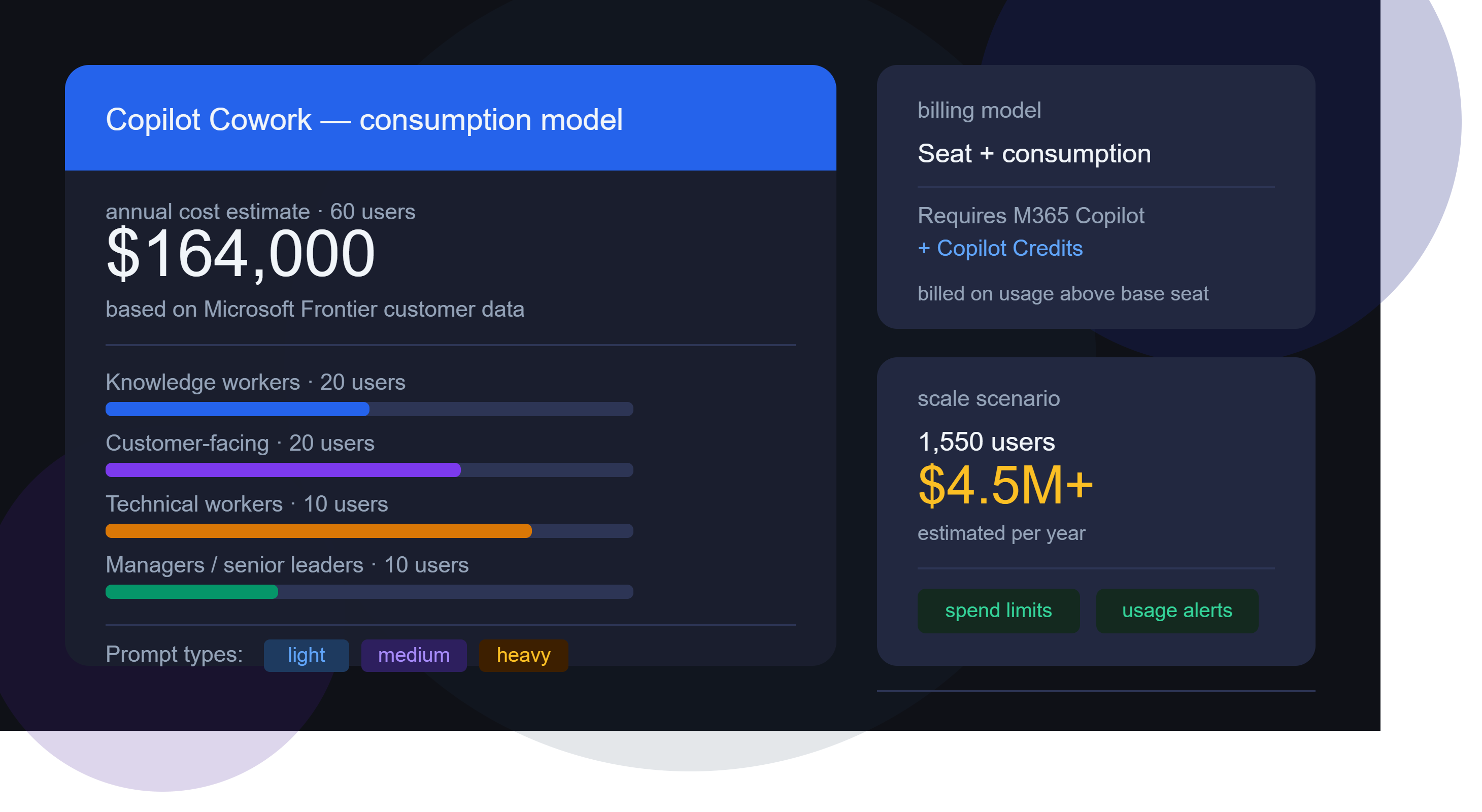
Microsoft has officially announced that Copilot Cowork is generally available. If you caught my LinkedIn post on this just after launch, you’ll know I flagged the headline numbers – and promised a deeper look. Here it is.
This isn’t just another Copilot feature release, Cowork represents a different, additional way of working…and brings with it an additional billing mechanism.
What Is Copilot Cowork?
Copilot Cowork is Microsoft’s agentic AI layer sitting on top of Microsoft 365 Copilot. Where standard Copilot handles in-the-moment assistance (drafting emails, summarising meetings, generating content), Cowork is designed for longer-running, multi-step tasks that span multiple apps and require sustained reasoning in the background.
How the Billing Works
This is where things get interesting and where CFOs – and everyone else – will want to pay close attention.
Copilot Cowork uses a seat + consumption model:
Seat requirement: Users must already hold a Microsoft 365 Copilot licence
Consumption billing: Cowork usage is billed on top of that, via Copilot Credits
In other words, you’re not paying a flat per-user fee for Cowork. You’re paying based on what people actually do with it. That might sound fair – but as we’ll see, it creates significant cost unpredictability at scale.
The Three Prompt Types
To help organisations estimate their likely spend, Microsoft has defined three categories of prompt complexity:
- Light Simple, quick tasks – lookups, short summaries, straightforward Q&A
- Medium Multi-step tasks with moderate reasoning or tool use
- Heavy Complex, long-running agentic tasks – deep research, multi-app orchestration, extended workflows
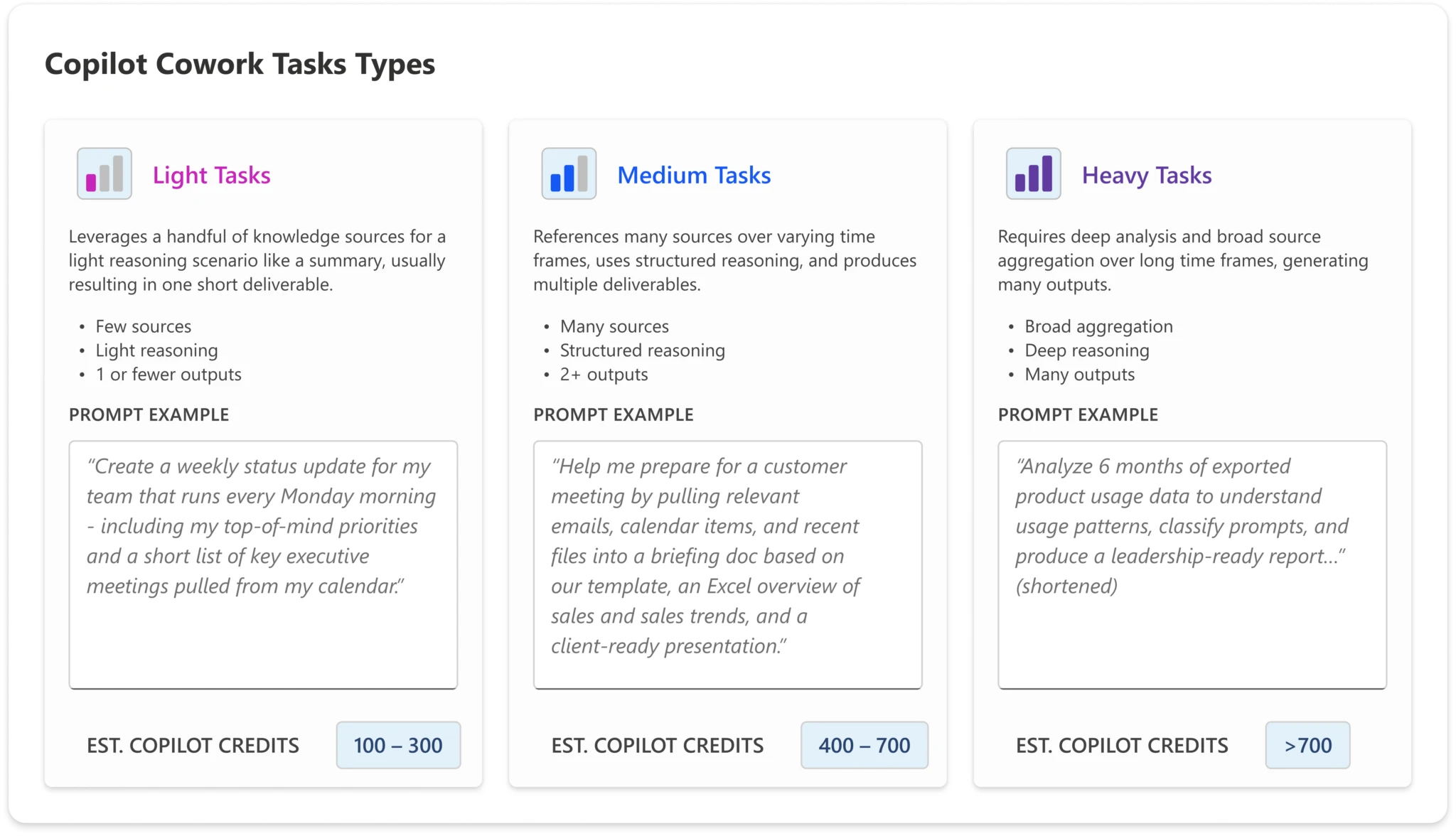
The credit cost per interaction scales accordingly. A user who primarily sends light prompts will consume far fewer credits than one regularly triggering heavy agentic workflows.
The Four Microsoft-Defined Personas
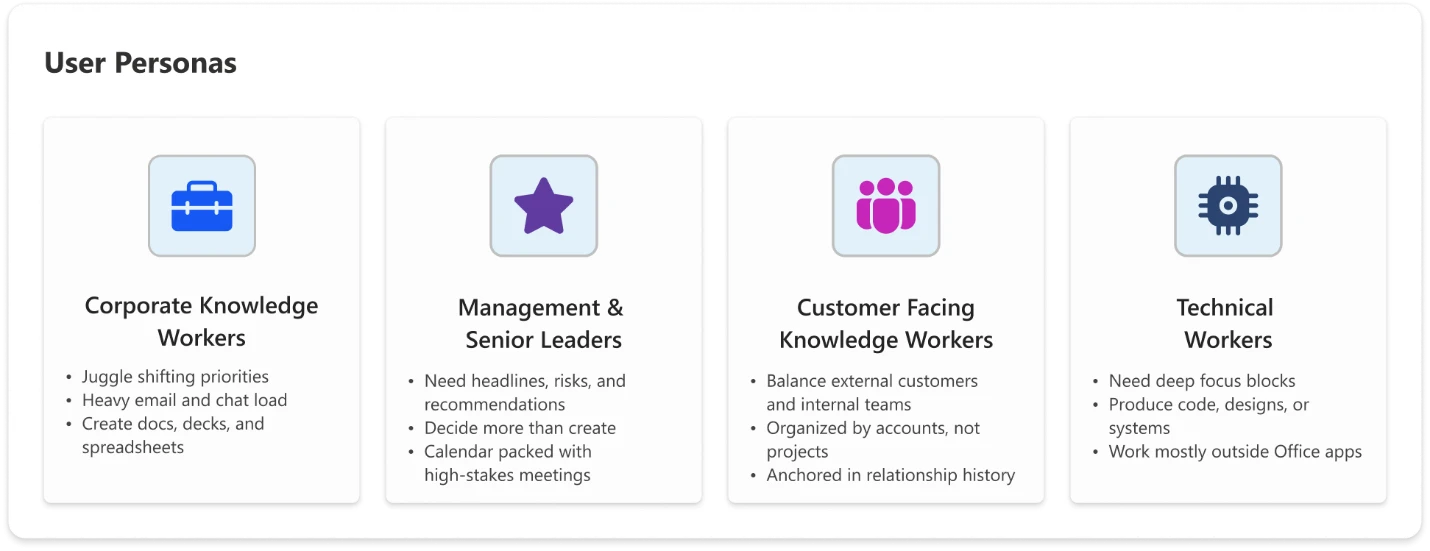
Microsoft has also defined four user personas to help organisations model expected usage – and therefore expected cost:
- Knowledge Worker
Your standard office employee: using Copilot for day-to-day tasks like drafting documents, summarising emails, and pulling information. Predominantly light-to-medium prompt usage.
- Customer-Facing Knowledge Worker
Staff in sales, customer success, support, or account management. Higher interaction volume and a greater likelihood of medium-to-heavy prompts – researching customer history, generating proposals, triaging complex queries.
- Technical Worker
Developers, analysts, engineers, and data professionals. Usage tends towards heavier, more complex prompts – code generation, data analysis, technical documentation, multi-step problem solving.
- Manager / Senior Leader
Executives and team leads. Usage is often more strategic – executive briefings, synthesising reports across sources, preparing for key meetings. Likely lower volume but higher complexity per interaction.
What Does This Actually Cost?
Microsoft has shared estimated annual Cowork costs based on data from early Frontier customers. Modelling the costs is where things start to get really surprising…the below uses list pricing and doesn’t factor in any type of discount.
*Update 18-06-26*
The calculator I’ve been using is here – GitHub – mfg-365/cowork-cost-estimator: Live usage-based cost estimator for Microsoft Copilot Cowork — print & PDF export · GitHub
However, in their announcement post, Microsoft link to this spreadsheet – https://aka.ms/CustomerCoworkEstimator.
As was pointed out in a comment, there is a small but important difference between the two. The Github hosted calculator estimates “Heavy” prompts at 2,500 credits while the spreadsheet version uses a value of 1,200. This means the latter version produces lower prices for those heavy prompt users.
Let’s look first at a small org of 60 users:
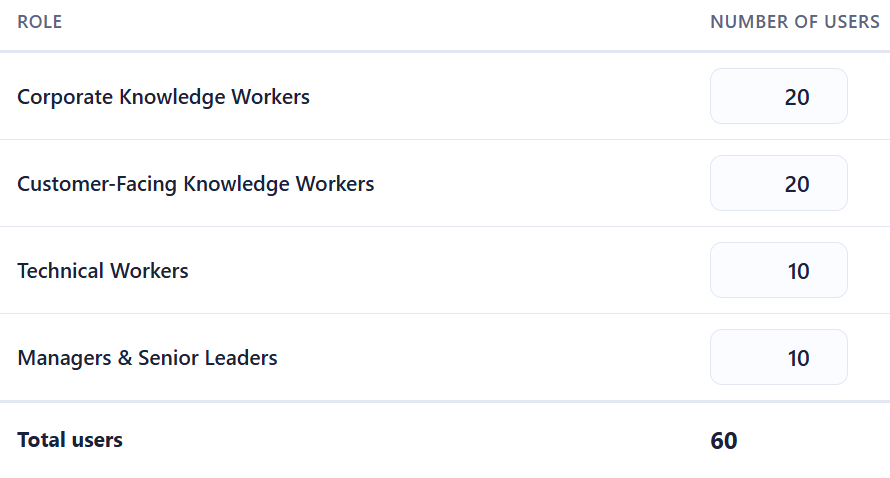
The Microsoft calculator uses the following estimates for the number and type of prompts each persona will use:
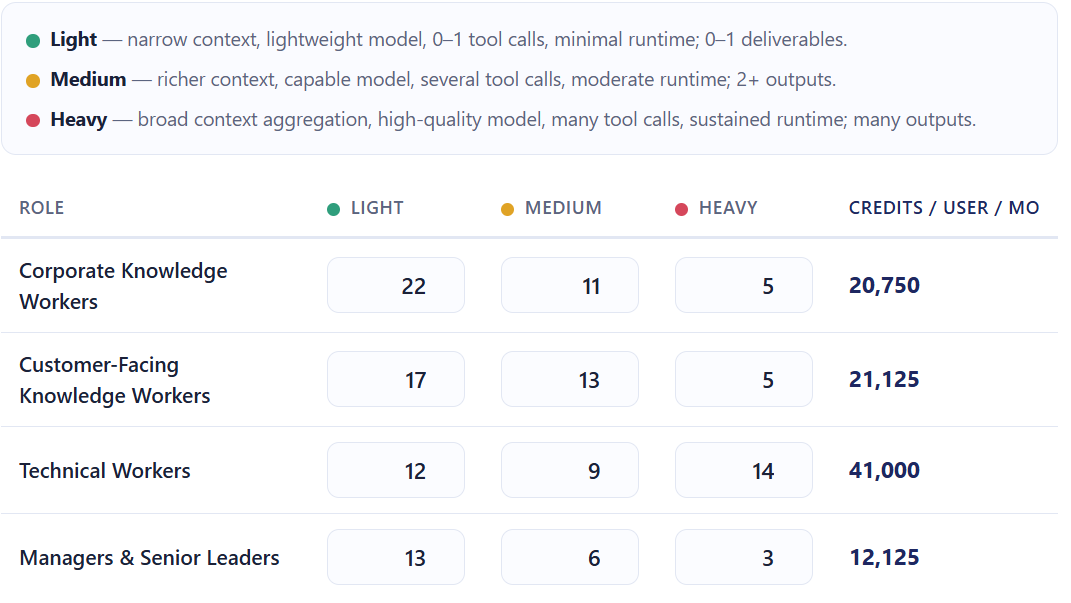
and these for the number of credits used per prompt:
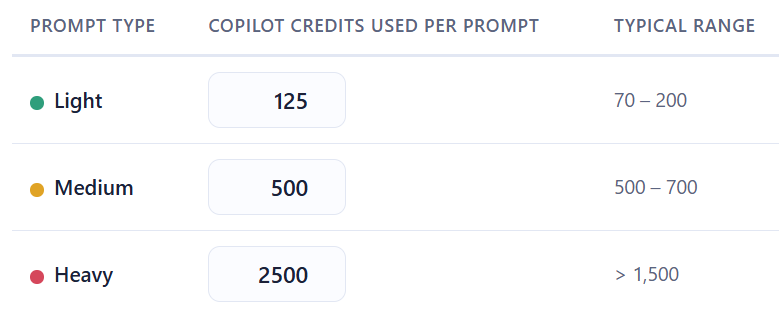
That gives a final estimate of:
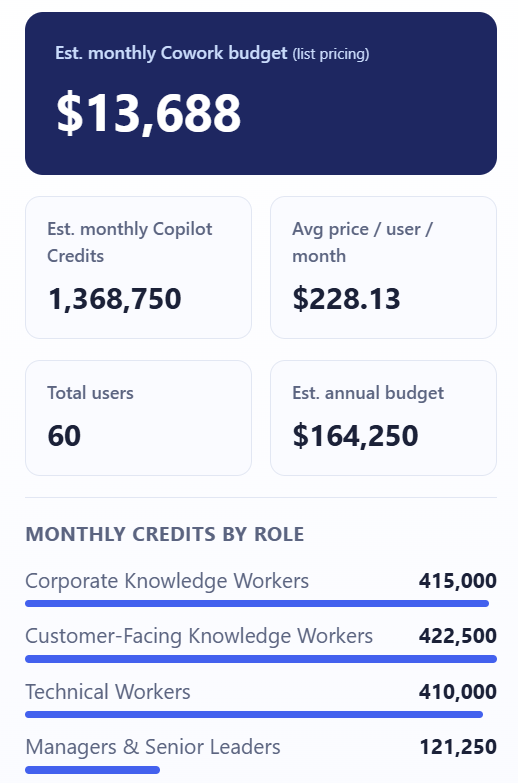
That’s right – over $164,000 per year for 60 people to use Copilot Cowork.
For a company of 1,680 staff:
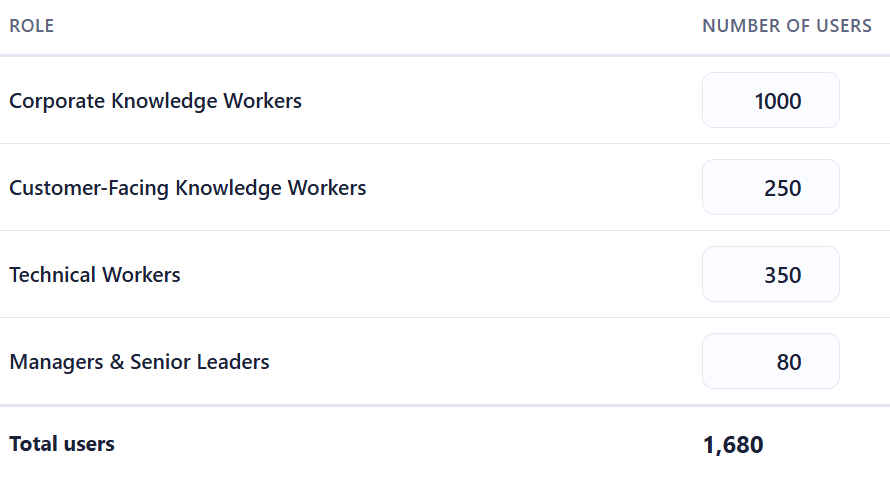
You end up with an estimated annual bill of almost $5,000,000!
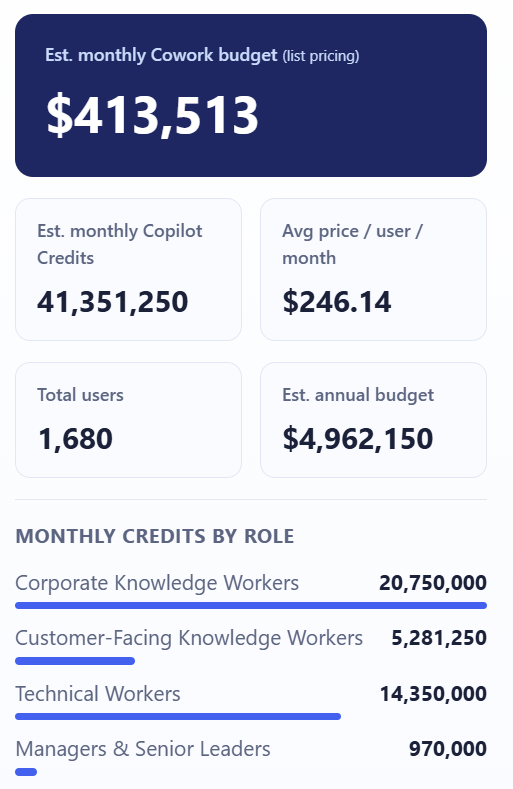
It seems impossible that companies are going to pay these amounts – surely? If these costs are real, it shows that customers are going to have to be much more realistic as to who gets access to Copilot Cowork.
The Guardrails Microsoft Provides
To be fair to them, Microsoft have built in some controls:
- Spending limits – administrators can cap Cowork credit consumption at tenant, group, and user levels
Usage alerts – notifications when consumption approaches defined thresholds - Usage reporting – Admins see usage broken down by user, group, and feature
- User-level pricing – Users see what each task costs as they run it (coming soon)
These are sensible features, and their inclusion suggests Microsoft is aware of the sticker shock potential and are trying to get out in front of it.
As well as PAYG pricing, the Copilot P3 advance purchase option – which can give discounts of up to 20% – is available for Cowork – see more here Microsoft Copilot Credit Pre-Purchase Plan – Cloudy with a chance of Licensing
Why This Changes the AI Governance Conversation
This is what I really want to focus on, because the billing model isn’t just a procurement question — it’s an organisational design question.
- Not all usage is equal value
A heavy prompt from a technical worker building an internal tool could save dozens of engineering hours. A heavy prompt from someone using Cowork to draft a quick internal update is a poor use of credits. The credit model treats both the same. Your organisation needs a way to distinguish between them.
- You need a usage policy, not just a spending cap
A spending cap is a ceiling. What you actually need is a framework that answers questions like:
- Which personas should have access to Cowork at all?
- What types of tasks are appropriate for Cowork vs. standard Copilot?
- Who approves high-complexity agentic workflows?
- How do we measure whether Cowork usage is delivering value?
Without answers to these, you’re handing out a consumption-based service with no purchasing guidelines.
- The ROI question is now urgent
With flat-fee AI tools, ROI questions are important but not time-sensitive – you’re paying regardless of use. With consumption billing, poor adoption and excessive adoption are both problems. You need a framework for measuring the value of AI usage – not just the cost.
- Consumption models reward the vocal, not the strategic
In many organisations, power users will naturally gravitate toward the most capable features. That’s not always aligned with where the highest-value use cases are. Without intentional governance, Cowork credit consumption may cluster around enthusiastic individuals rather than high-value workflows.
What Organisations Should Do Now
If you’re already running Microsoft 365 Copilot – or planning to – here’s where to focus:
- Map your personas
- Use Microsoft’s four categories as a starting point, but refine them for your organisation. Who are your heaviest potential users? Where are the highest-value use cases?
- Model your costs before you deploy
- Use the per-persona estimates to build a realistic cost projection. Stress-test it against both optimistic and conservative adoption scenarios.
- Define your governance framework
- Decide who gets access to Cowork, for what purposes, and with what approval process for high-complexity tasks. Document this as policy, not just an IT configuration.
- Set up monitoring from day one
- Don’t wait for the first bill to understand usage patterns. Use Microsoft’s alerting tools, and complement them with your own reporting.
- Establish a value measurement approach
- Credits spent should be traceable to outcomes. What did that agentic workflow actually deliver? This doesn’t need to be complex – even a lightweight system for use case categories can help you build the picture.
See the Microsoft announcement here – Copilot Cowork is now generally available | Microsoft 365 Blog
Grab the calculator from Github here – Live usage-based cost estimator for Microsoft Copilot Cowork
Join the conversation on my LinkedIn post here – Copilot Cowork Post


Hi Rich,
Thanks for the great article. I looked up the Github repository you link here and found something interesting:
The calculator listed there shows credits consumed per task for heavy tasks at 2500 with a description range of > 1500.
The “official” linked Excel File calculator gives different results as it lists only 1200 credits consumed for heavy tasks (which is below the descriptive range of >1500) but it shows the same disclaimer of data being from Frontier program of May 27th. I think this is odd and it could be downsized to understate the actual cost…
Best Darius