A robot wearing a GitHub Copilot Workshop vest stands in a busy office with people collaborating in the background.
Microsoft have announced General Availability of a new feature within Copilot Studio – the GitHub Copilot harness. This sits alongside the already available Standard harness and Copilot Chat harness.
This new capability means your in-house created agents can now use the same coding and reasoning capabilities as Copilot Cowork and GitHub Copilot – putting new capabilities on the table for your AI agents.
While that is all well and good I would, not surprisingly, like to focus in on a licensing/pricing change. The Microsoft post casually states:
“Agents running on the GitHub Copilot harness use usage-based billing for all work, regardless of Microsoft 365 Copilot licensing.”
That, potentially, has quite the impact. Agents built using the 2 existing harnesses have their Copilot Credits covered by a user’s M365 Copilot license – this is not the case when agents are built with the GitHub Copilot harness. This means those agents will use Copilot Credits and burn pre-purchased amounts or incur PAYG costs.
To be clear, Microsoft aren’t removing anything or forcing this more expensive model on customers; the GitHub Copilot harness is a new, additional option that organisations can choose to use, or not. However it does add another potential way for people to inadvertently spend money with Microsoft and thus further highlights the need for storng internal governance and awareness/training programs.
Microsoft has officially announced that Copilot Cowork is generally available. If you caught my LinkedIn post on this just after launch, you’ll know I flagged the headline numbers – and promised a deeper look. Here it is.
This isn’t just another Copilot feature release, Cowork represents a different, additional way of working…and brings with it an additional billing mechanism.
What Is Copilot Cowork?
Copilot Cowork is Microsoft’s agentic AI layer sitting on top of Microsoft 365 Copilot. Where standard Copilot handles in-the-moment assistance (drafting emails, summarising meetings, generating content), Cowork is designed for longer-running, multi-step tasks that span multiple apps and require sustained reasoning in the background.
How the Billing Works
This is where things get interesting and where CFOs – and everyone else – will want to pay close attention.
Copilot Cowork uses a seat + consumption model:
Seat requirement: Users must already hold a Microsoft 365 Copilot licence Consumption billing: Cowork usage is billed on top of that, via Copilot Credits
In other words, you’re not paying a flat per-user fee for Cowork. You’re paying based on what people actually do with it. That might sound fair – but as we’ll see, it creates significant cost unpredictability at scale.
The Three Prompt Types
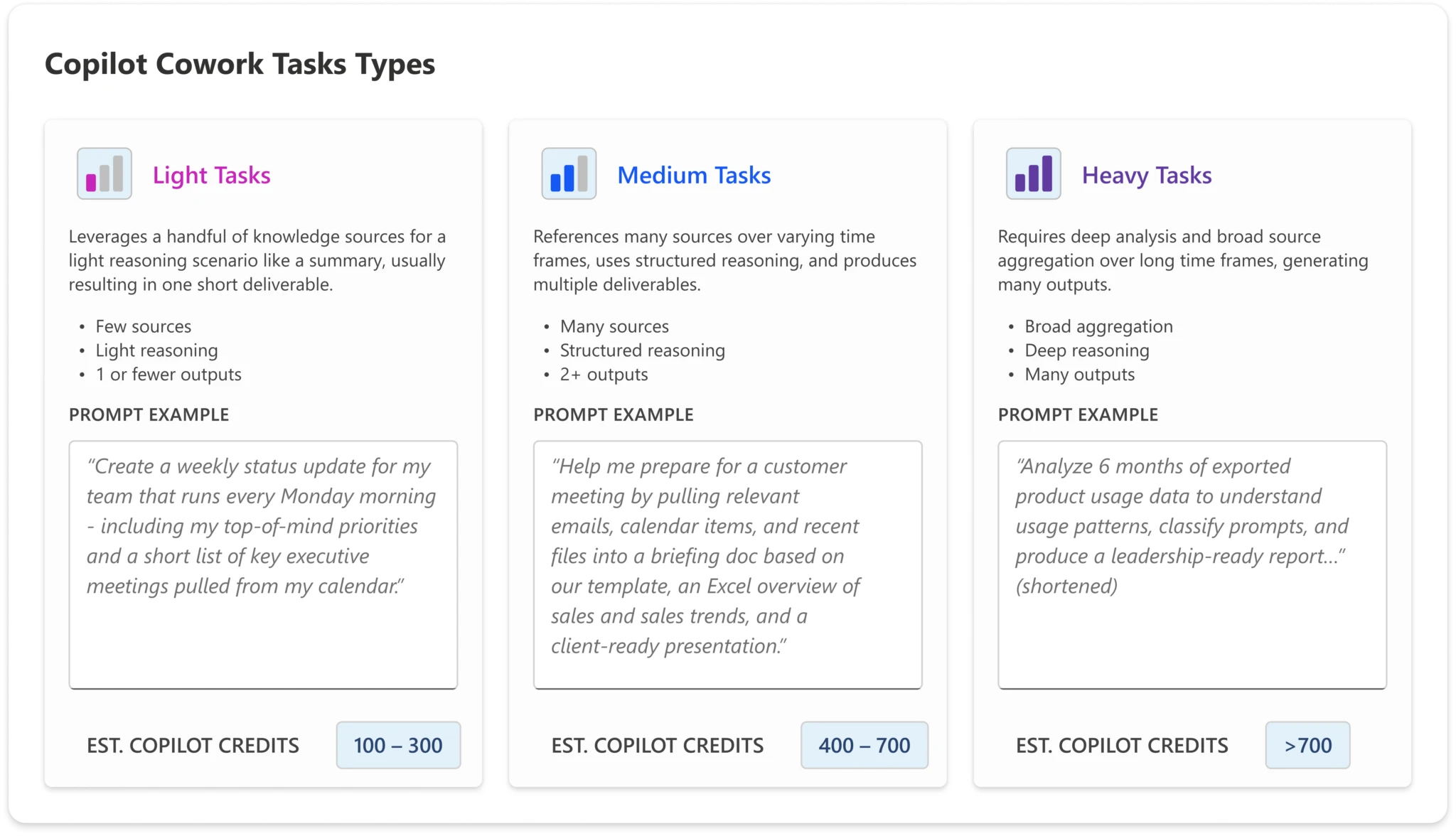
To help organisations estimate their likely spend, Microsoft has defined three categories of prompt complexity:
Light Simple, quick tasks – lookups, short summaries, straightforward Q&A
Medium Multi-step tasks with moderate reasoning or tool use
Heavy Complex, long-running agentic tasks – deep research, multi-app orchestration, extended workflows
The credit cost per interaction scales accordingly. A user who primarily sends light prompts will consume far fewer credits than one regularly triggering heavy agentic workflows.
The Four Microsoft-Defined Personas
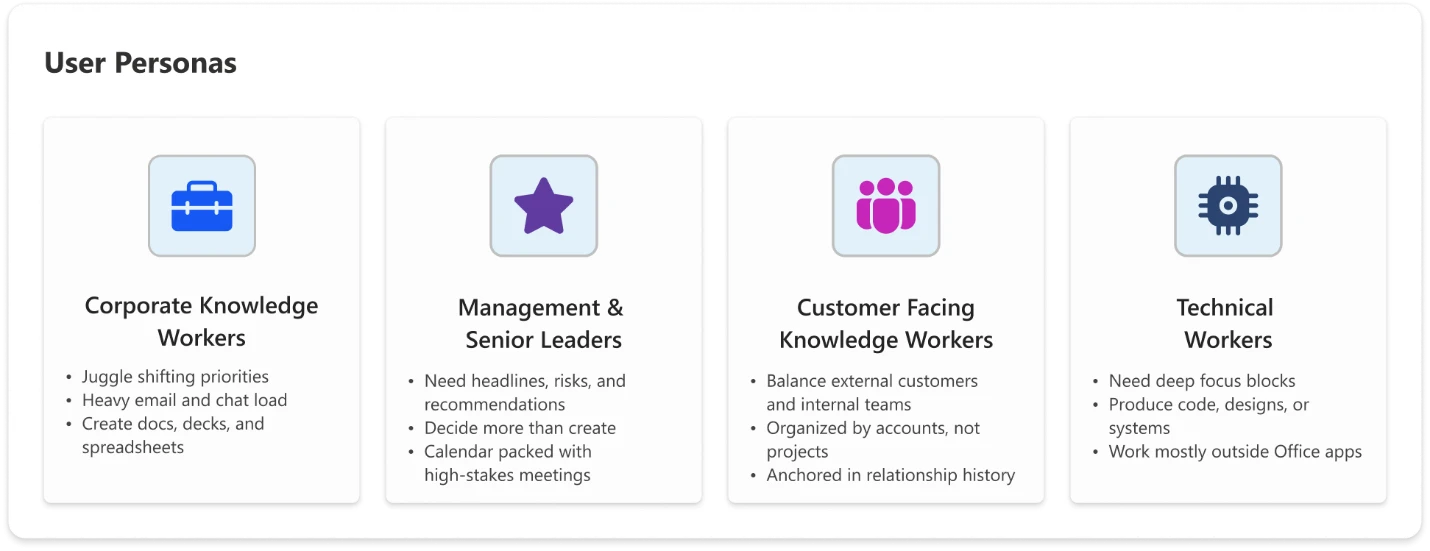
Microsoft has also defined four user personas to help organisations model expected usage – and therefore expected cost:
Knowledge Worker
Your standard office employee: using Copilot for day-to-day tasks like drafting documents, summarising emails, and pulling information. Predominantly light-to-medium prompt usage.
Customer-Facing Knowledge Worker
Staff in sales, customer success, support, or account management. Higher interaction volume and a greater likelihood of medium-to-heavy prompts – researching customer history, generating proposals, triaging complex queries.
Technical Worker
Developers, analysts, engineers, and data professionals. Usage tends towards heavier, more complex prompts – code generation, data analysis, technical documentation, multi-step problem solving.
Manager / Senior Leader
Executives and team leads. Usage is often more strategic – executive briefings, synthesising reports across sources, preparing for key meetings. Likely lower volume but higher complexity per interaction.
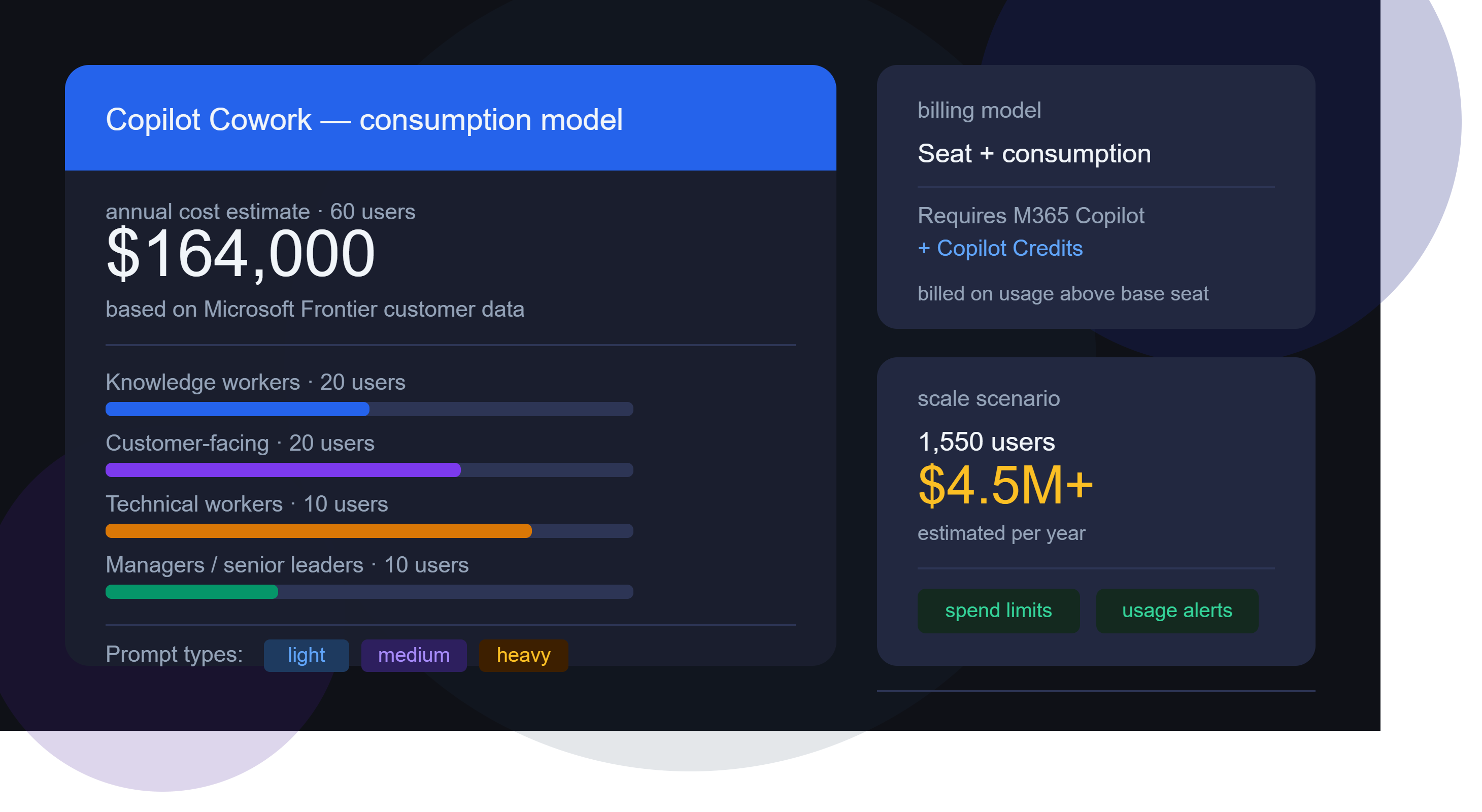
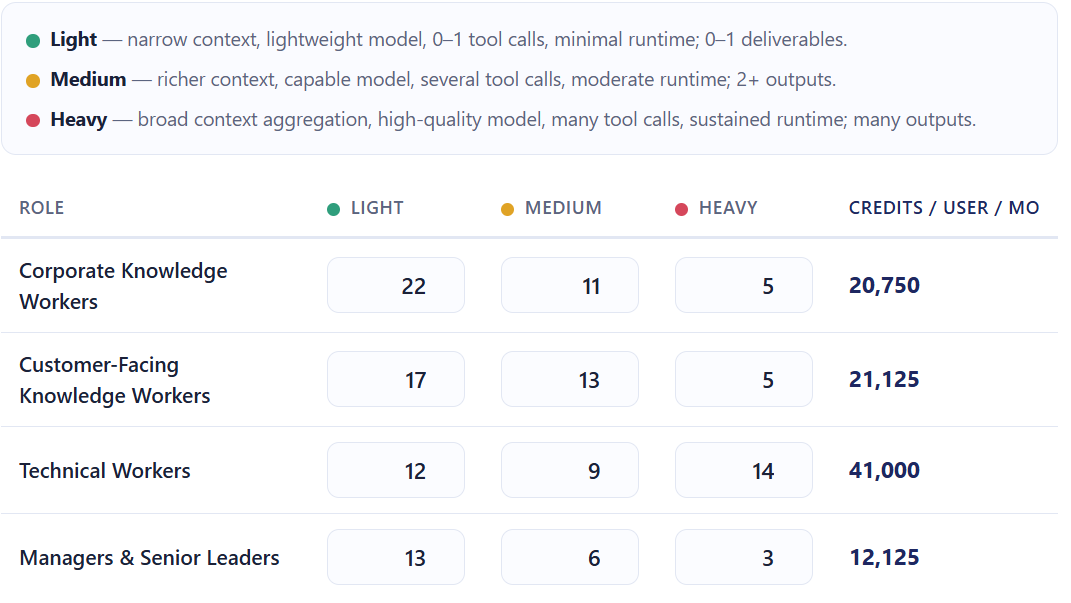
Microsoft has shared estimated annual Cowork costs based on data from early Frontier customers. Modelling the costs is where things start to get really surprising…the below uses list pricing and doesn’t factor in any type of discount.
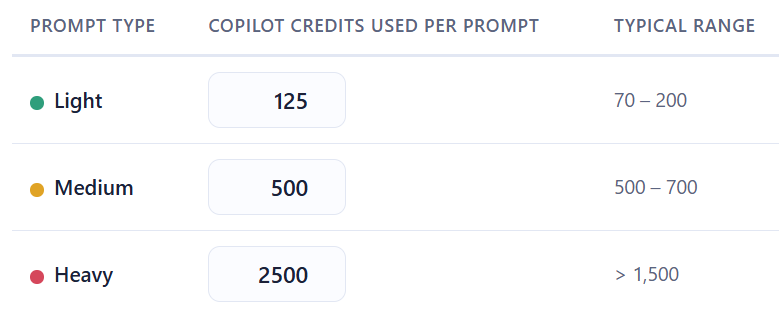
As was pointed out in a comment, there is a small but important difference between the two. The Github hosted calculator estimates “Heavy” prompts at 2,500 credits while the spreadsheet version uses a value of 1,200. This means the latter version produces lower prices for those heavy prompt users.
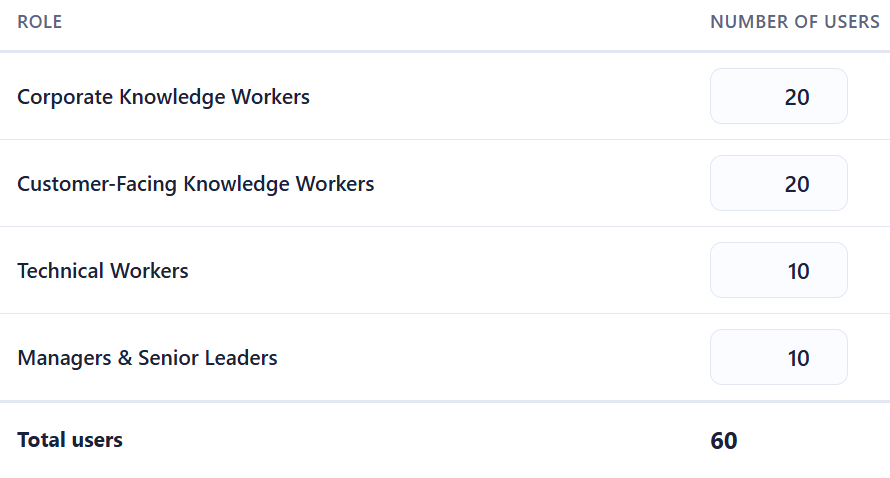
Let’s look first at a small org of 60 users:
The Microsoft calculator uses the following estimates for the number and type of prompts each persona will use:
and these for the number of credits used per prompt:
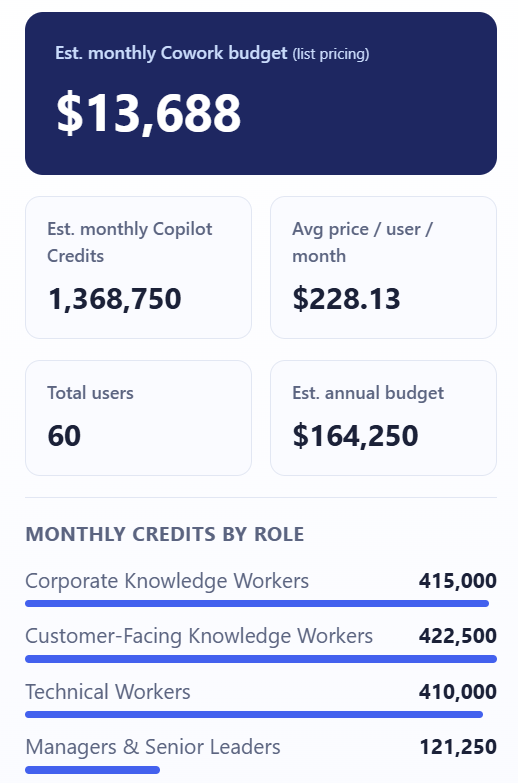
That gives a final estimate of:
That’s right – over $164,000 per year for 60 people to use Copilot Cowork.
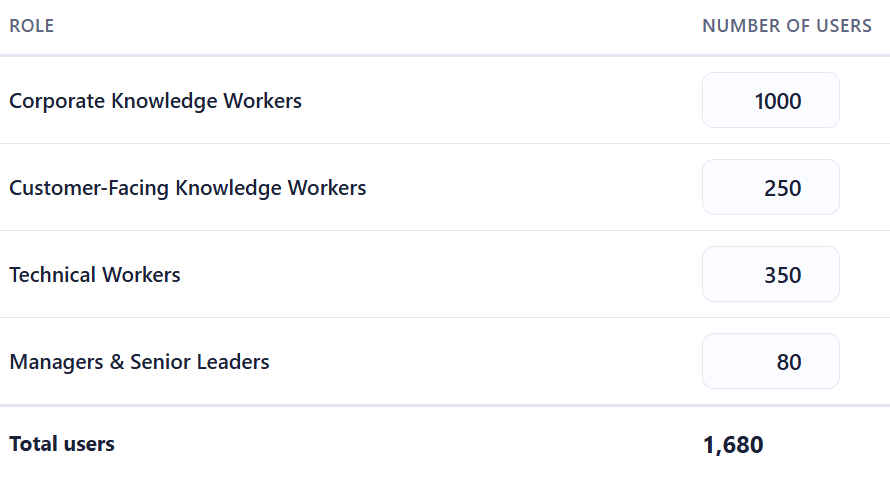
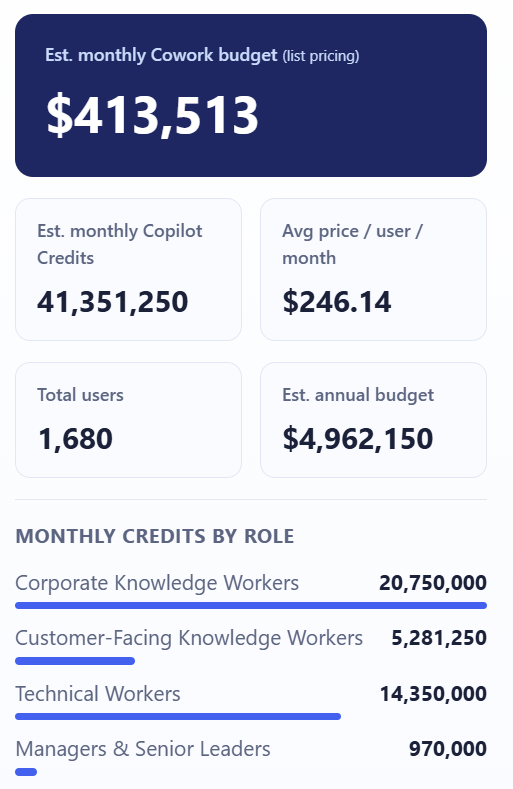
For a company of 1,680 staff:
You end up with an estimated annual bill of almost $5,000,000!
It seems impossible that companies are going to pay these amounts – surely? If these costs are real, it shows that customers are going to have to be much more realistic as to who gets access to Copilot Cowork.
The Guardrails Microsoft Provides
To be fair to them, Microsoft have built in some controls:
Spending limits – administrators can cap Cowork credit consumption at tenant, group, and user levels Usage alerts – notifications when consumption approaches defined thresholds
Usage reporting – Admins see usage broken down by user, group, and feature
User-level pricing – Users see what each task costs as they run it (coming soon)
These are sensible features, and their inclusion suggests Microsoft is aware of the sticker shock potential and are trying to get out in front of it.
This is what I really want to focus on, because the billing model isn’t just a procurement question — it’s an organisational design question.
Not all usage is equal value
A heavy prompt from a technical worker building an internal tool could save dozens of engineering hours. A heavy prompt from someone using Cowork to draft a quick internal update is a poor use of credits. The credit model treats both the same. Your organisation needs a way to distinguish between them.
You need a usage policy, not just a spending cap
A spending cap is a ceiling. What you actually need is a framework that answers questions like:
Which personas should have access to Cowork at all?
What types of tasks are appropriate for Cowork vs. standard Copilot?
Who approves high-complexity agentic workflows?
How do we measure whether Cowork usage is delivering value?
Without answers to these, you’re handing out a consumption-based service with no purchasing guidelines.
The ROI question is now urgent
With flat-fee AI tools, ROI questions are important but not time-sensitive – you’re paying regardless of use. With consumption billing, poor adoption and excessive adoption are both problems. You need a framework for measuring the value of AI usage – not just the cost.
Consumption models reward the vocal, not the strategic
In many organisations, power users will naturally gravitate toward the most capable features. That’s not always aligned with where the highest-value use cases are. Without intentional governance, Cowork credit consumption may cluster around enthusiastic individuals rather than high-value workflows.
What Organisations Should Do Now
If you’re already running Microsoft 365 Copilot – or planning to – here’s where to focus:
Map your personas
Use Microsoft’s four categories as a starting point, but refine them for your organisation. Who are your heaviest potential users? Where are the highest-value use cases?
Model your costs before you deploy
Use the per-persona estimates to build a realistic cost projection. Stress-test it against both optimistic and conservative adoption scenarios.
Define your governance framework
Decide who gets access to Cowork, for what purposes, and with what approval process for high-complexity tasks. Document this as policy, not just an IT configuration.
Set up monitoring from day one
Don’t wait for the first bill to understand usage patterns. Use Microsoft’s alerting tools, and complement them with your own reporting.
Establish a value measurement approach
Credits spent should be traceable to outcomes. What did that agentic workflow actually deliver? This doesn’t need to be complex – even a lightweight system for use case categories can help you build the picture.
Microsoft Security Copilot uses Security Compute Units (SCU) to measure the compute power used to run various workloads. A quantity of these is now available with Microsoft 365 E5 licenses, rollout starting from November 18th 2025..
What SCU capacity is included with Microsoft 365 E5 licenses?
Each Microsoft 365 E5 license includes 0.4 SCU so, for example, an organisation with 1,000 M365 E5 licenses will have 400 SCU per month. The allocation resets monthly and unused SCU cannot be rolled over to the next month.
There is a maximum limit of 10,000 included SCU per month – this is equivalent to 25,000 M365 E5 licenses.
Pricing considerations
Should organisations exceed their M365 E5 included SCU quantity, overage SCU will be available for $6 per SCU on a Pay As You Go (PAYG) basis. That is 50% higher than the “Provisioned” SCU pricing of $4.
However, an interesting point – and something that adds complexity to these decisions – is that the included SCU provide more flexible billing than the traditional provisioned capacity model.
Under provisioned capacity, an organisation commits to a set number of SCU per hour and is charged for that amount even if actual usage is lower. With E5, the included SCU are drawn down only by the amount actually consumed each hour, which provides a more accurate reflection of usage and avoids paying for unused capacity:
With Provisioned Capacity, if you provision 5 SCU but only use 3.5 – tough, you pay for all 5.
With E5 Included, you would only use 3.5 SCU.
This addition is another move to keep organisations on M365 E5, rather than stepping down to E3 +add-on.
AI Builder Credits have been around for a while as a way of paying for AI features within various Microsoft products including Power Apps Premium, Power Automate Premium, Dynamics 365 Finance and more. They’re being replaced by Copilot Credits and that means the seeded AI Builder Credits, where they came bundled along with other licenses, are disappearing.
From November 1, 2025 new customers – those who didn’t already have some AI Capacity add-ons – cannot buy any…but can still buy new Premium licenses that come bundled with AI Credits.
From November 1, 2026 AI Builder capacity add-ons can still be used but cannot be purchased or renewed. Also at this time, seeded credits will stop – to quote Microsoft “seeded AI Builder credits will be definitively removed from their premium licenses.“
Action: You should count up how many AI Builder credits you currently receive as part of your Premium licenses, and also how many of those credits you actually use. Then calculate, as well as you’re able, how much that usage will cost you once you have to start paying for it all separately.
The cost of basic prompts has increased by 33% while object detection has risen by 1400%! These price rises must be taken into account…and note that those prices are based on the annual commitment price so the differences will likely be larger for those who choose to use PAYG billing.
A related question – will Microsoft reduce the price of the premium licenses, now that something is being removed from them?
Microsoft are moving more and more towards consumption billing for their products – right across the portfolio. This makes it much more difficult for customer organisations to predict and forecast usage, which will generally lead to over-commitment and uncertainty. It also, however, means that Microsoft’s revenues and product sales are less predictable, which isn’t what they want.
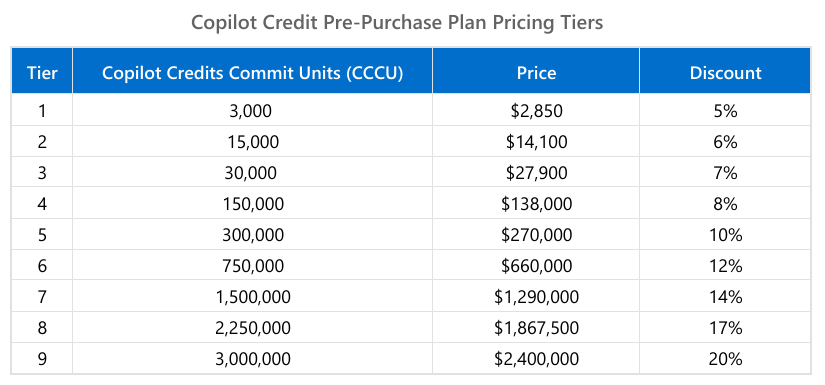
Copilot is a huge focus for Microsoft as is moving towards Agentic AI – which is done via Copilot Studio. Much of this is billed via Credits (formerly Messages) and Microsoft have now introduced the “Copilot Credit Pre-Purchase Plan” (aka “P3“) to help with some of the unpredictability (on both sides). You purchase an amount of “Copilot Credit Commit Units (CCCU)” and pay upfront for the year.
Each CCCU is worth $1 and is equivalent to 100 credits. There are 9 tiers:
These credits expire annually which is a better than the Microsoft Copilot Studio Copilot Credit capacity packs, which expire monthly.
Understanding when to buy this, which level to buy, and whether they’re being used effectively will be a great example of collaboration between ITAM & FinOps teams.
Microsoft have launched a new addition to the Copilot family, confusingly called Microsoft 365 Copilot Chat.
Copilot Chat was already a thing (that is different to Copilot Biz Chat) and this seems to be a re-positioning as they add some new capabilities too. It is a basic, entry point tool that sits below Microsoft 365 Copilot.
Microsoft 365 Copilot Chat is free and has access to internet info to give “web-grounded” responses. Additionally it can interact with Agents (more on that later) and also has elements of the “Copilot Control System” to help with corporate data privacy.
The table below shows how it stacks up against the “full” Microsoft 365 Copilot product:
One of the new additions is that users of this free product can use 2 types of agents on a Pay As You Go (PAYG) basis, they are:
“Tenant Graph” grounded agents
Autonomous action agents
“Tenant Graph” grounded means agents that can access internal company data as well as internet information, giving answers with additional, organisation specific info and context. This is an additional PAYG per-message cost for M365 Copilot Chat users but is included within the M365 Copilot license – adding a new variable to consider when pricing up licensing options.
Autonomous actions are where the agent uses “generatively orchestrated triggers, topics, data connectors, and workflows” to act on behalf of a user. This is an additional PAYG per-message cost for all users – it is an additional cost even for users licensed with M365 Copilot.
For more info and details on the PAYG per-message pricing model – see my post here.
Microsoft are huge fans of the Pay As You Go (PAYG) licensing/billing model for various products and now it has been extended for M365 Copilot and Copilot Studio.
Agents created with Copilot Studio provide answers to users, and these answers are measured in “messages:
Classic Answers
These are static answers written when the agent is created and only change when manually updated. These cost 1 message.
Generative Answers
These are dynamically generated answers using the conversation’s context and other knowledge. These cost 2 messages.
Tenant Graph grounded
This is a new option and allows agents to access internal information in SharePoint and also other sources via Graph connectors. This information will be incorporated within “generative” answers given by agents. These cost 30 messages.
This capability is included for users licensed with M365 Copilot and is also available on a PAYG basis for other users.
Autonomous Actions
As the name suggests, these agents act on their own via “generatively orchestrated triggers, topics, data connectors, and workflows” to complete tasks, answer queries etc. These cost 25 messages.
These are NOT included with the M365 Copilot license, so using agents with autonomous actions will be additional spend on top of the $30 per user per month license…which is already an add-on to your existing M365 license!
How does the pricing work?
Each message costs $0.01 which seems very low…however…it can quickly start to add up. Here is an example from Microsoft:
12,800 x $0.01 = $128 in PAYG costs.
Not a huge amount, about $33,280 per year. However, that’s for 100 users. If you had 1,000 users in that scenario it becomes $332,800 per year which is a much more significant amount…it’s about the same as buying M365 Copilot licenses for those users in fact.
You can purchase messages in bundles of 25,000 for $200 per month ($0.008 per message) which can help reduce spend a little on PAYG.
It seems likely that the behaviour Microsoft are hoping to drive will be for organisations to start out with this model and then, as spend increases, move them across to M365 Copilot licenses to increase the stickiness and adoption of their latest focus product.
It’s the Microsoft Product Terms for August 2024 – the first of the new FY so not much going on but let’s take a look.
O365/M365 A1 added as a base license for Copilot for M365
The base licenses for Copilot for Sales & Services have been expanded, although not to the extent of Copilot for M365. You can now add these to: Microsoft 365 Business Basic/Standard/Premium/F1/F3/E3/A1/A3/E5/A5 Office 365 F3/E1/E3/A1/A3/E5/A5
Intune Frontline Worker SKUs added to MCA
Changes to (seemingly) tighten the wording around using Open AI content for training purposes.
Much like a modern Augustus Gloop or Marjorie Dursley, Copilot for Microsoft 365 keeps expanding!
On June 12th, Microsoft added several more eligible base licenses for the Copilot add-on meaning the full list is now:
Microsoft 365 Apps for Business
Microsoft 365 Apps for Enterprise
Microsoft 365 Business Basic
Microsoft 365 Business Standard
Microsoft 365 Business Premium
Microsoft 365 E3/E5 (A3/A5)
Microsoft 365 F1/F3
Office 365 E1/E3 (A3/A5)
Office 365 F3
Exchange Online
SharePoint Online
OneDrive for Business
Microsoft Clipchamp
Microsoft Teams EEA/Enterprise/Essentials
Planner Plan 1
Project Online
Visio Online
I haven’t seen any news that Copilot has new capabilities that relate to these new licenses so I struggle to see the point of these scenarios. If I have Project Online or Clipchamp or Visio but not Apps for Business/Enterprise…why would I buy Copilot for M365?
Perhaps we’re about to see an expansion in Copilot’s capabilities in the new FY?
After a seemingly successful preview period, Microsoft’s Copilot for Security is now generally available.
Capabilities
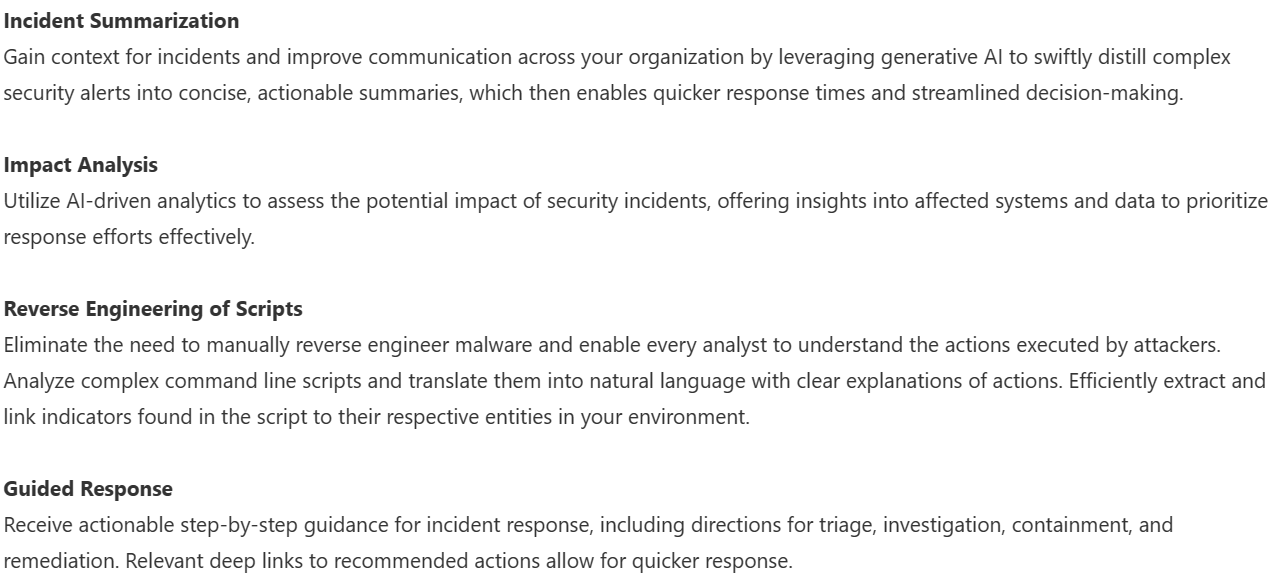
Copilot for Security has a range of features and capabilities that help organisations across the range of Microsoft’s security products such as Defender, Intune, and Purview. These include: