Microsoft’s results for FY27 Q1 are out and, once again, the numbers are bigger than last time. It’s always difficult to reconcile such huge results with layoff announcements and that has happened again with news that Microsoft have made a voluntary exit offer to approx. 60,000 staff – almost a quarter of the workforce.
Talking about the recent Copilot “super app” that combines Chat, Cowork, Autopilot, and Code, Satya Nadella said “We think of Copilot as the new OS for work” – make of that what you will!
It’s clear that AI, Copilot, and consumption billing are the big drivers of Microsoft’s revenue and future direction.
Revenue = $92.3 billion, up 19%
Net Income = $36.6 billion, up 32%
Microsoft Cloud revenue = $63.9 billion, up 30%
For several years, revenue has been split into different categories:
Productivity and Business Processes
Intelligent Cloud
More Personal Computing
but it now seems to be:
Agents and Infra
Devices and Consumer
so the Agents & Infra segment includes Azure and M365. I assume it will include Dynamics 365 too but, for the first time in a long time, that isn’t mentioned specifically…does that mean D365 hasn’t grown in Q1 FY27?
Nadella did say that they’re “bringing the business logic and capabilities of Dynamics 365 directly into Copilot and helping every organization stand up their own infinite SaaS Factory” – perhaps there’s a shift in focus happening?
Amy Hood, CFO, stated that:
“Capital expenditures were $45.2 billion,. Roughly three quarters of…capex was for short-lived assets, primarily CPUs and GPUs, including higher memory and storage costs.”
That’s over $33 billion on CPUs and GPUs in a single quarter!
Agents & Infra numbers
Revenue increased 25% to $76.8 billion
Azure revenue grew 48%
M365 Commercial increased 17%
M365 Copilot, E5, and E7 helped drive higher average revenue per user as well as more consumption billing, particularly of GitHub Copilot.
Earnings Call highlights
The number of Copilot customers actively consuming credits through usage-based billing grew over 75 percent over the quarter.
Credit consumption from agentic features on GitHub has more than doubled since usage-based billing went into effect.
Over 44,000 paid Fabric customers, up more than 50 percent year over year.
Microsoft added 24 new data centers across five continents this quarter.
Microsoft has officially announced that Copilot Cowork is generally available. If you caught my LinkedIn post on this just after launch, you’ll know I flagged the headline numbers – and promised a deeper look. Here it is.
This isn’t just another Copilot feature release, Cowork represents a different, additional way of working…and brings with it an additional billing mechanism.
What Is Copilot Cowork?
Copilot Cowork is Microsoft’s agentic AI layer sitting on top of Microsoft 365 Copilot. Where standard Copilot handles in-the-moment assistance (drafting emails, summarising meetings, generating content), Cowork is designed for longer-running, multi-step tasks that span multiple apps and require sustained reasoning in the background.
How the Billing Works
This is where things get interesting and where CFOs – and everyone else – will want to pay close attention.
Copilot Cowork uses a seat + consumption model:
Seat requirement: Users must already hold a Microsoft 365 Copilot licence Consumption billing: Cowork usage is billed on top of that, via Copilot Credits
In other words, you’re not paying a flat per-user fee for Cowork. You’re paying based on what people actually do with it. That might sound fair – but as we’ll see, it creates significant cost unpredictability at scale.
The Three Prompt Types
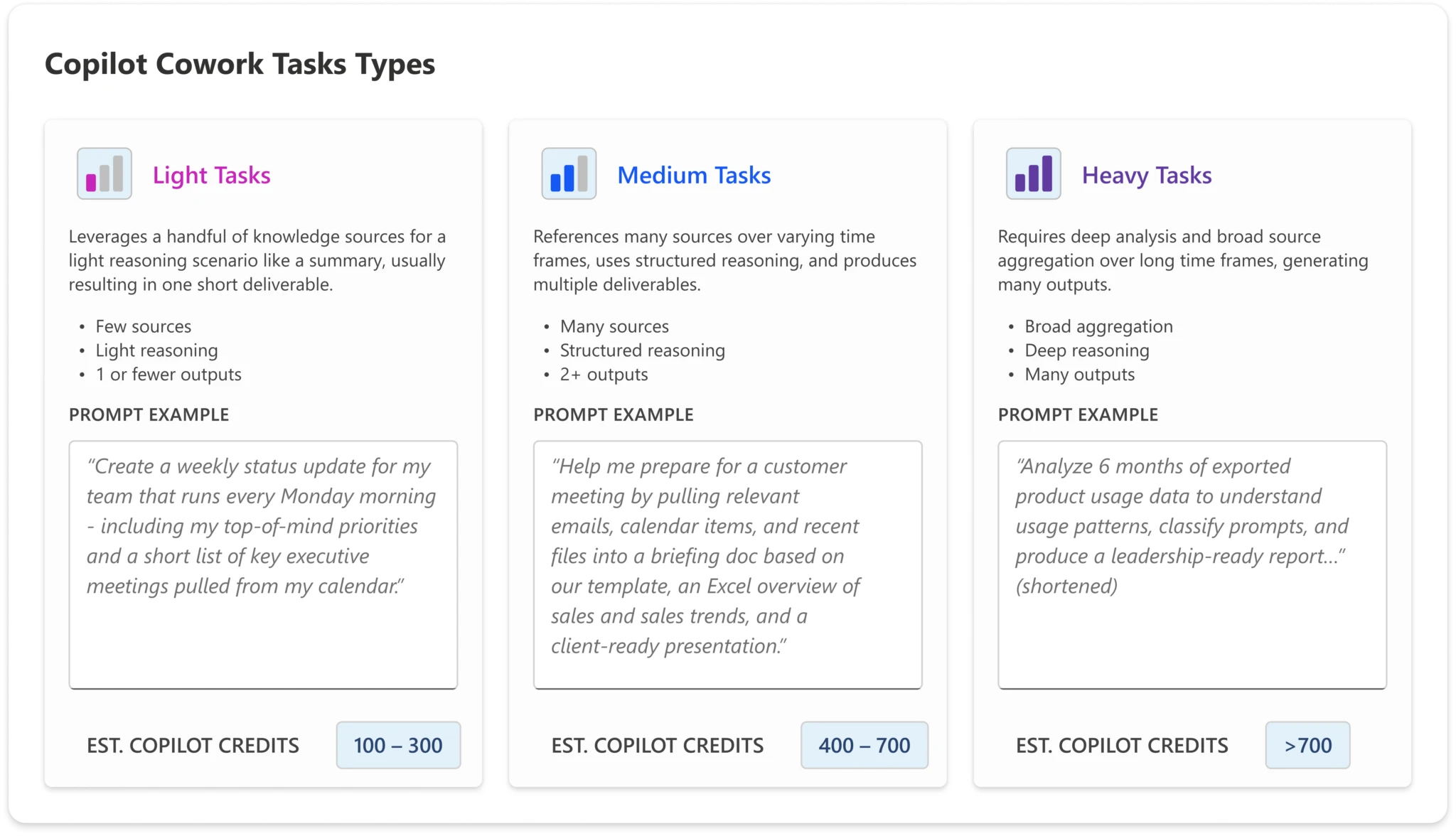
To help organisations estimate their likely spend, Microsoft has defined three categories of prompt complexity:
Light Simple, quick tasks – lookups, short summaries, straightforward Q&A
Medium Multi-step tasks with moderate reasoning or tool use
Heavy Complex, long-running agentic tasks – deep research, multi-app orchestration, extended workflows
The credit cost per interaction scales accordingly. A user who primarily sends light prompts will consume far fewer credits than one regularly triggering heavy agentic workflows.
The Four Microsoft-Defined Personas
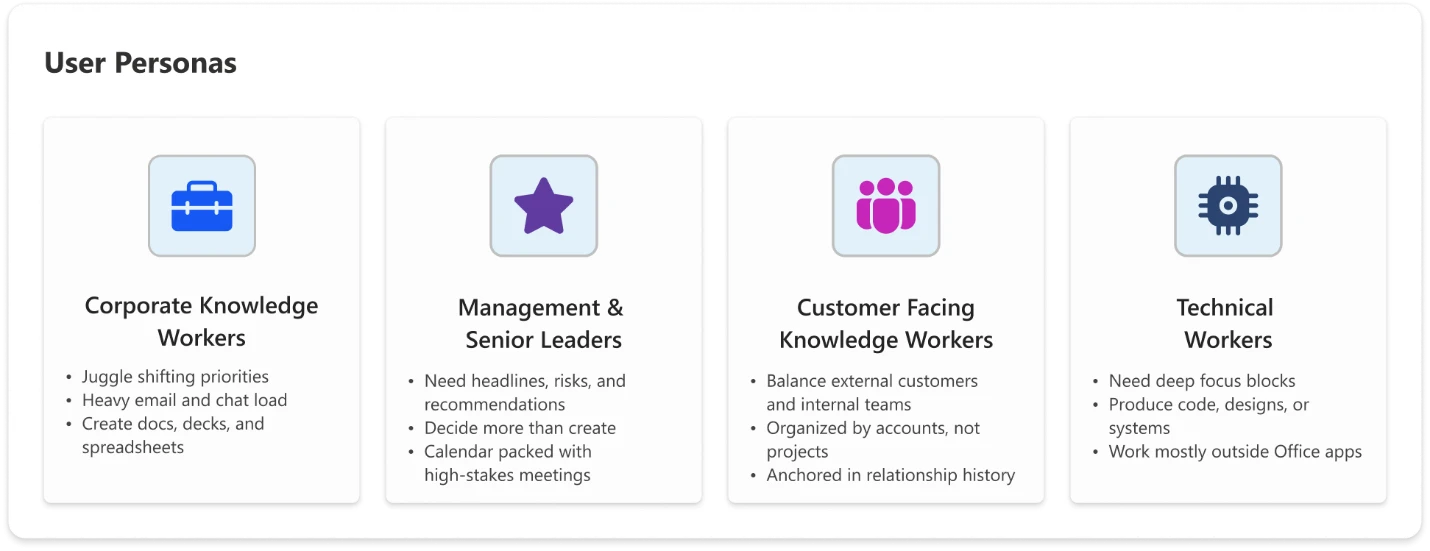
Microsoft has also defined four user personas to help organisations model expected usage – and therefore expected cost:
Knowledge Worker
Your standard office employee: using Copilot for day-to-day tasks like drafting documents, summarising emails, and pulling information. Predominantly light-to-medium prompt usage.
Customer-Facing Knowledge Worker
Staff in sales, customer success, support, or account management. Higher interaction volume and a greater likelihood of medium-to-heavy prompts – researching customer history, generating proposals, triaging complex queries.
Technical Worker
Developers, analysts, engineers, and data professionals. Usage tends towards heavier, more complex prompts – code generation, data analysis, technical documentation, multi-step problem solving.
Manager / Senior Leader
Executives and team leads. Usage is often more strategic – executive briefings, synthesising reports across sources, preparing for key meetings. Likely lower volume but higher complexity per interaction.
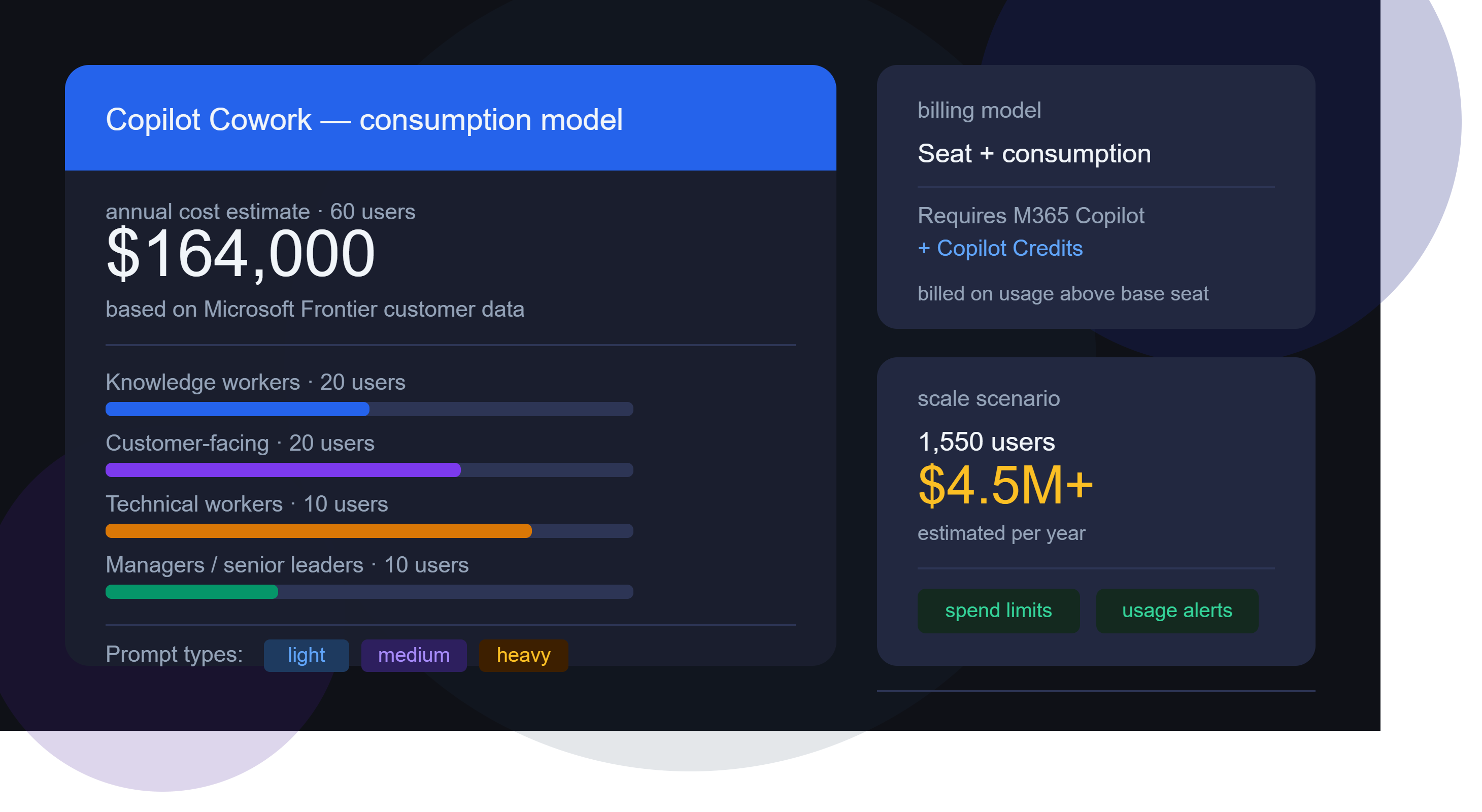
Microsoft has shared estimated annual Cowork costs based on data from early Frontier customers. Modelling the costs is where things start to get really surprising…the below uses list pricing and doesn’t factor in any type of discount.
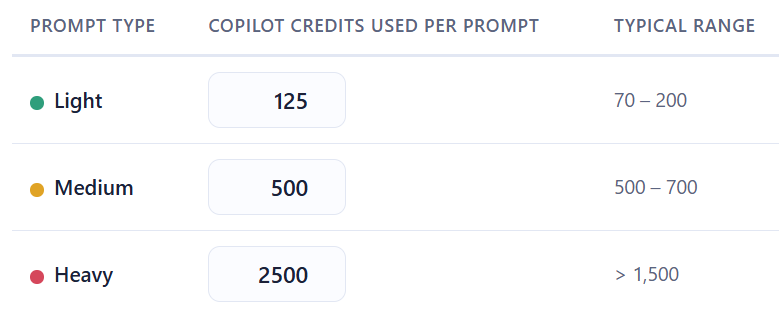
As was pointed out in a comment, there is a small but important difference between the two. The Github hosted calculator estimates “Heavy” prompts at 2,500 credits while the spreadsheet version uses a value of 1,200. This means the latter version produces lower prices for those heavy prompt users.
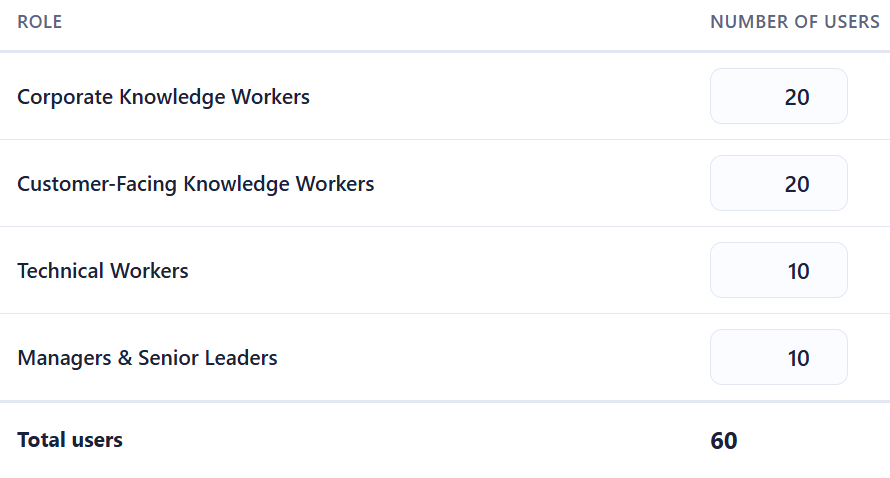
Let’s look first at a small org of 60 users:
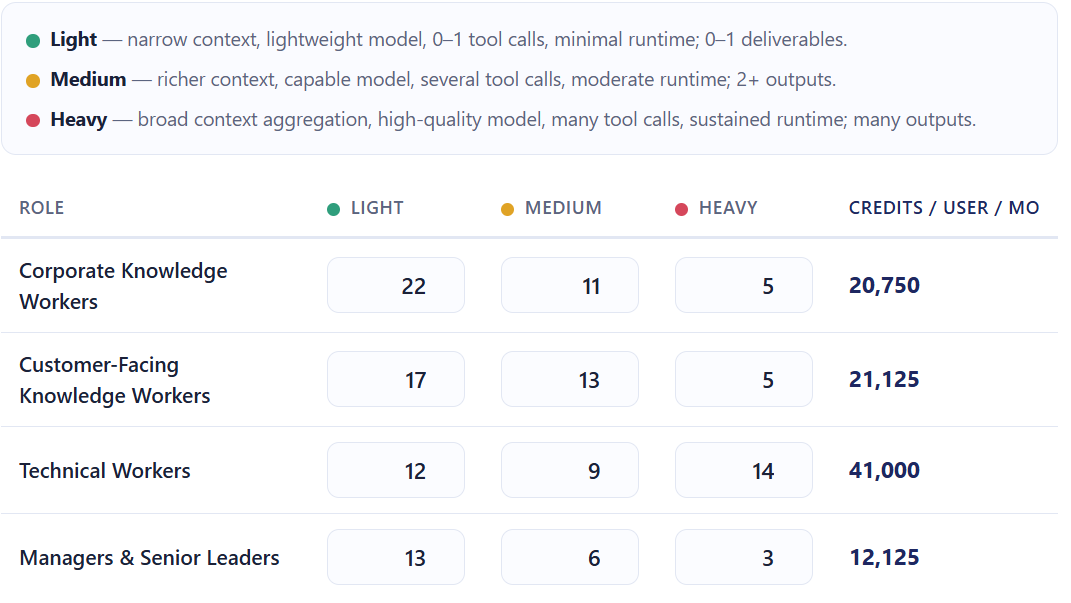
The Microsoft calculator uses the following estimates for the number and type of prompts each persona will use:
and these for the number of credits used per prompt:
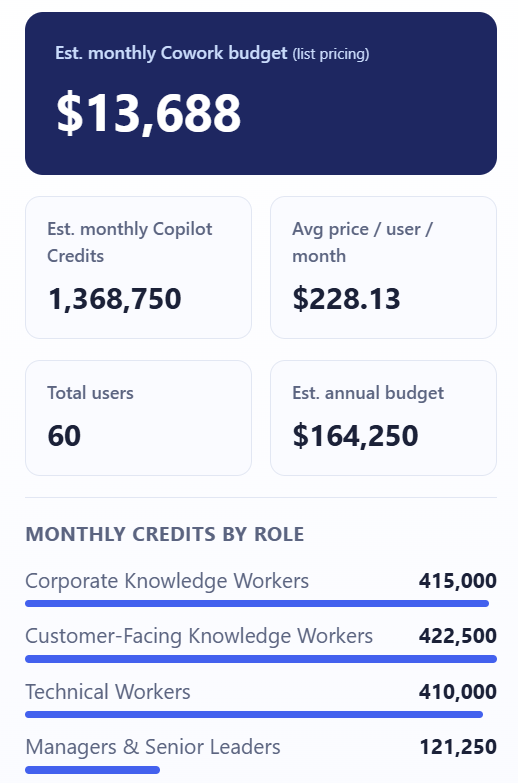
That gives a final estimate of:
That’s right – over $164,000 per year for 60 people to use Copilot Cowork.
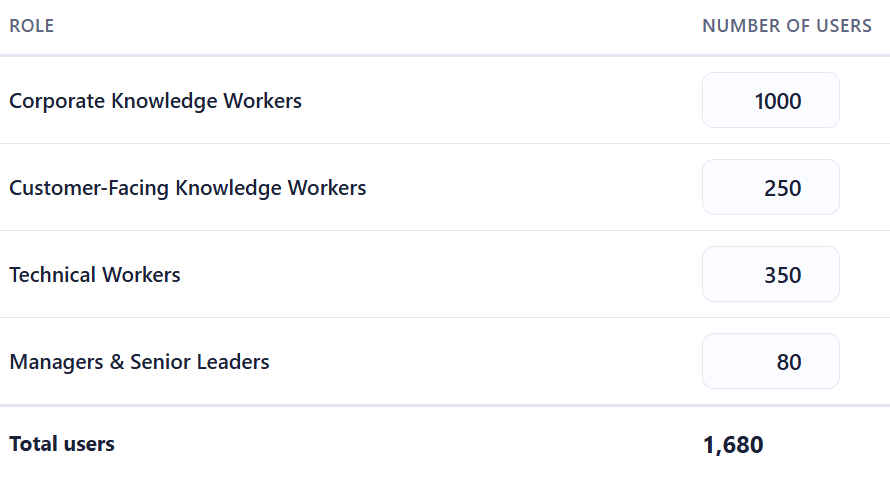
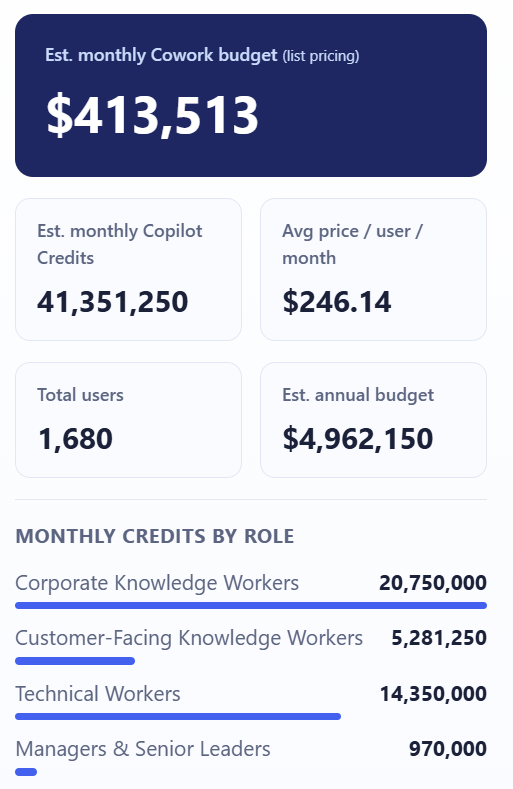
For a company of 1,680 staff:
You end up with an estimated annual bill of almost $5,000,000!
It seems impossible that companies are going to pay these amounts – surely? If these costs are real, it shows that customers are going to have to be much more realistic as to who gets access to Copilot Cowork.
The Guardrails Microsoft Provides
To be fair to them, Microsoft have built in some controls:
Spending limits – administrators can cap Cowork credit consumption at tenant, group, and user levels Usage alerts – notifications when consumption approaches defined thresholds
Usage reporting – Admins see usage broken down by user, group, and feature
User-level pricing – Users see what each task costs as they run it (coming soon)
These are sensible features, and their inclusion suggests Microsoft is aware of the sticker shock potential and are trying to get out in front of it.
This is what I really want to focus on, because the billing model isn’t just a procurement question — it’s an organisational design question.
Not all usage is equal value
A heavy prompt from a technical worker building an internal tool could save dozens of engineering hours. A heavy prompt from someone using Cowork to draft a quick internal update is a poor use of credits. The credit model treats both the same. Your organisation needs a way to distinguish between them.
You need a usage policy, not just a spending cap
A spending cap is a ceiling. What you actually need is a framework that answers questions like:
Which personas should have access to Cowork at all?
What types of tasks are appropriate for Cowork vs. standard Copilot?
Who approves high-complexity agentic workflows?
How do we measure whether Cowork usage is delivering value?
Without answers to these, you’re handing out a consumption-based service with no purchasing guidelines.
The ROI question is now urgent
With flat-fee AI tools, ROI questions are important but not time-sensitive – you’re paying regardless of use. With consumption billing, poor adoption and excessive adoption are both problems. You need a framework for measuring the value of AI usage – not just the cost.
Consumption models reward the vocal, not the strategic
In many organisations, power users will naturally gravitate toward the most capable features. That’s not always aligned with where the highest-value use cases are. Without intentional governance, Cowork credit consumption may cluster around enthusiastic individuals rather than high-value workflows.
What Organisations Should Do Now
If you’re already running Microsoft 365 Copilot – or planning to – here’s where to focus:
Map your personas
Use Microsoft’s four categories as a starting point, but refine them for your organisation. Who are your heaviest potential users? Where are the highest-value use cases?
Model your costs before you deploy
Use the per-persona estimates to build a realistic cost projection. Stress-test it against both optimistic and conservative adoption scenarios.
Define your governance framework
Decide who gets access to Cowork, for what purposes, and with what approval process for high-complexity tasks. Document this as policy, not just an IT configuration.
Set up monitoring from day one
Don’t wait for the first bill to understand usage patterns. Use Microsoft’s alerting tools, and complement them with your own reporting.
Establish a value measurement approach
Credits spent should be traceable to outcomes. What did that agentic workflow actually deliver? This doesn’t need to be complex – even a lightweight system for use case categories can help you build the picture.
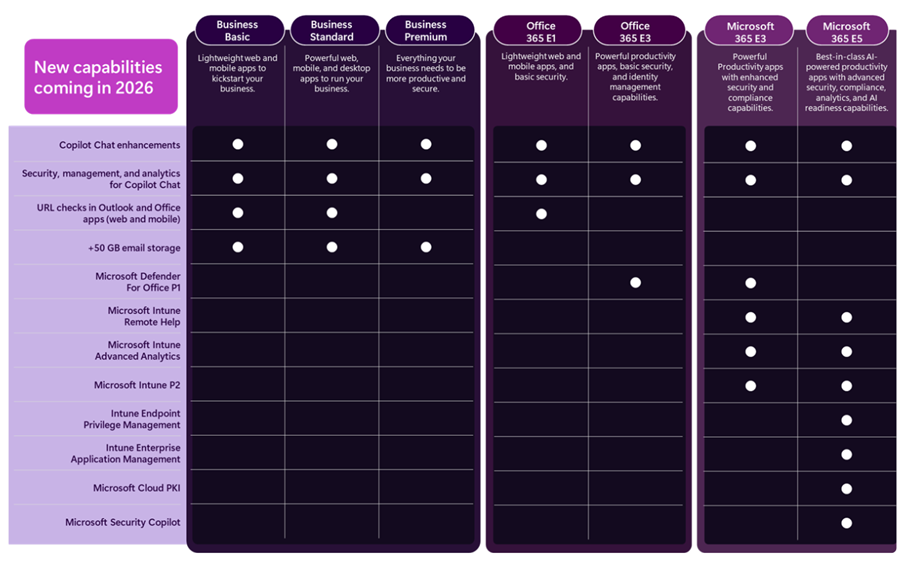
Following Microsoft’s Ignite 2025 conference, they have announced some feature additions to Microsoft 365…and some price increases to go along with it.
Copilot Chat
This free entry point to Copilot, included with various Microsoft products, will have new features to work with Outlook inboxes and calendars and standard access to Agent Mode. There will also be additional management and security capabilities around Copilot Chat.
Enhancing Copilot Chat makes sense as an entry point into M365 Copilot…effectively a “freemium” model albeit in a product you’re already paying for.
Addition Security Features
Microsoft Defender for Office 365 Plan 1, currently only available with Microsoft 365 E5, is being added to:
Microsoft 365 E3
Office 365 E3
It appears that all features are being added but that is to be confirmed.
Furthermore, URL checking features are being added to Office 365 E1, Business Basic, and Business Standard. The Business SKUs (including Premium) are all getting 50GB email inboxes too.
Boosting the security capabilities of lower SKUs is a welcome move, given the importance of security in today’s tech world.
Endpoint Management
A range of Microsoft Intune products are being added to both Microsoft 365 E3 and E5, these are:
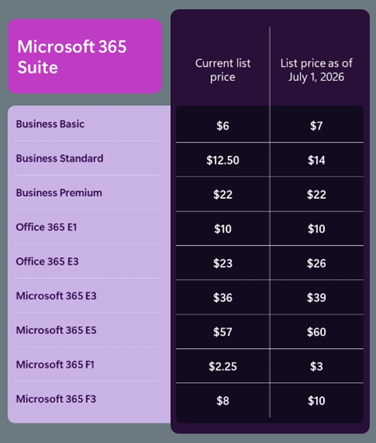
Of course, these new features come at a cost. Pricing for the included suites will be increasing as of July 1, 2026 (aka Microsoft’s new financial year)…even Microsoft 365 E5.
M365 E3 increases by 8% and M365 E5 by 5%. An organisation with 15,000 E5 SKUs will see an increase of $1.6 million over a 3-year contract – so understanding how the additional features may work for you will help you decide what steps to take at renewal.
Something that I did notice is that, while there is no mention of new features being added to the Frontline Worker F SKUs, they too are increasing in price – with M365 F1 rising by 33% and M365 F3 by 25%.
8,000 F3 users will lead to an increase of almost $600,000 over 3 years…seemingly with no new features to show for it.
Note as well that these increases will also apply to non-profit pricing.
ARPU (Average Revenue Per User) is a key metric for Microsoft (and all SaaS publishers) and this will help keep that growing for several more quarters through their next financial year and beyond. Increasing the amount they earn from each user is key to driving shareholder value…especially as the amount of new users to buy M365 licenses is decreasing. Higher pricing also increase the Customer Lifetime Value (CLV), another important metric that helps businesses plan future campaigns and initiatives.
There is the risk that customers will become angry and disillusioned and look for alternatives. However it’s likely that Microsoft are confident in their view that there are very few real alternatives to many of their products and, even when they are available, the time and effort involved in swapping will discourage most organisations. While some may leave, the increased revenue from those who stay will more than offset the losses.
For some organisations, the additional products in E3 and E5 may mean that they can reshape their licensing slightly – dropping additional SKUs or possibly even dropping from E5 to E3. However, it is yet another price increase from Microsoft…particularly galling if you don’t need or want those additional features. Review your Microsoft budget projections and work to lock in the lower pricing for as long as possible.
Removed “without Microsoft’s prior written approval” from the clause preventing using MS service to mine crypto…I guess they realised they were never going to give anyone permission for this!
Changed the Use Rights for Azure Local software from:
“Customer may use the Azure Local software only (i) on servers dedicated to Customer’s internal use“
to
“Customer may use the Azure Local software only (i) on devices dedicated to Customer’s internal use“
Microsoft say this represents a move to “include smaller, more affordable devices than traditional servers“
They also removed the following clause “Any customer support for Azure Local that may be available from Microsoft requires that Azure Local runs on server hardware that is pre-validated and listed in the Azure Local catalog or any successor.”
Added Microsoft 365 Copilot Chat to the list of EU Data Boundary Services
March 5th
You can now add the Microsoft 365 E5 Security add-on to the Business Premium SKU.
March 12th
Added a section on Data Handling of Query Data with M365 Copilot & M365 Copilot Chat:
Microsoft has no rights in Query Data other than as needed to provide the services,
Query Data is not used to improve Bing,
Query Data is not used to create advertising profiles or track user behavior,
Query Data is not shared with advertisers or otherwise beyond Microsoft and its contracted suppliers who are subject to terms no less protective than these provisions,
Query Data is not used to train generative AI foundation models, and
Query Data is treated as Customer confidential information and protected by appropriate technical and organizational measures.
Clarification that certain concurrent use rights for Defender on up to 5 devices does not include Server OSEs:
Eligible Licensed Users may use Microsoft Defender for Business on up to five concurrent devices. Customer may not use a Microsoft Defender for Business User SL with server OSEs.
Eligible Licensed Users may use Microsoft Defender Vulnerability Management or Microsoft Defender Vulnerability Management Add-on on up to five concurrent devices. Customer may not use Microsoft Defender Vulnerability Management or Microsoft Defender Vulnerability Management Add-On User SLs with server OSEs.
Microsoft have launched a new addition to the Copilot family, confusingly called Microsoft 365 Copilot Chat.
Copilot Chat was already a thing (that is different to Copilot Biz Chat) and this seems to be a re-positioning as they add some new capabilities too. It is a basic, entry point tool that sits below Microsoft 365 Copilot.
Microsoft 365 Copilot Chat is free and has access to internet info to give “web-grounded” responses. Additionally it can interact with Agents (more on that later) and also has elements of the “Copilot Control System” to help with corporate data privacy.
The table below shows how it stacks up against the “full” Microsoft 365 Copilot product:
One of the new additions is that users of this free product can use 2 types of agents on a Pay As You Go (PAYG) basis, they are:
“Tenant Graph” grounded agents
Autonomous action agents
“Tenant Graph” grounded means agents that can access internal company data as well as internet information, giving answers with additional, organisation specific info and context. This is an additional PAYG per-message cost for M365 Copilot Chat users but is included within the M365 Copilot license – adding a new variable to consider when pricing up licensing options.
Autonomous actions are where the agent uses “generatively orchestrated triggers, topics, data connectors, and workflows” to act on behalf of a user. This is an additional PAYG per-message cost for all users – it is an additional cost even for users licensed with M365 Copilot.
For more info and details on the PAYG per-message pricing model – see my post here.
It’s that time of year again – Microsoft have announced their Q4 and full financial year results…so let’s take a look.
Full Year FY24 Results
Revenue = $245.1 billion, a 16% increase
Net Income = $88.1 billion, a 22% increase
Microsoft Cloud = $135 billion +, a 23% increase.
Q4 FY 24 Results
Q4 Revenue = $64.7 billion, a 15% increase
Q4 Net Income = $22 billion, a 10% increase
Microsoft Cloud
This isn’t a Business Unit but rather a group of related products across the organisation including:
Azure
O365 Commercial
Dynamics 365
Parts of LinkedIn
“Other cloud properties”
Revenue was $36.8 billion, an increase of 21% Year on Year (YoY).
Microsoft note that gross margin decreased YoY to 69%. This is driven by “sales mix shift to Azure” but was partially offset by Microsoft making Azure improvements including scaling their AI Infrastructure.
Now let’s look at some of the individual Business Units and how they performed in Q4 FY24.
Productivity and Business Processes
Revenue = $20.3 billion, an 11% increase
Office 365 Commercial = 13% increase. Seat growth was again driven by SMB and Frontline Worker growth while Average Revenue Per User (ARPU) growth was driven by E5 and Copilot for M365.
LinkedIn = 10% increase
Dynamics 365 = 19% increase <– This is now almost 90% of all Dynamics revenue.
This gives a good overview of growth over the last 5 quarters:
Intelligent Cloud
Revenue = $28.5 billion, a 19% increase
Azure (and other cloud services) growth was 29% for this quarter, a little drop from the percentage point increase of the last 2 quarters but, as it’s Q4, likely increasing from a higher base. Microsoft highlight that 8 points of this growth was from AI services.
Amy Hood (CFO) states that AI demand is higher than Microsoft’s currently available capacity but they expect availability to increase in H2 FY25 aka Jan 2025 onwards.
Server Products grew by 2% this quarter, again driven by hybrid BYOL use with Azure Hybrid Benefit.
Overall growth over the last 5 quarters looks like this:
Overall business and FY25
In terms of how Microsoft are spending money, Amy Hood, CFO, stated that:
“Cloud and AI related spend represents nearly all of total capital expenditures [CAPEX]. Within that, roughly half is for infrastructure needs where we continue to build and lease datacenters that will support monetization over the next 15 years and beyond. The remaining cloud and AI related spend is primarily for servers, both CPUs and GPUs, to serve customers based on demand signals.”
Amy Hood gave her expectations for Q1 FY25 (and beyond) and they are:
Productivity and Business Processes
Expected revenue growth of between 10% and 11% in constant currency (or $20.3 to $20.6 billion), with O365 driven by E5 and Copilot for M365.
Intelligent Cloud
Expected revenue growth of 18 – 20% (or $28.6 to $28.9 billion) with Azure expected to be 28% – 29% up.
Earnings Call highlights
42 mentions of Copilot.
Number of customers with 10,000+ licenses of Copilot for Microsoft 365 doubled quarter over quarter,
Industry specific Copilots are here. DAX Copilot for Healthcare (over on the Nuance side of the portfolio) has over 400 customers currently.
Over 1,000 paying customers of Copilot for Security. Satya Nadella also states they have “1.2 million security customers” <– that indicates a lot of potential growth for Copilot there!
60,000+ Open AI customers – with average spend per customer increasing.
GitHub Copilot accounts for over 40% of GitHub’s revenue and is bigger than GitHub was when Microsoft acquired it.
36,000 Azure Arc customers, a 90% YoY increase.
14,000+ paying Microsoft Fabric customers.
48 million Monthly Active Users of Power Platform, a 40% YoY increase.
Over 40,000 organisations using Dynamics 365 Business Central.
Over 3 million users of Teams Premium.
More large-scale SAP workloads being migrated to Azure.
There was further growth in the “number of 10-million-dollar-plus and 100-million-dollar-plus contracts for both Azure and Microsoft 365“
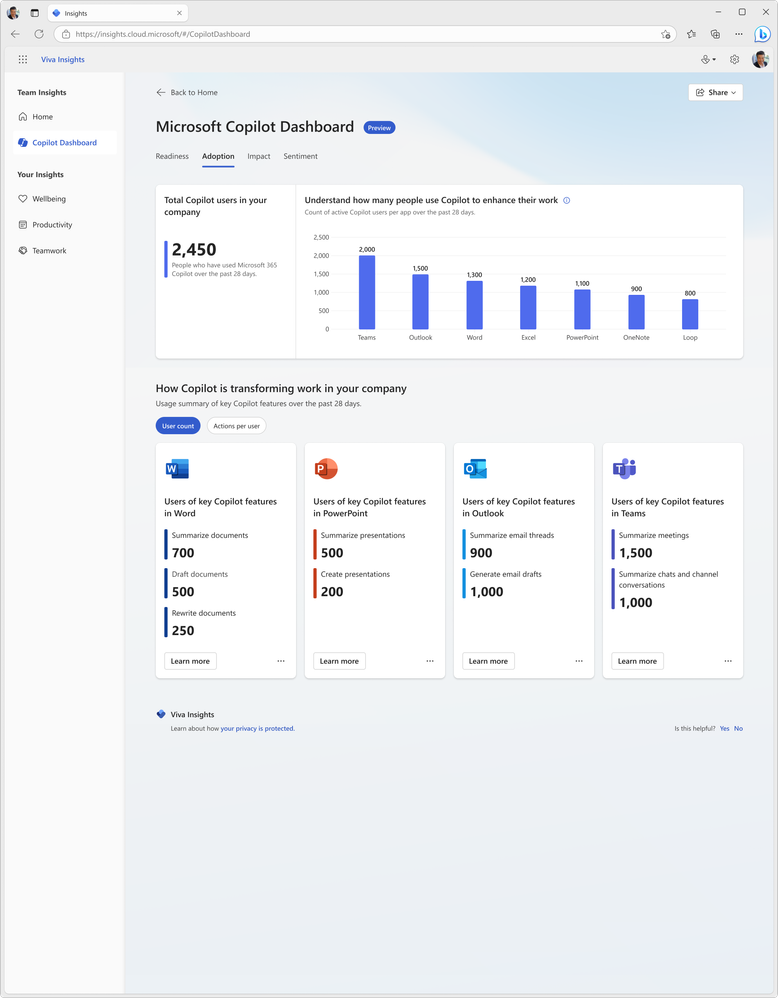
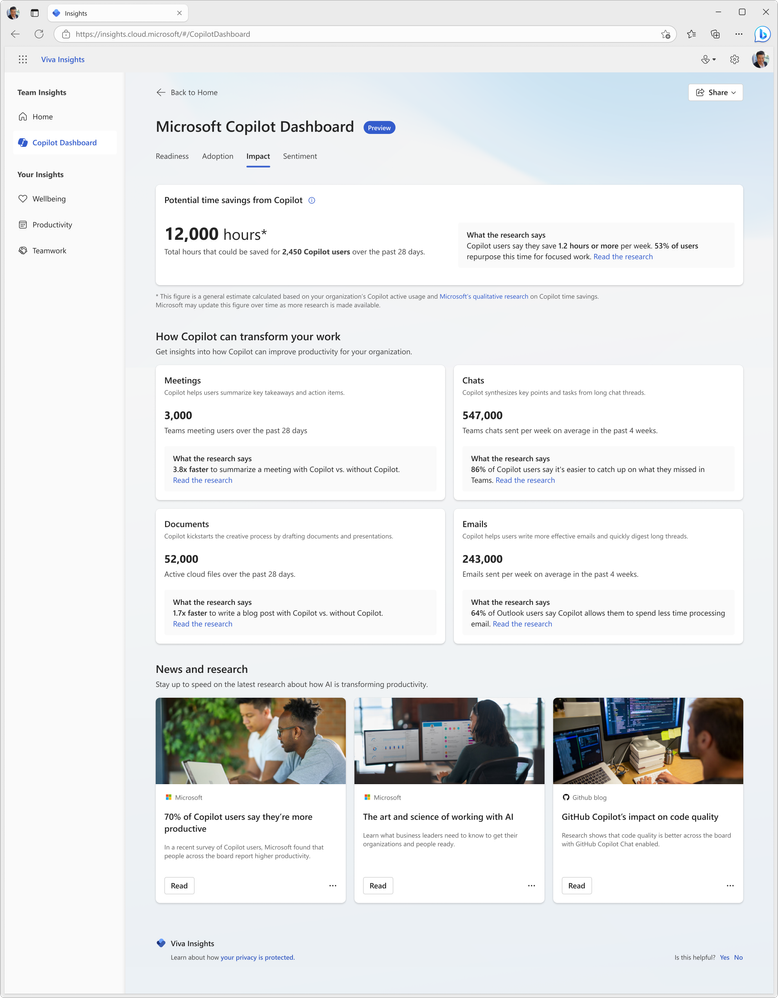
Since the introduction of Copilot for Microsoft 365, one of the big questions I, and others, have been asking is “how do you determine value?”. I laid out my initial concerns, questions, and actions here and now want to look at Microsoft’s offerings to enable this kind of insight. Currently available in preview (https://insights.cloud.microsoft/#/CopilotDashboard) – although I couldn’t get it to work – Microsoft’s Copilot Dashboard is their option to get the much needed insights.
Microsoft Copilot Dashboard
Microsoft aim for this to help customers across the 3 stages of the adoption journey:
It will show:
Who is eligible for Copilot for M365
How people are currently using M365 apps
How people are using Copilot and in which different apps
Information on how Copilot is impacting productivity
Microsoft are referring to it as “Microsoft Copilot Dashboard, powered by Viva” and from “early 2024” there will be additional dashboard features available to users with Viva Insights licenses. According to Microsoft, these will include:
“Copilot adoption and usage metrics combined with collaboration data, out-of-the box reports for organizational leaders, before and after behavioral data and even insights from employee surveys.”
and will also show time spent in meetings, processing emails, and creating content with before and after Copilot information.
All in all, the Copilot dashboard will be useful for organisations looking to understand more about their Copilot readiness and then their Copilot usage. However, some may have concerns about the reliability and objectivity of the data and reports generated by Microsoft on their own software. Ideally, Microsoft will be transparent and accountable in how they collect, process, and share the data from the Copilot dashboard. They should also provide ways for users to verify, challenge, or complement the data with their own sources and feedback.
I’ve recently recorded a couple of videos with Nathan Miller, Microsoft Program Manager at Bytes.
In the first, we discuss Copilot for Microsoft 365 (we recorded this in October 2023 but it took me ages to edit it!):
We talk about the General Availability of Copilot for M365 as well as tips for preparing for deployment.
We then talk about the Microsoft Azure Consumption Commitment (MACC): agreement:
where we explain what the MACC agreement is, how it works, and the potential pros and cons for customer organisations. We also talk about the Azure cloud marketplace and the impact this will have on customer procurement processes and also the wider IT channel.
I hope you find the videos useful and informative – as there are more planned! Let me know if you have requests for topics and also if you’d like to jump on a video or podcast with me at some point. I usually focus on blog posts but am looking to get all multimedia on you in 2024 so this is just the start 😁
Microsoft have announced a new Copilot – we now have Copilot for Service.
Copilot has been within Dynamics 365 for a few months already and now Microsoft bring the ability to “synthesize[s] vast amounts of data already available from an organization’s trusted knowledge sources to provide relevant, timely guidance to agents in their flow of work” to users of other CRM and Contact Centre solutions including Salesforce and ServiceNow, and Zendesk.
How does it work?
Microsoft say that it will very easy:
“Organizations can simply point to their data—such as public websites, SharePoint, knowledgebase articles, and offline files—and in a few minutes unlock generative AI-powered conversations across all of their data”
It will enable customer service agents to ask natural language questions of their data, whether in Teams or another client. Further down the line additional features will include email summaries, email drafts, and meeting recaps as well as automating common CRM tasks based on emails and context.
Interestingly, this product will include the much hyped Copilot for Microsoft 365 – meaning these users will also have access to Copilot across their Office suite.
Pricing and availability
Copilot for Service will be $50 per user per month (pupm). Remember that this includes Copilot for M365 which is priced at $30 pupm alone.
Copilot for Service is currently in public preview in US-based environments only, and the Copilot for M365 features may not be available during preview.
Announcement here and more info sign up form here.
It’s been announced that Power Virtual Agents (PVA) is now part of Copilot Studio so let’s look at the licensing for this new product.
Microsoft Copilot Studio for Microsoft Teams
Just as there is Dataverse for Teams, this is a cut-down version for use exclusively with Teams and the rights are included with “select” M365 licenses. These seem to be a way of keeping PVA available to many users and further promoting the idea that Teams is where all internal bot related scenarios should occur.
As you can see, the features are relatively limited:
It will be possible to acquire a full Copilot studio license via the Teams app so SAM managers beware! I’m yet to find pricing for the standalone license but will update once I see it.
Microsoft state that “use rights and functionality available as part of paid, standalone Power Automate subscriptions serve automation scenarios cannot be applied to Microsoft Copilot Studio scenarios“.
Copilot Studio entitlements are also included within D365 Customer Service Digital Messaging and Chat add-ons.