Microsoft Copilot Cowork Pricing Explained: What Your Organisation Will Actually Pay


Microsoft has officially announced that Copilot Cowork is generally available. If you caught my LinkedIn post on this just after launch, you’ll know I flagged the headline numbers – and promised a deeper look. Here it is.

This isn’t just another Copilot feature release, Cowork represents a different, additional way of working…and brings with it an additional billing mechanism.

What Is Copilot Cowork?

Copilot Cowork is Microsoft’s agentic AI layer sitting on top of Microsoft 365 Copilot. Where standard Copilot handles in-the-moment assistance (drafting emails, summarising meetings, generating content), Cowork is designed for longer-running, multi-step tasks that span multiple apps and require sustained reasoning in the background.

How the Billing Works

This is where things get interesting and where CFOs – and everyone else – will want to pay close attention.

Copilot Cowork uses a seat + consumption model:

Seat requirement: Users must already hold a Microsoft 365 Copilot licence
Consumption billing: Cowork usage is billed on top of that, via Copilot Credits

In other words, you’re not paying a flat per-user fee for Cowork. You’re paying based on what people actually do with it. That might sound fair – but as we’ll see, it creates significant cost unpredictability at scale.

The Three Prompt Types

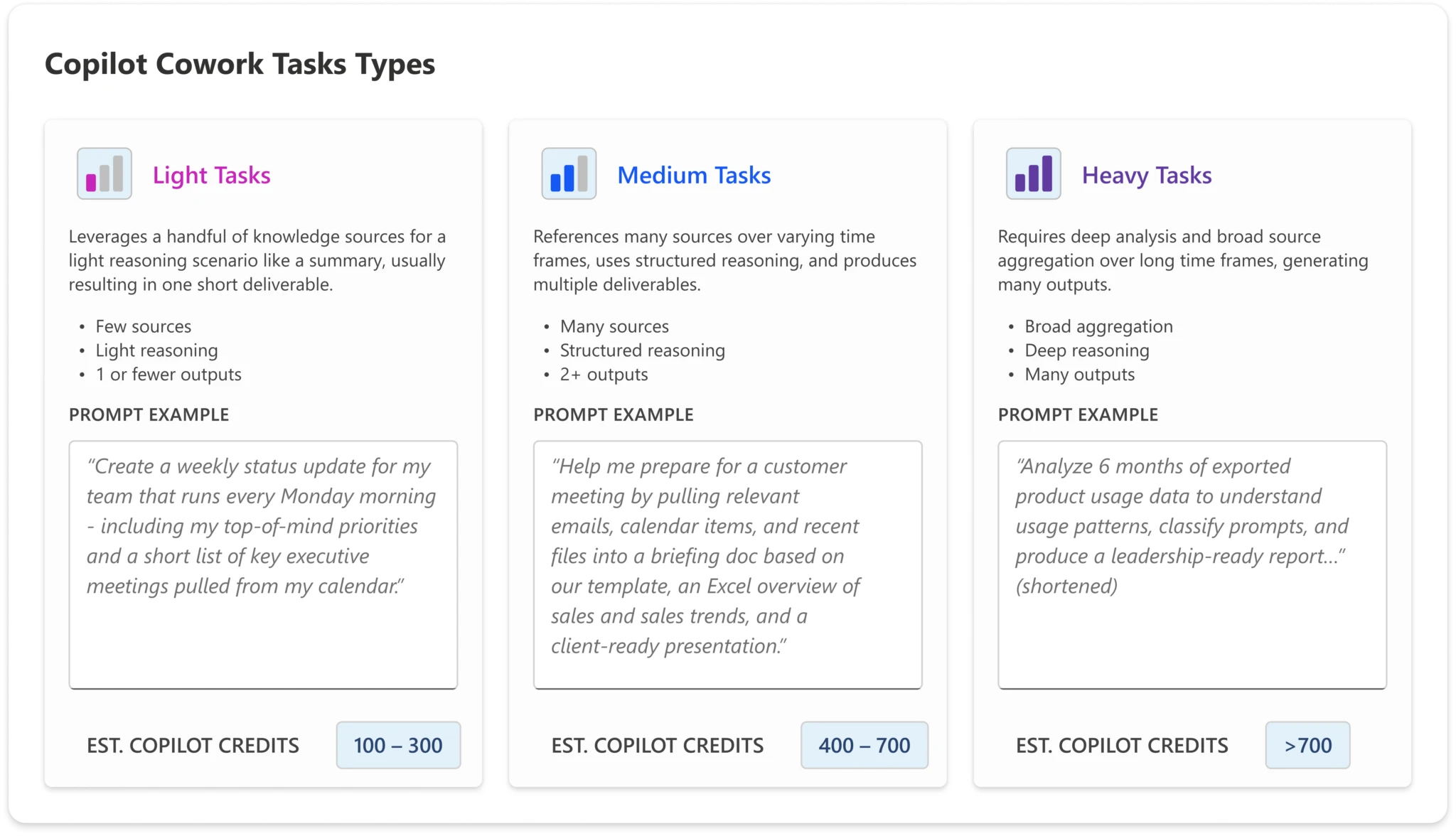
To help organisations estimate their likely spend, Microsoft has defined three categories of prompt complexity:

  • Light Simple, quick tasks – lookups, short summaries, straightforward Q&A
  • Medium Multi-step tasks with moderate reasoning or tool use
  • Heavy Complex, long-running agentic tasks – deep research, multi-app orchestration, extended workflows
Copilot Cowork is now generally available | Microsoft 365 Blog

The credit cost per interaction scales accordingly. A user who primarily sends light prompts will consume far fewer credits than one regularly triggering heavy agentic workflows.

The Four Microsoft-Defined Personas

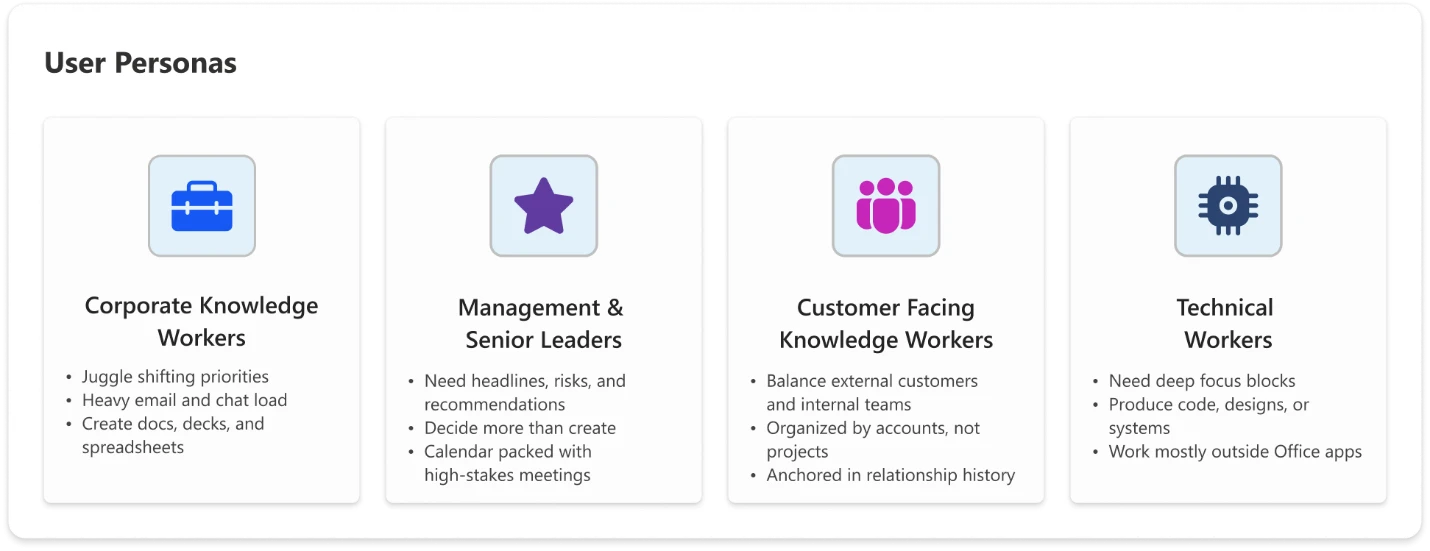
Microsoft has also defined four user personas to help organisations model expected usage – and therefore expected cost:

  1. Knowledge Worker

Your standard office employee: using Copilot for day-to-day tasks like drafting documents, summarising emails, and pulling information. Predominantly light-to-medium prompt usage.

  1. Customer-Facing Knowledge Worker

Staff in sales, customer success, support, or account management. Higher interaction volume and a greater likelihood of medium-to-heavy prompts – researching customer history, generating proposals, triaging complex queries.

  1. Technical Worker

Developers, analysts, engineers, and data professionals. Usage tends towards heavier, more complex prompts – code generation, data analysis, technical documentation, multi-step problem solving.

  1. Manager / Senior Leader

Executives and team leads. Usage is often more strategic – executive briefings, synthesising reports across sources, preparing for key meetings. Likely lower volume but higher complexity per interaction.

Copilot Cowork is now generally available | Microsoft 365 Blog

What Does This Actually Cost?

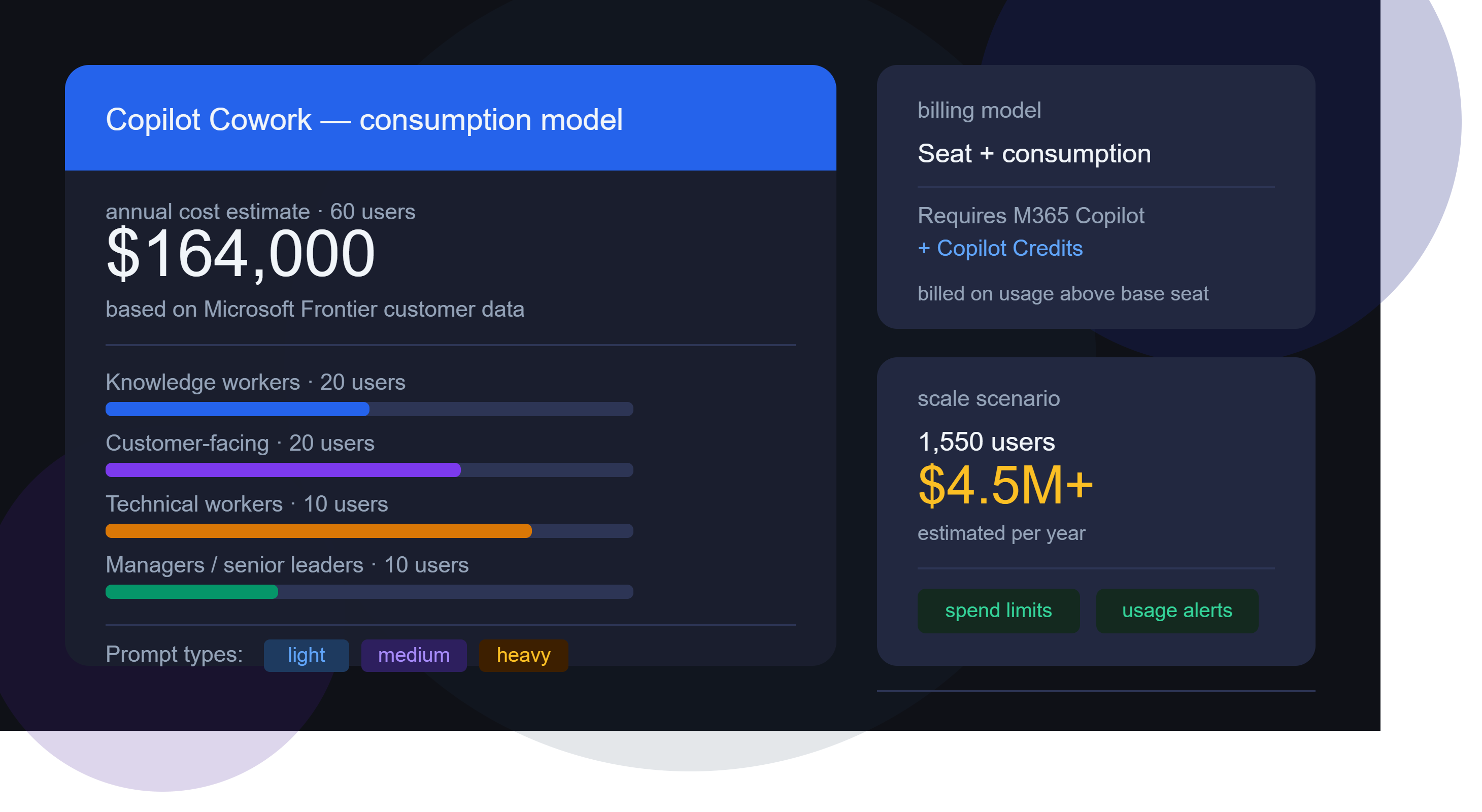
Microsoft has shared estimated annual Cowork costs based on data from early Frontier customers. Modelling the costs is where things start to get really surprising…the below uses list pricing and doesn’t factor in any type of discount.

*Update 18-06-26*

The calculator I’ve been using is here – GitHub – mfg-365/cowork-cost-estimator: Live usage-based cost estimator for Microsoft Copilot Cowork — print & PDF export · GitHub

However, in their announcement post, Microsoft link to this spreadsheet – https://aka.ms/CustomerCoworkEstimator.

As was pointed out in a comment, there is a small but important difference between the two. The Github hosted calculator estimates “Heavy” prompts at 2,500 credits while the spreadsheet version uses a value of 1,200. This means the latter version produces lower prices for those heavy prompt users.

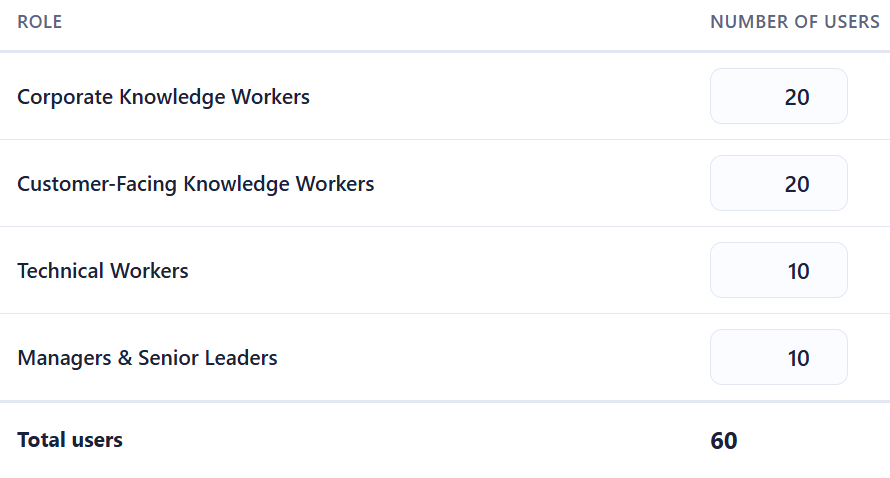
Let’s look first at a small org of 60 users:

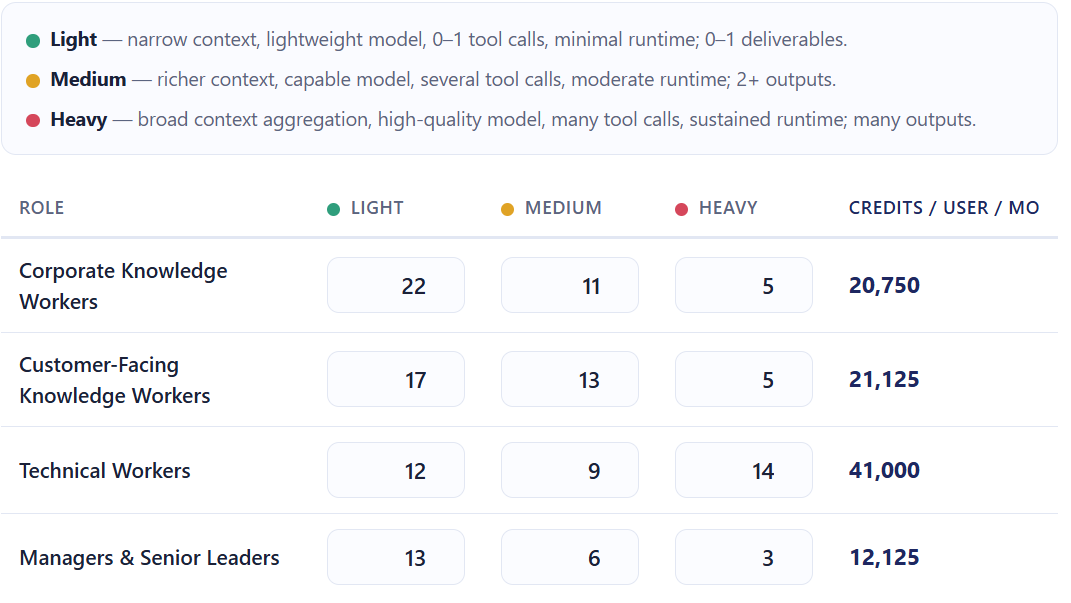
The Microsoft calculator uses the following estimates for the number and type of prompts each persona will use:

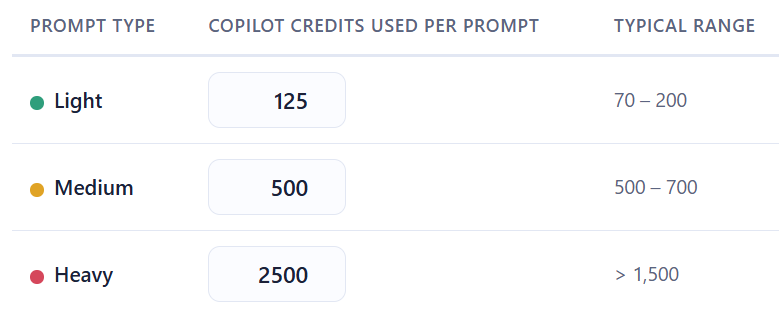
and these for the number of credits used per prompt:

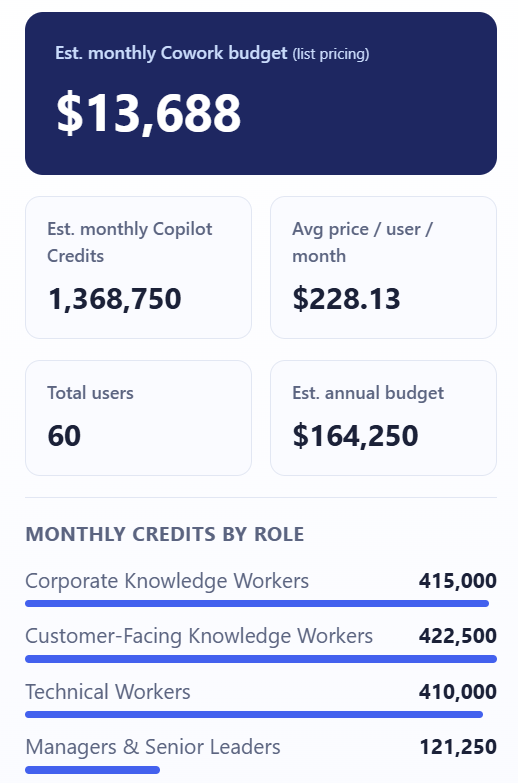
That gives a final estimate of:

That’s right – over $164,000 per year for 60 people to use Copilot Cowork.

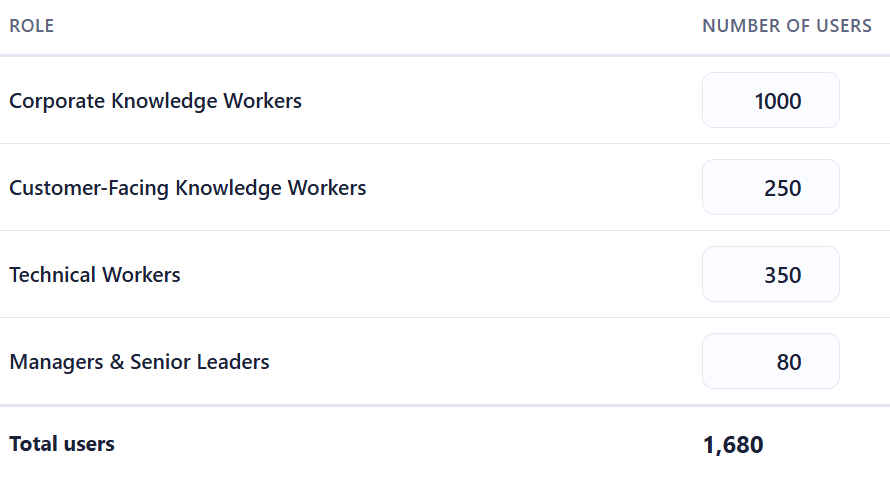
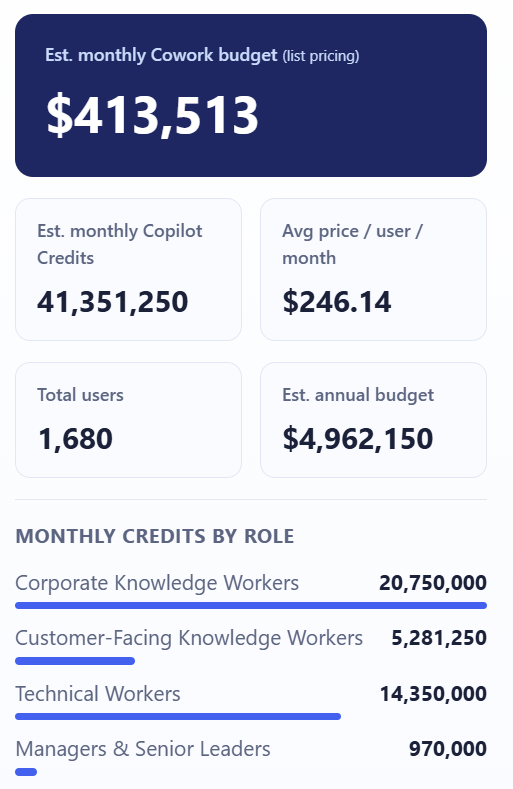
For a company of 1,680 staff:

You end up with an estimated annual bill of almost $5,000,000!

It seems impossible that companies are going to pay these amounts – surely? If these costs are real, it shows that customers are going to have to be much more realistic as to who gets access to Copilot Cowork.

The Guardrails Microsoft Provides

To be fair to them, Microsoft have built in some controls:

  • Spending limits – administrators can cap Cowork credit consumption at tenant, group, and user levels
    Usage alerts – notifications when consumption approaches defined thresholds
  • Usage reporting – Admins see usage broken down by user, group, and feature
  • User-level pricing – Users see what each task costs as they run it (coming soon)

These are sensible features, and their inclusion suggests Microsoft is aware of the sticker shock potential and are trying to get out in front of it.

As well as PAYG pricing, the Copilot P3 advance purchase option – which can give discounts of up to 20% – is available for Cowork – see more here Microsoft Copilot Credit Pre-Purchase Plan – Cloudy with a chance of Licensing

Why This Changes the AI Governance Conversation

This is what I really want to focus on, because the billing model isn’t just a procurement question — it’s an organisational design question.

  1. Not all usage is equal value

A heavy prompt from a technical worker building an internal tool could save dozens of engineering hours. A heavy prompt from someone using Cowork to draft a quick internal update is a poor use of credits. The credit model treats both the same. Your organisation needs a way to distinguish between them.

  1. You need a usage policy, not just a spending cap

A spending cap is a ceiling. What you actually need is a framework that answers questions like:

  • Which personas should have access to Cowork at all?
  • What types of tasks are appropriate for Cowork vs. standard Copilot?
  • Who approves high-complexity agentic workflows?
  • How do we measure whether Cowork usage is delivering value?

Without answers to these, you’re handing out a consumption-based service with no purchasing guidelines.

  1. The ROI question is now urgent

With flat-fee AI tools, ROI questions are important but not time-sensitive – you’re paying regardless of use. With consumption billing, poor adoption and excessive adoption are both problems. You need a framework for measuring the value of AI usage – not just the cost.

  1. Consumption models reward the vocal, not the strategic

In many organisations, power users will naturally gravitate toward the most capable features. That’s not always aligned with where the highest-value use cases are. Without intentional governance, Cowork credit consumption may cluster around enthusiastic individuals rather than high-value workflows.

What Organisations Should Do Now

If you’re already running Microsoft 365 Copilot – or planning to – here’s where to focus:

  • Map your personas
    • Use Microsoft’s four categories as a starting point, but refine them for your organisation. Who are your heaviest potential users? Where are the highest-value use cases?
  • Model your costs before you deploy
  • Use the per-persona estimates to build a realistic cost projection. Stress-test it against both optimistic and conservative adoption scenarios.
  • Define your governance framework
  • Decide who gets access to Cowork, for what purposes, and with what approval process for high-complexity tasks. Document this as policy, not just an IT configuration.
  • Set up monitoring from day one
  • Don’t wait for the first bill to understand usage patterns. Use Microsoft’s alerting tools, and complement them with your own reporting.
  • Establish a value measurement approach
  • Credits spent should be traceable to outcomes. What did that agentic workflow actually deliver? This doesn’t need to be complex – even a lightweight system for use case categories can help you build the picture.

See the Microsoft announcement here – Copilot Cowork is now generally available | Microsoft 365 Blog

Grab the calculator from Github here – Live usage-based cost estimator for Microsoft Copilot Cowork

Join the conversation on my LinkedIn post here – Copilot Cowork Post

Microsoft Financial Results: FY26 Q3


As I say every few months, it’s another bumper quarter for Microsoft with all the numbers getting bigger.

  • Revenue = $82.9 billion (up 18%)
  • Net Income = $31.8 billion (up 23%)
  • Microsoft Cloud = $54.5 billion (up 29%)

Microsoft had Operating Expenses of $17.7 billion this quarter and say they were “primarily driven by continued investments in R&D compute capacity, AI talent, and data“.

Productivity & Business Processes

  • Revenue = $35 billion, up 17%
  • Microsoft 365 Commercial cloud revenue increased 19%
  • Dynamics 365 revenue increased 22%

M365 Copilot is now over 20 million paid seats. That’s a 33% increase over Q2 (where it was 15 million) but still a fraction of the overall customer base.

Paid M365 Commercial seats grew 6% YoY and ARPU increased driven by E5 & M365 Copilot.

Intelligent Cloud

  • Revenue = $34.7 billion, up 30%
  • Azure increased 40%

Earnings Call

Satya Nadella started by saying “We are at the beginning of one of the most consequential platform shifts that will change the entire tech stack as agents proliferate and become the dominant workload.

  • He says there are “Tens of thousands of companies are already managing tens of millions of agents in Agent 365” – frankly, that surprises me.
  • Cosmos DB had 50% YoY revenue growth
  • Microsoft Fabric up to 35,000 paid customers, a 60% YoY increase
  • Copilot Credit spend almost doubled quarter over quarter
  • Nearly 60% of “service customers” are buying consumption credits

I’ve been banging on about consumption billion (aka Pay as You Go) billing for a few years now and it’s definitely where Microsoft (and a lot of the software industry) is going. Amy Hood, MS CFO, said;

“I start to think about it as a license business plus a consumption business, and really applying far more broadly than I think people have thought about that. And so, it starts to mean that over time, bookings will actually also look a little different. It’ll still have that per-seat license logic, but it’ll also have a meter, just like you see in Azure.”

and Satya said:

“seat-based pricing is just entitlement to some consumption”

While I think he means that seat based licenses are effectively a bundle of some consumption packaged up, that certainly sounds like it being a gateway to more consumption charges…which of course it is in many cases.

See more info here – FY26 Q3 – Press Releases – Investor Relations – Microsoft

Microsoft Product Terms: March & April 2026


Photo by Markus Winkler on Pexels.com

March:

Windows 10 ESU Cloud Managed Requirements updated to state “Intune & Entra ID” as license requirements for user access.

Microsoft Entra ID Governance External Identities rebranded to Microsoft Entra ID Governance for Guests

Azure Arc license restrictions updated for Windows Server

April:

SQL Server & Windows Server Subscriptions on MCA/CSP get rights equivalent to Software Assurance (SA)

Windows 10 Enterprise LTSB ESU added

Microsoft Product Terms: February 2026


Photo by Markus Winkler on Pexels.com

Microsoft Defender for EndPoint P2 Add-on for M365 E3 added to MCA for CSP

Microsoft Entra ID P2 Add-on for M365 E3 added to MCA for CSP

Dragon Copilot Physician Practice Per User added to MCA for CSP

Microsoft CSP subscriptions get License Mobility rights


Boxes labeled Software Assurance and Cloud Solution Provider on a futuristic train track

Microsoft have announced that, from April 1st 2026, CSP subscription products have the full equivalent rights of their volume license w/ Software Assurance counterparts.

The big thing here is that eligible CSP subscriptions now have License Mobility (through Software Assurance) rights – so you can take them to Authorised Mobility Partner clouds – including the Listed Providers i.e. Amazon AWS, Google GCP, and Alibaba.

Eligible server products are:

  • Windows Server External Connectors*
  • Windows Server RDS User CALs*
  • Microsoft SQL Server
  • Microsoft Exchange Server
  • Microsoft SharePoint Server
  • Microsoft System Center servers
  • Microsoft Dynamics 365 Operations Server
  • This applies to subscriptions only (not perpetual licenses)
  • *Windows Server subscriptions are NOT included, as Windows Server does not have License Mobility rights.

This was the big remaining difference – it furthers the rise of CSP as an alternative to volume licensing and reduces the scope for Microsoft to be accused of anti-competitive behaviour against the Listed Providers and customers.

See more from Microsoft here – April 2026 announcements – Partner Center announcements | Microsoft Learn

Microsoft announces Azure Savings Plan for Databases


Microsoft has announced “Savings Plan for Databases” – a new option to manage Azure cloud costs, alongside the existing “Savings Plan for Compute”.

Just like the AWS version (announced in December 2025), this helps organisations reduce spend on certain databases while giving additional freedom when compared to Reserved Instances – but, due to the added flexibility, giving lower discount levels.

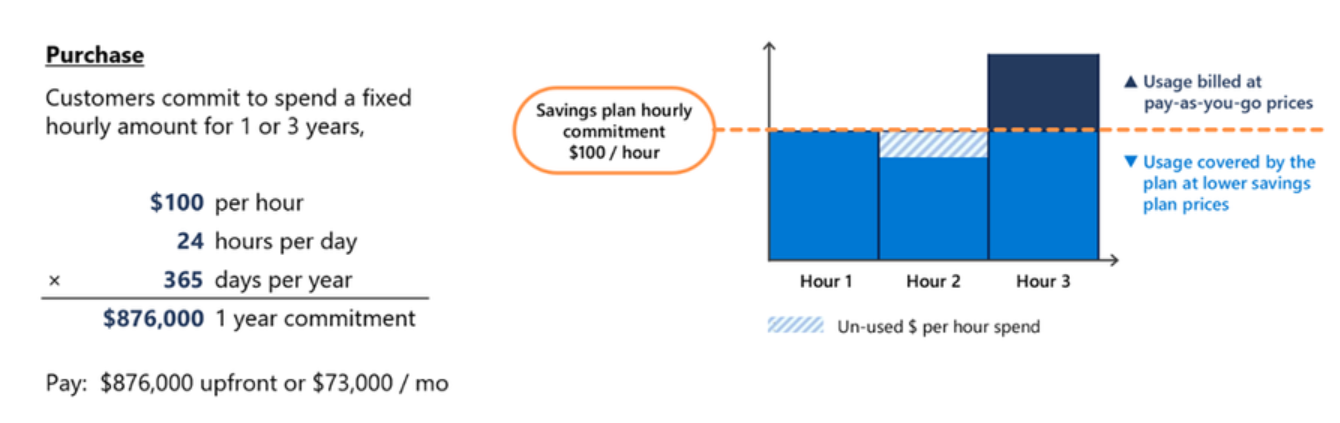
Rather than committing to a specific service/region etc., Savings Plans allow you to commit to a level of hourly spend that can be applied across a range of services.

Savings Plans for Databases are worth considering when you have a predictable baseline of database spend but still need flexibility in how that spend is consumed. If your environment includes multiple database engines, regions, or services that change over time, committing to a fixed hourly spend can unlock savings without being as specific as with Reserved Instances.

They are particularly useful where workloads are steady in aggregate but variable at an individual service level. If you can reliably forecast a minimum level of database spend each hour, a savings plan can reduce costs while preserving freedom.

Announcing savings plan for databases: flexible savings for modern, evolving workloads | Microsoft Community Hub

What services are covered?

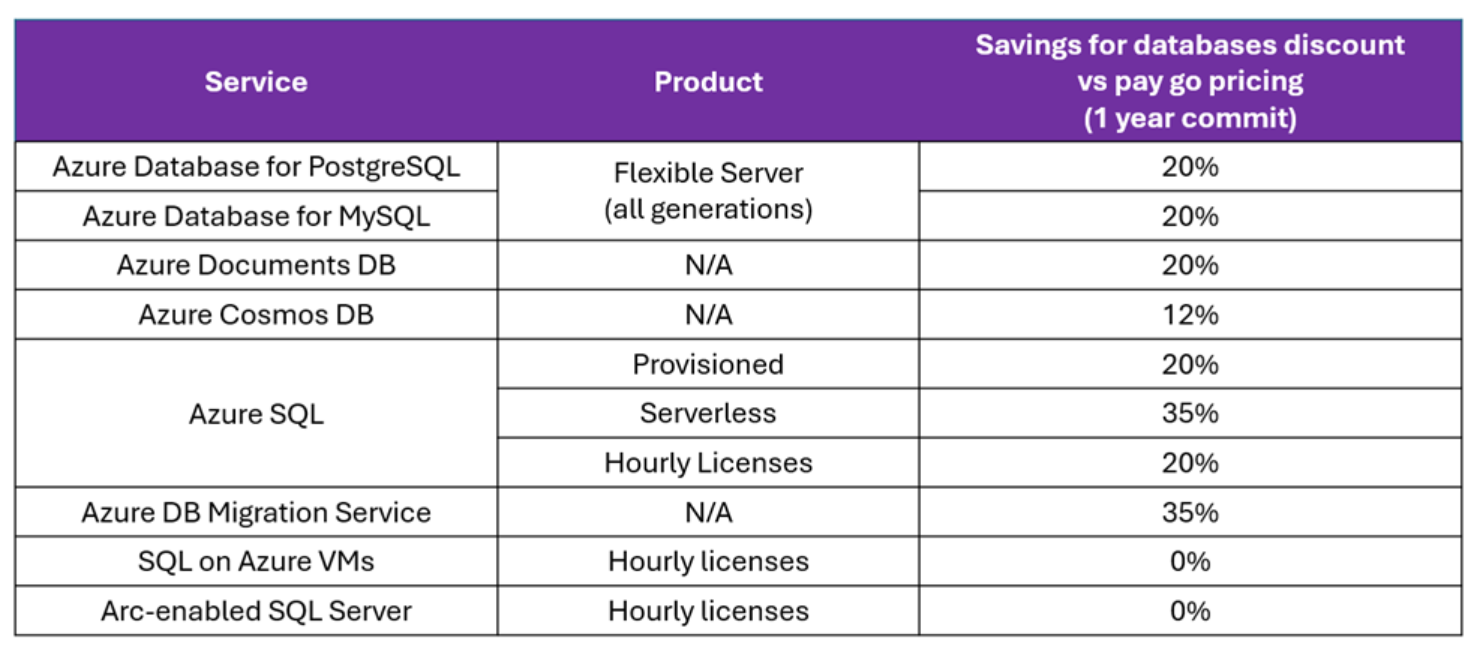
A range of database options, including Cosmos DB, are covered with discount levels varying:

Announcing savings plan for databases: flexible savings for modern, evolving workloads | Microsoft Community Hub

It seems these new Savings Plans are available just in 1-year variants and, assuming they follow the same method as Savings Plan for Compute, can be paid for upfront or monthly with no impact to the total amount.

This announcement helps bring Azure to parity with AWS (in this area) and will enable some organisations to make additional savings. As always, be sure to work out how it will apply to your specific contract and scenario.

See more from Microsoft here – Announcing savings plan for databases: flexible savings for modern, evolving workloads | Microsoft Community Hub

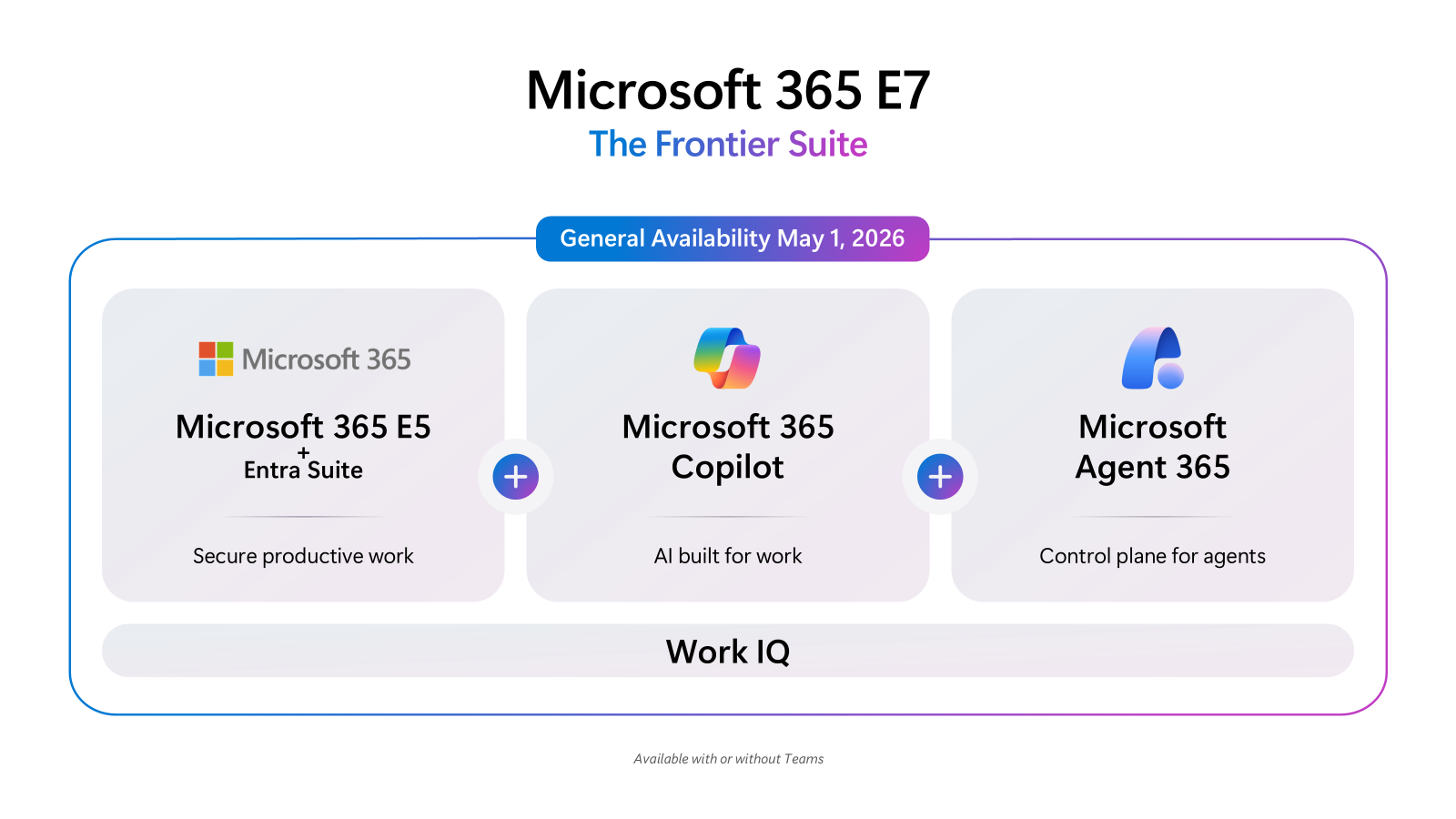
Microsoft 365 E7 is announced


Microsoft 365 E7 is here!

There have been rumours for years but now it is official, there is a new member of the M365 family…the Frontier Suite as Microsoft are calling it, ready to bring humans and agents together.

Leading Frontier Firm transformation with Microsoft 365 E7: The partner opportunity

The release date is May 1, 2026 for $99 per user per month. The separate pricing will be (after the July 1st price increase) $60 for E5, $33 for M365 Copilot, and $15 for Agent365 so E7 represents a saving.

This is a quick post to get this info available – I’ll do further posts looking more at Agents 365, exactly what’s included in E7, and how pricing stacks up etc.

See more from Microsoft:

Introducing the First Frontier Suite built on Intelligence + Trust – The Official Microsoft Blog

Partner Blog | Introducing Microsoft 365 E7: The Frontier Suite | Microsoft Community Hub

Leading Frontier Firm transformation with Microsoft 365 E7: The partner opportunity

Microsoft Financial Results FY26 Q2


Microsoft Financial Results for Q2 FY26

Revenue = $81.3 billion (up 17%)

Net Income = $38.5 billion (up 60%)

Microsoft Cloud = $51.5 billion

As it has been every quarter for many years now, more big increases across the board as Microsoft continues to grow. They have RPO (Remaining Performance Obligation) of $625 billion, an increase of 110%, which indicates a lot of multi-year agreements have been signed. This huge backlog of guaranteed revenue likely means that Microsoft aren’t as bothered about your order/renewal as you might like them to be…making discounts harder to come by for many customers.

Is AI still a hot topic?

Yes!

Satya Nadella, Microsoft CEO said:

“We are only at the beginning phases of AI diffusion and already Microsoft has built an AI business that is larger than some of our biggest franchises”

“We are pushing the frontier across our entire AI stack to drive new value for our customers and partners.”

And devoted the majority of his time on the earnings call to discussing AI, both software and hardware.

Additionally, Q2 saw commercial booking increase 230%, “driven by Azure commitments from OpenAI and Anthropic”. Further more, Perplexity have also signed a $750 million deal with Azure – https://www.msn.com/en-us/money/other/perplexity-inks-microsoft-ai-cloud-deal-amid-dispute-with-amazon/

Productivity & Business Processes

Revenue = $51.5 billion, an increase of 26%

Dynamics 365 revenue increased 19%

Microsoft 365 Commercial cloud revenue increased 17% with ARPU (Average Revenue Per User) driven by E5 and M365 Copilot.

Microsoft 365 Copilot seats added increased 160% year on year in FY26 Q2 (Oct – Dec 2025) taking them to 15 million paid seats. Of course, how many of those are being used – and being used well – is a different question entirely. 

Tracking and understanding ROI of AI investments isn’t as high a priority for most organisations as it should be. This really is an areas where ITAM & FinOps professionals can help organisations take a deeper, more data driven approach to AI procurement and value. I wrote this over 2.5 years ago – https://cloudywithachanceoflicensing.com/2023/07/21/microsoft-365-copilot-pricing-and-licensing-strategy/ – and I don’t think much has changed tbh.

Intelligent Cloud

Revenue = $32.9 billion, an increase of 29%

Azure increased by 39% (down from 40% in the previous quarter) but gross margin on cloud declined slightly. Market analysts were hoping for higher Azure growth so this perceived miss was partially responsible for a drop in Microsoft’s stock after the announcement.

They are also concerned that the huge amount of money Microsoft are spending on CAPEX related to AI datacentres etc. isn’t generating ROI fast enough.

Conclusion

Microsoft’s results underscore that licence management, cloud cost control, and financial governance are now inseparable, particularly as AI accelerates both consumption and complexity. 

For ITAM and FinOps leaders, Q2 FY26 is less about Microsoft’s growth and more about the operational response it demands: proactive review of AI and cloud commitments, tighter contract scrutiny, and implementation of usage intelligence. 

Organisations that align ITAM and FinOps processes to anticipate consumption variability and optimise spend can mitigate financial risk while maximising value from licences, cloud services, and emerging AI capabilities. Success will increasingly depend on granular monitoring, AI-informed analytics, and governance tools that bridge licensing, cloud, and financial metrics.

See more here – FY26 Q2 – Press Releases – Investor Relations – Microsoft

Microsoft retire Power Apps per App


Microsoft have (quietly) retired the Power Apps per App SKU.

They’ve not made an announcement, they’ve simply removed it from the January 2026 licensing guide.

Update: 14 days later, they finally made an official announcement here:

https://www.microsoft.com/en-us/licensing/news/power-app-per-app-end-of-sale

If this license is in use within your organisation, be prepared for changes at your next renewal. It’s still showing on pricelists as it will be available to existing customers until their next renewal but if you haven’t bought any already, you’ve missed your chance.

Sticking with licenses will mean a move to Power Apps Premium, which will be a price increase.

Alternatively, you can move to Power Apps Pay As You Go (PAYG) which is going to be Microsoft’s preference as they want as many customers on consumption billing as possible.

Microsoft Product Terms: January 2026


Photo by Markus Winkler on Pexels.com

“Azure AI Foundry” renamed to “Microsoft Foundry” – a common move

Microsoft Security Copilot SCU included in M365 E5 – read more here:

https://cloudywithachanceoflicensing.com/2025/11/20/microsoft-security-copilot-scu-included-with-microsoft-365-e5/

Microsoft Defender Experts Suites P1 & P2 added. Can be added to:

Microsoft 365 E5
Microsoft Defender + Purview Suite FLW
Microsoft Defender Suite
Microsoft Defender Suite FLW