Microsoft Copilot Cowork Pricing Explained: What Your Organisation Will Actually Pay


Microsoft has officially announced that Copilot Cowork is generally available. If you caught my LinkedIn post on this just after launch, you’ll know I flagged the headline numbers – and promised a deeper look. Here it is.

This isn’t just another Copilot feature release, Cowork represents a different, additional way of working…and brings with it an additional billing mechanism.

What Is Copilot Cowork?

Copilot Cowork is Microsoft’s agentic AI layer sitting on top of Microsoft 365 Copilot. Where standard Copilot handles in-the-moment assistance (drafting emails, summarising meetings, generating content), Cowork is designed for longer-running, multi-step tasks that span multiple apps and require sustained reasoning in the background.

How the Billing Works

This is where things get interesting and where CFOs – and everyone else – will want to pay close attention.

Copilot Cowork uses a seat + consumption model:

Seat requirement: Users must already hold a Microsoft 365 Copilot licence
Consumption billing: Cowork usage is billed on top of that, via Copilot Credits

In other words, you’re not paying a flat per-user fee for Cowork. You’re paying based on what people actually do with it. That might sound fair – but as we’ll see, it creates significant cost unpredictability at scale.

The Three Prompt Types

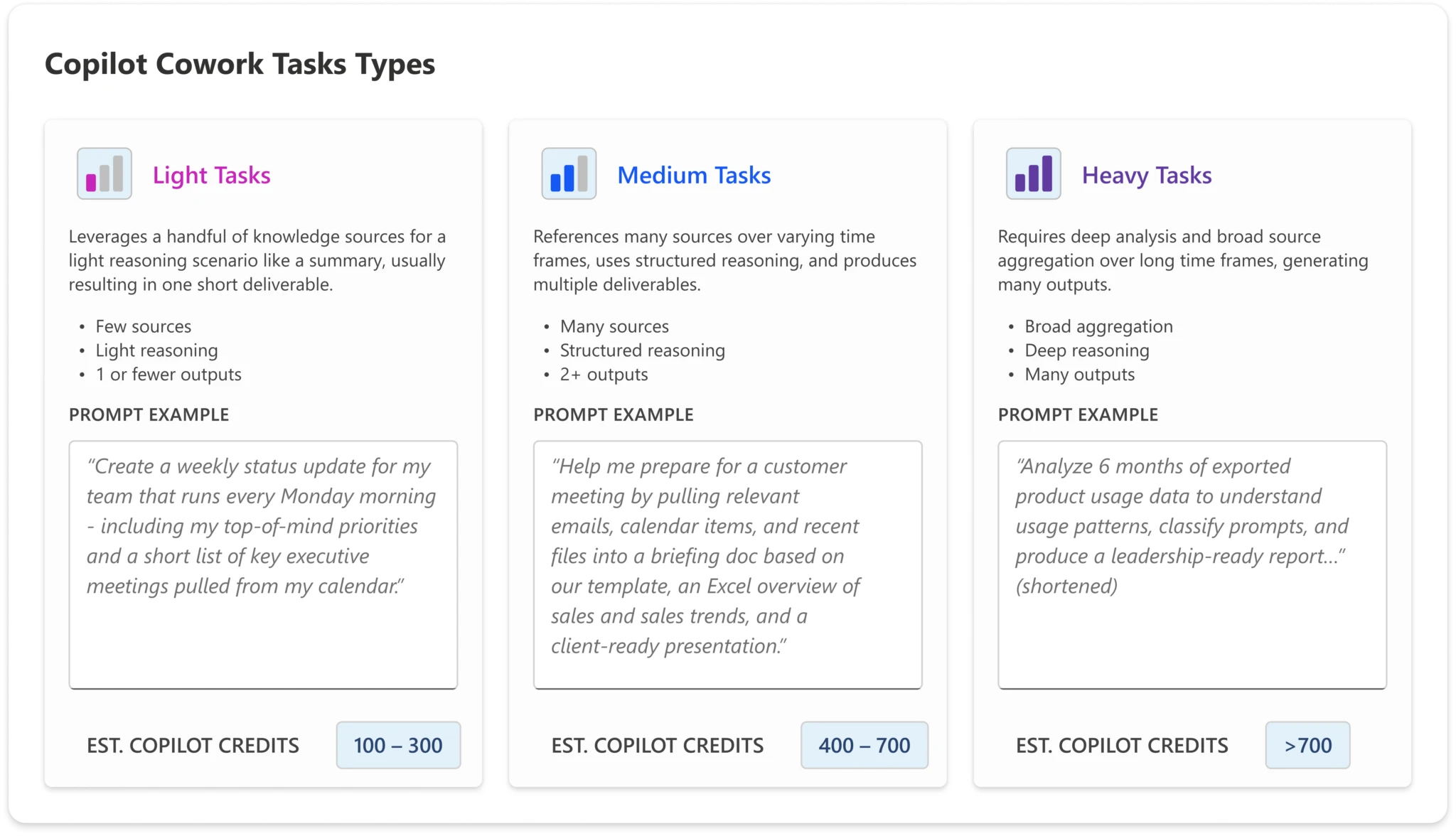
To help organisations estimate their likely spend, Microsoft has defined three categories of prompt complexity:

  • Light Simple, quick tasks – lookups, short summaries, straightforward Q&A
  • Medium Multi-step tasks with moderate reasoning or tool use
  • Heavy Complex, long-running agentic tasks – deep research, multi-app orchestration, extended workflows
Copilot Cowork is now generally available | Microsoft 365 Blog

The credit cost per interaction scales accordingly. A user who primarily sends light prompts will consume far fewer credits than one regularly triggering heavy agentic workflows.

The Four Microsoft-Defined Personas

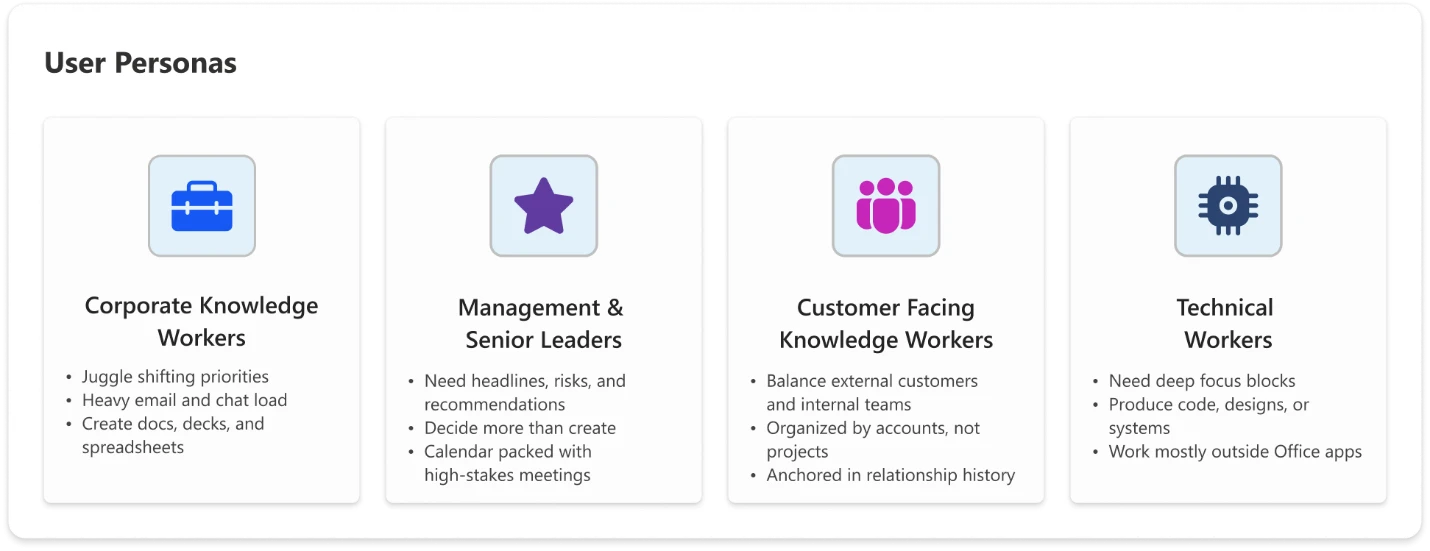
Microsoft has also defined four user personas to help organisations model expected usage – and therefore expected cost:

  1. Knowledge Worker

Your standard office employee: using Copilot for day-to-day tasks like drafting documents, summarising emails, and pulling information. Predominantly light-to-medium prompt usage.

  1. Customer-Facing Knowledge Worker

Staff in sales, customer success, support, or account management. Higher interaction volume and a greater likelihood of medium-to-heavy prompts – researching customer history, generating proposals, triaging complex queries.

  1. Technical Worker

Developers, analysts, engineers, and data professionals. Usage tends towards heavier, more complex prompts – code generation, data analysis, technical documentation, multi-step problem solving.

  1. Manager / Senior Leader

Executives and team leads. Usage is often more strategic – executive briefings, synthesising reports across sources, preparing for key meetings. Likely lower volume but higher complexity per interaction.
Copilot Cowork is now generally available | Microsoft 365 Blog

What Does This Actually Cost?

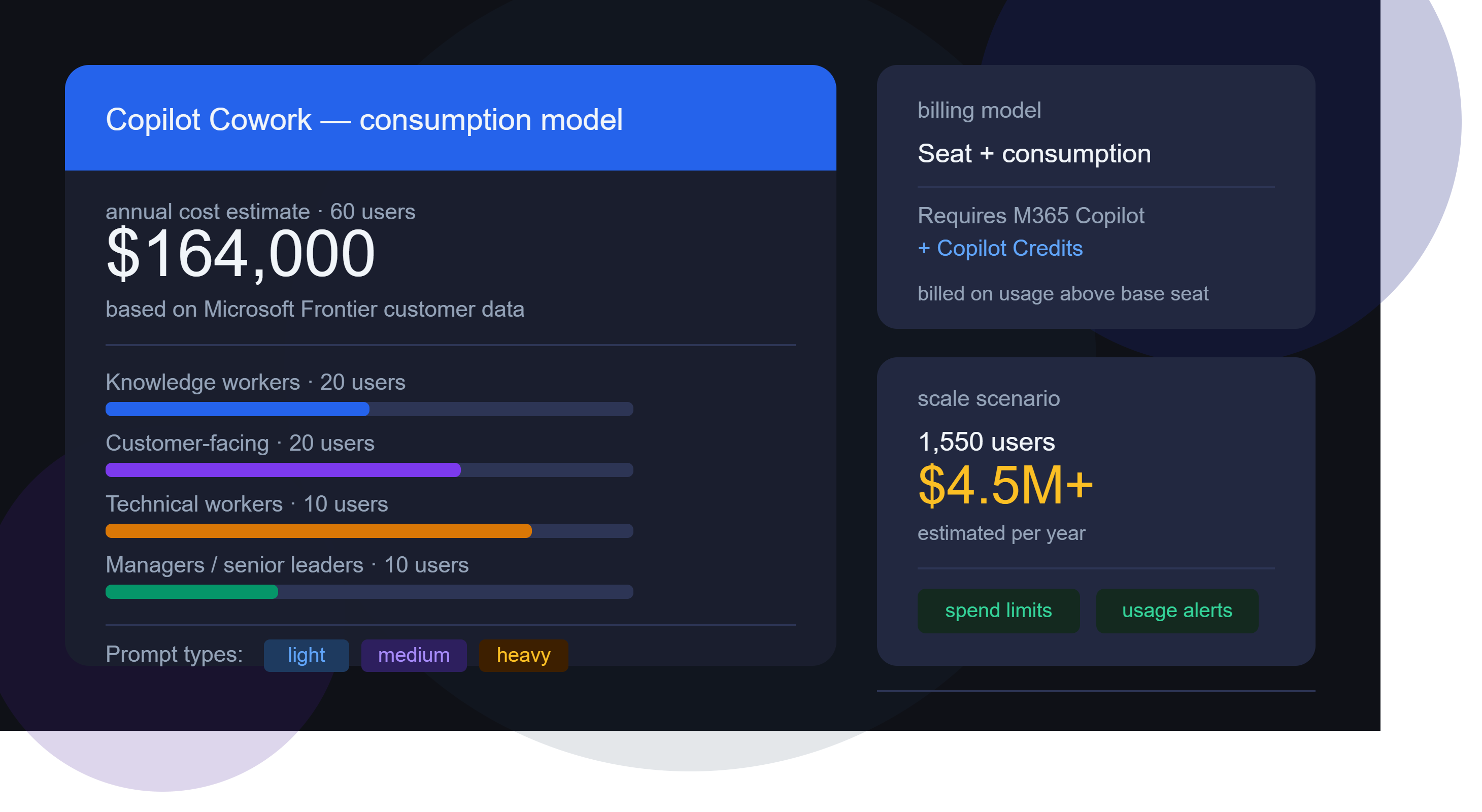
Microsoft has shared estimated annual Cowork costs based on data from early Frontier customers. Modelling the costs is where things start to get really surprising…the below uses list pricing and doesn’t factor in any type of discount.

*Update 18-06-26*

The calculator I’ve been using is here – GitHub – mfg-365/cowork-cost-estimator: Live usage-based cost estimator for Microsoft Copilot Cowork — print & PDF export · GitHub

However, in their announcement post, Microsoft link to this spreadsheet – https://aka.ms/CustomerCoworkEstimator.

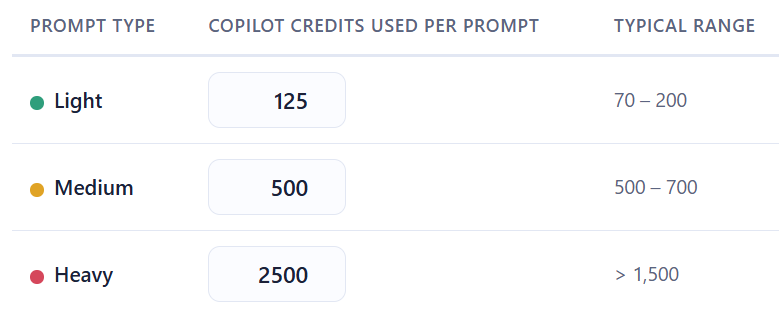
As was pointed out in a comment, there is a small but important difference between the two. The Github hosted calculator estimates “Heavy” prompts at 2,500 credits while the spreadsheet version uses a value of 1,200. This means the latter version produces lower prices for those heavy prompt users.

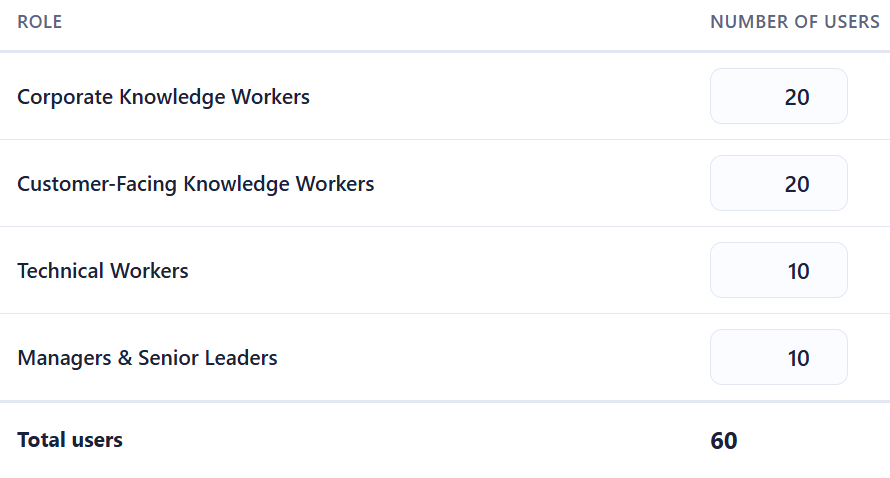
Let’s look first at a small org of 60 users:
The Microsoft calculator uses the following estimates for the number and type of prompts each persona will use:
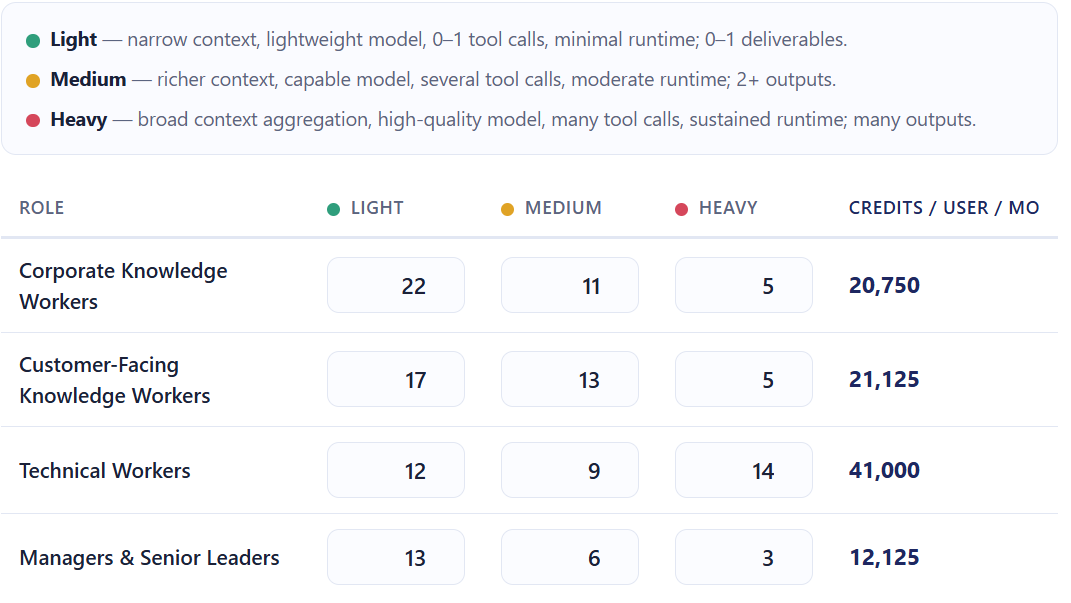
and these for the number of credits used per prompt:
That gives a final estimate of:
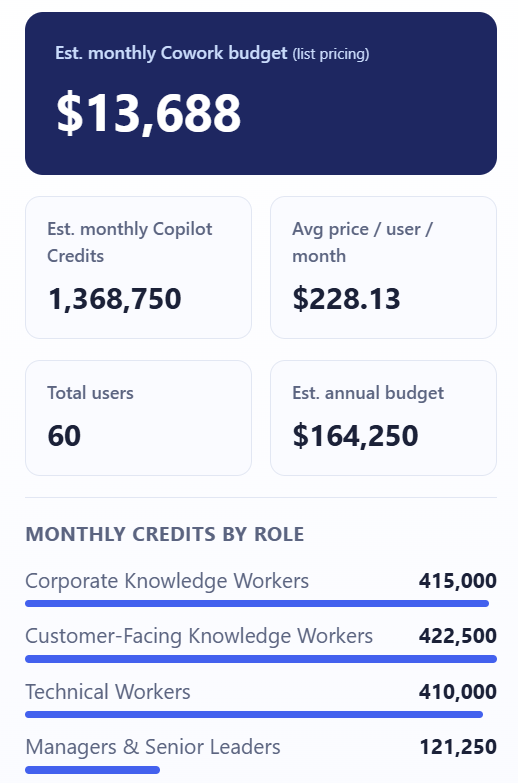
That’s right – over $164,000 per year for 60 people to use Copilot Cowork.

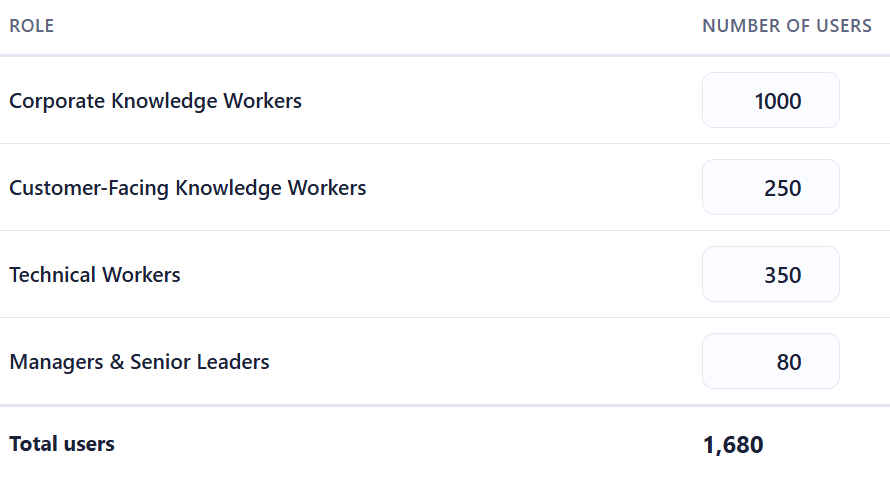
For a company of 1,680 staff:
You end up with an estimated annual bill of almost $5,000,000!
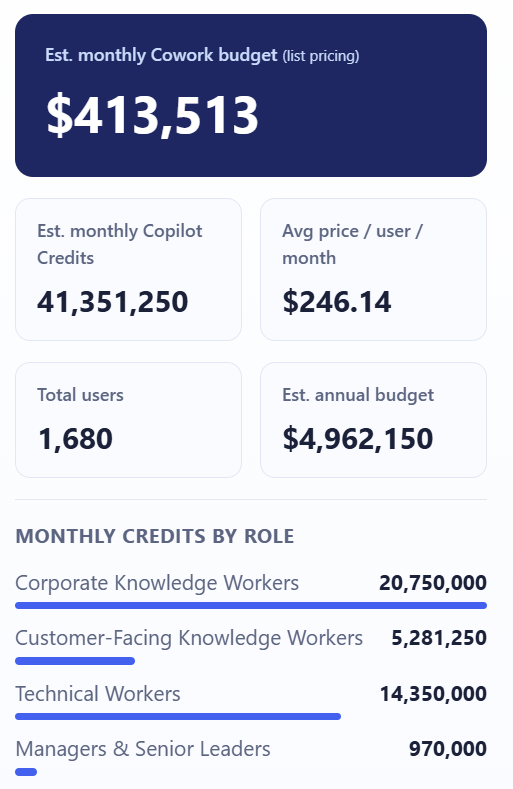
It seems impossible that companies are going to pay these amounts – surely? If these costs are real, it shows that customers are going to have to be much more realistic as to who gets access to Copilot Cowork.

The Guardrails Microsoft Provides

To be fair to them, Microsoft have built in some controls:

  • Spending limits – administrators can cap Cowork credit consumption at tenant, group, and user levels
    Usage alerts – notifications when consumption approaches defined thresholds
  • Usage reporting – Admins see usage broken down by user, group, and feature
  • User-level pricing – Users see what each task costs as they run it (coming soon)

These are sensible features, and their inclusion suggests Microsoft is aware of the sticker shock potential and are trying to get out in front of it.

As well as PAYG pricing, the Copilot P3 advance purchase option – which can give discounts of up to 20% – is available for Cowork – see more here Microsoft Copilot Credit Pre-Purchase Plan – Cloudy with a chance of Licensing

Why This Changes the AI Governance Conversation

This is what I really want to focus on, because the billing model isn’t just a procurement question — it’s an organisational design question.

  1. Not all usage is equal value

A heavy prompt from a technical worker building an internal tool could save dozens of engineering hours. A heavy prompt from someone using Cowork to draft a quick internal update is a poor use of credits. The credit model treats both the same. Your organisation needs a way to distinguish between them.

  1. You need a usage policy, not just a spending cap

A spending cap is a ceiling. What you actually need is a framework that answers questions like:

  • Which personas should have access to Cowork at all?
  • What types of tasks are appropriate for Cowork vs. standard Copilot?
  • Who approves high-complexity agentic workflows?
  • How do we measure whether Cowork usage is delivering value?

Without answers to these, you’re handing out a consumption-based service with no purchasing guidelines.

  1. The ROI question is now urgent

With flat-fee AI tools, ROI questions are important but not time-sensitive – you’re paying regardless of use. With consumption billing, poor adoption and excessive adoption are both problems. You need a framework for measuring the value of AI usage – not just the cost.

  1. Consumption models reward the vocal, not the strategic

In many organisations, power users will naturally gravitate toward the most capable features. That’s not always aligned with where the highest-value use cases are. Without intentional governance, Cowork credit consumption may cluster around enthusiastic individuals rather than high-value workflows.

What Organisations Should Do Now

If you’re already running Microsoft 365 Copilot – or planning to – here’s where to focus:

  • Map your personas
    • Use Microsoft’s four categories as a starting point, but refine them for your organisation. Who are your heaviest potential users? Where are the highest-value use cases?
  • Model your costs before you deploy
  • Use the per-persona estimates to build a realistic cost projection. Stress-test it against both optimistic and conservative adoption scenarios.
  • Define your governance framework
  • Decide who gets access to Cowork, for what purposes, and with what approval process for high-complexity tasks. Document this as policy, not just an IT configuration.
  • Set up monitoring from day one
  • Don’t wait for the first bill to understand usage patterns. Use Microsoft’s alerting tools, and complement them with your own reporting.
  • Establish a value measurement approach
  • Credits spent should be traceable to outcomes. What did that agentic workflow actually deliver? This doesn’t need to be complex – even a lightweight system for use case categories can help you build the picture.

See the Microsoft announcement here – Copilot Cowork is now generally available | Microsoft 365 Blog

Grab the calculator from Github here – Live usage-based cost estimator for Microsoft Copilot Cowork

Join the conversation on my LinkedIn post here – Copilot Cowork Post

Microsoft announce 2026 price increases


Following Microsoft’s Ignite 2025 conference, they have announced some feature additions to Microsoft 365…and some price increases to go along with it.

Copilot Chat

This free entry point to Copilot, included with various Microsoft products, will have new features to work with Outlook inboxes and calendars and standard access to Agent Mode. There will also be additional management and security capabilities around Copilot Chat.

Enhancing Copilot Chat makes sense as an entry point into M365 Copilot…effectively a “freemium” model albeit in a product you’re already paying for.

Addition Security Features

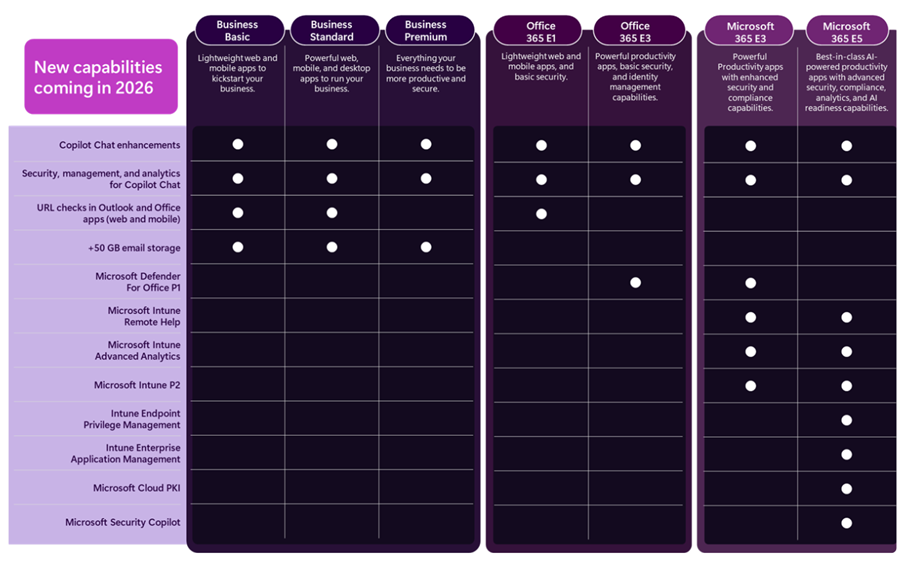
Microsoft Defender for Office 365 Plan 1, currently only available with Microsoft 365 E5, is being added to:

  • Microsoft 365 E3
  • Office 365 E3

It appears that all features are being added but that is to be confirmed.

Furthermore, URL checking features are being added to Office 365 E1, Business Basic, and Business Standard. The Business SKUs (including Premium) are all getting 50GB email inboxes too.

Boosting the security capabilities of lower SKUs is a welcome move, given the importance of security in today’s tech world.

Endpoint Management

A range of Microsoft Intune products are being added to both Microsoft 365 E3 and E5, these are:

  • Intune Plan 2
  • Intune Advanced Analytics
  • Intune Remote Help

While M365 E5 will also receive:

  • Intune Endpoint Privilege Management
  • Enterprise Application Management
  • Microsoft Cloud PKI
https://www.microsoft.com/en-us/microsoft-365/blog/2025/12/04/advancing-microsoft-365-new-capabilities-and-pricing-update/

Security Copilot and Microsoft 365 E5

The Microsoft announcement also talks about the adding of Security Copilot SCUs to Microsoft 365 E5. I covered that a few weeks ago here – https://cloudywithachanceoflicensing.com/2025/11/20/microsoft-security-copilot-scu-included-with-microsoft-365-e5/

2026 Pricing

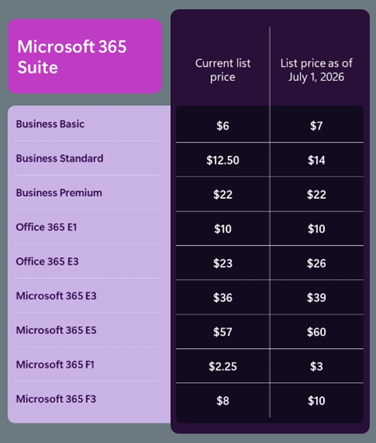
Of course, these new features come at a cost. Pricing for the included suites will be increasing as of July 1, 2026 (aka Microsoft’s new financial year)…even Microsoft 365 E5.

https://www.microsoft.com/en-us/microsoft-365/blog/2025/12/04/advancing-microsoft-365-new-capabilities-and-pricing-update/

M365 E3 increases by 8% and M365 E5 by 5%. An organisation with 15,000 E5 SKUs will see an increase of $1.6 million over a 3-year contract – so understanding how the additional features may work for you will help you decide what steps to take at renewal.

Something that I did notice is that, while there is no mention of new features being added to the Frontline Worker F SKUs, they too are increasing in price – with M365 F1 rising by 33% and M365 F3 by 25%.

8,000 F3 users will lead to an increase of almost $600,000 over 3 years…seemingly with no new features to show for it.

Note as well that these increases will also apply to non-profit pricing.

See the Microsoft post here – Advancing Microsoft 365: New capabilities and pricing update | Microsoft 365 Blog

What’s it all about?

ARPU (Average Revenue Per User) is a key metric for Microsoft (and all SaaS publishers) and this will help keep that growing for several more quarters through their next financial year and beyond. Increasing the amount they earn from each user is key to driving shareholder value…especially as the amount of new users to buy M365 licenses is decreasing. Higher pricing also increase the Customer Lifetime Value (CLV), another important metric that helps businesses plan future campaigns and initiatives.

There is the risk that customers will become angry and disillusioned and look for alternatives. However it’s likely that Microsoft are confident in their view that there are very few real alternatives to many of their products and, even when they are available, the time and effort involved in swapping will discourage most organisations. While some may leave, the increased revenue from those who stay will more than offset the losses.

For some organisations, the additional products in E3 and E5 may mean that they can reshape their licensing slightly – dropping additional SKUs or possibly even dropping from E5 to E3. However, it is yet another price increase from Microsoft…particularly galling if you don’t need or want those additional features. Review your Microsoft budget projections and work to lock in the lower pricing for as long as possible.

Microsoft remove Enterprise Agreement discounts on Online Services


Photo by Sebastian Palomino on Pexels.com

BIG Microsoft news!

Are you a Microsoft EA customer with Online Services at Level B, C, or D pricing?

From November 1st, 2025:

“Microsoft will expand the set of products that have a single consistent price across Price Levels A-D to include all online services” on EA and MPSA agreements.”

The new pricing will be the same as on the Microsoft site once the waterfall discounts are removed.

This will take effect from your next renewal, or when you buy Online Services not on your CPS, post November 1st.

On-premises software pricing isn’t changing.

This is going to cause a lot of Microsoft bills to increase significantly – be prepared!

See the announcement here – https://www.microsoft.com/en-us/licensing/news/online-services-pricing-consistency-update

Microsoft announce new European Cloud options


Microsoft announce new cloud options for Europe. There is an increasing push back from European organisations, particularly Government, against so many critical services and so much data all being run out of the US…this has been accelerated by the current geo-political situation too.

These announcements are Microsoft’s attempt to pre-emptively stem the flow of European customers away from their cloud services.

Altogether we’ve got:

  • Sovereign Public Cloud
  • Sovereign Private Cloud
  • National Partner Clouds
  • Microsoft 365 Local
  • Data Guardian
  • External Key Management
  • Regulated Environment Management

Microsoft 365 Local is interesting but the MS announcement only talks about productivity workloads like Exchange Server & SharePoint Server. Does M365 Local include Teams, Stream, ClipChamp, Planner etc.? 🤷‍♂️

Sovereign Public Cloud

Will be offered across all existing European datacentre regions, for all European customers, across enterprise services such as Microsoft Azure, Microsoft 365, Microsoft Security and Power Platform.

Customer data stays in Europe, under European Law, with operations and access controlled by European personnel, and encryption is under full control of customers.

Sovereign Private Cloud

Will support critical collaboration, communication and virtualization services workloads on Azure Local. This solution now integrates Microsoft 365 Local and the security platform with Azure Local, providing consistent capabilities for hybrid or air-gapped environments to meet resiliency and business continuity requirements

National Partner Clouds

Available in France (Bleu) & Germany (Delos Cloud), these will offer comprehensive capabilities of Microsoft 365 and Microsoft Azure in an independently owned and operated environment.

Microsoft 365 Local

Microsoft 365 Local provides customers with additional choice by bringing together Microsoft’s productivity server software into an Azure Local environment that can run entirely in a customer’s own datacentre.

This provides a simplified deployment and management framework for organizations to run Microsoft’s trusted productivity servers in environments they fully control. It remains to be seen exactly what is included and how the licensing works…

Data Guardian

Data Guardian will add an additional level of assurance by ensuring that only Microsoft personnel residing in Europe control remote access to these systems and adds additional human and technical oversight whenever engineers outside of Europe need access.

All remote access by Microsoft engineers to the systems that store and process your data in Europe is approved and monitored by European resident personnel in real time and will be logged in a tamper-evident ledger.

External Key Management

With external key management, customers can connect Azure to keys stored on their own Hardware Security Module (HSM) on-premises or hosted by a trusted third party.

Regulated Environment Management

The Regulated Environment Management service will allow customers to easily manage all these features in one place (for instance, configuring Data Guardian policies or reviewing access log entries).

The Microsoft announcement is here.

Microsoft Product Terms: March 2025


Photo by Markus Winkler on Pexels.com

Removed “without Microsoft’s prior written approval” from the clause preventing using MS service to mine crypto…I guess they realised they were never going to give anyone permission for this!

Changed the Use Rights for Azure Local software from:

Customer may use the Azure Local software only (i) on servers dedicated to Customer’s internal use

to

Customer may use the Azure Local software only (i) on devices dedicated to Customer’s internal use

Microsoft say this represents a move to “include smaller, more affordable devices than traditional servers

They also removed the following clause “Any customer support for Azure Local that may be available from Microsoft requires that Azure Local runs on server hardware that is pre-validated and listed in the Azure Local catalog or any successor.”

Added Microsoft 365 Copilot Chat to the list of EU Data Boundary Services

March 5th

You can now add the Microsoft 365 E5 Security add-on to the Business Premium SKU.

March 12th

Added a section on Data Handling of Query Data with M365 Copilot & M365 Copilot Chat:

  • Microsoft has no rights in Query Data other than as needed to provide the services,
  • Query Data is not used to improve Bing,
  • Query Data is not used to create advertising profiles or track user behavior,
  • Query Data is not shared with advertisers or otherwise beyond Microsoft and its contracted suppliers who are subject to terms no less protective than these provisions,
  • Query Data is not used to train generative AI foundation models, and
  • Query Data is treated as Customer confidential information and protected by appropriate technical and organizational measures.

Clarification that certain concurrent use rights for Defender on up to 5 devices does not include Server OSEs:

  • Eligible Licensed Users may use Microsoft Defender for Business on up to five concurrent devices. Customer may not use a Microsoft Defender for Business User SL with server OSEs.
  • Eligible Licensed Users may use Microsoft Defender Vulnerability Management or Microsoft Defender Vulnerability Management Add-on on up to five concurrent devices. Customer may not use Microsoft Defender Vulnerability Management or Microsoft Defender Vulnerability Management Add-On User SLs with server OSEs.

Microsoft 365 Copilot Chat


Microsoft have launched a new addition to the Copilot family, confusingly called Microsoft 365 Copilot Chat.

Copilot Chat was already a thing (that is different to Copilot Biz Chat) and this seems to be a re-positioning as they add some new capabilities too. It is a basic, entry point tool that sits below Microsoft 365 Copilot.

Microsoft 365 Copilot Chat is free and has access to internet info to give “web-grounded” responses. Additionally it can interact with Agents (more on that later) and also has elements of the “Copilot Control System” to help with corporate data privacy.

The table below shows how it stacks up against the “full” Microsoft 365 Copilot product:

https://www.microsoft.com/en-us/microsoft-365/blog/2025/01/15/copilot-for-all-introducing-microsoft-365-copilot-chat/?msockid=1c5969e97aa36c313d327b0f7b586d33

One of the new additions is that users of this free product can use 2 types of agents on a Pay As You Go (PAYG) basis, they are:

  • “Tenant Graph” grounded agents
  • Autonomous action agents

“Tenant Graph” grounded means agents that can access internal company data as well as internet information, giving answers with additional, organisation specific info and context. This is an additional PAYG per-message cost for M365 Copilot Chat users but is included within the M365 Copilot license – adding a new variable to consider when pricing up licensing options.

Autonomous actions are where the agent uses “generatively orchestrated triggers, topics, data connectors, and workflows” to act on behalf of a user. This is an additional PAYG per-message cost for all users – it is an additional cost even for users licensed with M365 Copilot.

For more info and details on the PAYG per-message pricing model – see my post here.

You can see Microsoft’s announcement here.

Microsoft Product Terms: November 2024


Photo by Markus Winkler on Pexels.com

After a delay of several hours where the website wasn’t working (one of the perils of this current format), we can now see the changes this month are:

  • Windows Server 2025 added
  • Windows Server PAYG via Azure Arc is added
  • System Center 2025 added
  • Windows 10 ESU added
  • Various additional/refined terms for Azure Services

  • Let’s take a look at the Win Svr PAYG option in more detail based on the Product Terms:
  • Customer must have a valid Windows Server Standard or Windows Server Datacenter License to use the PAYG option. <– Just one license or all cores in the server?
  • For Licensed Servers running PAYG virtual machines, there are no restrictions on the number of PAYG virtual machines that can be deployed.
  • Additional virtualization rights are not granted. A separate License is required for each guest. <– So you don’t get 2 OSEs for Std and Unlimited for Datacenter…each PAYG VM needs to be paid for.

This, taken from the Microsoft Learn page, is very odd:

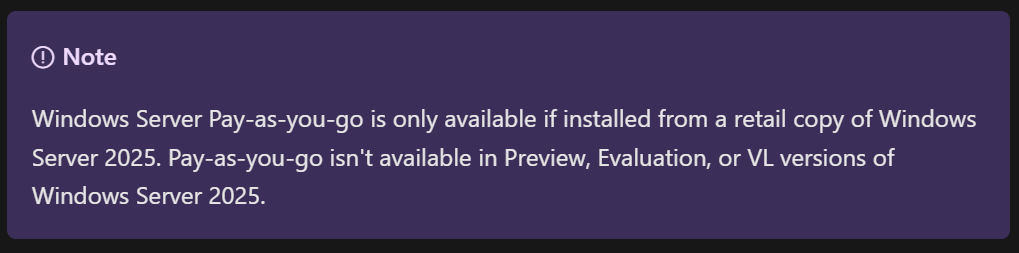
Apparently, you can only use Windows Server PAYG if you install a retail copy of Windows Server 2025?!

We have also seen that there will be a 10% price increase for Windows Server 2025 & System Center 2025 from December 1st 2024 and then also for SPLA from January 1st, 2025.

Microsoft Financial Results: FY 24


It’s that time of year again – Microsoft have announced their Q4 and full financial year results…so let’s take a look.

Full Year FY24 Results

Revenue = $245.1 billion, a 16% increase

Net Income = $88.1 billion, a 22% increase

Microsoft Cloud = $135 billion +, a 23% increase.

Q4 FY 24 Results

Q4 Revenue = $64.7 billion, a 15% increase

Q4 Net Income = $22 billion, a 10% increase

Microsoft Cloud

This isn’t a Business Unit but rather a group of related products across the organisation including:

  • Azure
  • O365 Commercial
  • Dynamics 365
  • Parts of LinkedIn
  • “Other cloud properties”

Revenue was $36.8 billion, an increase of 21% Year on Year (YoY).

Microsoft note that gross margin decreased YoY to 69%. This is driven by “sales mix shift to Azure” but was partially offset by Microsoft making Azure improvements including scaling their AI Infrastructure.

Now let’s look at some of the individual Business Units and how they performed in Q4 FY24.

Productivity and Business Processes

Revenue = $20.3 billion, an 11% increase

Office 365 Commercial = 13% increase. Seat growth was again driven by SMB and Frontline Worker growth while Average Revenue Per User (ARPU) growth was driven by E5 and Copilot for M365.

LinkedIn = 10% increase

Dynamics 365 = 19% increase <– This is now almost 90% of all Dynamics revenue.

This gives a good overview of growth over the last 5 quarters:

Intelligent Cloud

Revenue = $28.5 billion, a 19% increase

Azure (and other cloud services) growth was 29% for this quarter, a little drop from the percentage point increase of the last 2 quarters but, as it’s Q4, likely increasing from a higher base. Microsoft highlight that 8 points of this growth was from AI services.

Amy Hood (CFO) states that AI demand is higher than Microsoft’s currently available capacity but they expect availability to increase in H2 FY25 aka Jan 2025 onwards.

Server Products grew by 2% this quarter, again driven by hybrid BYOL use with Azure Hybrid Benefit.

Overall growth over the last 5 quarters looks like this:

Overall business and FY25

In terms of how Microsoft are spending money, Amy Hood, CFO, stated that:

“Cloud and AI related spend represents nearly all of total capital expenditures [CAPEX]. Within that, roughly half is for infrastructure needs where we continue to build and lease datacenters that will support monetization over the next 15 years and beyond. The remaining cloud and AI related spend is primarily for servers, both CPUs and GPUs, to serve customers based on demand signals.”

Amy Hood gave her expectations for Q1 FY25 (and beyond) and they are:

Productivity and Business Processes

Expected revenue growth of between 10% and 11% in constant currency (or $20.3 to $20.6 billion), with O365 driven by E5 and Copilot for M365.

Intelligent Cloud

Expected revenue growth of 18 – 20% (or $28.6 to $28.9 billion) with Azure expected to be 28% – 29% up.

Earnings Call highlights

  • 42 mentions of Copilot.
  • Number of customers with 10,000+ licenses of Copilot for Microsoft 365 doubled quarter over quarter,
  • Industry specific Copilots are here. DAX Copilot for Healthcare (over on the Nuance side of the portfolio) has over 400 customers currently.
  • Over 1,000 paying customers of Copilot for Security. Satya Nadella also states they have “1.2 million security customers” <– that indicates a lot of potential growth for Copilot there!
  • 60,000+ Open AI customers – with average spend per customer increasing.
  • GitHub Copilot accounts for over 40% of GitHub’s revenue and is bigger than GitHub was when Microsoft acquired it.
  • 36,000 Azure Arc customers, a 90% YoY increase.
  • 14,000+ paying Microsoft Fabric customers.
  • 48 million Monthly Active Users of Power Platform, a 40% YoY increase.
  • Over 40,000 organisations using Dynamics 365 Business Central.
  • Over 3 million users of Teams Premium.
  • More large-scale SAP workloads being migrated to Azure.
  • There was further growth in the “number of 10-million-dollar-plus and 100-million-dollar-plus contracts for both Azure and Microsoft 365

Microsoft vs CISPE: An agreement


Microsoft & CISPE have come to an agreement which takes some of the legal pressure off Microsoft and should lead to a more diverse cloud market…to a point.

Background

CISPE (the Cloud Infrastructure Service Providers in Europe) is, as its name suggests, a group comprised of, and working for, European Cloud hosting organisations including AWS, OVH, and Aruba.

In November 2022, CISPE filed a formal complaint with the European Commission about Microsoft’s “anti-competitive licensing practices” in the cloud. CISPE said:

“the new contractual terms imposed unilaterally by Microsoft on 1st October 2022 add new unfair practices to the list. Microsoft’s ongoing position and behaviours are irreparably damaging the European cloud ecosystem and depriving European customers of choice in their cloud deployments.”

The crux of the issue is that Microsoft’s licensing rules make it cheaper to run Microsoft workloads in Azure than any other cloud environment, thus giving them an unfair advantage against their competitors.

What’s happened now?

The two parties have signed a Memorandum of Understanding (MoU) where Microsoft have committed to make changes to address the claims and so CISPE have agreed to withdraw its complaint and also that they “will not initiate or support complaints on these issues in Europe or elsewhere”. Microsoft have also agreed to pay $22 million to CISPE to reimburse them for the last 3 years’ of “cost of litigation and campaigns for fair software licensing”.

Central to the agreement is Microsoft agreeing to release “Azure Stack HCI for Hosters”. This new Azure Stack HCI offering will include:

  • Multi-session virtual desktop infrastructure based on Windows 11
  • Free Extended Security Updates (ESU)
  • Pay-as-you-go licensing for SQL Server

Enabling 3rd-party cloud providers to close the gap between their services and those available in Microsoft Azure – a key part of the complaint.

There is a clock ticking for Microsoft now, as changes must be made within 9 months. They must release this new offering and/or solve the issues another way within that timeframe otherwise the complaint will be refiled with the European Commission.

It must be noted that CISPE state:

“Amazon Web Services, a CISPE member, was excluded from these negotiations and it, along with Google Cloud Platform and AliCloud, will neither benefit from nor be bound by these terms

This means Microsoft’s “Listed Provider” exclusion still applies to this change.

European Cloud Observatory (ECO)

This new body, established by CISPE and including Microsoft, will monitor the development of “Azure Stack HCI for Hosters” and the fairness of Microsoft’s cloud licensing.

Reception

Not everyone is happy with this outcome. It has been reported that Google made an offer to CISPE worth almost $500 million, comprised of licenses and cash, for them to continue their compliant against Microsoft.

Additionally, Google’s Head of Platform, Amit Zavery, has said:

“Microsoft’s playbook of paying off complainants rather than addressing the substance of their complaint hurts businesses and shouldn’t fool anyone

while an AWS spokeperson stated:

“Microsoft selectively making these changes for some CISPE members shows that there are no technical barriers that prevent Microsoft from making its software more easily available to rival cloud providers”

What’s next?

The Azure Stack for Hosters product will enable cloud providers to offer new features and capabilities that are attractive to customers, which is good. The main issue that many people may have is that this agreement excludes Amazon AWS and Google Cloud Platform, so their customers are no better off than before.

While that is true, I think it is also representative of what I believe is CISPE’s main aim – to help boost the non-hyperscaler cloud market in Europe. They want to help companies like OVH, Irideos, and UpCloud more so than Amazon and Google.

This is certainly not the end of this story. The cloud is going to be a battleground for many years to come and so licensing and competitive advantages will be a key issue for some time…

Microsoft Product Terms: June 2024


Photo by Markus Winkler on Pexels.com

It’s the Microsoft Product Terms for June 2024.

As always at this point of the year (almost end of FY), it’s a quiet one with nothing major but, as we’re here, let’s take a look anyway shall we?! 😊

Azure GenAI terms updated re: Training content

Several products added to the “Core Online Services” table

Clause re: automatic updates for Microsoft Defender for Identity added

Microsoft Defender for Endpoint P2 for Student added to EES

Microsoft added several more base licenses for Copilot for M365 on June 12 – see the full list here