Another relatively quiet month in Feb 22 but there are a couple of things to note:
Microsoft have added a number of education and government SKUs to the eligible SKUs for a range of add-on licenses. This includes Office 365 A1 being an eligible pre-requisite for Business Voice and bringing the Privacy Management SKUs to government.
The Azure “Hosting Exception” is now called the “Azure Customer Solution”
It’s the first Microsoft Product Terms of 2022 and, as expected, it’s a very quiet one.
A statement re: the end of Open Licensing confirms that:
“…commercial, government, education, and non-profit organizations won’t be able to buy new or renew software licenses, Software Assurance, or online services through the Open License program”
Another name change: “Phone System” is now “Microsoft Teams Phone Standard”.
Microsoft Viva Insights is an employee experience product from Microsoft that provides insights into how employees are spending their time – are they in too many meetings, are their meeting productive, do they have the time needed to focus on tasks, who do they collaborate with and plenty of other areas.
While it provides a range of pre-built views into that data, organisations are able to build their own too – known as queries. Users, known as analysts, are able to create queries against the vast amounts of data collected by Viva Insights in order to gain more specific…insights into their organisation.
This introduces a range of new metrics and price considerations for organisations. Viva Insights queries are licensed based on capacity credits and every query costs a certain amount of credits, based on factors such as:
The number of measured employees included in the analysis
The number of weeks of data included in the query output for each measured employee
The number of metrics used in the query
The type of metrics used from the different price tiers
Within the query designer it will give an estimate of the required credits:
How is it priced?
You’ll be pleased to know that Microsoft have introduced some low-level algebra to help calculate pricing, the formula being:
A*B*C*D/1000
Where:
A = measured population i.e. number of employees included in the query
B= metrics – there are a range of metrics to choose from
C = price tier cost – yep, there are different price tiers
D = week i.e. the length of time covered by the data being analysed
Price tiers
There are 3 price tiers:
Tier 1 = 1.25 credits
Tier 2 = 2.25 credits
Tier 3 = 6 credits
Tier 1 includes a total of 68 metrics (at the time of writing) such as collaboration hours andlow quality meeting hours
Tier 2 includes “advanced metrics” which, at the time of writing, is the “network query” group which includes 10 individual metrics dealing with connections and levels of influence between staff.
Tier 3 includes metrics with CRM data
An example of a query calculation is shown here:
I think it’s interesting that, although they have this formula, Microsoft state:
“The cost shown is only an estimate. The estimate might vary from the query’s actual cost, which can be seen after the query is successfully ran”
What if you run a query with multiple metrics at different tiers? You calculate as above for each metric and then add the totals together.
How do you get credits?
Each Viva Insights license includes 1 capacity credit per month, pooled across the tenant. If an organisation requires additional capacity credits, they are licensed in increments of 5,000 credits and costs $5,000 per month.
Unused credits expire monthly.
Insights v Workplace Analytics
Viva Insights is the replacement for Workplace Analytics but the latter doesn’t appear to have disappeared completely – the SKU still seems to be available and the Microsoft documentation talks about the differences between Viva Insights Consumption tenants and Workplace Analytics tenants. Analysts working in a Workplace Analytics tenant won’t see query usage or consumption units.
If you have eligible M365 licenses, you can receive a grant of up to 5MB per user per day for free data ingestion from certain sources. Microsoft say this will save $1,500 a month on a standard 3,500 user deployment.
Microsoft have announced that they’re launching a new add-on SKU “Teams Phone with Calling Plan”, which will replace the SMB focused “Microsoft 365 Business Voice” SKU as well as adding some Enterprise capabilities.
It can be added onto:
Microsoft 365 Business Basic
Business Standard
Business Premium
Microsoft 365 F1, F3, E3, A3
Office 365 F3, E1, E3, A1, A3
What’s included
Microsoft have stated the new SKU will include:
“A phone system and a domestic calling plan. Domestic calling plan includes 3,000 minutes for the US and Canada, 1,200 minutes in other available markets.
Adding toll-free numbers and additional minutes can be paid per use through Communications Credits and an optional international calling plan that includes 600 minutes/user/month can be purchased as an add-on.
Timeline
January 1, 2022
“Teams Phone with Calling Plan” SKU is available for purchase via partners.
Direct purchases via web will be available January 3 for US, UK, and CA and mid-January for all other markets where available.
March 1, 2022
Business Voice no longer available.
Customers who purchased Business Voice before this date will continue with their Business Voice subscription until its expiration date.
June 30, 2022
Last day to renew existing Business Voice licenses
Amongst the various elements of the Power Platform, Microsoft offer AI Builder credits. These are used whenever a creation needs to use the power of Microsoft’s Artificial Intelligence offerings – say for translating or scanning documents. Historically, these have been included with the Power Automate per User w/Attended RPA plan but an additional charge for all other Power Automate and PowerApps licenses.
However, according to a tweet* from Ryan Cunningham – the product lead for Microsoft PowerApps – they are now including AI Builder Credits with all per User and per App licenses…including those already purchased.
We're also now including AI Builder credits with every Per User and Per App license – and yes, that includes everyone who's already purchased.
AI is no longer a luxury. We believe it will quickly become table stakes for all business apps. Now it's easier than ever to build.
He also states that the API request limits are being increased from 5,000 per user per day to 40,000 per user per day.
*I know that tweets aren’t exactly the most legit of sources for licensing information and I will definitely be looking for this to be reflected in product documentation, licensing guides, and the Product Terms…but you’d hope it’s accurate!
Update December 9th, 2021
The new Power Platform licensing guide confirms the AI Builder additions:
Power Apps per App = 250 credits
Power Apps per User = 500 credits
Interestingly, there is a cap on accrued credits of 1,000,000…that equates to 4,000 Per App licenses or 2,000 Per User licenses and is worth $500 per month. This means large organisations will still find themselves spending money on AI Builder credits.
During their Ignite 2021 conference, Microsoft announced a range of name changes across their security portfolio – these are:
Old name
New name
Microsoft Cloud App Security (MCAS)
Microsoft Defender for Cloud Apps
Azure Security Center + Azure Defender
Microsoft Defender for Cloud
Azure Defender for IoT
Microsoft Defender for IoT
Azure Defender for Storage
Microsoft Defender for Storage
Azure Sentinel
Microsoft Sentinel
These are, I believe, all the changes but there may be some other “Azure –> Microsoft” changes that have taken place!
Whenever products change names, there’s the potential for confusion among partners and customers. While many of these are fairly straightforward, I can definitely see people getting confused between “Microsoft Defender for Cloud” and “Microsoft Defender for Cloud Apps” 😂
Power Apps has always been licensed on a per user or per app basis but now it is also available under the Pay as you go (PAYG) model. Microsoft see this as a way to help organisations innovate faster with less wasted spend as it doesn’t require licenses to be allocated to specific users.
How it works
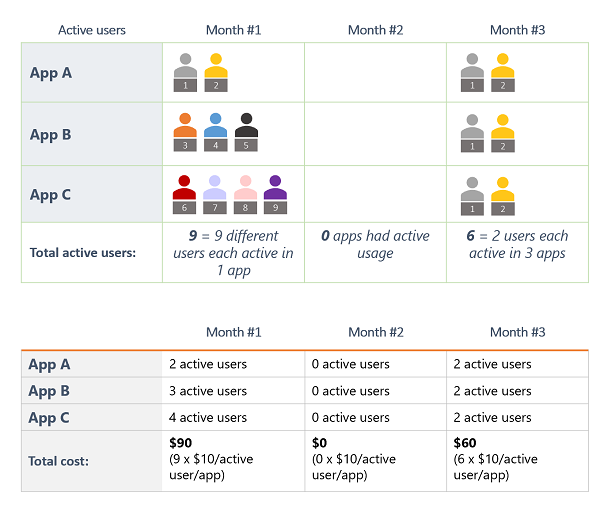
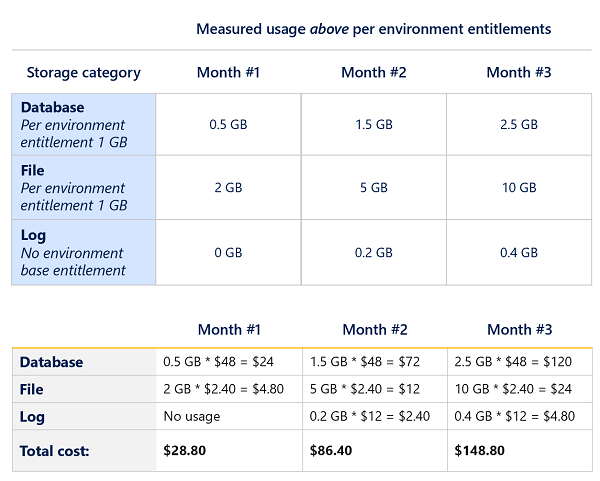
You connect the apps environment to an Azure subscription and then pay for usage via 3 meters:
Power Apps per appPAYG
Pay when a user runs an app – rather than the existing model of allocating licenses beforehand and seeing them consumed based on apps being shared rather than run.
An active user is someone who opens an app/portal at least once a month – usage by users licensed on a per user basis is not included. Cost is $10 per active user per app per month.
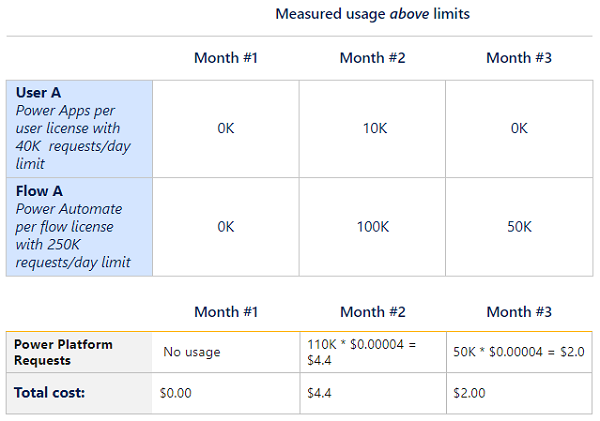
This is the new name for API calls and, as standard, you get 6.000 API calls per user per app per day – Microsoft believe this will be enough for most users. If it isn’t, any additional API calls are charged at $0.00004 per request per day.
Note that the request example includes both Power Apps and Power Automate.
Where it makes sense, organisations can use both the per user and PAYG models simultaneously.
Cost Management
These new meters will be available within Azure Cost Management, meaning costs can be tracked, budgets can be set, and resources can be tagged. For some organisations, particularly those where FinOps is stronger than ITAM, this new approach may yield better results.
The November 2021 Microsoft Product Terms contains quite a few updates!
Microsoft Managed Desktop
As an offering, it’s been available for a while as a bit of a hidden secret almost but now it’s in the Product Terms.
Microsoft Viva
A few additions here:
Microsoft Viva
Viva Learning
Viva with Glint* add-on added
which rounds out the Viva line-up in the Product Terms (I think!):
*Glint is a 3rd-party product that sits in a similar, complementary area – see more here.
Defender products
Another addition to the Defender line up as:
“Microsoft Cloud App Security (MCAS)” is renamed to “Microsoft Defender for Cloud Apps”
I’m not 100% sure I agree with this name change as I feel it downplays the capabilities of MCAS as a Cloud Access Security Broker (CASB) for a start.
Additionally, Microsoft Defender for Endpoint Plan 1 has been added (see more here) and the existing version renamed to Plan 2.
Following on from the above, a new product has appeared…
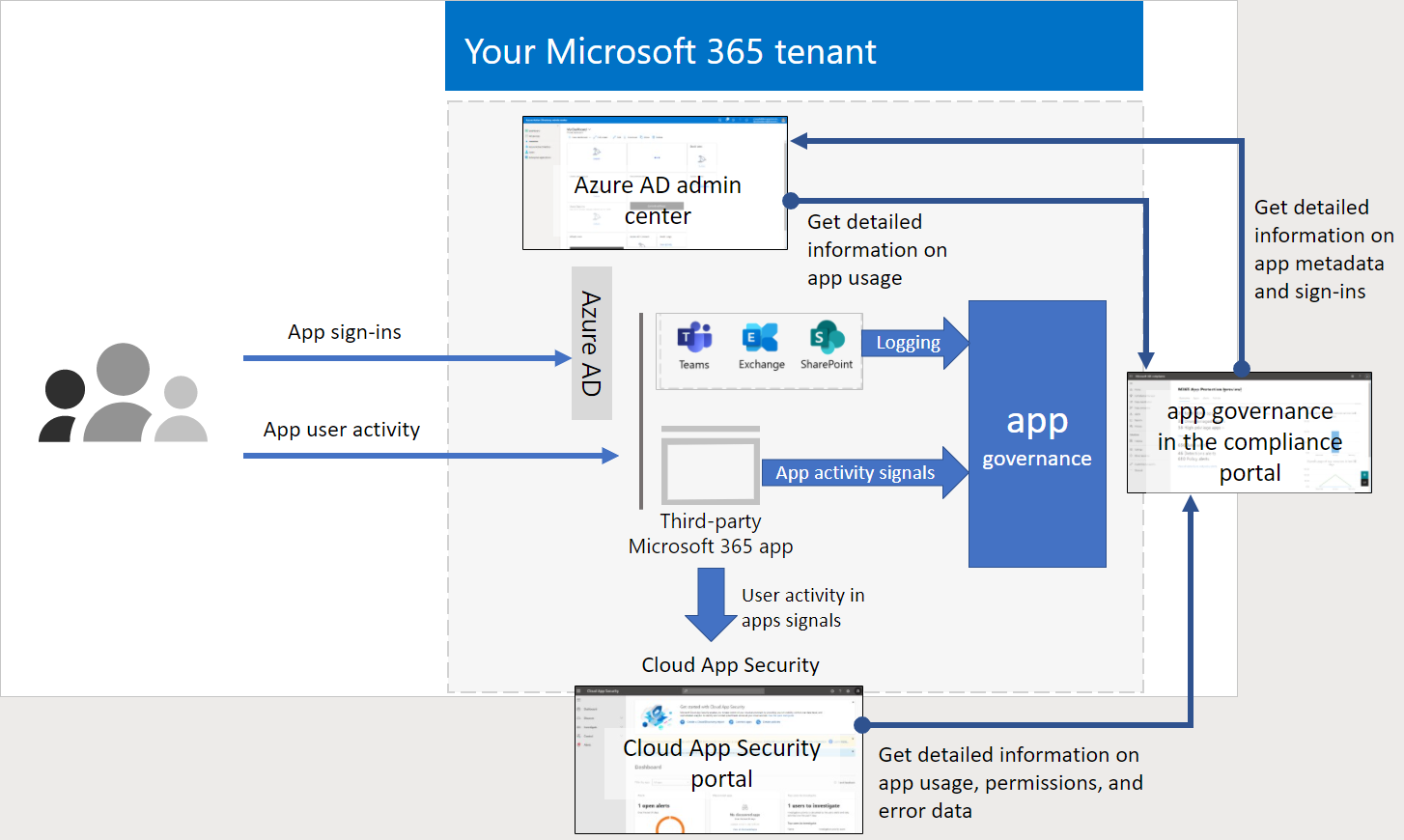
App Governance add-on for “Microsoft Defender for Cloud Apps”
This is a “security & policy management” product for OAuth-enabled apps that access Microsoft 365 data via the Microsoft Graph and aims to help organisations govern, detect, and remediate 3rd-party access to corporate data in Microsoft 365.
A new “Power Apps per User” 2000 seat minimum SKU has been added – clearly Microsoft are seeing/expecting large scale rollouts of PowerApps…especially after its 202% year-on-year growth in Q1!
Productivity Servers
It was revealed a while back that the next releases of the Productivity Servers (Exchange/SharePoint/Lync), as well as Project, would be subscription only and now some of them have arrived in the Product Terms.
Just Project and SharePoint have been added currently but I’d imagine the same rules will apply to the other products. They are now officially known as:
Project Server Subscription Edition
SharePoint Server Subscription Edition
and active Software Assurance (SA) is required to run the latest “Subscription edition”. However, should SA lapse, you receive perpetual rights to run the 2019 version.
Microsoft Clouds
Two previously announced Microsoft Cloud products:
“Financial Services”
“Nonprofit”
have been added, as add-ons, to the Product Terms. They can be added on top of the following licenses:
Financial Services
Microsoft 365 E3/E5
Microsoft Project
Power Apps/Power Automate/PowerBI
Dynamics 365 Customer Service Enterprise
Dynamics 365 Digital Messaging
Dynamics 365 Customer Insights
Dynamics 365 Sales Enterprise
Dynamics 365 Customer Voice
Non-Profit
Office 365 E3/E5
Microsoft 365 E3/E5
LinkedIn Sales Navigator
Power Apps/Power Automate/Power BI
Dynamics 365 Sales Enterprise
Dynamics 365 Marketing
Azure App Service
Non-Profit comes in 3 flavours:
Basic
Plan 1
Available to orgs with up to, and including, 250 total employees













 Cloudy with a chance of Licensing