Sharepoint Online & Groove


This week I ‘ave been mostly…using Groove.

Groove has been the one bit of MS technology that I’ve never taken a look at before and I’ve always thought it was a bit pointless…but not anymore! Now I think it’s awesome and perhaps the best product they’ve got, alongside Sharepoint. I’ve had it installed for years as part of Office ’07 but I have literally never opened it up until this week. The thing that prompted me was this post here over on Dutch Technet about using it with Sharepoint Online and as MS Online is my big thing-I figured it was worth investigating.

Groove is essentially a collaboration tool that let’s you create “workspaces” and then invite co-workers and/or external people to join; you can then share and edit files, chat via IM, track issues, play chess (!) and more-all with a minimum amount of effort. As an example, I’ve created a MS Online/BPOS workspace and have invited the various people involved @ MS-this way we can share info, ask questions and keep updated much easier than simply via email.

The Technet post revealed to me that you can link Groove to Sharepoint and thus share files from your site collections without the hassle/cost of giving users direct access to Sharepoint…even better, you can do this with Sharepoint Online too!

Internet Explorer 8.1 is an April Fool


Internet Explorer 8.1 AKA “Eagle Eyes” has been all over the net this afternoon, sitting on the Front Page of Digg and Techmeme…but it’s an April Fool’s joke-at least according to Mary Jo.

It did perhaps sound too good…faster Javascript and better Acid 3 testing and, best of all, support for Firefox extensions. Would MS really have released IE8 without these features if they were so close at hand? Apparently not…

I thought it was against the rules to do the pranks early so I think that means the joke is on you Jacob Gube (technically) Good skills though 🙂

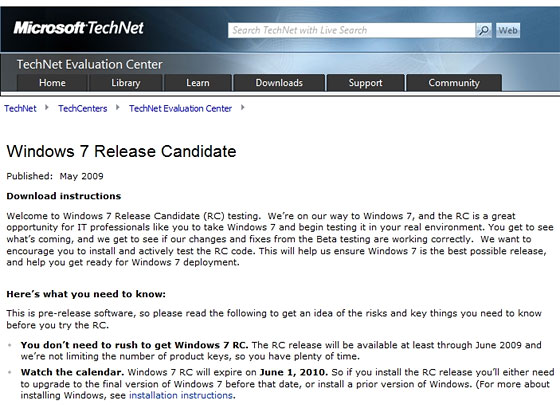
Windows 7 Release Candidate


Thanks to some eagle eyed spotting by Ars Technica, we now know that the Windows 7 Release Candidate (RC) is slated for a May 2009 release-(that’s only 5 weeks away!) and will run through until June 2010.

Both 32-bit and 64-bit versions will be available in English, French, German, Japanese, and Spanish. The hardware requirements remain unchanged:

  • 1 GHz 32-bit or 64-bit processor or higher
  • 1 GB of system memory or more
  • 16 GB of available disk space
  • Support for DirectX 9 graphics with 128 MB memory (to enable the Aero theme)
  • DVD-R/W Drive

rcleakdate2

I think this will see another wave of people moving into the world of Windows 7, there are a few people at work who’ve been too scared/cautious to install the beta but can’t wait to get hold of the RC 🙂

Samsung say Windows 7 beats Linux


I just saw over on Endgadget that Samsung’s European Product Manager Patrick Pavel has said he expects Windows 7 to spell the end for Linux on Netbooks 🙂

That’s yet another great compliment for Windows 7-and it’s not even finished yet!

He also said that, depending on licence fees, Samsung would like to include some of the higher end versions of Windows 7 on their netbooks…that would excellent!

No need to wait for Windows 7 SP1


Gartner have said something that I suspect many thought they’d never hear in these post-Vista years…there is no need to wait for Windows 7 SP1 before you get it installed or to quote:

The first Service Pack for Windows 7 is not necessary for the operating system’s stability and security readiness…”

How awesome is that?! Windows 7 is not even at Release Candidate stage and it’s already super stable!

This is yet another example of how different Windows 7 is to Vista and really helps to show the vast improvements Microsoft have made.

Are you looking to deploy Windows 7 in your corporate environment before SP1?

Outlook/Sharepoint Problem


I had a funny little issue with my PC at work that took me a fair while to figure out today. I’d set up a new Site Collection in Sharepoint and connected it to Outlook (something that I’d never done before) and it was excellent…I could see all the different documents (Excel sheets, Word docs etc) in Outlook just as I could in the portal…nice 🙂

However after a while I noticed that Outlook was taking it’s time to send mails etc and then when I tried to swap to another application-it all went wrong! Apps started “not responding”, hanging, the works…a quick CTRL+SHIFT+ESC and Task Manager showed OUTLOOK.EXE on 99%…WTF!!! I killed the process tree and restarted Outlook but to no avail…I rebooted my  machine too but it was useless; my processor was maxed out.

I started turning off add-ins in the Trust Center and then noticed 3 search/index related processes in Task Manager so I killed those and disabled indexing of the Sharepoint list I’d created. This was bound to work so I closed and re-opened Outlook and it was on 37%…not brilliant but better, then all of a sudden BOOM-99% again…holy maxed out processor Batman!

After having a look online I became pretty sure that it was related to .PST files but I was equally sure that I didn’t have a .PST file so that left me in something of a conundrum! However I went off to have a look anyway in:

C:\Documents and Settings\<Username>\Local Settings\Application Data\Microsoft\Outlook\<PST File name>

and what I found was interesting. While there was no Outlook .PST there WAS a Sharepoint List .PST…I deleted that and lo and behold, Outlook started behaving again (I also deleted the list from Outlook).

While I was happy to sort the problem out and be able to use my PC properly again, I am sad that I seemingly can’t have Sharepoint lists in Outlook 😦 Perhaps if I’d left it for a while the indexing would have finished and calmed the processor down but I just don’t have time for that…if anyone’s got any ideas please let me know!

MS Windows Mobile Ad


This new advert for Microsoft Windows Mobile phones is pretty good. Bright, fun, young, funky, girls, scooters, music but with benefits to business too-a good all rounder.

Having said all that, I’m not 100% sure it will bring over many new customers-more likely it will just make us existing customers feel a bit cooler 😉

IE 8 Video


This new video for Internet Explorer 8 was introduced at MIX 09 (the MS Web conference) and it’s pretty fantastic…the “Gentleman” is quality!

Canvas for OneNote


Microsoft Office Labs have come up with another excellent prototype “Canvas for OneNote”.

This let’s you visualise the different pages in a workbook, or even your different workbooks, from a Bird’s Eye view. This Office Labs video explains it very well but I can’t embed SoapBox here so head over to the Geek in Disguise and watch it here.

The software can be downloaded here and is marked as Vista only…although I’m sire it will run on Windows 7 too (something I need to test soon)…

If you’re familiar with PPTplex (another Officelabs invention) then this is pretty similar in that it lets you see everything all at once, rather than sequentially.

Comparison of Sharepoint Server & Sharepoint Online


While Sharepoint Online is an excellent product and fits the bill nicely for the vast majority of customers, there are certain features it lacks when compared to it’s regular on-premise brethren; this is mainly down to the multi-tenant environment of the standard datacenters.

moss-online-comparison

Green = Sharepoint Online Blue = On Premise Server Only

As you can see, the Search & Business Intelligence sections are practically non-existent online which may put some people off. However if you need those features then you can utilise MS Online in it’s full Software PLUS Services mode and have an online AND an on-premise server together. It will be interesting to see if Sharepoint Online features more Search & BI functionality once “Wave 14” hits as Sharepoint On-Premise will have a whole raft of new features in these areas…

Microsoft state:

In the current release of the services, the following actions are not supported:

·         Use inline code, build coded workflows, or develop Office InfoPath forms with coded business logic.

·         Deploy features, solutions, pluggable authentication providers, Web Parts, site definitions, or other modifications that require deployment and configuration on the server.

·         Modify built-in SharePoint files, web.config settings, security policy, and other elements.

·         Make configuration changes that affect the Web server or the Microsoft .NET Framework.

·         Make changes or add capabilities that require a custom database or changes to the database schema.