Microsoft Exchange Online Domain Verification Video


Microsoft Exchange Online gives users a temporary domain like @yourcompanyname.microsoftonline.com which is fine for testing but a bit long and unwieldy for full day to day corporate use; luckily Exchange Online lets you add your own domain. This is done by a couple of easy to use wizards and simply involves adding a CNAME record to your DNS server. While it’s pretty straightforward, it’s always good to see someone else do it first and Arvind Suthar from MSOnline Technet has created a great walkthrough video:

The original post and more info can be found here.

Microsoft BPOS available from Monday!


The much hyped, very exciting Microsoft Online Services will be available to order via the MOCP (Microsoft Online Customer Portal) from Monday 27/04/09!

Find more Microsoft Online here:

https://richardgibbonsuk.wordpress.com/ms-onlinebpos/

Office Communicator Mobile for Java


Microsoft Office Communicator Mobile for Java is a new enterprise messaging client built on the Java Platform Micro Edition. Thanks to John Westworth for the heads up on this.

 When deployed together with Office Communications Server 2007 R2, Communicator Mobile for Java enables several mobile phones that are otherwise not supported by native clients but have the capability to run Java applications to function as unified communications endpoints, providing instant messaging (IM), presence, and telephony to create a familiar experience for users of Microsoft Office Communicator.

Like Office Communicator users, Communicator Mobile for Java users can:

  • View Contact List and click to call.
  • View contacts’ presence.
  • Search enterprise directory and click to call.
  • Directly dial enterprise-routed calls from a mobile phone.
  • Benefit from Single Number Reach, where a user can be reached on the mobile phone like all other endpoints when contacted through one phone number assigned to the user.
  • Control incoming enterprise-routed cellular voice calls and choose to redirect them to Unified Enterprise Voice Mail.
  • Receive notifications of unread voice mail count and respond by calling voice mail (on selected models).
  • Initiate IM conversations with individuals and also add more participants to escalate conversations to IM Conferences.
  • Retrieve the phone book contacts from the phone into Communicator Mobile for Java and call those numbers from Communicator Mobile for Java

The following are prerequisites for installing the Communicator Mobile for Java client.

  • Nokia S60
  • Nokia S40
  • Motorola RAZR V3xx

Each of the mobile phones must also meet the following prerequisites:

  • Capable of running Java applications greater than 512 KB, and with a heap size of 2 MB.
  • Mobile Information Device Profile 2.0 (MIDP 2.0).
  • Connected Limited Device Configuration 1.1 (CLDC 1.1).
  • Screen resolution:
    240×320 for Nokia S40 and Motorola RAZR V3xx phones.
    240X 320 or 320×240 for Nokia S60 phones.
  • Data-connection-enabled (GPRS, Edge, or 3G connection) mobile device. Subscription to an unlimited data plan on the mobile device is recommended, because the client and server will be exchanging messages even when they are in an idle state.

More info can be found on Technet here.

Outlook Auto-Complete


This isn’t a problem I’ve ever experienced but I had to help a colleague out with it today, and it seems to be relatively common.

The problem is where Outlook’s AutoComplete feature for remembering previously used email addresses just doesn’t work, each time you open Outlook-they’re all gone which is pretty annoying. It all comes down to the “.NK2” file that Outlook 2003/2007 uses and there are 2 likely causes:

1) Your .NK2 file has become corrupted somehow

2) You upgraded from Outlook 2000 and the new file wasn’t created.

Outlook 2000 used a “.NICK” file which is unreadable to later versions of the email client, but it seems that an upgrade from 2000 to 2007 doesn’t replace it with the required “.NK2” file. This was the case at work so we simply closed Outlook/deleted the “.NICK” file (some prefer to rename the file rather than deleting it)/re-opened Outlook/sent an email/hey presto a new “.NK2” file appeared and all was well 🙂

The file can be found here:

C:\Documents and Settings\<your username>\Application Data\Microsoft\Outlook

I hope this helps!

Windows 8


Although we’re all caught up in the buzz waiting for Windows 7 to be released, MS have started looking forward to Windows 8!

A job posting highlighted by CodeName Windows is looking for someone to work on Distributed File System Replication (DSFR) technology for Windows 8:

“For the upcoming version of Windows, new critical features are being worked on including cluster support and support for one way replication. The core engine is also being reworked to provide dramatic performance improvements. We will also soon be starting major improvements for Windows 8 where we will be including innovative features which will revolutionize file access in branch offices.””

That last point shows that the advanced made in Windows 7 and Win Svr 2008 R2 with Branch Cache are only the beginning of Microsoft’s plans to help companies with satellite offices.

Windows Server 2011 (as I imagine it will be) gets in on the action too:

In Windows Server 2008 R2 release, the Server UX Test team (under the File Server Management organization) is finalizing the MMC [Microsoft Management Console] based User eXperience (UX)/Interfaces for the File Server Role. Currently the team owns DFS [Distributed File System] Management, Share and Storage Management, FSRM [File Server Resource Manager] & Classification UI, Disk Management, SMFS. For Windows 8, the SSD organization is working on the next version of the file server.

“As the team moved to Windows 8, you will have 2 main responsibilities – (i) put on the customer/design critique hat as we plan our next version file server management experience (i) participating in the architectural design, and development and driving automated testing for managing the next generation file server. Our current automation does not meet the multi-machine paradigm requirement and so you will contribute significantly in the development of test automation to validate setup/configuration of the new server, managing configuration changes, performing diagnostics and reporting using Power Shell, Command line, Object Model, UI.”

Thanks to Mary Jo for the job descriptions.

I know some people will think it’s weird that MS are working on another version of Windows while the newest version hasn’t been released yet, but that’s teh best way to ensure that the UX (User Experience) is very similar between the two aswell as keeping to the 3 year timeline.

I’m very excited for Windows 7 but I can’t help wondering what awesome features will be in Windows 8…any ideas?! 🙂

Windows 7 RC Release Date


A “slip-up” on the Microsoft Partner Portal earlier revealed that the Windows 7 RC (Release Candidate) will be with us on 5th May 🙂

I got the Windows 7 beta as soon as it was available which was Build 7000 and I installed that on my desktop at home. There have been numerous leaks of newer builds (we’re up to 7077 now) but I’ve not moved up to any of these for 2 reasons:

1) I’m not sure of the legality of downloading a leaked beta build and I don’t want to get caught up in all that!

2) The hassle of backing up and upgrading for what might be imperceptible changes.

Despite, or perhaps because of that, I can’t wait to upgrade to the RC. To see the many 1000’s of changes and updates that have been made will be excellent.

Windows Mobile 6.5 Launch


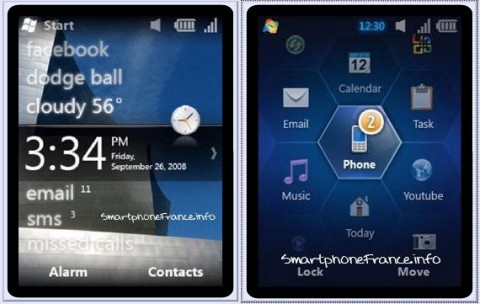
MS have confirmed that the offical launch date for Windows Mobile 6.5 is May 11th 2009, which is the first day fo this year’s TechEd event.

The Windows Mobile blog says:

“Stephanie Ferguson, GM (General Manager) of Business Experiences at Microsoft’s Mobile Communications Business is going to deliver the kick off launch presentation of Windows Mobile 6.5 on Monday, May 11th at 1:00PM – 2:15PM. This Tech Ed 2009 session focuses on one of the biggest launches in the history of Windows Mobile – Windows Mobile 6.5. It is targeted at both IT Professionals and Developers, with a cool demo and an outline of great stuff to come.”

winmo65_2winmo

It will still be a number of months until we see any WinMo 6.5 devices but TechEd will give us a chance to see even more about the features of the new mobile OS and more things to look forward to!

*Update* Microsoft Windows Mobile 6.5 phones will start being released on October 6th 2009 🙂

Exchange 2010 Public Beta Released


Microsoft today (15/04/09) made the beta of Exchange 2010 available to the public-this can be downloaded here:

Get Exchange 2010 Beta

There are numerous new features in the latest incarnation of the world’s most popular email platform (I think that’s a safe statement to make?!) including:

·         OWA (Outlook Web Access) support for Internet Explorer (IE) 7 and 8, Firefox 3, and Safari 3.


·         MailTips. Are you about to accidentally send a personal e-mail to the whole company? A a time-sensitive e-mail to someone who is on maternity leave for six months? A 30MB attachment to people who have 20MB attachment size limits on their mailboxes? MailTips tells you before you send the message.


·         Conversation view. Have the arrangements for a company party Friday night cluttered up your mailbox to the point where you can’t find the approval e-mail for the urgent customer visit that you need to book today? Switch to conversation view, and collapse those 50 party discussions into one expandable node.


·         Calendar sharing extended to OWA


·         Automatically transcribed text-based preview of voice mail messages

·         Federation – Trust Exchange servers of partner organizations, share calendars, presence. You can schedule meetings with your business partners as easily as you can schedule meetings within the company.

·         Mailboxes can be moved during normal business hours with user online!

      ·      The Exchange 2010 version of OWA will have full parity with Outlook 2010 by the time they both ship; & the Windows Mobile client will come close.

One thing that might surprise some and will probably cause issues for others is that Exchange 2010 will require Windows Server 2008 minimum-so NO Windows Server 2003 support. I’m sure this won’t sit well with everyone but Windows Server 2008 is such a great product, and a huge leap forward from Server 2003, that I’m sure it will only benefit people to adopt it.

I’ve just seen a tweet from @Pbarone that Exchange 2010 will have a “mute” button which will allow you to remove yourself from email threads…that is seriously cool! At least a couple of times a week I find myself caught up in a “reply all/forward” whirlwind where I’m one of say, 6 people that all receive an email and then each of then “reply all” and then that receives multiple replies and so on. It’s very rare that I actually need to see these responses but once one person hits “reply all”, it seems to be the custom for everyone else involved to follow suit…and it can be really annoying so this mute button is a great new feature!

Outlook Thread Compressor


Geek in Disguise Steve Clayton has posted about a great utility, Ewan Dalton’s Outlook Thread Compressor.

“it’s an add-in to Outlook which removes unnecessary emails, on the assumption that most people reply to mail and leave the original intact, so you could keep the last mail in each branch of a thread, and remove all the others.”

I’d just like to re-iterate Ewan’s disclaimer:

“Let me say that again: Thread Compressor, as it is configured by default, WILL DELETE DATA FROM YOUR INBOX.

If you choose to download it and use it from here, you do it with the author’s blessing, but it’s completely at your own risk and Microsoft cannot be held responsible for what it does.”
tc4

Head over to http://threadcompressor.co.uk/default.aspx for more info and to download this great tool.

Azurelight


Microsoft Architect Aleksey Savateyev is building a basic product support app…that is based in the cloud and is to be called “Azurelight”. It will collect feedback about products and allow users to exchange opinions on the products too. “It’s also intended to be used by developers as a reference application utilizing both Windows Azure and Silverlight for rich yet scalable and highly available business solutions…” as described by Savateyev himself.

Mary Jo Foleyreports that as well as utilizing Azure & Silverlight (as it’s name suggests) Azurelight will also use Microsoft’s ADO.NET Entity Framework, ADO.NET Data Services (aka Astoria) and SQL Data Services.

azurelight

Once it’s all up and running “sometime in the summer” of 2009 (via MSDN it seems) this should be a great example of what Microsoft’s technologies, both cloud and programming, can do 🙂

I’m excited about this program and as the source code will be released Free of Charge, I hope I’ll be able to make full use of Azurelight!