
This new video for Internet Explorer 8 was introduced at MIX 09 (the MS Web conference) and it’s pretty fantastic…the “Gentleman” is quality!
Canvas for OneNote
Microsoft Office Labs have come up with another excellent prototype “Canvas for OneNote”.
This let’s you visualise the different pages in a workbook, or even your different workbooks, from a Bird’s Eye view. This Office Labs video explains it very well but I can’t embed SoapBox here so head over to the Geek in Disguise and watch it here.
The software can be downloaded here and is marked as Vista only…although I’m sire it will run on Windows 7 too (something I need to test soon)…
If you’re familiar with PPTplex (another Officelabs invention) then this is pretty similar in that it lets you see everything all at once, rather than sequentially.
Comparison of Sharepoint Server & Sharepoint Online
While Sharepoint Online is an excellent product and fits the bill nicely for the vast majority of customers, there are certain features it lacks when compared to it’s regular on-premise brethren; this is mainly down to the multi-tenant environment of the standard datacenters.

Green = Sharepoint Online Blue = On Premise Server Only
As you can see, the Search & Business Intelligence sections are practically non-existent online which may put some people off. However if you need those features then you can utilise MS Online in it’s full Software PLUS Services mode and have an online AND an on-premise server together. It will be interesting to see if Sharepoint Online features more Search & BI functionality once “Wave 14” hits as Sharepoint On-Premise will have a whole raft of new features in these areas…
Microsoft state:
In the current release of the services, the following actions are not supported:
· Use inline code, build coded workflows, or develop Office InfoPath forms with coded business logic.
· Deploy features, solutions, pluggable authentication providers, Web Parts, site definitions, or other modifications that require deployment and configuration on the server.
· Modify built-in SharePoint files, web.config settings, security policy, and other elements.
· Make configuration changes that affect the Web server or the Microsoft .NET Framework.
· Make changes or add capabilities that require a custom database or changes to the database schema.
Microsoft BPOS Trials Announced
Today at Cebit, Microsoft announced the availability of trials of their Online Services-BPOS (Business Productivity Online Suite) in 19 countries (Austria, Belgium, Canada, Denmark, Finland, France, Germany, Ireland, Italy, Japan, Netherlands, New Zealand, Norway, Portugal, Spain, Sweden, Switzerland, the United Kingdom). This follows on from the US launch in November 2008.
BPOS is an online offering of some of Microsoft’s most popular software including Exchange Online, Sharepoint Online, Live Meeting Online and Office Communications Server Online, and it is something I am very excited about.
As a Microsoft Partner I envision that Microsoft Online Services will help more customers access the benefits of these MS technologies, particularly the smaller customers as they will benefit greatly from the lower costs, reduced/removed hardware and management costs and the ease of implementation. Having said that these are all attractive benefits to even the largest customer who can use them to increase productivity and reduce costs, something which is even more important in today’s economic climate!
A great example of this is the case study that MS released today of their work with GlaxoSmithKline and their adoption of MS Online Services. GSK are migrating 100,000 users from Lotus Notes over to MS Exchange Online with a number of users taking the “Deskless Worker SKU”-a new product that gives limited access to Exchange and/or Sharepoint for users who don’t need full access and is thus available at a reduced cost:
“The move to Microsoft Online Services will help GlaxoSmithKline cut operational costs by an estimated 30 percent and create a variable cost model that will provide increased flexibility in the future,” said Ingo Elfering, vice president of Information Technology Strategy, GlaxoSmithKline.
A blog post by GSK about why they swapped to BPOS can be found over at the MS Online Blog here. A great Q&A with the GSK CIO can be found here.
On a personal note, I’ve been trialling BPOS at work for a few months now and it is absolutely fantastic. It gives me a lot more freedom that a standard premise based solution as well as cutting down on hassle such as VPN clients etc. We’ve had great success talking to our customers about it and I think we, as an industry, will see a great take up of this new way to consume MS technology.
Windows 7 Editions Feature Comparison
There are 6 diffferent editions of Windows 7, starting with the Limited distribution Starter edition through to Windows 7 Enterprise. Each edition builds on the feature set of the one before as the following image shows:

Note that Windows 7 Ultimate includes all Windows 7 Enterprise, including multiple-language packs.
Changes to Windows 7 in Release Candidate
This MS blog contains a great look at the numerous improvements that Microsoft have made to Windows 7, all based on beta testers feedback. Some of these changes include:
1. Windows Flip (ALT + TAB) with Aero Peek
8. Jump List length
21. Improved playback support for video content from digital camcorders and cameras
Steven Sinofsky says that they have fixes for nearly 2000 reported bugs/glitches in the pipeline. He also gives his definition of a bug which is “any time the software does something that someone one wasn’t expecting it to do” and “a cosmetic issue, a consistency issue, a crash, a hang, a failure to succeed, a confusing user experience, a compatibility issue, a missing feature, or any one of dozens of different ways that the software can behave in a way that isn’t expected”.
Steven’s whole post can be found here.
These are all improvements that help make it an even more enjoyable experience to use Windows 7-well done team!
Go and check out the list and see how what might well be MS’s best OS has got even better 🙂
Microsoft MyPhone-Hands On
After a not too long wait, I’ve gained entry to the Microsoft MyPhone beta and am just getting started now.
The initial setup process was nice and easy. I just visited 1 site on my phone, downloaded a small 58kish .cab file and installed that on my mobile device. A couple of “I agree”s later and it’s installed-ready for the initial sync. Here it gives you a choice of what you would like to sync-such as calendar, contacts, music, photos, texts etc (corporate users with push mail won’t get calendar & contacts) and while your initial reaction might be “all of it”; you have to remember it’s got a 200MB storage limit. While that is pretty limiting, I imagine once the service is out of beta we will see a dramatic increase in available storage a la SkyDrive (25GB). However for now I chose to sync just texts, documents and photos-hopefully that will be less than 200MB 🙂
I have to say that this initial sync is taking it’s time-particularly the photos; I’ve been at it for about 30 minutes and am currently on 48% (Update-completed in 75 minutes). I know that the first big backup is always the slowest but I think I started this too late for it to be taking over 1 hour! Luckily it’s happy to sync over Wi-Fi…
Once the sync has been completed, all the data can be accessed via your MyPhone homepage:
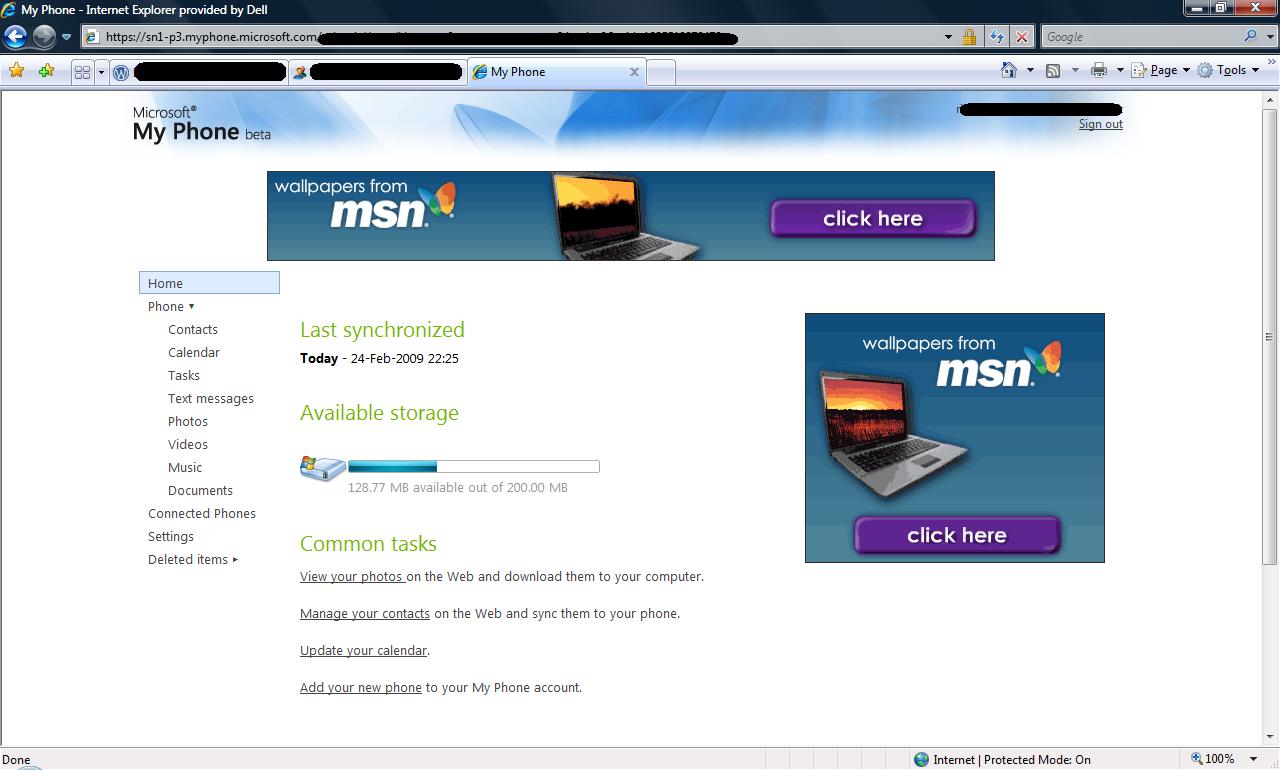
One cool thing you can do with your contacts is “Archive to Web” so you can delete them from your phone but still retain a record of the numbers just in case. This is really handy for me as I’ve got a lot of random (might need them one day” numbers clogging up my contacts list. Only issue is you can only select one contact to be archived at a time (despite appearances)-would be could to do a mass archive…but hey-it’s still a beta 🙂
With Contacts, photos, text messages etc you can also delete them from the MyPhone site and this will delete them from your phone too at the next sync. Once thing that has just caught me out and is quite annoying is that just selecting the tick box of an object doesn’t change focus to it, you have to click on the actual image. Because of this, I’ve just deleted the wrong picture! For instance, in the below example:
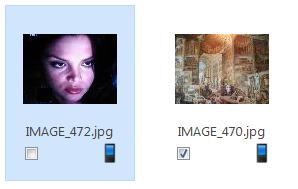
hitting “delete” will get rid of Vanessa Ferlito, rather than the artwork on the right. Maybe it’s just me who feels this way but I think the tick box should be the deciding factor when it comes to selections. Also, this means you can’t perform the same action to multiple items (as with archiving above).
I was hoping to use MyPhone to improve my management of text messages as, let’s be honest, it isn’t a great experience doing on the device, but the inability to select multiple items makes it even more of a chore!
To sum up, I think MyPhone is a great new service and one that will continue to get better-such as using SkyDrive to store things, giving us 25GB storage and me a place to backup the music and videos on my phone too. It’s only a beta so there’s plenty of time for things like the storage, the basic appearance of the website, it’s integration into other services and the inability to select multiple items (this is a real sticking point for me!) to be fixed 🙂
I’m glad that MS have delivered this service, both form a user/consumer point of view but also looking at it as a partner and a fan of Microsoft, as it signals that they’re starting to take the mobile arena more seriously than perhaps ever before.
Direct Access in Windows 7
Direct Access is a new feature in Windows 7, a new feature that allows users to securely access corporate servers from outside the network…without a VPN. This was perhaps the most eye-catching feature for me and could well change the way that people work all over the world but it is something of a big claim. Pretty much any system admin that I’ve mentioned this to has said “Oh yeah-I’d like to see that? How does it work?” with a heavy dose of cynicism but now I can tell them…well show them a white paper at least!
VPN’s or Virtual Private Networks are used by almost everyone who need to access corporate servers, info etc from outside the network so at home, on the road, from the hotel, wherever…and they’re not the easiest things in the world-for both users and admins. The backend needed to set them up and maintain them can be costly and tricky to manage and I’m sure that VPN problems must be in the Top 5 HelpDesk calls at most companies. We’re constantly visited by account managers and reps from a huge array of manufacturers and nearly every single has to call HQ to get access to emails etc via their VPN…but with the advent of Windows 7 and Windows Server 2008 R2-that could all be over.
“DirectAccess establishes bi-directional connectivity with the user’s enterprise network every time the user’s DirectAccess-enabled portable computer is connected to the Internet, even before the user logs on”
“Clients establish an IPsec tunnel for the IPv6 traffic to the DirectAccess server, which acts as a gateway to the intranet. Clients can connect even if they are behind a firewall.”
System Requirements:
DirectAccess requires the following:
· One or more DirectAccess servers running Windows Server 2008 R2 with two network adapters: one that is connected directly to the Internet, and a second that is connected to the intranet.
· On the DirectAccess server, at least two consecutive, public IPv4 addresses assigned to the network adapter that is connected to the Internet.
· DirectAccess clients running Windows 7.
· At least one domain controller and Domain Name System (DNS) server running Windows Server 2008 or Windows Server 2008 R2. When smart card-based authentication is required for end-to-end protection, you must use Active Directory Domain Services (AD DS) in Windows Server 2008 R2.
· A public key infrastructure (PKI) to issue computer certificates, smart card certificates, and, for NAP, health certificates. For more information, see http://www.microsoft.com/pki.
· IPsec policies to specify protection for traffic. For more information, see http://www.microsoft.com/ipsec.
· IPv6 transition technologies available for use on the DirectAccess server: ISATAP, Teredo, and 6to4.
Optionally, a third-party NAT-PT device to provide access to IPv4-only resources for DirectAccess clients.
It’s proving quite difficult to truly get the message across in this post without it becoming boringly long (!) so instead go and download the Technical WhitePaper from Microsoft here.
No Office 14 until 2010
Steve Ballmer has said that the next release of the Office family “Wave 14, won’t hit us until 2010-not the late 2009 that I and many others were expecting.
Office 14 will bring the new versions of Word, Excel, Powerpoint, OneNote etc as well as Office for Sales, Sharepoint and OCS as well as other products too-so it’s a big ol’ release and one that I’m definitely looking forward to…
OCS Licensing changes coming with next version
It appears that there will be an extra CAL (Client Access Licence) for users to choose from when Microsoft OCS Server 14 is released in 2010.
On top of the current Standard and Enterprise CALs, there will also be a Voice CAL which will offer telephony & VOIP services. These features will be removed from the Enterprise CAL and thus the Enterprise CAL will drop in price by around 23%. Also, MS are allowing current OCS customers with SA (Software Assurance) to “grandfather” in the new Voice CAL-if they agree to buy it before July 2009.
Hat Tip to Mary Jo Foley

