Most of the focus is on the changes that Microsoft have made to cloud and virtualisation licensing for Windows Server, Windows 11, Office and more – you can check out my analysis of that here – but there are other changes this month too.
Three new products are added:
Viva Sales
I cover this in more depth here but it is now in the Product Terms and there’s a clause that organisations must use a Viva Sales connector to link it to their CRM…so no 3rd-party or in-house connectors.
SharePoint Advanced Management Plan 1
I’ve not seen any info about this and am still looking for details – let me know if you have any info!
Workload Identities
Again, no info about these yet. Looking at Microsoft Learn/Docs, workload identities are “applications, service principals, and managed identities” but I’m not sure how this relates to the new SKU.
There was also:
The removal of Intune for EDU (device) from MCA
Windows 11 Home to Pro availability expanded to Central and South America
Microsoft first announced these changes in May 2022 and, after an update in September, we’ve now got the majority of the info in the October 2022 Product Terms document. Let’s take a look at what’s changed and what it means for us all.
First things first, the Listed Providers:
Microsoft Azure
Amazon AWS
Google Cloud Platform
Alibaba Cloud
are not included in any of these changes.
Outsourcing Software Management clause
This is in the “Universal license terms for all Software” which means it applies to all products under this category. There are 3 new elements within this clause:
Flexible Virtualisation Benefit
The Microsoft wording:
“Customers with subscription licenses or Licenses with active Software Assurance (including CALs) may use licensed copies of the software on devices, including shared Servers, that are under the day-to-day management and control of Authorized Outsourcers.”
This is similar to the existing “License Mobility through Software Assurance” benefit but doesn’t have the requirement to use an “Authorized Mobility Partner” -rather, you can use any “Authorized Outsourcer” partner…which is any partner that isn’t a Listed Provider.
While much of the focus here is on Windows Server, this new benefit applies to other products such as SQL Server too.
CSP Hoster
The Microsoft wording:
“Customers with subscription licenses or Licenses with active Software Assurance (including CALs) may access their licensed copies of software that is provided by a Cloud Solution Provider-Hoster and installed on that partner’s devices.”
Dedicated device outsourcing
The Microsoft wording:
“Customers may use licensed copies of the software on devices that are under the day-to-day management and control of Authorized Outsourcers, provided all such devices are and remain fully dedicated to Customer’s use.”
As I say, these apply to all Microsoft Software products and, as we’ll see, individual products may have their own additional terms.
Windows Server – license individual VMs
You are now able to license individual Windows Server virtual machines rather than licensing the underlying physical hardware. As expected, there are a few rules you need to follow:
Minimum of 8 core licenses per VM
Minimum of 16 core licenses per customer
Licenses must have active SA or be active subscriptions – this includes CALs used to access the Windows Server instances
Licenses can be re-assigned with the same server farm as often as needed.
90-day rule applies if moving to another server farm/cloud provider
Windows 11
Customers with per-user licenses for Windows 11:
Enterprise
Education
VDA
install Windows 10 Creators Update or later in an Azure VM or a server that meets the requirements in the “Outsourcing Software Management” clause. The QMTH language has been removed from this section too, opening this up to the wider pool of Authorized Outsourcers.
Reading the terms, it appears that the restriction on local virtualisation with CSP licenses has been removed too – bringing them even closer to parity with volume licenses. The language now states that customers can install Windows in a VM running on their Azure or “a server” – which I read as including their own servers as well as those of an authorized outsourcer.
Desktop Applications
For Office/Project/Visio, the word “dedicated” has been removed from the terms which means hosting on shared servers is now possible:
“Remote use of the software running on a Server is permitted for any user from a Licensed Device”
Microsoft 365
There have been changes to the use rights for the Windows component of Microsoft 365 too. The previous language was:
“rights to access and use remote virtualized instances of Windows only apply to Licensed Users that are the Primary User of a device licensed with a Qualifying Operating System.”
While it now says:
“Licensed Users may only run Windows Enterprise locally on devices with a Qualifying Operating System.”
Removing the primary user requirement to access remote virtual instances. Microsoft say:
“Essentially, when licensed as part of Microsoft 365, the requirement to use VDA rights for remote access from desktops without Qualifying Operating Systems no longer applies“
There is also a change for Microsoft 365 F3 to loosen the remote virtualisation restriction. The previous clause:
“rights to access and use virtualized instances of Windows only apply to Licensed Users of a shared device with a Qualifying Operating System“
has been removed.
Microsoft 365 Apps
There is definitely some further clarification needed here. Microsoft released a new licensing guide “Using software products under the Flexible Virtualization Benefit” this month and that document states that the Flexible Virtualisation Benefit applies to Microsoft 365 Apps (formerly Office 365 Pro Plus).
“With the introduction of the Flexible Virtualization Benefit, customers’ options for using Microsoft 365 Apps…outside their own data centers are expanded to include any Authorized Outsourcer’s shared servers“
However, I can’t find language which clearly states this in the current Product Terms, so for now I’d advise not to get too carried away! I expect we’ll see an update to the Product Terms soon to add that language in – but I’ll update either way once we see something from Microsoft.
Thoughts
This is all pretty exciting for a licensing fan like myself – lots of new language and terms and things to check and understand. Also lots of training presentations to update!
For customers though, I’m not sure how much impact this will really have. Yes, it enables organisations to work with a much larger pool of potential hosting providers…but, in my experience at least, most orgs that are struggling want to work with Amazon AWS…and they’re not included in these changes as they’re a Listed Provider. I’m keen to see what real world impact these changes have and who wins (and loses) from it all.
PS: I’m still processing all this new info so will update with corrections as/if needed!
The Microsoft Viva family continues to grow – they have announced new apps as well as a host of new features…let’s take a look.
Microsoft Viva Pulse
This allows managers to gather feedback from their team members, in a regular and confidential manner via Teams. It comes with templates and suggested questions which help ensure the right questions are being asked in the best way – something which can be difficult for a manager to get right on their own.
Microsoft also mention that Glint, currently a separate but related product, will be “coming to Viva” in 2023.
Apply for the Microsoft Viva Pulse Customer Advisory Board here.
Microsoft Viva Amplify
This is aimed at supporting “effective communication at scale” and will help leaders write effective messages to their teams and organisations, and then publish it across multiple channels and receive analytics to understand how well they were received etc. It sounds quite useful as internal corporate messaging can often be disjointed with little insight into effectiveness…but I know some will be concerned about whether the analytics allows for invasive tracking of employees.
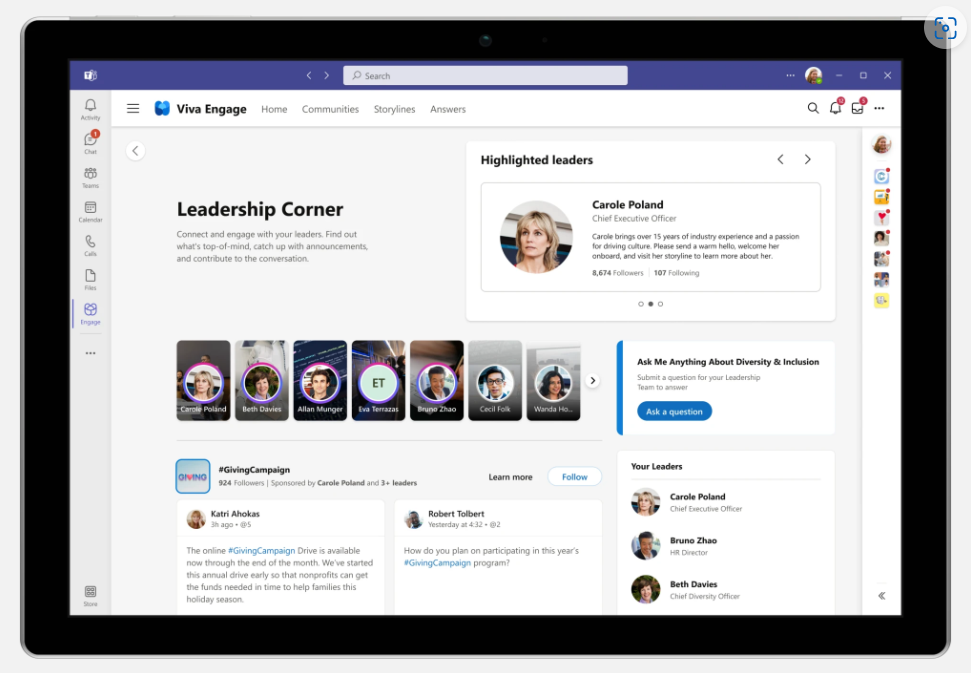
This, as the name suggests, has been developed to help leaders better communicate and connect with people across the organisation. It enables Ask Me Anything (AMA) events, surveys, and news to be published and, again, tracked with metrics and sentiment analysis.
This will be available within the Viva Engage app, to users licensed for Viva Suite, and will work with Viva Topics and Viva Engage. It uses AI to match user questions to existing answers and highlights relevant topics and experts. It also uses gamification to to encourage people to add content to the knowledge base.
The continued growth of Viva through 2022 shows that Microsoft are betting big on this area an also shows it’s likely to reach Dynamics 365 levels of confusion pretty quickly 😊 Some things are apps, some are features, some are in the suite, some are standalone, some are inside one thing but work with another and so on…it’s definitely going to be its own ecosystem!
Check out the Microsoft post here which has even more new features and info.
Photo by Susanne Jutzeler, suju-foto on Pexels.com
Microsoft have added more new products to the Defender family – “Microsoft Defender Threat Intelligence” and “Microsoft Defender External Attack Surface Management” – and have brought out an SAP add-on for Microsoft Sentinel.
Microsoft Defender Threat Intelligence
This new offering, incorporating what was RiskIQ, effectively “maps the internet” and gives customers direct access to Microsoft’s real-time data and security signals; this enables organisations to “proactively hunt” for threats within their environment.
Microsoft Defender External Attack Surface Management
This helps organisations identify all their internet facing resources – including those you’re not aware of and/or have forgotten about. It’s so easy to lose track of your external facing devices with COVID changes, mergers, good old shadow IT, and the potential for mis-configured assets around the business.
Being able to see a continuously updated map of potentially vulnerable assets will be key for organisations looking to protect themselves, their assets, and their users.
Microsoft Sentinel for SAP
They have announced an SAP specific add-on for Microsoft Sentinel that will:
Monitor all system layers
Detect & respond to threats
Enable customisation to extend protection
According to Microsoft it will integrate with “virtually any” NetWeaver system. It launched in August 2022 and is free for the first 6 months. After that it will be an add-on charge to the regular Sentinel pricing.
The September Product Terms revealed that Microsoft have replaced Teams Rooms Standard & Premium with Teams Rooms Basic & Pro, and we now have more information on feature differences and licensing.
Teams Rooms Basic
This is the free entry level license, included with certified Teams Devices and available via the Microsoft 365 Amin Center (not via resellers etc.). It is limited to 25 licensed devices within an organisation, if devices are needed they must be covered with Pro licenses. Furthermore, it is limited to 1 device per room with the same resource account – if 2 or more devices are needed, this again requires a Pro license.
You’ll notice below that Basic does not include a Teams Phone license, preventing the room from making/receiving PSTN calls.
Teams Rooms Pro
These are $40 per device per month and offer a much wider range of features than the Basic license.
It seems Microsoft have removed access to in-person engineers as part of the management features offered, with the Docs page stating “Microsoft Service engineers will no longer serve as intermediaries to incident response starting October 1, 2022“.
How do they compare to their predecessors?
Teams Rooms Basic is missing many of the features that were present in Teams Room Standard which means organisations may find themselves having to move from the $15 per month Standard license to the $40 per month Pro license at renewal – a significant increase. Equally, although probably much less likely, some organisations could drop from Standard ($15) to Basic ($0) and save money each month.
This link here gives a detailed comparison of the differences between Basic & Pro in various different use areas. I would recommend also comparing the new functionality to your existing licenses to identify if you’ll need the Pro option going forwards.
October 2022 will see some Microsoft price changes and new options added to the Server Subscriptions for Azure on the CSP program:
Windows Server 2022 Std 8-core license pack (1yr) drops from $272 to $213.60
Windows Server 2022 RDS User CAL (1yr) increases from $56.04 to $77.04
They are also adding Windows Server Datacenter 8-core license packs in 1 & 3 year variants, to complement the existing Windows Server Std offering.
Microsoft also state that, “over time”, the 1-year software subscriptions via CSP will be aligned with pricing on SPLA – meaning some products will increase while others decrease.
Back in May 2022, Microsoft announced a range of upcoming changes to licensing in cloud environments and now, September 2022, we have more details.
Flexible Virtualization
This new benefit will allow customers with Software Assurance or subscription licenses to use their existing licenses to install and run on any (but not Listed Provider) infrastructure – whether it’s dedicated or shared.
Windows Server virtual cores
Customers will be able to license Windows Server by virtual core on 3rd party infrastructure. There will, of course (!), be a per VM minimum. The Microsoft announcements don’t mention Listed Providers for this element so perhaps this new licensing option will be available with Amazon, Google, and Alibaba…although it seems unlikely!
Desktop virtualization
Microsoft 365 E3/E5/F3 users without a primary device with a Qualifying Operating System (QoS) will be able to virtualize Windows 10/11 on 3rd-party infrastructure (but not Listed Providers) without needing the VDA add-on.
Cloud Solution Provider – Hoster
This new variant of the CSP program replaces the QMTH (Qualified Multi-Tenant Hosting) program. It will enable hosting partners to pre-build hosted desktop & server environments for customers and either provide the licenses or use customer provided licenses – giving greater flexibility for organizations. Customers will need to show proof-of-license for BYOL scenarios – verification of which I assume will be done by the partner. Initially it will only be available for Direct partners but Microsoft “look forward to expanding program eligibility over time“.
Microsoft state these will go live from October 1st so we should see them added to the Product Terms on that date too. I’ll of course be updating on that asap 😊
Teams Rooms Standard & Premium swapped for Basic & Pro Qatar added as a data location Clarified terms for Azure Databox & Stack Edge
Microsoft also revealed further details around the upcoming cloud licensing changes (which I’ll post about separately) but these aren’t in the Product Terms this month…will likely be October.
The Product Terms were on time this month (😊) but not a huge amount has happened (as expected).
The M365 F1 & F3 maximum screen size limitation is increased from 10.1″ to 10.9″ – this expands the devices available to F SKU users and – perhaps – widens the scope of who can be assigned such a license?
“Home Use Program” is renamed “Workplace Discount Program” – no changes to terms…yet…
Microsoft Defender Experts for Hunting added (although the specific page currently has an error)
Still no sign of the rule changes around 3rd-party cloud licensing that were announced in May…
After a bit of a wait for Redmond to publish, the latest update is here. Not surprisingly, given the time of year, there’s nothing major – mainly just a bit of tidying up this month:
Added/updated terms for:
Windows AutoPatch MCA cancellations Azure Limited Access Services
Removed old references for:
Business Voice GitHub Learning Lab for Organizations Office 365 Add-ons
Change to show 3.5K AI Builder Credits are included per SharePoint Syntex license
Academic plans added to Cloud for Non-profit qualifying licenses














 Cloudy with a chance of Licensing