Forefront Product Cull


Microsoft are discontinuing a number of their Forefront security products:

  • Forefront Protection 2010 for Exchange Server (FPE)
  • Forefront Protection 2010 for SharePoint (FPSP)
  • Forefront Security for Office Communications Server (FSOCS)
  • Forefront Threat Management Gateway 2010 (TMG)
  • Forefront Threat Management Gateway Web Protection Services (TMG WPS)
  • There will be no further releases of these products and “Forefront Online Protection for Exchange” AKA “FOPE” will, from the next release be known as, “Exchange Online Protection”.

    Additionally, “basic malware protection” is being added to Exchange 2013, although this can be “easily turned off, replaced, or paired with other services”.

    Both Forefront Identity Manager (FIM) & Unified Access Gateway (UAG) are continuing to be actively developed.

    The full Microsoft post is here:

    http://blogs.technet.com/b/server-cloud/archive/2012/09/12/important-changes-to-forefront-product-roadmaps.aspx

    Managing Windows RT tablets & Windows Intune Licensing Changes


    Windows 8 RT is a new member of the Windows family, and one that’s caused/causing some confusion when it comes to management. It transpired a while ago that Windows RT pcs/tablets will not be able to join Active Directory domains and since then, people have been wondering exactly how they’d manage these devices. Well the answer is here – Windows Intune & System Center Configuration Manager (SCCM) SP1.

    “Windows Phone 8 and Windows RT devices will be managed by the next release of Windows Intune.  IT Pros will have the flexibility of using either the Windows Intune or Configuration Manager 2012 SP1 console to set mobile security policies, distribute mobile apps and view reports.  We’ll share more details as we get closer to the next release of Windows Intune.”

    As Windows Intune is becoming more of a star, it’s getting some licensing changes too – always a favourite thing of mine 🙂

    1. We are shifting from a per-device to a per-user licensing model.  Each user license for Windows Intune covers up to 5 managed devices.
    2. There will be a Windows Intune user license that includes the rights to System Center 2012 Configuration Manager, enabling organizations to manage those devices through either Windows Intune or Configuration Manager, or both
    3. Organizations that already own System Center 2012 Configuration Manager licenses, such as through the Core CAL, will have access to Windows Intune at a reduced price
    4. We will also make a version of Windows Intune available without rights to Windows Enterprise, thereby lowering the cost for organizations that are not ready to move to the latest operating system.

    That final point is something I’ve been hoping to see since the first release of Intune. I’ve always felt that having the desktop OS and a systems management product intertwined muddy the waters and made it a more difficult proposition in many cases; so this is a positive move that will enable Intune to shine in its own light.

    It’s also interesting to note that SP1 of SCCM will be able to manage other types of devices including:

    • Windows Embedded Thin Clients
    • Point of Sale (PoS) terminals
    • Digital Signage
    • Kiosks

    as well as:

  • Distribution point for Windows Azure to help reduce infrastructure costs
  • Automation of administrative tasks through PowerShell support
  • Management of Mac OS X clients and Linux and UNIX servers
  • I’m pleased to see this move to bring Windows RT into the management fold, making it easier for partners AND customers to tell, understand and take part in the Windows 8 story.

    See the whole post over at:

    http://blogs.technet.com/b/server-cloud/archive/2012/09/10/system-center-2012-configuration-manager-sp1-beta-and-windows-intune-update.aspx

    Sideloading Apps in Windows 8


    Many organizations have there own Line Of Business (LOB) systems that they use internally, and in Windows 8 there are 2 ways of installing these on machines:

    • Via the Windows Store
    • Sideloading (I.e. bypassing the Windows Store)

    How to Sideload:

    Sideloading is a Software Assurance (SA) benefit & the document I have from MS says:

    “Windows EA, Select SA, and EES customers will be granted sideloading license rights”

    It doesn’t mention Open SA customers there but I see no reason they would be excluded, so I will ask for clarification on that.

    The requisite license keys for this will automatically be provided via the VLSC.

    If you do not have SA, Sideloading is still possible…for a charge:

    WinSideLoad-H 8 Sngl OPEN 100 License = £2,435

    Purchase this license and you will then receive the license keys via the VLSC.

    Of course, it is still free for companies to publish their apps via the Store, but this method affords them more privacy.

    I have to say I’m not 100% sure why the ability to sideload outside of SA has a fee attached too it. Is it in an attempt to ensure companies are serious about the apps they deploy, and stopping them pushing out willy nilly, poorly created apps that will detract from the Windows 8 experience?

    Nokia Lumia 920 Windows Phone 8 Device


    Windows Phone 8 is not far away and today we’ve seen sneak previews of 2 devices that will surely be revealed at Nokia’s event on September 5th, alongside Microsoft.

    Nokia Lumia 920

    image

    What will it include?

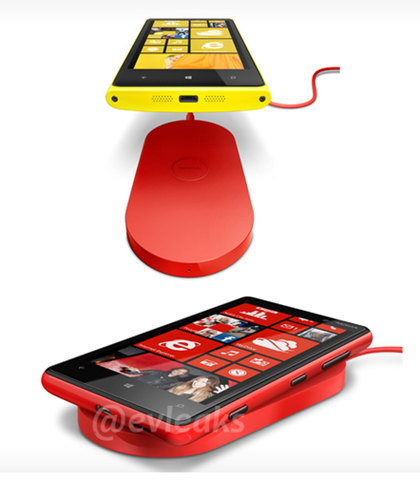
    • Wireless Charging
    • 32GB Storage
    • 1GB RAM
    • 1.5GHz Dual Core CPU
    • 4.5” HD Display
    • Front Facing Camera

    The Verge also report that the camera will be branded as “PureView” but will be 8MP rather than 41 as on the Nokia 808. Until my Lumia 800, I’ve never had a Nokia nor have I had any interest in Nokia if I’m honest, so I haven’t come across the PureView brand before. What I gather is that it’s a kick-ass camera and people are upset that this has just 8 megapixels yet is being branded as PureView. Nokia say there have been advancements in image stabilization & software that mean they can brand it as such which seems reasonable to me, we all know that megapixels aren’t everything 🙂

    This looks like it could well be my next phone…double the storage which will be great for my ever more eclectic music taste, a front facing camera for making use of the baked in Skype features and WIRELESS CHARGING – that is some Star Trek stuff right there!

    Here’s a picture of the wireless charging mat via @evleaks:

    image

    Office 365–Office Pro Plus Subscription


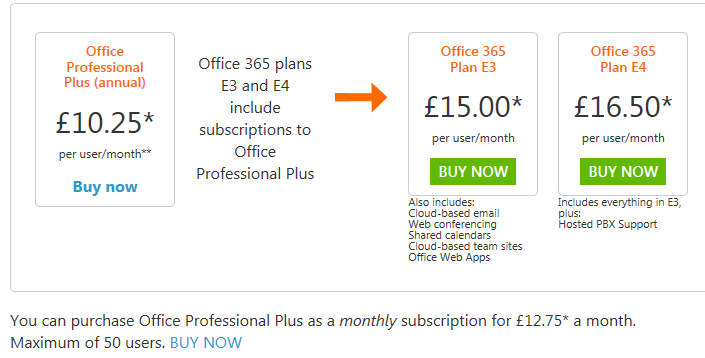
    Amidst all the news around Office 365 for Open & FPP and the awesome preview of the 2013 editions, I noticed something else earlier. When it comes to Office Pro Plus as an individual subscription, there are now 2 options:

    image

    image

    As you can see, the Office Pro Plus 1 Year is £10.75 per user per month while the month to month option is £12.75, and limited to 50 users.

    I haven’t seen any info on this yet but I assume that this means you can choose to drop the subscription after each month rather than being tied to a full 12 months. This would be good for companies not on Open Value Subscription who find themselves with an influx of temporary staff requiring Office.

    I’ve just been chatting to our Marketing Manager and he once did some temp work for Vodafone over in Australia where they brought in 100 temps for 2 weeks to update all their customer records…if they needed Office to do it then this new offering would be perfect!

    Office 2013 & Office 365


    So today’s secret announcement is what we all thought it would be – Ballmer announcing the public preview of Office 2013. It’s available to download here:

    http://www.microsoft.com/office/preview/en

    or for more choices head to:

    http://www.microsoft.com/office/preview/en/try-more-products

    where you can find:

    • Office 365 Small Business Premium
    • Office 365 Enterprise
    • Project Online

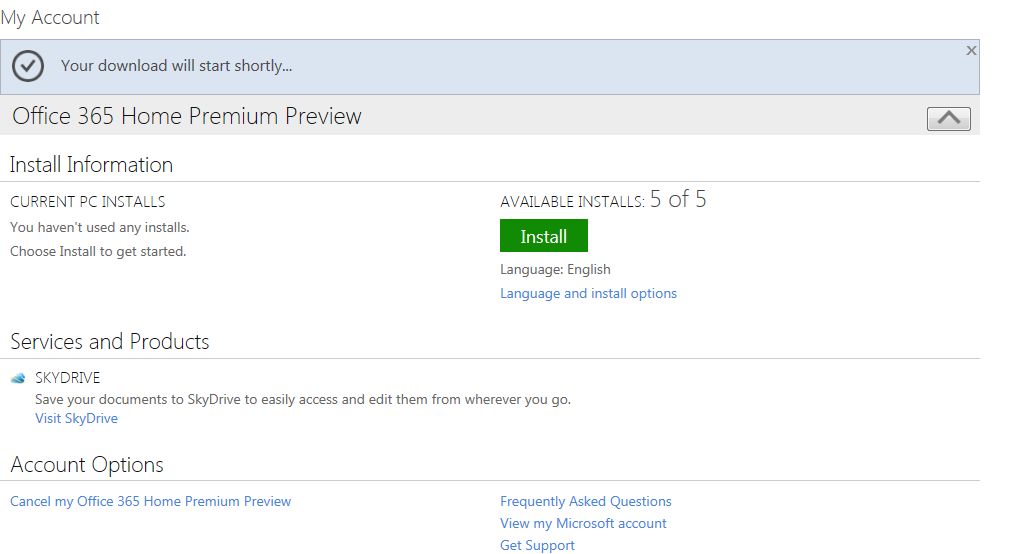
    I’m just getting everything installed right now so will be back later with a more in-depth look at the new features but for now here are some screenshots of the install process:

    image

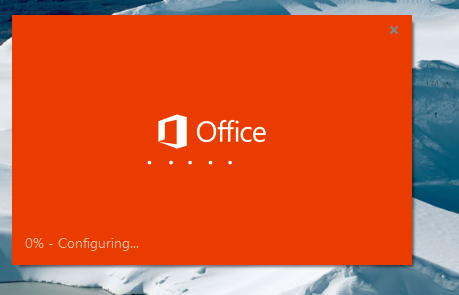
    Notice the great new logo below:

    image

    Notice the “Streaming Applications” feature in the installation shot below, this will allow you to stream Office components to devices that don’t have it installed!

    image

    Here’s how it looks pinned to a Windows 7 desktop.

    image

    and here you can see the start of how tightly integrated the Cloud is into the new release of Office:

    image

    There is also…wait for it…Project Online!

    This is going to be interesting…especially to see if the full Project Server will be made available online or just the desktop app equivalent.

    I’m just installing the Project bits now…head over to the links and get playing!

    Windows Server 2012 Licensing Changes


    Windows Server 2012 is getting ever closer and today we had some exciting news – changes to the licensing – Yay! This has genuinely got me quite excited Smile

    Currently Windows Server has 3 main flavours:

    • Standard / Licensed Per Server
    • Enterprise / Licensed Per Server / Rights to 4 Virtual Servers
    • DataCenter / Licensed Per CPU / Rights to Unlimited Virtual Servers

    There are also Web Server, HPC & Small Business Server (SBS) editions.

    There are also feature differences between the versions.

    Going forward with Windows Server 2012 we will have:

    • Std / Licensed Per CPU / Rights to 2 Virtual Servers
    • DataCenter / Licensed Per CPU / Rights to Unlimited Virtual Servers
    • Each license covers 2 CPUs

    Std & DataCenter will have feature parity and the only difference will be the virtual server rights. This is a question I’ve already seen on Twitter:

    image

    So it’s good to get an answer straight away.

    Features previously not in Windows Server Std that will be with 2012 include:

    • Windows Server Failover Clustering
    • BranchCache Hosted Cache Server
    • Active Directory Federated Services
    • Additional Active Directory Certificate Services capabilities
    • Distributed File Services (support for more than 1 DFS root)
    • DFS-R Cross-File Replication

    This follows the same path as the changes recently made to System Center and, while it may make small installations more expensive, overall it reduces costs and simplifies the licensing for end users.

    There are 2 other editions of Windows Server 2012 – Essential & Foundation:
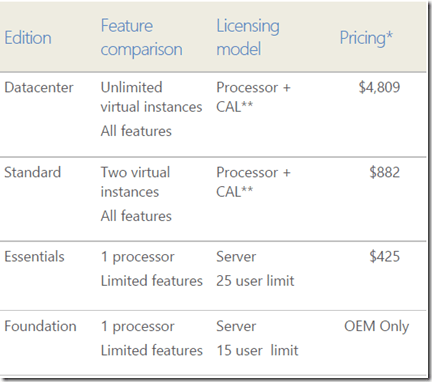
    image

    As you can see, Essentials & Foundation are aimed at the very small networks and both are limited to 1 CPU. Things which are missing from the lower editions include:

    • Direct Access
    • Hyper-V
    • ADFS

    To see the full list of feature differences between the various editions, download the Windows Server 2012 datasheet here:

    View Datasheet

    Web Server

    Windows Web Server can only run web facing workloads but does not require any CALs (Client Access Licenses) which makes it perfect for hosting external sites. However Web Server is being discontinued in the next release but before tales of astronomical rises in costs as companies are forced to buy CALs for every single user of their service:

    “Despite the removal of Web Server edition, web workloads running on a Windows Server 2012 edition will continue to receive the “CAL waiver” that is in effect for these workloads today. Windows Server CALs will not be required to access the licensed server if it is only being used to run web workloads”

    Software Assurance Transition

    If you have active Software Assurance (SA) on Windows Server licenses at the time of release for 2012, you will receive rights to the new versions as per the below:

    image

    What about SBS?

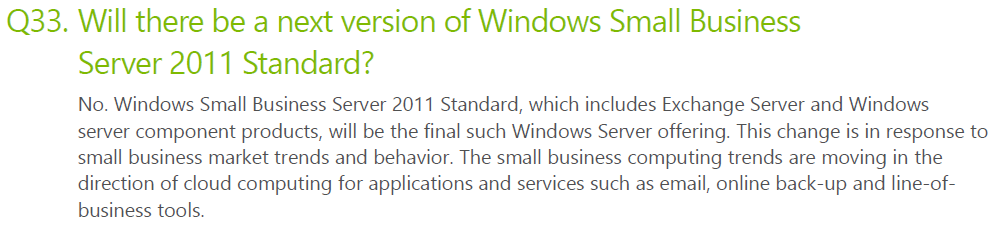
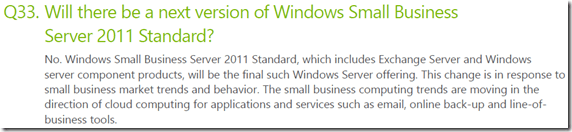
    Small Business Server has been around for years, combines Windows Server & Exchange Server and is aimed at networks with less than 75 users. Now however it’s time has come to an end…
    image


    image

    SBS has quite a thriving community built around it with many passionate advocates, most of whom are sad/angered to see it go. I on the other hand am really rather happy about it! I’ve always found it to be an extra, unnecessary complication when new sales staff/customers get involved with licensing. I realise I’m not going to be popular with that opinion and I’m equally sure that if I worked more in that area I’d have a different opinion but as it is, from the Mid-market & Enterprise space, this is a welcome move.

    You can find the full FAQ here:

    Find Answers

    JaJah Voice for Office 365


    Here’s an interesting bit of software I came across earlier:

    Jajah Voice for Office 365

    which extends the voice capabilities of Lync Online including:

    • Make and receive phone calls from your Lync online contacts
    • Click-to-call from IM conversations, Outlook, SharePoint and other Office apps
    • Find me/Follow me: set incoming calls to be forwarded or simultaneously ring personal mobile phone
    • ‘Call via work’: make outgoing calls from your smart phone using work number
    • Mid-call transfer to your mobile phone or any other number or user.

    I’m really quite excited about this. This takes Lync Online into the world of mobility very well, being able to make/receive calls via Lync Online will surely speed up the adoption of both Lync & Office 365.

    The service is currently in closed beta and is expected to go live this month (July 2012)

    Jajah’s MS Pinpoint page can be found here:

    http://pinpoint.microsoft.com/en-us/applications/jajah-voice-for-office-365-12884930736

    and their main site here:

    http://www.jajah.com/

    Microsoft buy Yammer


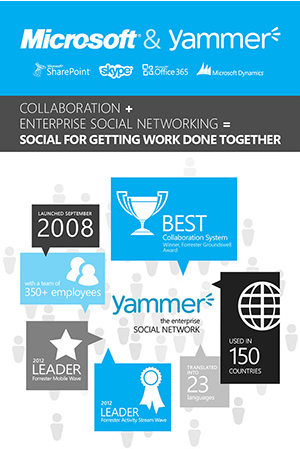
    It first came to light when a couple of Yammer employees got a little TOO carried away with the caramel in their lattes in a Seattle coffee-house and now it’s been made official…Microsoft are buying Yammer for $1.2 billion.

    Yammer will join the Office division, headed up by Kurt DelBene, which is a great move as it will surely be integrated into Sharepoint, Outlook and Lync as soon as possible. There was talk that it would be moved into the Dynamics team which, while logical, would have limited the reach of Yammer among Microsoft’s install base.

    Microsoft have crafted that most current of crazes, the InfoGraphic, to help explain the rationale behind the purchase:

    image

    You can see a bigger version here.

    I’ve never had a chance to use Yammer but I’ve always been very intrigued by it, I can see it being a great addition to a lot of companies. I’ll be keeping my eye on out internal use rights at work to see when Yammer pops up Winking smile