Windows Server 2012 Licensing Changes


Windows Server 2012 is getting ever closer and today we had some exciting news – changes to the licensing – Yay! This has genuinely got me quite excited Smile

Currently Windows Server has 3 main flavours:

  • Standard / Licensed Per Server
  • Enterprise / Licensed Per Server / Rights to 4 Virtual Servers
  • DataCenter / Licensed Per CPU / Rights to Unlimited Virtual Servers

There are also Web Server, HPC & Small Business Server (SBS) editions.

There are also feature differences between the versions.

Going forward with Windows Server 2012 we will have:

  • Std / Licensed Per CPU / Rights to 2 Virtual Servers
  • DataCenter / Licensed Per CPU / Rights to Unlimited Virtual Servers
  • Each license covers 2 CPUs

Std & DataCenter will have feature parity and the only difference will be the virtual server rights. This is a question I’ve already seen on Twitter:

image

So it’s good to get an answer straight away.

Features previously not in Windows Server Std that will be with 2012 include:

  • Windows Server Failover Clustering
  • BranchCache Hosted Cache Server
  • Active Directory Federated Services
  • Additional Active Directory Certificate Services capabilities
  • Distributed File Services (support for more than 1 DFS root)
  • DFS-R Cross-File Replication

This follows the same path as the changes recently made to System Center and, while it may make small installations more expensive, overall it reduces costs and simplifies the licensing for end users.

There are 2 other editions of Windows Server 2012 – Essential & Foundation:

image

As you can see, Essentials & Foundation are aimed at the very small networks and both are limited to 1 CPU. Things which are missing from the lower editions include:

  • Direct Access
  • Hyper-V
  • ADFS

To see the full list of feature differences between the various editions, download the Windows Server 2012 datasheet here:

View Datasheet

Web Server

Windows Web Server can only run web facing workloads but does not require any CALs (Client Access Licenses) which makes it perfect for hosting external sites. However Web Server is being discontinued in the next release but before tales of astronomical rises in costs as companies are forced to buy CALs for every single user of their service:

“Despite the removal of Web Server edition, web workloads running on a Windows Server 2012 edition will continue to receive the “CAL waiver” that is in effect for these workloads today. Windows Server CALs will not be required to access the licensed server if it is only being used to run web workloads”

Software Assurance Transition

If you have active Software Assurance (SA) on Windows Server licenses at the time of release for 2012, you will receive rights to the new versions as per the below:

image

What about SBS?

Small Business Server has been around for years, combines Windows Server & Exchange Server and is aimed at networks with less than 75 users. Now however it’s time has come to an end…

image


image

SBS has quite a thriving community built around it with many passionate advocates, most of whom are sad/angered to see it go. I on the other hand am really rather happy about it! I’ve always found it to be an extra, unnecessary complication when new sales staff/customers get involved with licensing. I realise I’m not going to be popular with that opinion and I’m equally sure that if I worked more in that area I’d have a different opinion but as it is, from the Mid-market & Enterprise space, this is a welcome move.

You can find the full FAQ here:

Find Answers

JaJah Voice for Office 365


Here’s an interesting bit of software I came across earlier:

Jajah Voice for Office 365

which extends the voice capabilities of Lync Online including:

  • Make and receive phone calls from your Lync online contacts
  • Click-to-call from IM conversations, Outlook, SharePoint and other Office apps
  • Find me/Follow me: set incoming calls to be forwarded or simultaneously ring personal mobile phone
  • ‘Call via work’: make outgoing calls from your smart phone using work number
  • Mid-call transfer to your mobile phone or any other number or user.

I’m really quite excited about this. This takes Lync Online into the world of mobility very well, being able to make/receive calls via Lync Online will surely speed up the adoption of both Lync & Office 365.

The service is currently in closed beta and is expected to go live this month (July 2012)

Jajah’s MS Pinpoint page can be found here:

http://pinpoint.microsoft.com/en-us/applications/jajah-voice-for-office-365-12884930736

and their main site here:

http://www.jajah.com/

Microsoft buy Yammer


It first came to light when a couple of Yammer employees got a little TOO carried away with the caramel in their lattes in a Seattle coffee-house and now it’s been made official…Microsoft are buying Yammer for $1.2 billion.

Yammer will join the Office division, headed up by Kurt DelBene, which is a great move as it will surely be integrated into Sharepoint, Outlook and Lync as soon as possible. There was talk that it would be moved into the Dynamics team which, while logical, would have limited the reach of Yammer among Microsoft’s install base.

Microsoft have crafted that most current of crazes, the InfoGraphic, to help explain the rationale behind the purchase:

image

You can see a bigger version here.

I’ve never had a chance to use Yammer but I’ve always been very intrigued by it, I can see it being a great addition to a lot of companies. I’ll be keeping my eye on out internal use rights at work to see when Yammer pops up Winking smile

Microsoft Announce Windows Phone 8


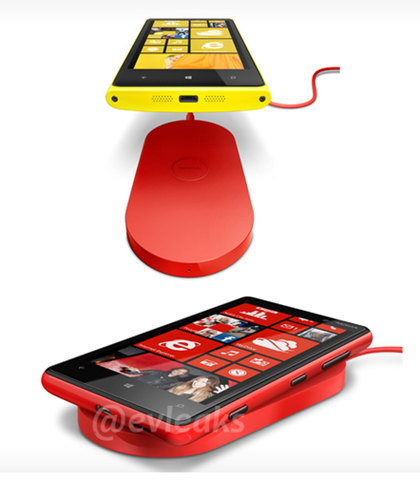
Just days after the Microsoft Surface tablet event, MS held another – this time to officially announce Windows Phone 8.

There were a lot of announcements, a lot of news – some good, some bad, a lot of innovations and a lot of reasons to get a Windows Phone 8 device. I’ll try and cover them off as best I can here:

New Start Screen

The Start Screen with it’s Metro interface and Live Tiles is one of the key eye grabbers of Windows Phone and it’s being improved in Windows Phone 8 (and 7.8 but we’ll come to that later).

First up is a new, third size for tiles giving us “small, medium & large” with the new “small” size enabling users to fit more on their home screen.

Secondly, Microsoft are removing the blank strip down the right hand side of the screen (you know, with the side arrow at the top), giving users a fair bit more screen real estate to play with.

image

They’re also going to be expanding the number of colours available.

NFC

Near Field Communication (NFC) is going to be integrated right into WP8, enabling payments by waving your phone at things, the ability to store card details, store cards etc and more…essentially a combination of Google Wallet & Apple Passbook with extras on top. It will also enable each pairing with a range of accessories such as, and I only discovered these today, Nokia’s NFC enabled speakers…you just touch your phone to them and BOOM – connected. These are available for Nokia’s current range of NFC enabled Symbian devices so I can only assume WP8 will be invited to the party. Another feature will be the ability to “bump” phones and transfer contact details etc…cool and useful for trade shows, impromptu meetings etc…I’m sure I’d end up using it all the time.

SD Support

Proper SD support is coming to Windows Phone 8 devices. SD cards that can be used as true removable storage…transfer music, pictures, documents and also install apps!

Windows 8 Core

This is a huge one – MS are moving away from the former Windows CE core and instead implementing the same NT Kernel as the new Windows 8 desktop OS! This means that file system, media, drivers and a lot of the security will be the same across desktop & mobile; allowing many of the features mentioned above as well as games/apps that can move between the two. That last point will make for a great user experience as well as making things much easier and more attractive for developers – which is always a good thing!

Another thing enabled by the move to the NT Kernel is multi-core processor support which will drive the next generation of WP mobile apps and games.

Internet Explorer 10

IE 10 will be on Windows Phone 8 bring the SmartScreen URL screening & phishing protection. That’s about all the news on that for now though…

VOIP Integration

VOIP is going to be “industry leading” when it comes to integration on WP8, with not just Skype but also Tango et al becoming “first class” app; giving them deep integration into things such as the People Hub and the dialler. The next crop of WP8 devices will surely (nearly) all come with front facing cameras – those 2 things combined could help to make video calling as ubiquitous as people have been predicting for years.

Enterprise Features

One of the (quite) valid criticisms levelled at WP 7/7.5 is its lack of Enterprise features; in some areas it was actually less feature rich than Windows Mobile 6.5. New business centric features WP8 will bring include:

  • On-Device Encryption
  • Device Management
  • Line Of Business (LOB) app support
  • Private market places for internal business app distribution
  • Side-Loading

Now for the bad news…

This ISN’T coming to existing Windows Phone devices. None of them. Not the Lumia 800. Not the Lumia 900. None of them.

Yes, if you’ve just upgraded to a shiny new Lumia (or other WP device) that is a bit of a rage-inducing moment but hey, there’s always Mazuma and Envirofone Open-mouthed smile

Microsoft have taken quite a brave step of angering some people to make wholesale changes that straight away move Windows Phone to the front of the mobile pack. Yes those recent adopters will be a bit annoyed but when their contracts come up for renewal again it seems likely that WP devices will be the best on market so they’ll be able to stick with it going forwards.

One thing that IS coming to current handsets is the new, improved Start Screen under the Windows Phone 7.8 update. Although it doesn’t bring the new features it does make an already great mobile OS even more aesthetically pleasing.

Microsoft Surface Tablet


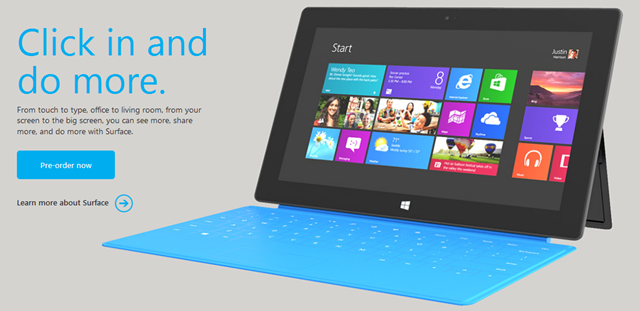
Well, Monday’s hyped up yet super secret announcement has been made…and it’s brilliant! Microsoft are introducing their own Microsoft branded tablets – “The Surface”, and they look stunning:

image

Just look at it. Glossy bezel, rounded corners, integrated kickstand AND A COVER THAT IS A KEYBOARD! I really can’t get over that, it’s such an ingenious innovation and a great unique selling point…not only that but it’s just 3mm thick.

image

Down to details – there are 2 versions of the Surface tablets:

OS Windows RT Windows 8 Pro
Weight 676g 903g
Thickness 9.3mm 13.5mm
Screen 1.06” Cleartype HD 10.6” Cleartype Full HD
Battery 31.5 W-h 42 W-h
Connections microSD, USB 2.0, Micro HD Video, 2xMIMO Antennae microSDXC, USB 3.0, Mini DisplayPort Video, 2xMIMO Antennae
Productivity Office 15, Touch Cover, Type Cover Touch Cover, Type Cover, Pen w/ Palm Block
Practical VaporMg Case & Stand VaporMg Case & Stand
Hard Drive 32GB, 64GB 64GB, 128GB

For now that’s all we’ve got in the way of confirmed features – but it’s a good start in my opinion…definitely enough to let me know that I want one. The 2 missing features that I’m most interested in are CPU & RAM – the latter especially as the iPad’s 768MB lets it down quite a lot.

I’m taking it that the keyboard cover comes with the tablet as standard rather than being an optional accessory – I hope that’s right!

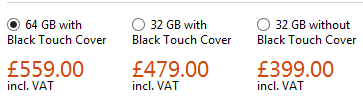
Nothing too much has been said about the pricing other than the Pro version will be “priced similarly to a comparable ultrabook” which I’d say puts it between £700 & £1000…and also suggests it will be rolling with Core i5 processors and 4GB+ of RAM. If that’s right it will be a portable beast Smile

The interest & buzz has been really great to see too. I saw people on Twitter who usually only tweet about MUFC talking about the Surface and saying how cool it looked and I’d fielded 2 customer enquiries by 09:20 at work this morning – love it!

Microsoft finalizes Price Increases


Microsoft’s impending price increases have been the subject of much discussion recently, with customers and partners working together to negate the impact this will have on budgets going forward. However we’ve only had rough figures as to what the price increases will actually be so it’ s been a little odd! However, we now have final numbers for the percentage increases:

image

As you can see, the increases aren’t as hefty as first expected, due to the volatile Euro.

You’ll also notice that Government Open License is being re-instated from next month.

MS to change Office 365 support?


CRN, Channel Reseller News, has just reported that MS are set to revamp the structure for Office 365, by giving sales and support responsibilities to distributors.

This will mean rather than customers purchasing directly from Microsoft and them giving resellers a rebate, resellers will purchase from distribution partners as they currently do for other items such as Office & Windows via the Open license models. They go on to say that distributors will also provide end user support but MS will retain ownership of the billing functionality; which raises two points for me:

1) End User Support: MS have invested quite heavily in their support teams and, in my experience, they are really good. Quick, knowledgeable, keen to help etc…it strikes me as odd that Redmond would look to move away from that and put it on the channel. Perhaps distributors will have the option to offer end-user support but I would imagine that MS will keep that support element.

2) Billing: Selling it through the channel but Microsoft keeping the billing seems overly complicated. A sales cycle would be:

  • Distributor buys from MS
  • Reseller buys from Distributor
  • Customer buys from Reseller

and payment would follow that back through the channel so I’m not sure where MS would fit in?

Feel free to offer your thoughts on all the above too!

I think it will, overall, be a good move to include the channel more in this but hey, I’ll see what new info we get at WPC and let you know Smile

Tabbed Conversations in Microsoft Lync


If you’ve been using Microsoft Lync for any length of time you’ll that, while it’s a great product there’s one slight issue with it…you end up with IM windows all over the place.

For some, that might not be an issue but it winds me up quite often and now it seems it’s not just me as Microsoft have made a Tabbed Conversations download available.

image

I’ve been using this for a few days and I like it…it reduces the clutter on the desktop and keeps it all tidy.

image

It’s a small download to run and install the add-on & the tabs will appear when you restart Lync. Grab it here:

http://lync.microsoft.com/Adoption-and-Training-Kit/tools-and-apps/Pages/Tabbed-Conversations.aspx

Office 365 Update


I’m not sure when this update happened but the “Kiosk Worker” SKU for Exchange on Office 365 (K1) now gives you a 1GB mailbox…an increase from the previous limit of 500MB.

A nice little update from Microsoft there…

Claim your 25GB in SkyDrive


As you may well have seen, Microsoft’s SkyDrive has been revamped with a Windows app, new features and the ability to purchase extra storage – all bringing it in line with DropBox and Google Drive.

It’s always offered 25GB free storage but going forwards, this will be reduced to 7GB – which is still plenty for most people I’d say. However, if you’re an existing SkyDrive user you loyalty is being rewarded as MS are giving you the chance to keep your full 25GB.

When you log into SkyDrive you should see this:

image

image

A couple of clicks and Boom:

image

Nice and simple.