Microsoft have once again combined and rebranded some of their products – Azure Purview + the Microsoft 365 compliance products = Microsoft Purview. This new product family combines 17 different products across data governance and risk management – the (relatively straightforward) name changes are:
Current Name
New Name
Microsoft 365 Advanced Audit
Microsoft Purview Audit (Premium)
Microsoft 365 Communication Compliance
Microsoft Purview Communication Compliance
Microsoft Compliance Manager
Microsoft Purview Compliance Manager
Office 365 Customer Lockbox
Microsoft Purview Customer Lockbox
Azure Purview Data Catalog
Microsoft Purview Data Catalog
Microsoft 365 Data Connectors
Microsoft Purview Data Connectors
Microsoft Information Governance
Microsoft Purview Data Lifecycle Management
Office 365 Data Loss Prevention
Microsoft Purview Data Loss Prevention
Azure Purview Data Map
Microsoft Purview Data Map
Double Key Encryption for Microsoft 365
Microsoft Purview Double Key Encryption
Records Management in Microsoft 365
Microsoft Purview Records Management
Office 365 Advanced eDiscovery
Microsoft Purview eDiscovery (Premium)
Microsoft 365 Information Barriers
Microsoft Purview Information Barriers
Microsoft Information Protection
Microsoft Purview Information Protection
Microsoft 365 Insider Risk Management
Microsoft Purview Insider Risk Management
Azure Purview portal
Microsoft Purview governance portal
Microsoft 365 compliance center
Microsoft Purview compliance portal
The new offering now includes data protection for the macOS platform as well as 50+ new sensitive info classifiers, co-authoring of encrypted documents on mobile devices (in preview), and multi-stage retention labels. It’s another step along the way in Microsoft’s journey to make their security portfolio stronger, less fragmented and – perhaps – less confusing.
If you have (what was) Azure Purview – head over to the Microsoft Purview governance portal here.
If you have Microsoft 365 E5 and/or Microsoft 365 E5 Compliance – head over to the Microsoft Purview Compliance portal here.
Microsoft Defender for Cloud is a relatively new product name – created through a combination of “Azure Defender” and “Azure Security Center” – and is Microsoft’s solution for “cloud security posture management” (CSPM) and “cloud workload protection” (CWP).
It works not only in Azure but also Amazon AWS and Google GCP and hybrid scenarios via Azure Arc.
Licensing & Pricing
The main thing to understand is that Microsoft Defender for Cloud isn’t one thing, it is an umbrella for several separate products that all have their own costs.
Microsoft Defender for IoT agentless monitoring covers existing environments and is deployed on-premises. It can be connected to Microsoft Sentinel with no additional Sentinel charges – but it will require an IoT Hub which costs between £7.61 – £1903.17 per month.
For new IoT devices deployed via Azure IoT Hub, Defender pricing is:
Solution
Price
Defender for IoT for devices managed by IoT Hub – by device
£0.0008/month
Defender for IoT for devices managed by IoT Hub – by messages
£0.153/25K transactions
Both of these offer free usage for the first 30 days and then the pricing kicks in, so be aware of what things people are turning on within your organisation.
Microsoft Defender for Cloud Free Tier
This is enabled on all Azure subscriptions when you visit the Defender for Cloud section of the Azure portal and includes:
Microsoft have announced a range of new features for Windows 365 that all serve to make it a more interesting and robust offering. The 2 that most interest me are:
Windows 365 Boot
Enabled by a local install of Windows 11, this features enables users to boot straight into their cloud pc instance from login. Microsoft use the example of a shared device where each user’s login takes them to their personalised Windows 365 device.
Windows 365 Offline
Pretty much the biggest issue with any cloud based service is “what about when I haven’t got internet?” such as when working on a train or simply a dodgy internet connection. With this upcoming feature, users can work offline and then changes will sync with the cloud once connectivity is regained.
I’m still not totally convinced by Windows 365 – particularly due to its cost – but these additions definitely help its case.
Microsoft have announced a set of price increases for the non-profit sector from September 1, 2022. The pricing is as follows:
Product
Current price
New price (Sept 22)
Office 365 E1
$2.00
$2.50
Office 365 E3
$4.50
$5.75
Office 365 E5
$14.00
$15.20
Microsoft 365 E3
$8.00
$9.00
Microsoft 365 Business Premium
$5.00
$5.50
Microsoft call out that these price increases can be used to drive adoption of Microsoft 365 E5 – which, just as with the commercial SKUs, doesn’t have a price increase planned.
Other changes
April 2022 also saw the end of Microsoft’s free grants for on-premises software – although non-profits in areas where Azure isn’t available can still get grants for Windows Server & SQL Server.
Microsoft are now making grants of 50 Windows Pro licenses available to non-profits, with additional discounted licenses being available
Under the Azure meter, the prices are listed here as:
Plan 1 = £0.006 per server per hour
Plan 2 = £0.016 per app service per hour
Volume Licensing
If you have 50 or more combined licenses of:
Microsoft Defender for Endpoint
Windows E5/A5
M365 E5/A5
M365 Security USLs
you can acquire Microsoft Defender for Endpoint (Server) under EA/EAS/MCA/EES agreements.
If you have these licenses and then choose to cover the same servers with Microsoft Defender for Cloud (the new name for Azure Security Center + Azure Defender), you will be eligible for a credit towards the cost of the latter.
Apparently, they’ve changed the Cloud for Healthcare licensing model from per-user to per-tenant. The “User Subscription License” option has been replaced but none of the other terms have been changed, so it still refers to add-on SLs etc. and doesn’t mention that it’s per-tenant anywhere other than the change summary. It makes sense as the other clouds are per-tenant…but we need all the info!
Microsoft Endpoint Manager Remote Help add-on has been added. Eligible pre-requisites are Microsoft 365 E3/E5/F1/F3, Enterprise Mobility + Security E3/E5, and Microsoft Intune.
System Center 2022 has been added.
“Dynamics 365 Customer Voice and Digital Messaging” added.
Windows 11 Pro (per Device) is now available via CSP.
Microsoft Bookings added to Student Use Benefit for O365 A3 & A5.
SQL Server 2012 goes end of support on July 12, 2022 – that’s about 10 weeks from the time of writing! This means even security updates from Microsoft will no longer be provided to customers running this software – a situation organisations really don’t want to find themselves in.
It only seems like 5 minutes since this was the situation with SQL Server 2008 (it was actually almost 4 years ago!) which causes headaches for a lot of organisations. I’d say that, based on conversations at conferences and training sessions etc., SQL Server 2012 is going to be at least equally painful as many businesses seem to have got to 2012 and then no further, considering it to be much more modern than 2008.
If your business is still running SQL Server 2012 – what are your options?
Remain on-premises
Assuming you want to remain up to date on security patches (which I’d say you do!), you’ll need to acquire Extended Security Updates (ESU) from Microsoft which will give you 3 more years of security updates. That however, comes at a price:
Year 1 = 75% of SQL Server license price
Year 2 = 100% of SQL Server license price
Year 3 = 125% of SQL Server license price
Let’s say you have a 4-core SQL Server 2012 Std box – approx. license cost of £5,000. That will mean:
Year 1 = £3,750
Year 2 = £5,000
Year 3 = £6,250
3 year total = £15,000
Migrate to Azure
ESUs are included free of charge for workloads running in Microsoft Azure VMs – including “regular” Azure VMs as well as:
Azure Dedicated Host
VMware on Azure
Nutanix Clusters on Azure
Azure Stack HCI/Hub/Edge
You can save a big amount of money through not having to pay for the ESUs…but cloud migrations come with their own set of costs…as well as benefits.
If you’ve not already made a decision on this, please gather the relevant people together and discuss the option. While both the above options can seem expensive, I’d suggest they’re nothing when compared to the cost of a security breach/ransomware attack.
You can see more info in the Microsoft blog post here.
Available for EA and MCA customers, the Microsoft Azure Consumption Commitment (MACC) is a 3-year agreement where an organisation commits to spend a certain amount on Azure over that time period.
It doesn’t require an upfront payment of the agreed amount, rather the total must be reached by the end of the MACC term. Ongoing qualifying Azure spend (either PAYG or the purchase of Azure Prepayment) is deducted* from the total on a regular basis by Microsoft and the remaining balance can be seen in the Azure portal (or via REST API). In this way, it adds some flexibility to what’s possible with Azure commitment and budgets.
However, it is a contractual commitment so if future Azure spend has been over-estimated, an organisation will find itself expected to make up any shortfall at the end of the agreement.
*If you receive Azure credits from Microsoft, any services paid for using those will not count towards your MACC total.
Azure Marketplace
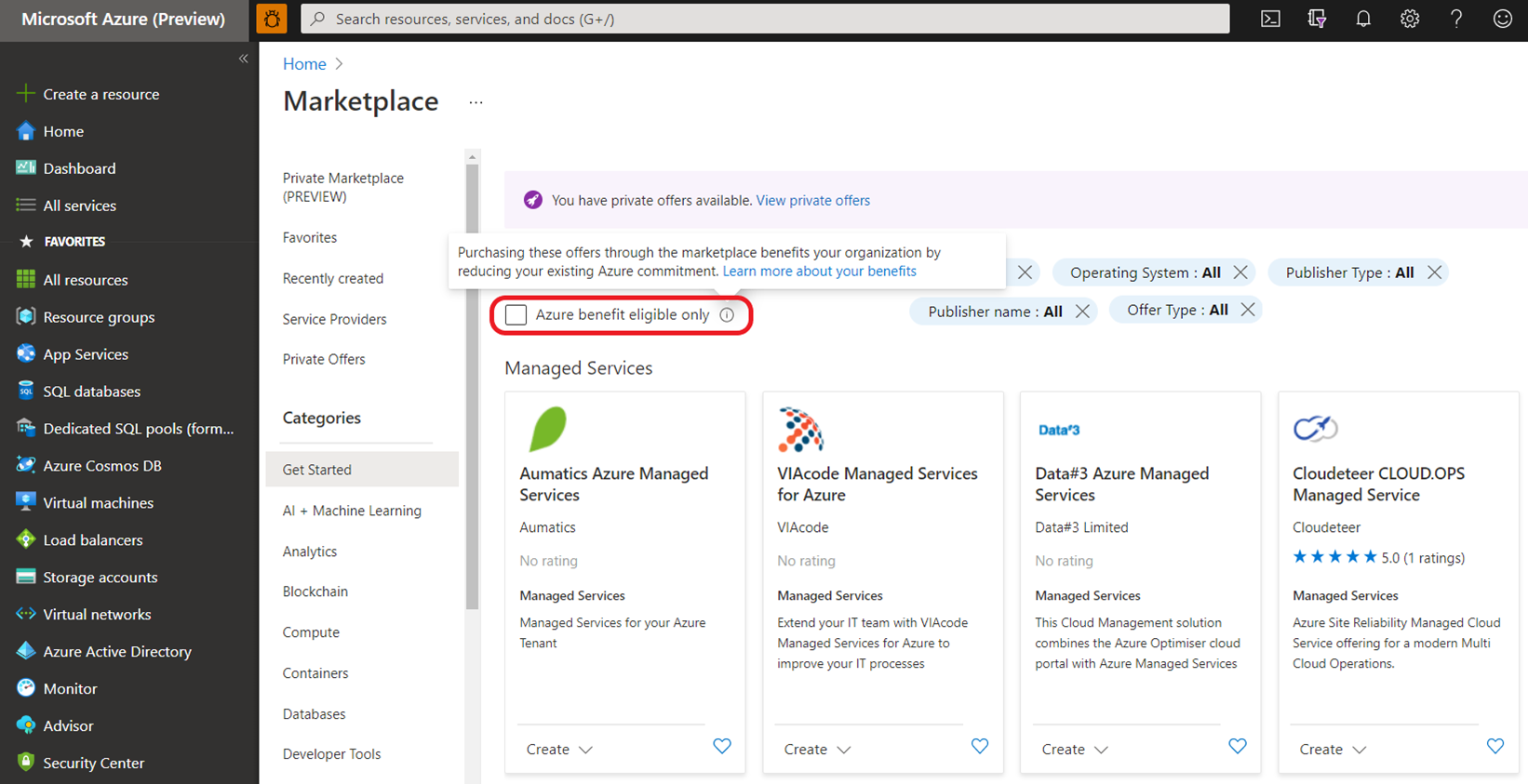
Certain 3rd-party services in the Azure Marketplace are eligible to count towards a MACC. In the Marketplace portal, there will be an “Azure benefit eligible” option to filter the applicable services.
Microsoft have announced today a series of updates and changes to their Partner Program, kicking in from October 2022. There’s a LOT of into to go through but below contains a lot of the key changes and an overview of how some of the new elements will work.
New name
It is now known as the “Microsoft Cloud Partner Program” and, according to Microsoft, this “ better reflects the enormous and ongoing transition of business operations to the cloud, and how Microsoft intends to support partners in the future” and “aligns…partners’ go-to-market motions with the way customers buy today“.
From competencies to designations
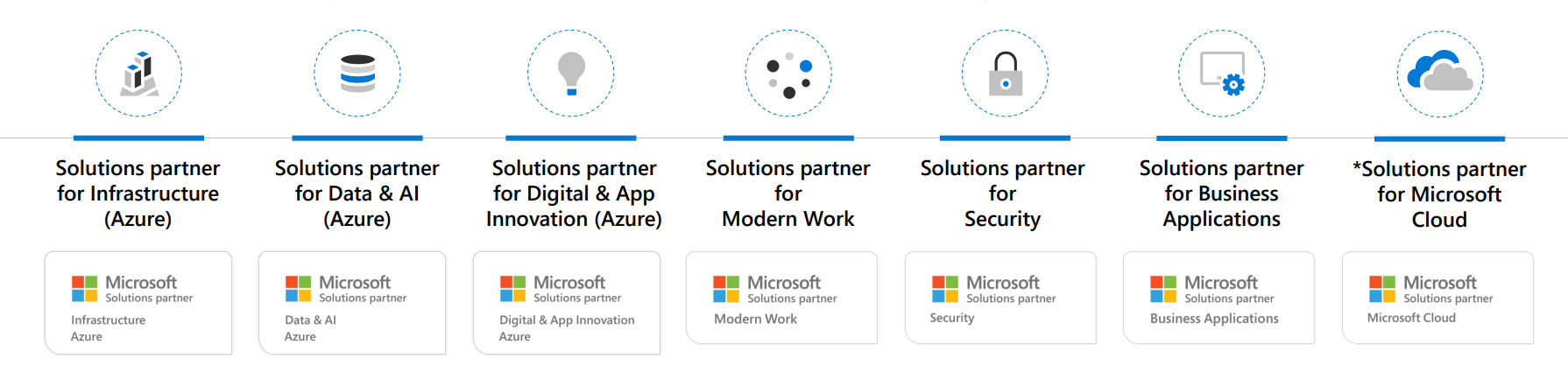
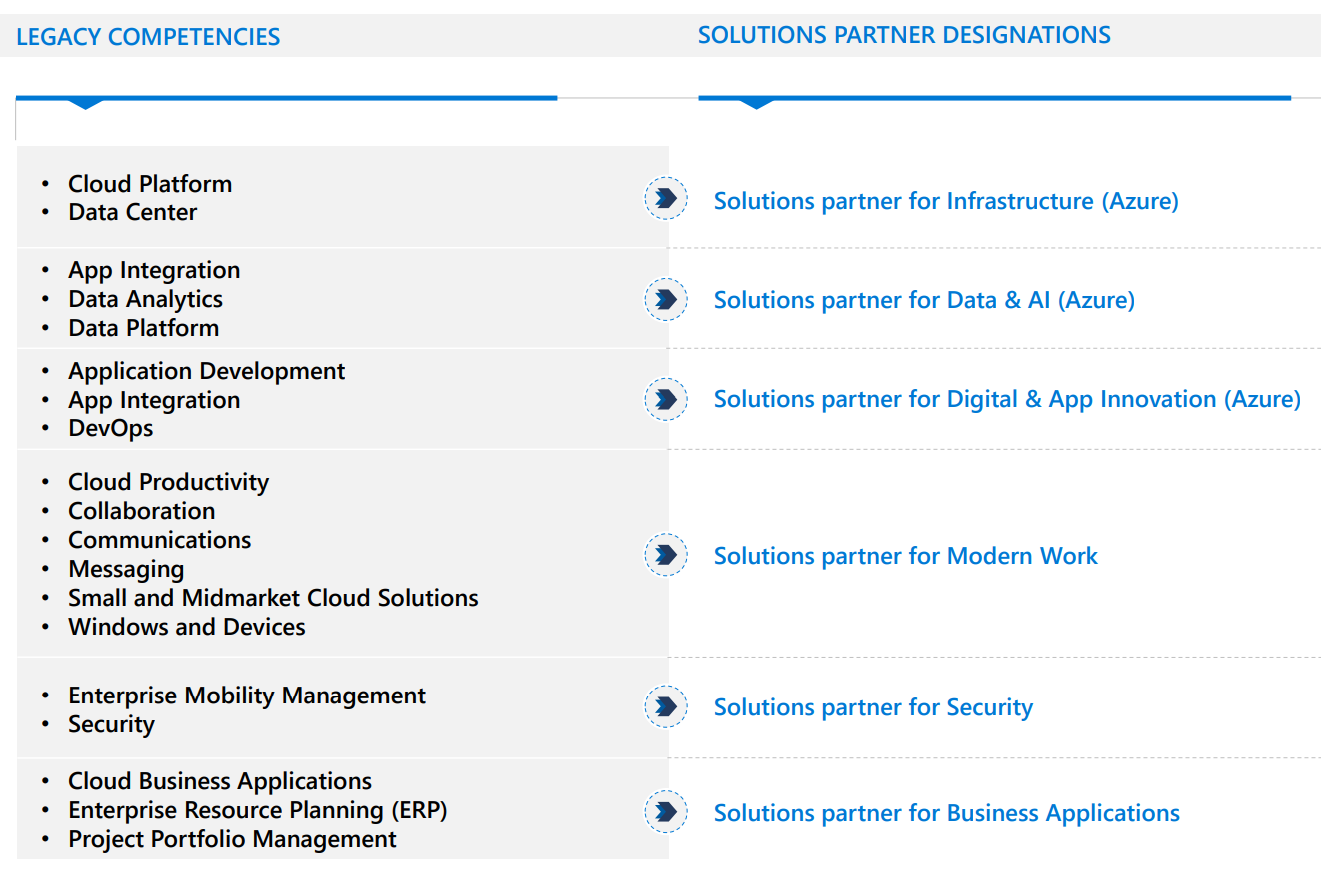
The various (19) competencies that Microsoft partners have long worked to attain are now “legacy” and have been replaced by 6 “Solutions partner designations”:
Solutions partner for Infrastructure (Azure)
Solutions partner for Data & AI (Azure)
Solutions partner for Digital & App Innovation (Azure)
Solutions partner for Modern Work
Solutions partner for Security
Solutions partner for Business Applications
They map across from legacy to new as follows:
How do they work?
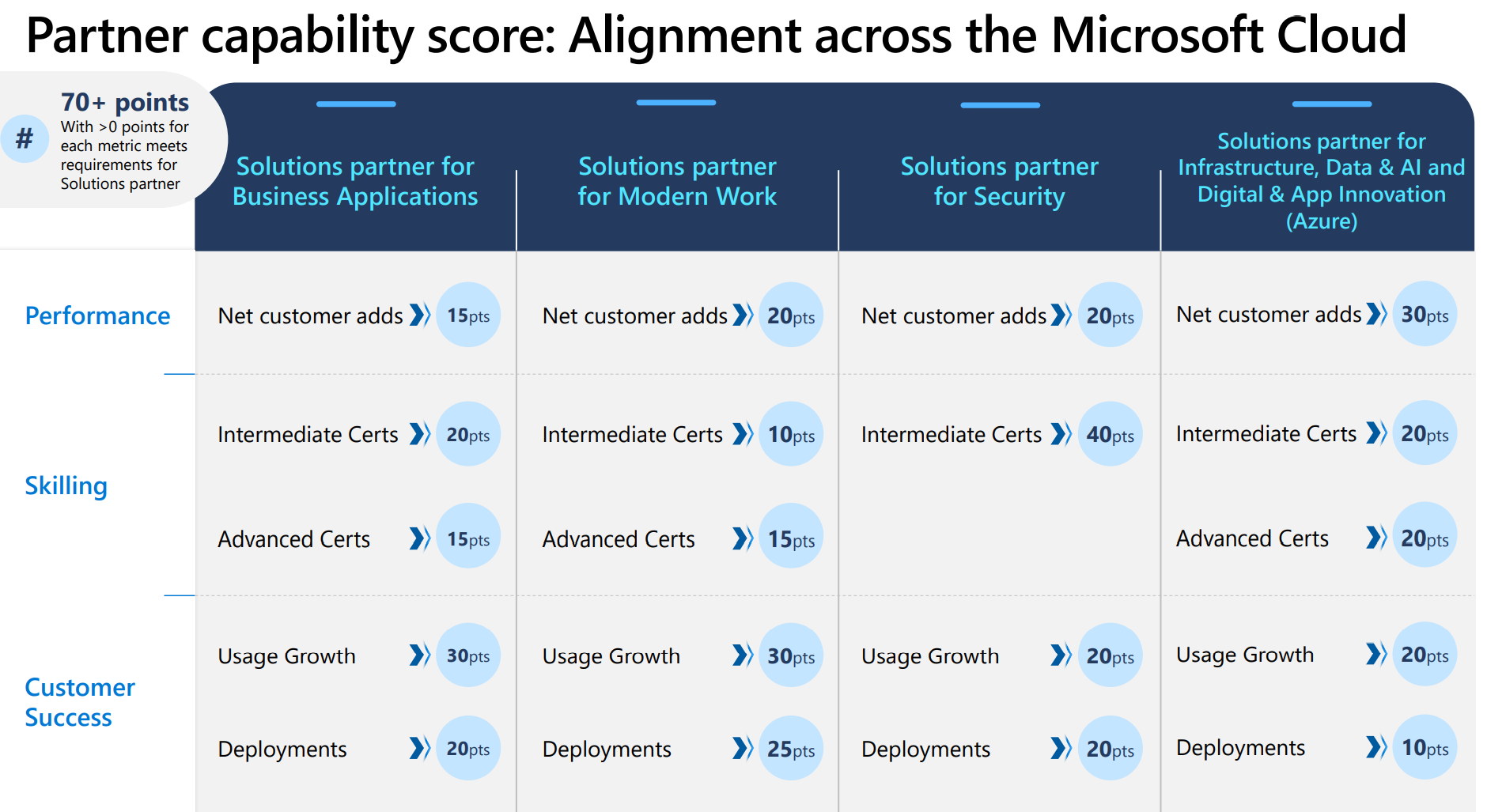
Partners will need to earn at least 70 points, from a potential total of 100.
Performance: Measured by net customer adds.
Skilling: Verifies and demonstrates your dedication to skilling and training. Points are awarded for each person on your team with specified certifications.
Customer success: Measured by usage growth and number of successful deployments.
A Modern Work example
The Solutions partner for Modern Work is split into SMB & Enterprise tracks.
Customer adds
Enterprise
A customer add of 300+ seats = 4 points and partners can accrue 20 points in this manner – so a total of 5 customers.
SMB
Customers must be between 10 & 300 seats and each one = 2 points. Again there is a cap of 20 points, this time equating to 10 customers.
Partner skilling
This section is divided into Intermediate & Advanced certifications, the applicable certifications are:
This area is also divided into 2 categories – Usage Growth & Deployments. The calculations for points are slightly less than straightforward as this example from Microsoft demonstrates:
If you have 2000 MAU growth from DPOR associations over the past 12 months and 1500 MAU growth from CPOR associations, then this is the way the scoring is decided for the Usage growth metric.
DPOR based growth = 2000 MAU DPOR based points = (actual growth / Threshold growth level) * max points = 2000/4000 * 30 = 15
CPOR based growth = 1500 MAU CPOR based points = (actual growth / Threshold growth level) * max points = 1500/1000 * 30 = 45
Usage growth net score = 30 ~ higher of 15 and 45 from above, for up to a maximum of 30
A similar calculation is used for the deployment metric:
Each new qualifying CPOR deployment gets 5 points OR each new qualifying DPOR deployment gets 2.5 points, whichever aggregates to higher points, for up to a maximum of 25 points.
For example, if you have four net new deployments from DPOR associations over the past 12 months and 3 from CPOR associations, the scoring is decided for Deployments metric as follows:
DPOR based growth = 4 DPOR based points = (actual growth / Threshold growth level) * max points = 4/10 * 25 = 10 points
CPOR based growth = 2 MAU CPOR based points = (actual growth / Threshold growth level) * max points = 3/5 * 25 = 15 points
**Deployments net score = 15** ~ higher of 15 and 10 from above, for up to a maximum of 30
As well as the receiving licensing of on-premises software such as SQL Server, Windows Server, and System Center, qualifying partners will also receive allowances of:
Windows 365
Microsoft Viva
Project & Visio Online
Windows IoT
and more.
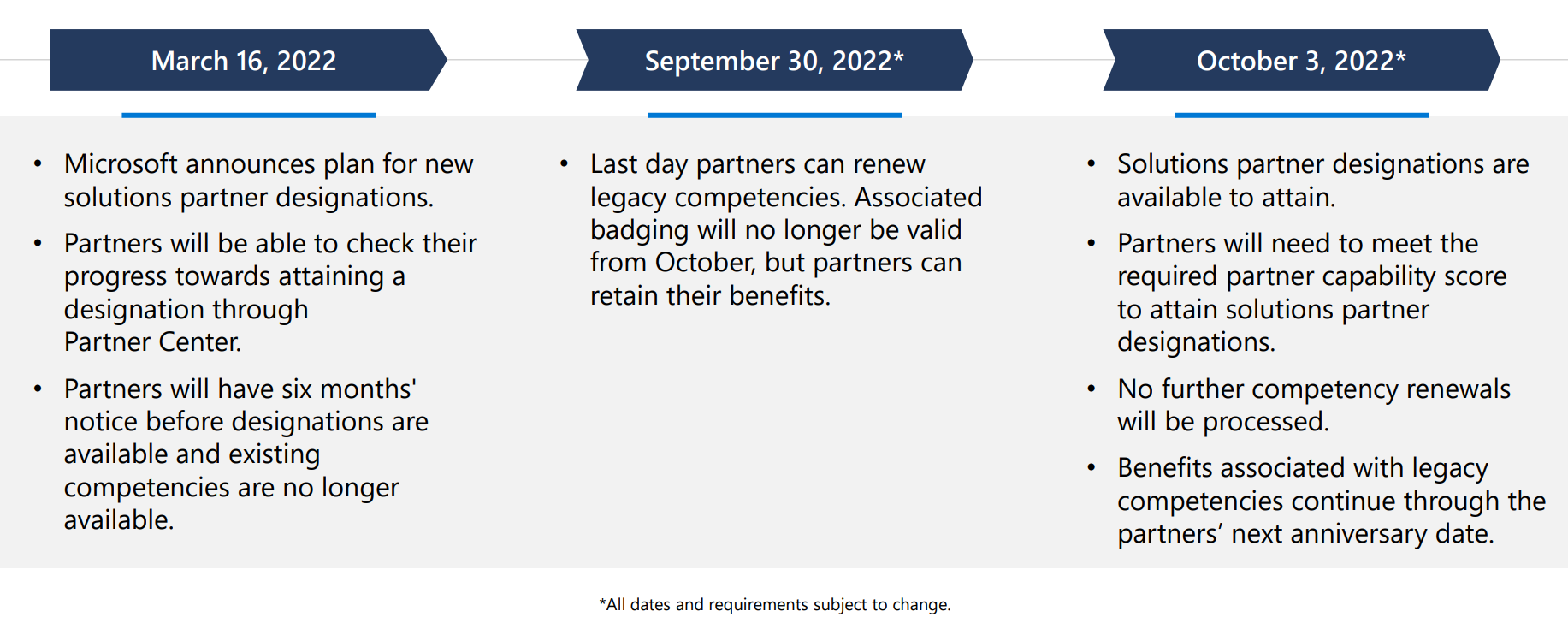
Timeline of changes
Conclusion
Overall this seems like the next step in Microsoft’s long-term plan to keep moving partners towards being more service based around cloud technologies. This was the case the 7+ years ago and is still where they want their partner base to go – offering as many cloud technologies as possible and providing the services to ensure customers get the best results.
This will likely cause plenty of upset and confusion among partners but, ultimately, how much difference it will actually make remains to be seen. Usually, the bigger the partner the more able the are to absorb and adapt to these new initiatives – we’ll see if this is any different.
Again, not a huge amount of change in the Microsoft Product Terms for March 2022:
Microsoft 365 Privacy Management has been rebranded “Priva”…I thought they might change their mind on this one 😂 I guess they wanted to make sure there was something people could confuse with Viva?!
Expanded pre-requisite licenses for Cloud for Healthcare add-on
Azure Virtual Desktop per user access promo extended to March 31st, 2022 (although the section doesn’t appear to have actually been updated)
SQL Server Big Data Nodes have been retired – anything other than the “core” SQL editions just never seems to quite work does it?
Updated “no cancellations after 72 hours” terms for online services under CSP NCE