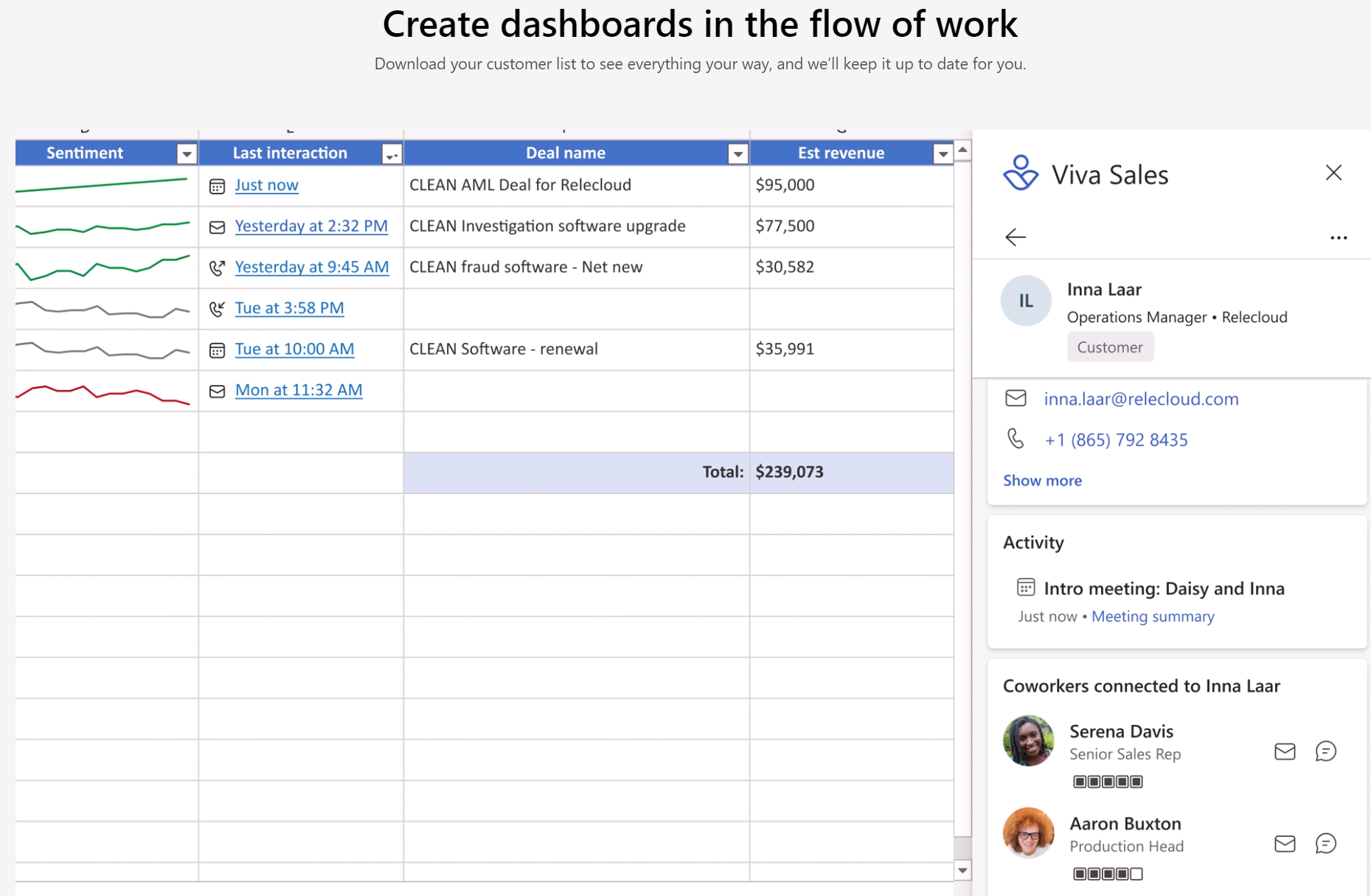
Hot on the heels of Viva Goals, Microsoft have introduced Viva Sales. This latest family member is a “new seller experience” that brings Microsoft 365 & Teams together with “any” CRM system to streamline processes for salespeople…it also adds a hint of AI into the mix.
Areas it helps with include:
AI organised data and tasks
Inbuilt sentiment analysis
Surfacing unstructured data from Office documents
Automated data capture
Reminders
and more, with Microsoft describing it as a sales coach that helps move deals along. It will also surface “business context” data within Outlook and Teams and allow salespeople to update their CRM from those platforms too.
Much of this is, as with many other products, about keeping people within Teams as much as possible – making it the “collaboration hub” for users across organisations.
A feature called Sales Conversation Intelligence (SCI) will help sellers byl:
Generating meeting summaries
Tracking customer sentiment
Suggesting action items
all to keep deals on track and moving along.
Licensing and pricing
Viva Sales is free for users already licensed with Dynamics 365 Enterprise and Premium – for everyone else it will be $40 per user per month. It hits General Availability on October 3rd, 2022 and is NOT part of the Viva Suite.
I like the sound of what Viva Sales can do and am keen to check it out further – as anything that makes sales and customer management easier is a good thing. No matter the CRM you use, it’s never as intuitive and easy to use as users would like…perhaps Viva Sales will go some way to alleviating that. Or perhaps it will just be one more thing to add to the mix?!
Some new M365 F5 Security bundles made available – further expanding what’s possible for protecting frontline workers.
Microsoft Sustainability Manager added. This is what we’ve been calling Microsoft Cloud for Sustainability…it seems that will be now an umbrella term and Sustainability Manager will come under that.
Clarification that the SQL Server Enterprise SA benefit of running Power BI Server applies in a fail over OSE too
Tidying up of various clauses and terms.
No mention of the major changes they announced for cloud BYOL rules around Windows Server, Windows desktop, and Office.
Their aim is to “serve as a trust fabric for the entire digital ecosystem” – Microsoft really looking ahead to the future and setting themselves up to be a big part of that once again.
The product is Microsoft Entra Permissions Management – built on the CloudKnox acquisition from 2021. It does things such as “help detect, right-size, and monitor unused and excessive permissions” and enforces the principle of least privilege across Azure, AWS, and GCP. It will integrate with the Defender for Cloud dashboard too.
This will be a standalone product available from July 2022.
Decentralised Identity
The product here is Microsoft Entra Verified ID, which aims to make “portable, self-owned identity possible” and to give more control over what information is shared and also it taking back that data.
This will be a standalone product available from August 2022.
Security is a huge focus for governments, organisations, and individuals right now and, as more things become more digital, it will only continue to be so. Creating a safe and secure platform for digital interaction – both B2B & B2C – is a great business move from Redmond but may well also serve to help the “digital revolution” to carry on and succeed.
However, for those of us who must navigate Microsoft’s products and licensing – this only serves to confuse matters! We have Priva, Purview, and now Entra…what’s next?
At Microsoft Build 2022, they have introduced us to the new Intelligent Data Platform.
They say this will help in “removing points of friction between your databases and analytics systems while automatically mapping and governing your full data estate” and allow developers/organisations to “Focus on building innovative apps—and spend less time managing your data“.
Is it a new product?
No – instead it’s a collection of existing products that MS position as forming a better, cohesive eco-system for organisations. Those products are:
Azure SQL
Azure Cosmos DB
SQL Server 2022
Azure Arc
Azure Synapse Analytics
Power BI
Azure Machine Learning
Microsoft Purview
The latter enabling comprehensive governance of data across all these different locations, products, and use cases.
For many organisations across a variety of verticals, data is the key to success. However, given the increasing regulatory pressures and growing threat of cyber attacks – not managing that data effectively can be one of the largest risks a business faces. The dual concept of helping organisations better connect their data to extract more useful insights more quickly AND securing all that data will surely seem a particularly attractive offering for a lot of customers. Several other organisations, including Amazon and Google, are heavily focusing on data too – it’s the next frontier for winning/losing customers in many ways – and I’m sure Microsoft will continue to enhance this area of their business. I’m also sure they will be selling this concept, and the underlying products, heavily during renewals and customer briefings etc.
Microsoft may have taken a trip to Greyskull as, to paraphrase He-Man they:
“Have the Poweeeeerrrrr…Pages”
The newest member of the Power Platform family, Power Pages is a upgraded version of Power Platform Portals – moving from a component to a fully-fledged standalone product.
What does it do?
Power Pages is designed to help easily create websites using drag & drop plus a range of templates available. Microsoft are positioning it as good for uses including FAQ sites, self-service portals, support sites and more.
The Microsoft Viva family has been around for a little while now and I really think it will become a big product for Microsoft – eventually. There doesn’t seem to be much focus on it at the moment but I’m sure that will change…and Viva Goals will help that. It is built on Ally.io which Microsoft acquired back in October 2021 and really aligns to the need for businesses to be more streamlined and focused than ever.
What is it?
Microsoft Viva Goals is all about OKRs – Objectives & Key Results – and helping organisations keep them visible in order to achieve what the business aims to do. An OKR is defined as:
“a proven goal-setting framework for creating alignment, focus and building a highly productive and engaged work culture to drive your business outcomes.“
Enabling everyone in a business to see what they, and everyone else, are working towards helps create more efficient, united organisations.
Microsoft have some great resources on OKRs as a concept here.
Features
Although currently only available in Private Preview (and only in English), the product features within Viva Goals include:
Which gives a good overview of what can be done with the product. Of course, Viva Goals will have strong integration with Teams to help make OKR usage an integral part of internal communication.
I think understanding and successfully using OKRs will be a key skill sought after by many organisations – I’ll be completing the OKR Champion program on Microsoft Learn to get up to speed!
Microsoft have just announced a range of changes to their rules around using their software in SOME cloud environments, aimed at reducing some of the heat they’ve been receiving from European cloud providers – including complaints to the European Commission – and also heading off potential issues with the EU Digital Markets Act.
The changes include CSP access, more support for providers from Microsoft, and some changes to Software Assurance licensing rules too.
Background
Microsoft have been under fire from various angles due to their licensing rules that restrict which products can be used within 3rd-party datacentres…particularly when compared to Microsoft Azure. It recently came to light that ‘OVHCloud’ lodged a complaint with the European Commission in 2021 and many of the “Fair Software Licensing Principles” were seen to be aimed at Microsoft too.
The current BYOL (Bring Your Own Licensing) rules of Microsoft restrict certain on-premises licenses from being used in cloud environments (apart from Azure) which, for some customers, causes frustration and higher costs…and in some cases it means a project cannot be completed.
What’s changing?
Microsoft have announced a big new focus on ‘European Cloud Providers’ (ECP) – giving them expanded access to CSP (Cloud Solution Program) as well as creating a new internal team to focus on supporting them and their customers.
Cloud providers can host more products
The ECPs will be able to offer hosted desktop solutions containing Windows desktop and Office – including Office 365 Apps for Business/Enterprise. They will offer this via their own “unified solutions” and also by hosting customer-owned licenses – hugely expanding the available options for customers.
Microsoft are also expanding the availability of long-term fixed pricing for these providers, removing some of the pricing volatility from them and their customers.
Software Assurance changes
This is a pretty big one – Microsoft are adding ‘License Mobility’ rights to Software Assurance for Windows Server, Windows desktop, and Office. This means customers can use their on-premises licenses in 3rd-party ECP datacentres (but not AWS, GCP, or Alibaba), something that wasn’t possible before.
New Windows Server licensing option
Windows Server is licensed based on the physical CPUs and cores within the server. Microsoft are now introducing the ability to license just the virtual capacity you need, regardless of the underlying hardware. Whether this will be available globally and across all licensing programs, or restricted to just ECP datacentres, is something we are yet to discover.
European Cloud Providers – and more?
Although Microsoft’s announcement was careful to keep referring to ‘European Cloud Providers’ – it seems a Microsoft spokesperson has confirmed that the CSP and Software Assurance changes apply globally (via Mary Jo Foley). This means the vast majority of cloud providers are now able to offer something to their customers that they couldn’t previously.
On the flipside of that though, the main takeaway is that this doesn’t help customers looking to run software on AWS, Google, and Alibaba (the Listed Providers) and, in all honesty, that’s where I see most of the customer issues in this area. However, perhaps Microsoft hope that not only will these changes placate the EU but that they will also divert business away from the Listed Providers to smaller partners instead. In the new world, Microsoft may see that as a win…sure, they’re not on Azure…but they’re not on AWS either.
Update:
Microsoft have confirmed here that these changes do NOT apply to the Listed Providers – Amazon, Google, and Ali-Baba.
Other changes
Microsoft have outlined their 5 “European Cloud Principles”:
It’s almost the end of Microsoft’s financial year and typically things quieten down, but there is one interesting change this month:
SQL Server Standard can now use Distributed Availability Groups (AG*), a feature which has been an Enterprise only feature up until now. However, it is limited by the fact that the DAG may only synchronise with Azure.
Microsoft have announced that 24×7 Problem Resolution Support is being retired as of February 1, 2023.
Historically, access to 24×7 support has been determined based on how much organisations spend on certain products. As part of the SA changes introduced in 2019/20, there was a plan to change this to being simply as-needed 24×7 support for organisations with a spend of $250,000+.
Now however, Microsoft have decided to ditch it completely in favour of Unified Support. Current support incidents can either be used or transferred to a Microsoft Support contract before Feb 23. Any unused/non-transferred incidents will be lost.
Microsoft say their goal is to give every customer “comparable support…at a comparable price” but, given the large price increases most people saw when Unified Support was introduced, I can sense a large amount of scepticism about this! Those of you with existing Premier/Unified Support contracts will start to hear from Microsoft in August 2022.
If you don’t have a Support contract from Feb 23, you can buy support on a per-incident basis from Microsoft.
Microsoft’s financial results for Q3 FY22 (Jan – Mar 22) are in and, once again, they’re showing strong growth in all their key focus areas. They also listed several big name customers that they’re working with including:
Bridgestone
Lufthansa
Fujitsu
Woolworths
Cracker Barrel
Heineken
and called out Boeing, Heinz, and Westpac among customers making “strategic” Azure commitments.
Satya Nadella always hits us with a good quote during the earnings call and this quarter’s was:
“The last two years have proven that every organization needs a digital fabric that connects the entire organization”
Let’s take a look at some of the numbers:
Overall
Revenue = $49.4 billion – up 18%
Operating income = $20.4 billion – up 19%
Really strong top line numbers as always – remember, this is for just 3 months!
Productivity & Business Processes
Revenue = $15.8 billion – up 17%
Office 365 Commercial up 17%
Dynamics 365 up 35%
LinkedIn up 35%
Microsoft saw growth in SMB and frontline SKUs as well as increase in Revenue Per User – a key SaaS metric.
Office on-prem revenue was down 28%, continuing the downwards trend that we’ve been seeing for a couple of years now. It was noted as well that the end of Open Licensing has caused a drop in transactional license sales during the last quarter.
Intelligent Cloud
Revenue = $19.1 billion – up 26%
Azure (and other cloud services) up 46%
Server products up 5%
Another strong showing from Azure…with the number of $100 million Azure deals more than doubling over the previous year.
The server products increase includes Window Server & SQL Server in hybrid use cases (as well as Nuance) and again Microsoft mentioned the impact of Open Licensing’s end.
What else did we learn?
Satya Nadella once again called out the performance of Cosmos DB, with 100%+ YoY growth for 3 quarters in a row.
Power Platform, as a family, was up 72% year on year.
Microsoft Viva has over 10 million monthly active users.
Overall this is another great performance from Microsoft, giving them good momentum as they move into their Q4 (April – June) which is always a busy time of year. It will be interesting to see the full FY results in July for sure!