Microsoft Kinect official pricing


Microsoft Kinect, the motion sensing, wii-beating, game changing Xbox 360 add on, now has official pricing.

US = $149.99
UK = £129.99

It’s good to have pricing but it does seem we’re getting the short end of the stick here in the UK. The current conversion rate puts it around £90, which would far more palatable. I don’t see why it is so much more over here…almost 50%!

When I pre-ordered my Kinect a couple of weeks ago, Game told me they expected it to be less than £100 as Microsoft wanted to “make it as accessible as possible”…that sounded plausible but alas, clearly isn’t the case 😦

In my opinion the Kinect should be positioned as a way to attract new Xbox owners, but I can’t see £300 being seen as that attractive…especially when a Wii costs £119.99!

Will I still pick up my pre-order? To be honest, yes…but I’ll be expecting even more from it now!

Windows 7 Service Pack 1 coming soon


Windows 7 is, by far, the best Operating System Microsoft have produced but we all know it isn’t perfect…and so do Microsoft. They have announced that Service Pack 1 will be available as a public beta next month (July), not just for Windows 7 but also Windows Server 2008 R2.
For server it will bring RemoteFX (VDI multimedia performance) and Dynamic Memory Allocation; for the desktop it is really just a collection of fixes, many/most of which have already been delivered via Windows Update.
It’s real use is going be moving people off XP, something which many companies are still reluctant to do. The “accepted wisdom” is not to deploy a new MS OS until the first service pack has been released and, in times gone by, this was generally sound practice…as Vista proved 😉 However Windows 7 has always been stable…even as a beta, so a lot of people are missing out on the dozens of benefits it brings,for no real reason. Once this milestone has officially been reached I’ll be very interested to see its effect on corporate buying strategies.

Downgrade Rights

OEM licences (the ones that come pre installed on new pcs/laptops) can currently be downgraded to Vista or XP, and many people are still choosing to drop down to XP. However:

“Can I downgrade my OEM version of Windows 7 Professional to XP Professional?

For a limited time of 18 months after the general availability of Windows 7 or the release of a Windows 7 Service Pack, whichever is earlier , the OEM license of Windows 7 Professional and Windows 7 Ultimate will include downgrade rights to Windows XP Professional. After that period the OEM license will enable downgradeable to Windows Vista Business.”

That excerpt from the “Microsoft Downgrade Rights Chart” shows that, very soon; downgrading to Windows XP Pro will only be available to Volume Licensing customers.

I believe that this will be the push most people need to stop clinging to XP and make the move to the 21st century, so this will drive Windows 7 usage. If not, and there are people who insist on downgrading then it will drive adoption of Volume Licensing and all the extras and benefits that brings.

All in all, pretty big changes that will have a positive effect for customers, resellers & Microsoft.

Microsoft to end Itanium Support


Microsoft have announced that the next versions of a number of their products will cease to support Itanium processors; making:

Windows Server 2008 R2
SQL Server 2008 R2
Visual Studio 2010

the last to support the Itanium architecture.

The reasoning behind this is that 64-bit processors & servers are now so hugely scalable that Itanium, as a solution for massive data-centers/high performance clusters etc, is simply no longer needed.
With both Intel & AMD releasing 6/8 core CPU’s and a servers with 8+ processors being offered by a dozen manufacturers, 64+ core boxes are available & close to becoming common. Windows Server can handle 256 logical CPU’s and so is perfectly placed to look after the datacenter.

Support
Itanium users need not worry though, Windows Server 2008 R2 is fully supported until July 9th 2013, then going into extended support until July 10th 2018; so Microsoft aren’t abandoning anyone!

See the full post here:

blogs.technet.com/windowsserver/archive/2010/04/02/windows-server-2008-r2-to-phase-out-itanium.aspx

Windows Phone 7


Not often is the end of a series welcomed by all, especially when it hasn’t even started yet…but this is different. Microsoft’s upcoming mobile OS is now officially titled:
“Windows Phone 7”
The previous name was a bit of a mouthful and I don’t think I’ve ever heard anyone use the whole title anyway, so it seems like a good move to me…the reaction on Twitter has been positive so far too
Now we just need it to be released…and be better than Android 😉

Office 2010 line up revealed


Office 2010 is a little bit closer as today Microsoft announced the FPP (Full Packaged Product aka Box Copy) SKU lineup, along with US retail pricing.

The Tech Preview & Beta have been very well received with the current beta being downloaded over 2,000,000 times already! Now consumers & small businesses can see what versions are available and which Office products they will contain.

Office Home & Student:
This version has proved very popular on Office 2007, giving great flexibility for home users & students while also offering great value for money. The 2010 release includes:

Word 2010
Excel 2010
PowerPoint 2010
OneNote 2010
Office Web Apps

It will continue to allow installation on three PCs in one house; which is a huge draw for everyone 🙂

Office Home & Business:
This is aimed at small businesses and includes all the above plus Outlook 2010.

Office Professional:

This is the top level version of Office available outside of Volume Licensing, and is comprised of:

Word 2010
Excel 2010
PowerPoint 2010
OneNote 2010
Outlook 2010
Publisher 2010
Access 2010
Office Web Apps

You’ll notice that Sharepoint Workspace (the new name for Groove) isn’t included…that’s included in Office Pro Plus on Volume Licensing.

Office Professional Academic:

This contains the same products as the regular Office Pro but with Educational pricing, so around 1/5 the cost! The inclusion of Outlook et al make this a great offering for more advanced students such as those in Higher Education.

Although not mentioned in today’s announcement, Standard & Professional Plus will still be available in Volume Licensing with Office 2010. Don’t forget that we will also have Office 2010 Starter as the free, ad supported replacement for MS Works!

I’m excited for Office 2010 both as a user and a partner…how about you?

King of Kong: Donkey Kong Documentary


I’ve just watched a documentary called King of Kong: A Fistful of Dollars, about the battle to be classed as the World’s #1 Donkey Kong Player.

A documentary about 80’s video games perhaps isn’t to everyone’s taste but, in my opinion, this is a great film that you should definitely watch if you’re at all interested in Arcade games. To be honest, I think even if gaming isn’t your thing, this film is still worth watching…it does a great job of making you have real feelings (for and against) the main protagonists and I really cared about the outcome of the high-score battle. Seeing inside the world of competitive gaming is very interesting; it’s a lot more cut-throat that I previously imagined 🙂

This film is entertaining, engaging, very well made and highly enjoyable…this, my second post on a film, urges you to go and watch it…but keep an eye out for barrels on the way to BlockBuster 😉

For a few disputed facts, see Wikipedia here (but do it after you’ve watched the film!)

App-V & MED-V Updates


It seems that October will bring some pretty great updates to 2 key Microsoft products: App-V & MED-V.

A Service Pack for App-V 4.5 will allow it to work with the task bar and jumplists found within Windows 7 as well as enabling the virtual applications to offer full federated search, just as if they were on the desktop.

MED-V 2.0 will be released in October 2009 (so next month) rather than the “sometime” during Q1 2010 that Microsoft initially stated. This will give support for 64bit desktop OS’s among other things.

See a bit more over at The Register.

Asset Inventory Service (AIS)


Asset Inventory Service (AIS) is one of the core components of the Microsoft Desktop Optimization Pack (MDOP) and, as the name suggests, is aimed at helping customers to manage their assets.

Why Manage Assets?

Software Asset Management (SAM) should be a key part of a businesses processes these days, as ensuring software compliancy is a big thing. In a nutshell, SAM is making sure you have the right number of licences for the number of users you have and making sure they were purchased correctly. Licence Compliancy is a big thing for Microsoft and they, as well as most other major software vendors, have a dedicated SAM team to help customer (and partners) with this process.

Even with the best will in the world it can be hard for customers to remain compliant, if they don’t have a SAM system in place. I recently visited a customer who, through one person deploying an incorrect system image a number of years ago, have found themselves under-licensed by a substantial amount, which must now be corrected-and that has a not-insignificant cost attached to it.

Microsoft AIS is a SAM system that can help customers keep track of their assets:

Ensure compliance to reduce risk:

By getting the most complete view of the software installed on enterprise PCs, you can determine whether licenses have been deployed. You can also tell whether all software is compliant with license agreements, key industry standards such as Sarbanes-Oxley and HIPAA, and corporate policies. By identifying applications that are out of date or that don’t comply with corporate policy, Microsoft Asset Inventory Service can help IT staff find unapproved applications that may be causing conflicts.

Improve forecasting and budgeting:

Data can be gathered on all software assets in a single query without consuming the IT Dept’s time or interrupting users.. AIS captures a comprehensive list of all the applications installed on each machine which is then reconciled against the AIS Application Knowledgebase. This contains hundreds of thousands of software titles, to create a detailed inventory of the software that is in use in your organization. This information can be transformed into browser-based reports that help your IT staff manage software assets and forecast future needs. The service also analyzes how Microsoft Volume License agreements are deployed to help you more easily manage true-ups, renewals, and license reallocation.

As well as under-licensing, enterprises can also determine if they’re over-licensed; this can happen if a number of people leave and so you have Office licences in reserve for example…many companies automatically purchase a new licence for each new starter-AIS can help stop them over-spending.

Samantha Fox

Software Asset Management-Not this SAM 😉

Microsoft hook up with Yahoo (finally!)


It’s been one of the greatest “Will they, won’t they” relationships of all time…(perhaps beaten only by Mulder & Scully)

Reg.4402.10.jpg

 and now it turns out, (like nearly all cheerleaders in horror films), that yes they will:

Microsoft & Yahoo are inked a 10 year deal to combine their search businesses.

Taken from the official site for this announcement:

  • The term of the agreement is 10 years;
  • Microsoft will acquire an exclusive 10 year license to Yahoo!’s core search technologies, and Microsoft will have the ability to integrate Yahoo! search technologies into its existing web search platforms;
  • Microsoft’s Bing will be the exclusive algorithmic search and paid search platform for Yahoo! sites. Yahoo! will continue to use its technology and data in other areas of its business such as enhancing display advertising technology.
  • Yahoo! will become the exclusive worldwide relationship sales force for both companies’ premium search advertisers. Self-serve advertising for both companies will be fulfilled by Microsoft’s AdCenter platform, and prices for all search ads will continue to be set by AdCenter’s automated auction process.
  • Each company will maintain its own separate display advertising business and sales force.
  • Yahoo! will innovate and “own” the user experience on Yahoo! properties, including the user experience for search, even though it will be powered by Microsoft technology.
  • Microsoft will compensate Yahoo! through a revenue sharing agreement on traffic generated on Yahoo!’s network of both owned and operated (O&O) and affiliate sites.
    • Microsoft will pay traffic acquisition costs (TAC) to Yahoo! at an initial rate of 88% of search revenue generated on Yahoo!’s O&O sites during the first 5 years of the agreement.
    • Yahoo! will continue to syndicate its existing search affiliate partnerships.
  • Microsoft will guarantee Yahoo!’s O&O revenue per search (RPS) in each country for the first 18 months following initial implementation in that country.
  • At full implementation (expected to occur within 24 months following regulatory approval), Yahoo! estimates, based on current levels of revenue and current operating expenses, that this agreement will provide a benefit to annual GAAP operating income of approximately $500 million and capital expenditure savings of approximately $200 million. Yahoo! also estimates that this agreement will provide a benefit to annual operating cash flow of approximately $275 million.
  • The agreement protects consumer privacy by limiting the data shared between the companies to the minimum necessary to operate and improve the combined search platform, and restricts the use of search data shared between the companies. The agreement maintains the industry-leading privacy practices that each company follows today.
  • The bold and underlining is mine to highlight some of the key points. It looks like the awesomeness of Bing was a driving force behind showing Yahoo that this deal made sense and it certainly looks like the balance sheets will be healthier after all this!

    Another point to note is:

    “The agreement does not cover each company’s web properties and products, email, instant messaging, display advertising, or any other aspect of the companies’ businesses. In those areas, the companies will continue to compete vigorously”

    so at best, MS & Yahoo are Frenemies 🙂

    I haven’t delved into the depths of this partnership and who will earn what when etc, but there is more info on that over at the official site:

    http://www.choicevalueinnovation.com/thedeal/Default.aspx

    ps: I’ve consciously stayed away from using the term “MicroHoo” 🙂

    image

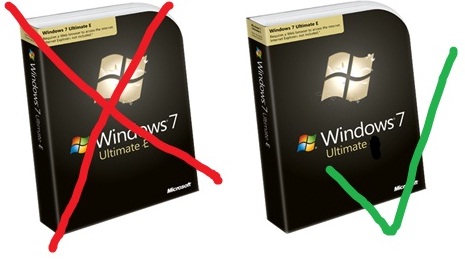
    Windows 7 WILL have IE


    The EU fuelled saga of IE8 in Windows 7 has taken another turn now-it seems Windows 7 WILL included Internet Explorer here in Europe. Microsoft have instead agreed with the EU’s idea of having a “ballot screen” allowing users to choose and download other competing browsers such as Firefox or (the instigators of this whole thing) Opera…This is a bit of an about-turn as MS were dead set against this idea initially.

    The interesting thing is how this affects the availability of Windows 7 upgrades in Europe. The last minute creation of “Windows E” meant that an upgrade version wouldn’t be available in Europe so users would need to do a clean install-which wasn’t an ideal situation. However with this change, perhaps we will get the ability to upgrade after all?

    It seems that Microsoft will continue with Windows 7 “E” until the EU formally accepts the Ballot proposal. Hopefully that won’t take too long (in the work of international law) to go through and Europe will be able to get it’s upgrade on! The RC installation of Windows 7 doesn’t expire until March 2010 so if they can get it wrapped up before then-that should suit everybody…expect those who’ve pre-ordered!

    Thanks to Mary Jo for this and as she updates, I’ll update 🙂

    *Update* It seems that Windows 7 E may well still be the plan!

    *Update* There is now an official statement on the Microsoft PressPass site here. The most exciting bit is:

    “Under our new proposal, among other things, European consumers who buy a new Windows PC with Internet Explorer set as their default browser would be shown a ‘ballot screen’ from which they could, if they wished, easily install competing browsers from the Web. If this proposal is ultimately accepted, Microsoft will ship Windows in Europe with the full functionality available in the rest of the world.” (Bold mine).

    The EU should accept it as it was their/Opera’s idea in the first place so hopefully we’ll all be doing nice upgrade installs on our machines soon-whoo hoo!

    Windows 7 e

    Check out my sweet photo editing skills 😉

    *Update* Opera now want the Ballot screen to be logo free (See techflash)! I’ve said it before that Opera are, and pardon my French, taking the piss…as formerly funny fellow Northerner Peter kay once said “Too far (Tony), too far”!