Microsoft hook up with Yahoo (finally!)


It’s been one of the greatest “Will they, won’t they” relationships of all time…(perhaps beaten only by Mulder & Scully)

Reg.4402.10.jpg

 and now it turns out, (like nearly all cheerleaders in horror films), that yes they will:

Microsoft & Yahoo are inked a 10 year deal to combine their search businesses.

Taken from the official site for this announcement:

  • The term of the agreement is 10 years;
  • Microsoft will acquire an exclusive 10 year license to Yahoo!’s core search technologies, and Microsoft will have the ability to integrate Yahoo! search technologies into its existing web search platforms;
  • Microsoft’s Bing will be the exclusive algorithmic search and paid search platform for Yahoo! sites. Yahoo! will continue to use its technology and data in other areas of its business such as enhancing display advertising technology.
  • Yahoo! will become the exclusive worldwide relationship sales force for both companies’ premium search advertisers. Self-serve advertising for both companies will be fulfilled by Microsoft’s AdCenter platform, and prices for all search ads will continue to be set by AdCenter’s automated auction process.
  • Each company will maintain its own separate display advertising business and sales force.
  • Yahoo! will innovate and “own” the user experience on Yahoo! properties, including the user experience for search, even though it will be powered by Microsoft technology.
  • Microsoft will compensate Yahoo! through a revenue sharing agreement on traffic generated on Yahoo!’s network of both owned and operated (O&O) and affiliate sites.
    • Microsoft will pay traffic acquisition costs (TAC) to Yahoo! at an initial rate of 88% of search revenue generated on Yahoo!’s O&O sites during the first 5 years of the agreement.
    • Yahoo! will continue to syndicate its existing search affiliate partnerships.
  • Microsoft will guarantee Yahoo!’s O&O revenue per search (RPS) in each country for the first 18 months following initial implementation in that country.
  • At full implementation (expected to occur within 24 months following regulatory approval), Yahoo! estimates, based on current levels of revenue and current operating expenses, that this agreement will provide a benefit to annual GAAP operating income of approximately $500 million and capital expenditure savings of approximately $200 million. Yahoo! also estimates that this agreement will provide a benefit to annual operating cash flow of approximately $275 million.
  • The agreement protects consumer privacy by limiting the data shared between the companies to the minimum necessary to operate and improve the combined search platform, and restricts the use of search data shared between the companies. The agreement maintains the industry-leading privacy practices that each company follows today.
  • The bold and underlining is mine to highlight some of the key points. It looks like the awesomeness of Bing was a driving force behind showing Yahoo that this deal made sense and it certainly looks like the balance sheets will be healthier after all this!

    Another point to note is:

    “The agreement does not cover each company’s web properties and products, email, instant messaging, display advertising, or any other aspect of the companies’ businesses. In those areas, the companies will continue to compete vigorously”

    so at best, MS & Yahoo are Frenemies 🙂

    I haven’t delved into the depths of this partnership and who will earn what when etc, but there is more info on that over at the official site:

    http://www.choicevalueinnovation.com/thedeal/Default.aspx

    ps: I’ve consciously stayed away from using the term “MicroHoo” 🙂

    image

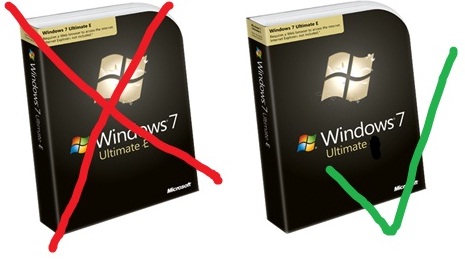
    Windows 7 WILL have IE


    The EU fuelled saga of IE8 in Windows 7 has taken another turn now-it seems Windows 7 WILL included Internet Explorer here in Europe. Microsoft have instead agreed with the EU’s idea of having a “ballot screen” allowing users to choose and download other competing browsers such as Firefox or (the instigators of this whole thing) Opera…This is a bit of an about-turn as MS were dead set against this idea initially.

    The interesting thing is how this affects the availability of Windows 7 upgrades in Europe. The last minute creation of “Windows E” meant that an upgrade version wouldn’t be available in Europe so users would need to do a clean install-which wasn’t an ideal situation. However with this change, perhaps we will get the ability to upgrade after all?

    It seems that Microsoft will continue with Windows 7 “E” until the EU formally accepts the Ballot proposal. Hopefully that won’t take too long (in the work of international law) to go through and Europe will be able to get it’s upgrade on! The RC installation of Windows 7 doesn’t expire until March 2010 so if they can get it wrapped up before then-that should suit everybody…expect those who’ve pre-ordered!

    Thanks to Mary Jo for this and as she updates, I’ll update 🙂

    *Update* It seems that Windows 7 E may well still be the plan!

    *Update* There is now an official statement on the Microsoft PressPass site here. The most exciting bit is:

    “Under our new proposal, among other things, European consumers who buy a new Windows PC with Internet Explorer set as their default browser would be shown a ‘ballot screen’ from which they could, if they wished, easily install competing browsers from the Web. If this proposal is ultimately accepted, Microsoft will ship Windows in Europe with the full functionality available in the rest of the world.” (Bold mine).

    The EU should accept it as it was their/Opera’s idea in the first place so hopefully we’ll all be doing nice upgrade installs on our machines soon-whoo hoo!

    Windows 7 e

    Check out my sweet photo editing skills 😉

    *Update* Opera now want the Ballot screen to be logo free (See techflash)! I’ve said it before that Opera are, and pardon my French, taking the piss…as formerly funny fellow Northerner Peter kay once said “Too far (Tony), too far”!

    Office 2010


    office_2010Microsoft Office 2010 was a big star of today’s opening keynote at Microsoft’s WPC 2009 event, and boy did it shine brightly! The new version of Office is always exciting and there have been some features leaking out recently, mainly around Outlook with it’s “mute button” and conversation threading etc, but the video demo’s today were amazing.

    Unfortunately the keynote video isn’t available on demand yet  is available on demand now at www.digitalwpc.com (as I couldn’t get over to N’Orleans), so I’ll have to try and remember the new features that I saw for now 🙂

    Word 2010: One new feature of Word is an improved Copy & Paste function. At first glance you wouldn’t think you could do much with it, but it is actually a great new addition-it gives you a live preview of what you’re about to paste…clever eh? I often hit “Ctrl + V” only to find that it’s something completely different than I expected so this will definitely come in handy… as Stephen Elop (MS Business Division President) says, the aim is to get users away from the pattern of “paste, oops, undo”.

    Powerpoint 2010: Two big additions to Powerpoint 2010 are Photo Editing & Video Editing. These give you the ability to crop the image/video, change colours and hues, add borders etc all within Powerpoint; that will definitely make creating slide shows quicker, easier and more enjoyable!

    Another great feature is the ability to “broadcast” your slideshow via a Live-Meeting style effort so people can see it in real-time. This feature extends to users of mobile devices and not just Windows Mobile-iPhones too!

    ppt 2010

     Excel 2010: Many of the new features in Excel 2010 are centered around Business Intelligence (BI). One such feature is Sparklines: these give a snapshot of data trends in a single cell, which makes charting many different data ranges in one datasheet much easier, and much more attractive for readers 🙂

    Outlook 2010: Outlook now has the ribbons interface to bring it in line with Word, Excel etc and also contains many new features. Namely the “Mute Button” which will allow you to remove yourself from the “Reply All” floods that occue when someone accidentally puts the addresses in “To” rather than “Bcc” and everyone, for some reason, decide that they need to “Reply All” each time. This quite quickly makes your inbox a joke…now however with a simple click of the mouse they’re all gone…plus it also keeps any future replies from appearing too 🙂

    Another new Outlook feature I’d forgotten about is Mail Tips, which provides info & hints to help prevent you making daft mistakes! Just added 250 names in the “To” field-it’ll tell you…sending a mail to someone who’s out of office-it’ll tell you…added people outside of your organization-it’ll tell you (to help prevent confidential info leaking out) and much more 🙂

    Conversation View lets you group emails by conversation helping clear up inbox clutter. This is a BIG one for me!

    Sharepoint 2010: This wasn’t really demo’d during today’s keynote so I don’t have much to say (yet) other than it has the ribbon interface and “embraces” social media/web 2.0.

    Office 2010 now supports co-authoring, this means that multiple people can work on the same document at the same time without users receiving the “this document is already in use” error…this is really something and gives a pretty big middle finger to other pretenders to the crown such as Google Apps and Zoho.

    So far I’m very impressed with what I’ve seen of Office 2010 and by the end of the week I expect to be even more impressed!

    A great top 10 features list can be found here, props to Sarah for this 🙂

    Thanks to Techcrunch for the pics…

    Microsoft Licensing: Subscription Enrollment for Schools


    Microsoft have today launched a new licensing program specifically for education-Subscription Enrollment for Schools AKA SESP (for those wondering, the “P” stands for “Pilot”). This is response to comments made by Becta (British Educational Communications and Technology Agency) on Microsoft’s current licensing offerings; specifically the need to licence ALL machines even if the licences won’t be used on them all.

    SESP Overview:

    You can use SESP to licence a singel school, multiple schools or an entire school system and it includes all the usual benefits:

    • Assessment of software needs once per year
    • One annual payment for all software at academic prices
    • Access to the most current version of licensed software
    • Ability to downgrade to an earlier version of software
    • Broad product selection available in all languages
    • Microsoft Windows or Apple Macintosh platform
    • Options for student licensing at home
    • Automatic media fulfilment

    The entry requirements are consistent with the current Schools Agreement program so:

    50 Unit minimum entry point

    Level A = 50 Units

    LEvel B = 2500 PCs

    SESP Benefits:

    The 2 big new benefits here are:

    • User & Device based pricing
    • No Institution wide commitment required.

    User/Device Pricing: This allows schools to choose the licensing model that is most beneficial to their set-up. The ability to licence by device can show a significant saving, for example:

    If there are 50 machines in an IT suite that are used by 150 different people (different classes etc) then you can, under SESP, purchase just 50 Device CALS while previously the only option would have been 150 user CALs.

    No Institution wide commitment required: Under a Schools Agreement, the customer must licence ALL eligible machines even if the software will be used on just a sub-set of those. For example,

    You need Office on 150 of your 400 machines-you are required to buy 400 licences.

    However with SESP, you can buy just the licences you need, so in the above example-150. This again will make Microsoft licensing more cost effective and easier to manage for schools and their administrators.

    Licensing Options:

    SESP brings with it a few new ways that schools can licence their Microsoft software:

    SESP

    Of course the big addition is the Non-Institution wide offering, allowing you to licence just specific Users or Devices, such as “The Science Dept.”, “Year 11” etc.

    FAQ’s:

    What is a Qualified Desktop PC? 

    Qualified Desktop PC means any personal desktop computer, portable computer, workstation, or similar device that the institution uses for educational purposes that meets the minimum requirements for running any of the enterprise products.
    What is an eligible user?

    1. Eligible users include all full- or part-time students enrolled at the institution.
    2.  


    3. Eligible users include the full time equivalent (FTE) faculty and staff members categorized as ―employed more than 200 hours per annum.
    4.  


    Can I have a subscription for servers only?

    Yes, if your order meets the server 300-unit minimum requirement.


    The full Microsoft SESP page can be found here.

    One thing to note is that SESP can only be sold via EdLARs (Educational Large Account Resellers).

    Set MP3 as SMS alert


    Today I finally got around to finding out how to set MP3’s as the sounds for other (non-incoming call) alerts on my Windows Mobile phone, and it’s nice and easy!

    All you need to do is save the file in the root of your My Documents folder and it will appear in the selection list; so now I’ve got Chubb Rock as my new text message alert 🙂

    It might be that everyone already knows this but I figured it can’t hurt to mention…

    Modern Day Samurai Part 2


    This dude Isao Machii is crazy skilled with a Samurai sword…check him out here:

    The slow-mo of him skinning an asparagus at 02:46 is awesome!

    Microsoft Online/BPOS Guide


    I’ve been working with Microsoft for months on BPOS, their Software Plus Services offering and getting the word out to customers etc…helping them align their business decisions with MS Online and more. I think that MS Online Services are excellent and will be a real game changer-allowing end users to increase profitability while simultaneously reducing costs and streamlining processes…what more could you want?! 🙂

    I’ve put together a guide to MS Online Services (collectively called BPOS) over at:

    https://richardgibbonsuk.wordpress.com/ms-onlinebpos/

    which should answer most questions you might have. I’m constantly updating it as I discover/remember more info but please feel free to leave a comment if you’re question hasn’t been answered.

    Microsoft BPOS Trials available


    After Monday’s Cebit announcement, the customer trials of MS Online (BPOS) are now available here. You can also see the pricing too…

    Here you can choose to trial Exchange Online, Sharepoint Online, Live Meeting Online or the complete BPOS suite (including Office Communications Server Online).

    The trial is up to a maximum of 20 users and will run until General Availability (sometime in April) and then a further 30 days. If you choose to turn it live and purchase subscription, the systems will simply carry on working so you won’t have to reconfigure anything 🙂

    At £10.04 per user per month for the entire suite, MS Online can really help business increase productivity and cut costs at the same time…go check it out!

    Defending Windows 7 against rumours


    Today I saw an article on Ars Technica that I think highlights the shift in attitude from Vista to Windows 7, but first some background 🙂

    Yesterday (Weds 18/02/09) Slashdot had a post about “the terrible DRM situation in Windows 7“; the gist of it was that Windows 7 contained new levels of crippling DRM that prevented users from operating their machines properly.

    One particular quote that caught my eye:

    “A legitimate copy of Photoshop CS4 stopped functioning after we clobbered a nagging registration screen by replacing a DLL with a hacked version” (italics mine)

    Here is some who has hacked a 3rd party (non-Microsoft) application and is blaming MS and Windows 7 when it stops working! Clearly ridiculous and this is where we see something great-people were quick to point out the flaws in this post, both in the comments on Slashdot and also a great article over at Ars Technica.

    I believe that if this had been Vista, people would have been happy to let the myths perpetuate around the Internet and I doubt anyone would have written an article purely to rebuff the points made on Slashdot. This is the biggest difference between the two Operating Systems-people like and care about Windows 7.

    Microsoft SkyBox Site nearly live


    Near the top of Techmeme tonight is news that www.getskybox.com has made an appearance, although it now re-directs to a /myphone page on microsoft.com here and it seems SkyBox will now be called “MyPhone”.

    MyPhone will allow you to:

  • Back up and restore your phone’s information to a password-protected web site
  • Access and update your contacts and appointments through your web account
  • Share photos on your phone with family and friends
  • Choice tidbits from the “More info” section include:

    • Most phones that run the Windows Mobile 6 operating system are compatible with My Phone service.
    • If you have an active connection with Microsoft Exchange server (which is frequently used for corporate e-mail), My Phone will not synchronize your contacts, calendar appointments, or tasks.
    • Users will be given a 200MB storage limit for Skybox.

    That storage limit is pretty small, I’ve got multiple GB’s of data on my device that’s a mix of wma’s, pdf’s, office docs, pictures and more and I’m sure most people have a similar amount. This means we’ll have to be pretty selective when it comes to what gets backed up and what doesn’t!

    Hopefully that limit will get upped, as it did with Skydrive or that SkyBox will one day let you use Skydrive as a storage area-it’d make sense based on the naming conventions. It’s a beta that hasn’t been released yet so there’s plenty of scope for things to change 🙂