Windows RT Office Licensing


More Surface info was announced last night, with pricing and pre-orders being made available.

All was great and then something of a hubbub started on Twitter when it was noticed/realised/discovered that the Office included in Windows RT can’t be used for commercial purposes or, to quote MS:

“not for use in commercial, nonprofit, or revenue-generating activities”

Now, I’ve known this over 2 weeks and didn’t really think it was particularly surprising; it is, after all, Home & Student edition – which has never allowed those usage scenarios.

I’ve also known that, through:

  • Having a copy of Office 2013 on the RT device user’s primary device

or

  • That user having an Office 365 subscription that includes Office

or

  • Buying the “Office RT commercialization license” that will/should be available from November

You will be able to use said RT Office license in the previously restricted manners mentioned above.

I’m honestly surprised at the furore around this…it follows the same rules as the previous version and is related to a product not actually out yet…is that just me?

Microsoft Surface pricing announced


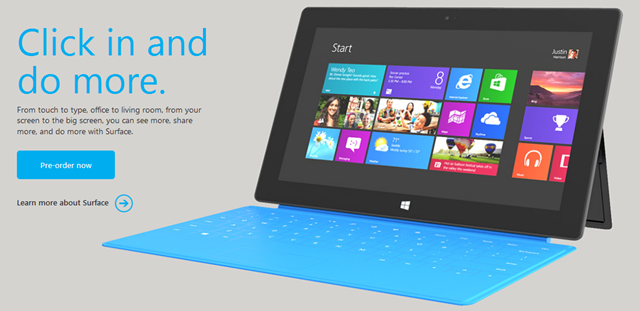
Microsoft Surface, the Redmond produced tablet – built from awesomeness and secrecy – is pretty much here. Microsoft have announced pricing and pre-order availability!!!

image

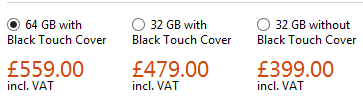
So what are the scores on the doors?

image

How does this stack up to the iPad3?

32GB iPad = £479

64GB iPad = £559

So the Surface matches up exactly against the best seller from Cupertino, which I must say I find a little surprising – I thought it would come in under those prices…but I can see Microsoft not wanting to under-value the great hardware and efforts that are on offer here.

Features

  • Integrated Touchstand
  • 32GB or 64GB
  • WiFi and Bluetooth 4 – no cellular/3g
  • 8 hours “mixed activity” battery life
  • 2 x 720p HD cameras, 1 x front & 1 x rear facing
  • USB 2.0
  • Micro SDXC slot
  • 2GB RAM
  • 10.6” Screen

Head over to the Microsoft Store at:

http://www.microsoftstore.com/store/msuk/en_GB/pdp/productID.257929400?WT.mc_id=FY13WinHH

and check out the specs, the accessories and get one on pre-order!

I am REALLY excited about this product release, both from a personal “zOMG, I want one” but also from an industry/technology perspective – this is an exciting time for everyone (except perhaps Apple!).

First Windows 8 advert arrives


Windows 8 will be released on October 26th and the first advert has debuted. It’s reported that Microsoft are set to spend $1.5 billion on advertising for this latest OS release…take a look at the first offering here:

Office 2013 goes RTM


Office 2013 RTM (Release To Manufacturing) build has been signed off.

Coding and testing is complete.

Now the focus is getting the latest version of Microsoft’s productivity suite (and it’s many relations) out to customers, both consumer and business.

It’s not just the Office suite but also:

  • Lync
  • SharePoint
  • Exchange
  • Visio
  • Project

Office Upgrade Promo

From October 19th, people purchasing Office 2010 from resellers or retailers will receive a free upgrade to Office 2013 upon availability.

Availability

  • Microsoft will begin rolling out new capabilities to Office 365 Enterprise customers in our next service update, starting in November through general availability.
  • Volume Licensing customers with SA (Software Assurance) will be able to download the Office 2013 applications as well as other Office products (including SharePoint 2013, Lync 2013 and Exchange 2013) through the Volume Licensing Service Center by mid-November. These products will be available on the Volume Licensing price list on December 1.
  • IT professionals and developers will be able to download the final version via their TechNet or MSDN subscriptions by mid-November.

I’ve been using the preview for a while now and am a big fan of it, as are people who see it when they’re talking to me at my desk. It will be great once the RTM code is available to all!

Office 2013 Upgrade program


It seems that Office 2013 will appear on the Volume License (VL) price lists from October, despite not being released for around another 6 months. Could this be because the Surface RT tablets, to be released on October 26th, will include Office 2013 and Microsoft feel the need/must have it on the VL price lists for some reason? I’m not sure but it seems odd that it will be on there SO far prior to the availability of the next version of Office.

Microsoft are also, so it seems, gearing up to start a tech guarantee program whereby people who buy Office 2010 will receive a guaranteed upgrade to Office 2013 upon it’s release.

Will it be free like the last Office tech guarantee program or will there be a small charge like the Windows 8 upgrade program? We don’t know but either way it’s a good offer!

ZDNet’s Mary Jo has more details over on her blog:

http://www.zdnet.com/microsoft-readies-office-2010-to-office-2013-upgrade-program-7000004138/

Managing Windows RT tablets & Windows Intune Licensing Changes


Windows 8 RT is a new member of the Windows family, and one that’s caused/causing some confusion when it comes to management. It transpired a while ago that Windows RT pcs/tablets will not be able to join Active Directory domains and since then, people have been wondering exactly how they’d manage these devices. Well the answer is here – Windows Intune & System Center Configuration Manager (SCCM) SP1.

“Windows Phone 8 and Windows RT devices will be managed by the next release of Windows Intune.  IT Pros will have the flexibility of using either the Windows Intune or Configuration Manager 2012 SP1 console to set mobile security policies, distribute mobile apps and view reports.  We’ll share more details as we get closer to the next release of Windows Intune.”

As Windows Intune is becoming more of a star, it’s getting some licensing changes too – always a favourite thing of mine 🙂

  1. We are shifting from a per-device to a per-user licensing model.  Each user license for Windows Intune covers up to 5 managed devices.
  2. There will be a Windows Intune user license that includes the rights to System Center 2012 Configuration Manager, enabling organizations to manage those devices through either Windows Intune or Configuration Manager, or both
  3. Organizations that already own System Center 2012 Configuration Manager licenses, such as through the Core CAL, will have access to Windows Intune at a reduced price
  4. We will also make a version of Windows Intune available without rights to Windows Enterprise, thereby lowering the cost for organizations that are not ready to move to the latest operating system.

That final point is something I’ve been hoping to see since the first release of Intune. I’ve always felt that having the desktop OS and a systems management product intertwined muddy the waters and made it a more difficult proposition in many cases; so this is a positive move that will enable Intune to shine in its own light.

It’s also interesting to note that SP1 of SCCM will be able to manage other types of devices including:

  • Windows Embedded Thin Clients
  • Point of Sale (PoS) terminals
  • Digital Signage
  • Kiosks

as well as:

  • Distribution point for Windows Azure to help reduce infrastructure costs
  • Automation of administrative tasks through PowerShell support
  • Management of Mac OS X clients and Linux and UNIX servers
  • I’m pleased to see this move to bring Windows RT into the management fold, making it easier for partners AND customers to tell, understand and take part in the Windows 8 story.

    See the whole post over at:

    http://blogs.technet.com/b/server-cloud/archive/2012/09/10/system-center-2012-configuration-manager-sp1-beta-and-windows-intune-update.aspx

    Sideloading Apps in Windows 8


    Many organizations have there own Line Of Business (LOB) systems that they use internally, and in Windows 8 there are 2 ways of installing these on machines:

    • Via the Windows Store
    • Sideloading (I.e. bypassing the Windows Store)

    How to Sideload:

    Sideloading is a Software Assurance (SA) benefit & the document I have from MS says:

    “Windows EA, Select SA, and EES customers will be granted sideloading license rights”

    It doesn’t mention Open SA customers there but I see no reason they would be excluded, so I will ask for clarification on that.

    The requisite license keys for this will automatically be provided via the VLSC.

    If you do not have SA, Sideloading is still possible…for a charge:

    WinSideLoad-H 8 Sngl OPEN 100 License = £2,435

    Purchase this license and you will then receive the license keys via the VLSC.

    Of course, it is still free for companies to publish their apps via the Store, but this method affords them more privacy.

    I have to say I’m not 100% sure why the ability to sideload outside of SA has a fee attached too it. Is it in an attempt to ensure companies are serious about the apps they deploy, and stopping them pushing out willy nilly, poorly created apps that will detract from the Windows 8 experience?

    Nokia Lumia 920 Windows Phone 8 Device


    Windows Phone 8 is not far away and today we’ve seen sneak previews of 2 devices that will surely be revealed at Nokia’s event on September 5th, alongside Microsoft.

    Nokia Lumia 920

    image

    What will it include?

    • Wireless Charging
    • 32GB Storage
    • 1GB RAM
    • 1.5GHz Dual Core CPU
    • 4.5” HD Display
    • Front Facing Camera

    The Verge also report that the camera will be branded as “PureView” but will be 8MP rather than 41 as on the Nokia 808. Until my Lumia 800, I’ve never had a Nokia nor have I had any interest in Nokia if I’m honest, so I haven’t come across the PureView brand before. What I gather is that it’s a kick-ass camera and people are upset that this has just 8 megapixels yet is being branded as PureView. Nokia say there have been advancements in image stabilization & software that mean they can brand it as such which seems reasonable to me, we all know that megapixels aren’t everything 🙂

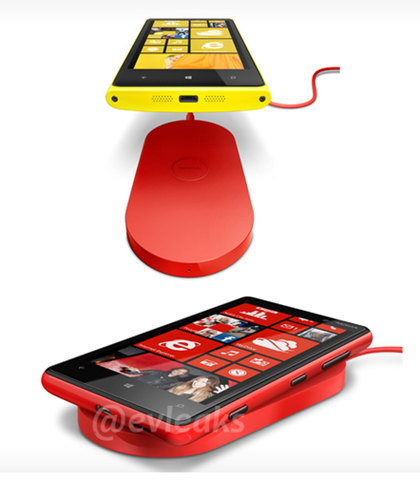
    This looks like it could well be my next phone…double the storage which will be great for my ever more eclectic music taste, a front facing camera for making use of the baked in Skype features and WIRELESS CHARGING – that is some Star Trek stuff right there!

    Here’s a picture of the wireless charging mat via @evleaks:

    image

    Windows Server 2012 Licensing Changes


    Windows Server 2012 is getting ever closer and today we had some exciting news – changes to the licensing – Yay! This has genuinely got me quite excited Smile

    Currently Windows Server has 3 main flavours:

    • Standard / Licensed Per Server
    • Enterprise / Licensed Per Server / Rights to 4 Virtual Servers
    • DataCenter / Licensed Per CPU / Rights to Unlimited Virtual Servers

    There are also Web Server, HPC & Small Business Server (SBS) editions.

    There are also feature differences between the versions.

    Going forward with Windows Server 2012 we will have:

    • Std / Licensed Per CPU / Rights to 2 Virtual Servers
    • DataCenter / Licensed Per CPU / Rights to Unlimited Virtual Servers
    • Each license covers 2 CPUs

    Std & DataCenter will have feature parity and the only difference will be the virtual server rights. This is a question I’ve already seen on Twitter:

    image

    So it’s good to get an answer straight away.

    Features previously not in Windows Server Std that will be with 2012 include:

    • Windows Server Failover Clustering
    • BranchCache Hosted Cache Server
    • Active Directory Federated Services
    • Additional Active Directory Certificate Services capabilities
    • Distributed File Services (support for more than 1 DFS root)
    • DFS-R Cross-File Replication

    This follows the same path as the changes recently made to System Center and, while it may make small installations more expensive, overall it reduces costs and simplifies the licensing for end users.

    There are 2 other editions of Windows Server 2012 – Essential & Foundation:

    image

    As you can see, Essentials & Foundation are aimed at the very small networks and both are limited to 1 CPU. Things which are missing from the lower editions include:

    • Direct Access
    • Hyper-V
    • ADFS

    To see the full list of feature differences between the various editions, download the Windows Server 2012 datasheet here:

    View Datasheet

    Web Server

    Windows Web Server can only run web facing workloads but does not require any CALs (Client Access Licenses) which makes it perfect for hosting external sites. However Web Server is being discontinued in the next release but before tales of astronomical rises in costs as companies are forced to buy CALs for every single user of their service:

    “Despite the removal of Web Server edition, web workloads running on a Windows Server 2012 edition will continue to receive the “CAL waiver” that is in effect for these workloads today. Windows Server CALs will not be required to access the licensed server if it is only being used to run web workloads”

    Software Assurance Transition

    If you have active Software Assurance (SA) on Windows Server licenses at the time of release for 2012, you will receive rights to the new versions as per the below:

    image

    What about SBS?

    Small Business Server has been around for years, combines Windows Server & Exchange Server and is aimed at networks with less than 75 users. Now however it’s time has come to an end…

    image


    image

    SBS has quite a thriving community built around it with many passionate advocates, most of whom are sad/angered to see it go. I on the other hand am really rather happy about it! I’ve always found it to be an extra, unnecessary complication when new sales staff/customers get involved with licensing. I realise I’m not going to be popular with that opinion and I’m equally sure that if I worked more in that area I’d have a different opinion but as it is, from the Mid-market & Enterprise space, this is a welcome move.

    You can find the full FAQ here:

    Find Answers