Microsoft reverse decision on Office 2013 licensing


It recently came to light that Microsoft had changed the Office 2013 FPP licensing, meaning users were no longer allowed to transfer a copy of Office 2013 from one machine to another – even in the event of that machine breaking.

This was not received well by most people and there have been a lot of blog posts, tweets, conversations about this; almost all of them negative about MS making things “more expensive”, “pushing users to the cloud” etc.

In an interesting development, Microsoft have now reversed that decision:

As a result of customer feedback to Office 2013 retail license transferability terms, we are changing the Office 2013 retail license agreement to allow customers to transfer the software from one computer to another.

The End User License Agreement text accompanying Office 2013 software will be updated in a future release, however this change is effective on March 6, 2013 at 6am PT. This amendment applies to Office Home and Student 2013, Office Home and Business 2013, Office Professional 2013, as well as Office 2013 standalone applications. These transferability options are equivalent to those found in the Office 2010 retail license terms.

This is a great example of Microsoft listening to feedback from end users and moving, really quite quickly, to rectify the issue at hand. I think this is a positive step from Microsoft and shows that customer feedback, particularly via social media, really does work!

To see the official Microsoft post, head over to:

http://blogs.office.com/b/office-news/archive/2013/03/06/office-2013-retail-license-agreement-now-transferable.aspx

HP Elitepad 900


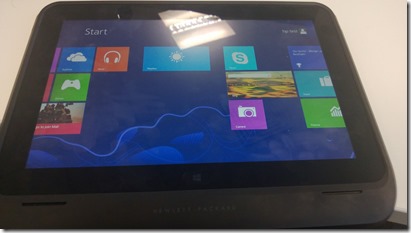
HP announced the Elitepad 900 a little while ago and it didn’t seem to create that much buzz, with me personally or the tech-sphere in general really. The only thing I knew about it was that it doesn’t meet the 1368×768 minimum resolution to enable the “snap” feature in Windows 8. I’ve been concentrating on the Samsung & Lenovo offerings and that’s where we’ve been seeing the customer interest too (the still elusive Surface Pro aside); but having played with one today my opinion has changed.

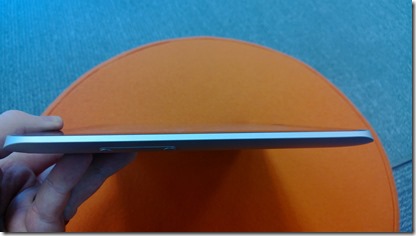
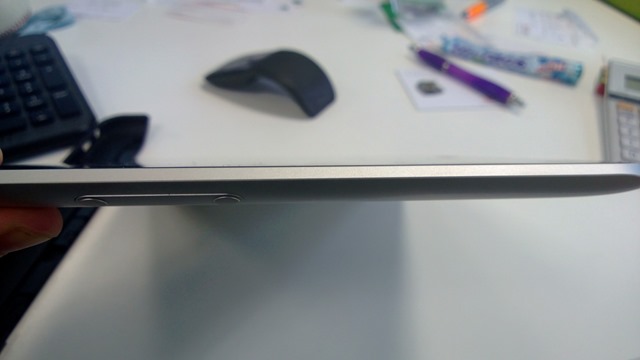
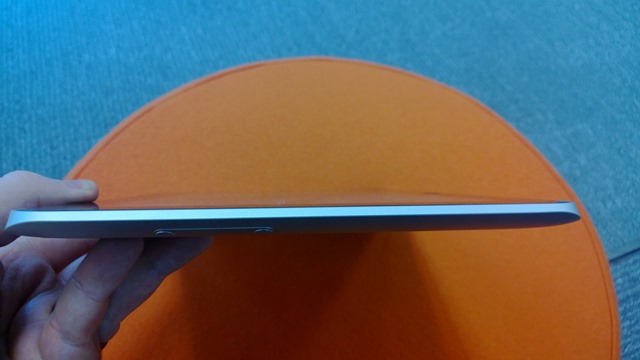
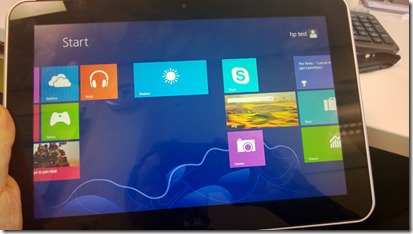
It looks good. It feels good. It’s sleek. It’s light.
WP_20130129_001   WP_20130129_007 WP_20130129_021

You’ll notice as you admire those images that it’s sleek edges are uninterrupted by ports, of any kind – this is certainly odd. The HP ElitePad 900 has available for it a range of “expansion jackets” – the one I had today was the “Expansion Jacket”:

WP_20130129_002

The above jacket comes in 2 parts & clips around the device to offer a good range of ports:

WP_20130129_005

  • 2 x USB 2.0
  • 1 x HDMI
  • 1 x HCSM/MMC card slot
  • 1 x Combo stereo/headphone port

It seems you can use the jacket as a form of easel for the tablet but that wasn’t apparent to me whilst handling it today.

That rectangle you see in the centre of the jacket (in the first picture) is an additional battery which adds around 80% to the battery life of the device – handy for long days away from chargers! It appears that the battery is not part of the jacket but rather an additional option (see this HP page here & the spec page here).
WP_20130129_003 

Even jacketed, the ElitePad 900 still looks quite stylish and is still easy to handle and hold. As this jacket contained the additional battery it did add a noticeable amount of extra weight, making the device too heavy to hold for any real length of time. The jacket on its own is 260g while the battery is another 190g, so a total of 450g added to a tablet that weights 680g (1.5lbs) – making a total of 1130g (2.49lbs).

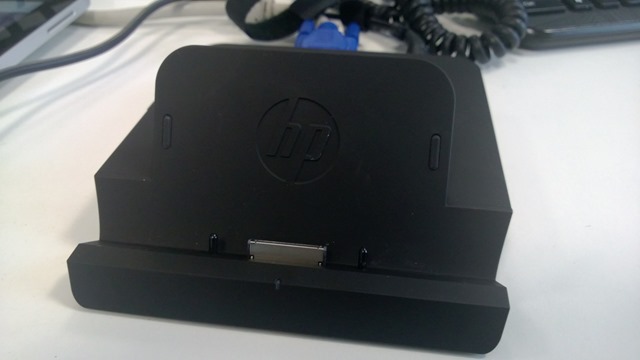
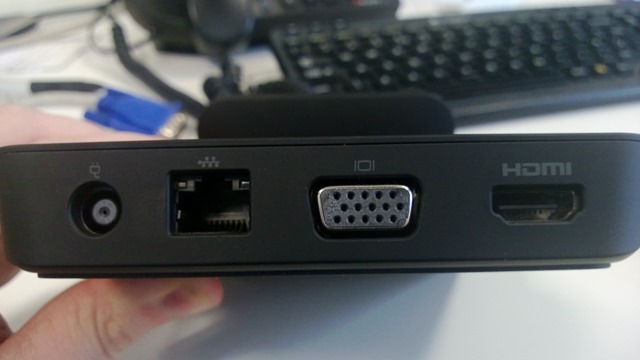
Another accessory available for this tablet is a comprehensive (and very well made/heavy at 1.48 lb) docking station, giving you those required ports when at desk.

 WP_20130129_016  WP_20130129_017 WP_20130129_018 WP_20130129_019 

You get:

  • 3 x USB 2.0
  • 1 x powered USB 2.0
  • 1 x Combo stereo/headphone jack
  • 1 x HDMI
  • 1 x VGA
  • 1 x RJ45
  • 1 x Smart AC Adapter

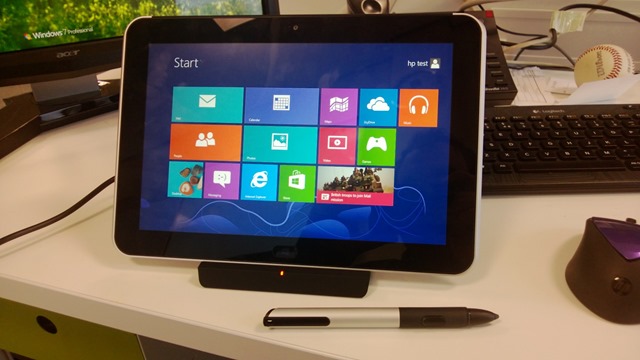
making it a very well connected device. You can dock it with or without the expansion jacket :

 WP_20130129_009 WP_20130129_013 WP_20130129_014 WP_20130129_015

but it seems i forgot to take pictures of it jacketed in the dock! You’ll notice the stylus pen in a couple of those pictures – this is also an additional option for the ElitePad, although sadly it wasn’t working on the unit I trialled. I find pen input on the Samsung 700t to be excellent and very useful so it’s good to see this as an option for business users.

I used the VGA port to connect the device to my monitor and use it as a second screen, which worked very well. Also, the snap feature is then available.

ElitePad 900 Specs

The spec of the device are reasonable:

  • Intel Atom Z2760 (1.5GHZ, “upto 1.8GHZ using Intel Burst & Hyper Threading)
  • 2GB RAM
  • 32GB or 64GB Flash storage
  • 10.1” 16:10* 1280 x 800 Gorilla Glass 2 screen
  • 2 x cameras (1080p front, 8MP w/LED rear)
  • 9.2mm thickness
  • Wireless 802.11 a/b/g/n
  • Bluetooth
  • HP hs2350 HSPA+ Mobile Broadband module w/GPS Support**
  • HP hs3120 HSPA+ Mobile Broadband*

*This gives users an extra 5% usable space over a 16:9 screen (according to HP)

**Not all models will have 3g capabilities.


Accessories and costs

The docking station is $149 (HP Site)

The expansion jacket is $99 (HP Site)

The expansion battery is $149 or $99, depending which page you look at (HP Site or HP Site)

The ElitePad case is $39 (HP Site)

There will also be a “Productivity Jacket” which gives:

  • integrated keyboard
  • “”several additional ports”
  • SD Card reader

and allows you to use the ElitePad like a clamshell notebook. I can’t find final specs or a price for this as yet. HP say it will be available “Spring 2013”, here’s a picture until then:

image

The pen is an additional item but I can’t see a price for that either.

The full range of accessories is:

  • • HP ElitePad Productivity Jacket
  • •HP ElitePad Expansion Jacket
  • • HP ElitePad Rugged Case
  • • HP ElitePad Case
  • • HP ElitePad Jacket Battery
  • • HP ElitePad Jacket and Battery
  • • HP ElitePad Docking Station
  • • HP Tablet Stand
  • • HP Executive Tablet Pen
  • • HP ElitePad USB Adapter
  • • HP ElitePad SD Card Reader
  • • HP ElitePad Serial Adapter
  • • HP ElitePad 10W A/C Adapter
  • • HP ElitePad HDMI & VGA Adapter
  • • HP ElitePad Ethernet Adapter
  • • HP ElitePad Smart A/C Cable
  • • HP Multi-Tablet Charging Module

The multi-tablet Charging Module will be very useful for companies looking to have a number of tablets as pool/loan devices. This will give an easy, tidy way of keeping them safe and charged.

Conclusion

My biggest issue is the  lack of connectivity ports without the jacket; I find it far from inconceivable that people will leave the jacket at home when they set off in the morning, in the hotel room when they checkout, on the adjacent seat on the train etc. etc. and then you’re stuck. Yes, you can have additional jackets dotted around but that is an extra cost and certainly not ideal. That said, it’s been pointed out to me (by the HP Category Manager) that it does ship with a USB adapter. This means even without the jacket/s users will still have a USB port through which to connect peripherals.

Not having the snap feature is mildly annoying but I feel one would quickly get used to not having that at your fingertips, so no biggie there. Interestingly, HP’s line on leaving out snap is this:

Snap doesn’t currently work with Outlook – or some other business applications – which are pretty vital for day-today
commercial use. Here’s the thing: The ElitePad supports the Windows 8 Snap feature when docked and
connected to an external monitor. So, it’s a consumer-centric function that isn’t yet optimized for a business tablet.

I do think the Atom processor and 2GB RAM could give some organization cause for concern as to whether this will be powerful enough as a laptop replacement. Having plentiful and quick access to trial units will be the best/only way to get past this in many instances – letting customers trial the device in real world settings and see how it fares.

All in all I’m very impressed with HP’s ElitePad 900. It’s clearly aimed at businesses and they’ve done a good job of providing everything they will need, making this a real contender for large scale enterprise rollouts and laptop replacement efforts. I’m very excited to talk to customers about this device and get their feedback – that’s always the key part!

Nokia Music+: Nokia comes to the desktop


Nokia Music is a brilliant app included with Lumia Windows Phone devices, free of charge (see all about that app here) – and now Nokia are taking it further with Music+. Not just enhancing the mobile experience but also extending it to the desktop.

What’s it all about?

Unlimited Skips – The limited ability to skip songs is one of my main issues with the free app, but Music+ changes that – allowing you to skip as many songs as needed. Although the song selections are usually great, it’s good to have full control.

Unlimited Downloads – The free app lets you download 4 “mixes” to listen to offline, Music+ takes away that limitation.

Higher Quality – The paid for Nokia Music+ app gives you 8 x the quality when downloading tracks.

Lyric Streaming – Helps you make sure you’ve got that catchy hook right before you break it out in the canteen at work.

On the Desktop – This could be the biggest attraction, and also the part that most competes with Microsoft’s Xbox Music – “A web-app gives you the ability to play Mixes on your computer, smart TV or other connected screens.”

These are all excellent additions to what is already a great offering so the big question is:

How Much?

$3.99/€399 so I assume £3.99 too.

This makes it half the price of the Xbox Music Pass…and I can’t see a reason one would go with Xbox over Music+ once this rolls out over the next few weeks?

See more on this here:

http://conversations.nokia.com/2013/01/27/more-from-your-music/

Nokia Music: A look inside


Nokia Music is a free app that comes bundled with Nokia Lumia Windows Phone devices, and offers a wide range of music and services. I can see this being enough to swing some people towards a Lumia over any other WP device, but I’m not sure enough people know about it – so here’s a little run down.

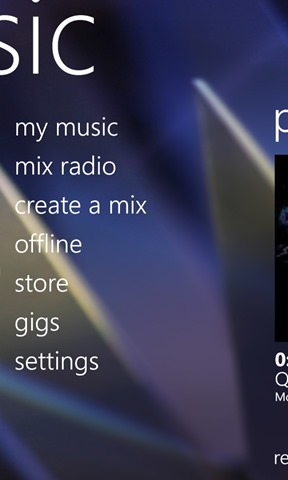
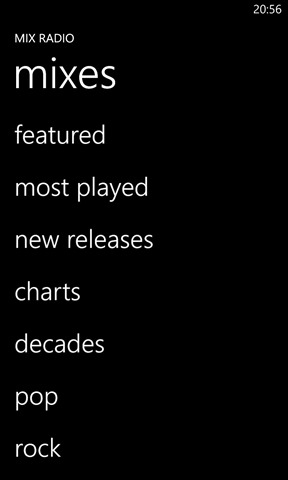
Nokia Music gives you access to 100’s of hours of music, for free, across a wide range of genres. When you enter the app, you see a “most recent” screen next to a screen listing the available sections:

Nokia Music 9Nokia Music 6

Scroll across and you come to “Mix Radio:

Nokia Music 4Nokia Music 10Nokia Music 8

where you can choose from pre-made song mixes based on a variety of genres. Quite the collection as you can see:

 Nokia Music 5Nokia Music 12 Nokia Music 13

You can easily create your own mixes. It asks you to input 3 artists and then builds a selection around those:

Nokia Music 3

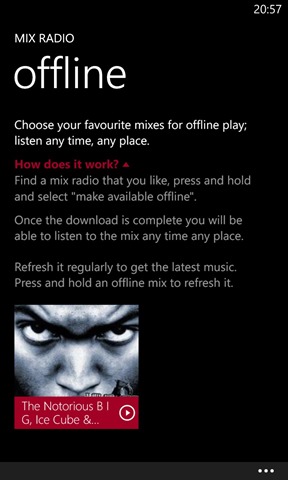
These can then be downloaded (up to a maximum of 4) so you can listen to them offline. This is a great and very handy feature, especially if your local music collection is limited and/or played out!

Nokia Music 1

Another neat feature is the ability to scan the music collection on you PC and build a music profile from that:

 Nokia Music 2  

Finally, the Nokia Music store allows you to purchase songs and albums to download and keep:

  Nokia Music 7  

I’ve been using it more and more over the last few weeks and I find it to be great. It’s brilliant for both discovering new songs and hearing those old songs you may have forgotten about. If you’re looking at Windows Phone but can’t decide which one, hopefully this helps gives you an idea of what’s available with Nokia Lumia devices.

Surface Pro: We have a release date


Microsoft’s Surface Pro tablet will be released to the world (sort of) on February 9th 2013.

image

I say sort of because that is the day MS stores (physical & virtual) will start to sell it, along with Best Buy & Staples in the US.

No word of other retailers in the UK and more importantly, no word on when/if it will be made available to the “Channel” – the network of distributors and resellers that makes up the vast majority of Microsoft’s partner ecosystem.

This to be is of utmost importance – we (my company and the channel in general) are seeing so much interest in this device that, if we are left unable to fulfil this for our customers, it will be perhaps the biggest run-in Microsoft has ever had with it’s partners.

We’ve had pricing for a little while now but still no answer as to channel availability…and I’ve been asking!

ZDNet’s Ed Bott has got more info on this, as well as news of new accessories here:

http://www.zdnet.com/microsofts-surface-with-windows-8-pro-to-go-on-sale-february-9-7000010107/

Install Office 365 on Mobile devices


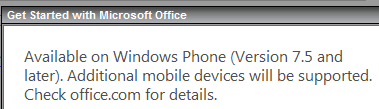
I meant to post this a while back, but clearly didn’t get the chance. It’s interesting to note that the Office 365 Home Premium subscription allows users to install Office on “select mobile devices” as well as the ability to install on 5 PCs or Macs.

image

image

I take it this refers to the expected Office for iPad and Office for Android editions that will be here soon. It’s good to see that these non-MS platforms will be included within the standard device total of the subscription, rather than incurring extra cost for home users who also have these devices.

A problem with the Windows 8 ecosystem AKA All I want is a dock


Microsoft Windows 8 has many great things about it, and some things that could be better. It has as many naysayers as it does great features and, as you probably know, I’m certainly not one of them. I’m a fan of it’s new tile interface (matches my Lumia 920 very well), it’s new sync features, it’s inclusion of an “app store” and more…but I do have an issue with it, and that is is the ecosystem.

This is an area that Microsoft can’t directly control, however I feel they must surely be able to take action to improve the situation. The situation is this:

I’ve got a Samsung Ativ Tab, the Windows RT device released a couple of months ago. It’s a great device: it’s sexy, it’s light, it’s quick, it’s got Office – I’m a big fan. I love using it in it’s tablet form but the other week I noticed the dock connector on the bottom of the tablet and thought about all the extra things I could do with a keyboard attachment too.

Samsung Ativ Tab Connector Here’s the dock.

I got into work and emailed one of our distributor partners to find out how much the dock would be, it’s availability etc. – and this is there the story starts.

The reply was quick to come back that I would need AA-RD8NMKD/UK, but that’s listed as being for the “Windows 8 Pro versions only” so no dice. I pointed this out and waited for the correct part code to come back. I chased up a few hours later to be told that there isn’t a dock available because “the RT version comes with the keyboard” – which isn’t correct.

I also asked our Samsung account manager who came back with the part code for a generic bluetooth keyboard!

I’m now at a loss as to whether this dock even exists and if it does, how on earth one is supposed to buy it. This kind of thing is surely going to put consumers off moving to one of these devices – if someone with direct access to distributors and even the manufacturer can’t get a straight answer, how is someone’s mum/auntie/dad/niece/brother going to fare in PC World?! There will either be so much confusion they just decide not to bother OR they’re sold the wrong item, causing them inconvenience and giving a better experience of Windows 8. (In this scenario, it’s doesn’t matter if it’s RT or 8, Samsung or Microsoft – it will be seen as the fault of Microsoft and Windows 8).

I’m confused as to why the item I was originally given is listed as “only for Windows 8 Pro devices” – what’s the difference? A hardware manufacturer surely isn’t going to incur the extra cost of changing the manufacturing process for two such similar devices? I can’t see that it’s an OS level issue either?

After much searching I’ve managed to find comparable pictures of the 2 devices:

Ativ Tab

image

Ativ Smart PC

image

The top device there is clearly designed to have the ability to dock – so why can’t I find one anywhere?! Is it that they share the same dock? Is the Ativ Tab add-on simply not released yet? So many questions!

A “regular” consumer would have given up on this about a week ago and at best decided to get a different Windows tablet (be that RT or Pro) or, at worst, gone and bought an iPad.

If anyone reading this can shed some light, that’d be great 🙂

Windows RT tablets, Reviews & iPads


I had a Twitter conversation with a couple of bloggers from ZDNet today and don’t feel that it was resolved. I don’t know if I’m wrong, if they didn’t understand my point, if they just wanted me to leave them alone or a bit of all three…but here’s the gist.

Matt Baxter-Reynolds (@mbrit) posted a review of the Lenovo Yoga 11 (see it here) which included the following:

“It can’t be a tablet because it weighs too much. It comes in at 1190g (2.6lbs). (For comparison, an iPad mini with silicon case weighs 376g — meaning a stack of about three of them weigh the same as the Yoga”

Now I don’t see how this is a true/fair comparison. The Yoga is almost 50% bigger than an iPad mini (11” vs 7.9”) AND includes a keyboard. I find it very doubtful that any consumer will be tossing up between these 2 devices…one is a small tablet and the other is a small laptop that converts to a tablet form factor. This was the first point I made on Twitter…it feels like the iPad comparison has been thrown in there more to further the “ipads are better than Windows tablets” cause – even when they’re apples and oranges. (No pun intended).

The conversation then moved onto the fact that the Yoga is, at 2.8lbs, too heavy to be a tablet. Now that I agree with…if you’re looking at it being used as a tablet 100% of the time. However I don’t think people will be using it like that. If you want a Windows RT tablet, that will be a tablet ALL the time, there are plenty of other choices…get a Surface or a Samung Ativ Tab; these give you the same OS in a much lighter package.

The most common usage scenario I see for the Yoga (and other convertible devices of this ilk) is 80/20 – a laptop 80% of the time and then being converted to a tablet ~in certain scenarios ~ when required. Thus users get all the benefits of having a full keyboard (a big reason for the extra weight) when working in Office etc with the flexibility to switch it up when needed.


image 

image

I made the point that there ARE cases where it’s ability to transform is useful without it’s weight being an issue – these are primarily desk based scenarios. James Kendrick at this point said:

image

Now this I don’t agree with at all. You’re in a meeting with a colleague or two and you want to review some documents on your device…is it only me who would prefer to do that in tablet mode, echoing the more natural feeling “looking at paper documents”, rather than all 3 people huddling round a laptop screen?

You’re in a larger meeting, say 8 people around the boardroom table, and have PowerPoint slide you’d like everyone to take a look at. It’s going to me MUCH easier to flip your Yoga into tablet mode and pass that around than a full on laptop.

I think it’s quite widely felt that, in a meeting setting, the screen of a laptop makes an effective barrier between the people involved. Again, flipping your Yoga into tablet mode allows you to negate that, hopefully making everyone feel more comfortable and keeping them engaged etc., and the weight won’t matter because you’re not carrying it.

The feeling that a tablet is only of use if you’re carrying it is, in my opinion, missing part of the picture.

My initial point was that comparing the Yoga to the iPad Mini is not a true comparison, perhaps a little disingenuous and done to tap into that Apple vs Microsoft battle so often prevalent with tablets – even though it’s not really part of the discussion. I re-iterated that point, to which James Kendrick replied:

image

Which doesn’t really make any sense! The above is not the same as comparing an 11” convertible laptop with keyboard to a 7.9” tablet without a keyboard.

I’m keen to understand if it’s just me who sees it like this or if there’s anyone out there that agrees with me, so I welcome your feedback!

Windows RT has been Jailbroken


Here’s quite an interesting development for a Monday morning….Windows RT, Microsoft’s new tablet OS, is no longer restricted to just apps obtained through the Windows Store.

It is now possible to run unsigned ARM-compiled apps on the Windows RT desktop, using  an exploit in memory to make in possible to run desktop based apps, other than Office 2013 & IE 10. It seems that as it’s an in memoery exploit, it won’t persist – meaning it will have to be “re-cracked” each time the device is turned on. This may well mean it finds little favour with users but is, if nothing else, a big step forward in this arena.

This opens up the possibility of a homebrew market for Windows RT, enabling developers to create apps without going through the costs and processes associated with the official Windows Store route.

That said, I’ve been told on Twitter that it’s only £35 a year for personal Windows Store registration (which comes with free development tools) and isn’t a particularly arduous process to get an app accepted by Microsoft (thanks @CraigHawker); which doesn’t really seem like it will be preventing many developers from getting started on Windows RT app creation.

The other potential outcome is that it will lead to app piracy, enabling people to install apps that they haven’t paid for.

Thanks to The Verge for finding this.

Merry Xmas to all Software Ruminators!


2012 is the 5th year I’ve been blogging and it keeps getting better – at least for me! I really enjoy writing these posts and helping bring some clarity to the often confusing world of Microsoft licensing – I hope you all enjoy reading them…or at least find them useful 🙂

Some choice stats:


I’d also like to give a shout out to the excellent Mary Jo Foley of ZDNet for the great conversation at WPC and also the blog links and retweets throughout the year – most appreciated, thank you very much! 🙂

Microsoft have given me a lot of things to blog about in 2012 and hopefully 2013 will be the same. Thank you to everyone who has visited this blog, tweeted a link, shared it in LinkedIn, shared it on Facebook etc – it’s hugely appreciated 🙂

See you next year.

Cheers

Rich