Microsoft are changing the Office 365 update models again!
1) They’re introducing the “Monthly Enterprise Channel” – for orgs who want new features each month but with “added predictability, insights and control”…although the insight and control elements won’t be available until later in the year.
This was available as of May 12th, 2020.
2) June 9th sees name changes for the update channels (old name –> new name):
Insider –> Beta Channel
Monthly Channel (Targeted) –> Current Channel (Preview)
3) June 9th will also see the default update model for Microsoft 365 Apps for Enterprise (aka Office 365 ProPlus) on NEW tenants switch to Current Channel, rather than Semi-Annual Enterprise Channel. Existing tenants won’t change.
Microsoft have been big on driving the “low code/no code” movement through their Power Automate and Power Apps products for a while now. They coined (or at least popularised) the term “Citizen Developer” for people who aren’t “traditional” developers but are creating their own applications with these new tools and there is a growing community too.
April saw the introduction of new RPA (Robotic Process Automation) licensing for Microsoft 365 and Power Automate – which I looked at here. Now, Microsoft have announced the acquisition of Softomotive to boost the capabilities of Power Automate via their WinAutomation offering – which, if you have a Power Automate RPA attended license, is available at no extra cost.
RPA is definitely an area of increasing importance, driven by the impact of COVID-19 to a large degree, and certainly represents a big focus and growth area for Microsoft and its partners. It is also a whole new area for licensing confusion and disagreements so whatever your role, pay attention to the robots! 🤖
A new Office 365 license for “Premium Messaging” which requires F1/F3/E3/E5 as a pre-requisite. Can’t currently see any other info about this but I’ll keep looking!
Retirement of Windows Thin PC as an SA benefit.
Removal of text around converting Training Vouchers into Planning Services days.
Clarification around SQL + containers.
Clarification around From SA licenses.
Updates to reflect the various Office/Microsoft 365 related name changes.
With the SQL clarification, nothing has changed so I wonder if this “clarification” is Microsoft’s way of giving everyone a reminder of the rules before they start to enforce them in compliance checks and audits?
This month’s Product Terms has got a few cool additions – one in particular!
Microsoft Defender Advanced Threat Protection for Servers
This was previously only available via an Azure Security Center subscription but can now be obtained via EA/EAS and CSP. It covers Windows Server 2008 R2/2012R2/2016/2019.
In order to purchase MDATP for Servers, organisations must have a combined minimum of 50 licenses of:
Microsoft Defender ATP
Windows E5/A5
Microsoft 365 E5/A5
Microsoft 365 E5 Security
Interestingly, if ATP for Servers customers decide to migrate to using Azure Security Center (ASC) on those same servers, active ATP for Server licenses will be credited against the ASC price.
New Microsoft 365 SKUs
April 2020 sees the introduction of:
E5 eDiscovery & Audit
E5 Information Protection & Governance
E5 Insider Risk management
Prerequisites
For eDiscovery & Audit and Insider Risk Management, the license prerequisites are:
Microsoft 365 (any)
Office 365 (any)
Exchange Online
SharePoint Online
OneDrive for Business
For Information Protection & Governance, the prerequisite licenses are:
Microsoft 365 (any)
Office 365 (any)
Exchange Online
SharePoint Online
OneDrive for Business
Azure Information Protection
EMS E3/A3
Office / Microsoft 365 F1 & F3
Microsoft have renamed the old F1 licenses to F3, and introduced a new F1 SKU to sit underneath, with limited capabilities as it only includes EMS E3 and “limited” Office services. The F1 license is pretty much just Teams really – no email, no Onedrive etc.
Microsoft licensing for Robotic Process Automation (RPA)
I’ve saved the best ’til last here – in my opinion at least! RPA is a growing area of business – the idea of using bots, rather than humans, to perform repetitive tasks to increase efficiency and, when used properly, job satisfaction. However, it’s also a licensing minefield – and Microsoft have been very quiet on this subject…until now! Well, actually, they’re still being quiet because these new additions were just slipped into the April Product Terms without any other mention – it strikes me as odd because these new licenses could herald a pretty significant change.
What have they added?
The Product Terms now contains:
Microsoft 365 E3/A3 – Unattended license
Power Automate per user with attended RPA plan
Power Automate unattended RPA add-on
There’s not a huge amount of extra info in the Product Terms but it does say that the E3/A3 unattended license includes Office 365 E3/A3, Windows 10 E3/A3, and EMS E3/A3 – no mention of them being restricted or limited at all.
Some definitions
The OST (Online Service Terms) gives more information. Microsoft’s definition of RPA is:
“An application (or set of applications) used to capture data and manipulate applications to perform repetitive tasks. Bots operate upon any UI element of Windows 10 within an OSE and/or operates upon any Office application in any OSE.”
Attended bot = This is a bot that “assists a person to execute automation on the person’s local and/or remote workstations.” They go on to say that “it operates concurrently with the person on the same workstation/s to accomplish repetitive tasks and is triggered by explicit actions of that person“.
In this scenario, it sounds like you would assign a regular M365 license to both the user and the bot?
Unattended bot = “Any bot that doesn’t strictly conform to the definition of an attended bot“.
The Power Automate unattended RPA add-on can be added onto the Power Automate per user with attended RPA plan and Power Automate per flow plan.
There have been reports recently that some users in certain regions were hitting capacity limits in Microsoft Azure when trying to create new resources. Microsoft have shared some information around the impact the coronavirus epidemic is having on their cloud infrastructure:
775% increase in cloud services (in regions performing lockdown)
Teams up to 44 million daily users, running over 900 million minutes of meetings and calls each day
Windows Virtual Desktop (WVD) usage increased 3x
42% increase in government use of Power BI for sharing COVID-19 dashboards
Some of these numbers are pretty mind-blowing and one can see how they might catch a cloud vendor by surprise.
Cloud Datacentre provisioning
Microsoft say they will be adding “significant new capacity” over the coming weeks to help support this increased use.
Something I’m sure Microsoft have considered is how much of this extra usage will continue?. What happens as things start to return to normal and some of this usage starts to drop off? They’ll be left with more unused capacity than their models anticipated – might this lead to them raising prices on certain Azure services in the future?
Prioritising certain services
Microsoft have detailed that they’re focusing the “highest level of monitoring” on services related to emergency services, medical supply management, healthbots, and more.
They have also introduced some temporary restrictions to help ease the load – free offers are being limited, to keep capacity available for “existing customers”, and certain resources are being “soft” limited for new subscriptions. Customers can raise support tickets to raise these soft limits, but Microsoft do say that other geographical regions may need to be used to help manage demand.
Teams changes
Microsoft have made a number of small changes to Teams in an effort to reduce bandwidth. They scaled back how often it checks for people’s “presence” (whether they’re online or not), reduced the video resolution, limited how quickly it shows if the other user is typing, and made OneNote within Teams read-only for non-education tenants. All small changes that won’t really impact users but, collectively, must make quite a difference to the bandwidth being used.
A pretty quiet March from Microsoft again – the main changes being:
VDA add-on for M365 E3/E5 added
Updated Windows 10 use rights for Microsoft 365 F1*. It can now use prior versions, access VDI, and use KMS activation.
Number of O365 licenses required for Multi-Geo Capabilities reduced from 500 to 250.
*It was called Microsoft F1 at the time but they have subsequently announced this product will be renamed to Microsoft 365 F3, and a new F1 will be introduced as well.
Microsoft have finally announced per-device licensing of Office 365 Pro Plus* for commercial organisations – following its introduction to the education EES agreement last year. Coming, like a Hollywood blockbuster, in “summer 2020” – this is something that some organisations have been waiting on for a LONG time – particularly in verticals such as retail and manufacturing.
How to use it
As ever, there are conditions to its availability:
Only available as an add-on license
Only available via EA/EAS
Device must be Windows 10 – version 1803 or later
Office Pro Plus must be version 1907 or later
Device must be Azure Active Directory (AD) or hybrid AD joined
and there are various steps that need to be taken to enable it, including group policy changes.
I’ve long said that Microsoft would do this one day as a big portion of their customers wanted it and a sizeable chunk of potential cloud business was being blocked. If you’re a Microsoft customer who’s been holding out on moving to the cloud, expect a call from your friendly neighbourhood partner soon 😊
Microsoft have been on a cloud push for 12 years now, since the launch of BPOS in 2008. They’ve been slowly “turning the ship” in various ways over the last decade, with the ultimate aim that as much of Microsoft is pointing at the cloud as possible. This is also a case of “trickle down (cloud) economics” – Microsoft are making their new direction reflect as much as possible within their partner base…and that change will then happen within Microsoft’s customers too.
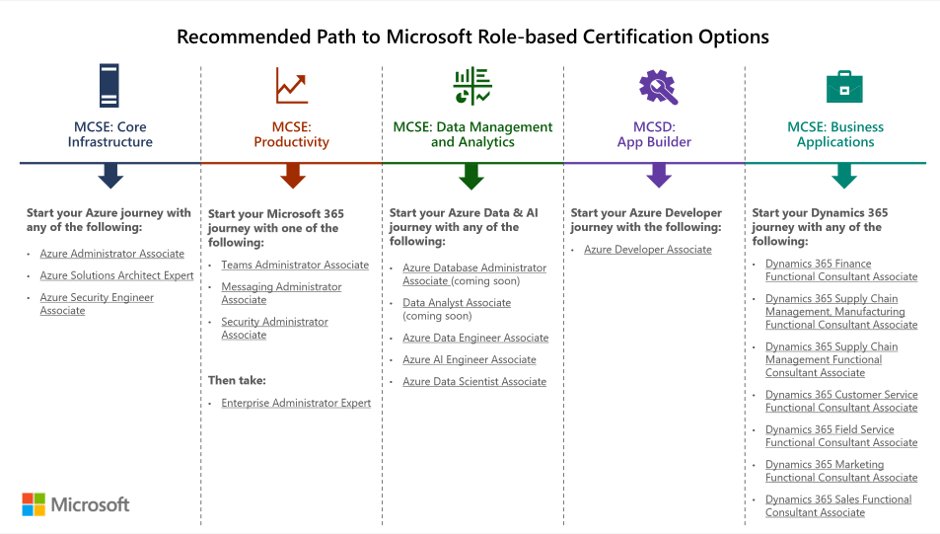
Microsoft have made various changes to partner incentives, changed a few Software Assurance benefits related to training resources, and changed the Home Use Program – all aimed to drive cloud awareness in different ways. Their latest move is to retire all their on-premises server certification paths and exams related to the MCSA, MCSD, and MCSE qualifications that have been a staple of the Microsoft server world for years. The retirement date is June 30, 2020.
As you can see in this image from Microsoft, the recommended paths are now all cloud focused:
While not surprising given the focus on cloud, not just from Microsoft but across the industry, I do wonder if this is a little short sighted? There are still a LOT of on-premises servers in use and, with hybrid cloud being the de-facto way forward for most organisations, they will remain for a long time to come. Rightly or wrongly, this feels like Microsoft saying that they don’t care about on-premises anymore. I’ve seen MS people saying they’re still hiring lots of on-premises server engineers etc. and that may be the case, but this announcement will definitely be taken as a sign of their overall focus.
I’m often asked if Microsoft will continue to make on-premises versions of their software and, following this announcement, I can’t help but wonder if I need to rethink my answer…










 Cloudy with a chance of Licensing