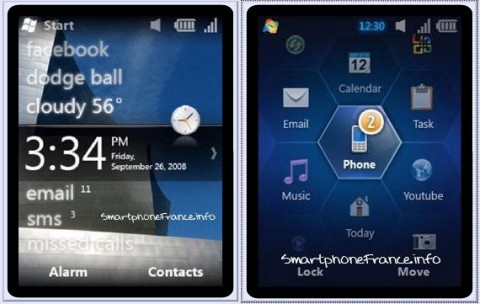
Windows Mobile 6.5 Launch


MS have confirmed that the offical launch date for Windows Mobile 6.5 is May 11th 2009, which is the first day fo this year’s TechEd event.

The Windows Mobile blog says:

“Stephanie Ferguson, GM (General Manager) of Business Experiences at Microsoft’s Mobile Communications Business is going to deliver the kick off launch presentation of Windows Mobile 6.5 on Monday, May 11th at 1:00PM – 2:15PM. This Tech Ed 2009 session focuses on one of the biggest launches in the history of Windows Mobile – Windows Mobile 6.5. It is targeted at both IT Professionals and Developers, with a cool demo and an outline of great stuff to come.”

winmo65_2winmo

It will still be a number of months until we see any WinMo 6.5 devices but TechEd will give us a chance to see even more about the features of the new mobile OS and more things to look forward to!

*Update* Microsoft Windows Mobile 6.5 phones will start being released on October 6th 2009 🙂

Exchange 2010 Public Beta Released


Microsoft today (15/04/09) made the beta of Exchange 2010 available to the public-this can be downloaded here:

Get Exchange 2010 Beta

There are numerous new features in the latest incarnation of the world’s most popular email platform (I think that’s a safe statement to make?!) including:

·         OWA (Outlook Web Access) support for Internet Explorer (IE) 7 and 8, Firefox 3, and Safari 3.


·         MailTips. Are you about to accidentally send a personal e-mail to the whole company? A a time-sensitive e-mail to someone who is on maternity leave for six months? A 30MB attachment to people who have 20MB attachment size limits on their mailboxes? MailTips tells you before you send the message.


·         Conversation view. Have the arrangements for a company party Friday night cluttered up your mailbox to the point where you can’t find the approval e-mail for the urgent customer visit that you need to book today? Switch to conversation view, and collapse those 50 party discussions into one expandable node.


·         Calendar sharing extended to OWA


·         Automatically transcribed text-based preview of voice mail messages

·         Federation – Trust Exchange servers of partner organizations, share calendars, presence. You can schedule meetings with your business partners as easily as you can schedule meetings within the company.

·         Mailboxes can be moved during normal business hours with user online!

      ·      The Exchange 2010 version of OWA will have full parity with Outlook 2010 by the time they both ship; & the Windows Mobile client will come close.

One thing that might surprise some and will probably cause issues for others is that Exchange 2010 will require Windows Server 2008 minimum-so NO Windows Server 2003 support. I’m sure this won’t sit well with everyone but Windows Server 2008 is such a great product, and a huge leap forward from Server 2003, that I’m sure it will only benefit people to adopt it.

I’ve just seen a tweet from @Pbarone that Exchange 2010 will have a “mute” button which will allow you to remove yourself from email threads…that is seriously cool! At least a couple of times a week I find myself caught up in a “reply all/forward” whirlwind where I’m one of say, 6 people that all receive an email and then each of then “reply all” and then that receives multiple replies and so on. It’s very rare that I actually need to see these responses but once one person hits “reply all”, it seems to be the custom for everyone else involved to follow suit…and it can be really annoying so this mute button is a great new feature!

Outlook Thread Compressor


Geek in Disguise Steve Clayton has posted about a great utility, Ewan Dalton’s Outlook Thread Compressor.

“it’s an add-in to Outlook which removes unnecessary emails, on the assumption that most people reply to mail and leave the original intact, so you could keep the last mail in each branch of a thread, and remove all the others.”

I’d just like to re-iterate Ewan’s disclaimer:

“Let me say that again: Thread Compressor, as it is configured by default, WILL DELETE DATA FROM YOUR INBOX.

If you choose to download it and use it from here, you do it with the author’s blessing, but it’s completely at your own risk and Microsoft cannot be held responsible for what it does.”
tc4

Head over to http://threadcompressor.co.uk/default.aspx for more info and to download this great tool.

Azurelight


Microsoft Architect Aleksey Savateyev is building a basic product support app…that is based in the cloud and is to be called “Azurelight”. It will collect feedback about products and allow users to exchange opinions on the products too. “It’s also intended to be used by developers as a reference application utilizing both Windows Azure and Silverlight for rich yet scalable and highly available business solutions…” as described by Savateyev himself.

Mary Jo Foleyreports that as well as utilizing Azure & Silverlight (as it’s name suggests) Azurelight will also use Microsoft’s ADO.NET Entity Framework, ADO.NET Data Services (aka Astoria) and SQL Data Services.

azurelight

Once it’s all up and running “sometime in the summer” of 2009 (via MSDN it seems) this should be a great example of what Microsoft’s technologies, both cloud and programming, can do 🙂

I’m excited about this program and as the source code will be released Free of Charge, I hope I’ll be able to make full use of Azurelight!

Sharepoint Online & Groove


This week I ‘ave been mostly…using Groove.

Groove has been the one bit of MS technology that I’ve never taken a look at before and I’ve always thought it was a bit pointless…but not anymore! Now I think it’s awesome and perhaps the best product they’ve got, alongside Sharepoint. I’ve had it installed for years as part of Office ’07 but I have literally never opened it up until this week. The thing that prompted me was this post here over on Dutch Technet about using it with Sharepoint Online and as MS Online is my big thing-I figured it was worth investigating.

Groove is essentially a collaboration tool that let’s you create “workspaces” and then invite co-workers and/or external people to join; you can then share and edit files, chat via IM, track issues, play chess (!) and more-all with a minimum amount of effort. As an example, I’ve created a MS Online/BPOS workspace and have invited the various people involved @ MS-this way we can share info, ask questions and keep updated much easier than simply via email.

The Technet post revealed to me that you can link Groove to Sharepoint and thus share files from your site collections without the hassle/cost of giving users direct access to Sharepoint…even better, you can do this with Sharepoint Online too!

Internet Explorer 8.1 is an April Fool


Internet Explorer 8.1 AKA “Eagle Eyes” has been all over the net this afternoon, sitting on the Front Page of Digg and Techmeme…but it’s an April Fool’s joke-at least according to Mary Jo.

It did perhaps sound too good…faster Javascript and better Acid 3 testing and, best of all, support for Firefox extensions. Would MS really have released IE8 without these features if they were so close at hand? Apparently not…

I thought it was against the rules to do the pranks early so I think that means the joke is on you Jacob Gube (technically) Good skills though 🙂

Windows 7 Release Candidate


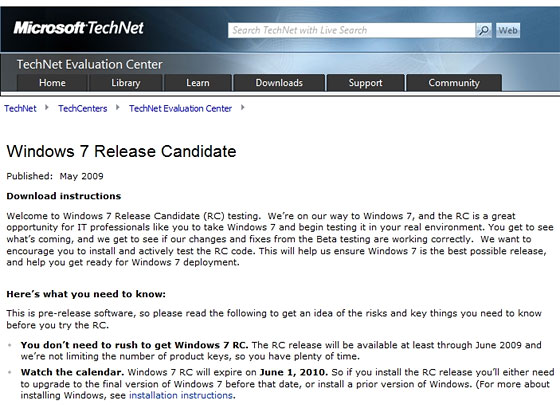
Thanks to some eagle eyed spotting by Ars Technica, we now know that the Windows 7 Release Candidate (RC) is slated for a May 2009 release-(that’s only 5 weeks away!) and will run through until June 2010.

Both 32-bit and 64-bit versions will be available in English, French, German, Japanese, and Spanish. The hardware requirements remain unchanged:

  • 1 GHz 32-bit or 64-bit processor or higher
  • 1 GB of system memory or more
  • 16 GB of available disk space
  • Support for DirectX 9 graphics with 128 MB memory (to enable the Aero theme)
  • DVD-R/W Drive

rcleakdate2

I think this will see another wave of people moving into the world of Windows 7, there are a few people at work who’ve been too scared/cautious to install the beta but can’t wait to get hold of the RC 🙂

Samsung say Windows 7 beats Linux


I just saw over on Endgadget that Samsung’s European Product Manager Patrick Pavel has said he expects Windows 7 to spell the end for Linux on Netbooks 🙂

That’s yet another great compliment for Windows 7-and it’s not even finished yet!

He also said that, depending on licence fees, Samsung would like to include some of the higher end versions of Windows 7 on their netbooks…that would excellent!

No need to wait for Windows 7 SP1


Gartner have said something that I suspect many thought they’d never hear in these post-Vista years…there is no need to wait for Windows 7 SP1 before you get it installed or to quote:

The first Service Pack for Windows 7 is not necessary for the operating system’s stability and security readiness…”

How awesome is that?! Windows 7 is not even at Release Candidate stage and it’s already super stable!

This is yet another example of how different Windows 7 is to Vista and really helps to show the vast improvements Microsoft have made.

Are you looking to deploy Windows 7 in your corporate environment before SP1?

Outlook/Sharepoint Problem


I had a funny little issue with my PC at work that took me a fair while to figure out today. I’d set up a new Site Collection in Sharepoint and connected it to Outlook (something that I’d never done before) and it was excellent…I could see all the different documents (Excel sheets, Word docs etc) in Outlook just as I could in the portal…nice 🙂

However after a while I noticed that Outlook was taking it’s time to send mails etc and then when I tried to swap to another application-it all went wrong! Apps started “not responding”, hanging, the works…a quick CTRL+SHIFT+ESC and Task Manager showed OUTLOOK.EXE on 99%…WTF!!! I killed the process tree and restarted Outlook but to no avail…I rebooted my  machine too but it was useless; my processor was maxed out.

I started turning off add-ins in the Trust Center and then noticed 3 search/index related processes in Task Manager so I killed those and disabled indexing of the Sharepoint list I’d created. This was bound to work so I closed and re-opened Outlook and it was on 37%…not brilliant but better, then all of a sudden BOOM-99% again…holy maxed out processor Batman!

After having a look online I became pretty sure that it was related to .PST files but I was equally sure that I didn’t have a .PST file so that left me in something of a conundrum! However I went off to have a look anyway in:

C:\Documents and Settings\<Username>\Local Settings\Application Data\Microsoft\Outlook\<PST File name>

and what I found was interesting. While there was no Outlook .PST there WAS a Sharepoint List .PST…I deleted that and lo and behold, Outlook started behaving again (I also deleted the list from Outlook).

While I was happy to sort the problem out and be able to use my PC properly again, I am sad that I seemingly can’t have Sharepoint lists in Outlook 😦 Perhaps if I’d left it for a while the indexing would have finished and calmed the processor down but I just don’t have time for that…if anyone’s got any ideas please let me know!