At their Inspire partner conference in July 2019, Microsoft announced a raft of licensing changes to Dynamics 365, PowerApps, and Power Automate (then Flow). Among the licensing rules covered in the sessions was a note that the PowerApps “Per App” option had a minimum license requirement of 30 licenses.
I noticed while perusing the subsequently published licensing guides that this minimum requirement wasn’t mentioned anywhere – which seems odd. Was it a change or an oversight I wondered aloud, and online? The PowerApps twitter account picked up my tweet and cam back to me with an answer very quickly:
Nothing major but a couple of interesting SQL Server bits:
1) A clause that, if you’re using SQL in Azure via Azure Hybrid Rights or DR rights, you must indicate it in the portal/API.
2) If you acquire SQL 2017 from an OEM before March 31, 2020 – you can add Software Assurance within 90 days of purchase.
That first addition feels audit related doesn’t it? While it makes sense that organisations indicate where they’re using their licenses and which Software Assurance benefits they’re using etc. – it definitely feels like Microsoft are getting things lined up for the next generation of license compliance audits which will look at cloud environments too.
Also, slightly interestingly, the Online Service Terms (OST) won’t be published until January 8th. Whether this is because people are still on holiday or due to a major change being announced – we’ll have to wait and see! 😊
Microsoft have announced that they’re retiring two Dynamics 365 apps, Talent Attract and Talent Onboard, with the LinkedIn Talent Hub being the preferred replacement.
The retirement date is February 1, 2022 and “eligible” customers can continue using the services until that date or the end of their most recent contract or renewal – whichever comes first. If you’re not currently using these apps but have a plan to do so – and still want to continue now Microsoft have announced they’re being phased out and no new capabilities will be added – there is an opt-in process to enable eligibility. You can raise a support ticket to become eligible to access the services until 2022 – that process must be completed by January 31, 2020.
Microsoft are rebranding their “core HR capabilities” from “Dynamics 365 Talent” to “Dynamics 365 Human Resources”, with current customers being transitioned to the new service automatically. This is all further change and flux within the Dynamics 365 family – it will be interesting to see if it calms down through 2020 at all.
Microsoft Defender Advanced Threat Protection (MDATP) for “cross-platform devices”. Available only via the EA/EAS volume licensing programmes, this allows MDATP to be run on up to 5 non-Windows devices concurrently.
Power Virtual Agents are added, with no extra info. These aim to enable anyone to create AI-powered chat bots and look to be a new member of the Power Platform:
There are a couple of lines added covering the recently announced Intune access for SCCM users. This confirms SA is required on the existing licenses but, perhaps a little confusingly, doesn’t mention the “Microsoft Endpoint Manager” name at all.
Microsoft are making changes to the “Project experience” to make it easier to use. They say this new Project is “designed to be both simple and powerful, so anyone can get started quickly and take control of any project right away”, with a more intuitive user interface – certainly something Project could do with in my opinion! Not surprisingly, there’s a fair amount of integration with Teams and Power BI.
As part of this, there are new/changed product names too. Project Online Professional is now Project Plan 3, while Project Online Premium is Project Plan 5. Added to the lineup is Project Plan 1 – an entry level SKU which doesn’t include many of the features nor a desktop client. It’ll be interesting to see what, if anything, Plan 1 means for the future of Planner.
Microsoft have announced that they’re retiring 2 of their SMB focused products included in certain Office 365 flavours: Microsoft Invoicing and Microsoft Customer Manager. They’ve not indicated why but one would assume it’s due to a lack of customer interest.
According to a statement given to Mary Jo Foley of ZDnet, Microsoft have been offering affected customers special deals with “Invoice2Go” and “Nimble” to help them transition to their replacement services.
The release of SQL Server 2019 sees the introduction of Big Data Nodes. This new family member aims to help organisations create data lakes, combining big data tools such as Hadoop with SQL Server – all supported by Microsoft.
To run a Big Data Node cluster, you first require a SQL Server Master Instance. This must be running SQL Server 2019 – Standard or Enterprise – with SA and licensed via the per core model.
The licenses on the Master Instance give an entitlement to a certain number of Big Data Node core licenses. For Standard edition it’s a 1:1 ratio, while for Enterprise it’s 1:8 – as an example, a server with 32 cores of SQL Server 2019 Standard w/SA would give rights to 32 cores of Big Data Node, while the same server licensed with Enterprise edition would allow 256 Big Data Node cores. Additional Big Data Node cores can be purchased separately.
The big data nodes can also be deployed in Azure using the Azure Kubernetes Service (AKS).
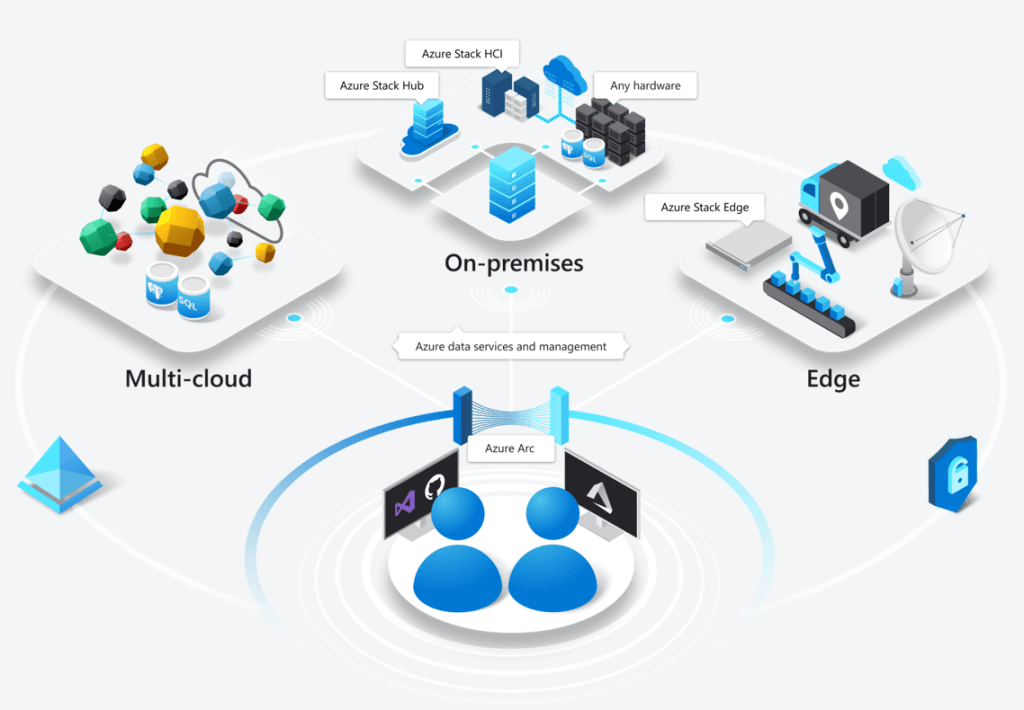
Microsoft Arc has been announced at Microsoft Ignite and it looks like it could be quite the game changer. Microsoft say that it “enables deployment of Azure services anywhere and extends Azure management to any infrastructure” across “across on-premises, edge and multicloud”.
The concept is pretty clever – it will allow certain Azure services to run in a variety of places, including on-premises hardware – both Azure Stack and seemingly regular customer hardware – but also other clouds like Amazon AWS and Google Cloud Platform!
Multi-cloud is the concept of an organisation having multiple public clouds (Azure, AWS, GCP etc.) in use at the same time and, while many say it isn’t necessary – and even more say it isn’t a good idea – it’s already reality for many companies around the world. That being the case, anything to help make it easier and more secure to manage is a positive for customers…but I’m really intrigued to see what Amazon and Google make of this! What measures will they put in place to prevent or discourage customers from using Azure Arc within their datacentres?
Microsoft are talking about “Azure data services anywhere”, which looks to be based on a Kubernetes container platform. Some of the benefits Microsoft tout include:
Unified Management
Consistent cloud billing model
Consistent governance
Unique security tools like Azure Threat Protection
Currently Azure SQL Database and Azure Database for PostgreSQL Hyperscale are available for private preview on Azure Arc – although this Microsoft site:
only talks about them being available on-premises. It does however mention that SQL Server customers will be able to “leverage their existing licensing investments” to use SQL on Azure Arc, which suggests a future widening of the Azure Hybrid Benefits available through Software Assurance.
This is definitely one to keep an eye on over the next few months as it goes through private preview, then public preview, and finally out into general availability.
It’s Microsoft Ignite 2019 and they’ve have announced Microsoft Endpoint Manager – the next generation of their desktop and endpoint management strategy. It brings together the various disparate elements including:
System Center Config Manager (SCCM)
Intune
Device Management Admin Center
Desktop Analytics
It will be interesting to see if other desktop related elements come under here too, in time.
As part of this, Microsoft are making Intune licenses available free of charge to all SCCM licensed customers – to manage Windows devices. If you want to manage non-Windows devices, paid licenses will still be required.












 Cloudy with a chance of Licensing