A pretty quiet March from Microsoft again – the main changes being:
VDA add-on for M365 E3/E5 added
Updated Windows 10 use rights for Microsoft 365 F1*. It can now use prior versions, access VDI, and use KMS activation.
Number of O365 licenses required for Multi-Geo Capabilities reduced from 500 to 250.
*It was called Microsoft F1 at the time but they have subsequently announced this product will be renamed to Microsoft 365 F3, and a new F1 will be introduced as well.
Microsoft have finally announced per-device licensing of Office 365 Pro Plus* for commercial organisations – following its introduction to the education EES agreement last year. Coming, like a Hollywood blockbuster, in “summer 2020” – this is something that some organisations have been waiting on for a LONG time – particularly in verticals such as retail and manufacturing.
How to use it
As ever, there are conditions to its availability:
Only available as an add-on license
Only available via EA/EAS
Device must be Windows 10 – version 1803 or later
Office Pro Plus must be version 1907 or later
Device must be Azure Active Directory (AD) or hybrid AD joined
and there are various steps that need to be taken to enable it, including group policy changes.
I’ve long said that Microsoft would do this one day as a big portion of their customers wanted it and a sizeable chunk of potential cloud business was being blocked. If you’re a Microsoft customer who’s been holding out on moving to the cloud, expect a call from your friendly neighbourhood partner soon 😊
Microsoft have been on a cloud push for 12 years now, since the launch of BPOS in 2008. They’ve been slowly “turning the ship” in various ways over the last decade, with the ultimate aim that as much of Microsoft is pointing at the cloud as possible. This is also a case of “trickle down (cloud) economics” – Microsoft are making their new direction reflect as much as possible within their partner base…and that change will then happen within Microsoft’s customers too.
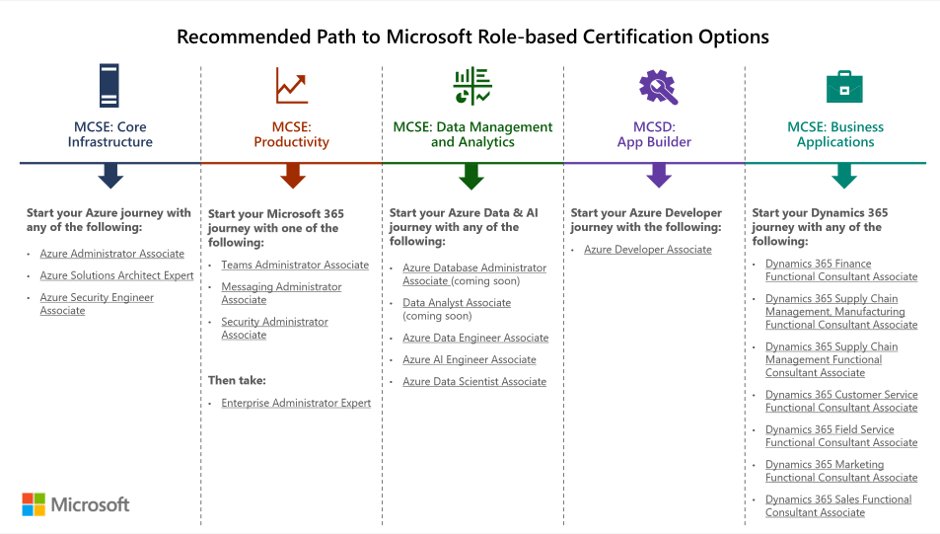
Microsoft have made various changes to partner incentives, changed a few Software Assurance benefits related to training resources, and changed the Home Use Program – all aimed to drive cloud awareness in different ways. Their latest move is to retire all their on-premises server certification paths and exams related to the MCSA, MCSD, and MCSE qualifications that have been a staple of the Microsoft server world for years. The retirement date is June 30, 2020.
As you can see in this image from Microsoft, the recommended paths are now all cloud focused:
While not surprising given the focus on cloud, not just from Microsoft but across the industry, I do wonder if this is a little short sighted? There are still a LOT of on-premises servers in use and, with hybrid cloud being the de-facto way forward for most organisations, they will remain for a long time to come. Rightly or wrongly, this feels like Microsoft saying that they don’t care about on-premises anymore. I’ve seen MS people saying they’re still hiring lots of on-premises server engineers etc. and that may be the case, but this announcement will definitely be taken as a sign of their overall focus.
I’m often asked if Microsoft will continue to make on-premises versions of their software and, following this announcement, I can’t help but wonder if I need to rethink my answer…
At their Inspire partner conference in July 2019, Microsoft announced a raft of licensing changes to Dynamics 365, PowerApps, and Power Automate (then Flow). Among the licensing rules covered in the sessions was a note that the PowerApps “Per App” option had a minimum license requirement of 30 licenses.
I noticed while perusing the subsequently published licensing guides that this minimum requirement wasn’t mentioned anywhere – which seems odd. Was it a change or an oversight I wondered aloud, and online? The PowerApps twitter account picked up my tweet and cam back to me with an answer very quickly:
Nothing major but a couple of interesting SQL Server bits:
1) A clause that, if you’re using SQL in Azure via Azure Hybrid Rights or DR rights, you must indicate it in the portal/API.
2) If you acquire SQL 2017 from an OEM before March 31, 2020 – you can add Software Assurance within 90 days of purchase.
That first addition feels audit related doesn’t it? While it makes sense that organisations indicate where they’re using their licenses and which Software Assurance benefits they’re using etc. – it definitely feels like Microsoft are getting things lined up for the next generation of license compliance audits which will look at cloud environments too.
Also, slightly interestingly, the Online Service Terms (OST) won’t be published until January 8th. Whether this is because people are still on holiday or due to a major change being announced – we’ll have to wait and see! 😊
Microsoft have announced that they’re retiring two Dynamics 365 apps, Talent Attract and Talent Onboard, with the LinkedIn Talent Hub being the preferred replacement.
The retirement date is February 1, 2022 and “eligible” customers can continue using the services until that date or the end of their most recent contract or renewal – whichever comes first. If you’re not currently using these apps but have a plan to do so – and still want to continue now Microsoft have announced they’re being phased out and no new capabilities will be added – there is an opt-in process to enable eligibility. You can raise a support ticket to become eligible to access the services until 2022 – that process must be completed by January 31, 2020.
Microsoft are rebranding their “core HR capabilities” from “Dynamics 365 Talent” to “Dynamics 365 Human Resources”, with current customers being transitioned to the new service automatically. This is all further change and flux within the Dynamics 365 family – it will be interesting to see if it calms down through 2020 at all.
Microsoft Defender Advanced Threat Protection (MDATP) for “cross-platform devices”. Available only via the EA/EAS volume licensing programmes, this allows MDATP to be run on up to 5 non-Windows devices concurrently.
Power Virtual Agents are added, with no extra info. These aim to enable anyone to create AI-powered chat bots and look to be a new member of the Power Platform:
There are a couple of lines added covering the recently announced Intune access for SCCM users. This confirms SA is required on the existing licenses but, perhaps a little confusingly, doesn’t mention the “Microsoft Endpoint Manager” name at all.
Microsoft are making changes to the “Project experience” to make it easier to use. They say this new Project is “designed to be both simple and powerful, so anyone can get started quickly and take control of any project right away”, with a more intuitive user interface – certainly something Project could do with in my opinion! Not surprisingly, there’s a fair amount of integration with Teams and Power BI.
As part of this, there are new/changed product names too. Project Online Professional is now Project Plan 3, while Project Online Premium is Project Plan 5. Added to the lineup is Project Plan 1 – an entry level SKU which doesn’t include many of the features nor a desktop client. It’ll be interesting to see what, if anything, Plan 1 means for the future of Planner.