Microsoft have announced a range of new features for Windows 365 that all serve to make it a more interesting and robust offering. The 2 that most interest me are:
Windows 365 Boot
Enabled by a local install of Windows 11, this features enables users to boot straight into their cloud pc instance from login. Microsoft use the example of a shared device where each user’s login takes them to their personalised Windows 365 device.
Windows 365 Offline
Pretty much the biggest issue with any cloud based service is “what about when I haven’t got internet?” such as when working on a train or simply a dodgy internet connection. With this upcoming feature, users can work offline and then changes will sync with the cloud once connectivity is regained.
I’m still not totally convinced by Windows 365 – particularly due to its cost – but these additions definitely help its case.
Microsoft have announced a set of price increases for the non-profit sector from September 1, 2022. The pricing is as follows:
Product
Current price
New price (Sept 22)
Office 365 E1
$2.00
$2.50
Office 365 E3
$4.50
$5.75
Office 365 E5
$14.00
$15.20
Microsoft 365 E3
$8.00
$9.00
Microsoft 365 Business Premium
$5.00
$5.50
Microsoft call out that these price increases can be used to drive adoption of Microsoft 365 E5 – which, just as with the commercial SKUs, doesn’t have a price increase planned.
Other changes
April 2022 also saw the end of Microsoft’s free grants for on-premises software – although non-profits in areas where Azure isn’t available can still get grants for Windows Server & SQL Server.
Microsoft are now making grants of 50 Windows Pro licenses available to non-profits, with additional discounted licenses being available
Under the Azure meter, the prices are listed here as:
Plan 1 = £0.006 per server per hour
Plan 2 = £0.016 per app service per hour
Volume Licensing
If you have 50 or more combined licenses of:
Microsoft Defender for Endpoint
Windows E5/A5
M365 E5/A5
M365 Security USLs
you can acquire Microsoft Defender for Endpoint (Server) under EA/EAS/MCA/EES agreements.
If you have these licenses and then choose to cover the same servers with Microsoft Defender for Cloud (the new name for Azure Security Center + Azure Defender), you will be eligible for a credit towards the cost of the latter.
Apparently, they’ve changed the Cloud for Healthcare licensing model from per-user to per-tenant. The “User Subscription License” option has been replaced but none of the other terms have been changed, so it still refers to add-on SLs etc. and doesn’t mention that it’s per-tenant anywhere other than the change summary. It makes sense as the other clouds are per-tenant…but we need all the info!
Microsoft Endpoint Manager Remote Help add-on has been added. Eligible pre-requisites are Microsoft 365 E3/E5/F1/F3, Enterprise Mobility + Security E3/E5, and Microsoft Intune.
System Center 2022 has been added.
“Dynamics 365 Customer Voice and Digital Messaging” added.
Windows 11 Pro (per Device) is now available via CSP.
Microsoft Bookings added to Student Use Benefit for O365 A3 & A5.
SQL Server 2012 goes end of support on July 12, 2022 – that’s about 10 weeks from the time of writing! This means even security updates from Microsoft will no longer be provided to customers running this software – a situation organisations really don’t want to find themselves in.
It only seems like 5 minutes since this was the situation with SQL Server 2008 (it was actually almost 4 years ago!) which causes headaches for a lot of organisations. I’d say that, based on conversations at conferences and training sessions etc., SQL Server 2012 is going to be at least equally painful as many businesses seem to have got to 2012 and then no further, considering it to be much more modern than 2008.
If your business is still running SQL Server 2012 – what are your options?
Remain on-premises
Assuming you want to remain up to date on security patches (which I’d say you do!), you’ll need to acquire Extended Security Updates (ESU) from Microsoft which will give you 3 more years of security updates. That however, comes at a price:
Year 1 = 75% of SQL Server license price
Year 2 = 100% of SQL Server license price
Year 3 = 125% of SQL Server license price
Let’s say you have a 4-core SQL Server 2012 Std box – approx. license cost of £5,000. That will mean:
Year 1 = £3,750
Year 2 = £5,000
Year 3 = £6,250
3 year total = £15,000
Migrate to Azure
ESUs are included free of charge for workloads running in Microsoft Azure VMs – including “regular” Azure VMs as well as:
Azure Dedicated Host
VMware on Azure
Nutanix Clusters on Azure
Azure Stack HCI/Hub/Edge
You can save a big amount of money through not having to pay for the ESUs…but cloud migrations come with their own set of costs…as well as benefits.
If you’ve not already made a decision on this, please gather the relevant people together and discuss the option. While both the above options can seem expensive, I’d suggest they’re nothing when compared to the cost of a security breach/ransomware attack.
You can see more info in the Microsoft blog post here.
Available for EA and MCA customers, the Microsoft Azure Consumption Commitment (MACC) is a 3-year agreement where an organisation commits to spend a certain amount on Azure over that time period.
It doesn’t require an upfront payment of the agreed amount, rather the total must be reached by the end of the MACC term. Ongoing qualifying Azure spend (either PAYG or the purchase of Azure Prepayment) is deducted* from the total on a regular basis by Microsoft and the remaining balance can be seen in the Azure portal (or via REST API). In this way, it adds some flexibility to what’s possible with Azure commitment and budgets.
However, it is a contractual commitment so if future Azure spend has been over-estimated, an organisation will find itself expected to make up any shortfall at the end of the agreement.
*If you receive Azure credits from Microsoft, any services paid for using those will not count towards your MACC total.
Azure Marketplace
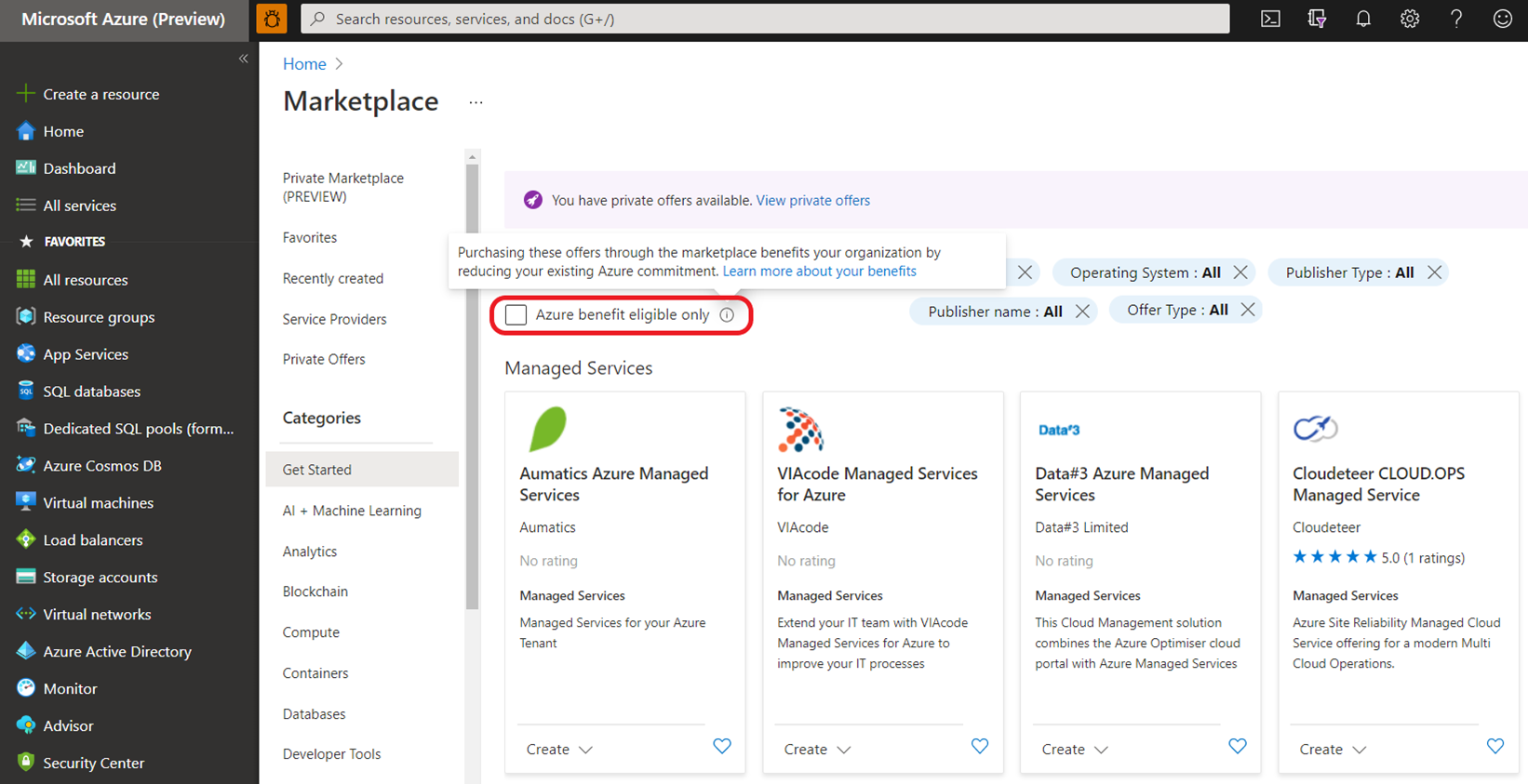
Certain 3rd-party services in the Azure Marketplace are eligible to count towards a MACC. In the Marketplace portal, there will be an “Azure benefit eligible” option to filter the applicable services.
Microsoft have announced today a series of updates and changes to their Partner Program, kicking in from October 2022. There’s a LOT of into to go through but below contains a lot of the key changes and an overview of how some of the new elements will work.
New name
It is now known as the “Microsoft Cloud Partner Program” and, according to Microsoft, this “ better reflects the enormous and ongoing transition of business operations to the cloud, and how Microsoft intends to support partners in the future” and “aligns…partners’ go-to-market motions with the way customers buy today“.
From competencies to designations
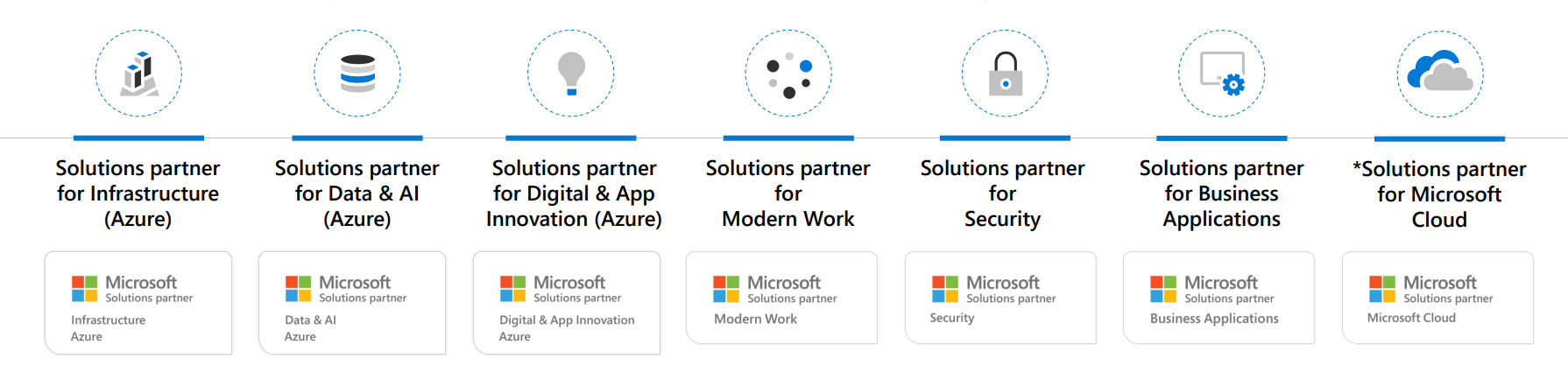
The various (19) competencies that Microsoft partners have long worked to attain are now “legacy” and have been replaced by 6 “Solutions partner designations”:
Solutions partner for Infrastructure (Azure)
Solutions partner for Data & AI (Azure)
Solutions partner for Digital & App Innovation (Azure)
Solutions partner for Modern Work
Solutions partner for Security
Solutions partner for Business Applications
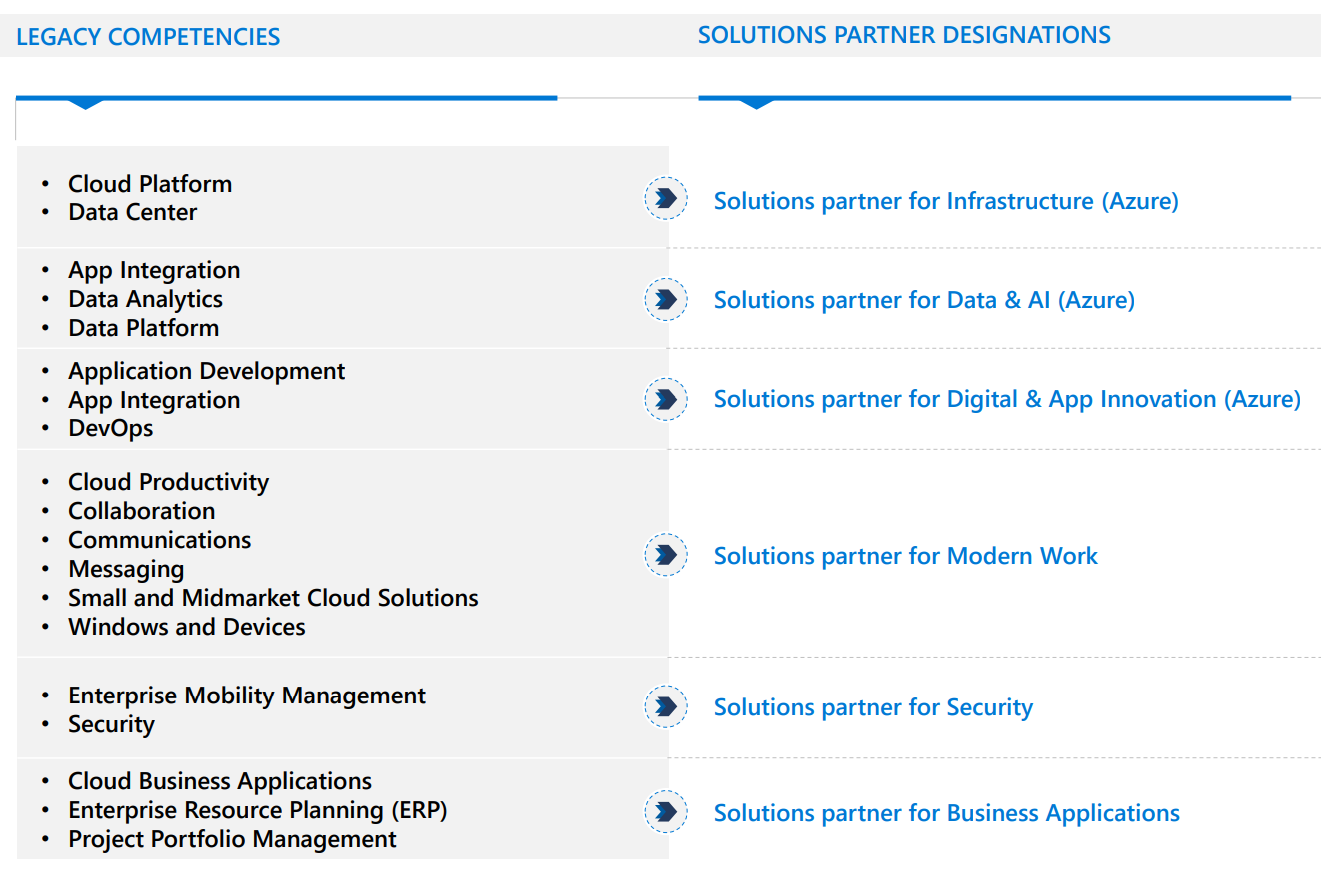
They map across from legacy to new as follows:
How do they work?
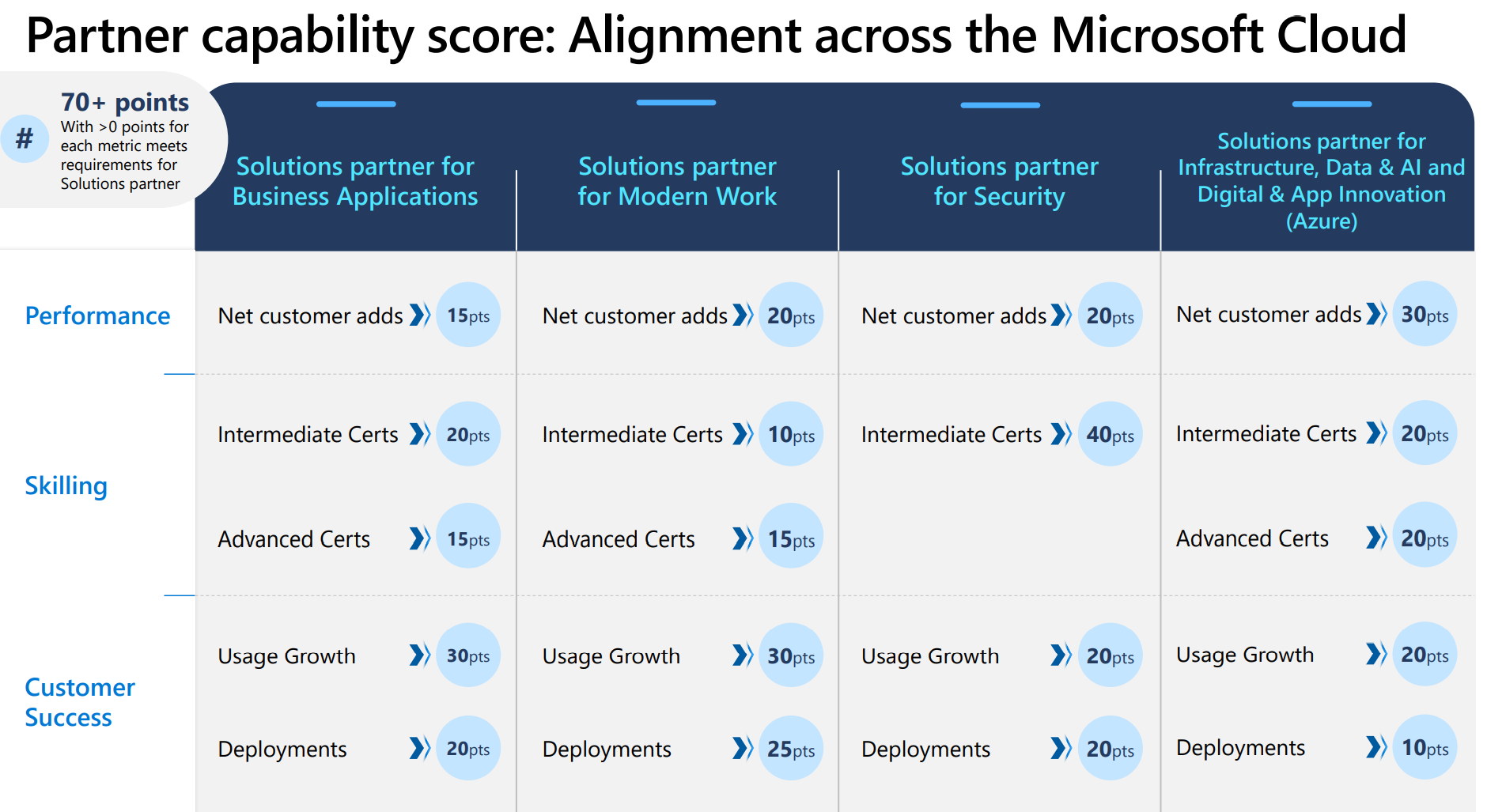
Partners will need to earn at least 70 points, from a potential total of 100.
Performance: Measured by net customer adds.
Skilling: Verifies and demonstrates your dedication to skilling and training. Points are awarded for each person on your team with specified certifications.
Customer success: Measured by usage growth and number of successful deployments.
A Modern Work example
The Solutions partner for Modern Work is split into SMB & Enterprise tracks.
Customer adds
Enterprise
A customer add of 300+ seats = 4 points and partners can accrue 20 points in this manner – so a total of 5 customers.
SMB
Customers must be between 10 & 300 seats and each one = 2 points. Again there is a cap of 20 points, this time equating to 10 customers.
Partner skilling
This section is divided into Intermediate & Advanced certifications, the applicable certifications are:
This area is also divided into 2 categories – Usage Growth & Deployments. The calculations for points are slightly less than straightforward as this example from Microsoft demonstrates:
If you have 2000 MAU growth from DPOR associations over the past 12 months and 1500 MAU growth from CPOR associations, then this is the way the scoring is decided for the Usage growth metric.
DPOR based growth = 2000 MAU DPOR based points = (actual growth / Threshold growth level) * max points = 2000/4000 * 30 = 15
CPOR based growth = 1500 MAU CPOR based points = (actual growth / Threshold growth level) * max points = 1500/1000 * 30 = 45
Usage growth net score = 30 ~ higher of 15 and 45 from above, for up to a maximum of 30
A similar calculation is used for the deployment metric:
Each new qualifying CPOR deployment gets 5 points OR each new qualifying DPOR deployment gets 2.5 points, whichever aggregates to higher points, for up to a maximum of 25 points.
For example, if you have four net new deployments from DPOR associations over the past 12 months and 3 from CPOR associations, the scoring is decided for Deployments metric as follows:
DPOR based growth = 4 DPOR based points = (actual growth / Threshold growth level) * max points = 4/10 * 25 = 10 points
CPOR based growth = 2 MAU CPOR based points = (actual growth / Threshold growth level) * max points = 3/5 * 25 = 15 points
**Deployments net score = 15** ~ higher of 15 and 10 from above, for up to a maximum of 30
As well as the receiving licensing of on-premises software such as SQL Server, Windows Server, and System Center, qualifying partners will also receive allowances of:
Windows 365
Microsoft Viva
Project & Visio Online
Windows IoT
and more.
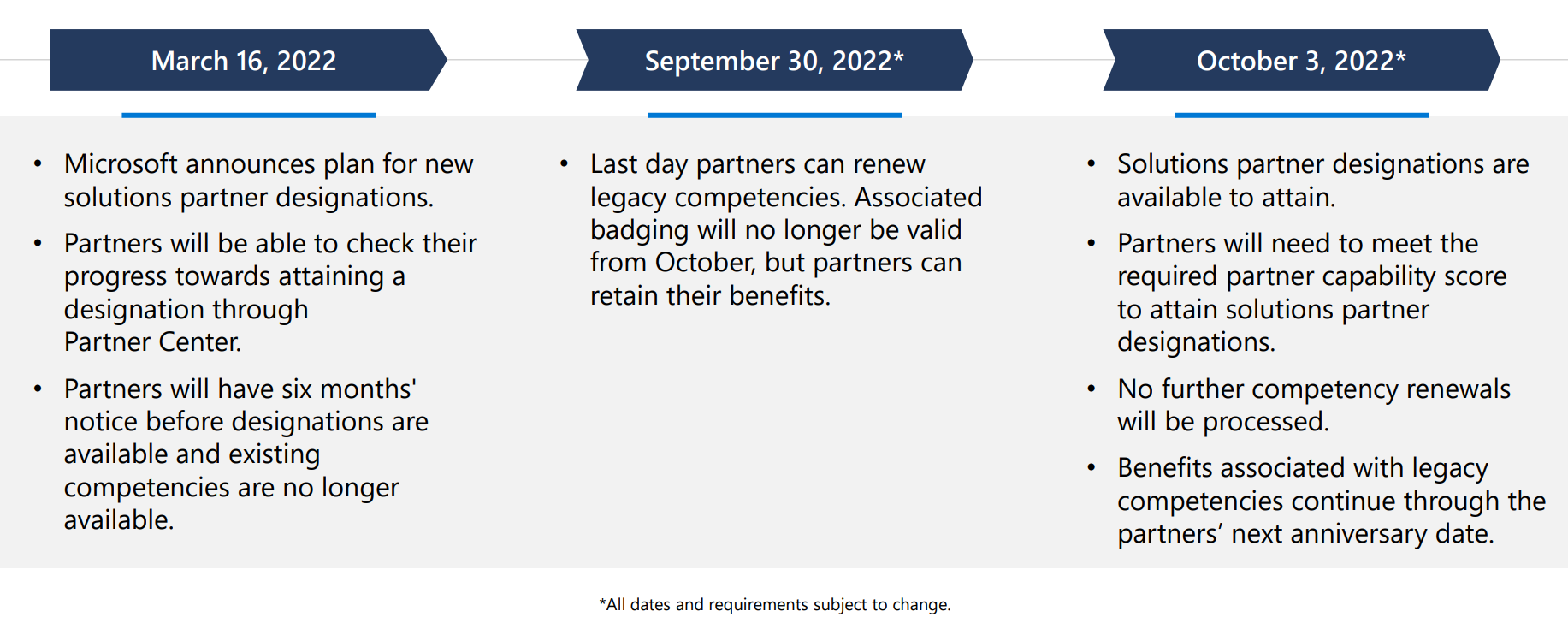
Timeline of changes
Conclusion
Overall this seems like the next step in Microsoft’s long-term plan to keep moving partners towards being more service based around cloud technologies. This was the case the 7+ years ago and is still where they want their partner base to go – offering as many cloud technologies as possible and providing the services to ensure customers get the best results.
This will likely cause plenty of upset and confusion among partners but, ultimately, how much difference it will actually make remains to be seen. Usually, the bigger the partner the more able the are to absorb and adapt to these new initiatives – we’ll see if this is any different.
Again, not a huge amount of change in the Microsoft Product Terms for March 2022:
Microsoft 365 Privacy Management has been rebranded “Priva”…I thought they might change their mind on this one 😂 I guess they wanted to make sure there was something people could confuse with Viva?!
Expanded pre-requisite licenses for Cloud for Healthcare add-on
Azure Virtual Desktop per user access promo extended to March 31st, 2022 (although the section doesn’t appear to have actually been updated)
SQL Server Big Data Nodes have been retired – anything other than the “core” SQL editions just never seems to quite work does it?
Updated “no cancellations after 72 hours” terms for online services under CSP NCE
Microsoft have announced a new way for Azure Stack HCI customers to license their Windows Server guest VMs. The snappily titled “Windows Server subscription for Azure Stack HCI” (WSSASHCI) allows organisations to purchase Windows Server licenses via their Azure subscription.
Currently the versions available are:
Windows Server 2022 Datacenter: Azure Edition
Windows Server 2022 Datacenter
Windows Server 2019
Windows Server 2016
Windows Server 2012 R2
Pricing
WSSASHCI is currently free in public preview but once it hits General Availability (GA) it will be $23.6 per physical core (in your Azure Stack HCI cluster) per month.
Microsoft’s financial results are, once again, fantastic. For Q2 FY22 (Oct – Dec 21) their headline results are:
Revenue = $51.7 billion, an increase of 20%
Operating Income = $22.2 billion, an increase of 24%
Net Income = $18.8 billion, an increase of 21%
That’s over $51 billion in 3 months – a single quarter bigger than recent annual revenues for companies like Oracle, Nike, and Coca Cola.
Looking at the separate business units we see the following…
Productivity & Business Processes
Revenue = $15.9 billion, up 19%
Office 365 Commercial up 19%
“Continued momentum” for E5
LinkedIn up 37%
Dynamics 365 up 45%
Power Apps up 161%
Office Commercial (i.e on-premises) down 17%
Intelligent Cloud
Revenue = $18.3 billion
Azure up 46%
“Significant growth” in long-term contracts (again)
Enterprise Mobility up to 209 million+ seats
Yet more strong double digit growth across all these product divisions, as we’ve seen so many times before over the last few years. Although the growth is still very strong with Azure, it’s perhaps worth noting that the % increase is dropping slightly over time…from 50 in Q1 to now 46…although this makes sense – as the base grows, maintaining the same % increase becomes more difficult.
We also saw that the security business surpassed $15 billion in revenue, up almost 45% YoY.
“Digital technology is the most malleable resource at the world’s disposal to overcome constraints and reimagine everyday work and life.”
Earnings Call
There is always plenty of great info in the earnings call and this quarter was no different.
Azure Arc has tripled its user base YoY as organisations expand hybrid environments.
New Azure customers include:
CVS Health
Johnson & Johnson Medical Devices
Kyndryl
Wells Fargo
Cosmos DB transactions increased 100% YoY
Industry Clouds are driving “significant usage” across Microsoft Cloud
Teams has 270 million+ monthly active users
Microsoft Viva has over 1,000 paying customers already
Microsoft Sentinel has over 15,000 customers – a 70% increase YoY
Satya Nadella also discussed “Dynamics 365 Connected Spaces” (currently in preview) which is focused on automating and managing physical processes. This is part of their “Metaverse” play for business.
Note that many of the new “exotic” products are being name checked here:
Azure Arc
Cosmos DB
Industry Clouds
Power Apps
Microsoft Sentinel
This really helps to highlight Microsoft’s future plans and the successful growth they’re seeing there already. It also seems that there’s plenty of room for growth over the next few years so it doesn’t seem that Microsoft’s growth will be slowing any time soon.







 Cloudy with a chance of Licensing