Crystal Reports Server 2008: New Features


As I’m sure you’ve noticed, Microsoft is my #1 software of choice, both here and at work-but I am also a fan of Crystal Reports (now from SAP).

Crystal Reports Server 2008 is their very successful product for serving up reports with automating & scheduling capabilities-and this month, it got a Service Pack. It added a number of new features but the 2 that I find most interesting are:

Report Bursting:

Report Bursting allows you to run a report once and produce subsets of results specific to different users; this is used to generate bank statements for example. This feature was previously only available in the more enterprise products from SAP-but is now available to the mid-market 🙂 I see this being a huge benefit to a lot of our customers…

Auditing: Report Auditing allows companies to see who is viewing what reports, when, for how long etc, which can be very useful for ensuring that your Business Intelligence (BI) efforts are paying off and being found relevant by users.

There are a number of other features around Sharepoint and .NET integration that I will detail a little later…

Microsoft Office 2010 Tech Preview: First Hand Look


I had hoped to get a full post together on the first day the tech preview became available but I had some issues with the installation, and that took a good few hours to sort out.

I have, somehow, ended up with a seemingly corrupt install of Office 2007 as Office 2010 is unable to upgrade it and I can’t remove it either! Eventually I tried installing 2010 alongside 2007 and it worked, the downside is that you can’t have 2 versions of Outlook together so I’m stuck on 2007 for that…however I’ll install it on another machine ASAP and hopefully Outlook will work on that 🙂 I managed to get rid of Office 2007 after 2 hours of deleting and registry editing so I now have it all installed! (I’ll do a separate post on how I did it).

Excel 2010:

Excel 2010 First Opened

That’s Excel 2010 opened for the first time-not much difference although I think it looks a bit “cleaner”.

Sparklines:

Excel 2010 Sparkline

These were one of the big features from the WPC demo of Office 2010 and they’re as awesome as they seemed. This feature is going to make Business Intelligence and the sharing of information so much easier (to understand and present) and more worthwhile; I think this is going to make a real difference in the world of work-it certainly will for me! I’ve got a spreadsheet at work that covers all our major software vendors and includes sales and profit for each one as well as overall totals, various comparisons between years and more. Currently this has multiple tabs that just contain trending charts, making it awkward to present and impossible to screenshot/print. With Sparklines in Excel 2010, I can show the trend in a single cell at the end of the data range, allowing me to consolidate it down to just one sheet!

There is an excellent post on Sparklines over on the Excel team blog here which features some great examples of how they can be used.

OneNote 2010:

One Note 2010 New Features

I haven’t had much of a play with OneNote yet but one thing I have noticed is it seems that OneNote no longer auto copies screen clippings into the Unfiled Notes section…I think I like that 🙂

Word 2010:

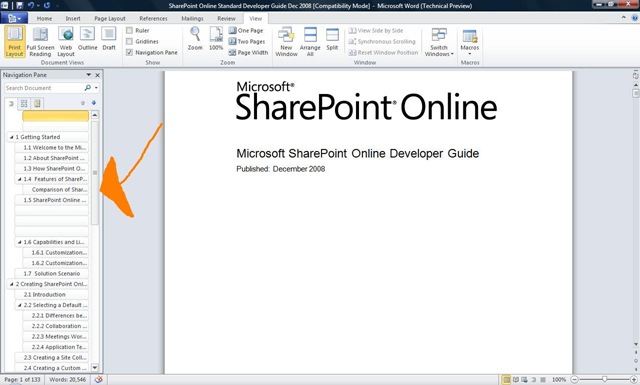
I don’t actually use Word that much and when I do it’s usually pretty basic, so it may well take me a while to find all the new features. However one that I’ve found straight away and is very useful is the Navigation Pane, which makes it much easier to read and work with large documents.

Word 2010 Navigation Pane Arrow

As you can see on the left hand side, the Navigation Pane has identified all the section headers in the document and allows you to jump around simply by clicking them-no more slightly random scrolling up and down 🙂 This is a truly great addition!

Outlook 2010:

I’ve not yet got any good screenshots of Outlook 2010 as I’ve discovered that the Hotmail connector doesn’t work with the new version, which is a shame. I’m sure that will be resolved by the final release though! I’ll get some screenshots from work but I’ll need to block out any confidential/customer info etc first so that’ll be next week.

I can however attest that Outlook 2010 is great. I was a BIG fan of the improvement in Outlook 2007 and the new version builds on those very well. There are no huge new killer features but there are lots of little ones such as:

Quick Steps: A set of handy time savings shortcuts which allow you to, for instance, forward a mail directly to your manager with 1 click, send an email just to your team, forward a mail and automatically add “FYI” to the subject line and more. It’s also possible to create your own Quick Steps, just like macros.

Calendar: When you receive a meeting invite, you can now see a preview of your calendar inside the mail-handy!

PowerPoint 2010:

Powerpoint has always been full of features I’ve never quite got round to using and I’m sure that is true of 2010 too, but one that I like is the ability to “Broadcast Slideshow”. This allows you to quickly and easily share your presentations with others in remote locations:

Powerpoint 2010 Broadcast 1

 Powerpoint 2010 Broadcast 2 Powerpoint 2010 Broadcast 3

This will be useful for informal collaboration with colleagues where you just want/need quick opinions and helps further Microsoft’s Collaboration through Office strategy.

General Features

Backstage: Gone is the menu/sub-menu structure for print preview, open, save as etc and in it’s place is Backstage:

Word 2010 Backstage

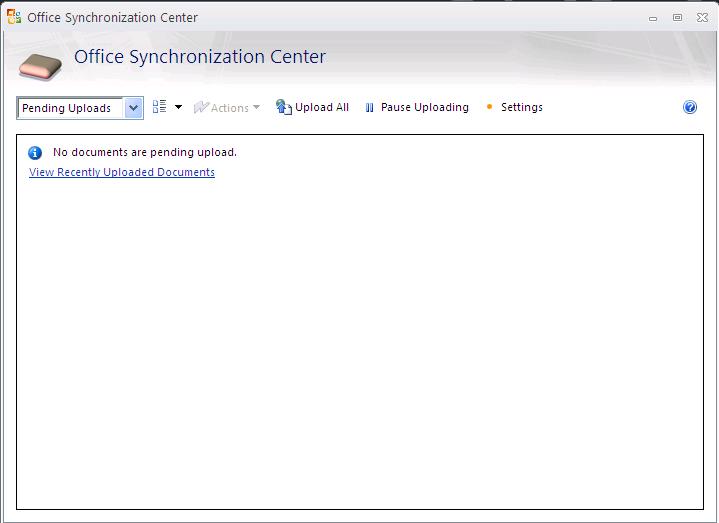
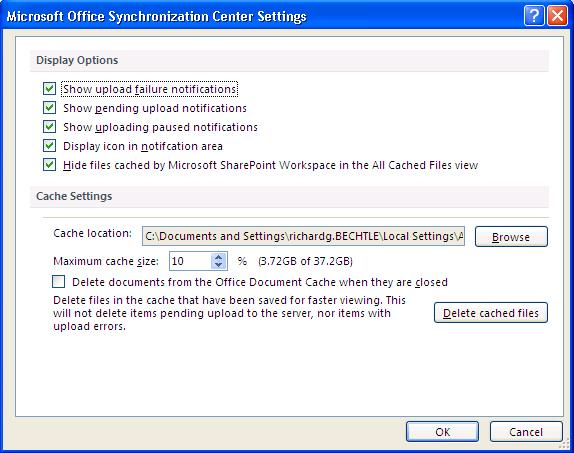
 The Office Sync Center:

This is a new thing AFAIK that I noticed when uploading some documents to our Sharepoint Online BPOS installation.

Office 2010 Sync Center

Office 2010 Sync Center Settings

This gives you a great overview of which files have been uploaded and if they were successful or not. It also shows a history of recently uploaded files which works well for me as I often forget whether I’ve done it or not 🙂 This seems like yet another great addition in Office 2010…

Summary:

This post isn’t finished, at the very least I’ll be adding in some screenshots and more info on Outlook. However as I come across new features in the various programs I’ll add them into this post as I go.

All in all, Office 2010 looks like a solid forward move for the Office suite and should see good adoption across the board-although perhaps more in the business rather than home space. The inclusion of more business intelligence, more collaboration and more time saving tricks is a sure winner and Sharepoint Workspace Manager (SWM formerly Groove) will only further that I’m sure.

Azurelight


Microsoft Architect Aleksey Savateyev is building a basic product support app…that is based in the cloud and is to be called “Azurelight”. It will collect feedback about products and allow users to exchange opinions on the products too. “It’s also intended to be used by developers as a reference application utilizing both Windows Azure and Silverlight for rich yet scalable and highly available business solutions…” as described by Savateyev himself.

Mary Jo Foleyreports that as well as utilizing Azure & Silverlight (as it’s name suggests) Azurelight will also use Microsoft’s ADO.NET Entity Framework, ADO.NET Data Services (aka Astoria) and SQL Data Services.

azurelight

Once it’s all up and running “sometime in the summer” of 2009 (via MSDN it seems) this should be a great example of what Microsoft’s technologies, both cloud and programming, can do 🙂

I’m excited about this program and as the source code will be released Free of Charge, I hope I’ll be able to make full use of Azurelight!

Comparison of Sharepoint Server & Sharepoint Online


While Sharepoint Online is an excellent product and fits the bill nicely for the vast majority of customers, there are certain features it lacks when compared to it’s regular on-premise brethren; this is mainly down to the multi-tenant environment of the standard datacenters.

moss-online-comparison

Green = Sharepoint Online Blue = On Premise Server Only

As you can see, the Search & Business Intelligence sections are practically non-existent online which may put some people off. However if you need those features then you can utilise MS Online in it’s full Software PLUS Services mode and have an online AND an on-premise server together. It will be interesting to see if Sharepoint Online features more Search & BI functionality once “Wave 14” hits as Sharepoint On-Premise will have a whole raft of new features in these areas…

Microsoft state:

In the current release of the services, the following actions are not supported:

·         Use inline code, build coded workflows, or develop Office InfoPath forms with coded business logic.

·         Deploy features, solutions, pluggable authentication providers, Web Parts, site definitions, or other modifications that require deployment and configuration on the server.

·         Modify built-in SharePoint files, web.config settings, security policy, and other elements.

·         Make configuration changes that affect the Web server or the Microsoft .NET Framework.

·         Make changes or add capabilities that require a custom database or changes to the database schema.

Microsoft Enterprise Search


This weeks FASTForward ’09 conference has brought more news on Microsoft’s Enterprise search plans.

Microsoft have announced that they will integrate the recently acquired technology into Sharepoint 14 (the next release due late 2009/early 2010) to beef up it’s search capabilities.

Fast adds more sophisticated user-interface elements, like thumbnail and preview views; cluster support and more compute-intensive tasks like entity abstraction and the creation of relationships between concepts, explained Jared Spataro, Director Enterprise Search (via Mary Jo Foley).

The new entity will be known as “Fast Search for Sharepoint” and MS have said that customers will existing Sharepoint CALs will be able to use those to access the new Fast Search servers once available, though they’ll of course have to buy the new server licences.

It also seems that current Sharepoint Enterprise customers will be able to purchase “ESP for Sharepoint” licences to gain access to high-end search features before the arrival of Sharepoint 14.

Kirk Koenigsbauer, general manager for Microsoft’s Office business platform group said Sharepoint & FAST together will give customers “50 per cent or greater cost savings over what they pay today…We are going to make the business productivity solution really more cost effective”.

We will also see the release of “Fast Seach for Internet Business”, which is a version specially tuned for web sites. This is slated to beta 2nd half of 2009…

Simplexo Enterprise Search


I had a meeting this week with Simplexo, a new Enterprise Search company and I was very impressed by what I heard.

Although, as a start up, they are classed as an “immature” company the guys they’ve got working there from the CEO down have been involved with companies including Ingram Micro and EMC so have a great track record with tech businesses.

Search is becoming a bigger and bigger issue among businesses, no matter their size and Simplexo appears to bring a real solution to the table. Not only does it have a huge range of features it is also very easy to use from an Information Worker’s perspective.

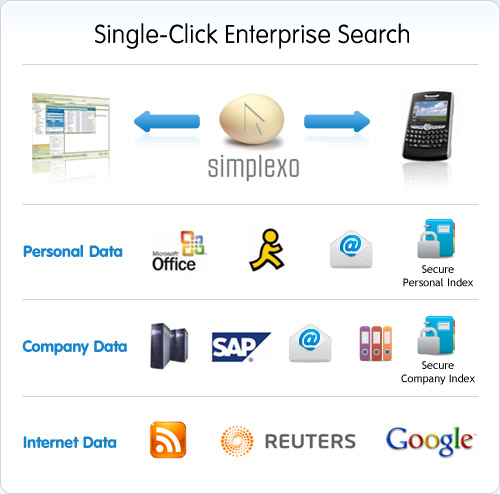
It eliminates the need for multiple searches as it can work across all types of structured (databases (Oracle, SQl etc), payroll and HR systems, SAP etc) and unstructured data (emails, Word documents, images, spreadsheets etc) with a single click.

simplexo-features

It delivers live, up-to-date results so you always get the most current & relevant information and all data is de-duplicated on the fly. It has been designed to MOD security levels and all search results are tied to users permission levels, helping keep data safe.

Another great feature is it’s image search capability; it doesn’t rely just on the metadata but can actually directly compare the pictures to return similar content! It is planned they they will extend this to streamed video in the future…

A perhaps surprising feature of Simplexo is that it is Open Source, so all it’s features are available to users free of charge; customers need only pay if they require dedicated support rather than the online forum. While I won’t mention specific pricing here I will say that it is very attractive and competitive, particularly against it’s main rival Autonomy. The pricing structure is on a per-server basis so number of users is not taken in to account at all, this helps keep costs down in almost all cases. *UPDATE* Having met with Simplexo a 2nd time, there has been a complete U-turn on the pricing structure…now it IS licensed per user. This makes it a much more expensive proposition around £75 per user, coming down to £50 for over 2000 users.

Although there are a number of big names in the Enterprise Search arena including Google, Microsoft and Autonomy none of them have anything approaching a hold on the market and I think there is a great opportunity for Simplexo to establish themselves here.

Simplexo will easily integrate into your existing environment and can be used from with numerous desktops applications including “MS Office, MS Outlook, Outreach, AutoCAD, Open Office. Star Office, Lotus” and more.

To download the software and check it out, go to the download page here.

To download the Simplexo Technology Audit from the Butler Group-click here. (Will launch PDF download).

Performance Point Server killed off?


Performance Point Server (PPS) has been part of the Microsoft product portfolio for a while now but, as far as I can tell, it hasn’t really made much of an impact. It’s been the top-end, full featured Business Intelligence (BI) product but the uptake hasn’t been amazing and MS announce there won’t be another standalone version of PPS, making Performance Point Server 2007 the last.

A lot of clients I work with who you would expect to jump on PPS have stayed away and they aren’t the only ones. The impression I get is that most people are unsure about Microsoft’s credentials in this part of the BI arena; they’re not sure that PPS will stack up against competitors such as SAP (Business Objects), Oracle (Hyperion) and IBM (Cognos) when it gets to the nitty gritty high end enterprise features. PPS isn’t cheap-coming in at around 17K-and when companies invest at that kind of level, they need to be completely confident they will get the best possible return on their investment.

However, this isn’t the end for Performance Point Server, or at least it’s component parts. As expected the scorecarding, dashboard and analytics features will all be folded into Sharepoint 14 (due this year/early 2010) and the new “Performance Point Services for Sharepoint” will be available via the Enterprise CAL.

I think this is a really good idea and will certainly increase peoples usage of MS BI and thus help increase their market share. The proliferation of MOSS 2007 (Sharepoint) throughout all market sectors means an amazing amount of people will have much easier access to these tools. It will make it yet another compelling reason for people to make the move to Sharepoint and for those that already have (but didn’t take Software Assurance)-a good reason to upgrade. By removing a product from the portfolio it looks like MS will increase the use of that product as well as grow it’s (Sharepoint) revenue at the same time…good skills 🙂

From the official statement:

“Additionally, in the summer of 2009, we will release ‘Service Pack 3′ for PerformancePoint Server 2007, which will include updates to the Planning module. From there we will focus our development on the new monitoring and analytic capabilities in ‘PerformancePoint Services for SharePoint’ and will not offer standalone versions of PerformancePoint Server.”

Microsoft WinHec 2008 sessions


Microsoft WinHEC (Windows Hardware Engineering Conference) 2008 starts November 5th (05/11/08) and as with the PDC, Windows 7is a big focus. WinHEC attendees will also get an alpha copy of Microsoft’s next desktop OS, but WinHEc is fast becoming the forgotten sibling!

The Session list for PDC gave us some interesting tidbits to speculate over such as Windows Strata, so I’m hoping the WinHEC listing will too. Here’s what I’ve spotted so far:

Windows 7 Device Experience Overview – CON-T531:

It summarizes the new Windows features for portable devices such as mobile phones and cameras, printing and imaging devices, and networked consumer electronic devices like media servers and digital picture frames.

Windows 7 Device Services for Media Transfer Protocol – CON-T568:

“Device services are the building blocks that enable new extensibility opportunities for Windows-compatible portable devices and align new experiences for portable devices in Windows 7″

The two sessions above give a good indication of some of the new features, and the general direction, of Windows 7.

The Manycore Shift: Microsoft Makes Parallel Computing Personal – COR-T522:

“We’ll highlight efforts in Visual Studio and Windows as examples of how Microsoft is addressing the problems that concurrency introduces through rich support in future tools and operating systems for threading, synchronization, scheduling, and resource management.”

This links in with other info we’ve seen that MS are doing what they can do increase parallel computing in Windows 7 without changing the kernel. Interesting to see Visual Studio mentioned too..

Directions for Virtualized I/O in Windows – ENT-T590:

This session discusses areas of technologies that are being investigated for future Microsoft virtualization offerings. These include PCI Single-Root I/O Virtualization, those technologies that enable it, and their implications to the Windows Driver Model. Improving storage area network (SAN) support and other I/O-related virtualization capabilities are also discussed.

Improving Networking Performance for Hyper-V Virtual Machines – ENT-T589:

Windows Server 2008 R2 will deliver new networking features and enhanced support of stateless and state-full offload technologies to Hyper-V virtual machines.

Microsoft Hyper-V – ENT-T587:

This session includes highlights of “selected features in the next release of Hyper-V.”

The three sessions above all point towards there being a clear(ish) definition of the features for Hyper-V R2..I’ll be interested to see what these are and how much closer Hyper-V gets to VMWare in terms of enterprise features…Live migration ala VMotion anyone?!

**Update** Seems everyone’s wish is coming true..it looks that Hyper-V 2.0 will have Live Migration…see more here

Windows Server Support for More than 64 Logical Processors – ENT-T554:

This session discusses the architecture and support of more than 64 logical processors in Windows Server 2008 R2.

This is a big advance for the Enterprise level/HPC end customers.

Windows Boot from One Image Format – ENT-T606:

“This session discusses native support of VHD in Windows Server 2008 R2” which “creates opportunities for lowering operational costs by enabling customers to use a single image creation, deployment, and maintenance process and toolset across virtual and physical environments.”

Windows 7 Network Optimization for Branch Offices – ENT-C659:

“..new capabilities in Windows 7 that reduce wide area networking link usage and provide the potential reduction in total cost of ownership (TCO) by reducing WAN link usage, providing faster downloads in the branch office, and requiring no networking infrastructure changes”.

This is an interesting sounding sessions and I’d bet that these features will speed up the adoption of WIndows 7 into corporate environments upon it’s release.

There are also a number of sessions about Multi-Touch.

Microsoft Business Intelligence (Project Gemini)


From Microsoft, Project Gemini could be the Business Intelligence turning point it needs. Despite SQL & Excel’s popularity, Microsoft were ranked just 5th in the BI arena by IDC.

Microsoft are getting serious about BI now, with SQL 2008, Performance Point Server 2007,Excel 2007 and now Project Gemini. Forrester say Gemini will

“bring an Excel-based user analytics mashup tool into the core of Microsoft’s BI and data warehousing product portfolio”. Tools currently only available to OLAP modelers will be accessible to all as an “in-memory, drag-and-drop, pivot-table-enabled” dashboard.

Tom Casey, Microsoft’s general manager for SQL Server business intelligence had this to say:

“is a game-changer for the BI and OLAP space, and will usher in the post-OLAP age of supremely versatile, deeply dimensional, user-developed analytics.”

The full article can be seen over at ComputerWorld here.

Nigel PEndse has got a great article over at olapreport, where he makes some great insights into what Gemini means for Microsoft, their users and their competitors..it’s well worth checking out.

SQL 2010: Microsoft Business Intelligence Conference 2008


It’s the 2nd Microsoft Business Intelligence Conference and we’ve already got info on SQL 2010 (Killimanjaro) thanks to the wonderful Mary Jo Foley over at ZDNet !!!

Despite SQL 2008 only just being in the price files for customers to buy, the SQL team are revealing details on the next incarnation, SQL 2010 codename Killimanjaro. Preview builds will be around in the first half of 2009, and then SQL Server 2010 will be available in the first of the following year.

“Kilimanjaro is set to include self-service analysis tools (codenamed “Gemini”) that Microsoft is saying will allow information workers to better “slice and dice data and create their own BI (business intelligence) applications and assets to share and collaborate on from within the familiar, everyday Microsoft Office productivity tools they already use.”” We will also see further add-ins to Excel as well as deeper Sharepoint integration, making it esaier for users to  share their own BI analyses.