Ice Cube Flow Chart


If you like Ice Cube and you like Flow Charts-then this is awesome! It’s a flowchart of Ice Cube’s seminal classic “Today was a good day” and it’s really well done-props to the creator!

The original can be found on Geekologie here but I’ve also made a SeaDragon version-which rocks 🙂 Unfortunately I don’t seem able to embed it into this blog so the link for all the zooming and panning goodness is:

http://seadragon.com/view/aje

Bing Visual Search


Today sees another great addition that makes Bing an even stronger competitor to Google, and that is Visual Search.

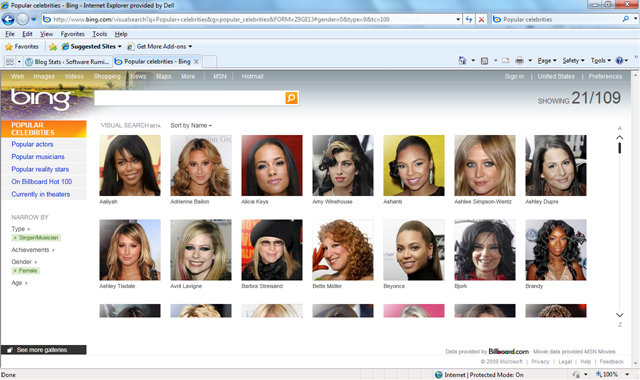
This gives you search results as images (which has been shown to speed up searches by around 20%), rather than just a list of text. You can then filter and re-arrange the image results based on various criteria. It’s still in Beta at the moment but it has quite a few “featured galleries” that give you an idea of how it works and it’s all based on Silverlight. Here’s an example:

Say you’re searching for a certain celeb but you can’t remember their name. Got to the “Popular Celebrities” gallery:

image

You know it’s a female singer you’re thinking of so using the filters on the left, you can tighten in up:

image

That’s cut it down from 915 to 109 but that’s still quite a few pictures to go through; luckily there’s one filter that I think is particularly awesome…the age range filter. The singer you’re thinking of is somewhere in here 30’s so:

image

Here (if you open up the bigger picture) you’ll see the age is set to 29-41, which has further narrowed it down to 31, which is an easy amount of pics to quickly flick through. Once you’ve found the person you’re looking for, simply click the image to be taken to a Bing search page for them:

image

Even in it’s Beta form, this is clearly a powerful new tool in Microsoft’s assault on the world of search and it can only get better. What’ll be great is when you can get the Visual Search results for any query so next time someone’s arguing that it’s Laurence Fishburne in 187, not Samuel L Jackson-you can Bing it and get Visual Proof-nice 😉

Well done Microsoft…now here’s my request for the next version of Visual Search…the ability to generate a search query with a picture. Say you’ve got a JPEG of a building/person/car and you just don’t know what or who it is, imagine being able to upload that to Bing and it identifying it for you…that’s be pretty sweet 🙂

If you can’t access the page www.bing.com/visualsearch then change your country to the US (in the top right corner) and you should be all good!

Wordle


I’ve just made my first Wordle-it’s something I’ve seen around the net on various occasions but have only just got round to playing with…don’t ask me why!

Here’s a Wordle of this very blog:

Blog Wordle Sept 09

I think this is an excellent idea and I’m now trying to think of ways to include these as much as possible at work 🙂

Windows Server 2008 TS/RDS


I’m sure you’re aware that Windows Server 2008 R2 has now been released, but not everyone is aware that Terminal Service (TS) is no more and has been replaced by Remote Desktop Services (RDS).

RDS offers all the same functionality as TS as well as a whole host of new benefits. These new additions include:

  • Simplified management with a unified and scalable connection broker for both Session Desktops and VDI Desktops providing:
  • Unified Remote Desktop Web Access (RD Web Access) and ‘RemoteApp and Desktop Connection’ feature for access to VDI and Session Desktops
  • Ensures users can only see the apps they are supposed to with per-user RemoteApp permissions and filtering
  • Provides the user a rich remote experience, bringing the experience closer to that enjoyed by users accessing local computing resources such as:
  • True multi-monitor support
  • Windows Media® Player redirection,
  • Bidirectional audio,
  • Enhanced bitmap acceleration for 3D applications and rich media content such as Silverlight and Flash.
  • Improved application compatibility and management of RD session host servers with the inclusion of Microsoft Application Virtualization for TS

This last point is especially interesting-“App-V for Terminal Service” is included with the CAL and is no longer a separate product. This applies not only to the 2008 R2 RDS CALs but also 2008 TS CALs. (I’m going to look into if and how it works with existing CALs and post an update here). *Update* I’ve investigated this today and, despite the blog’s wording, it doesn’t apply to Server 2008 TS CALs…it is Server 2008 R2 RDS CALs only.

*Update 2*I received a mail from Alex, the author of the original blog post, today telling me that my previous update was wrong and that is true*. Looking at the FAQ’s here shows that customers who currently have the Windows Server 2008 TS CAL will receive the App-V for TS functionality too-great news 🙂

Customers should find that the App-V for TS software is now available via the Volume Licensing Service Centre (VLSC) from September 1st.

It’s to be noted that “App-V for Desktops” isn’t included in this and is still separately licensed through MDOP.

Because of these extra features, the cost of the CALs will increase by around 5%. However MS are offering them at an equivalent price to the previous CALs until 31/12/09 (again, I’ll check where this promo is running and let you know).

This is another thing that makes Windows Server 2008 R2 an excellent step forward 🙂

The MS RDS Blog is here.

*I’ve apologised to Alex and I aim to correct the source of the incorrect information too. I also want to apologise to anyone who read the incorrect info on here-sorry!

App-V & MED-V Updates


It seems that October will bring some pretty great updates to 2 key Microsoft products: App-V & MED-V.

A Service Pack for App-V 4.5 will allow it to work with the task bar and jumplists found within Windows 7 as well as enabling the virtual applications to offer full federated search, just as if they were on the desktop.

MED-V 2.0 will be released in October 2009 (so next month) rather than the “sometime” during Q1 2010 that Microsoft initially stated. This will give support for 64bit desktop OS’s among other things.

See a bit more over at The Register.

New Symantec Security Ads


I’m not a huge fan of Symantec to be honest. Although I’m a fan of Backup Exec, Enterprise Vault etc that is still love for Veritas and so it’s rare I deal with Symantec security products at work or at home; that being said-these new adverts are pretty wicked 🙂

They’re just how I like adverts-funny, quirky, a bit odd, don’t take themselves too seriously, aren’t pulled from a “How to make an advert for Dummies” book and still get the point across.

Caterpillar vs Kimbo Slice:

Chicken vs Dokken:

Thanks to Geeks Are Sexy.

Microsoft MDOP


MDOP AKA the Microsoft Desktop Optimization Pack is one of the least well known Microsoft products, and that’s a shame as it’s packed full of goodness!

It’s only available to customers who have Software Assurance on Windows Desktop OS licences (Vista, Windows 7 etc) and contains the following:

Application Virtualization (App-V)

Microsoft Enterprise Desktop Virtualization (MED-V)

Diagnostics & Recovery Toolset (DaRT)

Advanced Group Policy Management (AGPM)

Asset Inventory Services (AIS)

System Center Desktop Error Monitoring (SCDEM)

These tools can help make managing systems so much easier in so many ways!

They are licensed on a per user per month basis which means they’re not available on all licensing programmes-namely MDOP is missing from Open licensing. If MDOP is attractive to you, you should look at the Open Value Program to get MDOP and other benefits too.

There’s a whole host of MDOP videos from Tech-Ed available here. Be warned though-they require a TechEd Online subscription.

Asset Inventory Service (AIS)


Asset Inventory Service (AIS) is one of the core components of the Microsoft Desktop Optimization Pack (MDOP) and, as the name suggests, is aimed at helping customers to manage their assets.

Why Manage Assets?

Software Asset Management (SAM) should be a key part of a businesses processes these days, as ensuring software compliancy is a big thing. In a nutshell, SAM is making sure you have the right number of licences for the number of users you have and making sure they were purchased correctly. Licence Compliancy is a big thing for Microsoft and they, as well as most other major software vendors, have a dedicated SAM team to help customer (and partners) with this process.

Even with the best will in the world it can be hard for customers to remain compliant, if they don’t have a SAM system in place. I recently visited a customer who, through one person deploying an incorrect system image a number of years ago, have found themselves under-licensed by a substantial amount, which must now be corrected-and that has a not-insignificant cost attached to it.

Microsoft AIS is a SAM system that can help customers keep track of their assets:

Ensure compliance to reduce risk:

By getting the most complete view of the software installed on enterprise PCs, you can determine whether licenses have been deployed. You can also tell whether all software is compliant with license agreements, key industry standards such as Sarbanes-Oxley and HIPAA, and corporate policies. By identifying applications that are out of date or that don’t comply with corporate policy, Microsoft Asset Inventory Service can help IT staff find unapproved applications that may be causing conflicts.

Improve forecasting and budgeting:

Data can be gathered on all software assets in a single query without consuming the IT Dept’s time or interrupting users.. AIS captures a comprehensive list of all the applications installed on each machine which is then reconciled against the AIS Application Knowledgebase. This contains hundreds of thousands of software titles, to create a detailed inventory of the software that is in use in your organization. This information can be transformed into browser-based reports that help your IT staff manage software assets and forecast future needs. The service also analyzes how Microsoft Volume License agreements are deployed to help you more easily manage true-ups, renewals, and license reallocation.

As well as under-licensing, enterprises can also determine if they’re over-licensed; this can happen if a number of people leave and so you have Office licences in reserve for example…many companies automatically purchase a new licence for each new starter-AIS can help stop them over-spending.

Samantha Fox

Software Asset Management-Not this SAM 😉

Dictionaraoke


Haha, I’ve just stumbled across this online and it’s pretty awesome…it’s classic hits performed by online talking dictionaries 🙂

Black Sabbath’s “IronMan” is particularly excellent-go check them out at:

http://www.archive.org/details/dictionaraoke

Admittedly some of them are more noise than anything, but the one’s that work definitely work in my opinion 😉

Importing Journaled data into Exchange Online


I was asked a great question via the comments on my blog, which was:

“Can BPOS accept journal data that has been exported from an existing Exchange system?”

With some help from the great people in the Worldwide BPOS teams at Microsoft I have an answer…and that answer is YES 🙂 It is possible to import already journaled data into Exchange Online, meaning you can easily move from Exchange Onsite to Exchange Online.

How to do it:

  1. There are a few caveats to this process:Data must be in .PST format only. Alternative file format types such as MIME, EML, MSG, or Lotus Notes are not accepted.
  2. You must submit historical data files on an external hard drive or USB memory stick.

This one is a little bit odd-I assume the reason you can’t transfer the data online is due to the sheer volume of data that may well be in question and so “sneakernetting” it would be quicker; but couldn’t DVD’s be used? I suppose that an External HD would mean the data could all be read in without any human intervention along the way, while a bunch of DVD’s would require someone to insert/eject them? (Feel free to add your thoughts).

You need to create a “mapping” file which for Exchange 2000, 2003 & 2007 can be done via:

1.Start a command prompt. (Click Start, click Run, type Cmd, and then click OK.)
2. At the command prompt, type or copy and paste the following and press enter:
C:\> csvde -l “mail,legacyExchangeDN” -r “(objectClass=user)” -f customer_name-map-file.csv

For Exchange 5.5:

1. Open the Microsoft® Exchange Server 5.5 administrative program and choose the option for a tools-directory export.
Historical Data File Format and Submission Procedures Microsoft Exchange Server
4
2. There will be an option to choose mailboxes, custom recipients, and distribution lists (select all).
3. Select the export file option and choose a destination for the file you are about to create. The file that is exported will be in a CSV format.
Please remember to include this file with your historical data. The file should be named: customer_name-map-file.csv

Once you have all that it’s loaded onto your External drive/USB stick, you need to package it up and physically mail it off to Microsoft with the following details:

Bulk Data Services Group

Attn: Betti Johnson (Ticket Number)

Alias: bettijo

3720 159th Ave NE

Redmond, WA 98052

Ph. 1 (425) 703-3237

I am checking to see if there is a separate address for EMEA (and indeed other regions) and also how much this service costs, as the pdf datasheet hints at a charge. *Update* I’ve just been told that the charge is $50 per GB (one time fee) for the import and that you must send the data to the US.

The datasheet can be found here.