Microsoft Windows InTune: Computers Overview


image

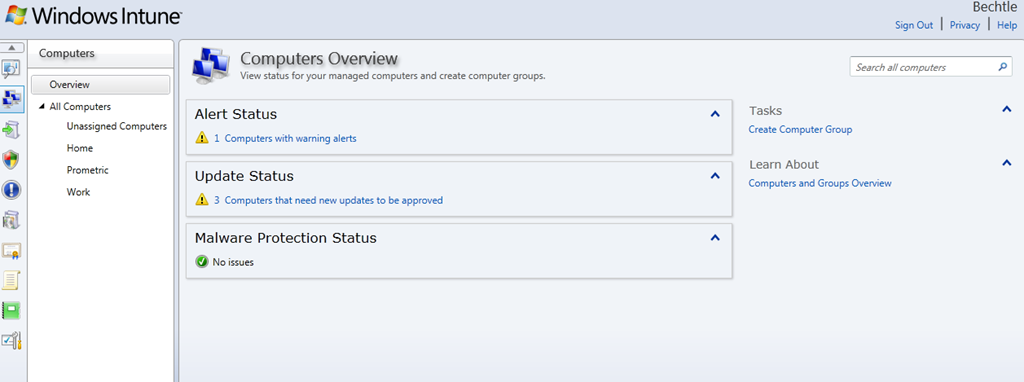
This is the second screen in the Windows InTune Console:

Computers

On the left you can see a list of all the computer groups that I’ve created. These machines are on 3 different networks but they all appear in this one central view, which makes administration very easy!

Selecting a group on the left takes you into a new view where you can see much more granular detail on the machines. At the minute, I’ve only got one machine in each group but you get the idea Smile

image

The “View Properties” button takes you deeper into that machine, with more sections available to view:

image

The first few tabs are all quite self explanatory…but the final two are very interesting.

Hardware

This gives an amazingly detailed list of the hardware in and related to the machine. For my laptop, this information includes:

  • Model
  • Serial Number
  • BIOS Name & Version
  • CPU Name/Type/Speed
  • Number of disks
  • Disk model
  • Disk Size
  • Number of partitions
  • Network adapter
  • IP Address
  • MAC Address
  • Monitor Resolution
  • Printers (including Soft printers like OneNote)

and more. It’s similar to the free ware program CPU-Z (which you may be familiar with) in that it gets really deep into you machine to give you all the information you could possibly need!

Software

This gives a list of all software installed on the machine…in this case:

image

It then gives you an idea of the category such as Browser, OS, Utility etc and also tells you if it’s a Virtual Application.

You can export these lists to either .csv or .html files for use with other applications and systems.

This feature fits really well in to the whole Software Asset Management piece, as organizations will have a complete, current list of all software installed on all machines. It’s very quick to update with added/removed software which will enable companies to be confident of compliance at all times.

Groups:

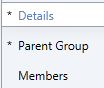
Creating a group is very straight forward. It has 3 sections, each with just one selection to make:
image

Details = Group name (and an optional description field)

Parent Group = Choose which group this will link off from. Either “All Computers” or one of your own.

Members = Choose which machines to add to the group.

Done.

I’ll cover deploy software to machines etc in a later post.

Microsoft Sharepoint 2010 and VMWare Error


I installed Sharepoint 2010 on a Virtual Server last week, set up some new site collections and then when I came to use it, got a very strange error:

”The trial period for Sharepoint Foundation has expired”

Strange because this wasn’t a trial and because it wasn’t Sharepoint Foundation…it was full server 2010!

I did a little searching round the web and saw something on the Microsoft forum that suggested it might be related to Windows Web Server. I checked and yes, our System Admin had built the VM with Windows Web Server…but than itself was weird…why did he do that?

I went downstairs and asked him…he didn’t make a web server, it was Windows Server Std 2008 R2 but by the time it got to me, it had magically morphed into a Web server…WTF?

The media being used was from MSDN and contained Std, Ent & Web in one image and you choose which one you want during the installation. The Sys Admin built a Svr Std machine, converted it to a VMWare template, deployed it again and gave it to me…and there was the problem. We tried again and this time, COPIED it to a template (rather than converting) and hey presto, it all worked perfectly. The VM was a Svr Std box and, after re-installing it, Sharepoint 2010 was up & running straight away Smile

I don’t know if this is a known problem and perhaps it seems really obvious to some, but it had me stumped for a while so I thought I’d share it on here…just in case.

ESPN ScoreCenter: Android App


I’ve had an Android phone for about 9 months now and I’ve found all kinds of great apps, but the one thing I’ve been missing is a decent football score app. Well now that I’ve got Android 2.1 on my HTC Hero I’ve finally got one:

ESPN Score Center

This really is a great app. I’ve got the Premier League selected under “My Sports” and when I opened it up this morning, it had all today’s games lined up. As the games were played, the scores were very close to real time – especially great when you’re out and about.

It goes beyond that though. It gives goal scorers and yellow/red cards, as well as a blow by blow account of all the main events in the game (like the BBC sport site); once the game is over, you get a great in-depth review of the game. You also get a visual representation of all the shots in the match and where they were from etc.

You can add a number of sports/events to the app such as Champions League, Serie A, La Liga plus sports like Cricket, Baseball, NFL and more.

It’s been really useful today and I’m sure it will continue to be so. If you’re a sports fan Android user…go get it!

Microsoft Windows Intune: Online Systems Management


Microsoft Windows InTune is the new Cloud based systems management tool from Microsoft, formerly known as “System Center Online” and has been long awaited. The ability to manage multiple locations/organizations from one central, online point is attractive to a lot of people for a lot of reasons…so let’s take a look @ InTune.

There are at least 10 sections inside InTune so I’m going to cover them in a number of posts, we’ll start with – System Overview:

image

image

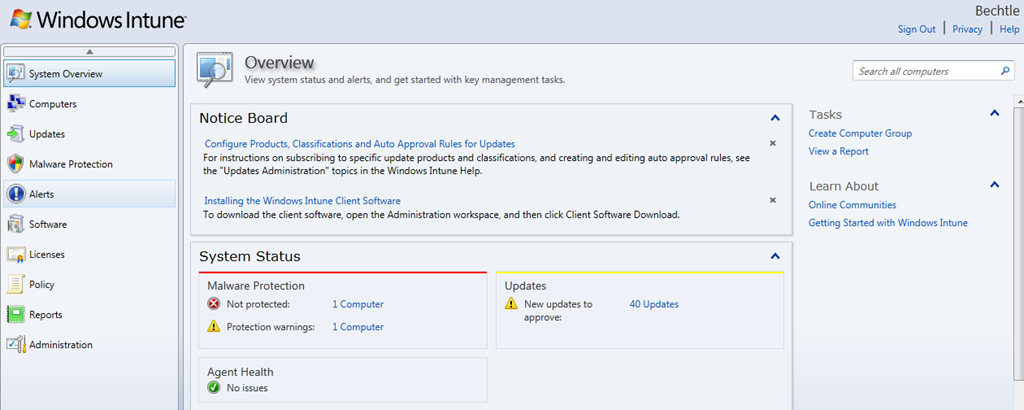
This is the first screen you see when you log in to the Windows InTune Admin Console and it immediately gives you a great overview of yours systems. It shows:

  • If Machines are infected/unprotected
  • If there are updates for your machines
  • A number of other alerts

Malware Protection:

From here you can see which machines have Malware protection turned off completely and also if they have overdue scans or specific parts of the protection, such as USB device scanning, turned off.

1 click takes you to a list of machines, from where you can turn on protection.

Updates:

This, not surprisingly, gives you a list of all the updates that are available for you machines be they for the OS or applications.

One issue with this is that, as default, it shows you ALL possible updates:

image

however, these can easily be filtered:

image

image

Another problem I have noticed is that it wants to give my laptop updates for Office 2007, as well as Office 2010; oddly, this doesn’t happen with my other 2010 machines. I had a number of issues when upgrading Office versions and I’m inclined to believe that there are some Office 2007 remnants on the machine that are being picked up by Intune.

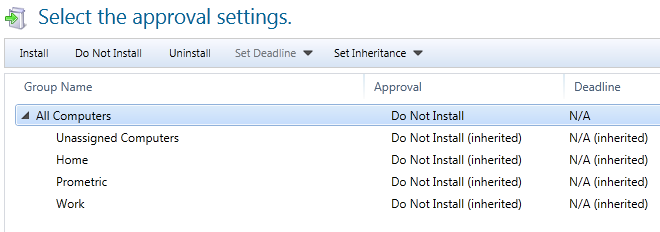
Should you choose to approve an update for a machine/machines, you then reach this screen:

image

Choose the groups on which you want to install the updates, click approve and job done!

I feel it would be a smoother experience and require less clicks, if you could see the machine names on the same screen as all the updates. Currently, you must:

  • Select the update
  • click on “x computers need this update”
  • Check the groups/machines
  • Go back to the previous screen
  • Approve Update

Showing the machines names/groups on the initial screen would remove a lot of that.

You can also access the updates via the individual machine screen, I’ll cover that in a later post.

Alerts by Type:

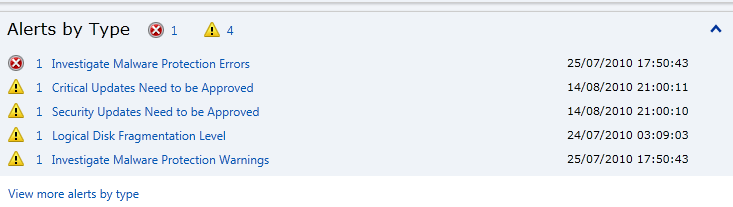
This section, as well as the above, also includes other types of alerts…not just updates and malware. This is where InTune starts to differentiate itself from other products, for example:

image

If I click through, it tell me:

image

That is pretty cool, and something that is very useful for System Admins. I didn’t expect InTune to cover things like this, certainly not in the beta, so I’m pleasantly surprised Smile However, you can’t initiate the defrag from InTune.
The 2 options on the right hand side “Create Computer Group” and “View a Report” will be covered in later posts.

Summary:

This is a brief look at just the first screen of Microsoft Windows InTune but I’m sure you will agree that it already looks very interesting. So stay tuned for the remaining posts in this series (at least 9!) and ask any questions you may have in the comments Smile

Cheers

Rich

Fantasy Football Score Predictions League


Following on from my Fantasy Football league post, I realise that not everyone wants to invest the time into creating and maintaining a team so…

I’ve also created a league where all you do is predict the scores…quick and easy 🙂

This time, sign up/login in at:

http://iknowthescore.premierleague.com/

Go to

“Mini Leagues”

and join with the following code:

F9E35-JLW

Have fun!

Fantasy Football Twitter League


The UK football/soccer (I know I get quite a few US readers so there you go :-)) season starts tomorrow, August 14th, and it is exciting!


I’m a big fan of Fantasy Football and, despite not being very good at it, I do enjoy the process of selecting my team…”argh, I’ve only got 4 million left and I still need 2 midfielders and a defender!” and it also makes so many more games interesting. So rather than me only watching Utd’s game against Newcastle on Monday, a whole host of games are now almost as important, which makes it that much more interesting.

The other good side of Fantasy Football is the league. Competing against people with your memories of last season’s performances and often rash predictions for the upcoming season merging together into supreme confidence that you are, in fact, the new Alex Ferguson…brilliant 🙂

To that end, I’ve created my own private league on:

http://fantasy.premierleague.com/

for my contacts on Twitter and also you, my awesome blog readers, to join!

Get yourself signed up, create a team, go to

“Leagues”

on the left, then

“Create/Join”

and enter the special code:

1367270-285519

Then you will be a member of the RFB Twitter League and the fun can begin!

I look forward to seeing you there 😉

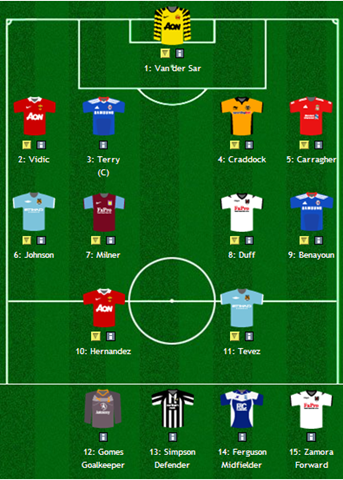
Oh yeah – here’s my team…

image

Microsoft VLSC N-2 Media Downloads


Microsoft’s VLSC (Volume Licensing Service Center) is the central portal for volume licensing customers to manage and download licence keys and media.

Microsoft’s Volume Licences all include “Downgrade Rights” which let you run previous version of the software, for instance:

Buy Windows 7, install XP or Buy Office 2010, install 2007

However, Microsoft have only ever provided the media for 1 previous version AKA N-1 so:

Windows 7 = Vista

Office 2010 = Office 2007

Exchange 2010 = Exchange 2003

If you needed to downgrade further than that, you were required to provide your own media…usually from a previous install.

That being said, Microsoft are now changing that!

From July 2010, VLSC users have been able to access:

  • Windows XP
  • Windows Server 2003 R2

and from September 2010, the following N-2 downloads will be made available:

  • Office 2003
  • SQL Server 2005
  • Exchange Server 2003

This will make it easier for organizations who still need to run these older versions.

(via Eric Ligman)

Microsoft Kinect official pricing


Microsoft Kinect, the motion sensing, wii-beating, game changing Xbox 360 add on, now has official pricing.

US = $149.99
UK = £129.99

It’s good to have pricing but it does seem we’re getting the short end of the stick here in the UK. The current conversion rate puts it around £90, which would far more palatable. I don’t see why it is so much more over here…almost 50%!

When I pre-ordered my Kinect a couple of weeks ago, Game told me they expected it to be less than £100 as Microsoft wanted to “make it as accessible as possible”…that sounded plausible but alas, clearly isn’t the case 😦

In my opinion the Kinect should be positioned as a way to attract new Xbox owners, but I can’t see £300 being seen as that attractive…especially when a Wii costs £119.99!

Will I still pick up my pre-order? To be honest, yes…but I’ll be expecting even more from it now!

Microsoft BPOS Wave 14: Client Support


BPOS, Microsoft’s Online Services offering, obviously plugs in to their Office suites but there are restrictions about which versions you can use. Currently Office 2003/2007 & 2010 are all supported but, once the new online release happens, that will change.

Based on current rules, partners are expecting Office 2003 support to end by early 2011 but, based on the MS Online Service post here, that may not be the case:

“We are currently investigating Office 2003 support and will publish a list of supported capabilities in the future”

which indicates at least some functionality will still be available to organizations running Office 2003. There are a HUGE number of reasons why upgrading to 2010 is a great idea, but that’s for another time 🙂

The full list of supported products is:

Operating Systems:

  • Windows XP SP3 with RPC over HTTP patch
  • Windows Vista SP2
  • Windows 7
  • OS X 10.4 (Tiger)
  • 10.5 (Leopard)
  • 10.6 (Snow Leopard)
  • *Windows XP Home and Windows Media Center edition are supported but will not support federated identity.

    Office Client:

  • Office 2007 SP2 or Office 2010
  • Office 2008 for Mac & Entourage 2008 Web Services Edition
  • .NET 2.0 or later
  • Microsoft Communicator “14”
  • Mac Messenger 9
  • *Office client is not required for customers who choose browser-only access. Office Communicator ‘14’ will be generally available later this year.

    Browser:

  • Administration Center and My Company Portal
    • Internet Explorer 8 for Windows XP
    • Internet Explorer 7 or higher for Windows Vista and Windows 7
    • Firefox 3.x
    • Safari 4.x
  • Outlook Web App
    • Internet Explorer 7 or later
    • Firefox 3 or later
    • Safari 3 or later on Macintosh OS X 10.5
    • Chrome 3 or later
  • Outlook Web App Light
    • Internet Explorer 5.5 or later
    • Firefox 2 or later
    • Safari 3 or later
    • Opera
  • The news that Office 2003 won’t be killed off completely is good news, as it allows partners to position BPOS separately to Office upgrades…and allows customers to keep the costs apart!

    Microsoft BPOS: More new features


    Microsoft BPOS has, yet again, been something of a star of the Worldwide Partner Conference and a bunch of new features have been confirmed/announced. They are:

    Exchange Online:

  • Voice mail with Unified Messaging
  • Integrated archiving
  • Retention policies and legal hold
  • Transport rules
  • Multi-mailbox search
  • Conversation View
  • MailTips
  • Enhanced Web-based administration
  • Role-Based Access Control
  • Remote PowerShell
  • Free/busy between cloud and on-premises
  • Cross-premises management
  • Native migration tools


    Sharepoint Online:


  • Portal site templates
  • Extranet access
  • Anonymous Access
  • Multi-Lingual UI
  • Office 2010 integration
  • Tagging, Rating, Tag Cloud
  • Activity Feed, Social Networking, Note Board
  • Improved Wikis & Blogs
  • Content publishing
  • Navigation controls
  • Cross site-collection search
  • Phonetic search
  • People search
  • Visio Services
  • Excel Services
  • Sandboxed Solutions
  • Improved workflows
  • Improved SharePoint Designer 2010
  • Access Services
  • Better controls of FQDNs


    Office Communications Online:


  • P2P A/V across firewall
  • File transfer across firewall
  • Presence with pictures
  • Federation
  • IM with Windows Live


    Platform Updates:


  • Free/Busy co-existence
  • Single Sign On
  • Identity federation
  • Redesigned admin interface
  • More administration and access control

    There are some really awesome additions here, which will make BPOS hugely more attractive and credible to users in the mid-market segment. Some of the game changes are, in my opinion,:

    Exchange Online:

    • Transport Rules
    • Legal Hold
    • Unified Messaging
    • Remote Powershell

    Sharepoint Online:

    Extranet & Anonymous Access

    Cross Site Collection Search

    Visio, Access & Excel Services

    Office Communications Online:

    Federation.


    These new features bring Microsoft’s Online Services so much closer to feature parity with their existing on-premise brethren which is what I, and most people, have been waiting/asking/pleading/clamouring for. The number of times I’ve had a customer opportunity collapse due to BPOS missing a standard and relatively basic feature isn’t funny!

    This is a very positive move from Microsoft which will make the world of Online Services a much better place for Microsoft, it’s partners and our customers 🙂