Microsoft Office 365 & BPOS


Microsoft made a big announcement today – Office is available online!

Yes Office Web Apps have been with us for a little while but they are lacking many features and, in the corporate world, you need a full Office licence on your desktop to use them. This however is “proper” online Office so, just like the original BPOS offerings such as Exchange & Sharepoint, it exists solely in the cloud…no on premise(s) software required.

There were also name changes, new products and new prices announced today so let’s take a look at the whole shebang!

Office 365

This is the new name for Microsoft’s cloud services, both existing and new. Family members include:

Office 365 Small Business

Office 365 for Enterprise (BPOS V2)

BPOS Government

Live@EDU

To be honest, I’m not really sure about the name. Maybe it will grow on me but for now at least, it feels a bit cheap and I’ve already seen people asking what happens on day 366 of a leap year Smile

Office 365 Small Business

This cut down version of Microsoft’s cloud offerings is, as the name suggests, aimed at small businesses with up to 25 users and offers:

  • Exchange Online
  • Sharepoint Online
  • Lync Online
  • Office Web Apps
  • External Web Site

for $6 per user per month.

Office 365 for Enterprise

BPOS V2 aka Union will be available in the first half of 2011, as per Mary Jo Foley’s info.

This will give companies:

  • Office Professional Plus
  • Exchange Online
  • Sharepoint Online
  • Lync Online
  • 24×7 Phone Support
  • On Premise(s) licences

It’s to be noted that the upcoming Wave 14 releases of the online products will introduce dozens of new features that make them much more compelling to businesses, such as the ability to federate Lync and host extranets on Sharepoint:

Read Microsoft BPOS- More new features

All this will cost just $24 per user per month – that is really amazing!

Availability

Beta testing across 13 countries has started, with beta sign up available at:

http://www.office365.com

If you can get it to load up for you – I’m having no luck!

Office365 will be available in 40 countries during 2011. It will then expand to include Dynamics CRM 2011 Online (a great product) and then a separate Educational focused offering will arrive, rolling into it Live@EDU.

Follow @Office365 for more info.

I’m already thinking of a number of our clients who will be very interested in Office Online but one question I have already been asked is:

“Can I get Office Online as a separate product?”

I don’t think so but I will check…

Microsoft Kinect & Sky Player


Microsoft Kinect is coming, and it’s going to be awesome.

Sky Player on Xbox 360 is already available and can be pretty awesome.

Microsoft’s Channel 9 have revealed that you’ll be able to combine the two. Yes that’s right, in a little under 6 weeks, you’ll be controlling Sky with Kinect…nice Smile

“Kinect for Sky Player on Xbox 360 will also let viewers control TV with their voice to pause, fast forward, rewind and play content.”

Microsoft Enrolment for Education Solutions (EES)


Microsoft licensing has a new family member, Enrolment for Education Solutions AKA EES.

Currently, there are 2 education specific licensing programs, Schools Agreements & Campus Agreements (I’m not including Open Academic & Select Academic as specific). These offer huge savings over standard licence costs but there are certain requirements that don’t always please people, mainly the requirements to cover ALL eligible desktops, even if they’re already licenced or not to be used for that purpose.

Last year, Microsoft introduced a pilot licensing scheme for education called SESP, which I covered here:

Read Microsoft Licensing- Subscription Enrollment for Schools

Not much has been heard about SESP since then, but it’s influence can definitely been seen in EES.

It’s interesting to note that Live@EDU, the free email+ service for Further/Higher Education establishments will be fully integrated into EES.

What’s different?

The big change is that EES is based on an FTE (Full Time Employee) count, rather than the number of desktops. This will, for almost all schools and colleges, dramatically reduce the number of licences needed.

Another change is the ability to add “non-platform” products in any quantity at any stage of the contract. This will reduce costs as well as help reduce complexity and perceived “pointlessness” of licensing. A good example of this is one we had with a customer a year or 2 ago, where they wanted 70 something Terminal Service CALs but they were required to purchase 700+ as that was their desktop count! Many grumbles were made about that as 600+ of them were never used and seen as a complete waste of money.

Something else that will help organizations further reduce costs is the ability to pro-rate the pricing of additional products, with a minimum charge of 6 months. For example:

Product added in month 3 = full price x 0.75

Product added in month 9 = full price x 0.5

You can also define an organization in a much more granular fashion so it could be:

  • Entire school district
  • Entire school
  • Just Year 11
  • Just the science departments

or more…much more flexible Smile

However you define the organization, the minimum entry point is still 300 units.

What exactly is FTE?

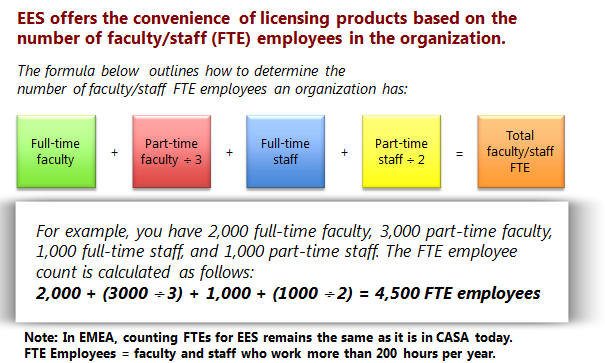
Perhaps not surprisingly, FTE isn’t quite as straight forward as just “Full Time Employees”! The actual calculation is:

image

“Non desktop PC Users” such as maintenance or food service staff can be excluded from the count. MS point out that you must include “student employees”, although I’m not sure what they are?!

Launch

EES is being made available at different time in different regions, and also through different channels. December 2010 will see the limited launch of EES.

In the US & Canada = December launch of EES under Campus Agreement via Distribution & Value Add Resellers (VARs).

In EMEA = December launch of EES to Campus Customer only via Large Account Resellers (LARs) only.

In APAC = December launch of EES under Campus Agreement via LAR only.

It won’t be available to primary & secondary schools in EMEA until March 1st 2011.

Microsoft XP OEM Downgrade discontinued


Microsoft Windows XP is still used by the majority of business around the world and it’s proving hard to get some people away from it. Well, Microsoft and it’s hardware partners are moving to make it more difficult to stick on XP and this is, in my opinion, a good thing.

What’s Happening?

From October 22nd 2010, downgrade restore media will not ship in PCs or Notebooks from HP.

If customers still require XP downgrade media, they will need to speak to HP support. A key bit of information is that this service will

“be available through HP Support until the end of July 2011”

which suggests in 10 months time, this service will be discontinued completely.

This isn’t specific to HP and is in fact a Microsoft directive that applies to all hardware OEM partners, although I believe the cut off dates may vary slightly.

Android App: GMote


A free app Android app saved me £59.99 last week!

I’ve got my desktop hooked up to the tv in the living room for the purposes of watching online media such as Lovefilm, 4oD, SKy Player etc and it’s great. One downside though was my lack of wireless keyboard and mouse. “They’re easy to find” you say, and you’re right…but I’m fussy. I didn’t want 2 separate peripherals, oh no, I wanted a wireless keyboard with an inbuilt touchpad; and these it seem are shockingly difficult to find!

It seems, at least to me, like the kind of thing that would be everywhere but that’s not the case. I looked in all the high street stores and a lot of online sellers and came up empty handed. Eventually I found one in PC World/Currys and how much did they want for this Toshiba crafted gem? That’s right – £59.99. In my opinion that is grossly over priced, so I left it on the shelf and continued to rue my lack of combined wireless peripherals.

Then, while looking at something different online, I came across the GMote app for Android…and this thing is AWESOME! Smile

What does it do?

It turns your Android 1.6+ phone into a wireless remote for your pc! Yes it does!

How?

You install Gmote on your mobile device and the Gmote server on the machine/s you wish to control.

Download the desktop server software here:

http://www.gmote.org/

On there, you point it towards your media files (my music etc) and you’re then able to connect to them from your Android device, search through them and play them on your desktop. You can use your mobile to pause, skip, reverse etc just like a regular remote control.

I can tell you’re thinking “that’s pretty good, but does it warrant the capital “awesome” above?”. That’s not all it does, this is the best bit:

It can remotely control your mouse and has keyboard input ability too!

So I can sit on my couch, open up a web browser and navigate to Youtube, maybe 4 on Demand, Lovefilm Online, Wikipedia, whatever…all from my Android device!

It works really well, is very smooth and it FREE!

Anyone who has an Android device and the need to control a machine – get this app NOW!

Microsoft Windows Phone 7: RTM


Microsoft’s new Mobile Operating System – Windows Phone 7 – has been “Released to Manufacturing”. That means it’s done and the work of the “internal engineering team is largely complete” according to Terry Myerson, Corporate Vice President of Windows Phone Engineering.

Terry’s blog post on the Windows Team Blog gives some fascinating examples of how Microsoft have been testing this new release:

“We had nearly ten thousand devices running automated tests daily, over a half million hours of active self-hosting use, over three and a half million hours of stress test passes, and eight and a half million hours of fully automated test passes”

That is a LOT of testing hours!

The full blog post can be read over at:

http://windowsteamblog.com/windows_phone/b/windowsphone/archive/2010/09/01/windows-phone-7-released-to-manufacturing.aspx

Android Apps: Great ones I’ve found


I’ve had my HTC Hero for 9 or 10 months now and one of my favourite things is the app market. Recently I’ve come across a few new (at least to me) apps that are pretty awesome, and they are:

Astrid Tasks

This is a great to-do list application to help you keep track of all the many tasks you need to do. The best thing about it though, is it links to and synchronizes with Remember The Milk, which is, in my opinion, the best task tracker/to-do list out there.

BBC Browsecast

This app enables you to listen to BBC Radio LIVE on your Android device as well as access BBC podcasts.

To listen live, you can choose from:

  • Radio 1
  • 1Xtra
  • Radio 2
  • Radio 3
  • Radio 4
  • 5Live
  • Radio 7
  • Asian Network

Podcasts from 37 stations are available including the above as well as:

and a host of other regional stations.

The app works really well and will definitely come in handy when I’m out and about…especially for catching footy!

Goal.Com

I found this app during the world cup and it’s a brilliant football app, with a wealth of news as well as scores. It really is one of my favourite apps and I look at it numerous times a day to keep up to date with what’s happening in the football world. It covers such a wide range of the football world that it’s hard to know where to start!

Across the top, you have the following menu choices:

Breaking | Live Scores | Club News | More

Breaking: This updates as and when new/breaking news hits the football world, be it injuries, transfers, comments etc.

Live Scores: This is a super handy section of the app which does what it says – it gives you live scores. Watching the Utd v Everton game, the Goal.com app updated with a minute or so of the goals happening on Sky…very swift – which is exactly what you need. The best thing is the scores aren’t limited to the Premier League either, you can get live updates for:

  • Champions League
  • Europa League
  • Premier League
  • Ligue 1 (France)
  • Bundesliga (Germany)
  • Primera Division (Spain aka La Liga)
  • MLS (America)
  • Copa Libertadores (South American club competition)

Club News: This section is sub divided into:

  • Manchester Utd
  • Chelsea
  • Liverpool
  • Arsenal

and gives the latest news on happening with those clubs.

More: This section is again broken down into the different country leagues/international cups. For some, such as the Premier League and Ligue 1, it gives news updates concerning all clubs in that league. This is really useful for keeping abreast of what’s happening in across the Premier League…it can be as important to know what the other teams are up to as it is your own…especially when you’re doing fantasy football! Not all league get the news feature but they do all have a league table which is again very useful. Being able to see who’s at the top of La Liga and Serie A is really nice Smile

If you’re a football fan I’d DEFINITELY recommend that you download this app!

IMDB

: Yes, I know this has been around for a while but my HTC Hero was stuck on Android 1.5 until my recent upgrade to 2.1 so I’m a little behind the curve on some things! If you have Android 1.6 or above, get this…having the power of IMDB at your fingertips is awesome…and can help settle disagreements where ever you are Winking smile

Last.FM

: This free app allows you to listen to Last.FM stations on the move. I’ve only used this on Wi-Fi but it worked a treat, great streaming and a nice quick app.

MixZing

: I use this instead of the built in music app and I’m a big fan of it. The main things for me are that it’s easy to create playlists and has a great shuffle function.

Sky+

: This app is brilliant. It lets you set things to record on your sky+ box…from your Android handset! I’ve used this loads of times and it’s really easy to do…simply put in your sky.com login details and bang, start remote recording Smile It’s even got a feature that the sky box doesn’t and it’s very useful, it gives you “alternative screenings” of films so you can easily if it’s on again when it won’t clash with your current schedule.

Vlingo Voice

: I was most disappointed to discover that the HTC build of Android 2.1 doesn’t include voice to text (V2T) capabilities. I have no idea why they decided to remove it but it was a feature I was really looking forward to so I was a little put out. However, I then discovered Vlingo, a free app that gives you brilliant V2T functionality…I was pretty amazed at what can be done with this app.

There are a number of things you can do with it (some U.S only it seems) but the ones that I use are:

Text Message: If you say “Text Geoff what are you doing” It will open up a new message, add in the text and then all you  need to do is click “send”!

Email: This is similar to text messages, just say “Email Geoff what are you doing” and, as long as their email address is listed in their contact card, it’ll pop up ready to send.

Twitter: Again, nice and easy just say “Twitter” followed by your update.

You can also use it to update Facebook and even check in on FourSquare!

These are all great apps that I’ve found over the last few weeks and I hope you find them useful too…if you’ve got any to add, hit up the comments!

Microsoft Zune Pass available internationally


Microsoft are making the Zune Pass available in countries other than the US. That gets a big:

from me and I’m sure, 1000’s of others across the world too!

The imminent arrival of Windows Phone 7, which has the Zune player built in, means making this available worldwide is high on the list of things Microsoft need to do Smile

The Zune Pass is something I’ve been looking at for a long time as it represents great value for money. In the UK, it will be £8.99 a month which will give you full access to stream the huge library of music available in the Zune Marketplace. That in itself wouldn’t be enough to sway me as I have enough music already (!) but here’s the kicker:

Each month, you can permanently download and keep 10 tracks.

Which works out as 89.9p per track. So the streaming AND the keeping – that’s a winner right there!

Also, it will probably mean I will use Spotify very infrequently…

Microsoft Windows Phone 7 Funeral Parade


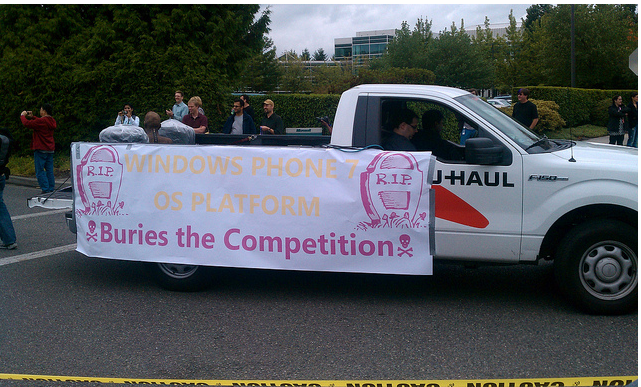
Microsoft have announced that Windows Phone 7 has been RTM’d (Released to Manufacturing) and to mark the occasion they held a great parade through their Redmond campus.

There were jugglers, unicyclists, fancy dressers and a funeral parade for Microsoft’s competitors such as the iPhone! Flickr member, and I assume MS employee, “Trioculus” has a great set of pictures on his Flickr account:

imageimageimageimage

Lots of fun with a great turn out of people but the funeral parade has received quite a few negative comments on Twitter from people such as EdBott & MaryJoFoley. I can see both side of the argument to be honest…yes it’s just a bit of fun and done very much tongue in cheek but perhaps it wasn’t the most appropriate thing for Microsoft to do. People are quick to criticise Microsoft for almost anything so this just seems like they’re asking for it! Also, Apple and their other competitors will use this as “proof” that Microsoft are focused simply on beating them, are scared of them etc. That said, let’s have a look at some pictures Smile

imageimage

Head over to http://www.flickr.com/photos/trioculus/ to see more pics of the event,

Your thoughts on this – fun or foul ?!

Microsoft Vine beta to end


Microsoft Vine, their online service aimed at helping people stay in contact during times of emergency, is coming to an end on October 11th 2011.

I signed up to the beta when it was announced and had a cursory look around…and then never logged in again. I suspect this is what the majority of people did and that will be a big factor in it being shut down.

I think the problem comes in that it isn’t really needed on a day-to-day basis; people have Twitter/Facebook etc to stay in contact and then, in times of emergency, logging into Microsoft Vine is almost certainly the last thing anyone will think of. No –one is quite sure what it does, it isn’t ubiquitous at all (in the way Twitter is) and so never gets used.

The full email sent out is:

Thank you for your valuable collaboration and participation in the Microsoft Vine beta program over the past year.
Releasing products and services in beta form gives us a way to learn and adapt our technologies in a real world environment, to gather valuable feedback from our customers and partners and ensure that new models are sustainable. And more specifically, the Microsoft Vine invitation-only beta program was designed to garner participation and subsequent feedback from consumers, communities and governments about the challenges they face today and explore how technology can improve and enhance communications.
Despite positive feedback from customers like you over the course of Vine’s private beta, Microsoft has made the decision to discontinue Microsoft Vine effective October 11, 2010. After this date, you will no longer be able to access Microsoft Vine. We suggest that you record any contact information currently stored in Vine, prior to October 11th.
The decision to discontinue future development of Microsoft Vine was not easily made. Multiple options were thoroughly explored and evaluated with rigor and in the end it was determined that Microsoft Vine is not sustainable as a standalone offering.
Thank you again for your valuable feedback on this product. The key learnings acquired over the past year from the Vine beta will be used to inform and strengthen future product concepts and offerings.  If you have any questions or concerns, please email vinemail@microsoft.com.

“determined that Microsoft Vine is not sustainable as a standalone offering”

This could well mean that parts of this experiment will be integrated into future offerings…perhaps Office Talk (should that ever come about)…maybe even Outlook and Sharepoint?

If you used Vine – let us know!