Microsoft Exchange Online & Blackberry


Microsoft BPOS, the online versions of Exchange, Sharepoint et al has offered a Hosted Blackberry service for around 12 months now and it’s been pretty popular. The vast majority of organizations that use Exchange also use RIM’s Blackberry’s so offering them a way to push that off to the cloud certainly made the adoption of Exchange Online an even easier deal to sell. It was a pretty cost effective solution too, at £6/$10 per user per month.

As BPOS is soon transitioning to Office 365, with new versions of the MS software available in the cloud, there is also a change happening to the Blackberry service…well actually two changes.

1) The service will move over to be hosted, managed & supported by RIM.

2) The monthly cost is changing to £0/$0

That’s right, the service is going to become a free value add from Microsoft and not only that, it will be better than the current offering! From an email Microsoft sent to customers and partners this morning:

“administrators will be able to create and manage more device policies, change device passwords and settings, and search across large numbers of BlackBerry users at one time.”

The monthly cost is also changing for current customers right now, enabling them to take advantage of the zero cost straight away. This is a significant cost saving for companies, as an example – an organization with 150 Blackberry users would look like this:

£6 x 12 months x 150 users = £10,800 per annum

This move from Microsoft instantly saves almost £11,000 a year in the example above, and 150 BB users isn’t a particularly large installation either. Companies could/should use that money to invest in other areas of infrastructure…they could add Sharepoint Online for those users and still have nearly a 50% saving!

Current Customers

Current Blackberry Online subscriptions are being terminated on June 30, 2011 so if you’re currently using the Blackberry Online Service, there are steps that must be taken to ensure continuous service.

  1. Log in to Microsoft Online: Go to the Microsoft Online Customer Portal and log into your Microsoft Online account.
  2. Locate the Hosted BlackBerry service offer: Click Manage Subscription, choose an active BPOS or Exchange Online subscription*, select Buy Hosted BlackBerry from the Actions dropdown, and click Go.
    * This can be the same BPOS or Exchange Online subscription with which Hosted Blackberry was last purchased.
  3. Checkout: In the Shopping Cart, enter your total required number of Hosted BlackBerry seats** and accept the Hosted Blackberry Service Terms of Use (checkbox). Click Update, then click Checkout. The new $0/user/month pricing for all of your current seats for the Hosted BlackBerry service takes effect at new agreement signature. All users under the old terms of use are now covered by the new terms of use regardless of the user count entered.
    ** At a minimum, customers should enter the number of Hosted BlackBerry licenses in use today across all existing Hosted BlackBerry subscriptions. This number is visible in the Hosted BlackBerry Administration Console which is a part of the Microsoft Online Administration Portal.
  4. Cancel the old subscription(s): To cancel your previous subscriptions and avoid being billed for the Hosted BlackBerry service as of your next billing cycle, you must cancel any previously existing subscriptions through a Service Request, either by phone or through the service request form in your Microsoft Online Administration Console (MOAC). Service use will continue uninterrupted after cancelling the old subscriptions.

Bad News

The good news is that organizations can save £1000’s per year but there is some bad news. Unfortunately, RIM aren’t going to have the new platform ready for the General Availability (GA) of Microsoft Office 365; it will be “beginning in late 2011” according to Microsoft.

We’ve been told that companies on Office 365 will be unable to use Hosted Blackberry until the RIM platform is complete, so perhaps some 6 months after Office 365 becomes available. I am yet to get 100% clarification on this point but it appears this means that existing BPOS & Hosted Blackberry users must choose:

Stay on the BPOS platform with Hosted Blackberry for a further 6 months

or

Move to the new Office 365 platform and lose Hosted Blackberry for around 6 months

Not an ideal situation for anyone so I am looking to get more clarification around this ASAP and will update here. My hope is that although they are terminating subscriptions, Microsoft will keep their platform running for existing customers until such time that RIM get their act together…
Windows InTune V2


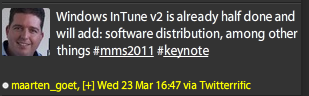
Windows Intune was released to General Availability (GA) today on March 23rd 2011 but already the next version is being worked on, at least according to Twitter.

image

I haven’t seen anyone else mention this but Maarten is a SCOM MVP and the hashtags indicate this came directly from today’s MMS2011 keynote speech, so I think it’s safe to believe it Smile Plus it is in no way unusual for Microsoft to be working on the next version of a product before they’ve even released the first edition…

If Windows Intune V2 does include Software Distribution, that will be pretty amazing. That will enable IT departments/Managed Service Providers (MSP’s) to deploy new software to users from a remote location via the web. Although it will of course be limited by internet bandwidth between the 2 points, this will make so many things so much easier for so many people! That could well be the point that sees InTune take hold in larger organizations…

Microsoft MDOP features and licensing changes


The Microsoft Management Summit has brought more great changes, this time involving MDOP.

The Microsoft Desktop Optimization Pack is a great set of additional tools aimed at making desktop management easier,faster and more dynamic – for more info, see this post:

https://richardgibbonsuk.wordpress.com/2009/09/05/microsoft-mdop/

MDOP 2011 will see both new products, feature enhancements and a change to the way the product is licensed.

Products:

Microsoft recently announced the “Microsoft Bitlocker Administration & Monitoring” tool aka MBAM (codename Malta), which makes the management of Bitlocker devices much easier across an organization; a big one being self-service recovery of keys…I’m sure many IT dept’s will be happy to lose that job!

This will be included in MDOP 2011 and the beta is available on Microsoft Connect here:

https://connect.microsoft.com/site1115/Downloads

Features:

DaRT – Diagnostics & Recovery Toolkit – is getting a new version with at least one new feature; the ability to do an offline remote boot, rather than needing to visit the physical machine. Again, another great time saver for some IT teams!

If you’re interested in this, the beta nomination form can be found here:

https://connect.microsoft.com/site1200/Survey/NominationSurvey.aspx?SurveyID=12358&ProgramID=6840

Licensing Availability:

Previously the only way to purchase MDOP was as an addition to having Windows 7 with Software Assurance (SA) but now it is also available to companies who have either the Virtual Desktop Access (VDA) licence or Windows InTune.

Thanks to Bridget Botelho for her article over at:

http://searchenterprisedesktop.techtarget.com/news/2240033610/Microsoft-sweetens-MDOP-deal-and-releases-Intune

Microsoft make changes to Core CAL Licensing


Microsoft Management Summit (MMS) 2011 is bringing announcement of a number of things such as new versions of System Center products, deeper integration between Microsoft products and, also Licensing.

Most Microsoft server products require a CAL (Client Access Licence) for each User/Device accessing the server software. To help reduce cost and licensing complexity, Microsoft offer 2 bundles that contain a number of these CALs: dsd

Core CAL

Enterprise CAL

The different products contained within have been, for some time:

clip_image002

but not any more!

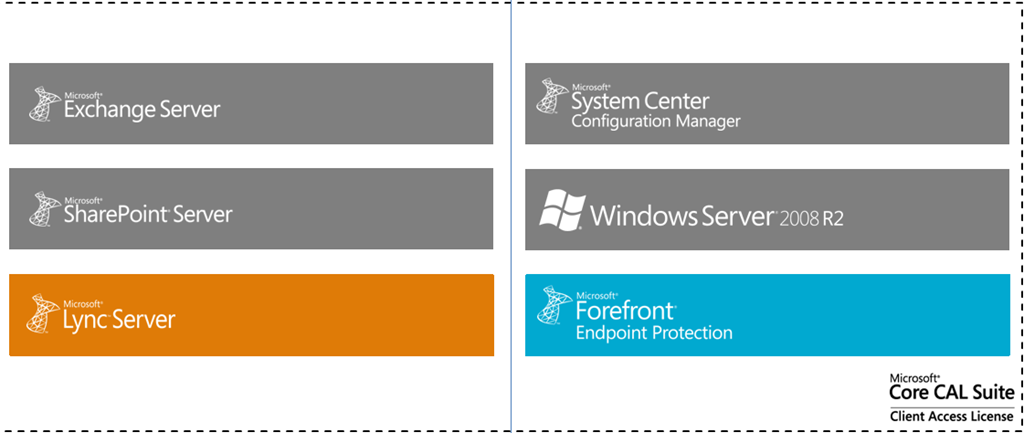
Core CAL will now include:

Lync Std CAL

Forefront Endpoint Protection

Notice that it is only “Forefront Endpoint Protection” that is being added to the Core CAL, if organizations require the other parts of the suite, they will still need to look at the Enterprise CAL.

image

Core CAL for the future

image

That is what the updated Core CAL will look like and these changes are going to take effect from the August 2011 price file. This will also see a slight increase in the price of the Core CAL, due to it’s increased product range.

Why do this?

The way people and companies use technology is changing, particularly there is a rapid increase in the use of Instant Messaging & Presence within organisations. Gartner say:

“By 2013, 95% of workers in Global 100 organizations will use the IM client as their primary interface for computer-based, real-time communications”

Microsoft are making it easier and more cost effective for organizations of ALL sizes to embrace these new technologies and reap the benefits they bring.

These changes are now reflected on the Microsoft site here:

http://www.microsoft.com/calsuites/en/us/products/default.aspx

Lync Online & VoIP


Microsoft are readying Office 365, the new version of their Online Services offering, to be released within the next 3-4 months and one of the new features over it’s previous iteration, BPOS, is the inclusion of VoIP (Voice over IP) Audio.

However, due to certain licensing restrictions, it isn’t currently available in all countries that can use the Office 365 service. Below is a table showing the current standing for VOIP availability across the range of countries who have the beta.

image

I assume this is down to specific country laws as to what services you can provide before you’re classed as a Telecommunications Provider…surely an area MS don’t want to get into!

I have to say I’m surprised it will be available in the UK Smile

Angry Birds: Letter from the Front Lines


I have just seen this on Twitter and it’s quite brilliant. Letters from the Angry Birds, written to their loved ones back home detailing the horrors of war.

imageimageimage


These are taken from the site:

http://www.mcsweeneys.net/2011/3/2riebschlager.html

and seen on Twitter via @nickbilton from the NY Times.

Microsoft Windows Intune


Microsoft have recently announced that Windows Intune will be available on March 23rd 2011. This is their new product aimed at simplifying PC management for SMB organisations.

What is it and what does it do?

Windows Intune is a cloud based, central management system aimed at SMB’s of up to 250 machines (or so).

“Windows Intune simplifies how businesses manage and secure PCs using Windows cloud services and Windows 7—so your computers and users can operate at peak performance, from virtually anywhere.”

Intune covers many of the areas that IT Managers find difficult and time consuming such as:

  • Managing Updates
  • Pro-active monitoring
  • Malware Protection
  • Asset Tracking (Hardware & Software)
  • Remote Assistance
  • Setting Security Policies


As much as it is a Web based management console, it is also more than that…and this piece, despite being pretty huge, doesn’t seem to be getting mentioned that much:

It includes Windows 7 with Software Assurance.

For $11 a month (or whatever your currency equivalent will be) you get a hugely impressive central management console, Windows 7 Enterprise (so features such as Bitlocker), new version rights for Windows 8 and beyond and the ability to add on MDOP and give yourself a truly dynamic IT Infrastructure.

You can read my more in-depth original post here:

https://richardgibbonsuk.wordpress.com/2010/04/19/windows-intune/

Can I get a trial?

You certainly can, head over to:

http://www.microsoft.com/windows/windowsintune/reminder.aspx

register, and get notified when trials are available.

Zune on Windows Phone 7


Having Zune on my Windows Phone 7 device is great and something I use at least once a day. However this constant use means I’ve found a few niggly things that I’d like to see changed.

1) You can’t create playlists on the device. This is something I’d do on my Android device quite a lot…a great way to quickly create lists on the fly. Only being able to create them on the pc feels quite restrictive.

2) You can’t put playlists on random. Now if one created a playlist with proper care & attention, I can see that this probably wouldn’t be necessary. However I don’t put that much effort into my playlist creation! I usually go through my catalogue by artist and add songs in that I’d forgotten about…this means I get runs of one artist for maybe a dozen songs, and I like my playlists to be much more varied than that…

3) You can’t spend Microsoft points. This one I really don’t get. I can spend Microsoft points in Zune on Xbox, Zune on PC but not Zune on Windows Phone 7…why? If you want to purchase something from the Zune marketplace, you have to use real money and that just seems odd. This means I tend to wait until I’m at a pc to purchase anything from the Marketplace…which certainly defeats the mobile aspect!

Windows Phone 7: My thoughts


Windows Phone 7 has been with the world for 5 or so months, and I’ve had the Samsung Omnia 7 for 3 of those:

This is, I believe, enough time to have formed some proper, coherent thoughts on what I do and don’t like about Microsoft’s new Mobile OS. First of all though, the device itself…

The Samsung Omnia 7 is by far the nicest mobile device I have ever held.

It’s light, it’s slim, it’s smooth, it’s sleek and yes…it’s sexy. It’s brushed metal body feels cool to the touch and looks great, as does the huge 4.3” screen. Not only is it a great size, it’s AMOLED…giving a clarity and brightness that puts most, if not all, other mobile devices to shame.

I haven’t seen another device that comes close to it’s overall aesthetic appeal.

Now on to the big one though, The OS!

I’m not going to go into hugely detailed comparisons with other mobile OS’s, just my opinions and what I think are it’s strong points. As a bit of background, I had an Android 2.1 device for over 12 months before getting WP7.

The first thing is how striking it is, especially on the Samsung screen. You can see in the pictures above, the “Live Tiles” in WP7…as you get an email/text message etc, the totals in the tile increase.

  • The Xbox tile is truly live…your Xbox avatar pops in from the side of the tile.
  • The Zune tile shows a scrolling image of the last artist you listened to.
  • If you pin a contact to the home screen it scrolls through their name and their picture.

Having these ever changing sections, right on the home screen, make Windows Phone 7 feel fluid, dynamic and interactive right from the word go.

Two huge, brilliant, unique features of Microsoft’s Windows Phone 7 are:

Xbox & Zune

Xbox:

The Xbox integration is still in its infancy but already is cool, useful and fun. There are 2 sides to it: interaction with your account & games.

Having it on my phone makes it much easier to do things such as editing my avatar, comparing my game progress against friends & inviting new friends. All things that can be done on the console but all much easier to do via the mobile OS.

Even better than that is the ability to earn actual Xbox achievements and gamer points on your mobile Smile I’ve currently got 5 games that contribute to my gamer score and they make gaming on my mobile more worthwhile, at least in my opinion!

Zune:

I’ve wanted a Zune device for years but, being in the UK, they’ve never been officially available to us. I’ve looked at Ebay many a time and got close to buying one, but when I heard the rumours that Microsoft’s next mobile OS would include Zune, I decided to wait. Lo and behold, WP7 arrives with full Zune integration Smile

I’ve been using the Zune desktop client for quite a while now and it is brilliant – check out my post here:

Read Zune 4.0 Desktop Software

The Zune client on WP7 is, like the rest of the OS, very slick, great to look at and great to use. No music player that I saw on Android came anywhere close to the polished look and feel of Zune…it really is a joy! It has so many great features such as:

History – This section shows the last 6 media items you played. Note I said “media items” not just “songs”…it includes videos too and not just local videos but also videos from YouTube too.

New – This section shows the last 8 items added to Zune…songs, videos and playlists.

Both of these sections are very visual, they both use album cover art and, if it’s a video, a screen grab.

Marquee

This section is pretty special and not something I was expecting. If you have other apps that tie in or relate to Zune in some way, then they appear here. For me this section includes:

  • YouTube
  • Last.fm
  • Lyrics

Office:

This is something I missed when I moved from Windows Mobile 6 to Android. Not having Microsoft Office on my mobile made things just that bit more difficult. Microsoft makes up a big part of my job so Word documents, Excel sheets and PowerPoint slides feature pretty heavily day to day so being unable to read them on my mobile device was pretty annoying!

Now with Windows Phone 7, I’ve got:

  • Word
  • Excel
  • PowerPoint
  • OneNote

at my fingertips and boy is it useful.

The other day I was at home when I came across a MAP 5.5 document that I thought might be useful, so I downloaded it and it showed up in the Office hub on my phone. Today when talking to someone at work about MAP 5.5, I pulled out my phone and quickly showed them the section they needed.

One random thing is how much quicker it is to connect to wireless networks that my Android device. It’s usually a matter of seconds between me arriving at home/work and my phone being connected automatically…that never happened with Android 2.1…

I’m sure there are other parts of Windows Phone that I’ve missed here and when I remember, I’ll put another post together Smile

Microsoft EES–Missing Licences


For all you schools out there looking to enroll into Microsoft’s new academic licensing program, EES (technically OVS-ES), I’ve just come across a small hiccup.

Remote Desktop Service (RDS) CALs, the new version of Terminal Service CALs, are missing from the price file, so resellers can’t give you a price for them. I’ve been told that they will appear in the May price file but that still leaves a 2 month window.

We’ve got customers who need to renew their agreements, which contain RDS CAL, before May so I’ve asked Microsoft what the official line is and will update ASAP.

Cheers

Rich