Activating Windows 8 Enterprise


Windows 8 has hit the RTM (Released To Manufacturing) stage so those people with Software Assurance, MSDN etc are able to install the final copy of Microsoft’s latest OS. However it’s not all plain sailing.

It seems sometimes, with the Enterprise version, it refused to activate. You get the screen overlay in the right hand corner telling you to activate but when you go to settings to do so, it fails. The ones I’ve seen fail with a “DNS name does not exist” and shows that it has a license key already, that ends “CWCK7” despite you not having entered one. There no longer appears to be a way of manually typing the key into the Windows Activation section…so what to do?

I came across an article at here that told me what to do, which is actually quite simple:

slmgr -ipk “valid license key”

That 2nd character is a lower case “L” by the way!

Couple of things I thought I’d mention to make things a bit easier:

First of all – you must run command prompt as an admin.

I must admit I struggled for a while to work out how to run CMD as an admin on my Windows 8 tablet. How do you right click without a mouse?

Simple (once you know/remember how) – swipe up on the app icon and it brings up the app commands at the bottom of the screen. Hit “Run as Admin” and you’re away!

Windows RT Office Licensing


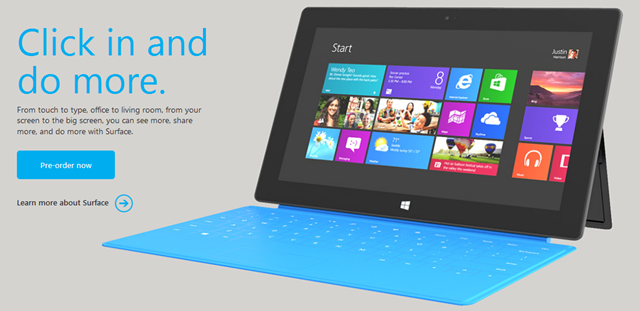
More Surface info was announced last night, with pricing and pre-orders being made available.

All was great and then something of a hubbub started on Twitter when it was noticed/realised/discovered that the Office included in Windows RT can’t be used for commercial purposes or, to quote MS:

“not for use in commercial, nonprofit, or revenue-generating activities”

Now, I’ve known this over 2 weeks and didn’t really think it was particularly surprising; it is, after all, Home & Student edition – which has never allowed those usage scenarios.

I’ve also known that, through:

  • Having a copy of Office 2013 on the RT device user’s primary device

or

  • That user having an Office 365 subscription that includes Office

or

  • Buying the “Office RT commercialization license” that will/should be available from November

You will be able to use said RT Office license in the previously restricted manners mentioned above.

I’m honestly surprised at the furore around this…it follows the same rules as the previous version and is related to a product not actually out yet…is that just me?

Microsoft Surface: A look at Screen Resolution


Microsoft have now released pricing and spec for the Surface RT tablet and one thing that some people have already latched onto is that the screen resolution isn’t as high as that on the iPad 3. This OF COURSE means it is much worse right? Because, just like in the camera world, it’s all about the number of pixels right? What’s that? It ISN’T all about the number of pixels with cameras? That’s right…so why would it be different for screens?

The Microsoft Surface team have, quite brilliantly, been doing an AMA (Ask Me Anything) over on Reddit and have almost literally* been droppin’ science about the screen, which we’ll look at now.

Stevie from the Surface team says:

“Screen resolution is one component of perceived detail. The true measure of resolvability of a screen called Modulation Transfer Function (MTF), not Pixels”

Here’s a Wikipedia article on MTF – http://en.wikipedia.org/wiki/Optical_transfer_function

“The common practice of defining resolution in terms of pixel count is not meaningful, as it is the overall OTF of the complete system, including lens and anti-aliasing filter as well as other factors, that defines true performance. The optical transfer function is roughly the equivalent of phase and frequency response in an audio system, and can be represented by a 3D graph of light amplitude (brightness, i.e. intensity) versus phase and spatial frequency (cycles per picture width).”

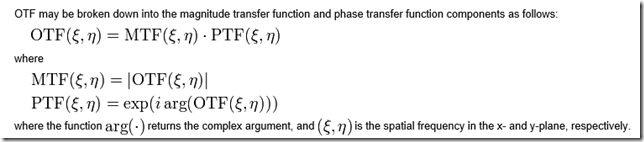
As Wikipedia articles of this ilk often do, and I love it, this quickly turns to what can be known as “crazy maths” – you know, the kind where there are more letters than numbers, to give more detail:
image

Back to “Surface Stevie”:

“Most folks just focus on one number out of dozens of items that effect perceived detail. Without good contrast resolution decreases”

That last piece is what jumps out at me – “without good contrast, resolution decreases”. Here we have a graph that shows contrast sensitivity of the human eye:

image

“Basically, as resolution/DPI increases the eye has become less sensitive. So as a result, the amount of light in a room and the reflections off the screen have a huge effect on the contrast of the display. In fact, a small amount of reflection can greatly reduce contrast and thus the perceived resolution of the display”

Stevie goes on to detail Microsoft’s 3-pronged approach to this subject:

  1. Microsoft has the best pixel rendering technology in Cleartype
  2. Microsoft designed a custom 10.6” high-contrast wide-angle LCD screen
  3. The screen was bonded with the thinnest optical stack anywhere on the market

Although they aren’t official, Stevie pulls these numbers out of the bag:

“…the amount of light reflected off the screen is around 5.5%-6.2%, the new IPad has a measurement of 9.9% mirror reflections”

From DisplayMate.com:

Marketing considerations aside, do you really need all of that “Retina Display” resolution and sharpness? In many cases no, for these five reasons: 

  • Most adults don’t actually have true corrected 20/20 Vision even with glasses or contact lenses.
  • If you view the display further away than the recommended viewing distance your eye can no longer fully resolve the sharpness of the display, so that high resolution is wasted. 
  • Unlike computer graphics images, photographic images (including videos) are inherently fuzzy, with the sharpest image detail spread over multiple pixels. Similarly, you would be hard pressed to visually tell the difference between 640×480 and 2048×1536 photographic images of a (Granny Smith) Apple.
  • Sub-pixel rendering, rather than ordinary pixel rendering, will significantly improve the visual sharpness of any display, especially for computer generated text and graphics, so that is the most efficient approach to improving sharpness.
  • Most people don’t even have 1600×1200 resolution on the much larger 15-19 inch screens on their (Apple or Windows) laptops and desktop monitors and are happy with them (even the tech journalists that I asked).

The AMA post can be found here – http://www.reddit.com/r/IAmA/comments/11kyja/iam_panos_panay_gm_of_microsoft_surface_amaa_ask/c6nf8q6

The whole AMA article is here – http://www.reddit.com/r/IAmA/comments/11kyja/iam_panos_panay_gm_of_microsoft_surface_amaa_ask

Thanks to @CarmenCrincoli for tweeting that post.


*It’s definitely science but they weren’t literally dropping it 🙂

Microsoft Surface pricing announced


Microsoft Surface, the Redmond produced tablet – built from awesomeness and secrecy – is pretty much here. Microsoft have announced pricing and pre-order availability!!!

image

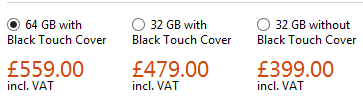
So what are the scores on the doors?

image

How does this stack up to the iPad3?

32GB iPad = £479

64GB iPad = £559

So the Surface matches up exactly against the best seller from Cupertino, which I must say I find a little surprising – I thought it would come in under those prices…but I can see Microsoft not wanting to under-value the great hardware and efforts that are on offer here.

Features

  • Integrated Touchstand
  • 32GB or 64GB
  • WiFi and Bluetooth 4 – no cellular/3g
  • 8 hours “mixed activity” battery life
  • 2 x 720p HD cameras, 1 x front & 1 x rear facing
  • USB 2.0
  • Micro SDXC slot
  • 2GB RAM
  • 10.6” Screen

Head over to the Microsoft Store at:

http://www.microsoftstore.com/store/msuk/en_GB/pdp/productID.257929400?WT.mc_id=FY13WinHH

and check out the specs, the accessories and get one on pre-order!

I am REALLY excited about this product release, both from a personal “zOMG, I want one” but also from an industry/technology perspective – this is an exciting time for everyone (except perhaps Apple!).

First Windows 8 advert arrives


Windows 8 will be released on October 26th and the first advert has debuted. It’s reported that Microsoft are set to spend $1.5 billion on advertising for this latest OS release…take a look at the first offering here:

Office 2013 goes RTM


Office 2013 RTM (Release To Manufacturing) build has been signed off.

Coding and testing is complete.

Now the focus is getting the latest version of Microsoft’s productivity suite (and it’s many relations) out to customers, both consumer and business.

It’s not just the Office suite but also:

  • Lync
  • SharePoint
  • Exchange
  • Visio
  • Project

Office Upgrade Promo

From October 19th, people purchasing Office 2010 from resellers or retailers will receive a free upgrade to Office 2013 upon availability.

Availability

  • Microsoft will begin rolling out new capabilities to Office 365 Enterprise customers in our next service update, starting in November through general availability.
  • Volume Licensing customers with SA (Software Assurance) will be able to download the Office 2013 applications as well as other Office products (including SharePoint 2013, Lync 2013 and Exchange 2013) through the Volume Licensing Service Center by mid-November. These products will be available on the Volume Licensing price list on December 1.
  • IT professionals and developers will be able to download the final version via their TechNet or MSDN subscriptions by mid-November.

I’ve been using the preview for a while now and am a big fan of it, as are people who see it when they’re talking to me at my desk. It will be great once the RTM code is available to all!

Office 2013 Upgrade program


It seems that Office 2013 will appear on the Volume License (VL) price lists from October, despite not being released for around another 6 months. Could this be because the Surface RT tablets, to be released on October 26th, will include Office 2013 and Microsoft feel the need/must have it on the VL price lists for some reason? I’m not sure but it seems odd that it will be on there SO far prior to the availability of the next version of Office.

Microsoft are also, so it seems, gearing up to start a tech guarantee program whereby people who buy Office 2010 will receive a guaranteed upgrade to Office 2013 upon it’s release.

Will it be free like the last Office tech guarantee program or will there be a small charge like the Windows 8 upgrade program? We don’t know but either way it’s a good offer!

ZDNet’s Mary Jo has more details over on her blog:

http://www.zdnet.com/microsoft-readies-office-2010-to-office-2013-upgrade-program-7000004138/

Forefront Product Cull


Microsoft are discontinuing a number of their Forefront security products:

  • Forefront Protection 2010 for Exchange Server (FPE)
  • Forefront Protection 2010 for SharePoint (FPSP)
  • Forefront Security for Office Communications Server (FSOCS)
  • Forefront Threat Management Gateway 2010 (TMG)
  • Forefront Threat Management Gateway Web Protection Services (TMG WPS)
  • There will be no further releases of these products and “Forefront Online Protection for Exchange” AKA “FOPE” will, from the next release be known as, “Exchange Online Protection”.

    Additionally, “basic malware protection” is being added to Exchange 2013, although this can be “easily turned off, replaced, or paired with other services”.

    Both Forefront Identity Manager (FIM) & Unified Access Gateway (UAG) are continuing to be actively developed.

    The full Microsoft post is here:

    http://blogs.technet.com/b/server-cloud/archive/2012/09/12/important-changes-to-forefront-product-roadmaps.aspx

    Managing Windows RT tablets & Windows Intune Licensing Changes


    Windows 8 RT is a new member of the Windows family, and one that’s caused/causing some confusion when it comes to management. It transpired a while ago that Windows RT pcs/tablets will not be able to join Active Directory domains and since then, people have been wondering exactly how they’d manage these devices. Well the answer is here – Windows Intune & System Center Configuration Manager (SCCM) SP1.

    “Windows Phone 8 and Windows RT devices will be managed by the next release of Windows Intune.  IT Pros will have the flexibility of using either the Windows Intune or Configuration Manager 2012 SP1 console to set mobile security policies, distribute mobile apps and view reports.  We’ll share more details as we get closer to the next release of Windows Intune.”

    As Windows Intune is becoming more of a star, it’s getting some licensing changes too – always a favourite thing of mine 🙂

    1. We are shifting from a per-device to a per-user licensing model.  Each user license for Windows Intune covers up to 5 managed devices.
    2. There will be a Windows Intune user license that includes the rights to System Center 2012 Configuration Manager, enabling organizations to manage those devices through either Windows Intune or Configuration Manager, or both
    3. Organizations that already own System Center 2012 Configuration Manager licenses, such as through the Core CAL, will have access to Windows Intune at a reduced price
    4. We will also make a version of Windows Intune available without rights to Windows Enterprise, thereby lowering the cost for organizations that are not ready to move to the latest operating system.

    That final point is something I’ve been hoping to see since the first release of Intune. I’ve always felt that having the desktop OS and a systems management product intertwined muddy the waters and made it a more difficult proposition in many cases; so this is a positive move that will enable Intune to shine in its own light.

    It’s also interesting to note that SP1 of SCCM will be able to manage other types of devices including:

    • Windows Embedded Thin Clients
    • Point of Sale (PoS) terminals
    • Digital Signage
    • Kiosks

    as well as:

  • Distribution point for Windows Azure to help reduce infrastructure costs
  • Automation of administrative tasks through PowerShell support
  • Management of Mac OS X clients and Linux and UNIX servers
  • I’m pleased to see this move to bring Windows RT into the management fold, making it easier for partners AND customers to tell, understand and take part in the Windows 8 story.

    See the whole post over at:

    http://blogs.technet.com/b/server-cloud/archive/2012/09/10/system-center-2012-configuration-manager-sp1-beta-and-windows-intune-update.aspx

    Sideloading Apps in Windows 8


    Many organizations have there own Line Of Business (LOB) systems that they use internally, and in Windows 8 there are 2 ways of installing these on machines:

    • Via the Windows Store
    • Sideloading (I.e. bypassing the Windows Store)

    How to Sideload:

    Sideloading is a Software Assurance (SA) benefit & the document I have from MS says:

    “Windows EA, Select SA, and EES customers will be granted sideloading license rights”

    It doesn’t mention Open SA customers there but I see no reason they would be excluded, so I will ask for clarification on that.

    The requisite license keys for this will automatically be provided via the VLSC.

    If you do not have SA, Sideloading is still possible…for a charge:

    WinSideLoad-H 8 Sngl OPEN 100 License = £2,435

    Purchase this license and you will then receive the license keys via the VLSC.

    Of course, it is still free for companies to publish their apps via the Store, but this method affords them more privacy.

    I have to say I’m not 100% sure why the ability to sideload outside of SA has a fee attached too it. Is it in an attempt to ensure companies are serious about the apps they deploy, and stopping them pushing out willy nilly, poorly created apps that will detract from the Windows 8 experience?