Microsoft Universal Print is a cloud printing service that removes the need for on-premises print servers and printer drivers and makes printing from anywhere easier for users and organisations.
Previously, each user licenses with Windows E3 received 5 print jobs per month which were added to a central pool. Microsoft have now added an allowance of 100 print jobs per month for Microsoft 365 E3/E5 users:
License
Jobs Per Month
Microsoft 365 E3, E5
100
Microsoft 365 A3, A5, F3, Business Premium
5
Windows 10 Enterprise E3, E5, A3, A5
5
Universal Print (standalone)
5
If you have 1,000 M365 E3/E5 licenses, you now have 100,000 print jobs available each month. For organisations where this pooled allowance isn’t enough, additional print jobs can be purchased:
Microsoft have introduced another member of the Defender family – Cloud Security Posture Management (CSPM).
Certain features are available free of charge in any environment where Defender for Cloud is enabled, these include:
Asset discovery
Security recommendations & compliance with Microsoft benchmarks
Secure score for posture
Paid features include:
Attack path analysis
Cloud security explorer
Advanced threat hunting
and more.
Pricing
Defender CSPM protects all workloads across multi-cloud environments but is only chargeable for Server, Database, and Storage resources including:
VMs
Storage accounts
OSS DBs
SQL PaaS
SQL Servers
Pricing starts from May 1, 2023 and is $5* per billable resource per month but there are discounts available for Defender for Cloud customers:
Current Defender for Cloud Customer
Automatic Discount
Defender CSPM Price
Defender for Servers P2
25%
$11.25/ Compute or Data workload / month
Defender for Containers
10%
$13.50/ Compute or Data workload / month
Defender for DBs / Defender for Storage
5%
$14.25/ Compute or Data workload / month
*Pricing was initially announced as $15 per billable resource per month but was later reduced to $5. It also appears the above discount structure has been removed.
It’s the Microsoft Product Terms updates for April 2023 and, to paraphrase Puff Daddy and the Bad Boy Family…it’s all about Windows Server baby!
Some key changes that help to harmonise licensing across different platforms, which is a benefit for all of us involved!
Azure Hybrid Benefit for Windows Server changes:
No longer need to allocate 16 licenses as a minimum No longer have to assign stacked licenses in groups of 8 Confirms minimum of 8 core licenses for AHB VM
Licensing Win Svr by individual virtual OSE:
No longer need to allocate 16 licenses as a minimum CSP customers with Standard licenses can use Datacenter images as guests when licensing by virtual OSE – but must follow Standard edition use rights
CSP-Hoster:
Customers do not need Windows Server CALs or External Connector licenses when accessing “server software acquired from, fulfilled, and hosted by a Cloud Solution Provider-Hoster”.
It’s been a while since there’s been much to say about the good old VLSC (Volume Licensing Service Center) – it’s been ticking along for years – but there is an update now. Many of its volume licensing features are being moved to the Microsoft 365 Admin Center (MAC), this includes:
Downloads and keys
License Summary
Relationship Summary
Note the latter two will both be found under “Contracts” in the M365 Admin Center.
This means customers will have one place to manage their VL and Subscription licenses…will the MPSA Business Center be merged too?
Power Automate has 2 new RPA (Robotic Process Automation) offerings:
Individual Hosted Machines
Hosted Machine Groups
which enable you to run Power Automate RPA in Azure to more quickly test, scale, and deploy.
Individual Hosted Machines
Currently in preview, these aim to make it quick and easy to test both attended and unattended flows without the need to set up physical machines.
Hosted Machine Group
This provides auto-scaling and auto-provisions additional bots as needed when initial capacity for unattended flow bots isn’t enough. It also provides dynamic load-balancing between different groups, ensuring one isn’t adding more VMs while another has several sitting idle.
To use either of these hosted options, users require:
Power Automate per user plan w/attended RPA add-on or
Power Automate per flow plan
as a base license and then you can purchase the Hosted RPA add-on which includes:
Hosted machine
Unattended desktop flows
5,000 AI Builder credits per month
and costs £162.10 per bot per month.
If you’re using Hosted Machine Groups, you need to assign 1 x Hosted RPA add-on for each bot you want to run in parallel. I’m not currently sure how this works in relation to the auto-scaling feature…do you have to have licenses available for the maximum number of bots you’re willing to run (something you can set as an admin) or is there a “pay in arrears” option where you’re billed monthly?
Furthermore, I imagine there will be additional Azure costs although I’m yet to confirm that.
Microsoft’s financial results for the 2nd quarter of FY23 (Oct – Dec 22) don’t make the usual pretty reading this time.
Revenue was $52.7 billion – an increase of just 2%
Net income was $16.4 billion – a decrease of 12%
That’s the first decrease for a long time, showing even Microsoft are not immune to the impacts of rising costs and global recessions. However, it’s not all doom and gloom:
Productivity & Business Processes
Revenue = $17 billion…up 7%
Office 365 Commercial revenue up 11%
LinkedIn revenue up 10%
Dynamics 365 revenue up 21%
All increases but quite a bit lower than we’re used to from previous quarters. Office Commercial (i.e. on-premises) has dropped 30% as customers continue to move to the cloud.
Intelligent Cloud
Revenue = $21.5 billion…up 18%
Azure = 31% up
In most scenarios, 31% growth is good, great even…but not for Azure after a couple of years of 50%+ growth! Although the most recent quarters dipped just below that 50% marker, this quarter still represents a significant drop. Microsoft do mention higher energy costs as a factor in the decreased margin.
Earnings call
There are now 12,000 Azure Arc customers, a 100% increase in 12 months.
45,000+ Power Automate customers – a 50% increase over last year.
Satya Nadella mentions new functionality to build workflows from natural language prompts…that would be really useful for me!
280 million Monthly Active Users (MAU) for Teams
Teams Phone added over 5 million PSTN seats in the last 12 months and is the market leader
Microsoft Security is now over $20 billion and Nadella states they’re taking market share in all the major categories. He also states that a customer has consolidated from 10 security vendors down to just Microsoft – this is something I often advise that organisations explore.
EMS is now at 241 million seats.
Overall, LOTS of mentions of AI from Satya Nadella (as expected) and a real focus on the future with AI, Platforms, Viva, E5 and more. The expectations for future growth and advances seem to more than outweigh the slight disappointment of these results.
Microsoft have announced plans to cut a further 10,000 jobs – a shade under 5% of their total workforce. As with previous rounds of job cuts, Satya Nadella has stated they’ll continue to hire in other “key strategic areas” likely including AI and platforms.
Microsoft will see $1.2 billion in charges in Q2 from these layoffs and also “changes to [the] hardware portfolio”.
This is part of a wider trend of layoffs across the industry recently including:
Alphabet = 12,000
Amazon = 18,000 Salesforce = 8,000 Meta = 11,000
as the tech industry boom comes to a halt and companies look to re-focus and prioritise. Google have said that they expanded to quickly during the pandemic and now need to rationalise their workforce.
It will be interesting to see which areas within Microsoft see the brunt of these cuts, as that will really give insight into how they’re reshaping their business.
I wish everyone affected by this the best of luck.
A very quiet month as you’d expect – the 2 main updates are:
Clarification that Microsoft Defender for Endpoint/Cloud/Business products can be used on devices running on-premises, in Azure, and under the control of 3rd-parties
Information added about the EU data boundary service – see more here
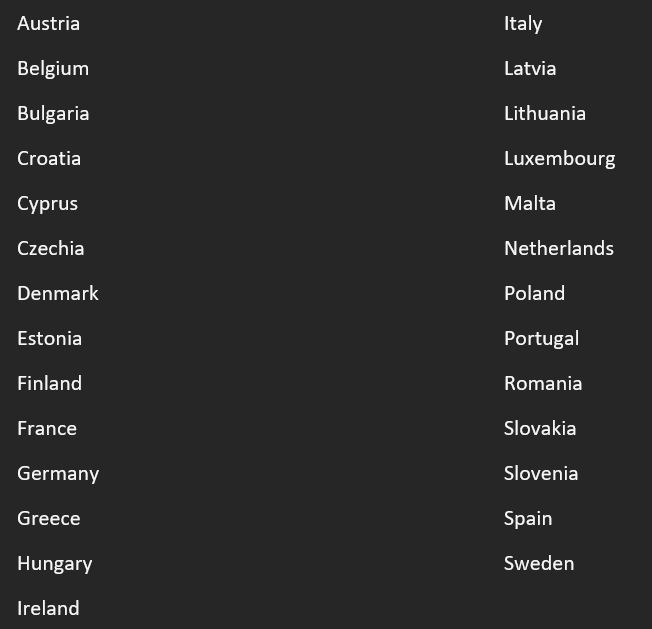
The EU Data Boundary is a geographical area within which Microsoft has committed to store and process customer data for the majority of their online services. This is aimed at addressing concerns around data processing/location and GDPR, held both by customers and organisations such as the European Union.
It is comprised of countries in the EU:
and EFTA:
For my fellow Brits, notice the United Kingdom isn’t included #Brexit
Currently, datacentres in the following countries are being used:
although Microsoft may add additional datacentres within the EU/EFTA over time.
How it works
Azure
Regional resources deployed within an EU Data Boundary region will be in-scope. For non-regional services, there is info here on how these can be configured within the EU Data Boundary. Note, not all services have yet been re-architected to allow this.
Dynamics 365 & Power Platform
This is based on the location of your billing address and, this, tenancy.
Microsoft 365
If you have a billing address within the EU/EFTA, you’re in scope…unless you have purchased the Multi-Geo capabilities add-on license.
Which products are in-scope?
According to the January 2023 Product Terms, the EU Data Boundary can apply to these products/services:
The Product Terms also lists half a dozen scenarios where data may still go outside the EU Data Boundary, these being: