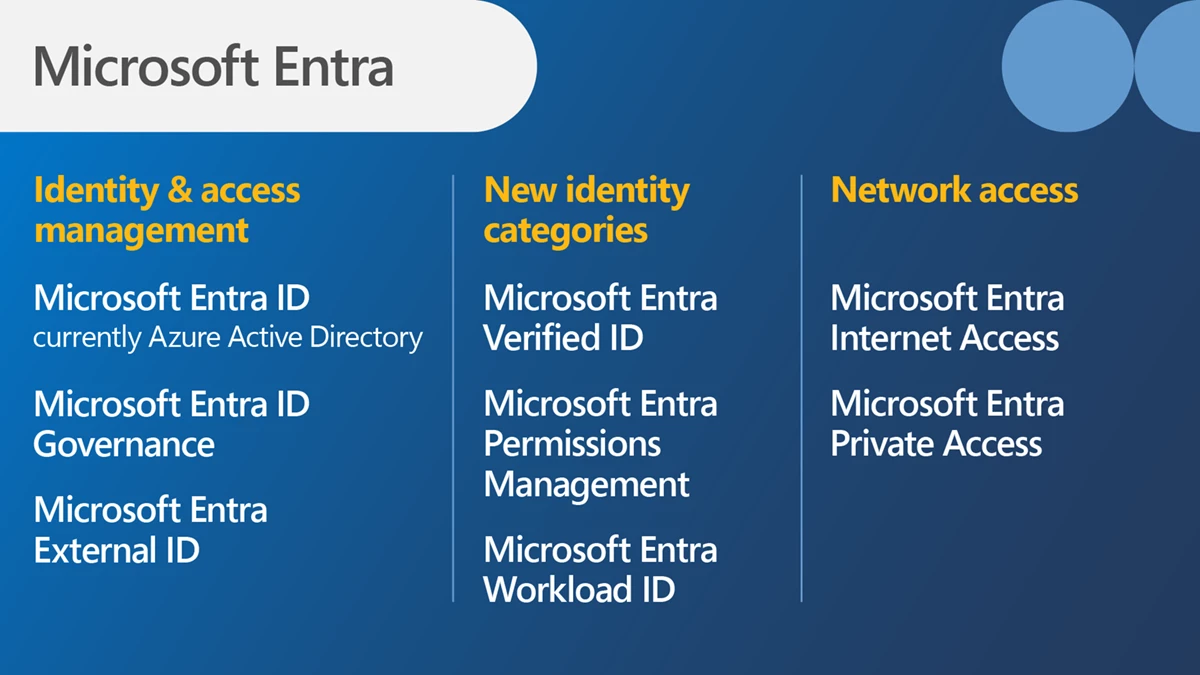
Microsoft have added 2 new products to their Entra family:
Microsoft Entra Internet Access
Microsoft Entra Private Access
Both are focused on security and protecting access to apps over the internet.
Microsoft Entra Internet Access
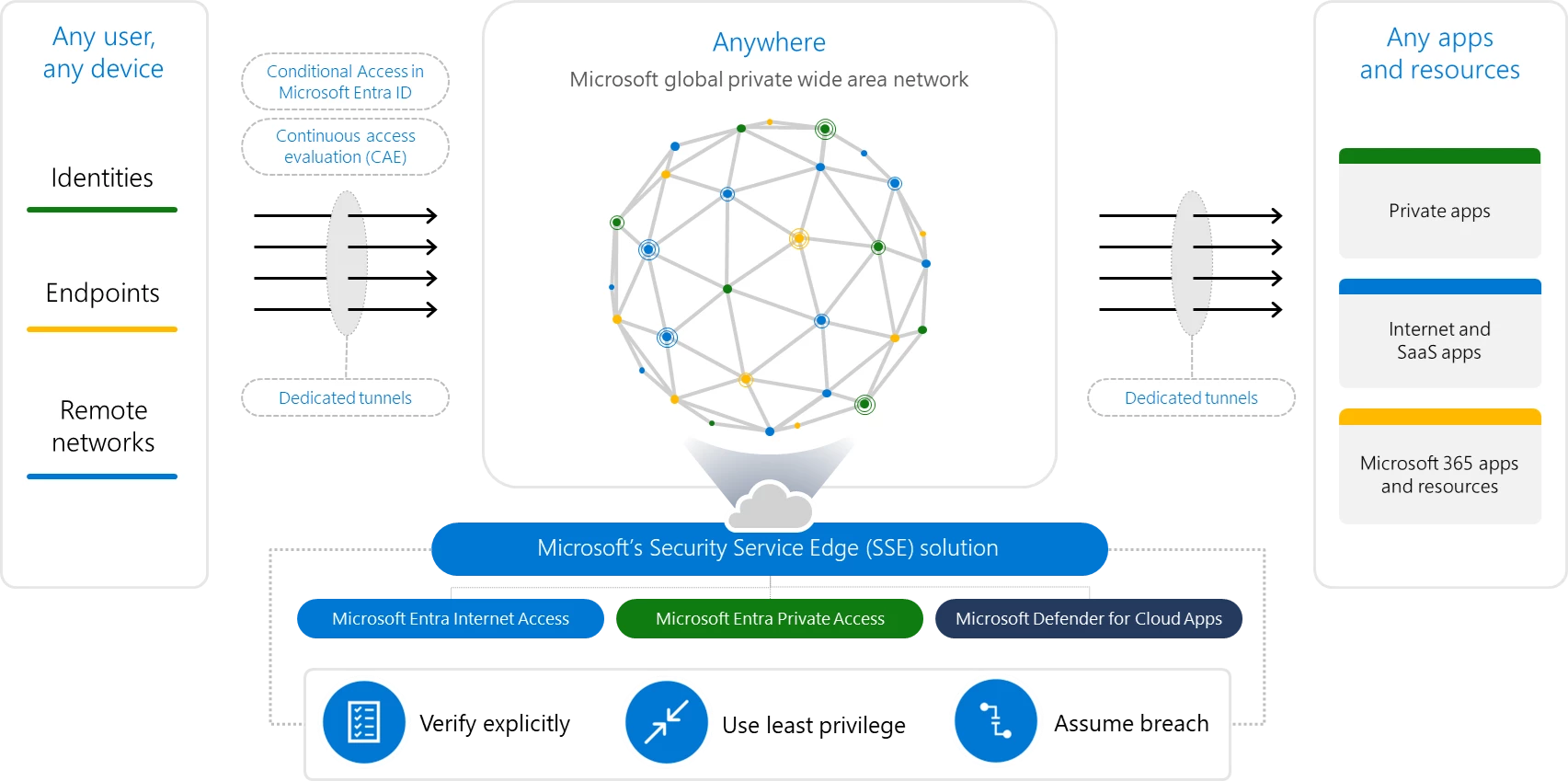
An identity-centric Secure Web Gateway that protects access to internet, SaaS, and Microsoft 365 apps and resources. It extends Conditional Access policies with network conditions to protect against malicious internet traffic and other threats from the open internet.
Microsoft Entra Private Access
An identity-centric Zero Trust Network Access that secures access to private apps and resources. It reduces operational complexity and cost by replacing legacy VPNs and offers more granular security. You can apply Conditional Access to individual applications, and enforce multifactor authentication, device compliance, and other controls to any legacy application without changing those applications
These 2 products, plus Defender for Cloud Apps, form what Microsoft call their Security Service Edge (SSE) solution:
Microsoft Build 2023 saw the announcement of Microsoft Fabric – “an end-to-end, unified analytics platform that brings together all the data and analytics tools that organizations need” by combining various products including Power BI, Azure Synapse Analytics, and Azure Data Factory.
Additionally, “Fabric comes with a SaaS, multi-cloud data lake called OneLake that is built-in and automatically available to every Fabric tenant. All Fabric workloads are automatically wired into OneLake, just like all Microsoft 365 applications are wired into OneDrive. “
To get more info about what Fabric is, check out the MS post here. To learn more about the licensing and pricing, read on 😊
Microsoft Fabric licensing
Microsoft Fabric takes its licensing model, and some of its terminology, from Power BI Premium which means parts of this may be familiar to you.
Each organisation must have 1 x “organisational” license and at least 1 x “individual” license and each subscription is broken down into tenants, capacities, and workspaces.
Organisational licenses
These provide the infrastructure for Microsoft Fabric – effectively this is what gets things provisioned in Azure so you have something to access/work with. There are 2 types which follow the Power BI Premium pattern:
Capacity – This provisions a set of resources in Azure with different SKUS providing different amounts of capacity, cores, RAM etc.
Premium Per User – Gives per-user access to Power BI elements on Microsoft Fabric, with shared capacity only.
Capacity SKUs
SKU
Capacity Units
PAYG (Hourly)
PAYG (Monthly)
Power BI SKUs
Power BI v-cores
F2*
2
$0.36
$262.80
N/A
0.25
F4*
4
$0.72
$525.60
N/A
0.5
F8*
8
$1.44
$1,051.20
EM1/A1
1
F16*
16
$2.88
$2,102.40
EM2/A2
2
F32*
32
$5.76
$4,204.80
EM3/A3
4
F64
64
$11.52
$8,409.60
P1/A4
8
F128
128
$23.04
$16,819.20
P2/A5
16
F256
256
$46.08
$33,638.40
P3/A6
32
F512
512
$92.16
$67,276.80
P4/A7
64
F1024
1024
$184.32
$134,553.60
P5/A8
128
F2048
2048
$368.64
$269,107.20
N/A
256
Pricing of Fabric capacity SKUs at US west 2
*SKUs smaller than F64 require all users, including those consuming content, to be licensed with a Power BI Pro license.
The Azure “F” SKUs are billed PAYG per second
The P SKUs are billed monthly/annually with a monthly commitment and support Fabric being enabled on top of the Power BI subscription.
The EM SKUs do not support Fabric.
Individual licenses
Free – This allows users with access to Fabric capacity to create and share Fabric content
Pro – Required to create, share, and in some cases consume, Power BI content
This appears to show a differentiation between “Fabric content” and “Power BI content” – even if the Power BI content is being created within Fabric 🤔
Pricing and costs
As well as the SKU pricing above, there will also be additional costs for OneLake storage. Again based on costs in US West, the price is:
$0.023 per GB per month
That equals $23 per TB per month ($276 annually). 500TB of data in Fabric OneLake will be $138,000 per year and I feel like that’s probably a low amount of data for many organisations.
There are also potential bandwidth costs as data is accessed and moved between regions:
Managing these resources and costs can be done through a combination of the Fabric portal and Azure Cost Management:
Furthermore, Azure Reservations (Reserved Instances) are planned for later in 2023 which will make the Fabric capacity pricing comparable to the Power BI capacity pricing.
While we’re still awaiting the full release, which could be July 1st or perhaps during Microsoft Inspire later that month, we do have more information available.
Eligible base licenses are:
Microsoft 365 E3 Microsoft 365 E5 Microsoft 365 Business Standard Microsoft 365 Business Premium
And users need to have an Azure AD account too. This is a clear indication that Copilot will be an extra add-on license.
Furthermore, their M365 Apps must be on “Current Channel” or the “Monthly Enterprise Channel” to access Co-pilot.
I haven’t seen any indication of pricing yet but I’m thinking perhaps £10 for E3 and £5 for E5? With some promos at first of course.
*Update* It turns out I was way off base! Microsoft have confirmed the price is $30 per user per month. More info and examples here.
The Multi-Geo add-on SKU is finally arriving on CSP from June 1, 2023 for users licensed with:
Microsoft 365 (but seemingly not the Business SKUs)
Office 365
Exchange Online
SharePoint Online
OneDrive for Business
This add-on enables customers to manage data-at-rest locations across multiple regions within a single tenant.
Licensing
As a minimum, customers must purchase a quantity of Multi-Geo licenses that is equal to at least 5% of the total number of eligible M365 licenses*. So if you have 1000 eligible licenses, you must purchase at least 50 Multi-Geo licenses.
A tenant must be configured for Multi-Geo support, a process which begins automatically once ordered licenses appear in the tenant. Interestingly Microsoft state that:
“the time required to configure a Tenant for Multi-Geo support varies from Tenant to Tenant, but most Tenants finish within a month after receipt of the feature licenses. Larger or more complex Tenants may require more time to complete the configuration process“
so make sure you leave enough time before the functionality is needed in production. You can see more details here.
Microsoft announced their Q3 FY23 (Jan – Mar 23) results recently – let’s take a look at the numbers.
Overall revenue for the quarter was $52.9 billion – an increase of 7% while net income was up 9% to $18.3 billion. The latter something of a turnaround from the 12% decrease the previous quarter.
Productivity & Business Processes
Revenue = $17.5 billion…up 11%
Office 365 Commercial up 14%
LinkedIn up 8%
Dynamics up 25%
A little higher than Q2 but still lower than we’ve been seeing for the last couple of years.
Intelligent Cloud
Revenue = $22.1 billion…up 16%
Azure growth was 27% again, a decent increase but continuing the ongoing shrinking of the percentage increase each quarter.
Earnings Call
Satya Nadella stated that Microsoft continue to focus on 3 priorities:
Helping customers to get the most value out of their digital spend
Investing in AI to increase their Total Addressable Market (TAM) and be the leader
Aligning their cost structure with their revenue growth
We are now in the era of ChatGPT and AI – an area where Microsoft are expected to do very well in the coming months and years – and Nadella stated in the earnings call that they have over 2,500 Open AI Azure customers which is a 10x quarter on quarter increase. He also mentioned that ChatGPT runs on top of Microsoft’s CosmosDB.
Further updates include:
Azure Arc is up to 15,000+ customers which is 150% up year on year (YoY).
Power Platform is up to 33 million Monthly Active Users (MAU) – almost 50% up YoY.
Teams has broken the 300 million MAU mark.
Almost 60% of Enterprise customers are buying Teams Phone, Teams Rooms, and/or Teams Premium.
Almost 600,000 customers have deployed at least 4 Microsoft security workloads – a 35% YoY increase.
Amy Hood stated that, at the end of April 23, total headcount was 9% more than a year prior.
Satya mentioned Copilot several times and, in response to an analyst question, stated that:
“We do plan to monetize a separate set of meters across all of the tech stack, whether they’re consumption meters or per-user subscriptions. The copilot that’s priced, and it is there, is GitHub Copilot. That’s a good example of incrementally how we monetize the price lists out there, and others are to be priced, because we are in preview mode. But you can expect us to do what we’ve done with GitHub Copilot pretty much across the board”
Satya Nadella, Q3 FY23 earnings call
and that gives a good idea of what Copilot licensing may look like. I think my expectation of add-ons to E3 and E5 is pretty accurate.
While Microsoft’s revenue and profits are looking great, and they’re excited about all the growth ahead of them, the shine is dimmed somewhat by 2 things: the memory of the layoffs of circa 10,000 staff in January and the recent news that there are to be no pay raises across Microsoft. Give the increases in cost of living, energy, and inflation – wages staying flat can be seen as a pay cut in many ways.
Microsoft have announced that the “App Governance add-on feature for Microsoft Defender for Cloud Apps” will, from June 1 2023, be included in Defender for Cloud Apps at no additional cost.
This means organisations licensed with:
Microsoft 365 E5
Microsoft 365 E5 Security/Compliance
Microsoft 365 F5
EMS E5
will receive access to what is currently a paid additional license free of charge. It’s not very often that Microsoft (or any software publisher) do things this way round!
Microsoft say they will either proactively cancel subscriptions or do so upon receiving a ticket, depending on the licensing channel.
Windows 365 Frontline is a new licensing option for Microsoft’s Cloud PC offering, aimed at “Frontline” workers who don’t need constant access to their own PC. This can be scenarios such as:
Staff on rota
Staff across timezones
Part-time staff
Licensing
Each W365 Frontline license allows 3 Cloud PCs virtual machines to be provisioned, but they cannot be used concurrently. The maximum active number of Frontline VMs allowed is equal to the number of licenses you’ve purchased i.e. you’ve bought 20 licenses which enables 60 VMs…but only 20 can be in use at any one time.
W365 Frontline introduces the concept of concurrent licensing – rather than licensing ever shift worker, you instead buy enough licenses to cover the maximum number of desktops active at any one time. For example, 300 users who work in 3 shifts of 100 users = 100 licenses needed.
From a management perspective, the licenses will not show as assigned to users (as they are applied at the tenant level) so you will need to use the W365 utilization report to see how many licenses are being used.