Tears for Fears: Head Over Heels-The Literal Version, a follow up to the A-Ha video, is brilliant too!
These really show how weird the 80’s could be!

Latest news on Microsoft licensing, Cloud, and AI
Tears for Fears: Head Over Heels-The Literal Version, a follow up to the A-Ha video, is brilliant too!
These really show how weird the 80’s could be!
Microsoft CHESS is their innovative automated error finding tool for multi-threaded applications. It’s been a Microsoft Research project for 2 years but they’re now set to let people see it at this year’s PDC.
THe MS Research page for CHESS says:
“CHESS is an automated tool for finding errors in multithreaded software by systematic exploration of thread schedules. It finds errors, such as data-races, deadlocks, hangs, and data-corruption induced access violations, that are extremely hard to find with current testing tools. Once CHESS locates an error, it provides a fully repeatable execution of the program leading to the error, thus greatly aiding the debugging process. In addition, CHESS provides a valuable and novel notion of test coverage suitable for multithreaded programs. CHESS can use existing concurrent test cases and is therefore easy to deploy. Both developers and testers should find CHESS useful. The CHESS architecture is described in this technical report.”
I’m not a Developer, but I have done some programming (just a few simple part code generators etc for work as well as a “never saw the light of day” software intranet portal) and I know how annoying errors and bugs can be, especially when you can’t repeat them. I imagine this is even worse when it happens in a huge, multi-threaded application where other people’s time and money are being wasted so CHESS will surely help out a huge amount!
Mary Jo Foley has got extra info here.
Could Microsoft be readying an “Instant On” OS? A survey sent to select MS customers and picked up by Engadget seems to indicate that Microsoft are at least thinking about it.
Microsoft are asking if users would like an OS that, within 8 seconds, allowed us access to a “select sub-set of services”, including Web browsing, IM & Media playback but not “Full Windows”. I’d love this, it would make things quicker and easier and I assume, reduce our power bills a little too 🙂
Microsoft & VMWare are the two big names in Virtualization at the moment, and it’s a topic everyone is talking about. Manufacturers, resellers, consultants, analysts, end users, Jeff down the pub..they’ve all got something to say about Virtualisation. There are all kinds of facts and figures going around, some of which seem contradictory but as with most things it all depends on viewpoint..
You might be wondering why I think it’s time to add my voice to the crowd so let me tell you. At work I see a number of people, our sales guys and our customers, who know the should be thinking about virtualization and talking about virtualization, but they don’t know what they’re supposed to think and say..they know that people can virtualize..but they don’t know why, or how. They know it reduces costs but if someone asked them, the would have to hope that “Err, erm, well..” translates into something better in one of this world’s many languages!! 😉
So in a nutshell, I hope this post/blog will become a safer, calmer haven for people to take a look at virtualization without the often deafening clamour of their colleagues, bosses and suppliers. I’ll say straight away that I’m a Microsoft Partner and supporter so I will lean towards Hyper-V but I will aim to keep everything well balanced and as neutral as possible 🙂
What is Virtualization?
Virtualization has been around since the Mainframes of the 70’s but has only become a general topic relatively recently (around 2005 it really took off).
A very common, entry level example of Virtualization is hard drive partitioning. You have one physical drive, but you can divide it up into 2 or more virtual drives and that’s what the computer sees.
The big buzz around Virtualization is…
Server Consolidation.
These days, many companies suffer from “Server Sprawl”, where they have large numbers of servers, often performing just a single task (Exchange Server, File Server etc) and wasting a lot of internal resources such as RAM, storage space and processing power as well as external resources like floor space, cooling and power.
This is where Server Virtualization comes in. Tools such as Microsoft Hyper-V, VMWare ESX, Citrix XEN and more all allow you to consolidate these various servers onto one physical server running multiple virtual instances or Virtual Machines (VM’s).

Each VM has it’s own Operating System (OS) and applications installed on it and is completely separate to the other VM’s, just like physical servers. (The “One Point of Failure” discussion is later..). It’s widely accepted that most physical servers are running at about 10% utilization, so each server is wasting 90% of it’s storage, RAM, processing power etc..all things that you’ve paid (and are still paying) for. This means you could put say 7 of those servers onto one box, and that machine would then run at around 80% utilization…immediately increasing your Return on Investment (ROI). If you can go from 7 to 1, you can go from 70 to 10 which all of a sudden is a huge difference…
Getting rid of all those servers will reduce the amount of cooling and power you use in your server room/data centre too. This leads us to..
Green IT:
Gartner say that the average company spends 4%-7% of their total IT budget on energy costs such as power and cooling. If your budget is £500,000 that’s £20,000-£35,000 a year, so if you can reclaim say 40% of that and add £8000-£14000 back into your budget straight away, that’s got to be a good thing. With the continued increase of energy prices at the moment, just this aspect on it’s own can be a compelling reason to move to a virtual environment.
A virtual infrastructure can be a lot easier to manage as well. It reduces the amount of time administrators spend on repetitive tasks such as provisioning & configuring servers. If you need a new server quickly, you can simply boot up a pre-configured Virtual template and you have a new machine up and running in minutes.
There are a number of management tools such as VMWare Virtual Center and Microsoft Virtual Machine Manager which make administration even easier.
Windows 7: “Vista but Better” is the description given by Steve Ballmer at the Gartner Symposium.
While he still stands by Vista-pointing out that it’s adoption rate at the 2 year mark is twice that of XP-he also said Microsoft are prepared for people to skip it and go straight to Windows 7.
Choice quotes from Ballmer include:
“Our next release of Windows will be compatible with Vista. The key is let’s get on with it. We’ll be ready when you want to deploy Windows 7.”
“It’s not (a) minor (release) because it’s a lot more work than a minor release. It’s a major release.”
“It’s clear Yahoo didn’t want to sell. They probably still think it’s worth more than $33 a share. I still think it makes sense for their shareholders and ours.”
More can be found over at ZDNet.
Microsoft are in a tricky position with Vista & Windows 7 really…no matter what they do, they’ll be accused of eithe rgiving up on Vista and “admitting” it’s not brilliant OR flogging a dead horse. Very close to the original Catch 22..
Personally I think Vista is a great OS. I use Vista @ home and XP @ work (I know!) and Vista wins hands down each time..it’s easier, faster, slicker, more user friendly but some people just don’t go for it. Certainly not friends but I’d guess that one day Vista & Betamax will be casual acquaintances in the “Why didn’t they like me” bar in Techsville, TW..
Microsoft Windows Server 2008 X64 on VMware ESX is now possible as ESX 3.5 Update 2 has been certified as seen here. This also means that you can install Exchange 2007 SP1 x64 in there too.
I saw this on BrettJo’s Exchange Blog..
Aha-Take on me. The Literal Version is a truly brilliant You Tube video…very very random but very very funny. It had me sitting here on my own laughing out loud…now that’s a good sign!
Everyone loves A-ha (don’t they?) so check this out:
The Microsoft Roundtable is a truly innovative, modern take on video conferencing and as I think my blog shows, one of my favourite gadgets!
To make it even easier, I’ve collected a number of documents and downloads to help you out with the setup, installation and use of the Microsoft Roundtable.
(It’s a good idea to have the firmware around, as you’ll need it in the event of a factory reset.)
My Microsoft Roundtable arrived today-yey! It made what was turning out to be a pretty boring, not so brilliant morning into a pretty awesome morning!
I took a load of pics of the Unboxing (on my HTC Diamond) a few of which are below, and the rest can be found here..

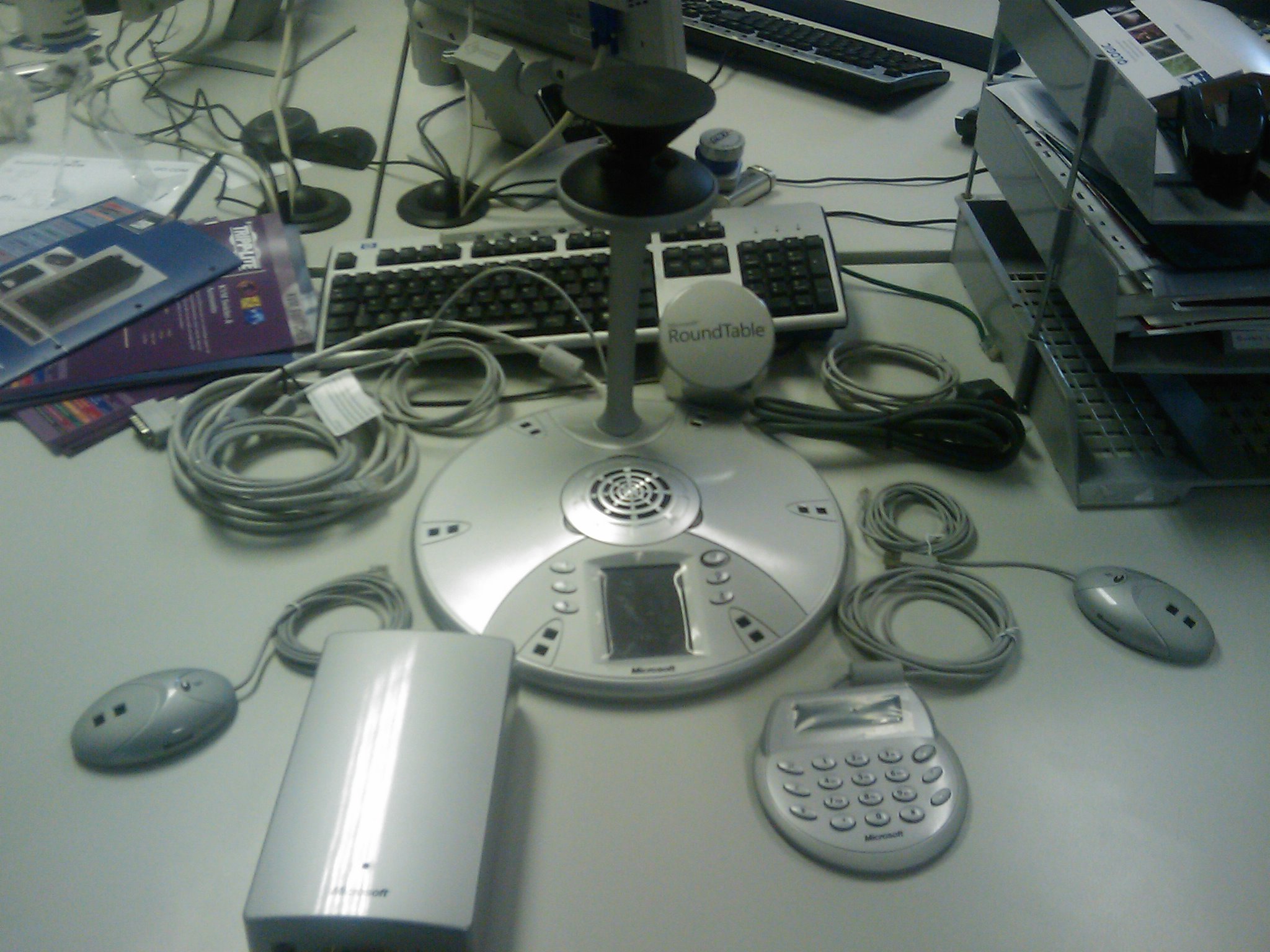


Typically, we’re just about to embark on installing a new PBX at work so I’m not going to be able to hook this bad boy up for probably a couple of weeks! It’s just going to be sitting next to me mocking me 🙂
This EA viral video for Tiger Woods is brilliant..well made, makes a good point and funny too! It’s a comeback to a fan video showing a “glitch” in Tiger Woods 2008..
I found this on Steve Clayton’s blog tonight but it’s a couple of months old now..I’m not sure how I missed it, I must’ve been slacking (surely not!)..
Anyways, this is a bit of the Randomness my blog header promises so here you go:
Enjoy!

