Microsoft Online Single Sign On Oddity


I’ve been working with MS Online (BPOS) for quite some months but it’s only now, with more and more customers looking into it for their environments that we’re seeing the odd little questions etc we didn’t anticipate.

This is one that came up today and, while it might be obvious to some of you, it probably won’t to others 🙂

BPOS provides users with a Single Sign On (SSO) client that logs them into the online services when they log into Windows, thus removing the need for repeated entering of credentials. If you right click the SSO icon in the System tray-it will launch you right into the app…unless it’s Outlook Web Access. When you try and run OWA, it requires you to enter your username and password each time; the reasoning behind it is a lack of pass-through authorization for increased security.

The upshot is…if you use Exchange Online but don’t have Outlook-you can’t use the Single Sign On to access your email. Maybe not the most common request but I’ve already have it once so you  never know 😛

MS Myphone: Windows IT Pro article


Jeff James over at Windows IT Pro has recently posted a review of MS Myphone with input from your’s truly 🙂

The article covers the good and the bad points of Microsoft’s mobile phone backup service and it seems we both agree on the one addition that should be made…

Go check the article here:

Windows IT Pro MyPhone Article

Windows 7 Downgrade Rights


The ability to downgrade Windows 7 to a previous version has been a hot topic these last few days and can be quite confusing, so I thought I’d put a post together to help make it clear what the rules will be 🙂

Windows 7 Pro & Windows 7 Ultimate OEM licences will be able to downgrade to Vista for an unlimited amount of time.

Windows 7 Pro & Windows 7 Ultimate OEM licences will be able to downgrade to XP Pro for 18 months only or until a Service Pack is released, whichever is first.

Q: What is an OEM licence?

A: OEM stands for “Original Equipment Manufacturer” and these are licences that come pre-installed on PCs when you buy them from PC World, Dixon’s etc.

Q: What about OEM licences of Windows 7 Home or Starter?
A: The OEM EULAs of these version do not permit downgrade rights.

Q: What if I purchase Windows 7 through Volume Licensing?
A: The versions of Windows 7 available through Volume Licensing (Open, Open Value, Schools, Select, EA ) will contine to have full downgrade rights to any previous version without time restrictions.

There are lots of people saying lots of things about this but I don’t really see it as being too much of an issue. In a nutshell, Microsoft are saying that after June 2011 the majority of home users won’t be able to downgrade a new PC to an OS that is 9 years old.

When you really think about it-who will want to? In 2 years-will there really be any reason for people to be using XP? I don’t think so. The applications that won’t work on Windows 7 will have been replaced with new, Windows 7 compatible versions and all will be good 🙂

New IE8 advert


Here’s a new advert for IE8 and I freaking love it! I love “weird” adverts that aren’t all “salesy” and this is perfectly offbeat, not only does it feature Lolcatz it also features SUPERMAN!!! It’s nice to see Good Ol’ Dean Cain back on the scene 🙂

Seriously I think this is a great style of advert and style that MS should use for everything…I’d love to see Sharepoint advertised like this for example 😉

Symantec Backup Exec gets De-Duplication


Symantec are planning to include the de-duplication of their PureDisk product into both Backup Exec & NetBackup, to further help reduce the amount of storage needed to keep data. AN analyst notes reveals:

“…dedupe would be integrated in NetBackup 7.0 and Backup Exec 2010 in the second half of its financial 2010 year, which closes at the end of March, 2010.”

This should help Symantec regain some of the market share, and reputation, it has lost over the last 18 months or so and become the well respected Backup vendor that Veritas once was.

More info can be found over at The Register.

Free Microsoft Hyper-V training


HyperVoria have got a post which gives access to free Microsoft e-learning on Hyper-V.

The courses within the collection include the following topics:

  • An overview of the Hyper-V technology
  • Creating a virtual environment
  • Deploying systems in a virtual environment
  • Configuring high availability in a virtual environment
  • Administering a virtual environment with SCVMM

They’ve just updated the promo code and access works, I’ve logged in and added it to My Learning. So if you’re just getting started with Hyper-V or are looking for a refresher-head over to HyperVoria on teh link below and go get it 🙂

http://hypervoria.com/hyper-v/hyper-v-free-training.aspx

The ebook that’s available is pretty good too!

Windows 7 without IE 8


Windows 7 will ship without Internet Explorer 8 in EU, and we’ll have to download it if we want to use it.

I’m a fan of IE & MS in general, and am pretty fed up with how much meddling the EU have done with their products…first Vista N (with Media Player) and now Windows 7 E (without IE). I don’t know anyone who has pro-actively purchased the Vista N product, either in the consumer or business world. There is one company I know who, for whatever reason, got the “N” version and then spent a fair amount of time getting Media Player back on to users pcs!

My thoughts are this:

The people who want to change browsers for whatever reason (better ACID test scores, better extensions, faster loading etc) will have no trouble in downloading a new browser and setting that as their default.

The people that don’t know how to do that (Mum’s, Dad’s,OAP’s etc) are also the people who don’t care what brwoser they use. As long as they can access the web they’re happy-they don’t mind if some things are rendered in a non-standards compliant way or if it takes 4/5ths of a second longer to load up…they just want to check their email etc and be done with it.

So who benefits from the un-bundling of IE 8 with Windows 7? That is a question I’m not sure there is an answer to…other than no-one, and maybe the EU getting their power fix.

I see this as at best going almost completely un-noticed as people just download IE 8 anyway or at best, causing extra confusion for users.

Opera are annoying me as they are now saying:

“However, we do not believe that Microsoft’s move will restore competition for desktop browsers. Most users get their operating systems from the OEM channel and Microsoft will recommend that OEMs pre-install IE8. As such, users are unlikely to be given a genuine choice of browsers.”

The way I look at it is:

If Opera is that brilliant and Opera did a proper job marketing it etc, then it’s market share would be bigger…the same goes for the other browsers guys.

I’m a big fan of Microsoft but I wouldn’t refuse to use a better product just because it was made by a competitor. I’ve got an iPod, I always used Google instead of Live Search (although I now Bing), I use VMWare Workstation instead of Virtual PC and there are other examples too. For a number of reasons I prefer Internet Explorer as my default browser but, if I need to, I will use another browser alongside it…I’ve got Firefox on this machine next to IE 8…but I’ve only used it once this year.

Bing better than Google


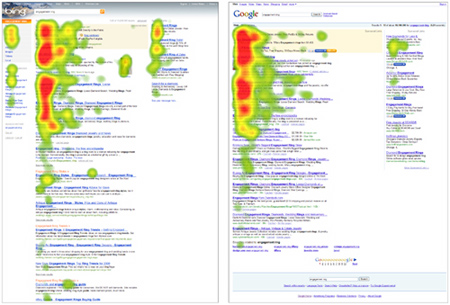
Bing, Microsoft’s new search engine has been with us for about 1.5 weeks and is still getting the great reviews it was receiving initially. This article over on The Register contains proof that Bing is actually better than Google…at least when it comes to adverts.

While we, as users, need search engines to give us relevant results easily and quickly; they, as businesses, need them to make money…and when it comes to search engines, that’s all about the adverts baby! A research specialist company called User Centric have been conducting tests based on where users of Bing and Google look when online:

BingvsGoogle

It seems the “vertical search and Bing-optimized categories, combined with the way Bing presents the search results on the screen” are the key here. Microsoft are sure to be happy that their latest venture is proving successful in pretty much every possible way 🙂

On a personla note-I think Bing is awesone 😉

Windows 7 Training and Documentation


If you’re looking for info on pretty much any part of Windows 7, John Westworth from MS has got what you need over on his blog:

http://blogs.technet.com/john_westworth/archive/2009/06/08/windows-7-training-and-documentation.aspx

It includes posts on:

  • Direct Access
  • Branch Cache
  • App Locker
  • Bit Locker

and much more-go check it out 🙂

Windows 7 Upgrade Offer


Today we had new pricefiles issued by our Microsoft distributor which include new items and details on the Windows 7 Upgrade offer, which will commence 19th of June. Bear in mind we are a Business to Business VAR, so the offer/pricing may well be different for consumers in high street stores/online etc.

There is a new set of part numbers for Vista OEM licences that come with a “Windows 7 Upgrade Form”-which when completed and returned, will entitle the customer to a “free” upgrade to Windows 7. I say “free” but these new part numbers are a little more expensive than their non-upgrade offering brethren; however the difference is only around £20 🙂

The upgrade offer is available on:

  • Vista Business
  • Vista Home Premium
  • Vista Ultimate

While this doesn’t directly apply to consumer PCs you can buy from PC World, Dixons, ASDA etc-there must be something very similar in place; as all those machines will ship with OEM licences on. I would expect that from 19/06/09, any new PC’s that ship out from manufacturing will all come with a “Windows 7 Upgrade” form 🙂

I don’t usually post about things directly involving sales and prices and info I get from work etc so I want to make it extra clear that posts on this blog aren’t representative of the company and any mention of price is subject to change, isn’t set in stone etc!

**Update** Final pricing and confirmation of how the EU decision will affect European upgrades has been released-see this post.**