Microsoft BPOS & Messagelabs


Can Exchange Online co-exist with Messagelabs or other 3rd party scanning tools?

That is the question I have been investigating for the past week or so…and I have an answer…sort of…nearly.

First things first, yes I know Exchange Online includes ForeFront Online Protection for Exchange (FOPE) and I also know that it is a very good product.

However there are a number of situations where customers would like a2nd option too. This could be because they’re mid way through a contract, because they’d like a “safety net” or indeed because they just don’t like Forefront.

I first looked into it last year and got a definite “Yes it can be done”; I used that as the basis for a customer conversation around 3rd party support. The customer then spoke with BPOS support around how to implement it…and they advised that it couldn’t be done! This was something of an issue and set me off on a quest to get a concrete answer, one way or the other.

I posted a question up on the Technet Exchange Online Forum but didn’t get a response so after much confusion internally at Microsoft, conversations with business groups and technical support teams, the final answer was:

“It isn’t supported but it should work”

So this wasn’t as good as my original “yes” but a vast improvement over “No”, which is something.

This is yet another issue that will be resolved with the arrival of Wave 14:

An update to FOPE, scheduled for release at the same time as BPOS wave 14, will include new connector functionality that will enable this scenario.

So within the next 6 months we’ll have full support for 3rd party mail scanning tools, which will be one less thing to worry about 🙂

Office 2010 Activation


Microsoft Office 2010 purchased through Volume Licensing now needs activating in the same way as Windows. Previously this only applied to Office through the OEM & FPP channels. This is a new introduction with 2010 and is surprising some people.

There are the same options to activate as with Windows, which are:

  • KMS (Key Management Service)
  • MAK (Multiple Activation Key)
  • MAK Proxy

KMS:

KMS uses a host computer to establish an activation service on your local company network. With a KMS host you can activate thousands of computers at the same time when they regularly connect to the company network. If you use a KMS host to activate Windows, you can use the same host to activate Office 2010.

MAK:

With MAK, each computer activates Office 2010 with the Microsoft hosted activation servers over the Internet or by phone. MAK is recommended when you have fewer than 50 computers to activate, and for computers that are not regularly connected to the company network.

Planning activation:

KMS:

A single internal server authenticated with Microsoft and in turn, the organization’s devices authenticate to that machine.

KMS activation through firewall

A KMS “Client Key” is installed inside every Volume Licensing copy of Office 2010, which means that no action is required by the end user and that a product key doesn’t need to be entered for the clients. All an administrator needs to do is activate the 1 KMS host reducing the amount of time spent on this task.

The KMS service does NOT require a dedicated server and can happily sit on a machine already in production. The Operating System requirements are:

Windows Server 2003

Windows Server 2008 R2

Windows 7 purchased through Volume Licensing <—This means OEM & FPP/retail won’t work

Devices are required to “re-authenticate” every 180 days.

Technet article is here:

http://technet.microsoft.com/en-gb/library/ff603508.aspx

MAK:

MAK activation at each desktop occurs directly with Microsoft, rather than via an internal server.

MAK independent activation via Internet

If machines are unable to connect to the internet, MAK activation can be via telephone too.

This method works well for smaller organizations and also sub-sets of larger organizations, such as mobile divisions who are away from the corporate network a lot.

MAK gives you a number of activations equal to the number of licences purchased.

Technet article is here:

http://technet.microsoft.com/en-gb/library/ff603511.aspx

MAK Proxy:

MAK Proxy activation uses VAMT (Volume Activation Management Tool) 2.0. Using this method, one designated machine collects activation info from multiple other machines and then sends a single centralized request for activation to Microsoft. Only the VAMT device connects to Microsoft’s servers, reducing bandwidth usage.

MAK Info:

MAK activation does NOT require periodic re-activation however it will be needed if significant changes are made such as replacing the hard drive or re-installing Windows. This will reduce the number of available activations, so if you:

Have 100 licences

Install on 90 machines

Re-install Windows and re-authenticate Office on 10

You will have 10 machines on which you cannot activate Office.

In this case, you would need to contact Microsoft to increase the number of available activations.

However if you use MAK Proxy, you can save the Confirmation ID given via VAMT and simply re-apply that to re-activate machines without reducing the number of activations available.

VAMT 2.0:

Volume Activation Management Tool (VAMT) 2.0 is a managed MMC plug-in. VAMT uses Windows Management Instrumentation (WMI) to configure managed systems. A convenient command line interface (CLI) allows automated, scheduled VAMT tasks without UI interaction.
Using the VAMT console, administrators can perform many activation-related tasks on remote computers:

  • Manage product keys obtained from the Volume Licensing Service Center (VLSC) or other sources including retail and Microsoft subscription programs such as MSDN, TechNet and partner programs — and product activations using those keys.
  • Activate remote systems using Key Management Service (KMS), Multiple Activation Key (MAK) or retail activation methods.
  • Perform disconnected proxy activation and reactivation of systems without each system having to connect with Microsoft activation services individually.
  • Assist with license compliance by enabling IT administrators to monitor system license state, including whether systems are licensed and running genuine Windows or Office.

You can download it here:

http://www.microsoft.com/downloads/details.aspx?FamilyID=ec7156d2-2864-49ee-bfcb-777b898ad582&displaylang=en

Troubleshooting

The Technet Troubleshooting page can be found here:

http://technet.microsoft.com/en-gb/library/ee624355.aspx

which will hopefully cover off any issues you may be having.

BPOS 2010 aka Wave 14


BPOS (Business Productivity Online Suite), Microsoft’s Online Services offering has been somewhat successful over the last year or so, but it is about to become a much more robust platform. Over the next few months the “Wave 14” rollout will begin, with an aim to being completed by the end of 2010.

The biggest update is that the products will match the versions that are available to purchase “on-site”. That is, BPOS will offer Exchange 2010 and Sharepoint 2010 with near feature parity; removing one of the biggest hurdles to BPOS adoption…at least in my experience.

However, there are a number of other additions and improvements coming…

Identity and authentication has been an issue for many people, as this whole area is quite clunky & “un-modern”. As Program Manager Dan Kershaw says:

“the password policy isn’t configurable, you can’t use the same credentials used inside the company for single sign-on with BPOS so admins have to maintain separate credentials, there’s no two-factor authentication and no role-based administration”.

The fact that Microsoft recognise these limitations is great as that means they’re also working on fixes. The update will bring:

  • Password Policy controls
  • Five admin roles
  • Federated ID’s w/ 2 factor authentication for single sign-on
  • New Admin Console
  • Service connector for managing Pcs & apps.


Powershell is definitely the way forward for 21st century system admins and, while it can be used for certain things with the current iteration of BPOS, more is coming soon.

I covered off some of the new features of Sharepoint Online 2010 in this post but now there is more information on what’s coming for Office Communications Online (OCO) over the next year.

Currently OCO gives IM and presence, along with peer to peer video, only within the customer’s domain. One of it’s biggest limitations is the inability to “federate” with on-premise OCS servers…this slightly puzzling block will be removed with Wave 14.

It’s said there will be “full integration” with Exchange & Sharepoint, both on-site and online.

This will lead to:

  • using the calendars on Exchange/Sharepoint to determine someone’s IM availability
  • voicemail in Exchange Online
  • IM functionality in OWA 2010.

One of the biggest questions people have is whether Office Comms Online will have VOIP/Voice capabilities.

"it might be more than a year later," says Ziv Fass, Senior Product Manager in the OCS team "but it won’t be years".

From a reseller AND a customer point of view, the updated versions of Microsoft’s Online Services will be a real benefit to us all.

Windows 7 Service Pack 1 coming soon


Windows 7 is, by far, the best Operating System Microsoft have produced but we all know it isn’t perfect…and so do Microsoft. They have announced that Service Pack 1 will be available as a public beta next month (July), not just for Windows 7 but also Windows Server 2008 R2.
For server it will bring RemoteFX (VDI multimedia performance) and Dynamic Memory Allocation; for the desktop it is really just a collection of fixes, many/most of which have already been delivered via Windows Update.
It’s real use is going be moving people off XP, something which many companies are still reluctant to do. The “accepted wisdom” is not to deploy a new MS OS until the first service pack has been released and, in times gone by, this was generally sound practice…as Vista proved 😉 However Windows 7 has always been stable…even as a beta, so a lot of people are missing out on the dozens of benefits it brings,for no real reason. Once this milestone has officially been reached I’ll be very interested to see its effect on corporate buying strategies.

Downgrade Rights

OEM licences (the ones that come pre installed on new pcs/laptops) can currently be downgraded to Vista or XP, and many people are still choosing to drop down to XP. However:

“Can I downgrade my OEM version of Windows 7 Professional to XP Professional?

For a limited time of 18 months after the general availability of Windows 7 or the release of a Windows 7 Service Pack, whichever is earlier , the OEM license of Windows 7 Professional and Windows 7 Ultimate will include downgrade rights to Windows XP Professional. After that period the OEM license will enable downgradeable to Windows Vista Business.”

That excerpt from the “Microsoft Downgrade Rights Chart” shows that, very soon; downgrading to Windows XP Pro will only be available to Volume Licensing customers.

I believe that this will be the push most people need to stop clinging to XP and make the move to the 21st century, so this will drive Windows 7 usage. If not, and there are people who insist on downgrading then it will drive adoption of Volume Licensing and all the extras and benefits that brings.

All in all, pretty big changes that will have a positive effect for customers, resellers & Microsoft.

Thoughts on the iPad


The iPad is upon us in the UK and so over the Bank Holiday weekend, I went into the local Apple store to have a look at what it was all about.

The first thing that struck me was the crowd…there were around 50 iPads available to play with and people were queuing up for almost every one, 2 or 3 people deep! I eventually burst through the crowd of people, deftly side stepping a small child and a nifty Jordan-esque manoeuvre around another shopper until BOOM…an iPad was in my hand. This, the most magical of devices, cause of hysteria worldwide and apparent confirmation of “The Greatness of Jobs” was in my hand…and…

“Meh”

That was my first thought and even now, a couple of days later, it’s still my overall opinion.

It was smaller and heavier than I thought, so something of a double loss there really! Upon first sight I was completely under-whelmed…there wasn’t even a twinge of “OMG – I MUST buy it”…and I really was expecting I’d have to fight that urge. I got an iPod years ago, when I saw the first iPhone, despite knowing all it’s shortcomings, I nearly got one…and the same for the MacBook Air.

This time however, I truly wasn’t tempted to buy it at all. I think part of the reason for this may be that it isn’t really anything new…I’ve seen tablet PCs before and I’ve seen an iPhone so I’ve seen an iPad. If someone had a huge potato I’d go and look at it…but I wouldn’t want to buy it 🙂

Part of my lack of interest in the iPad also applies to all tablets and it’s this one question:

“When would I use it?”

If I’m at home, I’ll use the laptop to surf the web, the Xbox to watch movies & the stereo to listen to music. If I’m out and about, depending where I’m going I’ll use my phone or my laptop…I don’t see what a tablet can do better AND easier than any of that setup.

My other complaint is transporting it. It’s too big to fit in a pocket so +1 to a smart phone so it will need to be carried in a bag/case of some sort…it which case you might as well take a laptop; or if weight is an issue…take a netbook.

If I’m going somewhere which means a Netbook is too big/heavy then it isn’t going to be much different with an iPad. Plus, and I know this is a tired argument but it’s worth repeating, netbooks and laptops can all play Flash!

There is one thing I’ll say (kind of) in it’s defense:

The “Multitasking” issue seems to be a little less clear cut that it’s made out. I was playing music and surfing the web which I had been led to believe was, in the words of Ralph Wiggum, “un-possible”. I guess perhaps it’s just 3rd party apps that can’t be multi-tasked?

Summation

All in all, it doesn’t seem to be anything special and I can’t see any compelling reasons to get one. I know Mac fans will be able to reel off any number of rebuttals to this but honestly it doesn’t matter…I can’t see the iPad attracting any new customers to the Apple fold; I’m going to say that nearly all iPad owners will already have an iPhone and/or iPod.

Microsoft Licensing: Do I need a Volume Licence Key (VLK)?


Microsoft Volume Licence Keys (VLK) are needed to install any Microsoft product.

If you buy box copies (FPP) or OEM, you’ll get the licence key on the machine/disc.

If you purchase through Volume Licensing (Open, Open Value, Select, Schools etc) you go to the VLSC website, go to the product keys section and away you go. While this is true for the vast majority of products, there are a few exceptions to this rule. These products won’t have a VLK listed in the VLSC site. One that usually surprises people is SQL…this doesn’t have a licence key available online.

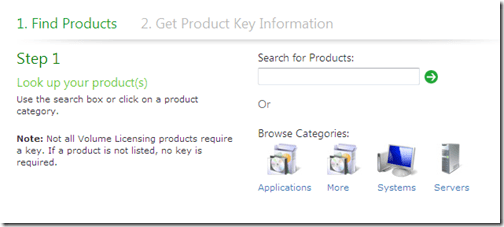
Rather than trying to list any & all products that this applies to, I’m going to give you the link to the:

Product Activation & Key Information

page on the Microsoft site.

Here you can search for the product in question and if it doesn’t return a result, it doesn’t need a licence key.

image

Hope this helps 🙂

OneNote 2010: RTM Upgrade


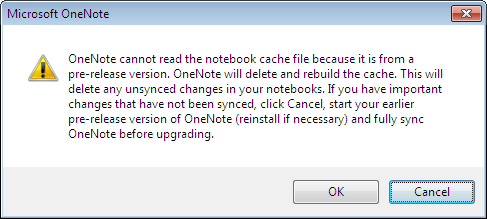
I upgraded to the final release version of Office 2010 yesterday and opened up my newly installed RTM version of OneNote this morning, to be greeted by this message:

image

This didn’t cause me any issues as I haven’t been syncing OneNote and I imagine that people who do would usually sync everything each day so this wouldn’t really come up.

However I can also imagine that this would be really annoying if it DID affect you as you’d need to:

  1. Uninstall Office 2010 RTM
  2. Re-Install Office 2010 Beta
  3. Sync One Note
  4. Uninstall Office 2010 Beta
  5. Re-Install Office 2010 RTM


which is quite a long winded process!

So, moral of the story is:

If you’re going to move up to the Office 2010 RTM, SYNC ONENOTE FIRST! 🙂

I hope that helps someone…

Office 2010: Installing the RTM


The Office 2010 Beta was downloaded and used by millions of people the world over and I imagine that most of them, like me, used it in a live environment; at home and/or at work. (I’ve never met anyone with a dedicated beta machine!)

Well the RTM (Release to Manufacture) version is available now to those of us with Software Assurance, TechNet or MSDN and from June 15th for FPP (Fully Packaged Product) boxed copies. This is great news as there are a few new additions and tweaks, plus you don’t have to worry about it expiring halfway through an important presentation in the future 🙂 There is however a downside to this:

There is no upgrade path from Office 2010 Beta to Office 2010 RTM

What do I do?

You need to completely uninstall the Office 2010 beta from your machine, but in itself, this often isn’t enough. You must also uninstall a number of other products, otherwise you’ll have problems! The total products you must remove are:

  1. Office 2010 Pro Plus Beta
  2. Sharepoint Designer 2010
  3. Project 2010
  4. Visio 2010
  5. Hotmail Connector for Office 2010
  6. SQL PowerPivot


I don’t think it would ever have occurred to me that PowerPivot was going to cause me issues, but it did! Luckily I got this list from a friendly neighbourhood Microsoftie before I lost my entire afternoon 🙂

Also, on my home machine I’m pretty sure the Hotmail Connector would have caught me out…but not now, oh no!

Hopefully you’ll see this before you start your RTM install process and potentially lose your afternoon/day/hair/mind 😉

Office 2010 Components


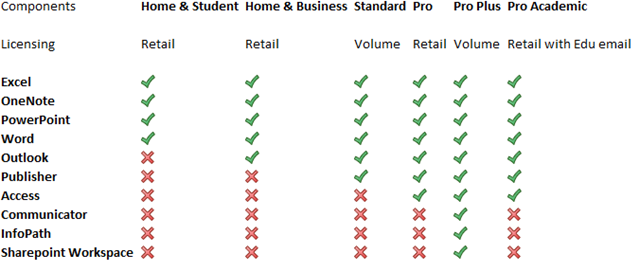
Office 2010 has hit RTM (Release To Manufacturing) and is just about to start making itself available to users in it’s final version. Most people are aware that there have been some changes with what is included in which Office editions but I don’t think I’ve seen a full breakdown yet, so here you are 🙂

image

A couple of major changes are:

No more Office Enterprise

New Pro Academic Option

and one that is quite big but isn’t really getting mentioned:

OneNote is now in ALL versions of Microsoft Office 2010 (except Starter); previously it appeared in just the Enterprise SKU. OneNote is a great application (What is OneNote?) and this will help increase it’s adoption among home users and also within Corporate Environments.

You can see more on Technet here.

Windows Azure: Free Developers Course


Windows Azure is a key part of Microsoft’s “Cloud” strategy moving into the future but of course, it needs people to use it and develop for it for it to be truly successful. They are piloting a new way of training developers & architects Azure, via self paced, web based training…best of all it’s FREE!

The method is one that I’m quite familiar with which aims to offer the best features of classroom training without the hassles and expense of travel, hotels, being out of the office for days etc. It utilises:

  • Interactive Live Meeting sessions with a tutor
  • On-line videos
  • Hands on Labs
  • E-Learning
  • Weekly Assessments

to cover off the topics, and you don’t need to go anywhere! The course lasts for 6 weeks from:

May 10th – June 18th

and covers:

Week 1 – Windows Azure Platform
Week 2 – Windows Azure Storage
Week 3 – Windows Azure Deep Dive and Codename "Dallas"
Week 4 – SQL Azure
Week 5 – Windows Azure Platform AppFabric Access Control
Week 6 – Windows Azure Platform AppFabric Service Bus

and did I mention it’s FREE?!

This is aimed at developers, architects, programmers and system designers and recommends at least 6 months experience programming in .NET and Visual Studio.

It will take around 4 to 5 hours a week to research and complete the tasks and there are timelines etc for submitting the work. However, successful completion gets you a “Microsoft Certificate of Completion” 🙂

This is a new approach from Microsoft and one that I hope will be expanded out to other product areas.

Register:

You can find more information and sign up here:

https://msevents.microsoft.com/CUI/EventDetail.aspx?EventID=1032449971&Culture=en-GB

If you’re technically minded and interested in Azure, sign up…and get any colleagues/friends that would be interested to sign up too!

I’ve registered and am looking forward to it so hopefully I’ll see you there 🙂