Windows 7 Training and Documentation


If you’re looking for info on pretty much any part of Windows 7, John Westworth from MS has got what you need over on his blog:

http://blogs.technet.com/john_westworth/archive/2009/06/08/windows-7-training-and-documentation.aspx

It includes posts on:

  • Direct Access
  • Branch Cache
  • App Locker
  • Bit Locker

and much more-go check it out 🙂

Windows 7 Upgrade Offer


Today we had new pricefiles issued by our Microsoft distributor which include new items and details on the Windows 7 Upgrade offer, which will commence 19th of June. Bear in mind we are a Business to Business VAR, so the offer/pricing may well be different for consumers in high street stores/online etc.

There is a new set of part numbers for Vista OEM licences that come with a “Windows 7 Upgrade Form”-which when completed and returned, will entitle the customer to a “free” upgrade to Windows 7. I say “free” but these new part numbers are a little more expensive than their non-upgrade offering brethren; however the difference is only around £20 🙂

The upgrade offer is available on:

  • Vista Business
  • Vista Home Premium
  • Vista Ultimate

While this doesn’t directly apply to consumer PCs you can buy from PC World, Dixons, ASDA etc-there must be something very similar in place; as all those machines will ship with OEM licences on. I would expect that from 19/06/09, any new PC’s that ship out from manufacturing will all come with a “Windows 7 Upgrade” form 🙂

I don’t usually post about things directly involving sales and prices and info I get from work etc so I want to make it extra clear that posts on this blog aren’t representative of the company and any mention of price is subject to change, isn’t set in stone etc!

**Update** Final pricing and confirmation of how the EU decision will affect European upgrades has been released-see this post.**

Windows 7 & Server 2008 R2


Windows 7 is excellent on it’s own, full of great new features, but when combined with Windows Server 2008 R2-it really comes in to it’s own. Things such as Direct Access, Branch Cache and Network Access Protection help make things easier, faster, more secure and better than ever before!
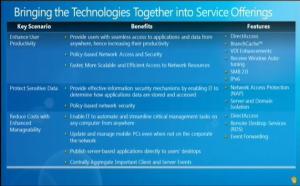
Win7 & R2

Direct Access:

Direct Access is Microsoft’s answer to the pain that is VPN’s. They are often tricky to set up, tricky to use with failed connections etc and can waste a lot of time and money in helpdesk calls and lost productivity; so this is where Direct Access comes in. Once PC’s have connected to the corporate network once, they’ll be able to do it anytime, from anywhere:

Direct AccessDirect Access

This means users will receive the latest updates wherever they log on…home, the airport, a hotel-anywhere! Making mobile working a more secure propostion for users and admins…

For more details, see my dedicated post here and there is a great Solution Design Technet article here.

Branch Cache:

This new feature is designed for remote office and works by caching information on local servers rather than retrieving it from HQ each time. I’ve just seen that the information can be cached on client computers and this is knows as “distributed cache mode”.This decreases network traffic and, at the same time, helps increase users productivity.
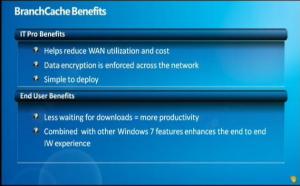
Branch Cache

Branch cache retention policies can be set by IT be it based on cache size, length of time cached etc. Technet has a great Early Adopters guide that’s full of information and can be found here.

To benefit from all these features, you need to run both Windows 7 AND Windows Server 2008 R2:
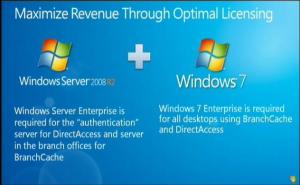
Licensing

Windows 7 not on ARM netbooks


With Windows 7, Microsoft have made a clear effort to include the netbook market with the OS’s smaller footprint, reduced hardware utilization and the recent removal of the 3 application limit. However, one area of the market that doesn’t look to be included is ARM-based netbooks, according to Microsoft’s announcement at this week’s Computex trade show.

What is ARM?

ARM (Acorn/Advanced RISC Machines) is a type of CPU first made in the 1980’s. These small processors are developed for low power consumption and so are found in most portable devices including mobile phones, PDAs & iPods as well as hard drives and routers.

It is believed that Microsoft’s long standing relationships with Intel & AMD are behind their decision not to support ARM with Windows 7, although they have also been working with ARM for 12 years on Windows CE & Windows Mobile-both of which sit on ARM processors.

Microsoft’s official statement was:

At this time, Windows 7 does not support any ARM architecture. Currently, Windows works on both x86 and x64 platforms, which, thanks to the pervasive PC hardware standard, power the vast majority of the world’s laptops and desktops. In the specialized devices space, where ARM is well suited, we offer the Windows Embedded CE platform

The first three words, “at this time”, could be significant; does that mean that an ARM compatible version is in the works? Perhaps it will make a surprise appearance before the General Availability date of October 22nd or possibly the early part of 2010; it would certainly be a mistake for Redmond to dismiss this growing section of the market-particularly with Google Android’s arrival on 6 new ARM netbooks!

Windows 7 Location Aware Printing


This is a Windows 7 feature I had forgotten about-Location Aware printing. Ever get it where you take your laptop into the office after a few days of working from home, hit print…then wonder when on earth it’s going to appear on the printer…then after a little while you realise you’ve printed it at home (or vice versa) and feel all daft?! Windows 7 Location Aware printing will stop all that 🙂

You can set default printers for certain networks I.e Epson “whatever” at home, HP “thingamajig” at work etc and Windows 7 will know where it is and print accordingly…nice!

Location Aware

Windows 7 Presentation Mode


Windows 7 just keeps surprising me with it’s great new features; I’ve just seen Presentation Mode which I think is great. It really shows that MS have been listening to feedback and putting a lot of thought into how their OS is used.

Presentation Mode is found in the Mobility Centre (Windows Key + X) and lets you control your machine’s behaviour while you are giving presentations. You can:

  • Stop the Screensaver coming on
  • Set the volume level
  • Display a different wallpaper

A lot of us have wallpaper of our kids, wives/girlfriends/husbands/boyfriends etc but maybe don’t want to have everyone in the meeting/seminar room to see it for whatever reason, and this is a simple, easy way to do it.

Presentation mode - new

As I say, a great example of Microsoft listening to it’s users 🙂

*Update* As Frederic points out in the comments-this isn’t actually a new feature of Windows 7…it’s there in Vista too! I’ve been using Vista pretty much since it came out and I’ve never come across Presentation Mode and I’ve never heard anyone talk about it; and I think that is a result of the differences between the two Operating Systems. People are just more excited about Windows 7 and that is definitely helping get word of these features out and about 🙂

Windows 7 Free Training Courses


We’ve got an official release date for Windows 7 now (22/10/09) so there’s now a definite time by which you need to be up to speed/certified on the latest OS from Redmond. The Register is here to help, they’ve got 3 introductory courses available here:

http://www.theregister.co.uk/2009/06/02/free_windows7_training/

or you can go directly to the courses here:

http://cblms.com/ekp/servlet/ekp/pageLayout

that are completely free of charge and look pretty good 🙂 Although having said that-the self test on the Information Workers “Finding & Organization” module wouldn’t work for me!

I’d be interested to hear what you think…

Windows 7 Release Date announced!


The Windows 7 Release Date has officially been announced by Microsoft. The most important OS related date for a LONG time is:

October 22nd 2009

That is the day that Windows 7 will be generally available…and I can’t wait! Less than 5 months to go until we can all get the latest & greatest OS in all it’s glory 🙂

Microsoft have confirmed that this is the General Availability date they are aiming towards and technology partners such as HP are confident it will happen. Phil Mckinney, CTO of HP said:

“We’re locked and loaded for the launch…The quality of code is just absolutely stellar.”

Windows 7 and Video Transcoding


Windows 7 will natively support GPU accelerated video transcoding, Microsoft’s Murray Vince revealed yesterday.

From www.bit-tech.net:

“The implementation was seamless as Henry simply dragged and dropped the high definition video file onto a Sony Walkman portable media player in Windows Explorer, where it automatically started transferring the file onto the Walkman.

This is yet another feature that makes Windows 7 easier to use and more people friendly.

Windows 7 AutoRun Changes


Microsoft are making a number of advancements with Windows 7 (see Safe Unlinking) and there’s another change being made-this time to the AutoRun feature.

More and more malware is using the Autorun feature as a way of getting itself onto machines, the most high profile being Conficker; so MS have moved to prevent this in their latest Operating System.

What is AutoRun?

AutoRun is a technology used to start some programs automatically when a CD or another media is inserted into a computer. The main purpose of AutoRun is to provide a software response to hardware actions that a user starts on a computer (from MS Security Research & Defense Blog).

What are MS doing?

The Microsoft engineers have made changes in Windows 7 to help prevent the spread of Malware:

1) AutoPlay will still work for CD/DVDs but it will no longer work for USB drives. For example, if an infected USB drive is inserted on a machine then the AutoRun task will not be displayed. The dialogs below highlight the difference that users will see after this change. Before the change, the malware is leveraging AutoRun (box in red) to confuse the user. After the change, AutoRun will no longer work, so the AutoPlay options are safe.

AutoRun1autorun2

This, and other changes, can already be seen in the Windows 7 RC  that is available for download now. Microsoft also plan on making these changes available for XP & Vista users. You can see full details over at the MS Security Research & Defense Blog.