Microsoft Windows 365 Frontline


Photo by Jou00e3o Jesus on Pexels.com

Windows 365 Frontline is a new licensing option for Microsoft’s Cloud PC offering, aimed at “Frontline” workers who don’t need constant access to their own PC. This can be scenarios such as:

  • Staff on rota
  • Staff across timezones
  • Part-time staff

Licensing

Each W365 Frontline license allows 3 Cloud PCs virtual machines to be provisioned, but they cannot be used concurrently. The maximum active number of Frontline VMs allowed is equal to the number of licenses you’ve purchased i.e. you’ve bought 20 licenses which enables 60 VMs…but only 20 can be in use at any one time.

W365 Frontline introduces the concept of concurrent licensing – rather than licensing ever shift worker, you instead buy enough licenses to cover the maximum number of desktops active at any one time. For example, 300 users who work in 3 shifts of 100 users = 100 licenses needed.

From a management perspective, the licenses will not show as assigned to users (as they are applied at the tenant level) so you will need to use the W365 utilization report to see how many licenses are being used.

Learn more here – https://learn.microsoft.com/en-us/windows-365/enterprise/introduction-windows-365-frontline and https://www.microsoft.com/en-us/microsoft-365/blog/2023/04/06/windows-365-offers-flexibility-from-the-office-or-home-to-the-frontline/

Windows 365 new features


Photo by SevenStorm JUHASZIMRUS on Pexels.com

Microsoft have announced a range of new features for Windows 365 that all serve to make it a more interesting and robust offering. The 2 that most interest me are:

Windows 365 Boot

Enabled by a local install of Windows 11, this features enables users to boot straight into their cloud pc instance from login. Microsoft use the example of a shared device where each user’s login takes them to their personalised Windows 365 device.

Windows 365 Offline

Pretty much the biggest issue with any cloud based service is “what about when I haven’t got internet?” such as when working on a train or simply a dodgy internet connection. With this upcoming feature, users can work offline and then changes will sync with the cloud once connectivity is regained.

I’m still not totally convinced by Windows 365 – particularly due to its cost – but these additions definitely help its case.

Resources

Microsoft announcement

Microsoft Product Terms August 2021


Photo by Markus Winkler on Pexels.com

We have confirmation of Windows 365 Enterprise base license requirements:

  • Windows 10 Enterprise
  • Intune
  • Azure AD P1

and the bundles that count too:

Microsoft 365 F3/E3/E5/A3/A5/Biz Prem/Student Use

Microsoft note that swapping a user’s Win365 license (by “resizing”) is not “license reassignment” and so can be done as frequently as required.

Also, you can’t use it for “digital asset transaction validation workloads” (aka Bitcoin mining I assume).

We also get confirmation that Windows 365 Business has no license pre-requisites (unlike Enterprise) although Windows 365 Business w/Windows Hybrid Benefit requires a Windows 10 Pro primary device (which is used periodically).

Azure Arc SQL has been added and Hybrid Benefit can be used…but prevents use on Listed Providers infrastructure.

There is a $0 license offer for Azure Virtual Desktop (until December 31, 2021) where you “serve Azure Virtual Desktop Customer Solutions to third parties on Azure”.

Microsoft Product Terms site is here.

Windows 365 pricing revealed


Photo by Artem Beliaikin on Pexels.com

Now that Windows 365 has hit General Availability, Microsoft have also listed the public pricing online.

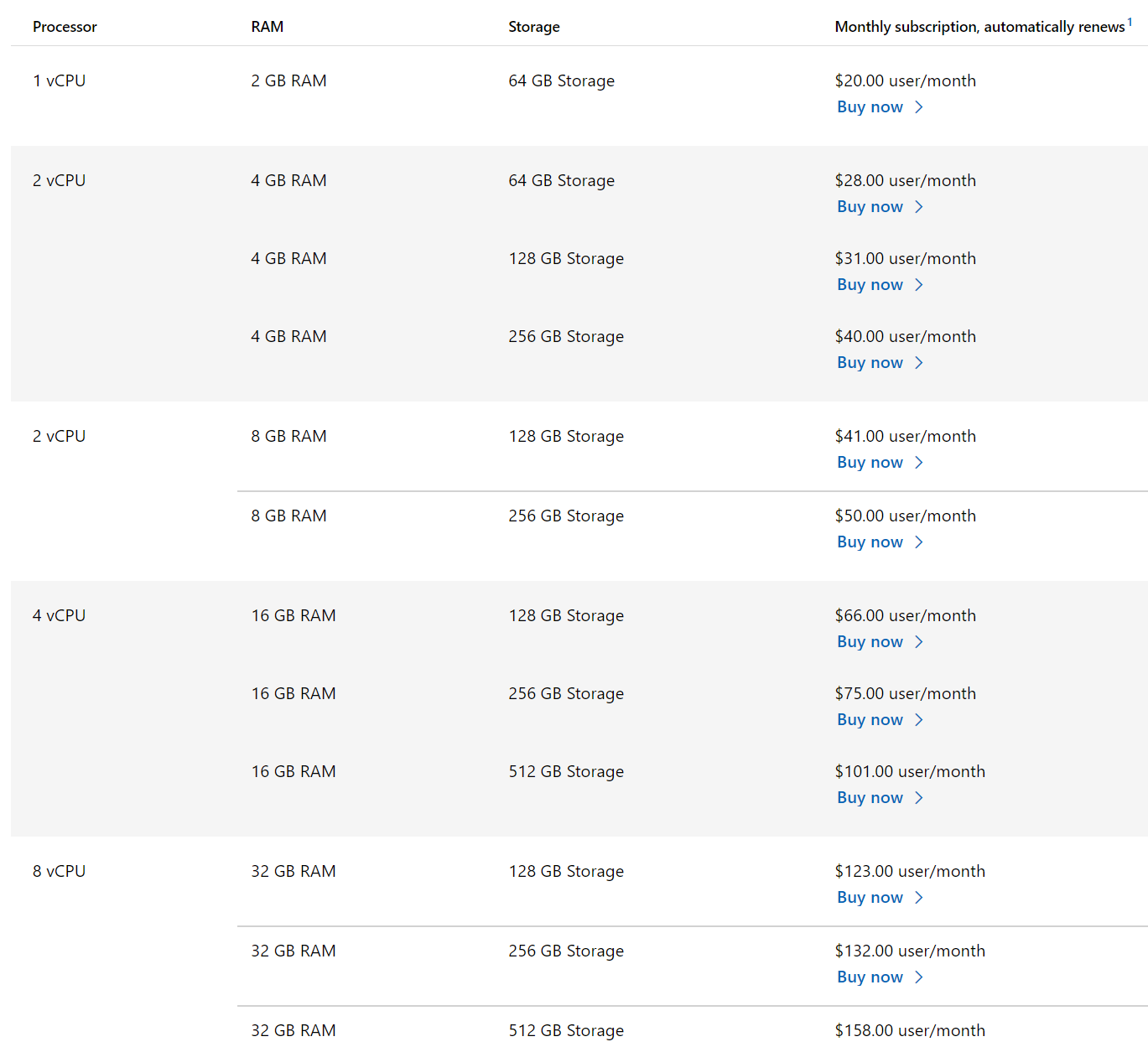
Pricing is per user per month and ranges from $20 to $162, the entry level giving you:

  • 1vCPU/2GB RAM/64GB storage

and the most expensive providing:

  • 8vCPU/32GB RAM/512GB storage

You are able to upgrade to a more powerful machine by “resizing” however, the ability to downgrade the machine is not currently available.

Microsoft also make it clear that Azure Bandwidth charges (see them here) will apply on top of any Windows 365 Enterprise charges. For the Business version, there is a monthly per user outbound data cap that ranges from 12GB to 70GB, depending on your plan.

Furthermore, Windows 365 Enterprise requires license pre-requisites including:

  • Windows 10/11 Enterprise
  • Intune
  • Azure AD P1

but Windows 365 Business has no such requirements – it is a standalone offering.

Windows 365 also introduces a new term “Windows Hybrid Benefit” (not to be confused with “Azure Hybrid Benefit”).

Windows Hybrid Benefit (WHB)

Applicable to Windows 365 Business (the sub-300 license offering), this gives a discount of up to 16% for users who are the primary user of a Windows 10 Pro device – that is also their primary work device. Said device must be accessed at least once during the license subscription term.

Here’s a screenshot of the full range of pricing for Windows 365 Business. Although WHB says it can save up to 16%, you can see below that all the WHB prices are simply $4 per user per month cheaper.

Windows 365 Plans and Pricing | Microsoft

The pricing for Windows 365 Enterprise is:

Windows 365 Plans and Pricing | Microsoft

Further Reading

Windows 365 Pricing

Windows 365 FAQ

Microsoft announces Windows 365


Photo by Konevi on Pexels.com

A new member of the 365 family has joined us – alongside Office 365, Microsoft 365, and Dynamics 365 – we now have Windows 365.

Formerly known as Cloud PC, this latest offering enables you to stream an entire PC – including the OS, apps, and settings – from the cloud to any device. This means Windows 10 and 11 will be easily available on any device – including MacOS and Linux.

Although clearly driven by the COVID-19 pandemic and the rapid, global shift to hybrid working, something like this has been a long time coming in many regards. It’s also driven by the changing security landscape…Microsoft also see this as a way to help organisations combat the rise of security threats – let Microsoft take care of securing your desktops so you don’t have to.

Although specific pricing information hasn’t been released yet, it’s expected there will be a range of pre-set options, making it more of an “off the shelf” SaaS offering than the current Azure Virtual Desktop (AVD). Different SKUs and plans will offer different amounts of storage, processing power, memory etc. for organisations to choose from, with Satya Nadella stating this offering would be applicable to businesses of any size.

Options available

Get started with Windows 365 – Microsoft Tech Community

Licensing requirements

Users with Windows Pro endpoints require:

  • Windows 10 Enterprise E3 + EMS E3

while users with non-Windows Pro endpoints require:

  • Windows VDA E3 + EMS E3

Alternatively, both scenarios can be covered by licenses for:

  • Microsoft 365 F3/E3/E5/Business Premium

Technical requirements

It’s not quite as straightforward as just having those licenses, you will also need:

  • Azure subscription
  • Azure Virtual Network
  • Azure Active Directory sync
  • Certain ports open

to ensure that everything works optimally.

More information on the requirements and how to provision can be found here.

Finally…

Not surprisingly, there will be 2 flavours available:

  • Windows 365 Business
  • Windows 365 Enterprise

and it is set to launch on August 2, 2021. I look forward to seeing more information as it becomes available…and hopefully trying it out myself!

Update

While Microsoft are yet to announce official pricing, pricing for 1 SKU has been revealed. For a desktop with 2vCPU/4GB RAM/128GB storage it will $31 per user per month ($372 per year) – which strikes me as quite expensive…

Further Reading

Microsoft announcement

Windows 365 page

Technical requirements