Teams has been “consciously decoupled*” from Microsoft 365 on a global basis, so they’re now only available separately to new users. Existing users can continue to renew but if you need to buy both, it equals more cash more Microsoft.
Teams Enterprise is now listed, which appears to be the standalone version of Teams. From a naming perspective, “that “Enterprise” sounds “bigger” than “Premium” (which is a paid add-on) so I’d expect a rebrand at some point soon🤔
Dynamics 365 Supply Chain Premium has been added…plus another error as “Dynamics 365 Supply Chain Management” is listed as having a minimum purchase quantity of both 10 and 20…clearly one should say “Premium” at the end (the one with 10 I believe).
They’ve still not corrected the D364 error from last month either 🤣
I posted at the end of July about the new EU probe into Microsoft’s practice of bundling Teams with Office 365 and now, just four or so weeks later, Microsoft have announced a significant change for customers in the EEA (European Economic Area) and Switzerland.
Microsoft state these changes have 2 aims:
To enable organisations to buy Office/Microsoft 365 without Teams – and pay less
To improve interoperation between rival communication/collaboration products
Licensing changes
From October 1st, 2023 the “Teams Included” Enterprise O/M 365 suites in the EEA and Switzerland will be discontinued. This means the suites will still be available, just without Teams included, and they will be €2 per user per month cheaper.
Net new customers will need to buy 2 separate SKUs: the EEA O/M365 SKU and the separate Teams SKU…which will cost €5 per user per month.
Existing customers can choose to stay with the Teams inclusive suite and renew/add seats or choose to switch to the new offering at anniversary/renewal.
The old and new F SKUs and Business SKUs will co-exist, meaning organisations can choose to buy the with or without Teams licenses.
Interoperability changes
Microsoft will provide additional information and resources around APIs and extensibility to 3rd party providers and ISVs. They will also “develop a new method for hosting the Office web applications within competing apps and services much like Microsoft accomplishes in Teams“
Microsoft links
You can see the full announcement here and more licensing details here.
The European Commission (EC) announced on July 27th, 2023 that they have opened a formal investigation into Microsoft. The focus is whether they have breached EU anti-competition rules through the bundling of Teams with Office/Microsoft 365.
Slack filed a complaint back in July 2020 that alleged Microsoft had:
“created a weak, copycat product and tied it to their dominant Office product, force installing it and blocking its removal, a carbon copy of their illegal behavior during the ‘browser wars.”
and now the European Commission have taken it up. I take it that at least part of the 3 year gap has been used by the EC to look into the situation and decide that there is merit to it being investigated formally.
“concerned that Microsoft may grant Teams a distribution advantage by not giving customers the choice on whether or not to include access to that product when they subscribe to their productivity suites and may have limited the interoperability between its productivity suites and competing offerings.
These practices may constitute anti-competitive tying or bundling and prevent suppliers of other communication and collaboration tools from competing, to the detriment of customers in the European Economic Area (‘EEA’)”
This isn’t the first time Microsoft have been here with the EU so I thought a little look back would be in order 😊
Media Player and the N SKU
As well as the “browser wars”, this is also reminiscent of the ruling in 2004 that Microsoft were guilty of breaching these rules by including Media Player with Windows, which led to the creation of the Windows “N” SKU…and a €497 million fine which was, at the time, the largest ever dished out by the EU.
In the 2004 ruling, the initial fine was €165 million which was then doubled to €331 million due to “Microsoft’s significant economic capacity” and finally an additional 50% was added due to the length of time the issue had been happening (5.5 years).
In FY 2003, Microsoft had revenue of $32.1 billion with operating income of $13.2 billion. In FY 2023, Microsoft had revenue of $211.9 billion and operating income of $88.5 billion…that’s a roughly 6.5x increase over the last 20 years. Should the EC decide to fine Microsoft in this latest case, simply multiplying the previous amount x 6.5 would come to a little over $3 billion!
It must be noted that the 2004 ruling was not just about Media Player, it also covered interoperability between Operating Systems.
The European Commission’s decision found that:
“Microsoft infringes Article 82 of the Treaty by tying WMP with the Windows PC operating system (Windows). The Commission bases its finding of a tying abuse on four elements:
(i) Microsoft holds a dominant position in the PC operating system market
(ii) the Windows PC operating system and WMP are two separate products
(iii) Microsoft does not give customers a choice to obtain Windows without WMP
(iv) this tying forecloses competition.”
What is Article 82?
“Article 82 of the Treaty” refers to the “Treaty establishing the European Community (TEC)” which is now Article 102 “Treaty of the Functioning of the European Union” (TFEU). This states:
“Any abuse by one or more undertakings of a dominant position within the internal market or in a substantial part of it shall be prohibited as incompatible with the internal market in so far as it may affect trade between Member States.
Such abuse may, in particular, consist in:
(a) directly or indirectly imposing unfair purchase or selling prices or other unfair trading conditions;
(b) limiting production, markets or technical development to the prejudice of consumers;
(c) applying dissimilar conditions to equivalent transactions with other trading parties, thereby placing them at a competitive disadvantage;
(d) making the conclusion of contracts subject to acceptance by the other parties of supplementary obligations which, by their nature or according to commercial usage, have no connection with the subject of such contracts.”
and is primarily focused on abuses by companies with a dominant position.
My thoughts
It’s true that you don’t get a choice as to whether Teams is included in your Office package when you purchase it. It is possible to prevent Teams from installing with M365 Apps, it isn’t the default option but the guidance is available here from Microsoft.
I can see it being quite likely that an organisation would stop paying for Slack once they purchased Office 365 and got Teams included with that, effectively for free. Now, with all the features and functionality it contains, I imagine that Teams would be successful as a standalone, paid for product but I suppose something the EC will consider is whether it would have reached that point without being bundled for the last few years? Also, what is the impact on consumers if Microsoft make O/M365 more expensive to include a paid-version of Teams?
Finally, I want to state that I Am Not A Lawyer and these are my own thoughts and musings on the subject based on the publicly available information.
Announced at Ignite 2022, Microsoft have introduced a Teams Premium add-on SKU – giving more benefits to organisations as hybrid working becomes more common and continues to evolve. Given the huge success of Teams, and how integral it has become to so many organisations, it makes sense that Microsoft will look to monetize this with a focus on hybrid features. These new options include:
Meeting Guides
This gives a set of pre-built options for different types of meetings i.e. client calls, brainstorming, help desk calls etc. that will set the length and best practices.
Customised branding
Again, the option to have customised meeting lobbies appears as well as custom backgrounds and together modes.
Intelligent Recap
This sounds like it could genuinely be a game changer.
It will use AI to pick out action items and assign owners during meetings and then create recordings which show key events such as where your name was mentioned or when a screen was shared – making it easier, and faster, to cover what you missed. It will also highlight speakers based on who you work most closely with, so you can skip through the transcripts to find relevant sections more easily.
Live translated captions
This is very cool for international companies and partnerships. An organiser having Teams Premium will mean all attendees get live captions in one of 40 languages.
Advanced Meeting Protections
New options around the security of meetings and recordings include watermarking and, for E5 customers, the ability to use Purview Information Protection sensitivity labels.
Appointment management
Teams Premium will offer advanced Virtual Appointments with better end to end management, text reminders, appointment access without the Teams app, a dashboard to see appointment overviews, and analytics. See more here.
Advanced webinar features
There are also some new features that help enhance the Teams webinar offering – something I’m particularly interested in. These include:
Registration waitlist
Automated branded reminder emails
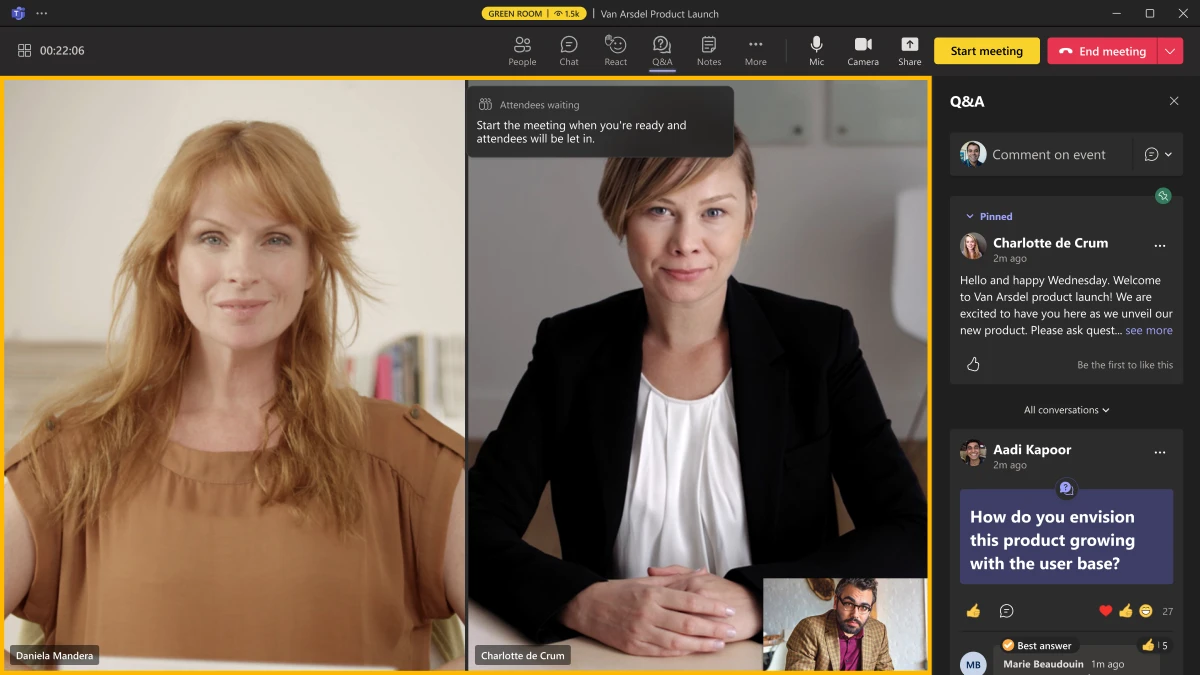
Virtual green room – this gives a space for speakers to chat, monitor Q&A, check content etc. separate to attendees
Teams Premium also gives control over which speakers, videos etc. attendees can see – which can be very useful when you have multiple presenters at once.
Pricing is currently expected to be $10 per user per month. The Preview will begin in December 2022 and General Availability with be February 2023, although intelligent recap features will be “first half of 2023”.
The September Product Terms revealed that Microsoft have replaced Teams Rooms Standard & Premium with Teams Rooms Basic & Pro, and we now have more information on feature differences and licensing.
Teams Rooms Basic
This is the free entry level license, included with certified Teams Devices and available via the Microsoft 365 Amin Center (not via resellers etc.). It is limited to 25 licensed devices within an organisation, if devices are needed they must be covered with Pro licenses. Furthermore, it is limited to 1 device per room with the same resource account – if 2 or more devices are needed, this again requires a Pro license.
You’ll notice below that Basic does not include a Teams Phone license, preventing the room from making/receiving PSTN calls.
Teams Rooms Pro
These are $40 per device per month and offer a much wider range of features than the Basic license.
It seems Microsoft have removed access to in-person engineers as part of the management features offered, with the Docs page stating “Microsoft Service engineers will no longer serve as intermediaries to incident response starting October 1, 2022“.
How do they compare to their predecessors?
Teams Rooms Basic is missing many of the features that were present in Teams Room Standard which means organisations may find themselves having to move from the $15 per month Standard license to the $40 per month Pro license at renewal – a significant increase. Equally, although probably much less likely, some organisations could drop from Standard ($15) to Basic ($0) and save money each month.
This link here gives a detailed comparison of the differences between Basic & Pro in various different use areas. I would recommend also comparing the new functionality to your existing licenses to identify if you’ll need the Pro option going forwards.
Another announcement at Microsoft Inspire is that soon users will be able to view and interact with Dynamics 365 records and data directly inside Microsoft Teams – without requiring additional licensing.
In a blog post, Microsoft state that they are “eliminating the licensing tax” that has previously prevented organisations from integrating Dynamics 365 & Microsoft Teams. There isn’t a huge amount of additional information available yet so the specific questions as to what data can be shared and what can be done to it etc. will have to wait for another day. This blog from Jukka Niiranen attempts to uncover some potential insights from the Microsoft demo video that’s available.
However, it is clear that this is (another) shot at Salesforce in Microsoft’s efforts to make Dynamics 365 the #1 CRM system out there. It also serves to further Teams’ growing position as the central hub for users throughout their work day, where they’re able to do most things at this point (but no email).
Microsoft are adding a cut down version of Visio directly into Teams, enabling users to create, edit, and share diagrams without leaving the ever growing central location for productivity. The new app will be available to users with the following licenses:
Microsoft 365 Business Basic
Microsoft 365 Business Standard
Microsoft 365 Business Premium
Microsoft 365 Apps for business
Office 365 E1
Office 365 E3
Office 365 E5
Office 365 F3
Microsoft 365 F3 (includes Office 365 F3)
Microsoft 365 E3 (includes Office 365 E3)
Microsoft 365 E5 (includes Office 365 E5)
Microsoft 365 Apps for enterprise
Office 365 A1
Office 365 A3
Office 365 E5
Microsoft 365 A1 (one-time, per-device license with free Office 365 A1 per user licenses)
Microsoft 365 A3 (includes Office 365 A3)
Microsoft 365 A5 (includes Office 365 A5)
You can see more info, and sign up for early access (not EU), here.
It was announced a while back that webinar functionality would be coming to Microsoft Teams and details have been released at this week’s Microsoft Ignite conference – including the required licenses.
Features
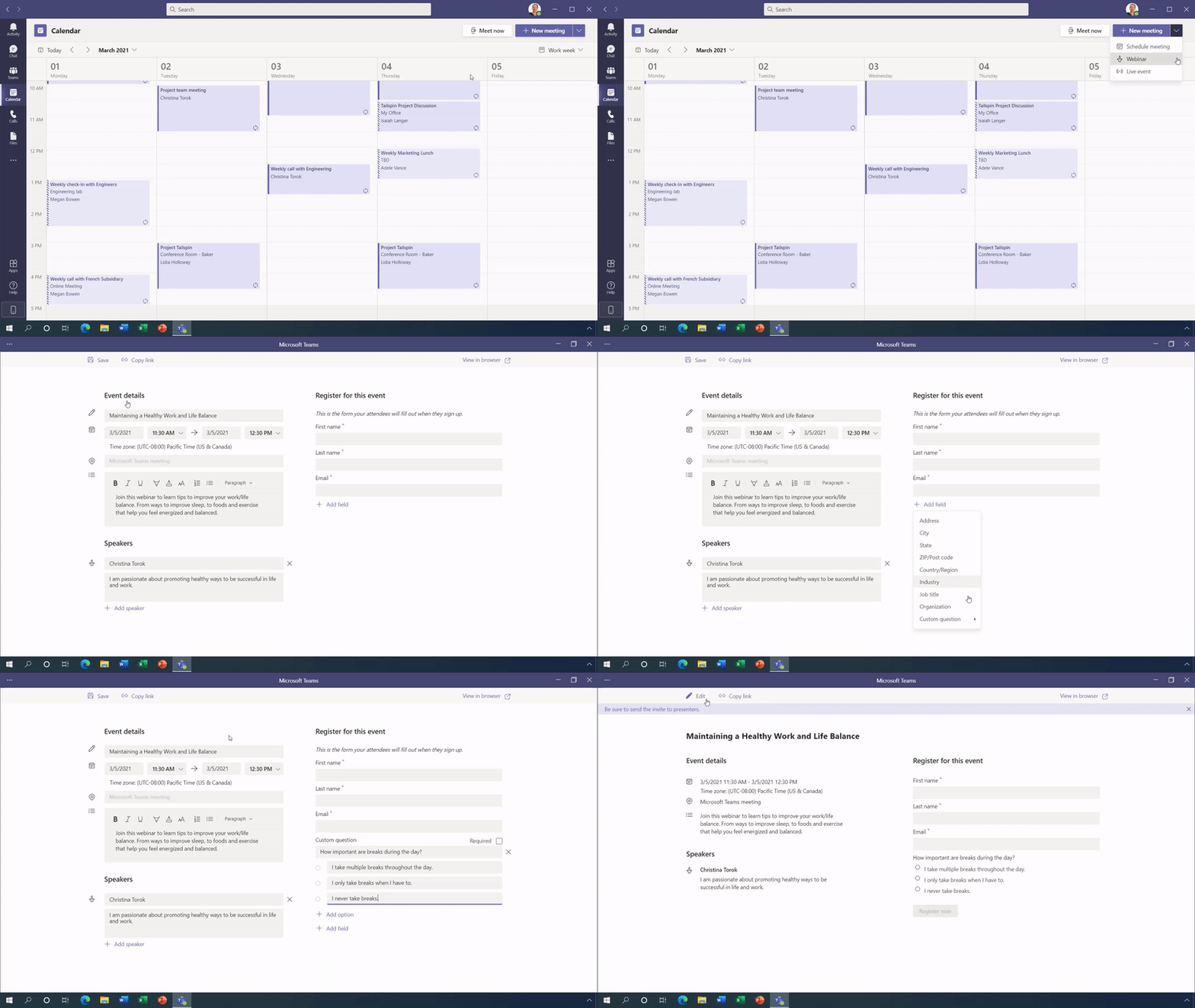
Organisations will be able to add a customisable registration page to webinars – an example of which you can see below:
Fully interactive webinars will be able to handle up to 1,000 (one thousand) participants with moderation available to control audio/video etc. and, should you need it, Teams can scale up to 10,000 participant “view-only” sessions. Microsoft are, for now, increasing that limit to 20,000.
You will also be able to download an attendee report showing attendance, participation etc. which is key for follow up. More reporting features are being rolled out over the coming months.
How is it licensed?
These new capabilities will be fully available as part of:
Microsoft 365 E3/A3/G3
Microsoft 365 E5/A5/G5
and will also be available in:
Microsoft 365 Business
Microsoft 365 Business Premium
for up to 300 users.
I’m pleasantly surprised that this doesn’t require an add-on license – it’s quite possibly been done as in-built functionality to give them the best chance of fighting off the threat from Zoom et. al. If you have to pay extra to Microsoft, you might as well just stick with your existing provider but if it’s “free”…that likely changes matters for a lot of organisations.
Further Reading
You can see more info on these, and dozens of other new features coming to Teams, here.
Teams Rooms Standard & Premium Device subscription licenses have been added.
SharePoint Syntex is added. This is “trainable AI” that can help process corporate data and automate some of the tasks involved. See more info on what it is and how it’s licensed here.
Dynamics 365 Project Operations added. As sure as night turns to day, there’s a new D365 SKU 😂 This is a replacement for Project Service Automation (PSA).
The snappily named “Audio Conferencing Extended Dial-out minutes to USA/CAN” is added. This add-on license gives “virtually unlimited” US & Canada dial-out minutes, although there is a “fair use” policy.
The new “Extra Graph Connector Capacity” license enables additional indexing using Microsoft Graph connectors. Graph being Microsoft’s evolving connective layer between various MS products that we will continue to see pop up over the coming months for sure. In my opinion, this is another example of Microsoft moving towards a licensing model reminiscent of IBM/SAP/Salesforce where there are 100s of odd, obscure metrics based around quantity and usage – making them easy to exceed and difficult to track.
None of the recently announced security name changes have been updated though…
To help drive adoption of Teams, Microsoft have announced a couple of customer promotions:
Audio Conferencing for free
For Enterprise Agreement customers, the offer is available immediately until January 21, 2021 and licenses are free until the end of your enrolment.
For purchases via partners and the web portal, you get the licenses free for 12 months. Offer starts October 1, 2020 and ends March 31, 2021 and isn’t available in China or India.
35% off Teams Advanced Communications
Available now for Enterprise Agreement customers (ends January 31, 2021) and “coming soon” if you buy via partners or the web portal. This is available worldwide.













 Cloudy with a chance of Licensing