Office 365 & Remote Desktop Services


Office Pro Plus has been available via Office 365 for a while but using it via an RDS server has never been allowed…until now.

With the recent update to Office 365, Microsoft have relaxed the licensing rules to allow RDS use of Office 365 licenses. Under “Installation & Use Rights” on page 82 of the January PUR:

Each user may also use one of the five activations on a network server with the Remote Desktop Services (RDS) role enabled

and from the March Product List:

Media Eligibility with Remote Desktop Services (RDS)

If the user to whom you have assigned an Office 365 ProPlus license uses the software on a network server with RDS role enabled, in lieu of installing a copy of the software provided with Office 365 ProPlus on one of the five permitted devices pursuant to the Product Use Rights for Office 365 ProPlus, that user may 1) install one copy of the Office Professional Plus 2013 software on a network server and 2) access the Office Professional Plus 2013 software from any device.  Upon termination of your Office 365 ProPlus subscription you must uninstall Office Professional Plus 2013 software from the network server.

I’m glad they’ve done this as it makes the messaging of “same product, different delivery method” a much truer statement and reduces any possible confusion for customers.

Install Office 365 on Mobile devices


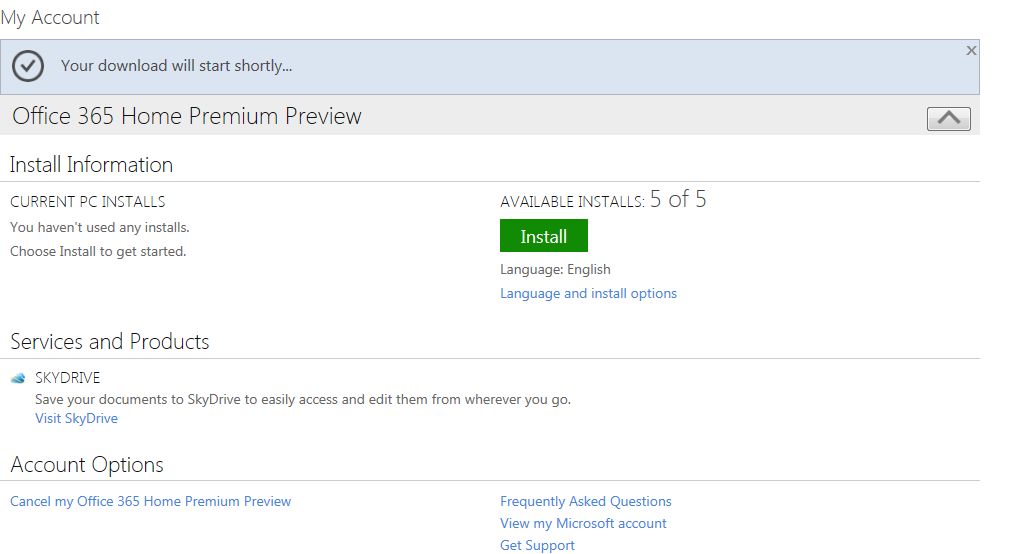
I meant to post this a while back, but clearly didn’t get the chance. It’s interesting to note that the Office 365 Home Premium subscription allows users to install Office on “select mobile devices” as well as the ability to install on 5 PCs or Macs.

image

image

I take it this refers to the expected Office for iPad and Office for Android editions that will be here soon. It’s good to see that these non-MS platforms will be included within the standard device total of the subscription, rather than incurring extra cost for home users who also have these devices.

Microsoft Office 2013 price increases & license changes


The upcoming 2013 release of Microsoft’s Office suite & the related products brings with it not just great new features but also price increases.

The affected products and the expected increases are:

  • SharePoint Server +38%
  • SharePoint 2013 Standard User CAL +15%
  • Exchange 2013 Standard and Enterprise User Cals +15%
  • Visio Standard 2013 +20%
  • Visio Pro 2013 +5%
  • Project Standard 2013 and Professional 2013 +5%
  • Project Server 2013 +15%
  • Lync Server +400%

An increase in price when a new version is released is quite common, with most manufacturers, but coupled with the December 1st 15% increase on user CALs and just 6 months after the up to 30% price rise relating to the Euro/GBP levelling – I do not anticipate this being well received by customers!

The big takeaway from this is *If you’re looking at purchasing these products, look at the cost of buying now with SA (as well as the extra benefits) compared to the projected costs from December onwards*.

There are also a number of licensing changes about to take effect:

Lync

Lync Server Std & Enterprise are merging into 1 SKU, with a price of around £2000+ – a significant increase over the current Lync Std price. This does bring the failover & load balancing features to all Lync 2013 organizations.

Sharepoint

Microsoft have, in many areas, moved to simplify licensing and SharePoint is another area.

FAST Search Server & Search Server are no longer separate entities, they’re now simply part of SharePoint Server 2013.

A big one here, SharePoint for Internet Sites is no more. Microsoft have done away with the (up to) £30,000+ license, which was required for external user access to SharePoint content, and rolled those licensing rights into the standard server license. From the October Product Use Rights (PUR) document:

“CAL WAIVER FOR USERS ACCESSING PUBLICLY AVAILABLE CONTENT
CALs are not required to access content, information, and applications that you make publicly available to users over the Internet (i.e., not restricted to Intranet or Extranet scenarios).”

I imagine that this will partially contribute to the increase in price we’re seeing with 2013.

Exchange

Basic Anti-Malware protection will be baked into Exchange Server 2013

External Connectors

External connector licenses have been removed for both Exchange 2013 & Lync 2013. Again from the October 2012 PUR:

“External User Access: Licensed with Server”

Visio

Again in a move to simplify the SKU line up and make it easier for customers to make the right selection, Visio Premium is being discontinued and all it’s extra features will be moved into Visio Pro 2013.

Software Assurance

Organizations who purchased any products that are due to be discontinued along with Software Assurance need not worry, your benefits will continue and you will receive access to the relevant 2013 version.

Office 365

Something that Microsoft have not mentioned much at all and have in fact been reluctant to discuss, is that Visio & Project are being made available online via Office 365. This will be of big benefit to many customers, enabling easier collaboration among staff no matter their location.

Another benefit of this may well be around Software Asset Management (SAM). It’s common to see organizations over licensed for Project & Visio, Office 365 may make it easier for them to track how many licenses they have and who they are assigned to.

Office 2013 goes RTM


Office 2013 RTM (Release To Manufacturing) build has been signed off.

Coding and testing is complete.

Now the focus is getting the latest version of Microsoft’s productivity suite (and it’s many relations) out to customers, both consumer and business.

It’s not just the Office suite but also:

  • Lync
  • SharePoint
  • Exchange
  • Visio
  • Project

Office Upgrade Promo

From October 19th, people purchasing Office 2010 from resellers or retailers will receive a free upgrade to Office 2013 upon availability.

Availability

  • Microsoft will begin rolling out new capabilities to Office 365 Enterprise customers in our next service update, starting in November through general availability.
  • Volume Licensing customers with SA (Software Assurance) will be able to download the Office 2013 applications as well as other Office products (including SharePoint 2013, Lync 2013 and Exchange 2013) through the Volume Licensing Service Center by mid-November. These products will be available on the Volume Licensing price list on December 1.
  • IT professionals and developers will be able to download the final version via their TechNet or MSDN subscriptions by mid-November.

I’ve been using the preview for a while now and am a big fan of it, as are people who see it when they’re talking to me at my desk. It will be great once the RTM code is available to all!

Office 365–Office Pro Plus Subscription


Amidst all the news around Office 365 for Open & FPP and the awesome preview of the 2013 editions, I noticed something else earlier. When it comes to Office Pro Plus as an individual subscription, there are now 2 options:

image

image

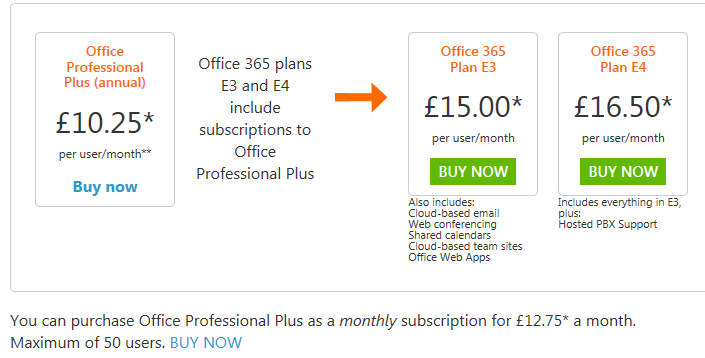
As you can see, the Office Pro Plus 1 Year is £10.75 per user per month while the month to month option is £12.75, and limited to 50 users.

I haven’t seen any info on this yet but I assume that this means you can choose to drop the subscription after each month rather than being tied to a full 12 months. This would be good for companies not on Open Value Subscription who find themselves with an influx of temporary staff requiring Office.

I’ve just been chatting to our Marketing Manager and he once did some temp work for Vodafone over in Australia where they brought in 100 temps for 2 weeks to update all their customer records…if they needed Office to do it then this new offering would be perfect!

Office 2013 & Office 365


So today’s secret announcement is what we all thought it would be – Ballmer announcing the public preview of Office 2013. It’s available to download here:

http://www.microsoft.com/office/preview/en

or for more choices head to:

http://www.microsoft.com/office/preview/en/try-more-products

where you can find:

  • Office 365 Small Business Premium
  • Office 365 Enterprise
  • Project Online

I’m just getting everything installed right now so will be back later with a more in-depth look at the new features but for now here are some screenshots of the install process:

image

Notice the great new logo below:

image

Notice the “Streaming Applications” feature in the installation shot below, this will allow you to stream Office components to devices that don’t have it installed!

image

Here’s how it looks pinned to a Windows 7 desktop.

image

and here you can see the start of how tightly integrated the Cloud is into the new release of Office:

image

There is also…wait for it…Project Online!

This is going to be interesting…especially to see if the full Project Server will be made available online or just the desktop app equivalent.

I’m just installing the Project bits now…head over to the links and get playing!

JaJah Voice for Office 365


Here’s an interesting bit of software I came across earlier:

Jajah Voice for Office 365

which extends the voice capabilities of Lync Online including:

  • Make and receive phone calls from your Lync online contacts
  • Click-to-call from IM conversations, Outlook, SharePoint and other Office apps
  • Find me/Follow me: set incoming calls to be forwarded or simultaneously ring personal mobile phone
  • ‘Call via work’: make outgoing calls from your smart phone using work number
  • Mid-call transfer to your mobile phone or any other number or user.

I’m really quite excited about this. This takes Lync Online into the world of mobility very well, being able to make/receive calls via Lync Online will surely speed up the adoption of both Lync & Office 365.

The service is currently in closed beta and is expected to go live this month (July 2012)

Jajah’s MS Pinpoint page can be found here:

http://pinpoint.microsoft.com/en-us/applications/jajah-voice-for-office-365-12884930736

and their main site here:

http://www.jajah.com/

MS to change Office 365 support?


CRN, Channel Reseller News, has just reported that MS are set to revamp the structure for Office 365, by giving sales and support responsibilities to distributors.

This will mean rather than customers purchasing directly from Microsoft and them giving resellers a rebate, resellers will purchase from distribution partners as they currently do for other items such as Office & Windows via the Open license models. They go on to say that distributors will also provide end user support but MS will retain ownership of the billing functionality; which raises two points for me:

1) End User Support: MS have invested quite heavily in their support teams and, in my experience, they are really good. Quick, knowledgeable, keen to help etc…it strikes me as odd that Redmond would look to move away from that and put it on the channel. Perhaps distributors will have the option to offer end-user support but I would imagine that MS will keep that support element.

2) Billing: Selling it through the channel but Microsoft keeping the billing seems overly complicated. A sales cycle would be:

  • Distributor buys from MS
  • Reseller buys from Distributor
  • Customer buys from Reseller

and payment would follow that back through the channel so I’m not sure where MS would fit in?

Feel free to offer your thoughts on all the above too!

I think it will, overall, be a good move to include the channel more in this but hey, I’ll see what new info we get at WPC and let you know Smile

Office 365 Update


I’m not sure when this update happened but the “Kiosk Worker” SKU for Exchange on Office 365 (K1) now gives you a 1GB mailbox…an increase from the previous limit of 500MB.

A nice little update from Microsoft there…

Office 365 Price Cuts


Office 365, Microsoft’s online services offering has had a price cut.

Effective immediately, the new pricing is thus:

image

     Was £6.50         Was £10.50      Was £15.75        Was £17.75

image

K1 has stayed the same but K2 has been reduced from £6.50.

The E3 SKU has been reduced by 16% and E1 by 19%.

Other pricing:

imageimage

The US price lists I’ve seen show that additional SharePoint storage has been reduced by 92%, from $2.50 to £.20! The UK site doesn’t currently contain pricing for this but I’ve asked for UK costs, so I’ll update this post once I hear back.

Some people will say these cuts are due to it not being as popular as hoped but I believe Microsoft’s reasoning about economy of scale & improved efficiency being the key drivers. We’re seeing some really great interest in Office 365 so far this year so I’d advise taking the naysayers with a pinch of salt Smile