Microsoft Unified Communications Demo


Microsoft’s Unified Communications portfolio contains some brilliant products and when they’re all used together, the results are amazing. However one thing I know first hand is that an actual demo works infinitely better than any number of .ppt slides and presentations so courtesy of Technet Edge, here’s a demo of:

Exchange Server 2007, Office Communications Server 2007 and Roundtable

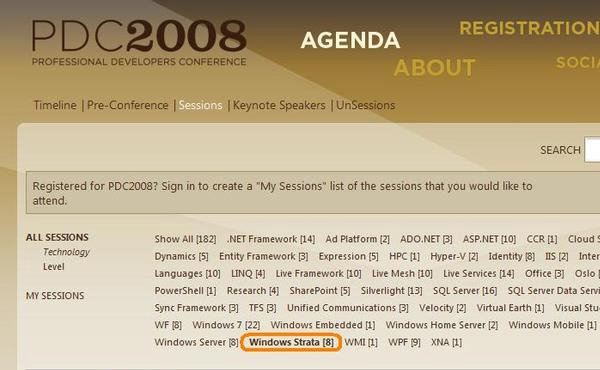
Microsoft Strata-Cloud OS name leak?


Microsoft’s Cloud Computing OS could be called “Strata”, if a now removed addition to the PDC session list is right.

**UPDATE** What was once called Strata is now known as Microsoft Windows Azure-see more info in my post here.

Got this from Kit Ong via The Register.

Microsoft-Facebook Live Search


The guys over at ReadWrite Web have got some news on Microsoft’s activities with Facebook.

Today see’s the release of Microsoft Live Search for Facebook which Microsoft say will provide “great search results while receiving highly relevant ads that are personalized by either my Facebook profile or search query”

and FaceBook give an example of it’s use over at their blog:

“For example, your friend may invite you to an event at a new restaurant. Without leaving Facebook, you can check out the details of the restaurant on the web”

I’m not a Facebook user at the minute..it’s one of the Web 2.0 things I’ve managed to resist but this sounds like a great addition to me!

Microsoft Enterprise CALs


Microsoft Enterprise CALs are a relatively new addition to the world of MS licensing, and from conversations I’ve had at work, I know some people are a little unsure as to what they’re for, how they’re licensed etc.

Why have they made more CALs?

A lot of people viewed the addition of these extra CALs as a way for Microsoft to make more money and make life more difficult, but that’s not the case at all. The Enterprise CALs actually give organizations more flexibilty and help reduce wasted expenditure on software.

What do they do?

The Enterprise CALs offer an extended range of features over and above the Standard CAL; this can be thing such as Unified Messaging, Call Management or Excel Services. I’ll give a breakdown of the complete differences later in this post.

How are they licensed?

There are 2 main points to this and not everyone is aware of them.

1) The Enterprise CALs are Additive, which means you must have the Standard CAL as well in order to be correctly licensed. So Std CAL + ENt CAL = 🙂

2) You aren’t required to have the same number of Enterprise CALs as you have Standard CALs. For example, if a company has 500 workers who use Outlook, all 500 will need an Exchange Std CAL. However if only 46 of those need Unified Messaging (Voicemail in their inbox etc), you would need just 46 additive Enterprise CALs so 500 Std + 46 Ent = 🙂


Which products have Standard & Enterprise CALs?

Exchange 2007, Office Communications Server (OCS) 2007 and Sharepoint Server (MOSS) 2007.

Here is an explanation as to the differences between the Std & Ent CALs for the products listed above:

Exchange 2007:

Standard CAL gives:

  • Email, Shared Calendars, contacts etc
  • Outlook Web Access (OWA)
  • ActiveSync
  • Managed E-Mail Folders (Default)

On top of that, the Enterprise CAL gives:

  • Advanced ActiveSync Policies (with Exchange 2007 SP1)
  • Unified Messaging – A single inbox for mail, voice and fax
  • Per User/Per distribution list journaling
  • Managed E-Mail Folders (Custom)

Office Communications Server (OCS) 2007:

Standard CAL gives:

  • Presence- Instantly find and communicate with fellow workers. Use presence to see people’s online status and initiate real-time conversations
  • Federation-Establish trusted relationships between your organization and others, allowing workers to communicate via IM (Instant Messaging)

On top of that, the Enterprise CAL offers:

  • Conferencing–Experience multi-party audio/video conferencing from within Microsoft Office Communicator.
    Meeting scheduling–Instantly establish ad-hoc meetings from a variety of Microsoft Office applications.
    Conduct online meetings–Use the power of the Live Meeting client to conduct conference meetings with participants inside and outside the organization with an on premise solution.
    VOIP capabilities: Software-powered VoIP that works with your existing messaging and telephony infrastructure and can adapt to your changing business needs.
    Call Management–Give users call management capabilities like call forwarding, hold, dynamic routing, and simultaneous ringing on all commonly used phones right from their desktop.

Microsoft Office Sharepoint Server (MOSS) 2007:

Standard CAL gives:

  • Content Management–Out-of-the-box workflows initiate, track, and report common business activities such as document review and approval, issue tracking, and signature collection.
  • Records Management–Record repository provides for the collecting, managing, and disposing of corporate records in a consistent and uniform manner based on the company’s policies.
  • Portal Site Management–Site Manager tools help personalize, deploy, and maintain portals using drag-and-drop capability.
  • Search–Extensible and customizable search of enterprise content and people.
  • Portals–Portal sites provide convenient starting points to connect your people to business-critical information, expertise, and applications.

On top of that, the Enterprise CAL gives:

  • Report Center–Broadly shares business data through personal or shared dashboards that include Microsoft Office Excel 2007 controls and key performance indicators.
  • Business Data Catalog–Discover more information through the ability to index business data and access it through your portal and search capabilities.
  • Excel Services–Help secure, manage, and control spreadsheets through a Web browser. Integrate Microsoft Office Excel as a part of your business intelligence infrastructure.
  • Forms Server–Enables the storage and organization of rich, dynamic server-based forms to gather, share, reuse, and manage information.



Microsoft System Center Virtual Machine Manager 2008


What is Virtual Machine Manager?:

The clue is in the name, but Virtual Machine Manager (VMM) is a management system for virtual machines (VM’s)..however, and this is the ace up Microsoft’s sleeve…it also manages physical servers-this is in contrast to VMWare’s VirtualCenter as that can only manage VM’s. That means IT Administrators only need to learn to use one console to manage ALL their servers and anything that makes an Admin’s job easier is a good thing yes? 🙂

Microsoft Virtual Machine Manager delivers end to end support for consolidating physical servers onto virtual, fast Physical to Virtual (P2V) conversion “Intelligent Placement” of server workloads to balance performance and of course, the centralized console.

It also contains V2V conversion, making it easy to convert any existing VMWare VMDX/VMX files to Microsoft’s VHD format.

Further info on VMM’s features can be found here.

What’s new in VMM 2008?:

Good question! VMM 2008 is packed full of great new features including:

·         Allows for fault tolerant and cluster aware VM’s to be created

·         Integration with VMWare’s Virtual Center

·         Windows PowerShell scripts for automation etc supported across multiple platforms

·         Performance and Resource Optimization (PRO) is a feature of VMM that can dynamically respond to failure scenarios or poorly configured components identified in hardware, operating systems, or applications

·         Working through PRO-enabled Management Packs together  with System Center Operations Manager 2007’s, PRO can either alert an administrator of an unhealthy system or application state and its proposed recommended corrective action or it can respond by automatically creating a system that is responsive and self-healing. PRO features are available to ESX VM’s as well.

·         VMM 2008 is now fully cluster-aware, meaning that it can detect and manage Hyper-V host clusters as a single unit

·         New in this version of VMM is automatic detection of virtual hosts that are added or removed from the cluster—thus easing the burden on the administrator to manage this function

·         Creating a High Availability (HA) VM is a simple as selecting a tick box

·         VMM 2008 also supports VMware host clusters in which the nodes of the cluster are VMware ESX Servers

A great White Paper on VMM 2008 can be found here

Microsoft System Center Data Protection Manager (DPM)


Microsfot Data Protection Manager delivers continuous data protection for Microsoft Applications & File servers. It was specifically built to protect and recover SQL Server, Microsoft Exchange Server, SharePoint Portal Server, Microsoft Virtual Server, as well as Windows file services through a disk to disk to tape backup strategy. An example of a typical setup can be seen below:

The Continuous Data Protection means that changes are backed up almost as they happen, giving you near up to the minute protection in the event of a disaster. It also means that when you restore the data, you’ve lost only 15 minutes worth of emails, transactions etc..not a whole day as with traditional tape backups.

Disk Based Backups also allow you to restore data in a few minutes, rather than hours with tape. Another benefit is that users can restore their own files (if allowed) without hassling IT 🙂

That being said, I’d still backup up to tape as well, giving you the added security of off site backups if you needed them.

You can see the Top 10 Benefits of DPM 2007 here.

Office 2003 MUI Packs


Office 2003 MUI Packs can be nearly as tricky to pin down as those for Vista.

Now with Office 2007, you need to purchase the Office Multi Language Pack via Volume Licensing (around £75).

If you need to downgrade to Office 2003, then you are entitled to downgrade the MUI pack too.

Microsoft System Center Configuration Manager 2007


Configuration Manager:

This is the replacement for SMS 2003 and is used to comprehensively assess, deploy, and update your servers, clients, and devices, across physical and virtual machines as well as mobile devices. Config. Manager provides Asset Intelligence giving organizations continuous visibility of their hardware/software assets, where they are and who’s using them.

It can show how many copies of a particular program have been deployed, which machines they’re on and which people actually use the software. This information can then be used at renewal time to help decide how many copies are needed for the next year etc.

Software Update Management is often the main reason that people look at System Center Config Manager. Keeping all the various bits of software in an Enterprise fully up to date with patches is very important and also very difficult! Using SCCM you can deploy patches & updates for Microsoft products, 3rd party applications, custom LOB (Line of Business) applications, hardware drivers and more to servers, desktops, laptops and mobile devices.

The new feature of Desired Configuration Management enables organization to increase desktop stability and security by assessing the compliance of computers with regards to things such as “whether the correct Microsoft Windows operating system versions are installed and configured appropriately, all required applications are installed and configured correctly, optional applications are configured appropriately, and whether prohibited applications are installed.”

Using SCCM for Software Package Deployment can make things a lot easier! This simplifies the task of distributing software packages to physical and virtual machines (servers, desktops, laptops and mobile devices). You can centrally define how and when these packages will run on client machines, installing the software with no user intervention.

Next Steps:

Now you’re got an idea of what it can do, I’m sure you can’t wait to get it set up in your Test & Development system so:

Online Virtual Labs

Download Trial Software

Pricing & Licensing:

There is a single licence for System Center Config Manager Server, Management Licence (ML) for Servers (Std and Enterprise) and a Management Licence for Clients.

An Enterprise Server ML is required for full application and server desired configuration management, including the proactive management of systems for configuration settings that follow an industry-leading framework for managing information in changing regulatory and business environments, while a Standard Server ML is limited to operating system and basic workload desired configuration management.

Microsoft System Center Operations Manager 2007


Microsoft System Center Operations Manager 2007 (SCOM) is the replacement for MOM (Microsoft Operations Manager). It is an the end-to-end service-management product that helps organizations increase efficiency while enabling greater control of the IT environment.

Management Packs are available to add extra functionality into SCOM 2007, these can be downloaded or you can create your own.

The Distributed Application Designer is a graphical wizard to help IT administrators quickly create health models and MPs (Management Packs) for their IT Services. The Management Pack Authoring Console is a graphical tool used to help IT administrators and developers build MPs for their custom applications and other technology components. The Operations Manager 2007 Software Development Kit (SDK) provides programming interfaces so developers can more deeply integrate with and automate Operations Manager 2007.

SCOM isn’t restricted to monitoring Windows environments, it’s possible to monitor HP-UX, Solaris, Red Hat & SUSE Linux by using the Cross Platforms Extension beta.

Download a trial of System Center Operations Manager 207 here.

Microsoft System Center Family


What is Microsoft System Center? What does it do? How much does System Center cost?

These, and more, are questions I get at work on a regular basis both from customers and our internal sales guys so I’m going to try and clear it up a little here if I can..

The System Center family helps you to manage physical and virtual environments across data centers, desktops and devices and includes:

Configuration Manager (SCCM)

Operations Manager (SCOM)

Data Protection Manager (DPM)

Virtual Machine Manager (VMM)

System Center Essentials (SCE)

I was going to put together one post for the whole family, but it was turning into a huge, unwieldy beast so I’ve broken it down into separate posts for each family member, links are above..(not all the posts are available yet but please bear with me!)