Fixing wmv files in IE8


I just clicked a link to play a .WMV video and was greeted by a “Page can’t be displayed” window. This was odd as I’ve done it plenty of times before, although I couldn’t remember the last time.

I did a quick Bing and came across a blog post from Eric Richards, an Office developer over at MS Redmond.

He too had that issue and points towards MS KB article KB974538. The inability to play .wmv files seems to be a knock on effect of installing the latest version of Windows Live Photo Gallery.

The KB article gives you some text to copy into a reg file which, and I can confirm this, will fix the problem. The fix for Windows 7 is:

This issue can be avoided if the following registry keys are present, which reset the file associations to original Windows 7 settings:

  1. On an account with Administration privileges, choose Start and type notepad.exe.
  2. Copy and paste the contents of the box below.
  3. Save the file as fix.reg.
  4. Double-click on the fix.reg file to add it to your registry.
    ——————————————————————
    Windows Registry Editor Version 5.00
    [HKEY_LOCAL_MACHINE\SOFTWARE\Classes\.asf]
    @="WMP11.AssocFile.ASF"
    [HKEY_LOCAL_MACHINE\SOFTWARE\Classes\.asx]
    @="WMP11.AssocFile.ASX"
    [HKEY_LOCAL_MACHINE\SOFTWARE\Classes\.avi]
    @="WMP11.AssocFile.AVI"
    [HKEY_LOCAL_MACHINE\SOFTWARE\Classes\.wmv]
    @="WMP11.AssocFile.WMV"
    ——————————————————————

(Copy the text between the dashed lines)

More info and the fix for Vista can be found by in the full article.

I’m glad it was such a quick fix and thanks to Eric 🙂

Ice Cube Flow Chart


If you like Ice Cube and you like Flow Charts-then this is awesome! It’s a flowchart of Ice Cube’s seminal classic “Today was a good day” and it’s really well done-props to the creator!

The original can be found on Geekologie here but I’ve also made a SeaDragon version-which rocks 🙂 Unfortunately I don’t seem able to embed it into this blog so the link for all the zooming and panning goodness is:

http://seadragon.com/view/aje

Bing Visual Search


Today sees another great addition that makes Bing an even stronger competitor to Google, and that is Visual Search.

This gives you search results as images (which has been shown to speed up searches by around 20%), rather than just a list of text. You can then filter and re-arrange the image results based on various criteria. It’s still in Beta at the moment but it has quite a few “featured galleries” that give you an idea of how it works and it’s all based on Silverlight. Here’s an example:

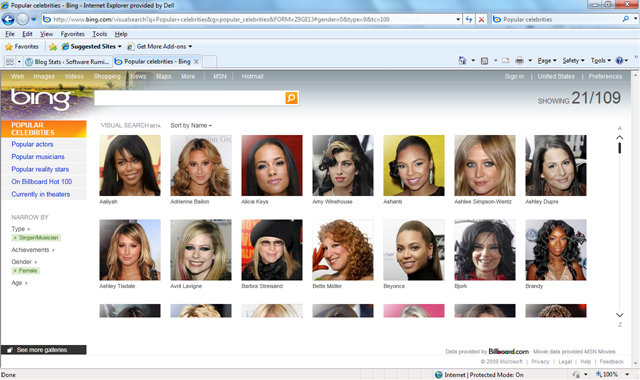
Say you’re searching for a certain celeb but you can’t remember their name. Got to the “Popular Celebrities” gallery:

image

You know it’s a female singer you’re thinking of so using the filters on the left, you can tighten in up:

image

That’s cut it down from 915 to 109 but that’s still quite a few pictures to go through; luckily there’s one filter that I think is particularly awesome…the age range filter. The singer you’re thinking of is somewhere in here 30’s so:

image

Here (if you open up the bigger picture) you’ll see the age is set to 29-41, which has further narrowed it down to 31, which is an easy amount of pics to quickly flick through. Once you’ve found the person you’re looking for, simply click the image to be taken to a Bing search page for them:

image

Even in it’s Beta form, this is clearly a powerful new tool in Microsoft’s assault on the world of search and it can only get better. What’ll be great is when you can get the Visual Search results for any query so next time someone’s arguing that it’s Laurence Fishburne in 187, not Samuel L Jackson-you can Bing it and get Visual Proof-nice 😉

Well done Microsoft…now here’s my request for the next version of Visual Search…the ability to generate a search query with a picture. Say you’ve got a JPEG of a building/person/car and you just don’t know what or who it is, imagine being able to upload that to Bing and it identifying it for you…that’s be pretty sweet 🙂

If you can’t access the page www.bing.com/visualsearch then change your country to the US (in the top right corner) and you should be all good!

Windows Server 2008 TS/RDS


I’m sure you’re aware that Windows Server 2008 R2 has now been released, but not everyone is aware that Terminal Service (TS) is no more and has been replaced by Remote Desktop Services (RDS).

RDS offers all the same functionality as TS as well as a whole host of new benefits. These new additions include:

  • Simplified management with a unified and scalable connection broker for both Session Desktops and VDI Desktops providing:
  • Unified Remote Desktop Web Access (RD Web Access) and ‘RemoteApp and Desktop Connection’ feature for access to VDI and Session Desktops
  • Ensures users can only see the apps they are supposed to with per-user RemoteApp permissions and filtering
  • Provides the user a rich remote experience, bringing the experience closer to that enjoyed by users accessing local computing resources such as:
  • True multi-monitor support
  • Windows Media® Player redirection,
  • Bidirectional audio,
  • Enhanced bitmap acceleration for 3D applications and rich media content such as Silverlight and Flash.
  • Improved application compatibility and management of RD session host servers with the inclusion of Microsoft Application Virtualization for TS

This last point is especially interesting-“App-V for Terminal Service” is included with the CAL and is no longer a separate product. This applies not only to the 2008 R2 RDS CALs but also 2008 TS CALs. (I’m going to look into if and how it works with existing CALs and post an update here). *Update* I’ve investigated this today and, despite the blog’s wording, it doesn’t apply to Server 2008 TS CALs…it is Server 2008 R2 RDS CALs only.

*Update 2*I received a mail from Alex, the author of the original blog post, today telling me that my previous update was wrong and that is true*. Looking at the FAQ’s here shows that customers who currently have the Windows Server 2008 TS CAL will receive the App-V for TS functionality too-great news 🙂

Customers should find that the App-V for TS software is now available via the Volume Licensing Service Centre (VLSC) from September 1st.

It’s to be noted that “App-V for Desktops” isn’t included in this and is still separately licensed through MDOP.

Because of these extra features, the cost of the CALs will increase by around 5%. However MS are offering them at an equivalent price to the previous CALs until 31/12/09 (again, I’ll check where this promo is running and let you know).

This is another thing that makes Windows Server 2008 R2 an excellent step forward 🙂

The MS RDS Blog is here.

*I’ve apologised to Alex and I aim to correct the source of the incorrect information too. I also want to apologise to anyone who read the incorrect info on here-sorry!

Microsoft MDOP


MDOP AKA the Microsoft Desktop Optimization Pack is one of the least well known Microsoft products, and that’s a shame as it’s packed full of goodness!

It’s only available to customers who have Software Assurance on Windows Desktop OS licences (Vista, Windows 7 etc) and contains the following:

Application Virtualization (App-V)

Microsoft Enterprise Desktop Virtualization (MED-V)

Diagnostics & Recovery Toolset (DaRT)

Advanced Group Policy Management (AGPM)

Asset Inventory Services (AIS)

System Center Desktop Error Monitoring (SCDEM)

These tools can help make managing systems so much easier in so many ways!

They are licensed on a per user per month basis which means they’re not available on all licensing programmes-namely MDOP is missing from Open licensing. If MDOP is attractive to you, you should look at the Open Value Program to get MDOP and other benefits too.

There’s a whole host of MDOP videos from Tech-Ed available here. Be warned though-they require a TechEd Online subscription.

Importing Journaled data into Exchange Online


I was asked a great question via the comments on my blog, which was:

“Can BPOS accept journal data that has been exported from an existing Exchange system?”

With some help from the great people in the Worldwide BPOS teams at Microsoft I have an answer…and that answer is YES 🙂 It is possible to import already journaled data into Exchange Online, meaning you can easily move from Exchange Onsite to Exchange Online.

How to do it:

  1. There are a few caveats to this process:Data must be in .PST format only. Alternative file format types such as MIME, EML, MSG, or Lotus Notes are not accepted.
  2. You must submit historical data files on an external hard drive or USB memory stick.

This one is a little bit odd-I assume the reason you can’t transfer the data online is due to the sheer volume of data that may well be in question and so “sneakernetting” it would be quicker; but couldn’t DVD’s be used? I suppose that an External HD would mean the data could all be read in without any human intervention along the way, while a bunch of DVD’s would require someone to insert/eject them? (Feel free to add your thoughts).

You need to create a “mapping” file which for Exchange 2000, 2003 & 2007 can be done via:

1.Start a command prompt. (Click Start, click Run, type Cmd, and then click OK.)
2. At the command prompt, type or copy and paste the following and press enter:
C:\> csvde -l “mail,legacyExchangeDN” -r “(objectClass=user)” -f customer_name-map-file.csv

For Exchange 5.5:

1. Open the Microsoft® Exchange Server 5.5 administrative program and choose the option for a tools-directory export.
Historical Data File Format and Submission Procedures Microsoft Exchange Server
4
2. There will be an option to choose mailboxes, custom recipients, and distribution lists (select all).
3. Select the export file option and choose a destination for the file you are about to create. The file that is exported will be in a CSV format.
Please remember to include this file with your historical data. The file should be named: customer_name-map-file.csv

Once you have all that it’s loaded onto your External drive/USB stick, you need to package it up and physically mail it off to Microsoft with the following details:

Bulk Data Services Group

Attn: Betti Johnson (Ticket Number)

Alias: bettijo

3720 159th Ave NE

Redmond, WA 98052

Ph. 1 (425) 703-3237

I am checking to see if there is a separate address for EMEA (and indeed other regions) and also how much this service costs, as the pdf datasheet hints at a charge. *Update* I’ve just been told that the charge is $50 per GB (one time fee) for the import and that you must send the data to the US.

The datasheet can be found here.

Impressions of VMWorld


As you may know, this week is VMWorld 2009, VMWare’s virtualization event for partners and customers. I’m not attending but I am following a great number of people on Twitter who are there and I have to say, it’s not doing VMWare much good in my eyes.

The first mark against them was the furore over the restrictions placed on Microsoft & Citrix. Yes-they’re competitors but:

  • Banning them from sponsoring the event
  • Restricting them to 10×10 booths
  • Stopping them from doing demo’s of their product
  • Stopping local hotels from renting conference rooms to them

just strikes me as childish and only serves to make VMWare look worse.

Now I’ll admit that I’m a big Microsoft fan and not much of a VMWare fan but I think even VMWare supporters must be having second thoughts 🙂

In one of the sessions today VMWare displayed a slide to demonstrate Microsoft driver crashes but the slide was 3 years old, and the data was 4 years old!

This attitude of “don’t show competing products", don’t use these rooms, don’t do this, don’t do that” is the same attitude that Microsoft were guilty of displaying a few years back. Microsoft saw a lot of people turn against them, both partners and customers, and it set them back in many areas. Microsoft had to make a real effort to change their corporate attitude from the top down and thanks to that, and the large number of loyal partners/customers, they were able to turn it around…these days MS are recognised by (nearly) everyone as much more open and accommodating to competitors and their products.

I’m not sure that VMWare will be able to make a similar change and, if they do, I don’t think it will be in time to save their market position…

Windows 7 Enterprise Trial


  • Windows 7 Enterprise is the most feature rich version of Windows 7 and offers much more than Windows 7 Pro including:
  • Direct Access
  • Branch Cache
  • App Locker
  • Bit Locker (To Go)
  • 4 Virtual licences

and more…

The only way to obtain the Enterprise version is to purchase Windows 7 Pro with Software Assurance.

Microsoft have released a 90 day trial of Windows 7 Enterprise which is generally available online, rather than restricted to Technet/MSDN, giving an even wider audience the chance to see what benefits Microsoft’s new OS will bring to them.

You can see more info and download the trial here. The trial is available in the following languages:

  • English
  • French
  • German
  • Spanish
  • Japanese

If you haven’t had the chance to play with Windows 7 and it’s Enterprise features, I implore you to download this trial 🙂 Move quickly as the trial is on a” first come first served basis” until March 31st 2010.

Exchange Online SMTP Enabled


It’s now possible to serve SMTP clients via Exchange Online-meaning you can have mail originating outside the online environment. I’ve had a few people ask me about this and the use has always been so that automated applications can send mail via Exchange Online…such as an SQL server auto sending a report etc.

To connect the SMTP client to Exchange Online you’ll need to give it the Fully Qualified Domain Name (FQDN) which will be:

  • North America: Smtp.mail.microsoftonline.com
  • Europe: Smtp.mail.emea.microsoftonline.com
  • Asia Pacific: Smtp.mail.apac.microsoftonline.com

You’ll also need to use Port 587 and TLS (Transport Layer Security).

Full info can be found over at the Technet BPOSitive blog.

Yet another great new feature that serves to make Exchange Online and BPOS a great choice for companies of all kinds & sizes…

ZuneHD in Europe?!


I’ve just been told on Twitter that there is a rumour, and it’s to be stressed that this is a rumour, that Microsoft may still be planning on using the Zune HD to launch the product into EMEA (Europe, Middle East and Africa)!!!

That means that this sweet ass gadget:

could be in our shores, in our stores and, more importantly, in our hands 🙂 In my opinion, the new Zune is much sexier than anything I’ve seen from Apple…

The specs for this are:

  • 3.3 inch OLED display capacitive touch screen (480×272 16:9 aspect ratio).
  • Size: 2.07″x4.08″x.35″ (52.7 mm x 102.1 mm x 8.9 mm)
  • Weight: 2.6 ounces (74 grams)
  • Runs on Nvidia Tegra APX with 8 independent processors.
  • Multi-touch technology.
  • 16/32 GB
  • Built-in accelerometer.
  • HD radio tuner.
  • 720p high definition video support and output (additional dock required).
  • Wi-Fi connectivity 802.11b/g with Open, WEP, WPA, and WPA2 authentication modes and WEP 64- and 128-bit, TKIP, and AES encryption modes.
  • A Wi-Fi version of the Zune Marketplace.
  • Web browser (based on Internet Explorer Mobile 6 for Windows CE).
  • Games
  • Unicode Support
  • Equalizer
  • Music, up to 33 hours (wireless off); video, up to 8.5 hours
  • Battery : 3.7 Volt, 730 mAh Lithium-Ion Polymer battery
  • I’ve wanted a Zune for ages so if this is true-it’d be AWESOME 😉

    *Update* Looks like it truly was a rumour, as the Zune HD isn’t available in Europe (or anywhere else for that matter) 😦