Microsoft Office 2010 beta: A Look


The beta of Office 2010 is available now from MSDN and Technet and this is a look at what’s new, what’s fixed and what caused me problems…hopefully it will be interesting and useful for you 🙂

Installation and some issues:

The first thing to note is that you can’t upgrade from the 2010 Technical Preview; this means you’ll need to uninstall and do a reboot. I had a bit of a hairy moment where I logged in after the reboot and was presented with a guest account…I had a little “oh dear” moment thinking I’d managed to screw up my machine! Thankfully it was just a little glitch, I logged out and back in and all was well.

I double clicked the .exe and…I got the “cannot upgrade from previous versions” message again! I had a little stress and then started looking for the culprit…turns out it was the Office Outlook Connector that was getting in the way. If you’ve got that installed so you can access Hotmail from Outlook, make sure you uninstall it 🙂

After the install was complete, which took about 20 minutes, I started up OneNote…and got a warning box that I had possibly counterfeit software! It told me it was for “corporate or institutional use” only and that I had to connect it my corporate domain…WHAT?! I was told on Twitter that it had worked fine for other people so I tried again…added the key & clicked “Install Now” again. The next time I opened up OneNote it asked me to activate it online, which thankfully worked!

So now I’ve got it all installed and activated but it was a bit of a rollercoaster ride! To be fair, this machine has had a few issues with various iterations of Office over the years so I guess there is something not quite right in the registry!

What’s New?

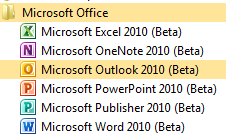
The first thing I notice is that the Office components have all got new icons:
image

Outlook:

The Outlook Connector doesn’t recognise the beta and installation fails; however as you’re setting up Outlook, it offers to go off and install the Connector for you. I gave it a try and it pulls down a different beta file…clearly made for Office 2010 as it installed without a problem.

Having said that, the Outlook setup wizard doesn’t recognise that it’s installed, which is pretty annoying, and so goes off to find the settings online. After checking and double checking my account details to no avail, I tried another reboot…lo and behold, this time, it recognised that the connector was installed and went through with the account setup 🙂

Web test:

The folder structure on the left looks different than the Technical Preview and I noticed this:

image

See Web test at the bottom…what could it be? Let me show you:

image

That’s right, Twitter inside Outlook as default…that’s pretty cool 🙂 Once you’ve logged in, you can leave the Web Test folder and still be logged in when you come back.

Social Media Integration:

At the bottom of a new email, you now get this:

image

If you expand it using the arrow on the right, you get:

image

Click to add networks and you get:

image

Which hints at the social networking features present in Sharepoint 2010 🙂 It says there are more providers available online, but the link just takes you to a general Office site at the moment 😦 Once this is up & running, it will be pretty awesome…having, and I’m guessing at which will be included, Twitter, FaceBook & LinkedIn info and profiles available inside Outlook will be great. I’m not on Facebook (I know!) but I use the other two, especially Twitter, quite heavily for networking with suppliers, customers and colleagues.

Blurring the divide between “Social Media” and “Corporate Resources” is a great move, one aimed at this “New World of Work” that will resonate with the graduates coming into the workplace as well as us cool, hip (!) people that get it too. I can imagine some managers/directors being a bit unsure about this but I’m confident they’ll quickly see the benefits…just like corporate IM.

I’ve linked one of my Live Accounts into Outlook and just sent my first test email. It asked me to complete a “captcha” to verify my account before it would send it…something I don’t remember 2007 doing? You only need to do it once 🙂

New network pane:

Once you open up a new mail to someone who has emailed you, you get a message that Outlook wants to run an add-on. Click to run it and then Outlook starts showing you related mails and items.

image

I have to say that it takes quite a while for new mails to show up in the networking pane…hopefully this will be improved in the final version.

Also, I’m finding that I’m needing to close and re-open Outlook for all the changes to take place and, while it’s showing emails, attachments aren’t showing up in the pane. Again, I think this is down to it’s beta status.

This is very much a work in progress…I posted early so people could see the screenshots 🙂

The Backstage Icon look a bit different too, a bit more boring:

image

Was there the option to swap colour schemes in 2007 and/or the 2010 tech preview? I’m quite liking the black:

image

This leads me onto something I realised the other week. I’ve been paying much more attention to the ins & outs of Office 2010 than I ever did 2007 and so finding all kinds of great new features. However, I can’t be 100% sure if they’re new to Office or just new to me 🙂 There are a few in Outlook where I think this may be the case…if so, feel free to let me know in the comments!

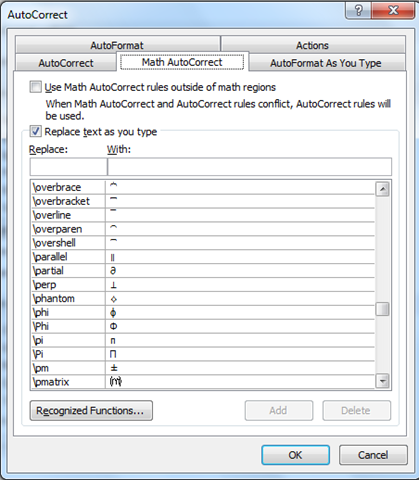
Options –> Proofing –> AutoCorrect Options

That takes you to the section that shows you what things are replaced with what. There are things such as “yuor = your” but it also shows you how to make the sign for Pi and much more…pretty interesting:

image

image

Another feature I like the look of is “Keep track of formatting”:

image


As for the other components:

  • Word
  • Excel
  • Powerpoint
  • OneNote

I have to say that they all look pretty much the same to me, at least at this early stage!

Microsoft PDC 2009


Microsoft’s annual Professional Developers Conference (PDC) 2009 starts next week on Tuesday 17th (to the 19th) and I’m hoping we’ll see some great announcements and revelations, just like last year.

Windows 7 is out now so all eyes are turned towards “Wave 14”, specifically Office 2010 and Sharepoint 2010…at least these are what I’m looking for more info on! It’s expected that the official release of the Office 2010 beta will be announced, as well as a beta of Office Web Apps.

The other big announcements will be around Windows Azure, which will be coming out of “Community Technical Preview” at the conference; so we’ll get more info on pricing and licensing.

I’m hoping there will be some BPOS news as that’s something of a pet area of mine, so it’s always good to learn more 🙂 I can see there’s a session titled “SharePoint Is Not Just On-Premise: Developing and Deploying Solutions to Microsoft SharePoint Online”…this is based on Sharepoint 2010 so should give some good hints and insight into what will be coming next year.

I’m not going to be there but I’ll be following it online and via Twitter so I’ll be posting all the big news for sure 😉

The keynotes will be streamed like from http://microsoftpdc.com/ starting at 08:30 PST (16:30 GMT) and feature:

Day 1: Ray Ozzie (Chief Software Architect) & Bob Muglia (President Server & Tools)

Day 2: Scott Guthrie (VP Developer Division), Kurt Delbene (Senior VP Office Business Productivity) and “Special Guest”

Not sure why but my guess is that the Special Guest will be Alec Baldwin…let’s see how wrong I am on that!

Microsoft BPOS: Sharepoint Online 2010


Sharepoint 2010 is due for release around April time 2010 and the Online version will become available through BPOS around September time I do believe.

When the 2010 version of Sharepoint (and Exchange & OCS) hit online, they will be SO much more fully features than the current 2007 versions; they will in fact be almost the same! This will be especially notable with Sharepoint as their is a large disparity at the moment:

Read Comparison of Sharepoint Server & Sharepoint Online

Sharepoint Online 2010 will include all the Business Intelligence (BI) aspects such as:

  • Excel Services
  • Forms Server
  • Dashboards
  • Key Performance Indicators (KPI’s)

and more 🙂 As a BPOS Partner this is great news…the BI features are becoming more interesting to more people and not having these features can be quite a big barrier to Sharepoint Online adoption. That’ll all change next year which is great news 🙂

Licensing

Wave 14 will bring some changes to the BPOS licensing too…there will be Standard and Enterprise USLS…just as there are for the on-premise CALs.

However, the split of features between the 2 will be decidedly different. The Enterprise CAL will include:

FAST Enterprise Search

There are also rumblings that it will include some part of, or ways of linking to, Microsoft’s Data Warehousing technology “Project Madison”. This would certainly fit with the BI capabilities inside Sharepoint…

I’ll be doing a post dedicated to Madison soon so keep your eyes peeled for that 🙂

This is all great news, for partners, customers and Redmond as, come H2 of 2010, Sharepoint Online will be a formidable challenger in the world of S+S/SAAS BI and should be pretty great. I, for one, am excited 🙂

Props to W Cornwill for the Britney pic!

SQL Server 2008 for Small Business


There are many version of SQL Server 2008. Standard, Enterprise, Web, Express, per Processor and more…and now there is one more…SQL Server for Small Business.

This version appeared pretty quietly and is particularly well known. It follows a similar path to Small Business Server in that it is restricted to 75 users, but it also has many other caveats.

First of all, it can only be installed on certain versions of Windows Server 2008. These are:

  • Server 2008 Std
  • Server 2008 Std without Hyper-V
  • Small Business Server 2008
  • Windows Server 2008 for Windows Essential Server Solutions
  • Windows Server 2008 without Hyper-V for Windows Essential Server Solutions

You’ll notice there’s no Enterprise or Datacenter and also no Server 2003. I’m going to double check if Server 2008 R2 is now an accepted OS too.

There are some specific rules around the domain too:

  • Must be joined to a domain “where a single server in the domain must contain all the flexible single master operations (FSMO) roles and is the root of the Active Directory forest
  • Domain cannot have trust relationships with any other domain
  • Domain cannot have any child domains

Further details can be found on Microsoft’s site here:

http://www.microsoft.com/sqlserver/2008/en/us/small-business.aspx

This version of SQL is licensed with CALs so cannot be used for Web applications.

It can be purchased through the OEM channel, which makes it an attractive price point for small businesses.

Exchange for Small Business

There is also Exchange for Small Business available now…but it is somewhat shrouded in mystery! It randomly appeared in November’s price file without so much as a “How do you do?” and doesn’t want to give out any information about itself.

The oddest part is that it is Exchange 2007…the month that Exchange 2010 is released brings a Small Business edition of 2007? Why?!

The URL that should give the info page now redirects to the Exchange 2010 site…understandable but a little frustrating. I asked Microsoft today what the restrictions on this edition are and they weren’t able to tell me…the best we can give at the minute is “it’s probably the same as SQL”.

If anyone can shed any light on it – I’d welcome it…

Windows 7 Slinky in Action


You’ve probably seen the photos of my Windows 7 Slinky and I’m sure you’ve thought…”I wonder what it looks like it action?”. Well wonder no more…here it is in glorious Technicolor 🙂

Good innit?!

My aim is to follow this up with some other, more extravagant videos but who knows if that’ll happen?!

Microsoft Data Protection Manager 2010 & Seagate


Microsoft’s Data Protection Manager (DPM) is soon to arrive in it’s 2010 incarnation (first half 2010) so this week’s TechEd Conference is revealing a host of new features.

DPM is currently a Windows focused product which, while not surprising, is quite limiting in many corporate IT environments these days. So with 2010, Microsoft have joined together with Seagate and OEM’d their i365 software to extend protection to heterogeneous environments including:

  • Linux
  • Unix
  • Netware
  • IBM iSeries
  • Oracle
  • VMWare

A great list…but you’ll notice no Mac support 🙂

This will instantly remove one of the main barriers to DPM adoption in enterprises,as many places have at least a few Linux/Unix servers running in their datacenters.

Microsoft will also be offering online backups via Seagate’s EVault service and datacenters. It includes data compression and data de-duplication to reduce bandwidth hit and has:

“a network of SAS 70 Type II certified, Tier 3 and 4 hosting facilities, WAN optimised backup and recovery, disaster recovery experts and processes, and a 12-year track record protecting data for over 22,000 customers across the globe”

according to Seagate.

What I find strange is that this doesn’t utilise any of Microsoft’s online services…in particular Microsoft Azure. With BPOS offering an online hosted archive, it seems strange that this technology can’t be extended to store other, non email, data too.

Is using eVault just a temporary measure until Azure is fully up and running? I don’t know but I would expect that it’s in the long term plan to fold all this inside Azure…maybe some kind of Seagate purchase will happen?!

I’m also keen to find out if the data compression and de-duplication are offered to customers who choose to back up on-site to local tape, NAS, SAN etc. De-Dupe is one of the big features Symantec are touting for the next release of Backup Exec (14 I guess to keep with superstition); if MS are including that too then it will really steal some thunder!

Thanks to The Register for this…

Microsoft “Geneva”: Single Sign On & Online Services


Microsoft Geneva:

“provides companies with simplified user access and single sign-on, for on-premises and cloud-based applications in the enterprise, across organizations, and on the Web to facilitate collaboration, increase security and reduce cost.”


There are 3 components to Geneva which now have more official names:

Geneva Framework = Windows Identity Foundation: provides developers pre-built .NET security logic for building claims-aware applications

Geneva Server = Active Directory Federation Services (ADFS) 2.0: a security token service (STS) for issuing and transforming claims, enabling federations, and managing user access

Geneva Cardspace = Windows Cardspace: helps users navigate access decisions

The aim of Geneva is to provide a true “Single Sign On” (SSO) experience to users across the various platforms that they come across, be they corporate and/or personal.

For example, once a user is logged in with their corporate domain credentials they could then access Microsoft Online Services such as Hotmail, MSDN, LiveSpaces etc; without being prompted to enter their @hotmail/@live credentials. All this requires is 1 Geneva Server and a Windows Live Tool currently called “Microsoft Online Services Federation Utility”.

Federation Gateway

The Microsoft Federation Gateway is a cloud based identity service, that extends beyond your corporate domain out into the internet. This is the hub for all the connections users want to make to external MS technologies, be it Azure, Live or BPOS (MS use CRM Online as an example on the MSDN site).

Cc287610.405c867e-b9fe-4933-8ca1-7387ae678041(en-us,MSDN.10).gif

The above shows the federation of identities between partners. An example of how the data flows between the different points of the SSO setup can be seen below:

Cc287610.83e88583-1e36-4e3c-8cfd-51a1a312b9a0(en-us,MSDN.10).gif

You can find more information about the Microsoft Federation Gateway on MSDN here.

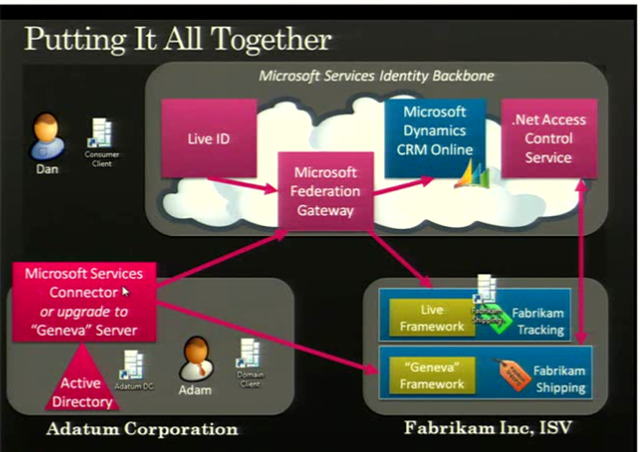
A slide from PDC 2008 showed an example of Geneva working with a BPOS component for the US:

image

The full 1hour+ video of the “Identity Roadmap for Software + Services” presentation video from PDC 2008 can be viewed here on Channel 9.

I know that BPOS, Microsoft’s hosted offerings of Exchange & Sharepoint (among others) will start using ADFS 2.0 at some stage next year. Most likely when the 2010 versions are deployed to the cloud, which I expect to be around late calendar Q3 so August/September. This is where I’m particularly keen to see what Geneva can do for SSO…it should make it pretty much seamless for corporate users whether they’re accessing on-site applications such as Exchange, their Online brethren, custom developed applications, hotmail, MSDN and more…and that will be excellent!

I use a variety of different MS Online Services and have at least 3 different logins for them…I’ll be interested to see if Geneva can look after that for me 🙂 BPOS currently comes with a separate SSO client which needs to be installed for each user and comes with it’s own unique set of issues, so having a corporate wide SSO would definitely be better. Also, you currently need to re-enter your details for OWA with BPOS as it’s on an HTTPS connection…I assume Geneva would remove that need?

Some great technical documents, step-by-step guides and Virtual Machine demos of Geneva can be found on the Technet site here.

Microsoft BPOS Updates for November


Microsoft are constantly improving BPOS and adding new features each month, and November is no different.

Mailbox Access Permissions

Powershell commandlets are being added to increase the range of mailbox permission settings that can be done by BPOS administrators including:

  • Full Mailbox Access
  • Delegate Send As
  • Send On Behalf

These provide capabilities including:

“up shared mailboxes, granting “send as” permissions for administrative assistants, and enabling full mailbox access for third party applications, such as archiving applications and fax servers”

No more opening a ticket with support!

The CMDlets are:

Add Mail Permission

Remove Mail Permission

These will require an update to the Transporter/Migration tools which will be downloadable from MS Download Centre once the update is deployed across all datacenters; this should be completed by early December.

Bulk User Management

A new set of CMDlets for bulk adding and removing users have been added too. These will also rely on the updated Transporter tool being made available. The CMDlets are:

Sharepoint Auditing

Admins will soon be able to view data and reports on site collection activities including:

  • items added
  • changes to permissions
  • documents viewed

Having access to this information can help track the utilisation of the Sharepoint investment within the company and so will be very useful. Companies will be able to see how users are interacting with the system and identify any areas that need improving or conversely, which areas are a roaring success 🙂

Partners on Invoices

Customers who use a Partner of Record will soon see that partner named on their invoices. From a Partner’s point of view, this is a great addition as it helps solidify the relationship between the Partner and the customer and reduces any confusion as to points of contact for support etc.

Once again, the updates have given BPOS an even stronger message and this, coupled with this week’s price cuts, should definitely see an increase in BPOS takeup.

The full MS Online blog post is here.

Exchange 2007 & Server 2008 R2


Windows Server 2008 R2 doesn’t support Exchange 2007. That is a fact and it has caused confusion, consternation & anger among many of Microsoft’s customers and indeed partners (I can confirm that!).

The big question was “Why"?”…as when Server 2008 R2 was released in September, Exchange 2007 was the current version. While Exchange 2010 is almost upon us it is still unlikely that companies will instantly move to the new version…particularly on something as important as their email infrastructure. So that meant either:

a) Customers stayed on Exchange 2007 and Server 2008

b) Customers had a mixed Server 2008/2008 R2 environment

and, aside from the technical aspect, many people viewed it as a cynical ploy by Redmond to force them to upgrade. The message alongside Windows 7 is “Deploy with Server 2008 R2, they’re better together” (which is true!) but then it seemed a little like “Gotcha! Now you’re got R2…you’ve got to buy Exchange 2010”. While that wasn’t the case, that’s how it seemed to customers and really-that’s what matters. Vista wasn’t anywhere near a terrible as a lot of people say it is…but it didn’t do very well did it…and that was because of user perception.

Now however, that’s all changed! This post on the Exchange Team Blog (You had me at EHLO) reveals that:

“In the coming calendar year we will issue an update for Exchange 2007 enabling full support of Windows Server 2008 R2”

They say that customers spoke, Microsoft listened and the change is happening…brilliant 🙂

Good work Microsoft!

Thanks to @JohnFontana for the tweet that flagged this up…

Exchange 2010 Licensing Considerations


Exchange 2010 is now in the price files so you can all go out and buy it 🙂 There is a lot of information about the technical differences, but not so much about the licensing changes…so let me change that 😉

Replication Licensing

The current “Local Continuous Replication” is being replaced by “Mailbox Resiliency” in 2010; Mailbox resiliency requires 2 active instances of Exchange 2010…and thus 2 licences.

As a one-time exception, customers with Exchange 2007 and Software Assurance (SA) on Select, Enterprise Agreement, Open, Open Value, Campus & School get:

“One complimentary Exchange Server 2010 Standard license for each datacenter where the customer has at least one server licensed for Exchange Server 2007 Standard with active Software Assurance as of November 1, 2009.”

The additional licences that you receive under this offer all included SA that expires at the same time as your originally purchased licence.

As an additional offer, if your Exchange SA expires between November 1st 2009 – November 1st 2010 you can renew just the SA for the original licence, and that will also renew the SA for the 2nd additional licence 🙂 However, after that the licences will need to be renewed separately.

The original MS post is here.