ITAM Review: Windows 8 Licensing Guide


If you’re looking to get a better understanding of Windows 8 and it’s licensing, including new additions such as Windows To Go and Companion Subscription Licenses, head over to ITAM Review and check out their guide – written by yours truly:

http://www.itassetmanagement.net/2012/12/20/windows8/

This is a great site for all things Asset Management related so if you’re interested in licensing and/or Software Asset Management (SAM) – check out the rest of the site too 🙂

Who to follow on Twitter


Engadget posted a list yesterday of “Who to follow on Twitter” for Microsoft and I’m happy today that (after a gentle reminder!), I’m on there 😊

Sitting alongside such luminaries as Mary Jo Foley, Ed Bott, Tom Warren & Todd Bishop is pretty cool! Check out the full list here:

http://www.engadget.com/2012/12/17/who-should-i-follow-on-twitter-microsoft-edition/

Surface Pro Pricing Announced


Microsoft’s Surface RT tablet has been out for just over a month and is generating a lot of interest from business customers. However, due to RT’s inability to run legacy software (non-RT versions of Office, Adobe Acrobat, LOB apps etc) the general conversation has gone like this:


“Wait for the Surface Pro”

“When’s it out”?”

“January”

“How much is it?”

“Erm…not sure”, we’re still waiting to hear from MS”

Well, now we’ve heard. Officially announced by Microsoft, the pricing is:

Surface Pro 64GB = $899

Surface Pro 128GB = $999

Converting them in GBP at today’s exchange rate gives:

Surface Pro 64GB = £560

Surface Pro 128GB = £623

but it is rare that costs of software & devices so truly follow the exchange rates, so it will be interesting to see the final UK price.

These are actually cheaper than those “leaked” from Germany a few weeks ago (Microsoft Surface Pro Pricing Leaked) which is great, as many considered those leaked costs to be too low to be true!

The specs haven’t changed and are as detailed in this post (Microsoft Surface Pro), giving quite the bang for one’s buck.

One thing that hasn’t been confirmed today is Microsoft’s plans for the sale and distribution of these devices. Will the retain the “direct from MS” strategy of the Surface RT or use the more common model of selling via retail stores as well as via the “Channel”, the network of distributors, resellers, VAR and other partners. The latter is the current way that most businesses purchase their laptops (as well as other IT equipment) and if Microsoft choose not to let them into the party, that will be a very poorly received decision…both by resellers and their customers.

The majority of businesses are not set up to make multiple, sizeable purchases via credit cards on websites and they don’t want to change that – thus Microsoft could be losing sales to their OEM partners (which they will at least say isn’t a bad thing) or perhaps Apple. If there are businesses out there happy/prepared to purchase directly from the MS site, there will then be scores of distributors/resellers upset at missing out on potential sales to their customers.

I’m of the opinion that the Surface Pro must, and will, be available via the Channel and retail stores but it would be nice to see it confirmed by Redmond.

Windows 8 Shortcut Keys


The usability of Windows 8, particularly on non-touch devices, is a hot topic with many claiming that it’s “touch first” design makes it harder to access things on a desktop or laptop. I personally don’t find it much of an issue on a desktop with an external mouse but have, I admit, found it a little frustrating sometimes when using a laptop trackpad as there can be quite a lot of cursor movement. TO this end I’ve started using keyboard shortcuts more than ever before – they’re quick, easy and make working with Windows 8 even more fluid and enjoyable.

Some of my favourite shortcuts are:

Win+C = Brings in Charms bar from right

Win+i = Bring up Settings menu from right

Win+H = Brings in Share menu from right

Win+Q/F/W = Brings in Search Apps/Files/Settings screen from right

Win+tab = Brings up the “Modern App Taskbar” (aka list of open apps) from left – holding win and pressing tab then scrolls through the apps

I find I use at least a couple of these each time I use my Windows 8 laptop and they definitely make it easier for me – I hope they do for you to!

Over on Technet, there is a great post with a very comprehensive list of keyboard shortcuts, many/most not just specific to Windows 8 either – check it out here:

Windows 8- For Those of us who Still Prefer Keyboard Shortcuts to Touch Screens – WE SALUTE YOU!

Office RT Commercialization Licenses


Microsoft RT devices all come with a copy of Office 2013 Home & Student which, as you may well have seen now, cannot be used for “commercial purposes”. Microsoft mentioned that a “commercialization license” would become available…I expected it in November but can confirm that it is now here. From the December Select Plus price file:

OffHomeandStdntRT 2013 SNGL MVL

@ roughly £45 (ex VAT) per license.

Purchasing this license will allow staff to use the edition of Office on their RT tablet for work, such as creating PowerPoints, working with spreadsheets, managing OneNote workbooks etc.

However, if the user has a license of Office 2013 (via VL or Office 365) on their desktop, this extra license is not required.

It’s worth noting that this license is available only as a “standard” SKU, so purchasing with SA (Software Assurance) is not an option. It will be interesting to see if this license grants these “commercialization” rights to future editions of Office RT (if indeed there are any), or if a new license would be required to use an RT tablet with Office H&S 2016?

Microsoft Office 2013 price increases & license changes


The upcoming 2013 release of Microsoft’s Office suite & the related products brings with it not just great new features but also price increases.

The affected products and the expected increases are:

  • SharePoint Server +38%
  • SharePoint 2013 Standard User CAL +15%
  • Exchange 2013 Standard and Enterprise User Cals +15%
  • Visio Standard 2013 +20%
  • Visio Pro 2013 +5%
  • Project Standard 2013 and Professional 2013 +5%
  • Project Server 2013 +15%
  • Lync Server +400%

An increase in price when a new version is released is quite common, with most manufacturers, but coupled with the December 1st 15% increase on user CALs and just 6 months after the up to 30% price rise relating to the Euro/GBP levelling – I do not anticipate this being well received by customers!

The big takeaway from this is *If you’re looking at purchasing these products, look at the cost of buying now with SA (as well as the extra benefits) compared to the projected costs from December onwards*.

There are also a number of licensing changes about to take effect:

Lync

Lync Server Std & Enterprise are merging into 1 SKU, with a price of around £2000+ – a significant increase over the current Lync Std price. This does bring the failover & load balancing features to all Lync 2013 organizations.

Sharepoint

Microsoft have, in many areas, moved to simplify licensing and SharePoint is another area.

FAST Search Server & Search Server are no longer separate entities, they’re now simply part of SharePoint Server 2013.

A big one here, SharePoint for Internet Sites is no more. Microsoft have done away with the (up to) £30,000+ license, which was required for external user access to SharePoint content, and rolled those licensing rights into the standard server license. From the October Product Use Rights (PUR) document:

“CAL WAIVER FOR USERS ACCESSING PUBLICLY AVAILABLE CONTENT
CALs are not required to access content, information, and applications that you make publicly available to users over the Internet (i.e., not restricted to Intranet or Extranet scenarios).”

I imagine that this will partially contribute to the increase in price we’re seeing with 2013.

Exchange

Basic Anti-Malware protection will be baked into Exchange Server 2013

External Connectors

External connector licenses have been removed for both Exchange 2013 & Lync 2013. Again from the October 2012 PUR:

“External User Access: Licensed with Server”

Visio

Again in a move to simplify the SKU line up and make it easier for customers to make the right selection, Visio Premium is being discontinued and all it’s extra features will be moved into Visio Pro 2013.

Software Assurance

Organizations who purchased any products that are due to be discontinued along with Software Assurance need not worry, your benefits will continue and you will receive access to the relevant 2013 version.

Office 365

Something that Microsoft have not mentioned much at all and have in fact been reluctant to discuss, is that Visio & Project are being made available online via Office 365. This will be of big benefit to many customers, enabling easier collaboration among staff no matter their location.

Another benefit of this may well be around Software Asset Management (SAM). It’s common to see organizations over licensed for Project & Visio, Office 365 may make it easier for them to track how many licenses they have and who they are assigned to.

Microsoft Surface Pro Pricing Leaked


Microsoft Surface Pro is the upcoming Redmond produced tablet that will run full Windows 8 Pro, and thus allow installation of legacy/LOB apps etc. We’ve seen recently the hardware spec for the device (https://richardgibbonsuk.wordpress.com/2012/11/05/microsoft-surface-pro/) and now, via Softpedia, we’ve got leaked pricing from Germany.

128GB Surface Pro = £729 / $1165 / €909

64GB Surface Pro = £648 / $1035 / €809

If those prices are correct (and there’s a high chance they’re not) then that is some quite amazing and aggressive pricing from Microsoft.

I can almost guarantee that all the customers I’ve spoken to about Windows 8 over the last few weeks would purchase those units with barely a second thought. Organizations are, in the most part, sold on Windows 8 and sold on the tablet form factor…it’s the £800+ price tag of many Windows 8 devices that causes them to pause. So a Core i5, 4GB RAM, Full HD, 64GB SSD device for £648 would be a real winner.

It is for that reason that Microsoft MUST ensure this device is available via “The Channel”, the network of distributors, resellers, VARs, LARs etc that make up 95%+ of their business. I’m seeing us lose sales at work, as customers are set on buying the Surface RT & so are going direct to Microsoft. In some cases, we’re able to cross sell to another Windows RT device such as the Samsung Ativ Tab but not always…and that’s to be expected. The Surface RT is such a great piece of hardware that people are bound to want that in a lot of cases. I’m sure this is the case for all the other resellers across the UK and indeed any other location.

Microsoft Surface Pro


The Microsoft Surface RT is making waves in the consumer space and, to some degree, the world of business too. It looks great and runs great…but it doesn’t run legacy software and doesn’t integrate into Active Directory managed domains. Due to this, many organizations are looking to wait for the Surface Pro which will run full Windows 8 Pro/Enterprise..

We don’t have a nailed on release date yet (other than at least 90 days after Windows 8 RT) but we do have specs:

  • Screen size = 10.6” ClearType Full HD, 1920×1080, 16:9
  • Weight = <2lbs
  • Storage = 64GB & 128GB
  • Memory = 4GB
  • Pen Input = Yes – pen included with purchase
  • CPU = 3rd Gen Core i5
  • Connectivity = Wi-Fi 802.11a/b/g/n, Bluetooth 4.0
  • Ports = Full Size USB 3.0, Micro SDXC slot, Mini Display Port

You can see the full spec here:

http://download.microsoft.com/download/3/7/A/37A9C06B-DB3D-4189-99EC-C1EE175234DE/SurfaceWithWindows8Pro_US_CA.pdf

The pdf does still mention the RT version of Office being included for free – I think someone might need to update that!

I like the spec of the machine, it looks decent but I feel the lack of 3g/4g is an odd omission. I read on the Reddit AMA that they had to choose between 3g and the Vapormg casing and that trade off, on a consumer device, makes some sense…but on a business device? I’m not so sure.

Even if people don’t really use 3g on tablet devices (and I’m sure MS studied/conducted research that showed this) it’s still the kind of thing that can put people off purchasing. If there’s another device with similar spec and a similar price AND offers cellular connectivity, I anticipate many would choose that.

Windows 8, tablets and hardware


Today is the day.

Windows 8 is finally here for everyone.

I’ve had my Samsung slate running Windows 8 for a few weeks now and I love it. Last week I had my extra hardware accessories arrive which make it even better:

  • Samsung Dock
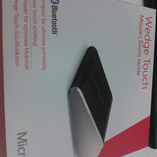
  • Microsoft Wedge Keyboard
  • Microsoft Wedge Mouse

Demoing the slate to customers with these bad boys hooked up really helps light up the fact that they can be used as a replacement to laptops, in the office as well as out on the road.

WP_001534

That right there looks great doesn’t it?! You can of course connect it to a  monitor for a bigger screen when in the office and then when you need to leave, for a meeting, to go home etc – just pick it up out of the dock and off you go!

Windows 8 Enterprise SideLoading Keys


One of the many new things introduced with Windows 8 is the concept of “Enterprise SideLoading”.

While existing “desktop” apps can be deployed in the same fashion as with previous editions of Windows, “Windows Style” apps are published to the Windows Store and then downloaded from there. Microsoft realise that this isn’t the preferred method for organizations with bespoke apps for LOB (Line Of Business), HR etc, software purchased directly from an ISV etc. and so “Enterprise SideLoading” was born. This enables organizations to publish a Windows Style app directly to machines, circumventing the Windows Store, and is available in a couple of different ways.

Software Assurance

Enterprise SideLoading is a Software Assurance (SA) benefit on the following license schemes*:

  • Enterprise Agreement
  • Enterprise Subscription Agreement
  • Enrollment for Education Solutions (EES)
  • Campus & Schools agreements still running
  • Select Plus with SA
  • Select contracts still running

*Note it is NOT an SA benefit on Open licensing.

meaning customers running Windows 8 Enterprise (obtained via Windows 8 Pro + SA or VDA subscription purchased on the above licensing schemes) can enable this feature on domain joined machines through the “Allow all trusted applications to install” Group Policy setting.

More info on the policy setting can be found here:

http://technet.microsoft.com/en-us/library/hh852635.aspx


Enterprise SideLoading Keys

Organizations who:

  • Choose not to purchase SA on Select/Select Plus & so have Windows 8 Pro
  • Have Windows RT devices
  • Obtain licensing (even with SA) via the Open license programmes

can purchase Enterprise SideLoading license keys in packs of 100, for approximately £2500 RRP…so around £25 per machine.

MAK (Multiple Activation Keys) will be made available via VLSC (Volume License Service Center).

For customers with non-domain joined Windows 8 Enterprise machines, these keys will be made available free of charge.

image

image

This will enable smaller organizations, or those who choose not to take SA, to still deploy apps without going through the Windows Store.

Extras

  • It should be noted that “Each…Enterprise SideLoading license must be permanently assigned to a single device”.
  • For Academic institutions, Sideloading may only be enabled on institution owned devices
  • This licensing is per device NOT per app.

It appears that the info on this isn’t as widespread as I’d thought so hopefully this will help!

Update: Here’s a link to the “Windows 8 & RT Licensing Document” that gives some info on page 12:

Volume Licensing guide Windows 8 and Windows RT

October Microsoft Product List, page 101 has good info:

October 2012 – Microsoft Product List