Microsoft retire on-premises server certifications


Microsoft have been on a cloud push for 12 years now, since the launch of BPOS in 2008. They’ve been slowly “turning the ship” in various ways over the last decade, with the ultimate aim that as much of Microsoft is pointing at the cloud as possible. This is also a case of “trickle down (cloud) economics” – Microsoft are making their new direction reflect as much as possible within their partner base…and that change will then happen within Microsoft’s customers too.

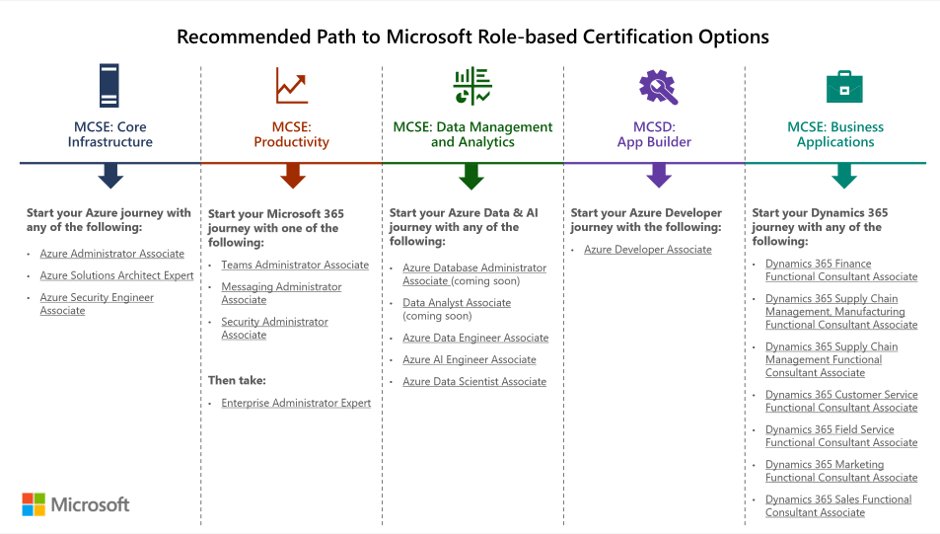
Microsoft have made various changes to partner incentives, changed a few Software Assurance benefits related to training resources, and changed the Home Use Program – all aimed to drive cloud awareness in different ways. Their latest move is to retire all their on-premises server certification paths and exams related to the MCSA, MCSD, and MCSE qualifications that have been a staple of the Microsoft server world for years. The retirement date is June 30, 2020.

As you can see in this image from Microsoft, the recommended paths are now all cloud focused:
Microsoft alternative certifications
Taken from https://www.microsoft.com/en-us/learning/community-blog-post.aspx?BlogId=8&Id=375282

You can see a full list of what’s being retired, along with some FAQs, here – https://www.microsoft.com/en-us/learning/community-blog-post.aspx?BlogId=8&Id=375282

While not surprising given the focus on cloud, not just from Microsoft but across the industry, I do wonder if this is a little short sighted? There are still a LOT of on-premises servers in use and, with hybrid cloud being the de-facto way forward for most organisations, they will remain for a long time to come. Rightly or wrongly, this feels like Microsoft saying that they don’t care about on-premises anymore. I’ve seen MS people saying they’re still hiring lots of on-premises server engineers etc. and that may be the case, but this announcement will definitely be taken as a sign of their overall focus.

I’m often asked if Microsoft will continue to make on-premises versions of their software and, following this announcement, I can’t help but wonder if I need to rethink my answer…

Microsoft Product Terms February 2020


Photo by Markus Winkler on Pexels.com

Another quiet month for Microsoft licensing , just a few minor changes.

A bunch more new Dynamics 365 SKUs including HR, Commerce, and IoT offerings.

Flow renamed to Power Automate.

Clarification on a few terms around Windows 7 ESU and Windows 10 QMTH (Qualified Multi Tenant Hosting).

It does make me think we’re going to see a number of changes all at once in an upcoming month…

Microsoft PowerApps – no minimum licensing requirement?


Photo by Pixabay on Pexels.com

At their Inspire partner conference in July 2019, Microsoft announced a raft of licensing changes to Dynamics 365, PowerApps, and Power Automate (then Flow). Among the licensing rules covered in the sessions was a note that the PowerApps “Per App” option had a minimum license requirement of 30 licenses.

I noticed while perusing the subsequently published licensing guides that this minimum requirement wasn’t mentioned anywhere – which seems odd. Was it a change or an oversight I wondered aloud, and online? The PowerApps twitter account picked up my tweet and cam back to me with an answer very quickly:

So it seems there is no minimum. It’s not the greatest way to make this information known to us all though!

Microsoft Product Terms – January 2020


Photo by Markus Winkler on Pexels.com

Nothing major but a couple of interesting SQL Server bits:

1) A clause that, if you’re using SQL in Azure via Azure Hybrid Rights or DR rights, you must indicate it in the portal/API.

2) If you acquire SQL 2017 from an OEM before March 31, 2020 – you can add Software Assurance within 90 days of purchase.

That first addition feels audit related doesn’t it? While it makes sense that organisations indicate where they’re using their licenses and which Software Assurance benefits they’re using etc. – it definitely feels like Microsoft are getting things lined up for the next generation of license compliance audits which will look at cloud environments too.

Also, slightly interestingly, the Online Service Terms (OST) won’t be published until January 8th. Whether this is because people are still on holiday or due to a major change being announced – we’ll have to wait and see! 😊

Microsoft retire Dynamics 365 apps for LinkedIn


Photo by fauxels on Pexels.com

Microsoft have announced that they’re retiring two Dynamics 365 apps, Talent Attract and Talent Onboard, with the LinkedIn Talent Hub being the preferred replacement.

The retirement date is February 1, 2022 and “eligible” customers can continue using the services until that date or the end of their most recent contract or renewal – whichever comes first. If you’re not currently using these apps but have a plan to do so – and still want to continue now Microsoft have announced they’re being phased out and no new capabilities will be added – there is an opt-in process to enable eligibility. You can raise a support ticket to become eligible to access the services until 2022 – that process must be completed by January 31, 2020.

Microsoft are rebranding their “core HR capabilities” from “Dynamics 365 Talent” to “Dynamics 365 Human Resources”, with current customers being transitioned to the new service automatically. This is all further change and flux within the Dynamics 365 family – it will be interesting to see if it calms down through 2020 at all.

Further Reading:

Microsoft Announcement – https://cloudblogs.microsoft.com/dynamics365/bdm/2019/12/06/building-a-more-successful-workforce-with-dynamics-365-human-resources/

Microsoft Details – https://community.dynamics.com/365/talent/b/dynamics365fortalent/posts/retiring-dynamics-365-talent-attract-and-onboard-apps

LinkedIn Talent Hub – https://business.linkedin.com/talent-solutions/talent-hub#

Microsoft Product Terms – December 2019


Photo by Markus Winkler on Pexels.com

December 2019 sees the following additions:

Microsoft Defender Advanced Threat Protection (MDATP) for “cross-platform devices”. Available only via the EA/EAS volume licensing programmes, this allows MDATP to be run on up to 5 non-Windows devices concurrently.

Power Virtual Agents are added, with no extra info. These aim to enable anyone to create AI-powered chat bots and look to be a new member of the Power Platform:

From https://powervirtualagents.microsoft.com/en-us/blog/microsoft-power-virtual-agents-is-now-generally-available/

There are a couple of lines added covering the recently announced Intune access for SCCM users. This confirms SA is required on the existing licenses but, perhaps a little confusingly, doesn’t mention the “Microsoft Endpoint Manager” name at all.

Microsoft Project gets a refresh


Photo by Pixabay on Pexels.com

Microsoft are making changes to the “Project experience” to make it easier to use. They say this new Project is “designed to be both simple and powerful, so anyone can get started quickly and take control of any project right away”, with a more intuitive user interface – certainly something Project could do with in my opinion! Not surprisingly, there’s a fair amount of integration with Teams and Power BI.

As part of this, there are new/changed product names too. Project Online Professional is now Project Plan 3, while Project Online Premium is Project Plan 5. Added to the lineup is Project Plan 1 – an entry level SKU which doesn’t include many of the features nor a desktop client. It’ll be interesting to see what, if anything, Plan 1 means for the future of Planner.

Project Plan 1 features – https://products.office.com/en-gb/project/compare-microsoft-project-management-software

You can see Microsoft’s announcement here, and check out the features and pricing for the Project Plans here.

Microsoft retiring Invoicing and Customer Manager


Photo by Mikhail Nilov on Pexels.com

Microsoft have announced that they’re retiring 2 of their SMB focused products included in certain Office 365 flavours: Microsoft Invoicing and Microsoft Customer Manager. They’ve not indicated why but one would assume it’s due to a lack of customer interest.

According to a statement given to Mary Jo Foley of ZDnet, Microsoft have been offering affected customers special deals with “Invoice2Go” and “Nimble” to help them transition to their replacement services.

SQL Server 2019 Big Data Nodes


Photo by ThisIsEngineering on Pexels.com

The release of SQL Server 2019 sees the introduction of Big Data Nodes. This new family member aims to help organisations create data lakes, combining big data tools such as Hadoop with SQL Server – all supported by Microsoft.

To run a Big Data Node cluster, you first require a SQL Server Master Instance. This must be running SQL Server 2019 – Standard or Enterprise – with SA and licensed via the per core model.

The licenses on the Master Instance give an entitlement to a certain number of Big Data Node core licenses. For Standard edition it’s a 1:1 ratio, while for Enterprise it’s 1:8 – as an example, a server with 32 cores of SQL Server 2019 Standard w/SA would give rights to 32 cores of Big Data Node, while the same server licensed with Enterprise edition would allow 256 Big Data Node cores. Additional Big Data Node cores can be purchased separately.

The big data nodes can also be deployed in Azure using the Azure Kubernetes Service (AKS).

Microsoft Arc – Azure on other clouds


Photo by Max Avans on Pexels.com

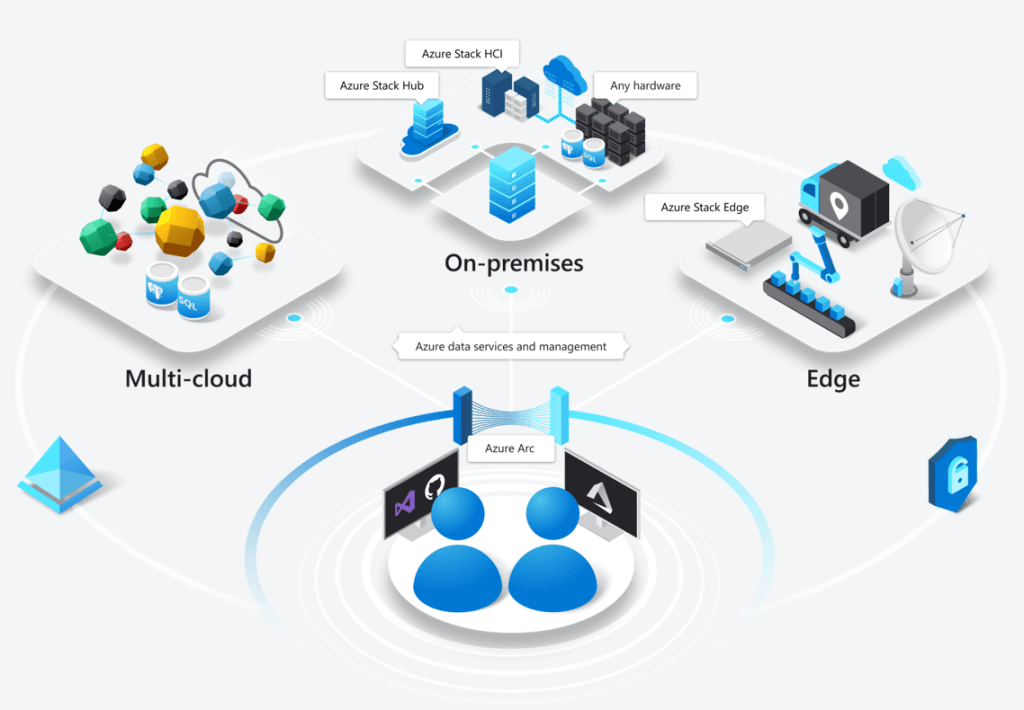
Microsoft Arc has been announced at Microsoft Ignite and it looks like it could be quite the game changer. Microsoft say that it “enables deployment of Azure services anywhere and extends Azure management to any infrastructure” across “across on-premises, edge and multicloud”.

The concept is pretty clever – it will allow certain Azure services to run in a variety of places, including on-premises hardware – both Azure Stack and seemingly regular customer hardware – but also other clouds like Amazon AWS and Google Cloud Platform!

Taken from https://azure.microsoft.com/en-us/services/azure-arc/

Multi-cloud is the concept of an organisation having multiple public clouds (Azure, AWS, GCP etc.) in use at the same time and, while many say it isn’t necessary – and even more say it isn’t a good idea – it’s already reality for many companies around the world. That being the case, anything to help make it easier and more secure to manage is a positive for customers…but I’m really intrigued to see what Amazon and Google make of this! What measures will they put in place to prevent or discourage customers from using Azure Arc within their datacentres?

Microsoft are talking about “Azure data services anywhere”, which looks to be based on a Kubernetes container platform. Some of the benefits Microsoft tout include:

  • Unified Management
  • Consistent cloud billing model
  • Consistent governance
  • Unique security tools like Azure Threat Protection

Currently Azure SQL Database and Azure Database for PostgreSQL Hyperscale are available for private preview on Azure Arc – although this Microsoft site:

https://azure.microsoft.com/en-us/services/azure-arc/hybrid-data-services/

only talks about them being available on-premises. It does however mention that SQL Server customers will be able to “leverage their existing licensing investments” to use SQL on Azure Arc, which suggests a future widening of the Azure Hybrid Benefits available through Software Assurance.

This is definitely one to keep an eye on over the next few months as it goes through private preview, then public preview, and finally out into general availability.