Microsoft’s financial results for Q3 FY21 (Jan – Mar 21) are in and, as usual, they’re pretty impressive.
Revenue = $41.7 billion – up 19%
Operating income = $17 billion – up 31%
Looking at the different product divisions we can see:
Productivity & Business Processes
Revenue = $13.6 billion – up 15%
Office 365 Commercial was up 22%, LinkedIn increased 25%, and Dynamics 365 was up 45%.
Microsoft Teams is up to 145 million daily active users, almost doubling YoY and Office 365 Commercial has nearly 300 million paid seats. Office Commercial products (on-premises Office) was down 25% – continuing its downwards trend as organisations continue to move to the cloud.
Satya Nadella revealed that Power Platform now has almost 16 million monthly active users, an increase of 97%, and revenue has increased by 84%. Amy Hood (CFO) called out Power Apps and Dynamics 365 Finance & Operations as strong performers.
Intelligent Cloud
Revenue = $15.1 billion – up 23%
Azure growth was 50% yet again, with Amy Hood highlighting an increase in the number of large, long-term Azure contracts.
On-premises server products grew 3%, although that seems to largely be due to year on year currency fluctuations, and the EMS install base grew again, now sitting at 174 million seats.
SQL Server on Azure VMs grew 129% YoY alongside Cosmos DB growth too.
More Personal Computing
Revenue = $13 billion – up 19%
Again there was a big difference in Windows OEM as Pro revenue declined 2% but non-Pro grew 44%.
Microsoft announced this month ( April 2021) that they’ve acquired Nuance Communications for $19.7 billion – their 2nd biggest acquisition behind LinkedIn.
You may be familiar with Nuance for their Dragon Naturally Speaking speech recognition software and/or Power PDF but the focus for Microsoft is their work in the Healthcare sector – much of which is built on Azure. It follows Microsoft’s announcement of their “Cloud for Healthcare” vertical offering and clearly indicates they see it as a growth market for them; they believe it will bring their Total Addressable Market to $500 billion in the healthcare provider space – even a small piece of that will make that $20 billion seem like small change!
Going forward, Nuance will be included within Microsoft’s “Intelligent Cloud” division and Nuance will retain its CEO, Mark Benjamin, who will report into Scott Guthrie – executive vice president of Cloud & AI at Microsoft.
Updates to the CAL/ML Equivalency tables to make them clearer Updates to Dynamics 365 Purchasing Minimums table Updated Azure Maps API results clause to include Weather
I can’t help but feel like there are some big things coming in a couple of months…
Microsoft are adding a raft of new features to both EMS (Enterprise Mobility & Security) and Intune, these include:
Microsoft Tunnel VPN features for Android and iOS devices
Enhanced MacOS management capabilities
New endpoint analytics features
Various enhancements to Microsoft Endpoint Manager
These, and other, additions mean that Microsoft are putting the prices up. From July 1, 2021:
EMS E3 will increase from $9 pupm to $11
Intune will increase from $6 pupm to $8
However, the price for Microsoft 365 E3 won’t increase (and so one must assume that neither will E5) – making the bundle option that little bit more attractive.
Back in May 2020, Microsoft announced Cloud for Healthcare – their first vertical specific cloud offering and it launched in October that year. Microsoft Cloud for Retail was announced in January 2021 and now, following Ignite 2021, they have announced three more:
Microsoft Cloud for Financial Services
Microsoft Cloud for Manufacturing
Microsoft Cloud for Non-profit
Why ?
One of the great benefits of public cloud – the ability to pick and choose from an almost endless array of options and combine them in a seemingly infinite number of combinations – can also be a huge weakness. For some industries, it’s more important to have an “Out of the Box” offering that does what they need and, most importantly these days, be super secure while it’s doing it.
Plugging various different cloud services together is often where security gaps start to appear – a slight misconfiguration here, a forgotten port there – and that can means certain industries are less enamoured with the cloud. Equally, from a portfolio perspective, knowing which different products do exactly what you need and which ones can be combined to help you achieve your goals can be perplexing and overwhelming.
These pre-built cloud packages for different verticals aim to address both of those issues as well as introducing brand new features aimed at vertical specific issues.
Microsoft Cloud for Retail
A combination of Microsoft products including Azure, Dynamics 365, Power Platform, Teams, Bing, Advertising among others, this is largely driven by changes brought about by COVID-19 and the (even greater) shift to online shopping. It focuses on areas of importance to Retail such as:
This combines products including Microsoft 365, Dynamics 365, Azure, and Power Platform in a solution designed to comply with regulatory and compliance frameworks in what is a highly regulated industry. It offers functionality in key areas including:
This vertical offering combines Azure, Dynamics 365, Microsoft 365, Power Platform, AI, HoloLens and more to address manufacturing specific needs such as:
This combines Microsoft 365, Dynamics 365, Azure, Power Platform, and LinkedIn to help charities better connect with their supporters and volunteers, make better decisions, and reach their goals faster.
There’s not as much info available for this offering yet but you can see more here and register for a webinar to learn more about this offering on March 30th here.
Microsoft have announced that Windows Server 2022 is in preview and will be available “later” in 2021.
According to this Microsoft page, new security features include “Secured-core server” and Credential Guard while it also brings interoperability with Azure Arc – the service that allows Azure policies to manage on-premises and multi-cloud resources – and Storage Migration Service, which helps connect on-prem file servers to those in Azure.
There are also several updates relating to Containers – all of which show Microsoft’s focus. Although this is a new on-premises server OS, it’s all about connecting to the cloud and enabling a smooth, hybrid infrastructure.
You’ll be pleased to know that there’s no sign of any changes to the licensing model at this stage 😁
Microsoft revealed more details about Power BI Premium at their recent Ignite conference. I covered the initial announcement here but it’s now in General Availability so we now have details on the pricing and licensing.
Availability
April 2, 2021
Pricing
A full license will be $20 per user per month
For customers with Power BI Pro (standalone or as part of E5), it will be $10 per user per month
This Microsoft page has more information on this plus the new features coming to Power BI Premium in general – including vCore auto-scaling charged via Azure PAYG.
Microsoft have announced that their Power Automate Desktop product is going to be free for Windows 10 users. Power Automate is Microsoft’s Robotic Process Automation (RPA) offering and, as the name suggests, the product in question here is the desktop variant.
RPA is a rapidly growing hot topic within businesses as people look to do “more with less” and to use their time to drive and deliver real business value – rather than “busy work”. Typically these will be things like compiling information and creating reports – it needs doing but it’s repetitive (read boring) and doesn’t really need human input…certain things need putting in certain places at certain times. The repetitive nature makes it perfect for RPA – thing of an Excel macro on steroids – replicating actions across a variety of desktop applications and websites…while you do more important things 😊
This is an example of what you can do from Microsoft:
Power Automate Desktop will eventually be built into Windows 10 – it will start to appear in Insider Builds shortly – but for those of you as impatient as me, you can download it here.
I wonder if this will cause any other RPA vendors (such as UIpath) to launch a case against Microsoft for unfair bundling – like Slack recently did re: Teams?
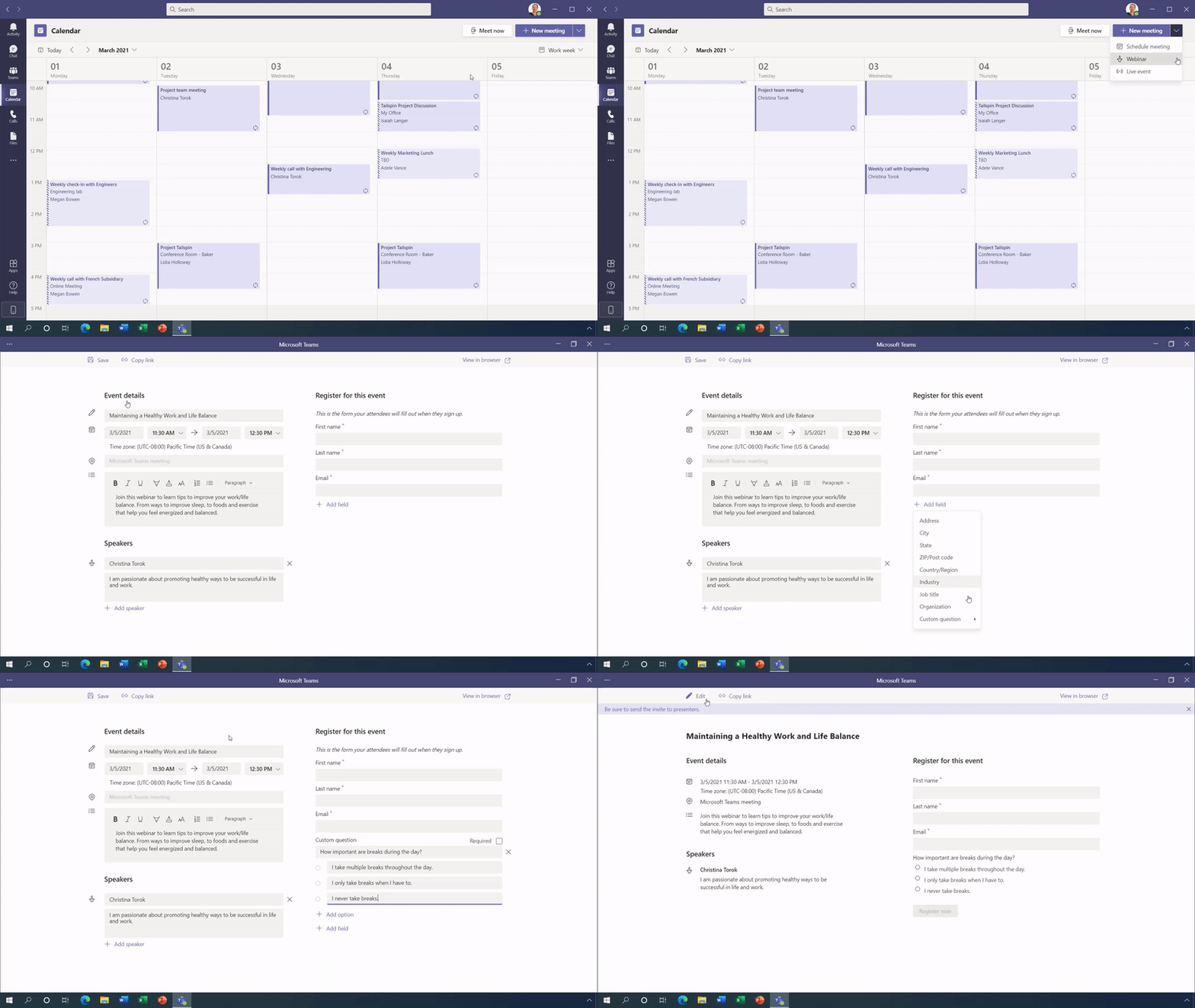
It was announced a while back that webinar functionality would be coming to Microsoft Teams and details have been released at this week’s Microsoft Ignite conference – including the required licenses.
Features
Organisations will be able to add a customisable registration page to webinars – an example of which you can see below:
Fully interactive webinars will be able to handle up to 1,000 (one thousand) participants with moderation available to control audio/video etc. and, should you need it, Teams can scale up to 10,000 participant “view-only” sessions. Microsoft are, for now, increasing that limit to 20,000.
You will also be able to download an attendee report showing attendance, participation etc. which is key for follow up. More reporting features are being rolled out over the coming months.
How is it licensed?
These new capabilities will be fully available as part of:
Microsoft 365 E3/A3/G3
Microsoft 365 E5/A5/G5
and will also be available in:
Microsoft 365 Business
Microsoft 365 Business Premium
for up to 300 users.
I’m pleasantly surprised that this doesn’t require an add-on license – it’s quite possibly been done as in-built functionality to give them the best chance of fighting off the threat from Zoom et. al. If you have to pay extra to Microsoft, you might as well just stick with your existing provider but if it’s “free”…that likely changes matters for a lot of organisations.
Further Reading
You can see more info on these, and dozens of other new features coming to Teams, here.








 Cloudy with a chance of Licensing