Microsoft Enterprise Agreement v CSP – upcoming changes


Optimizing our purchasing motions for customers and partners – Microsoft Partner Network

It seems that Microsoft are gearing up to position CSP (Cloud Solution Provider) as a replacement for Enterprise Agreement Level A.

In a recent blog post from Dan Truax, General Manager for Partner Digital Experiences and Programs, Microsoft revealed some very interesting information. The post talks about how the current purchasing experience across the various licensing programs is “fractured” as each program has its own terms, prices, consoles, sales processes etc. It states that all customers will sign the “Microsoft Customer Agreement” (MCA) which is currently only for CSP and there will be two “motions – Breadth (CSP) and Enterprise. The desire to simplify licensing is far from new but the blog post goes on to state:

“Partner economics in the breadth motion will be optimized for deals below 2400 seats for new commerce seat-based online service offers, or Azure deals below $1M USD annualized consumption”

Now, “Breadth motion” = CSP and 2,400 seats is the starting point for Enterprise Agreement Level B pricing. This seems to indicate that Microsoft will re-level pricing, and partner rebates and incentives, to make CSP the more attractive option for organisations below 2,400 seats. This is a fairly significant change, furthering Microsoft’s move to make Enterprise Agreements the domain of the large customers with more bespoke needs.

A few years ago, they raised the EA Level A entry point from 250 to 500 seats and I’ve long expected it to be increase to 1,000. In the above post, Microsoft state that the new incentives and pricing changes won’t be implemented before March 2022 at the earliest so perhaps we won’t see any changes until then.

See Microsoft’s post here.

Microsoft Product Terms: June 2021


Photo by Markus Winkler on Pexels.com

There was a pretty big change this month as Microsoft removed a key requirement for “From SA” licenses. These allow organisations that have on-premises licenses with Software Assurance (SA) to migrate to Microsoft 365 at a reduced price – taking into account the investment in SA.

Back in early 2020, Microsoft added a clause that customers had to retain their existing on-premises licenses throughout the “From SA” subscription period. This presented a barrier for organisations in Europe looking to engage in the 2nd-hand software market and re-sell their (now unwanted) on-premises licenses.

However, in June 2021 Microsoft said:

For customers who choose to purchase “From SA” licenses, we removed the requirement that customer retain the corresponding Qualifying Licenses throughout its From SA license subscription period

It’s a very interesting move from Microsoft and I am keen to see what related announcements we might see at their Inspire conference in July.

Further changes include:

Windows 10 Enterprise/E3 has been removed as a pre-requisite for the M365 F5 add-on SKUs.

Remote Work Starter Plan added to CSP <– This seems to have launched in Japan in August 2020 and looks to be basically a “Teams+OneDrive” SKU

 Customers with Microsoft Project Plan 1/3/5 are only permitted to use Universal Resource Scheduling to schedule Project and Task tables within the context of a project

Microsoft Product Terms: May 2021


Photo by Markus Winkler on Pexels.com

Here are the Microsoft Product Terms changes for May 2021:

M365 Business Basic/Standard/Premium added as pre-requisite licenses for Audio Conferencing and Phone System

Microsoft 365 Career Coach USL has been added for Academic customers

Microsoft 365 Scheduler has been added. This includes a “human-assisted AI Service” for complex scheduling requests.

Microsoft Teams: Terms added to confirm licenses are not required to join meetings/live events hosted by licensed users. Also that external users don’t need a license for Guest access via AAD External Identity.

Power Platform: All Power Platform licenses now have “extended term eligibility” under EA/EAS/SCE

A relaxing of the terms around Project for the web and how the data can be viewed.

Various Azure services have had updated terms.

Microsoft Product Terms – April 2021


Photo by Markus Winkler on Pexels.com

Very little activity this month:

Updates to the CAL/ML Equivalency tables to make them clearer
Updates to Dynamics 365 Purchasing Minimums table
Updated Azure Maps API results clause to include Weather

I can’t help but feel like there are some big things coming in a couple of months…

Microsoft EMS & Intune price increases


Image by NikolayFrolochkin from Pixabay

Microsoft are adding a raft of new features to both EMS (Enterprise Mobility & Security) and Intune, these include:

  • Microsoft Tunnel VPN features for Android and iOS devices
  • Enhanced MacOS management capabilities
  • New endpoint analytics features
  • Various enhancements to Microsoft Endpoint Manager

These, and other, additions mean that Microsoft are putting the prices up. From July 1, 2021:

  • EMS E3 will increase from $9 pupm to $11
  • Intune will increase from $6 pupm to $8

However, the price for Microsoft 365 E3 won’t increase (and so one must assume that neither will E5) – making the bundle option that little bit more attractive.

See the Microsoft announcement here.

Microsoft add webinars to Teams


Image by Alexandra_Koch from Pixabay

It was announced a while back that webinar functionality would be coming to Microsoft Teams and details have been released at this week’s Microsoft Ignite conference – including the required licenses.

Features

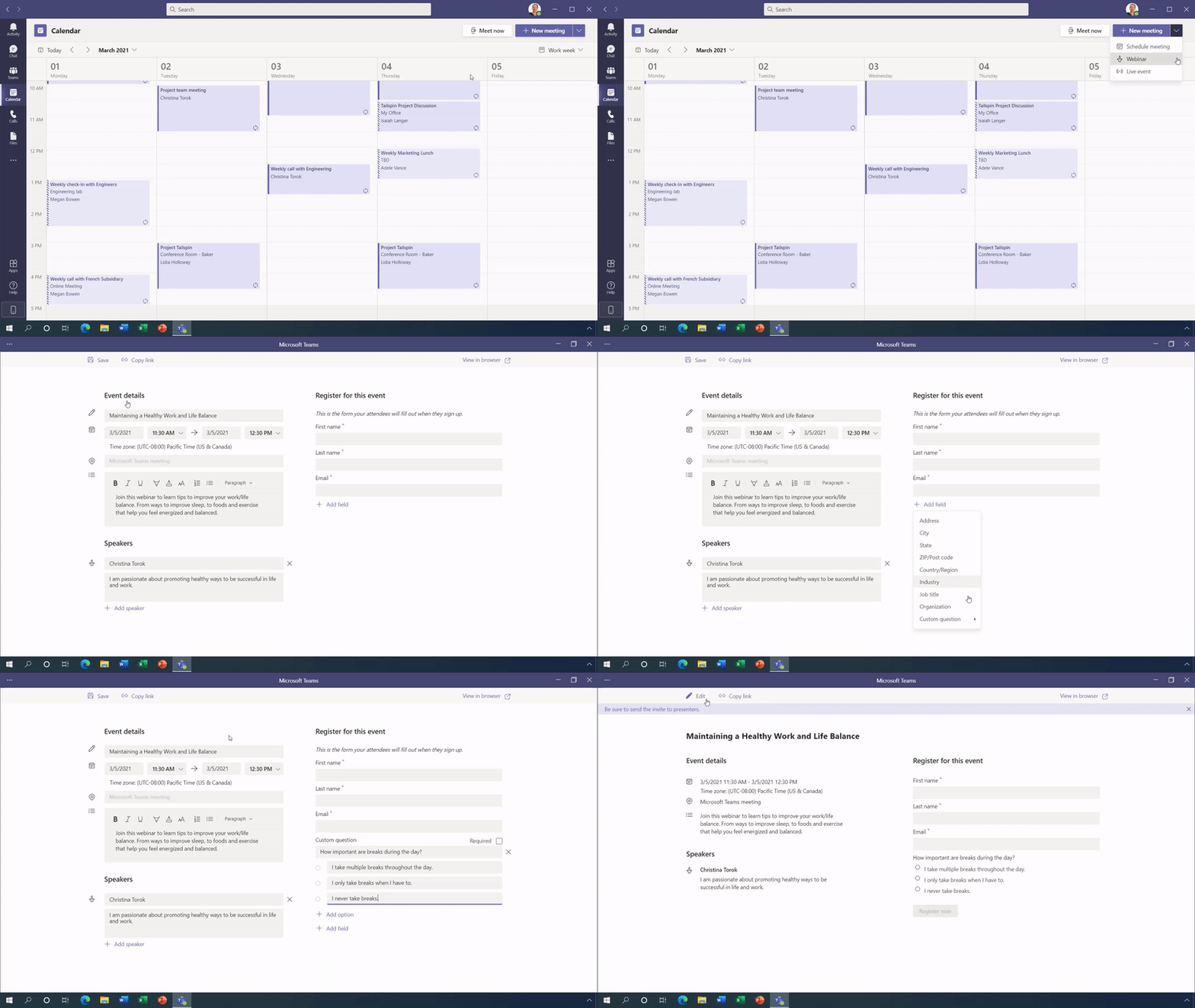
Organisations will be able to add a customisable registration page to webinars – an example of which you can see below:

Source: Microsoft – https://cdn.techcommunity.microsoft.com/assets/MicrosoftTeams/Attendee%20Registration%20%26%20Email%20Confirmations.gif

Fully interactive webinars will be able to handle up to 1,000 (one thousand) participants with moderation available to control audio/video etc. and, should you need it, Teams can scale up to 10,000 participant “view-only” sessions. Microsoft are, for now, increasing that limit to 20,000.

You will also be able to download an attendee report showing attendance, participation etc. which is key for follow up. More reporting features are being rolled out over the coming months.

How is it licensed?

These new capabilities will be fully available as part of:

  • Microsoft 365 E3/A3/G3
  • Microsoft 365 E5/A5/G5

and will also be available in:

  • Microsoft 365 Business
  • Microsoft 365 Business Premium

for up to 300 users.

I’m pleasantly surprised that this doesn’t require an add-on license – it’s quite possibly been done as in-built functionality to give them the best chance of fighting off the threat from Zoom et. al. If you have to pay extra to Microsoft, you might as well just stick with your existing provider but if it’s “free”…that likely changes matters for a lot of organisations.

Further Reading

You can see more info on these, and dozens of other new features coming to Teams, here.

Microsoft Viva: An introduction


Image by Christine Sponchia from Pixabay

Microsoft Viva is a new announcement from Redmond, focused on the world of “employee experience”, in part at least driven by the changes that COVID-19 has brought to the workplace. It’s split into 4 products:

  • Viva Topics
  • Viva Connections
  • Viva Learning
  • Viva Insights

Viva Topics

This, via AI, automatically curates content from across an organisation to help people find information and answers from throughout the business – something more important than ever with so many now working remotely.

It costs $5 per user per month and, as an add-on license, requires one of the following as a base:

  • Microsoft 365 F1, F3, E3, E5, A3, A5
  • Office 365 F3, E1, E3, E5, A3, A5
  • Microsoft 365 Business Basic / Business Standard / Business Premium
  • SharePoint K, Plan 1, Plan 2

More info here.

Viva Connections

This Viva product seems aimed at helping keep remote employees connected as, according to Microsoft it will bring together “relevant news [and] conversations” from across an organisation – and surface it in Teams. They cite stats that highly engaged employees are less likely to leave and help generate greater profitability – it seems they’re trying to make HR software more mainstream.

More info here.

Viva Learning

This product will serve as a central hub for learning -enabling content form various sources to be presented to employees within Microsoft Teams. As well as Microsoft Learn and LinkedIn Learning, it looks as though partners will include companies such as Coursera, Pluralsight, SkillSoft, SAP SuccessFactors and more.

More info here.

Viva Insights

This looks to be an evolution of Workplace Analytics and will, in fact, require Workplace Analytics for many of the features to be enabled. It will help provide information to employees to enable them to reduce stress and increase productivity, with connections to products such as Headspace.

More info here.

Microsoft Product Terms, February 2021


Photo by Markus Winkler on Pexels.com

Microsoft have stopped producing the standalone Product Terms document and have officially launched the Product Terms website as a replacement.

I’ve been a big fan of the Product Terms document for a long time and I’m not 100% happy about this change tbh! The ability to filter the site by program (EA, MPSA etc.) and product (M365, SQL etc.) will probably make it less confusing for many people – showing only the info that’s relevant to their search.

However, being able to see everything altogether was great for spotting any changes, missing bits etc. that Microsoft hadn’t highlighted and that isn’t as easy on the new site.

My initial concern was that not having a point in time downloadable copy would put customers and partners at a disadvantage, giving them nothing to reference in future conversations. However, having played with the site a little bit it turns out you can download a document from the site. It’s quite similar to the previous document although you have to filter by program, so you don’t get a document that allows comparison across the different licensing options.

The changes in February 2021 are:

  • Addition of Microsoft 365 F5 SKUs (more info here)
  • Planning Services & Training Vouchers SA Benefits have been removed
  • The free Audio Conferencing promos for EA/EES/CSP have been extended to June 30, 2021
  • Clarification that the Microsoft 365 E3/A3 Unattended license doesn’t require a Qualifying Operating System
  • Updates to terms for Azure Maps and Cognitive Services

Microsoft 365 F5 licenses


Starting February 2021, Microsoft have introduced 3 new “frontline” SKUs:

  • Microsoft 365 F5 Security ($8)
  • Microsoft 365 F5 Compliance ($8)
  • Microsoft 365 F5 Security & Compliance($13)

These are available as add-ons to the existing Microsoft 365 F1 and F3 SKUs and include “the majority of capabilities” from the E5 versions.

The Microsoft announcement is here: https://www.microsoft.com/en-us/licensing/news/new_f5_security_and_compliance_offer_for_frontline_workers

Microsoft 365 Security & Compliance additions


Image by Ryan McGuire from Pixabay

It seems Microsoft will be adding some new security and compliance SKUS in February 2021. According to a post from Bytes, a top UK Microsoft partner and LSP, we will soon be able to purchase:

Premium Compliance Assessments

There will be a range of over 150 assessments available which can be added to any Office 365 E5 or Microsoft 365 E5 plan, at a cost of $2,500 per assessments per month.

10-year audit log retention to Advanced Audit

This will enable organisations to retain audit logs for up to 10 years and can be added to:

  • Microsoft 365 E5
  • Microsoft 365 E5 Compliance
  • Microsoft 365 E5 eDiscovery & Audit
  • Office 365 E5

for $2 per user per month.

Data Connectors to E5

This looks like it will extend Microsoft 365 security and compliance capabilities to 3rd party services such as Slack and Zoom. It can be added to any Office 365 E5 or Microsoft 365 E5 plan and will cost $400 per 500GB of data.

Conclusion

The Data Connectors are, I think, the most interesting. Back in November 2019, Microsoft launched a preview of Azure Arc, which enables organisations to run Azure technologies and policies across other clouds such as Amazon AWS, and this new addition is the same thought process. The first time we saw this was when Satya Nadella opened up Office across Apple and Android – making Office available on those devices enables Microsoft to sell more Office 365 AND reach new customers…customers who may eventually purchase other Microsoft services.

While Microsoft would love everyone in every organisation to use Microsoft Teams, they’re pragmatic enough to realise that will never happen – their competitors’ products will always exist…so why not make some money out of it? 500GB of data isn’t much so that $400 a month will quickly start to become a pretty big number of organisations! It also helps Microsoft retain relationships with these organisations, ensuring they stay updated on respective changes and have reasons to talk – giving the chance for future sales…

I’ll keep an eye for more information and, hopefully, an entry in the February 2021 Product Terms.