Windows Azure MSDN Benefits


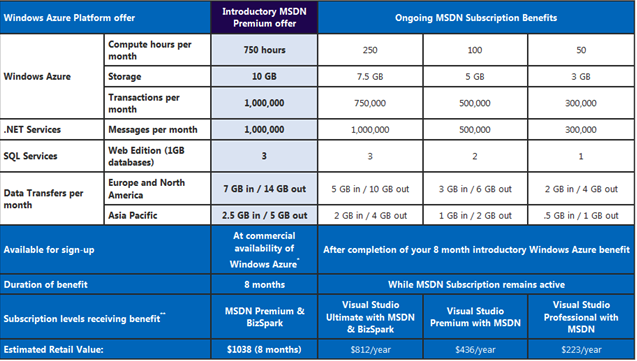
It was announced a little while ago that MSDN Premium subscribers would receive a number of free Windows Azure hours as part of their subscription:

image

and these would be, as expected with MSDN, for test and dev only.

However, I saw over on Eric Nelson’s blog that this is no longer the case. Microsoft have:

“decided to lift this restriction so that you will be able to use your Azure benefits for normal (production) use, if needed”

From January 4th 2010 the introductory Azure offer gives a huge 750 compute hours per month!

As Eric points out, the above offer expires after 8 months so don’t rush to sign up if you’re not going to make use of it straight away…make sure you get your “money’s” worth 😉 After that time period, the level of free access drops down as per the below chart:

image

This is a great way of making Azure easily available to the 1000’s of developers with MSDN subscriptions. It will allow them to test it as a solution, show the company how it will benefit them and then easily move to a production environment with reduced admin and cost.

See Eric’s post here.

SQL Server 2008 R2: Licensing Changes


SQL Server 2008 R2 has got a whole host of new features and now it’s got some new licensing too 🙂

The big move is that SQL’s licensing will follow the same path as Windows Server, both in editions and also virtual licence allowances:

  • SQL Server 2008 R2 Standard = 1 VM per licence
  • SQL Server 2008 R2 Enterprise = 4 VM’s per licence
  • SQL Server 2008 R2 Standard = Unlimited VM’s per licence

Here’s a Microsoft diagram that shows many of the main differences between the now 3 editions:

clip_image002

If you currently have SQL Server 2008 Enterprise and Software Assurance there is “a complete transition/migration path” but I don’t have any details yet…they will be available nearer launch on May 6th 2010.

For more info on SQL Server 2008 R2, see my other post here:

Read What’s New in SQL Server 2008 R2

Original post from MS here.

Microsoft Licensing – Rental Rights


Blockbuster And Microsoft ...

Microsoft Rental Rights are aimed at customers who

“rent, lease, or outsource PCs to third parties with qualifying Microsoft Windows or Microsoft Office software”

and are designed to make this previously tricky situation much easier by helping ensure all parties involved are compliant with MS licensing rules

“Rental Rights” are sold with, or on top of, existing volume licences and assigned per device. The rights exist for the life of the licensed device and cannot be re-assigned.

They have been available in a limited number of countries for a few months but, as of January 2010, they will be part of the Worldwide pricelist. The will be available on:

  • Open
  • Select
  • Select Plus

(so not available on Open Value, Enterprise Agreements or Campus/Schools)

for the following products:

  • Windows 7 Professional
  • Office Professional Plus 2007
  • Office Std 2007

Rules for Office

There are a couple of rules changes once Rental Rights are assigned.

Portable Copy:

“You may not use or permit use of additional copies of the qualifying software on a separate portable device or a network device. This prohibition overrides any right you have under the license terms that came with your qualifying software

Office gives you “Portable Installation Rights” which allows users to install their copy of Office on both a desktop AND a laptop. This is very useful for business users but, as you can see above, it is NOT permitted with Rental Rights.

Rules for Windows

Downgrade Rights:

Always a hot topic when it comes to the desktop OS, the ability to use previous versions.

“You may use a prior version of the software in place of the qualifying software only if the qualifying software was licensed under your volume licensing agreement, except for Windows XP Professional licensed from an original equipment manufacturer”

So downgrade rights are available where the original software was purchased via Volume Licensing. The exception to that is OEM XP Pro (so that came pre-installed on the machine).

Rules for both:

Remote Access:

“You may not permit remote access to the qualifying software. This prohibition overrides any right for the primary user of the licensed device or any user of a separately licensed device to access that software under the license terms that came with the qualifying software.”

Virtual Machines:

Rental Rights don’t apply in virtual environments…

“In other words, the primary customer may not create and rent virtual machines.”

How Rental Rights Work:

Here are a couple of diagrams to illustrate the whole thing:

Acquiring Software Assurance:

Software Assurance (SA) gives users many benefits including version upgrades, e-learning, training vouchers and access to MDOP among others. It is becoming more and more useful to more and more organizations in more and more ways…and businesses that lease their machines can take advantage too.

SA isn’t available to the “Primary Customer” acquiring the Rental Rights (i.e. the leasing company) but it CAN be purchased by the end user. So an organization that leases it’s machines on a long term contract can purchase SA on their own Volume Licensing agreement.

VStudio 2010 Editions & Licensing


VStudio 2010 will be here March 22, 2010 and with it come many advancements. However, this post isn’t to look at the feature differences but rather changes to the editions and licensing.

VStudio 2008 has got quite a few different versions on licensing:

  • VStudio Pro with MSDN Pro
  • VStudio Pro with MSDN Premium
  • VStudio Team Edition Test
  • VStudio Team Edition Architect
  • VStudio Team Edition Database
  • VStudio Team Edition Development
  • VStudio Team Suite

This can make it quite confusing for customers to choose the right editions for their teams…”Geoff does testing AND Architecting-which should I get?” or sometimes companies don’t have such defined roles, they just have “developers”. Getting the Suite ensures you get all the features but it’s expensive; this confusion has been known to put people off investing in 2008.

Editions

There are now just 3 editions:

  • VStudio Pro with MSDN
  • VStudio Prem with MSDN
  • VStudio Ultimate with MSDN

This straight away makes it quicker and easier for users to identify the edition best suited to particular user. This will definitely please a number of our customers 🙂

Another change is that Team Foundation Server is now included with all 3 versions of VStudio, rather than being a separate additional licence adding more confusion (and cost) to the deal.

Production Software:

VStudio comes with MSDN which, as it’s name (MicroSoft Developers Network) suggests, is aimed at Developers…giving them access to most/all of Microsoft’s software for testing and development purposes (access level depends on version)…according to Microsoft MSDN gives access to 10,9 Terabytes 🙂

However it’s a little known fact that VStudio 2008 w/MSDN also entitles you to production licences of a bunch of software. This benefit continues with a few tweaks and the 2010 editions (Pro & Ultimate only) now include:

  • Expression Studio 3
  • Office Pro Plus  2010
  • Visio Premium 2010
  • Project Pro 2010

That’s a pretty great addition 🙂 It seems that Communicator has been removed…

Comparison:

One of the biggest problems with VStudio 2008 was how oddly difficult it was to find easily comparable information about the different versions. Seeing which versions did what often involved trawling multiple pages/sites, clicking many a link and a general air of uncertainty…but that’s all gone with 2010 YAY! Microsoft have created a great webpage:

image

image

This is a brilliant, one stop shop to show end users (and partners) exactly what each version does, and doesn’t, do…something that will prove invaluable!

You can access the full version of the chart here:

http://www.microsoft.com/visualstudio/en-us/products/2010/default.mspx#compare

Upgrades and renewals:

Another question I’ve been getting is around how the current 2008 versions will transition to 2010, so here’s what MS say:

image

So you can see that if you’ve currently got a Team Edition, you’ll get MSDN Ultimate thus giving you access to all features…bonus 😉

The chart can be found here.

Ultimate Offer:

Microsoft’s website mentions an “Ultimate Offer” around subscription renewals but, to be honest, doesn’t make it particularly clear…at least not to me 🙂

image

I think this means that if you’ve got VStudio with MSDN Pro you can renew it as MSDN Premium at no extra cost, but I’m going to get confirmation from MS ASAP.

Microsoft have certainly made an effort to simplify the world of Dev tools licensing which is definitely a good thing 🙂

Update on The Ultimate Offer:

I’ve uncovered some more information on the “Ultimate Offer! (in fact, some came from a customer!) that helps make it a little clearer.

It’s effectively a free “Step Up” promo so:

“Eligible MSDN Premium subscription customers (at the time of launch) will gain access to one higher stock‐keeping unit (SKU) level”

The chart below shows the transition path:

image

So if you purchase any of the following editions:

• Visual Studio Professional 2008 with MSDN Premium
• Visual Studio Team System 2008 Development Edition with MSDN Premium
• Visual Studio Team System 2008 Architecture Edition with MSDN Premium
• Visual Studio Team System 2008 Test Edition with MSDN Premium
• Visual Studio Team System 2008 Database Edition with MSDN Premium

on or before March 22nd 2010, you will move up a level free of charge…nice 🙂

There are a couple of questions I’ve thought of that I’m aiming to get answered and will post them up here once I do.

Microsoft Volume Licensing Service Centre (VLSC)


The VLSC (Volume Licensing Service Centre) is the newest customer licensing site from Microsoft. It’s fair to say that their licensing websites have never been the best and certainly wouldn’t win any awards…both those for customers and partners. Yes, the Microsoft.com site is pretty great and the new Partner site is pretty good too but it’s the other sites that are lacking:

  • eOpen
  • MVLS
  • explore.ms
  • eAgreements

eOpen is definitely one of the slowest websites I have had to use on a semi-regular basis…slow to load up initially and slow to load up as one navigates around it. This is the site that all OLP (Open Licence) customers must use to access licence information, licence keys etc…It often flakes out half way through a session, leaving you unable to see your keys or add a new agreement. It also suffers from a lack of design love…it’s basic and not particularly pretty.

Explore.MS is for partners to see details of agreements, price files etc. While it always seems to function perfectly well, it’s a very sparse, plain design/layout and not always terribly intuitive.

eAgreements is the site used for the creation of Open Value agreements. We do quite a number of these but I actually can’t login to the site! I’m not sure why…it’s not cache or cookies or anything like that…it just doesn’t seem to like me 🙂 This is another site that’s clunky, slow and often fails and kicks you out…something of a familiar theme now!

MVLS is the site that Open Value & Select customers use to administer their agreements…find keys, download media, assign roles etc; and it’s by far the best of the sites listed. It’s still not perfect but it’s certainly a step in the right direction 🙂

Anyway, a lot of that is almost by the by as eOpen & MVLS are being merged into the VLSC as of the 6th of December 2009. You may have noticed that certain actions in eOpen & MVLS have been taking you to VLSC recently…product downloads for instance?

There is a problem with this though…it’s Monday the 7th of December today…and the site is still down:

image

This leaves customers unable to access their license info as the other sites have been taken down.

eOpen:

image

and MVLS gives you the 1st VLSC error page. This is a pretty big #fail by Microsoft and there has been no official word about it at all (at least not that I’ve seen), something which reflects quite badly on Microsoft. *Update* The Microsoft VLSC twitter account (@microsoft_VLSC) are responding to customer tweets:

image

image

image

It’s good to see Redmond responding to customers, especially via Twitter 🙂

This also has wider implications for “The Cloud” in general too. Customers are unable to access product downloads, licence keys and more just because a website is down…while it’s not the kind of information that is likely to be needed super urgently…it’s yet another example of Cloud Inconvenience…

I hope the site’s up tomorrow for the sake of Microsoft, customers and me…otherwise I’ll get loads of angry/confused customers calling me tomorrow 😉

Update – Tuesday 08/12/09

Well, the VLSC website was finally announced as being launched at 01:09 am GMT, but all is not well!

I’m still getting comments on this article from people who are experiencing trouble with the site and am experiencing issues myself…when I sign in, I get the below:

image

To be fair, when I was at my desk this afternoon for just a few fleeting minutes (it’s been a busy one today!) I took a look and I got in straight away. Now however, it takes a good few minutes of thinking about it…and then gives me the above error screen each time. This could perhaps be down to all those unable to access yesterday hitting the servers but I’m inclined to think otherwise.

The Twitter account of @Microsoft_VLSC shows that it hasn’t been plain sailing:

image

image

image

but then:

image

So it isn’t a complete outage…it seems to be working for some people which is something 🙂

I don’t want this post to seem overly critical, or that I’m having a go at the VLSC team but I do think that it’s a situation that warrants attention…and the 100’s & 100’s of hits this post means that users seem to agree 🙂 If there is one silver lining from this, it’s that the VLSC team are doing a great job of offering support via their Twitter account:

image

image

Not only are they keeping people up to date with changes etc; they’re also responding to, and assisting with, individual issues…which is very impressive 🙂

Update Monday 14/12/09

It’s now a full week since the new Microsoft Licensing website, VLSC, should have been up & running…and it isn’t. The VLSC Twitter account “@microsoft_VLSC” is still the best place to get information on the situation; yesterday they tweeted:

image

which would lead you to believe that the site would be back today (Monday) but unfortunately:

image

It seems that not all people have been experiencing the same problem…some cannot access the site at all, some can access only old licences, some cannot add new licences and so on…but now, with the site completely down, everyone will be affected.

While the Twitter account is doing a good job of communicating with VLSC users, there is still a large amount of ambiguity as to what is behind this:

image

I think everyone knows there’s an issue so not the most helpful comment! I know there will be various rules as to who can say what via which channels etc, but just a little insight would help a lot.

From my point of view as a Microsoft Licensing reseller, I haven’t heard or seen anything from Microsoft on this subject at all. No heads up so we can pre-warn our customers, or at least be prepared for the questions, no advice on how we can help etc…I find that a little disappointing to be honest.

From my point of view as a blogger, I find it very strange that none of the other Microsoft bloggers have picked up on this VLSC issue. The number of hits this post is getting keeps rising each day and the comments show real frustration on the part of both end users and Microsoft partners.

I’m not sure that there is any other way of being kept up to date on this from MS other than via the Twitter account; the number of people they’re following without profile pics suggests people are joining the micro-blogging service simply to contact Microsoft VLSC!

image

As mentioned in the comments, there is a new notice on the VLSC page:

image

Update Wednesday 16-12-09

We have a little more information from Microsoft on the subject today, their latest statement reads:

As you are aware, we recently upgraded three web sites including the Microsoft Volume Licensing Service Centre; Volume Licensing Contract Manager, and Explore.MS.  These tools are to help you provide services to your customers. In standard systems testing, we encountered an issue with the registration system, which we are currently fixing. The result is that the systems are currently offline.
 
Our goal is to have the sites available starting late in the day on December 17, 2009 US Pacific Time through to December 18, 2009 Pacific Time. Pacific Time (PST) time is 8 hours behind GMT so late on the 17th will be morning of the 18th for us in the UK 🙂
 
We would like to apologise for the inconvenience this is causing. As a valued partner, we understand that your experience trying to access the site is not optimal.
 
While there are limited capabilities,
Customers can still retrieve product keys during this maintenance. You can direct customers to the Product Activation Call Centres for assistance You can also find a phone number for your region by visiting http://www.microsoft.com/licensing/existing-customers/activation-centers.aspx

So hopefully Monday 21st will see everything right as rain 🙂

Update Friday 18-12-09

The VLSC site is back up…and all seems to be working…Whoo Hoo!

WaMu's 'Whoo-hoo' campaign ...

I’ve logged in to take a look around and can’t see anything missing, which is nice.

It’s taken much longer than expected and hasn’t been a great time for MS, it’s partners or it’s customers but hopefully everything is ok now.

Let me know how you’re finding the site…is it in full working order for you?

Update Monday 04-01-10

It’s been a while since my last update and, while the VLSC site is working fine for me, the comments below show that not everyone has seen these issues resolved yet. I’m still working on getting an update from Microsoft on what happened and when all the issues will be resolved but, to be honest, I’m not getting anywhere quickly!

Thanks to everyone who has commented on this post and offered up their advice to other people in the same position…it’s really great to see a small community spring up around my blog 🙂

Update Thursday 07-01-10

Bill Snyder over at Infoworld has posted an article about the VLSC issues too. Go check it out here:

Infoworld Article on VLSC

Bill’s article has generated a lot of click throughs to this site and so this is clearly an issue that many people are interested in.

Update Sunday 10-01-10

On Friday, I received an email from Microsoft’s PR agency Waggener Edstrom with an official update/response on the subject so far, which is:

“We apologize to our partners and customers for the inconvenience that they have been through during the upgrade improvements for the Volume Licensing Service Center (VLSC) site. In standard systems testing, we encountered an issue with the registration system.  While the vast majority of partners and customers are able to access the system, there remain some issues that are causing difficulties for some and it has taken us longer than expected to correct these issues. We are taking all necessary steps to resolve the situation and we are working with each impacted customer or partner to restore permissions if they can’t be resolved online. We understand the inconvenience that this causes and greatly value doing business with our partners and customers.”

It’s good that we’ve had a response but it’s again not that informative. “An issue with the registration system” doesn’t shed much more light on the situation…what do you think?

 Update Thursday 04-02-10

The majority of problems with the VLSC seem to have calmed down but it’s still not 100%…in fact this week has probably been the busiest re: VLSC issues for me!

 The biggest hurdle now is conflicting information as customers are told that MS can’t help them directly and they need to speak to the reseller; but I also know that resellers are being told that customers should contact MS directly!

The best process seems to be:

Customer -> Reseller -> Distributor -> Microsoft

With the request passed along in that manner, email addresses are being reset etc and all should be well 🙂

 If you would like to speak with a Microsoft VLSC rep, the number is 0800 917 9016. The email address is msdirecthelpe@msdirectservices.com .

If you’re still having problems and/or you’ve got a success story (!), please let us all know in the comments…

What’s New in SQL Server 2008 R2


SQL Server 2008 R2 aka Kilmajaro is due for release on May 6th, 2010 and is a much more Business Intelligence focused release. It has a bunch of new features as well as a number of improvements to existing features.

What’s New?

There are three main new features which we’ll take a look at here:

Master Data Services:

This is a “database, configuration tool, Web application, and Web service” that is used to “manage your organization’s master data and maintain an auditable record of that data as it changes over time”. This can then serve up the data for BI & Reporting tools such as Sharepoint, SSRS, SAP Crystal Reports etc for use around the business.

For information on architecture, deployment, security and more, see here. A great getting started guide can be found here

PowerPivot for Sharepoint

“Microsoft SQL Server PowerPivot for SharePoint extends SharePoint 2010 and Excel Services to add server-side processing, collaboration, and document management support for the PowerPivot workbooks that you publish to SharePoint”.

PowerPivot enables Excel workbooks to easily work with over 1,000,000 rows of data and still perform quick calculations…see my other post here.

3 tier diagram of client, middle, backend add-ins

.A great MSDN look at PowerPivot for Sharepoint can be found here.

Multi-Server Administration and Data-Tier Application:

This “forms a central repository for performance data and management policies that tailor the operation of instances of the Database Engine”. It also includes the ability to connect to a SQL Azure Database.

More info on the manageability side of SQL 2008 R2 is here.

What’s Enhanced?

SQL Server Reporting Services (SRSS) have been given a huge boost in SQL 2008 R2, to help bring them closer to dedicated Business Intelligence platforms such as SAP Business Objects Crystal Reports Servers and Business Object EDGE.

Sharepoint Integration: New features include:

  • Support for multiple Sharepoint Zones
  • New Data extension
  • Query designer for Sharepoint Lists as a data source
  • Right to Left text w/Arabic  & Hebrew

and more. You can now use data held in lists inside Sharepoint and include that in your reports, for more info head over to Getting Data from a SharePoint List Data Source Type (Report Builder 3.0).

Report Parts: This is a great feature which allows you store parts of reports on the server, to be re-used by you (or others) at a later date. This means if you’ve got someone who’s awesome at making charts, they can pre-create them and load them up on the server for the benefit of the rest of the team/business 🙂

Report Part Publishing LifeCycle:

image

You can publish the following report parts:

  • Charts
  • Gauges
  • Images and embedded images
  • Maps
  • Parameters
  • Rectangles
  • Tables
  • Matrices
  • Lists
  • This makes it quite similar to SAP Xcelsius but I don’t think it is as fully featured and also, and perhaps most importantly, it doesn’t seem anywhere near as end user friendly.

    MSDN have got more info on Report Part Publishing here.

    Wrap Up:

    I hope this has gone some way to explaining some of the new features of SQL Server 2008 R2 and that it helped show how these can help you and your business 🙂
    The full MSDN article with almost literally 100’s of how to’s, guides and FAQ’s is here:

    http://msdn.microsoft.com/en-us/library/bb500435(SQL.105).aspx

    SQL Server 2008 R2 Release Date


    SQL Server 2008 R2 AKA Kilimanjaro now has a release date..May 6th 2010.

    A post over on one of the MSDN blogs confirms this:

    image

    This tightens it up from “1st half 2010”, which is good for partners and customers…enabling us all to plan a bit better.

    Props to Mary Jo Foleys for this.

    Office 2010 coming in June


    Office 2010 will be with us in June. This was confirmed by a (now vanished) MS web page, stating that Office 2010 would be released in June 2010. I nearly didn’t bother posting this as it doesn’t seem, to me at least, to be news. I’ve been stating to colleagues and customers that Office 2010 will be here around April/June for a while…based on info already released by Microsoft.

    However, I thought I’d better mention it so I don’t look like I’ve missed something 😉

    Microsoft BPOS: Sharepoint Online 2010


    Sharepoint 2010 is due for release around April time 2010 and the Online version will become available through BPOS around September time I do believe.

    When the 2010 version of Sharepoint (and Exchange & OCS) hit online, they will be SO much more fully features than the current 2007 versions; they will in fact be almost the same! This will be especially notable with Sharepoint as their is a large disparity at the moment:

    Read Comparison of Sharepoint Server & Sharepoint Online

    Sharepoint Online 2010 will include all the Business Intelligence (BI) aspects such as:

    • Excel Services
    • Forms Server
    • Dashboards
    • Key Performance Indicators (KPI’s)

    and more 🙂 As a BPOS Partner this is great news…the BI features are becoming more interesting to more people and not having these features can be quite a big barrier to Sharepoint Online adoption. That’ll all change next year which is great news 🙂

    Licensing

    Wave 14 will bring some changes to the BPOS licensing too…there will be Standard and Enterprise USLS…just as there are for the on-premise CALs.

    However, the split of features between the 2 will be decidedly different. The Enterprise CAL will include:

    FAST Enterprise Search

    There are also rumblings that it will include some part of, or ways of linking to, Microsoft’s Data Warehousing technology “Project Madison”. This would certainly fit with the BI capabilities inside Sharepoint…

    I’ll be doing a post dedicated to Madison soon so keep your eyes peeled for that 🙂

    This is all great news, for partners, customers and Redmond as, come H2 of 2010, Sharepoint Online will be a formidable challenger in the world of S+S/SAAS BI and should be pretty great. I, for one, am excited 🙂

    Props to W Cornwill for the Britney pic!

    SQL Server 2008 for Small Business


    There are many version of SQL Server 2008. Standard, Enterprise, Web, Express, per Processor and more…and now there is one more…SQL Server for Small Business.

    This version appeared pretty quietly and is particularly well known. It follows a similar path to Small Business Server in that it is restricted to 75 users, but it also has many other caveats.

    First of all, it can only be installed on certain versions of Windows Server 2008. These are:

    • Server 2008 Std
    • Server 2008 Std without Hyper-V
    • Small Business Server 2008
    • Windows Server 2008 for Windows Essential Server Solutions
    • Windows Server 2008 without Hyper-V for Windows Essential Server Solutions

    You’ll notice there’s no Enterprise or Datacenter and also no Server 2003. I’m going to double check if Server 2008 R2 is now an accepted OS too.

    There are some specific rules around the domain too:

    • Must be joined to a domain “where a single server in the domain must contain all the flexible single master operations (FSMO) roles and is the root of the Active Directory forest
    • Domain cannot have trust relationships with any other domain
    • Domain cannot have any child domains

    Further details can be found on Microsoft’s site here:

    http://www.microsoft.com/sqlserver/2008/en/us/small-business.aspx

    This version of SQL is licensed with CALs so cannot be used for Web applications.

    It can be purchased through the OEM channel, which makes it an attractive price point for small businesses.

    Exchange for Small Business

    There is also Exchange for Small Business available now…but it is somewhat shrouded in mystery! It randomly appeared in November’s price file without so much as a “How do you do?” and doesn’t want to give out any information about itself.

    The oddest part is that it is Exchange 2007…the month that Exchange 2010 is released brings a Small Business edition of 2007? Why?!

    The URL that should give the info page now redirects to the Exchange 2010 site…understandable but a little frustrating. I asked Microsoft today what the restrictions on this edition are and they weren’t able to tell me…the best we can give at the minute is “it’s probably the same as SQL”.

    If anyone can shed any light on it – I’d welcome it…