Take screenshots on Windows Mobile


There have been quite a few occasions where I’ve wanted to screenshot something on my Windows Mobile device but I’ve always thought that to be impossible-how foolish I was it seems!

I found a great post from www.aboutonlinetips.com which lists 15 different free applications to do just that. You can find it here.

Simplexo Enterprise Search


I had a meeting this week with Simplexo, a new Enterprise Search company and I was very impressed by what I heard.

Although, as a start up, they are classed as an “immature” company the guys they’ve got working there from the CEO down have been involved with companies including Ingram Micro and EMC so have a great track record with tech businesses.

Search is becoming a bigger and bigger issue among businesses, no matter their size and Simplexo appears to bring a real solution to the table. Not only does it have a huge range of features it is also very easy to use from an Information Worker’s perspective.

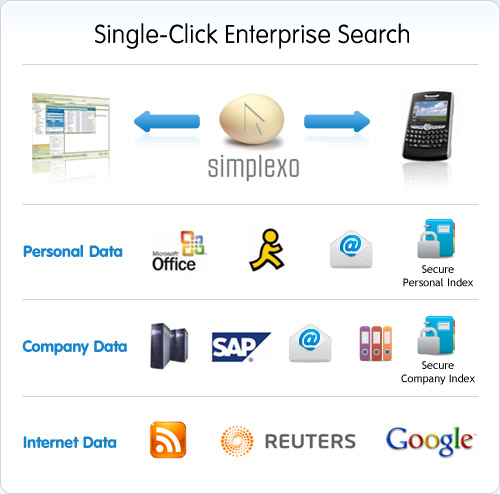
It eliminates the need for multiple searches as it can work across all types of structured (databases (Oracle, SQl etc), payroll and HR systems, SAP etc) and unstructured data (emails, Word documents, images, spreadsheets etc) with a single click.

simplexo-features

It delivers live, up-to-date results so you always get the most current & relevant information and all data is de-duplicated on the fly. It has been designed to MOD security levels and all search results are tied to users permission levels, helping keep data safe.

Another great feature is it’s image search capability; it doesn’t rely just on the metadata but can actually directly compare the pictures to return similar content! It is planned they they will extend this to streamed video in the future…

A perhaps surprising feature of Simplexo is that it is Open Source, so all it’s features are available to users free of charge; customers need only pay if they require dedicated support rather than the online forum. While I won’t mention specific pricing here I will say that it is very attractive and competitive, particularly against it’s main rival Autonomy. The pricing structure is on a per-server basis so number of users is not taken in to account at all, this helps keep costs down in almost all cases. *UPDATE* Having met with Simplexo a 2nd time, there has been a complete U-turn on the pricing structure…now it IS licensed per user. This makes it a much more expensive proposition around £75 per user, coming down to £50 for over 2000 users.

Although there are a number of big names in the Enterprise Search arena including Google, Microsoft and Autonomy none of them have anything approaching a hold on the market and I think there is a great opportunity for Simplexo to establish themselves here.

Simplexo will easily integrate into your existing environment and can be used from with numerous desktops applications including “MS Office, MS Outlook, Outreach, AutoCAD, Open Office. Star Office, Lotus” and more.

To download the software and check it out, go to the download page here.

To download the Simplexo Technology Audit from the Butler Group-click here. (Will launch PDF download).

Microsoft Tag


The MS Keynote speech at CES wasn’t amazing but one thing that does looks very interesting and could, if developed and marketed right, become quite a big part of peoples lives is Microsoft Tag. This is Redmond’s foray into the world of social 2d tagging to “tranform physical media (print advertising, billboards,product packages, information signs, in-store merchandising, or even video images)—into live links for accessing information and entertainment online.”

You download a small app for your mobile device and then you can start accessing these tags by photographing them with the camera on your device. There are some great examples of when this would be used on the Tag site such as allowing tracking analytics of ads in print media or using the tags on film posters to create a viral buzz as well as cinemas offering showing times etc.

The technology these tags is brand new, built from the ground up by the ever more famous MS Research Labs to best utilise the often limited camera tech on phones. The High Capacity Color Barcodes (HCCBs) as they are known “employs different symbol shapes in geometric patterns and multiple colors to provide more information in less space”. An example:

tag1

The Microsoft Tag mobile tagging system offers many advances and advantages:

  • Designed from the beginning to work with the limited capabilities of a typical camera phone.
  • Much smaller than other formats. Typical packaging application starts at 5/8 x 5/8”.
  • Optimized for both print and video display.
  • Enhanced Reed-Solomon error correction means Tags can still be read even if partially damaged.
  • On many phones can decode using a direct real-time camera video stream, you don’t even have to “click” to read the code.
  • Handles long URLs and allows for content to be dynamically changed.
  • Tags are saved for later viewing and can be forwarded to someone else (no need to scan it again).

I’ve just downloaded the mobile app as a .CAB file from the Tag site here, and it works really well. There’s a tag on the screen that you can “snap” and it takes you straight through to another MS site relating to Tag; I will say that you need to put your phone quite close to the screen for it to work-just so you know 🙂

I’ve just set myself up with an account over at Microsoft Tag (all it requires is signing in with a Live ID) and I’ve created my first tag-whoo hoo! I had some issues at first so if you keep getting “An error occured” messages when creating a tag, first ensure you have created a new category and then create the tag inside that; it doesn’t seem to work saving it just to “Main”.

Currently the tags can only be rendered in wmf, xps or pdf formats so the link below will open up a pdf with my created tag. I’ve just tested it on my phone and it works a treat 🙂

barcode <—- Click here to see my tag!

Windows Vista and Windows Server 2008 Service Pack 2


Windows Vista and Windows Server 2008 Service Pack 2 Betais now available to people with MSDN and/or Technet subscriptions to begin testing.

Then from December 4th, the Customer Preview Program will launch via Technet here for testing by all, though Microsoft recommend it’s for “enthusiasts, developers, and IT Pros” 🙂

SP2 will wrap up all the updates released since SP1 and include improvements from Customer Experience Improvement Programme too. For more information on specific changes with Vista SP2, check out Mike Nash’s blog post here and/or check out the Notable Changes document.

Thanks to Gizmodo for the following list of changes & improvements:

Emerging Hardware Support

•SP2 contains Blue tooth 2.1 feature pack supporting the most recent specification for Blue tooth technology
•Ability to record data on Blu-Ray media,
•Adds Windows Connect Now (WCN) Wi-Fi Configuration to Windows Vista SP2,
•exFAT file system now supports UTC timestamps, which enables correct file synchronization across time zones.
•SP2 provides support for new form factors, such as ICCD/CCID. new form factor support –example USB form factor as opposed to PCMCIA).
•Support for the new VIA 64-bit CPU
Security

•SP2 includes all previously released security updates, and builds on the proven security benefits of Windows Vista
•Secure Development Lifecycle process updates, where we identify the root cause of each security bulletin and improve our internal tools to eliminate code patterns that could lead to future vulnerabilities
•Reliability
•SP2 addresses previously released reliability updates, as well as addressing crashes, caused by Microsoft code, discovered since the launch of SP1
Performance

•Resume performance when Wi-Fi connection is no longer available after resume from sleep
•Inclusion of Windows Search 4 for improved indexing performance, improved relevancy in search, broader indexing scenario inclusion, as well as new Group Policy integration for Windows Search,
•Improvements to the RSS feeds sidebar gadget to improve update performance and responsiveness
Application Compatibility

•It is our goal that applications that run on the Windows Vista Operating System today and are written using public APIs will continue to work as designed on Windows Vista SP2.
•Previously released Application Compatibility updates are included in Windows Vista SP2.
•Spysweeper and ZoneAlarm now working with POP3 email accounts
Administration and Support Improvements

•Customers installing .net framework 3.5 service pack 1 will notice shorter download and installation times with Vista service pack 2 or Windows 2008 service pack 2 already installed,
•Service Pack Clean up tool (Compcln.exe): This tool helps restore the hard disk space by permanently deleting the previous versions of the files (RTM & SP1) that are being serviced by Service Pack 2.
•Single installer for both Vista & Server 2008
•Ability to detect an incompatible driver and block service pack installation or warn users of any loss of functionality
•Better error handling and providing more descriptive error messages where possible
•Better manageability through logging in system event log
•Componentization for Serviceability of the installer
Some Specific Fixes/Additions Include:

•Inclusion of Hyper-V
•Event logging support in SPC
•DNS Server now listens over ISATAP address
•Fixes DRM issues from WMP upgrades
•Windows Vista Feature Pack for Wireless
•Reduction of resources required for sidebar gadgets
•Improved power settings for WS08

Microsoft Touchless


Touchless is another Microsoft Office Labs project and it is seriously cool…it enables developers to create multi-touch based apps with just a webcam!

It lets you play Pong, control images on-screen and draw within applications using motions-all via a standard webcam 🙂

This video features the creator of Touchless, Mike Wassermann showing off the great capabilities of his Touchless SDK, which can be downloaded from Codeplex here

Good skills Mike, good skills!

Microsoft StickySorter


StickySorter is a new development by Microsoft’s Office Lab team, and looks jsut as great and useful as PPTplex.

Sticky Sorter lets you create and arrange virtual sticky notes, as often used for affinity diagramming. There are a number of programs out there that let you do this, but as always, Microsoft have brought something new to the table 🙂

The full post with more background info etc is available over at the Office Labs site here, but for a break down of it’s unique features:

·         Import and Exportinformation in csv format, a standard format that is compatible with many other applications such as Excel and Access.

·         Create and Label Groups of notes and save that information along with the notes themselves.
Other virtual note applications allow you move notes close to one another as the only means of grouping. StickySorter goes beyond this: it stores group information as a property of the individual notes so it can be saved and used for other tasks.  It also allows you move and manipulate groups with ease.

·         Display Structured Informationon a note. StickySorter allows you to create notes that have multiple fields—a title, description, and author, for example—rather than a single block of text.  Like groups, this field information is saved with the notes so it can be used for other tasks.

·         Create Custom Views of your information.  In addition to allowing you to define multiple fields on a note, StickySorter allows you to choose which fields you want to display. This is handy when you import information that has multiple fields but you only need to see a couple of them for sorting and organizing.

·         Work with Large Collections of notes.   StickySorter has a number of features that make it easier to work with large numbers of notes, including panning and zooming on an infinite canvas; tiling, cascading, and piling notes; setting note colors; searching for text within notes, and much more.

You can download StickySorter here and see more info, including help videos here.

This is yet anotehr example of Microsoft, especially the Office Labs team, bringing something fresh and unique to the game that’s actually going to help people too!

PDC 2008 Wrap Up


I think we can all agree that the PDC 2008 was pretty special. Azure, Windows 7, Office Web, Azure Services, Live Mesh..the list goes on. The sheer amount of information given out at these conferences often means that we miss bits that are interesting and/or pertinent to our jobs & lives (this was certainly the case when I was at the WPC in Houston!).

Fear not, as Mike Swanson over at MSDN Blogs has put together a wonderful collection of all the Keynotes and sessions, and where possible he’s included the Powerpoints and sample code!

Some of the sessions I’m glad to see are below. The main links go to the video on Channel9, the Powerpoint link will download the .pptx presentation.

A lap around the Azure Services Platform (Powerpoint)

Microsoft Office Communications Server & Exchange: Platform Futures (Powerpoint)

Office Communications Server R2: Enabling Unified Communications (Powerpoint)

Microsoft Silverlight 2 for Mobile: Developing for Mobile Devices (Powerpoint)

The whole, wonderful list can be found here. There are countless sessions on SQL, Azure, .NET, Windows 7 and more!

I really want to give a big thank you to Mike for doing this..there are sooo many sessions on there I didn’t know about that are really interesting and useful!

Microsoft System Center Virtual Machine Manager 2008 Released


Microsoft System Center Virtual Machine Manager 2008 has been Released To Manufacturing (RTM’d)!

An evaluation version can be downloaded here.

Zane Adam, Senior Director of Virtualizatio Strategy over at MS Redmond said:

“They are seeing the many cost reduction and management simplification benefits of Hyper-V and the SCVMM 2008 integration with the rest of System Center.   Now that RTM is official, I fully expect the rate of Hyper-V deployments to further accelerate.  Through the SCVMM 2008 console, administrators can see the entirety of their data center infrastructure – physical or virtual. SCVMM 2008 facilitates key functions like P2V (physical to virtual) migration, Intelligent Placement (selecting the best virtual host for a VM), and managing Hyper-V host clusters, to name just a few.  SCVMM 2008 works closely with its siblings – particularly SC Ops Mgr – in identifying consolidation candidates and in Performance and Resource Optimization (PRO), a new feature in which SCVMM 2008 can alert and recommend solutions to administrators about failing virtual machines or hardware.  As I mentioned above, this comprehensive view extends throughout the data center as SCVMM 2008 is capable of seeing and managing VMware ESX infrastructure through Virtual Center.”

The full transcript is here.

This is really great. SCVMM is always an integral part of conversation I have with customers artound Hyper-V and once the new version is available (1st of November 2008) I agree that many projects will start moving and being implemented.

Watch a silverlight demo and see the features yourself.

I saw this via Clive Watson’s blog.

What will SCVMM 2008 do over SCVMM 2008?

Virtual Machine Manager can manage multiple VMWare ESX VirtualCenter licences from one place, something that even VMWare can’t do !VMWare are working on it but it will be just a web console and not as fully featured as Microsoft’s VMM.

Performance and Resource Optimization (PRO) is another key feature that puts VMM over ESX. Matt McSpirit explains it well:

“Take an example of a virtualised Exchange Server.  If a service crashes inside that VM, and that service is an Exchange related service, and that service crash results in a CPU spike.  The VM is still running, but now, it’s consuming more resource, so DRS chooses to move it.  It does the same on it’s new host, so DRS moves it again.  SC Operations Manager would identify the crash as being an Exchange issue, and fix the crash, rather than move the VM, even if that VM is running on a VMware infrastructure”

Windows Search 4.0


Windows Search 4.0 allows Windows to search through text inside Office documents, as well as the file names and is available for download here.

This will be good for me as often the names I give files bear little relation to the content inside so it should be quite a bit easier for me to find things now 🙂

I saw this on Steve Clayton’s blog here.

Microsoft Roundtable Documents and Downloads


The Microsoft Roundtable is a truly innovative, modern take on video conferencing and as I think my blog shows, one of my favourite gadgets!

To make it even easier, I’ve collected a number of documents and downloads to help you out with the setup, installation and use of the Microsoft Roundtable.

Roundtable User Guide

Roundtable Manuals

Roundtable Deployment Guide

Roundtable Management Tool

Roundtable Firmware

(It’s a good idea to have the firmware around, as you’ll need it in the event of a factory reset.)
