Microsoft Cloud for Healthcare


Photo by Edward Jenner on Pexels.com

Microsoft have introduced their first vertical specific cloud offering – Cloud for Healthcare. Currently in public preview, the stated aims of this are to:

  • Enhance patient engagement
  • Empower health team collaboration
  • Improve insights

and, considering the current Coronavirus situation, focusing first on healthcare makes sense. They highlight that over 1,600 “COVID-19 bots” have gone live since March across 23 countries and we’ve already seen a huge rise in Azure usage during the last couple of months. The offering will span Azure, Microsoft 365, Dynamics 365 and more.

What’s next?

I look forward to seeing which other verticals are next to receive their own cloud and also, over the long term, if we start to see features and licensing differences between them. As cloud goes from being presented as one monolithic thing that everyone uses to separate, discrete offerings tailored to different industries, it will be much easier to introduce commercial differences. I imagine we’ll see some more about these at Microsoft Inspire in July.

The impact of Coronavirus on Microsoft Azure


Photo by Lukas on Pexels.com

There have been reports recently that some users in certain regions were hitting capacity limits in Microsoft Azure when trying to create new resources. Microsoft have shared some information around the impact the coronavirus epidemic is having on their cloud infrastructure:

  • 775% increase in cloud services (in regions performing lockdown)
  • Teams up to 44 million daily users, running over 900 million minutes of meetings and calls each day
  • Windows Virtual Desktop (WVD) usage increased 3x
  • 42% increase in government use of Power BI for sharing COVID-19 dashboards

Some of these numbers are pretty mind-blowing and one can see how they might catch a cloud vendor by surprise.

Cloud Datacentre provisioning

Microsoft say they will be adding “significant new capacity” over the coming weeks to help support this increased use.

Something I’m sure Microsoft have considered is how much of this extra usage will continue?. What happens as things start to return to normal and some of this usage starts to drop off? They’ll be left with more unused capacity than their models anticipated – might this lead to them raising prices on certain Azure services in the future?

Prioritising certain services

Microsoft have detailed that they’re focusing the “highest level of monitoring” on services related to emergency services, medical supply management, healthbots, and more.

They have also introduced some temporary restrictions to help ease the load – free offers are being limited, to keep capacity available for “existing customers”, and certain resources are being “soft” limited for new subscriptions. Customers can raise support tickets to raise these soft limits, but Microsoft do say that other geographical regions may need to be used to help manage demand.

Teams changes

Microsoft have made a number of small changes to Teams in an effort to reduce bandwidth. They scaled back how often it checks for people’s “presence” (whether they’re online or not), reduced the video resolution, limited how quickly it shows if the other user is typing, and made OneNote within Teams read-only for non-education tenants. All small changes that won’t really impact users but, collectively, must make quite a difference to the bandwidth being used.

Further Reading

Microsoft update on cloud services continuity

Microsoft retire on-premises server certifications


Microsoft have been on a cloud push for 12 years now, since the launch of BPOS in 2008. They’ve been slowly “turning the ship” in various ways over the last decade, with the ultimate aim that as much of Microsoft is pointing at the cloud as possible. This is also a case of “trickle down (cloud) economics” – Microsoft are making their new direction reflect as much as possible within their partner base…and that change will then happen within Microsoft’s customers too.

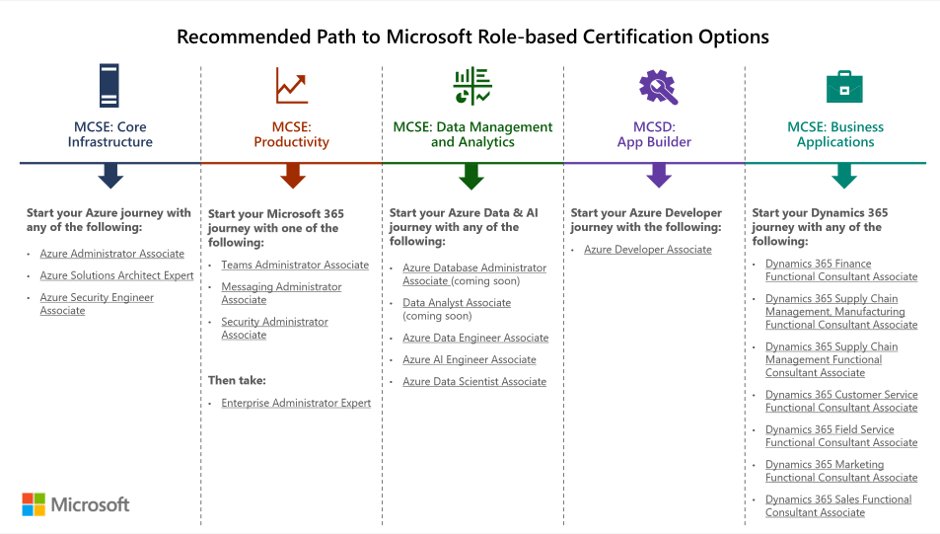
Microsoft have made various changes to partner incentives, changed a few Software Assurance benefits related to training resources, and changed the Home Use Program – all aimed to drive cloud awareness in different ways. Their latest move is to retire all their on-premises server certification paths and exams related to the MCSA, MCSD, and MCSE qualifications that have been a staple of the Microsoft server world for years. The retirement date is June 30, 2020.

As you can see in this image from Microsoft, the recommended paths are now all cloud focused:

Microsoft alternative certifications
Taken from https://www.microsoft.com/en-us/learning/community-blog-post.aspx?BlogId=8&Id=375282

You can see a full list of what’s being retired, along with some FAQs, here – https://www.microsoft.com/en-us/learning/community-blog-post.aspx?BlogId=8&Id=375282

While not surprising given the focus on cloud, not just from Microsoft but across the industry, I do wonder if this is a little short sighted? There are still a LOT of on-premises servers in use and, with hybrid cloud being the de-facto way forward for most organisations, they will remain for a long time to come. Rightly or wrongly, this feels like Microsoft saying that they don’t care about on-premises anymore. I’ve seen MS people saying they’re still hiring lots of on-premises server engineers etc. and that may be the case, but this announcement will definitely be taken as a sign of their overall focus.

I’m often asked if Microsoft will continue to make on-premises versions of their software and, following this announcement, I can’t help but wonder if I need to rethink my answer…

Microsoft Arc – Azure on other clouds


Photo by Max Avans on Pexels.com

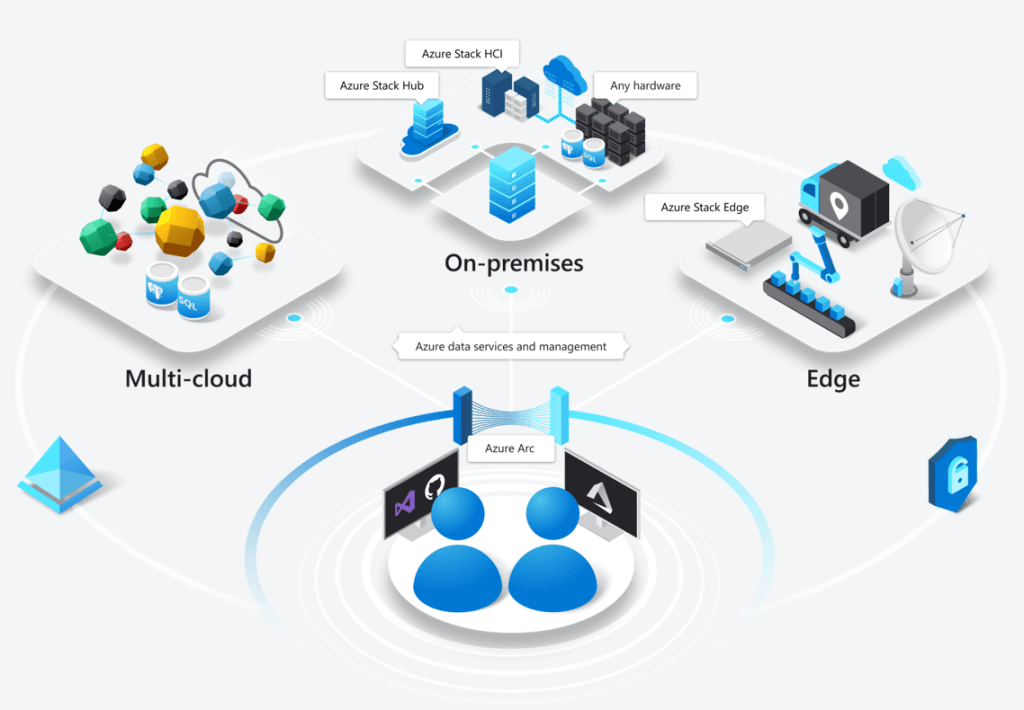
Microsoft Arc has been announced at Microsoft Ignite and it looks like it could be quite the game changer. Microsoft say that it “enables deployment of Azure services anywhere and extends Azure management to any infrastructure” across “across on-premises, edge and multicloud”.

The concept is pretty clever – it will allow certain Azure services to run in a variety of places, including on-premises hardware – both Azure Stack and seemingly regular customer hardware – but also other clouds like Amazon AWS and Google Cloud Platform!

Taken from https://azure.microsoft.com/en-us/services/azure-arc/

Multi-cloud is the concept of an organisation having multiple public clouds (Azure, AWS, GCP etc.) in use at the same time and, while many say it isn’t necessary – and even more say it isn’t a good idea – it’s already reality for many companies around the world. That being the case, anything to help make it easier and more secure to manage is a positive for customers…but I’m really intrigued to see what Amazon and Google make of this! What measures will they put in place to prevent or discourage customers from using Azure Arc within their datacentres?

Microsoft are talking about “Azure data services anywhere”, which looks to be based on a Kubernetes container platform. Some of the benefits Microsoft tout include:

  • Unified Management
  • Consistent cloud billing model
  • Consistent governance
  • Unique security tools like Azure Threat Protection

Currently Azure SQL Database and Azure Database for PostgreSQL Hyperscale are available for private preview on Azure Arc – although this Microsoft site:

https://azure.microsoft.com/en-us/services/azure-arc/hybrid-data-services/

only talks about them being available on-premises. It does however mention that SQL Server customers will be able to “leverage their existing licensing investments” to use SQL on Azure Arc, which suggests a future widening of the Azure Hybrid Benefits available through Software Assurance.

This is definitely one to keep an eye on over the next few months as it goes through private preview, then public preview, and finally out into general availability.

Microsoft buy Movere


Photo by George Dolgikh @ Giftpundits.com on Pexels.com

Microsoft recently announced their acquisition of Movere, a cloud discovery and assessment tool, to bolster their “Azure Migrate” offering.

Movere has been around since 2008 and has, over the last few years, become the tool of choice for Microsoft funded customer SAM/Cloud Readiness engagements – so the acquisition is perhaps no surprise. Microsoft’s main focus these days is getting more customers to move more workloads into their Azure cloud, and this is their next step in that journey; with the aim “to streamline our customers’ journey to the cloud, enabling them to bring innovation and transformation with the power of Azure”.

I wonder what this means for the other ISV partners involved in the Azure Migrate program, will they see a lack of focus on their elements of the scheme? Posting on LinkedIn brought a few interesting comments/questions: one person suggested that Movere is a “one trick pony” while another asked if this new acquisition could become the “ILMT* for Azure”.

*ILMT is the IBM License Metric Tool, which (most) IBM customers must use in order to prove compliance with certain license metrics.

Whenever a big vendor like Microsoft make an acquisition, it’s always interesting to see what happens to the technology, what it’s used for, how it’s licensed etc. I’ll definitely be watching for Movere to be added to the Product Terms!

Microsoft reduce Azure Archive Storage costs


Azure Archive Storage is used for less important data, where an organisation is happy to wait – perhaps hours – for access to their data. This means it is significantly cheaper than regular Azure storage.

Files, Paper, Office, Paperwork, Stack, Work, Data

Microsoft have announced that prices have dropped “by up to 50 percent in some regions” – although they haven’t given more precise info as to what reductions have taken place in what areas. That said, if you’re using this – you should see a reduction in your next cloud bill…or at least that section of it!

See Microsoft’s announcement here – https://azure.microsoft.com/en-gb/blog/we-re-making-azure-archive-storage-better-with-new-lower-pricing/

Microsoft give more info about VMware on Azure


Intro

Microsoft recently announced their plans to start running VMware software natively within the Azure cloud. This caused much interest in the tech world as well as some angry words from VMware!

You can read more about the initial announcement here

After the initial blog post, Microsoft went very quiet and had no more to say on the subject. I attended a webinar about VMware & Azure but this just covered the Azure Migrate tool – Microsoft’s new way of converting on-premises VMware VMs to Azure VMs running in the cloud…a great offering but not the super interesting part really!

Some news!

Today (December 19, 2017) Microsoft have given us a bit of an update, in a new blog post.

They tell us that they’re working with multiple VMware partners and will run the solution on existing VMware certified hardware:

preview hardware will use a flexpod bare metal configuration with NetApp storage

This will allow organisations to continue running the VMware software they have invested in – both in terms of money and time – and that they trust to run their business, but also allow them to have L3 network connectivity with Azure services such as:

  • Azure Active Directory
  • Azure Cosmos DB
  • Azure Functions

Microsoft are in discussions with these VMware partners – and also VMware themselves – and aim to:

make this offering generally available next year

VMware’s Angry Words

Interestingly, VMware angry words have become less angry.

There initial blog post was quite confrontational but has since been updated and now ahs a more reconciliatory tone. For example:

Original Post:

Recently, Microsoft announced preview of VMware virtualization on Azure, a bare-metal solution that is stated to run a VMware stack on Azure hardware, co-located with other Azure services in partnership with VMware-certified partners. No VMware-certified partner names have been mentioned nor have any partners collaborated with VMware in engineering this offering. This offering has been developed independent of VMware, and is neither certified nor supported by VMware.

Revised post:

Recently, Microsoft announced a preview of VMware virtualization on Azure, a bare-metal solution that is stated to run a VMware stack on Azure hardware, co-located with other Azure services in partnership with VMware-certified partners. This offering is being developed independent of VMware, however it is being offered as a dedicated, server-hosted solution similar in approach to other VMware Cloud Provider Partners (VCPP). The deployment is on VMware certified hardware consisting of FlexPod. VMware is in the process of engaging with the partner to ensure compliance and that the appropriate support model is in place.

The original post also said:

Microsoft recognizing the leadership position of VMware’s offering and exploring support for VMware on Azure as a superior and necessary solution for customers over Hyper-V or native Azure Stack environments is understandable but, we do not believe this approach will offer customers a good solution to their hybrid or multi-cloud future.

This is now nowhere to be found in the updated blog post!

A better relationship between the two vendors will surely make for a better experience for customers who take up this new offering as closer ties should mean better support.

Next steps

They say they’ll share more info on plans for General Availability and partners “in the coming months” and if you’d like to take part in the preview – contact your Microsoft account manager.

Further reading:

https://azure.microsoft.com/en-gb/blog/vmware-virtualization-on-azure/

https://blog.cloud.vmware.com/s/content/a1y6A000000aFlgQAE/vmware-the-platform-of-choice-in-the-cloud https://www.itassetmanagement.net/2017/11/28/vmware-azure/

Adding Azure to an Enterprise Agreement


It’s now easier than ever for customers to add Windows Azure to their Enterprise Agreement (EA).

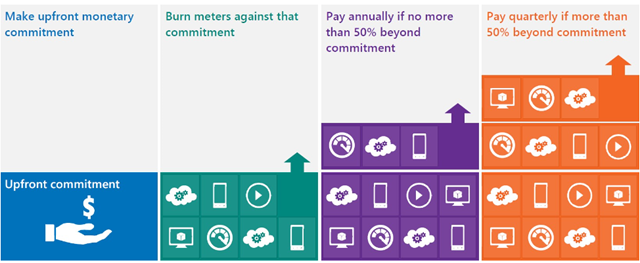
You commit upfront to a monthly amount that you feel will cover all your needs, and that monetary commitment can be utilised in any way within Azure.

image

Previously, you would receive great payment terms for your monetary commitment but – should you go over that amount (known as “overage”) – the extra usage would be charged at much higher rates. This effectively punished organizations who thought “wow, this Azure stuff is cool” – but no more, Overage is now charged at the same rates as the initial agreed amount. This makes increasing the usage of Azure a much more compelling proposition.

See Josh Waldo’s full post here:

http://www.digitalwpc.com/Community/Perspectives/Pages/Windows-Azure-added-to-Enterprise-Agreement-Use-it-to-power-your-solutions-.aspx?wt.mc_id=corp_mpn_tw_dwpc_joshwaldoazureagreement#fbid=7Lt8ur4Ygjd

Windows Azure: Free Developers Course


Windows Azure is a key part of Microsoft’s “Cloud” strategy moving into the future but of course, it needs people to use it and develop for it for it to be truly successful. They are piloting a new way of training developers & architects Azure, via self paced, web based training…best of all it’s FREE!

The method is one that I’m quite familiar with which aims to offer the best features of classroom training without the hassles and expense of travel, hotels, being out of the office for days etc. It utilises:

  • Interactive Live Meeting sessions with a tutor
  • On-line videos
  • Hands on Labs
  • E-Learning
  • Weekly Assessments

to cover off the topics, and you don’t need to go anywhere! The course lasts for 6 weeks from:

May 10th – June 18th

and covers:

Week 1 – Windows Azure Platform
Week 2 – Windows Azure Storage
Week 3 – Windows Azure Deep Dive and Codename "Dallas"
Week 4 – SQL Azure
Week 5 – Windows Azure Platform AppFabric Access Control
Week 6 – Windows Azure Platform AppFabric Service Bus

and did I mention it’s FREE?!

This is aimed at developers, architects, programmers and system designers and recommends at least 6 months experience programming in .NET and Visual Studio.

It will take around 4 to 5 hours a week to research and complete the tasks and there are timelines etc for submitting the work. However, successful completion gets you a “Microsoft Certificate of Completion” 🙂

This is a new approach from Microsoft and one that I hope will be expanded out to other product areas.

Register:

You can find more information and sign up here:

https://msevents.microsoft.com/CUI/EventDetail.aspx?EventID=1032449971&Culture=en-GB

If you’re technically minded and interested in Azure, sign up…and get any colleagues/friends that would be interested to sign up too!

I’ve registered and am looking forward to it so hopefully I’ll see you there 🙂

Windows Azure MSDN Benefits


It was announced a little while ago that MSDN Premium subscribers would receive a number of free Windows Azure hours as part of their subscription:

image

and these would be, as expected with MSDN, for test and dev only.

However, I saw over on Eric Nelson’s blog that this is no longer the case. Microsoft have:

“decided to lift this restriction so that you will be able to use your Azure benefits for normal (production) use, if needed”

From January 4th 2010 the introductory Azure offer gives a huge 750 compute hours per month!

As Eric points out, the above offer expires after 8 months so don’t rush to sign up if you’re not going to make use of it straight away…make sure you get your “money’s” worth 😉 After that time period, the level of free access drops down as per the below chart:

image

This is a great way of making Azure easily available to the 1000’s of developers with MSDN subscriptions. It will allow them to test it as a solution, show the company how it will benefit them and then easily move to a production environment with reduced admin and cost.

See Eric’s post here.