Microsoft have announced 3-year subscription terms on CSP for:
1) Microsoft 365 E3 (with and without Teams)
2) Microsoft 365 E5 (with and without Teams)
3) Microsoft Teams Enterprise
4) Microsoft 365 E5 Security
5) Microsoft 365 E5 Compliance
Numbers 1, 2, and 3 will be available from June 1, 2025 while 4 & 5 will come on July 1, 2025.
The price will be the same as 3 x 12-month subscriptions but of course, with the price protection against increases that a longer commit brings. It seems there will be a 100 SKU minimum for these 3-year SKUs.
This strengthens the push for smaller EA customers to move across to CSP and comes hot on the heels of the “channel transfers interface” to that launched in April to help partners renew Enterprise Agreements (EAs) into CSP and retain their existing rights to bundled Teams.
Microsoft have also announced enhanced investment in, and incentives for, CSP partners moving into FY26 from July 1st.
Microsoft Purview is a suite of products focused on data security, governance, and compliance across the Microsoft portfolio.
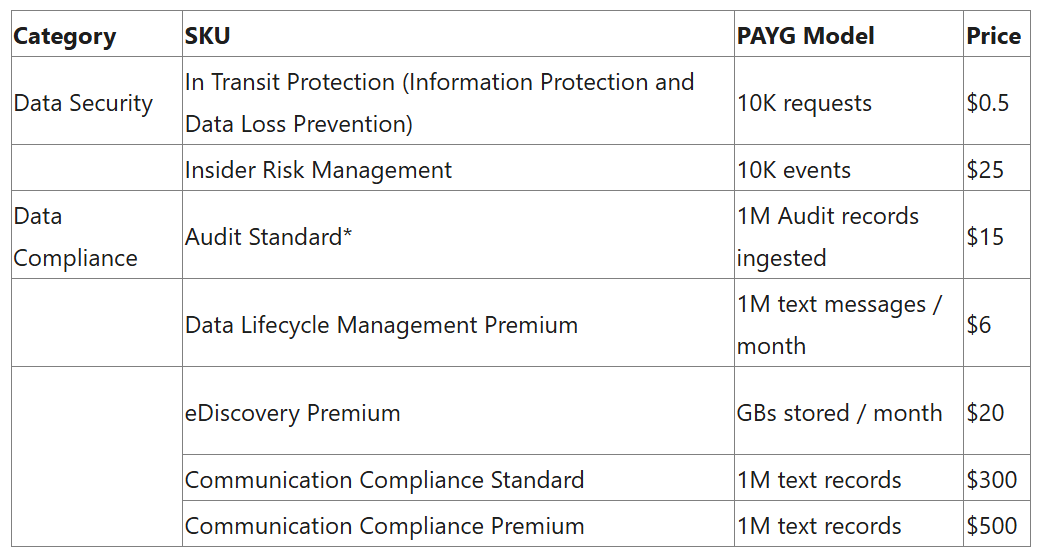
Microsoft first introduced Pay As You Go (PAYG) aka Consumption SKUs for Purview in January 2025 and now, from May 1, 2025 there are a new set. These new SKUs are aimed at protecting “your data as it moves across networks and through GenAI applications“.
The * is to note that Audit Standard is included within “Microsoft first party applications such as Microsoft 365 applications, Fabric, and Microsoft first party AI apps like Microsoft 365 Copilot, Security Copilot or AI applications custom-built using Copilot Studio“.
New metric/acronym alert! The 10,000 events for Insider Risk Management are known as a “Data Security Processing Unit (DPSU)”.
I notice that, for “Data Security Investigations”, Microsoft say:
“Data Security Investigations is billed through two meters: 1) the Data Security Investigations non-AI processing and storage meter and 2) Security Compute Units.
The Data Security Investigations non-AI processing and storage meter allows customers to store data related to an investigation. Security Compute Units are used to measure the computational capacity needed to run the AI analysis within DSI.”
Security Compute Units (SCUs) were introduced with Microsoft Security Copilot. It seems now that certain Purview PAYG usage may also consume your SCUs – needing further planning and budget insights.
Hotpatching – the ability to install patch updates without needing to restart the server – has been available in Microsoft Azure for a while. It is now coming to on-premises Windows Server 2025 machines…for a fee.
This new capability requires connection to Azure Arc and is currently free in preview but, from July 1 2025, it will cost $1.50 per core per month. That’s over $100,000 per year for 100 x 64 core servers…
*Update May 2026*
As of May 15th, 2026 – Hotpatch enabled by Azure Arc is available at no additional cost for Windows Server 2025. See more here:
Frontline Worker Use Rights have moved to the Universal Terms for Online Services from product specific pages
A new definition for “Frontline Worker License” has been introduced in the Glossary
“Frontline Worker License means a license for a Microsoft Product designated with an “F”, “FLW”, or “Frontline” as identified in the Product Conditions table of product specific terms, which are subject to the Eligibility to Assign Frontline Worker Licenses terms in the Universal License Terms for all Online Services.”
Added Windows 10 ESU Cloud Managed SKUs
Removed Dynamics 365 Fraud Protection and Fraud Protection Additional Capacity from Availability tables
Updated Windows 365 Frontline terms and grant Windows 365 access rights for Windows Cloud PC OS
Added Windows 365 Disaster Recovery Plus Add-on to Availability Table
Removed “without Microsoft’s prior written approval” from the clause preventing using MS service to mine crypto…I guess they realised they were never going to give anyone permission for this!
Changed the Use Rights for Azure Local software from:
“Customer may use the Azure Local software only (i) on servers dedicated to Customer’s internal use“
to
“Customer may use the Azure Local software only (i) on devices dedicated to Customer’s internal use“
Microsoft say this represents a move to “include smaller, more affordable devices than traditional servers“
They also removed the following clause “Any customer support for Azure Local that may be available from Microsoft requires that Azure Local runs on server hardware that is pre-validated and listed in the Azure Local catalog or any successor.”
Added Microsoft 365 Copilot Chat to the list of EU Data Boundary Services
March 5th
You can now add the Microsoft 365 E5 Security add-on to the Business Premium SKU.
March 12th
Added a section on Data Handling of Query Data with M365 Copilot & M365 Copilot Chat:
Microsoft has no rights in Query Data other than as needed to provide the services,
Query Data is not used to improve Bing,
Query Data is not used to create advertising profiles or track user behavior,
Query Data is not shared with advertisers or otherwise beyond Microsoft and its contracted suppliers who are subject to terms no less protective than these provisions,
Query Data is not used to train generative AI foundation models, and
Query Data is treated as Customer confidential information and protected by appropriate technical and organizational measures.
Clarification that certain concurrent use rights for Defender on up to 5 devices does not include Server OSEs:
Eligible Licensed Users may use Microsoft Defender for Business on up to five concurrent devices. Customer may not use a Microsoft Defender for Business User SL with server OSEs.
Eligible Licensed Users may use Microsoft Defender Vulnerability Management or Microsoft Defender Vulnerability Management Add-on on up to five concurrent devices. Customer may not use Microsoft Defender Vulnerability Management or Microsoft Defender Vulnerability Management Add-On User SLs with server OSEs.
Microsoft have launched a new addition to the Copilot family, confusingly called Microsoft 365 Copilot Chat.
Copilot Chat was already a thing (that is different to Copilot Biz Chat) and this seems to be a re-positioning as they add some new capabilities too. It is a basic, entry point tool that sits below Microsoft 365 Copilot.
Microsoft 365 Copilot Chat is free and has access to internet info to give “web-grounded” responses. Additionally it can interact with Agents (more on that later) and also has elements of the “Copilot Control System” to help with corporate data privacy.
The table below shows how it stacks up against the “full” Microsoft 365 Copilot product:
One of the new additions is that users of this free product can use 2 types of agents on a Pay As You Go (PAYG) basis, they are:
“Tenant Graph” grounded agents
Autonomous action agents
“Tenant Graph” grounded means agents that can access internal company data as well as internet information, giving answers with additional, organisation specific info and context. This is an additional PAYG per-message cost for M365 Copilot Chat users but is included within the M365 Copilot license – adding a new variable to consider when pricing up licensing options.
Autonomous actions are where the agent uses “generatively orchestrated triggers, topics, data connectors, and workflows” to act on behalf of a user. This is an additional PAYG per-message cost for all users – it is an additional cost even for users licensed with M365 Copilot.
For more info and details on the PAYG per-message pricing model – see my post here.
Microsoft are huge fans of the Pay As You Go (PAYG) licensing/billing model for various products and now it has been extended for M365 Copilot and Copilot Studio.
Agents created with Copilot Studio provide answers to users, and these answers are measured in “messages:
Classic Answers
These are static answers written when the agent is created and only change when manually updated. These cost 1 message.
Generative Answers
These are dynamically generated answers using the conversation’s context and other knowledge. These cost 2 messages.
Tenant Graph grounded
This is a new option and allows agents to access internal information in SharePoint and also other sources via Graph connectors. This information will be incorporated within “generative” answers given by agents. These cost 30 messages.
This capability is included for users licensed with M365 Copilot and is also available on a PAYG basis for other users.
Autonomous Actions
As the name suggests, these agents act on their own via “generatively orchestrated triggers, topics, data connectors, and workflows” to complete tasks, answer queries etc. These cost 25 messages.
These are NOT included with the M365 Copilot license, so using agents with autonomous actions will be additional spend on top of the $30 per user per month license…which is already an add-on to your existing M365 license!
How does the pricing work?
Each message costs $0.01 which seems very low…however…it can quickly start to add up. Here is an example from Microsoft:
12,800 x $0.01 = $128 in PAYG costs.
Not a huge amount, about $33,280 per year. However, that’s for 100 users. If you had 1,000 users in that scenario it becomes $332,800 per year which is a much more significant amount…it’s about the same as buying M365 Copilot licenses for those users in fact.
You can purchase messages in bundles of 25,000 for $200 per month ($0.008 per message) which can help reduce spend a little on PAYG.
It seems likely that the behaviour Microsoft are hoping to drive will be for organisations to start out with this model and then, as spend increases, move them across to M365 Copilot licenses to increase the stickiness and adoption of their latest focus product.
It’s the Microsoft Product Terms for February 2025:
Added Azure Managed Applications, Azure Resource Manager, and Cloud PC to the EU Data Boundary Services…which now also includes storage of Professional Services Data.
Added Microsoft Defender for Business customers can apply Defender for Business to five devices.
Removed Microsoft 365 Information Protection and DLP – Student Use Benefit Add-on from Availability and Prerequisite Tables.
Microsoft have announced their Q2 results for FY25 and, not surprisingly at all, they’ve earned a LOT of money and are talking a lot about AI!
Overall results
Revenue was up 125 to $69.6 billion and Net Income was up 10% to $24.1 billion. The over-arching “Microsoft Cloud” segment increased 21% to $40.9 billion while the AI business was approx. $3.25 billion as it had an annual run rate of $13 billion, which is 175% up year on year.
Satya Nadella sad:
“We are innovating across our tech stack and helping customers unlock the full ROI of AI to capture the massive opportunity ahead,”
Productivity & Business Processes
Revenue = $24.9 billion, up 14%
This was driven by a 16% increase in M365 Commercial cloud revenue and 19% revenue growth for Dynamics 365.
Microsoft saw “better-than-expected performance in E5 and M365 Copilot, both of which drove Average Revenue Per User (ARPU).
Intelligent Cloud
Revenue = $25.5 billion, up 19%
31% growth in Azure (and other cloud services)
Earnings Call
There were 54 mentions of AI throughout the call.
Over 19.000 paying customers for Microsoft Fabric.
30 million+ monthly active users (MAU) for Power BI, which is 40% up year on year.
200,000 MAU for Azure AI Foundry.
Over 400,000 custom agents created with Copilot Studio across 160,000 orgs in the last 3 months.
Continued growth in the number of $100 million+ contracts for Azure and M365.
More changes to the partner channel?
CFO Amy Hood stated:
“Growth in our non-AI services was slightly lower than expected due to go-to-market execution challenges, particularly with our customers that we primarily reach through our scale motions, as we balance driving near-term non-AI consumption with AI growth.”
She described the “scale motion” as “customers we reach through partners and through more indirect methods of selling” and alluded to changes around where investments, marketing spend, and internal resources would be positioned to help drive sales through the partner channel.
Nadella also said “How do you really tweak the incentives go to market? At a time of platform shifts, you want to make sure you lean into even the new design wins, and you just don’t keep doing the stuff that you did in the previous generation.“
This could be partly behind Microsoft’s increasing drive to take more customers direct, that it gives them more control over what’s happening to drive organisations towards new platforms and products.











 Cloudy with a chance of Licensing