

Power Apps has always been licensed on a per user or per app basis but now it is also available under the Pay as you go (PAYG) model. Microsoft see this as a way to help organisations innovate faster with less wasted spend as it doesn’t require licenses to be allocated to specific users.
How it works
You connect the apps environment to an Azure subscription and then pay for usage via 3 meters:
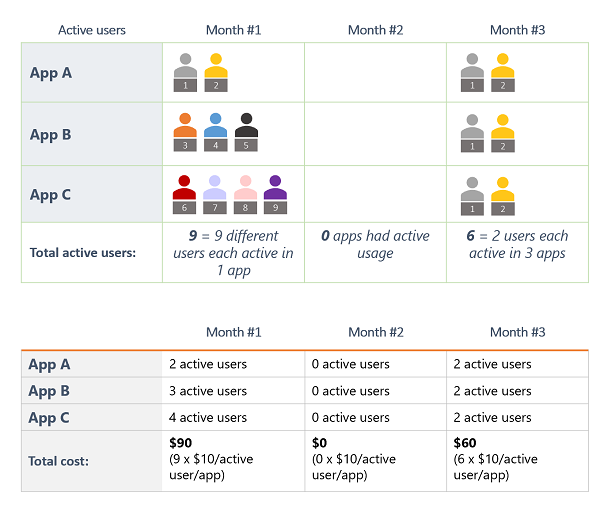
Power Apps per app PAYG
Pay when a user runs an app – rather than the existing model of allocating licenses beforehand and seeing them consumed based on apps being shared rather than run.
An active user is someone who opens an app/portal at least once a month – usage by users licensed on a per user basis is not included. Cost is $10 per active user per app per month.
Here’s an example from Microsoft:
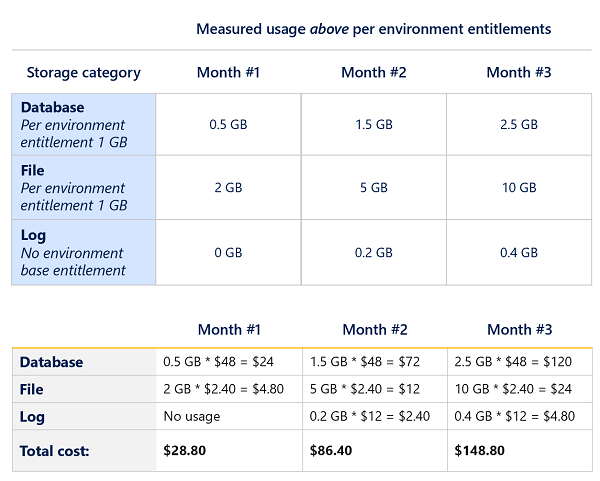
Dataverse PAYG
These are split between:
- Database storage
- File storage
- Log storage (only used if auditing is turned on)
and you get 1GB of database storage and 1Gb of log storage included with each linked environment.
Use over the free amount is charged at:
- Database – $48 per GB per month
- File – $2.40 per GB per month
- Log – $12 per GB per month
Microsoft example:
Power Platform Requests PAYG
This is the new name for API calls and, as standard, you get 6.000 API calls per user per app per day – Microsoft believe this will be enough for most users. If it isn’t, any additional API calls are charged at $0.00004 per request per day.
Example from Microsoft:
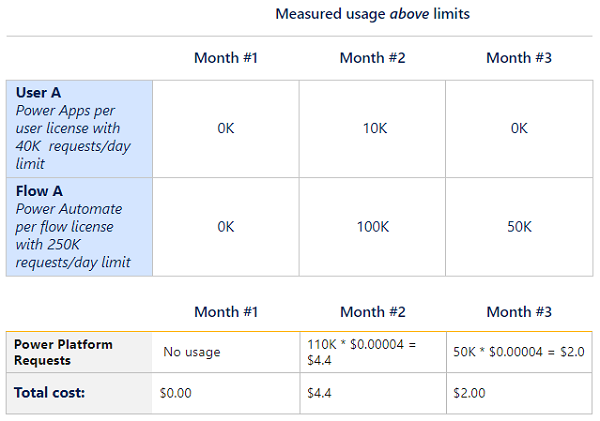
Note that the request example includes both Power Apps and Power Automate.
Where it makes sense, organisations can use both the per user and PAYG models simultaneously.
Cost Management
These new meters will be available within Azure Cost Management, meaning costs can be tracked, budgets can be set, and resources can be tagged. For some organisations, particularly those where FinOps is stronger than ITAM, this new approach may yield better results.
 Cloudy with a chance of Licensing